ESP Hyundai Azera 2013 Owner's Guide
[x] Cancel search | Manufacturer: HYUNDAI, Model Year: 2013, Model line: Azera, Model: Hyundai Azera 2013Pages: 403, PDF Size: 9.28 MB
Page 189 of 403
4113
Features of your vehicle
• For maximum defrosting, set the tem-
perature control to the extreme
right/hot position and the fan speed
control to the highest speed.
• If warm air to the floor is desired while
defrosting or defogging, set the mode
to the floor-defrost position.
• Before driving, clear all snow and ice
from the windshield, rear window, out-
side rear view mirrors, and all side win-
dows.
• Clear all snow and ice from the hood
and air inlet in the cowl grill to improve
heater and defroster efficiency and to
reduce the probability of fogging up the
inside of the windshield.
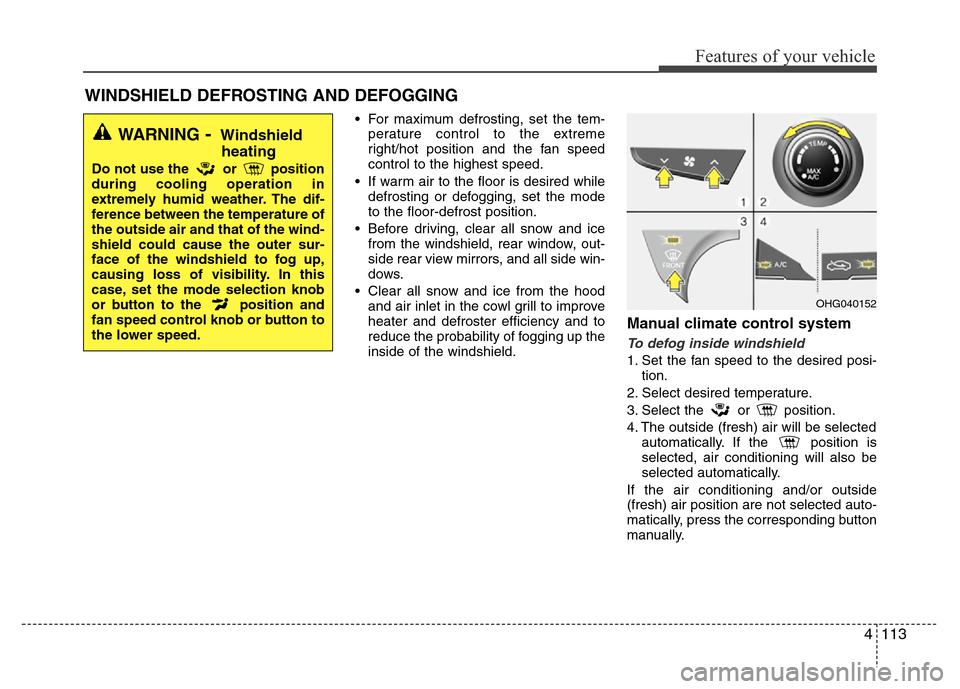
Manual climate control system
To defog inside windshield
1. Set the fan speed to the desired posi-
tion.
2. Select desired temperature.
3. Select the or position.
4. The outside (fresh) air will be selected
automatically. If the position is
selected, air conditioning will also be
selected automatically.
If the air conditioning and/or outside
(fresh) air position are not selected auto-
matically, press the corresponding button
manually.
WINDSHIELD DEFROSTING AND DEFOGGING
WARNING- Windshield
heating
Do not use the or position
during cooling operation in
extremely humid weather. The dif-
ference between the temperature of
the outside air and that of the wind-
shield could cause the outer sur-
face of the windshield to fog up,
causing loss of visibility. In this
case, set the mode selection knob
or button to the position and
fan speed control knob or button to
the lower speed.
OHG040152
Page 190 of 403
Features of your vehicle
114 4
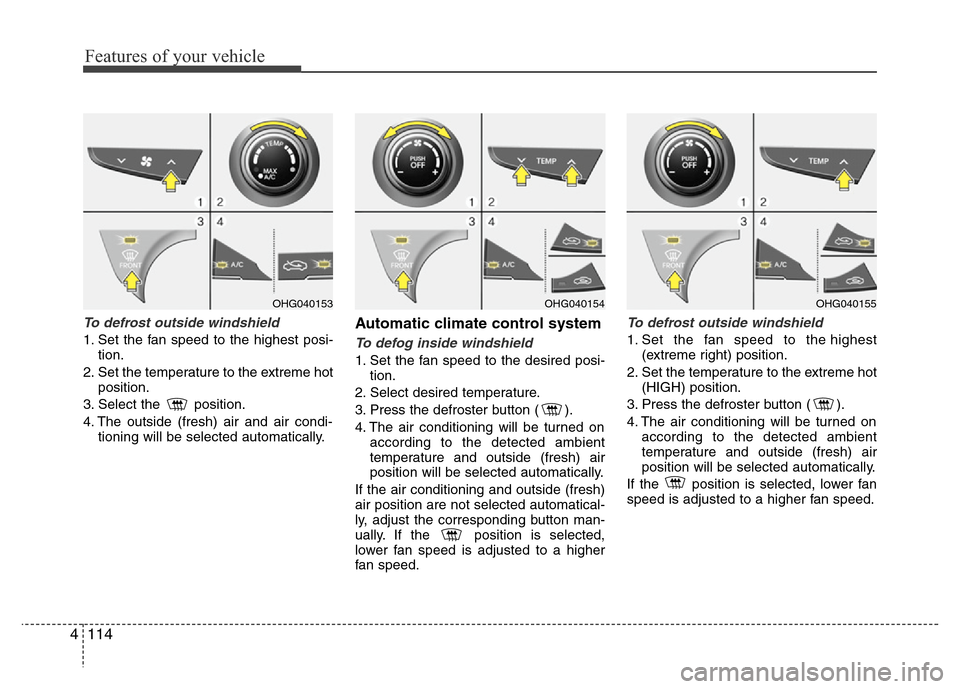
To defrost outside windshield
1. Set the fan speed to the highest posi-
tion.
2. Set the temperature to the extreme hot
position.
3. Select the position.
4. The outside (fresh) air and air condi-
tioning will be selected automatically.
Automatic climate control system
To defog inside windshield
1. Set the fan speed to the desired posi-
tion.
2. Select desired temperature.
3. Press the defroster button ( ).
4. The air conditioning will be turned on
according to the detected ambient
temperature and outside (fresh) air
position will be selected automatically.
If the air conditioning and outside (fresh)
air position are not selected automatical-
ly, adjust the corresponding button man-
ually. If the position is selected,
lower fan speed is adjusted to a higher
fan speed.
To defrost outside windshield
1. Set the fan speed to the highest
(extreme right) position.
2. Set the temperature to the extreme hot
(HIGH) position.
3. Press the defroster button ( ).
4. The air conditioning will be turned on
according to the detected ambient
temperature and outside (fresh) air
position will be selected automatically.
If the position is selected, lower fan
speed is adjusted to a higher fan speed.
OHG040154OHG040155OHG040153
Page 210 of 403
Features of your vehicle
134 4
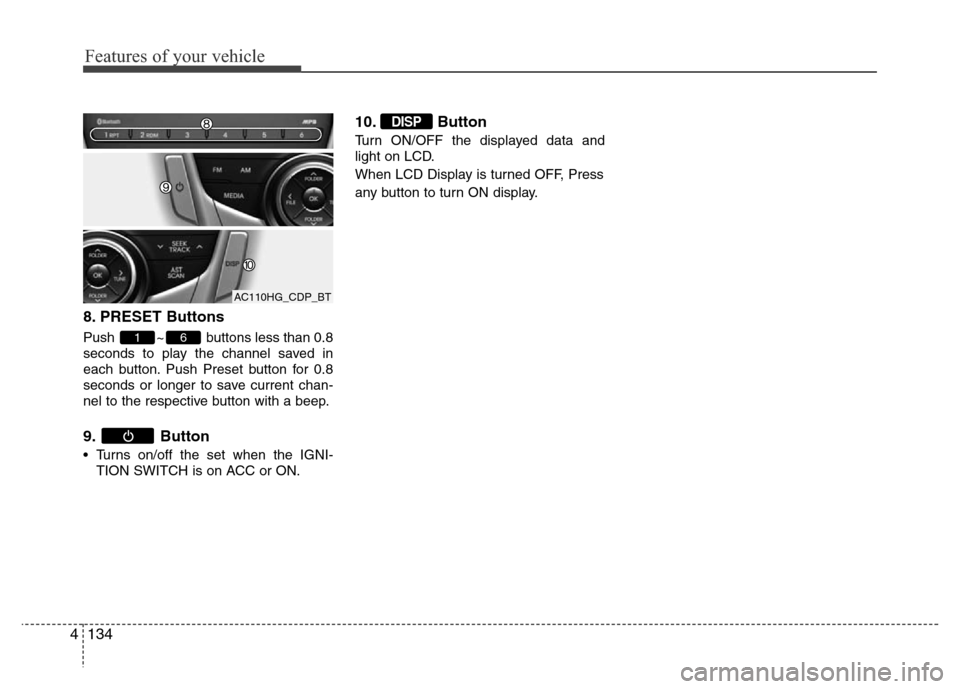
8. PRESET Buttons
Push ~ buttons less than 0.8
seconds to play the channel saved in
each button. Push Preset button for 0.8
seconds or longer to save current chan-
nel to the respective button with a beep.
9. Button
• Turns on/off the set when the IGNI-
TION SWITCH is on ACC or ON.
10. Button
Turn ON/OFF the displayed data and
light on LCD.
When LCD Display is turned OFF, Press
any button to turn ON display.
DISP
61
AC110HG_CDP_BT
Page 212 of 403
Features of your vehicle
136 4
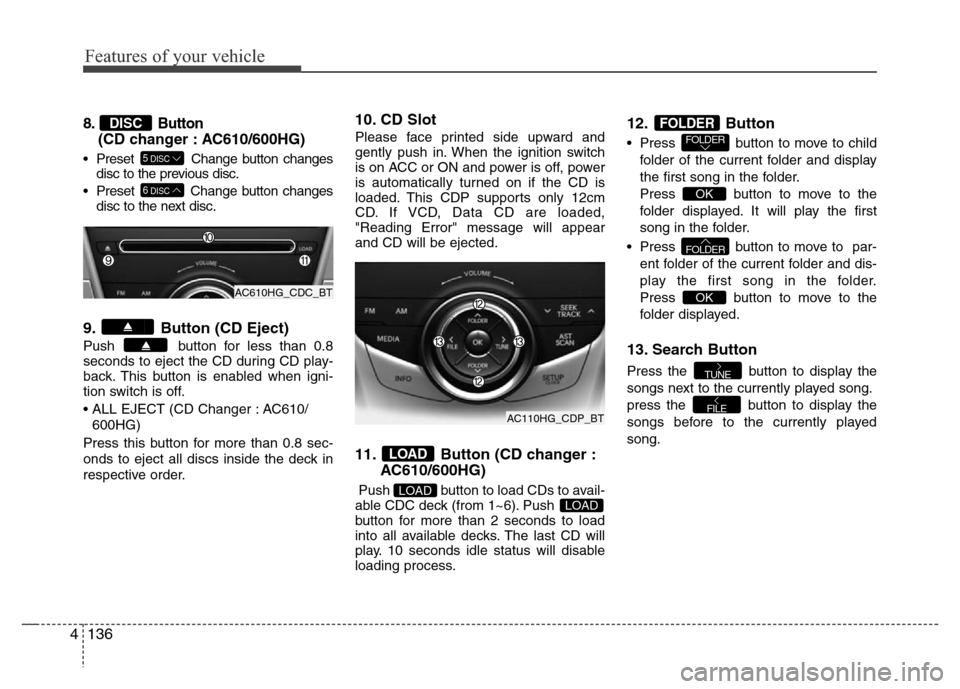
8. Button
(CD changer : AC610/600HG)
• Preset Change button changes
disc to the previous disc.
• Preset Change button changes
disc to the next disc.
9. Button (CD Eject)
Push button for less than 0.8
seconds to eject the CD during CD play-
back. This button is enabled when igni-
tion switch is off.
• ALL EJECT (CD Changer : AC610/
600HG)
Press this button for more than 0.8 sec-
onds to eject all discs inside the deck in
respective order.
10. CD Slot
Please face printed side upward and
gently push in. When the ignition switch
is on ACC or ON and power is off, power
is automatically turned on if the CD is
loaded. This CDP supports only 12cm
CD. If VCD, Data CD are loaded,
"Reading Error" message will appear
and CD will be ejected.
11. Button (CD changer :
AC610/600HG)
Push button to load CDs to avail-
able CDC deck (from 1~6). Push
button for more than 2 seconds to load
into all available decks. The last CD will
play. 10 seconds idle status will disable
loading process.
12. Button
• Press button to move to child
folder of the current folder and display
the first song in the folder.
Press button to move to the
folder displayed. It will play the first
song in the folder.
• Press button to move to par-
ent folder of the current folder and dis-
play the first song in the folder.
Press button to move to the
folder displayed.
13. Search Button
Press the button to display the
songs next to the currently played song.
press the button to display the
songs before to the currently played
song.
FILE
TUNE
OK
FOLDER
OK
FOLDERFOLDER
LOADLOAD
LOAD
6DISC
5DISC
DISC
AC610HG_CDC_BT
AC110HG_CDP_BT
Page 226 of 403
53
Driving your vehicle
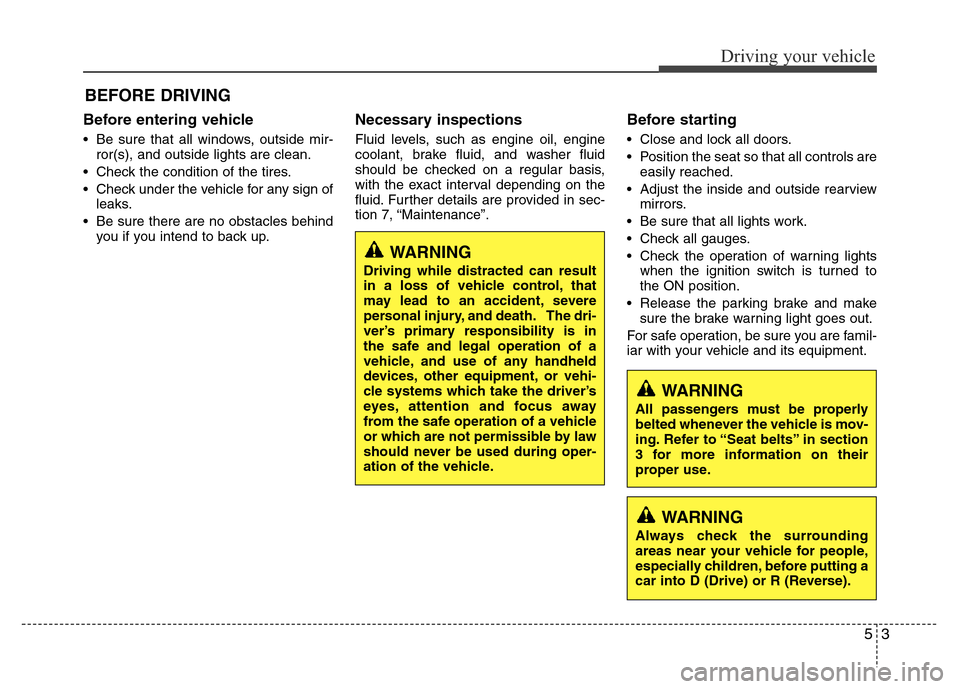
Before entering vehicle
• Be sure that all windows, outside mir-
ror(s), and outside lights are clean.
• Check the condition of the tires.
• Check under the vehicle for any sign of
leaks.
• Be sure there are no obstacles behind
you if you intend to back up.
Necessary inspections
Fluid levels, such as engine oil, engine
coolant, brake fluid, and washer fluid
should be checked on a regular basis,
with the exact interval depending on the
fluid. Further details are provided in sec-
tion 7, “Maintenance”.
Before starting
• Close and lock all doors.
• Position the seat so that all controls are
easily reached.
• Adjust the inside and outside rearview
mirrors.
• Be sure that all lights work.
• Check all gauges.
• Check the operation of warning lights
when the ignition switch is turned to
the ON position.
• Release the parking brake and make
sure the brake warning light goes out.
For safe operation, be sure you are famil-
iar with your vehicle and its equipment.
BEFORE DRIVING
WARNING
All passengers must be properly
belted whenever the vehicle is mov-
ing. Refer to “Seat belts” in section
3 for more information on their
proper use.
WARNING
Always check the surrounding
areas near your vehicle for people,
especially children, before putting a
car into D (Drive) or R (Reverse).
WARNING
Driving while distracted can result
in a loss of vehicle control, that
may lead to an accident, severe
personal injury, and death. The dri-
ver’s primary responsibility is in
the safe and legal operation of a
vehicle, and use of any handheld
devices, other equipment, or vehi-
cle systems which take the driver’s
eyes, attention and focus away
from the safe operation of a vehicle
or which are not permissible by law
should never be used during oper-
ation of the vehicle.
Page 227 of 403
Driving your vehicle
4 5
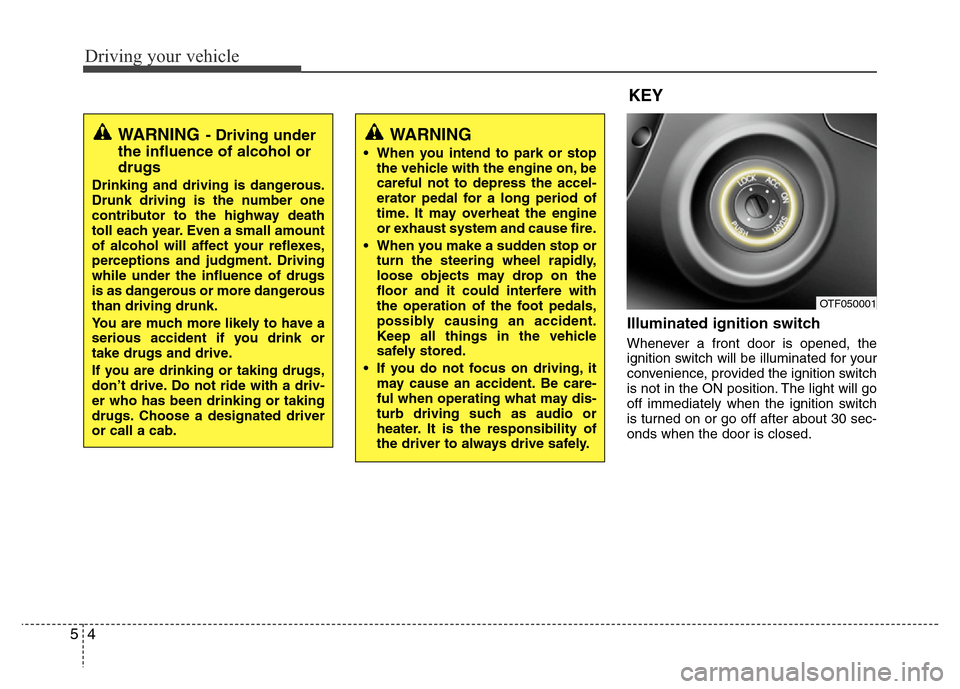
Illuminated ignition switch
Whenever a front door is opened, the
ignition switch will be illuminated for your
convenience, provided the ignition switch
is not in the ON position. The light will go
off immediately when the ignition switch
is turned on or go off after about 30 sec-
onds when the door is closed.
OTF050001
WARNING
• When you intend to park or stop
the vehicle with the engine on, be
careful not to depress the accel-
erator pedal for a long period of
time. It may overheat the engine
or exhaust system and cause fire.
• When you make a sudden stop or
turn the steering wheel rapidly,
loose objects may drop on the
floor and it could interfere with
the operation of the foot pedals,
possibly causing an accident.
Keep all things in the vehicle
safely stored.
• If you do not focus on driving, it
may cause an accident. Be care-
ful when operating what may dis-
turb driving such as audio or
heater. It is the responsibility of
the driver to always drive safely.
WARNING- Driving under
the influence of alcohol or
drugs
Drinking and driving is dangerous.
Drunk driving is the number one
contributor to the highway death
toll each year. Even a small amount
of alcohol will affect your reflexes,
perceptions and judgment. Driving
while under the influence of drugs
is as dangerous or more dangerous
than driving drunk.
You are much more likely to have a
serious accident if you drink or
take drugs and drive.
If you are drinking or taking drugs,
don’t drive. Do not ride with a driv-
er who has been drinking or taking
drugs. Choose a designated driver
or call a cab.
KEY
Page 236 of 403
513
Driving your vehicle
For smooth operation, depress the brake
pedal when shifting from N (Neutral) to a
forward or reverse gear.Transaxle ranges
The indicator in the instrument cluster
displays the shift lever position when the
ignition switch is in the ON position.
P (Park)
Always come to a complete stop before
shifting into P (Park). This position locks
the transaxle and prevents the drive
wheels from rotating.
WARNING- Automatic
transaxle
• Always check the surrounding
areas near your vehicle for peo-
ple, especially children, before
shifting a car into D (Drive) or R
(Reverse).
• Before leaving the driver’s seat,
always make sure the shift lever
is in the P (Park) position; then
set the parking brake fully and
shut the engine off. Unexpected
and sudden vehicle movement
can occur if these precautions
are not followed in the order iden-
tified.
• Do not use the engine brake
(shifting from a high gear to
lower gear) rapidly on slippery
roads. The vehicle may slip caus-
ing an accident.
CAUTION
• To avoid damage to your
transaxle, do not accelerate the
engine in R (Reverse) or any for-
ward gear position with the
brakes on.
• When stopped on an incline, do
not hold the vehicle stationary
with engine power. Use the serv-
ice brake or the parking brake.
• Do not shift from N (Neutral) or P
(Park) into D (Drive), or R
(Reverse) when the engine is
above idle speed.
WARNING
• Shifting into P (Park) while the
vehicle is in motion will cause the
drive wheels to lock which will
cause you to lose control of the
vehicle.
• Do not use the P (Park) position
in place of the parking brake.
Always make sure the shift lever
is latched in the P (Park) position
and set the parking brake fully.
• Never leave a child unattended in
a vehicle.
CAUTION
The transaxle may be damaged if
you shift into P (Park) while the
vehicle is in motion.
Page 239 of 403
Driving your vehicle
16 5
Ignition key interlock system
(if equipped)
The ignition key cannot be removed
unless the shift lever is in the P (Park)
position.
Good driving practices
• Never move the shift lever from P
(Park) or N (Neutral) to any other posi-
tion with the accelerator pedal
depressed.
• Never move the shift lever into P (Park)
when the vehicle is in motion.
• Be sure the car is completely stopped
before you attempt to shift into R
(Reverse) or D (Drive).
• Never take the car out of gear and
coast down a hill. This may be
extremely hazardous. Always leave the
car in gear when moving.
• Do not "ride" the brakes. This can
cause them to overheat and malfunc-
tion. Instead, when you are driving
down a long hill, slow down and shift to
a lower gear. When you do this, engine
braking will help slow the car.
• Slow down before shifting to a lower
gear. Otherwise, the lower gear may
not be engaged.
• Always use the parking brake. Do not
depend on placing the transaxle in P
(Park) to keep the car from moving.• Exercise extreme caution when driving
on a slippery surface. Be especially
careful when braking, accelerating or
shifting gears. On a slippery surface,
an abrupt change in vehicle speed can
cause the drive wheels to lose traction
and the vehicle to go out of control.
• Optimum vehicle performance and
economy is obtained by smoothly
depressing and releasing the accelera-
tor pedal.
Page 247 of 403
Driving your vehicle
24 5
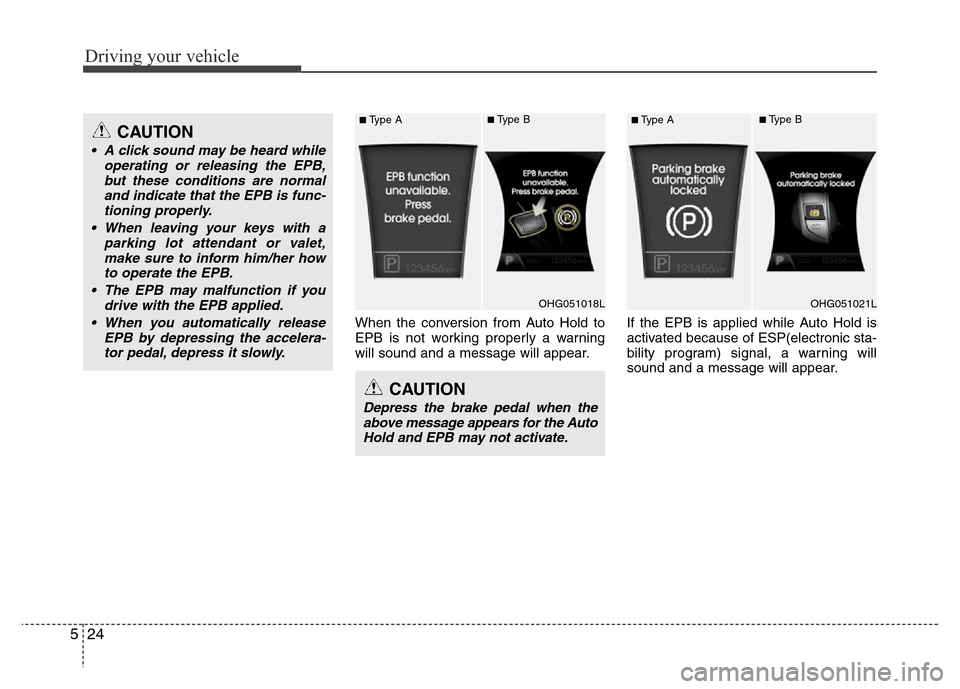
When the conversion from Auto Hold to
EPB is not working properly a warning
will sound and a message will appear.If the EPB is applied while Auto Hold is
activated because of ESP(electronic sta-
bility program) signal, a warning will
sound and a message will appear.
CAUTION
Depress the brake pedal when the
above message appears for the Auto
Hold and EPB may not activate.
CAUTION
• A click sound may be heard while
operating or releasing the EPB,
but these conditions are normal
and indicate that the EPB is func-
tioning properly.
• When leaving your keys with a
parking lot attendant or valet,
make sure to inform him/her how
to operate the EPB.
• The EPB may malfunction if you
drive with the EPB applied.
• When you automatically release
EPB by depressing the accelera-
tor pedal, depress it slowly.
OHG051018L
■Type A■Type B
OHG051021L
■Type A■Type B
Page 248 of 403
525
Driving your vehicle
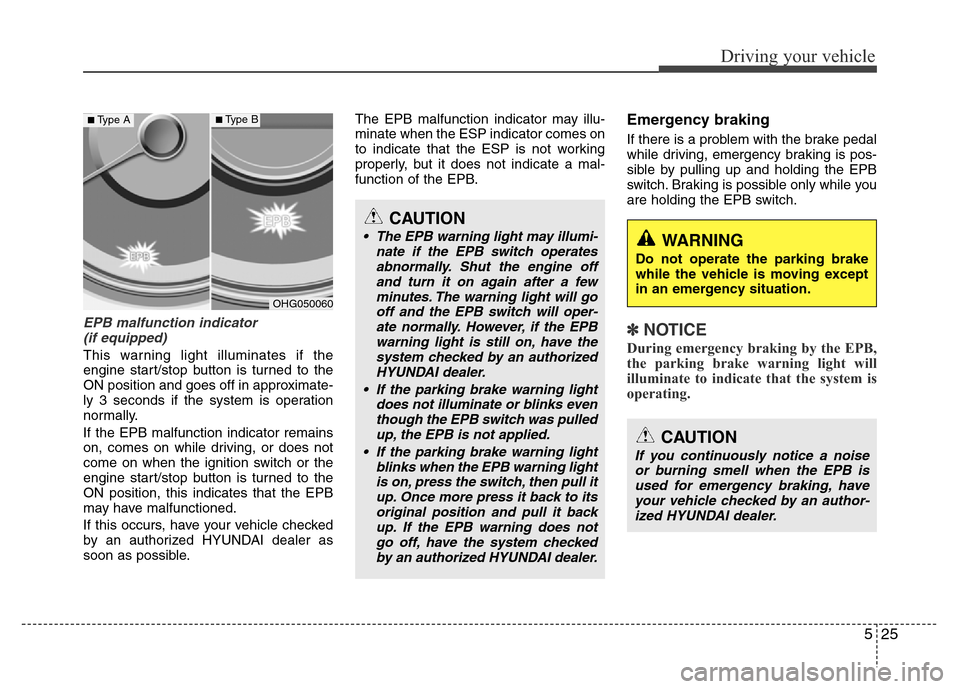
EPB malfunction indicator
(if equipped)
This warning light illuminates if the
engine start/stop button is turned to the
ON position and goes off in approximate-
ly 3 seconds if the system is operation
normally.
If the EPB malfunction indicator remains
on, comes on while driving, or does not
come on when the ignition switch or the
engine start/stop button is turned to the
ON position, this indicates that the EPB
may have malfunctioned.
If this occurs, have your vehicle checked
by an authorized HYUNDAI dealer as
soon as possible.The EPB malfunction indicator may illu-
minate when the ESP indicator comes on
to indicate that the ESP is not working
properly, but it does not indicate a mal-
function of the EPB.
Emergency braking
If there is a problem with the brake pedal
while driving, emergency braking is pos-
sible by pulling up and holding the EPB
switch. Braking is possible only while you
are holding the EPB switch.
✽NOTICE
During emergency braking by the EPB,
the parking brake warning light will
illuminate to indicate that the system is
operating.
WARNING
Do not operate the parking brake
while the vehicle is moving except
in an emergency situation.
OHG050060
■Type A■Type B
CAUTION
• The EPB warning light may illumi-
nate if the EPB switch operates
abnormally. Shut the engine off
and turn it on again after a few
minutes. The warning light will go
off and the EPB switch will oper-
ate normally. However, if the EPB
warning light is still on, have the
system checked by an authorized
HYUNDAI dealer.
• If the parking brake warning light
does not illuminate or blinks even
though the EPB switch was pulled
up, the EPB is not applied.
• If the parking brake warning light
blinks when the EPB warning light
is on, press the switch, then pull it
up. Once more press it back to its
original position and pull it back
up. If the EPB warning does not
go off, have the system checked
by an authorized HYUNDAI dealer.
CAUTION
If you continuously notice a noise
or burning smell when the EPB is
used for emergency braking, have
your vehicle checked by an author-
ized HYUNDAI dealer.