TURN SIGNALS Hyundai Azera 2013 Owner's Manual
[x] Cancel search | Manufacturer: HYUNDAI, Model Year: 2013, Model line: Azera, Model: Hyundai Azera 2013Pages: 403, PDF Size: 9.28 MB
Page 14 of 403
23
Your vehicle at a glance
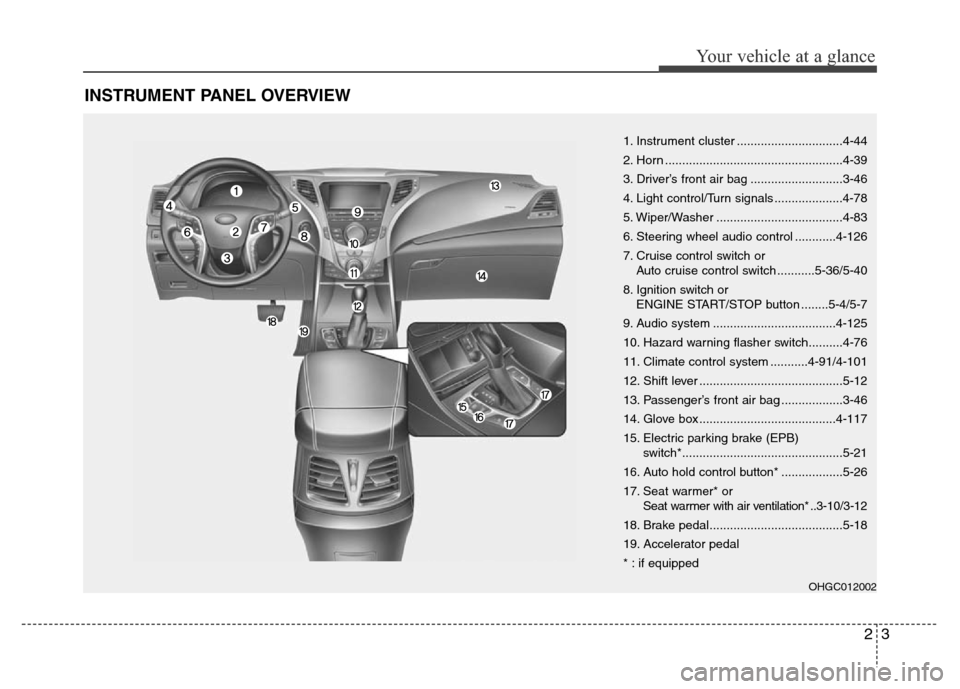
INSTRUMENT PANEL OVERVIEW
1. Instrument cluster ...............................4-44
2. Horn ....................................................4-39
3. Driver’s front air bag ...........................3-46
4. Light control/Turn signals ....................4-78
5. Wiper/Washer .....................................4-83
6. Steering wheel audio control ............4-126
7. Cruise control switch or
Auto cruise control switch ...........5-36/5-40
8. Ignition switch or
ENGINE START/STOP button ........5-4/5-7
9. Audio system ....................................4-125
10. Hazard warning flasher switch..........4-76
11. Climate control system ...........4-91/4-101
12. Shift lever ..........................................5-12
13. Passenger’s front air bag ..................3-46
14. Glove box ........................................4-117
15. Electric parking brake (EPB)
switch*...............................................5-21
16. Auto hold control button* ..................5-26
17. Seat warmer* or
Seat warmer with air ventilation* ..3-10/3-12
18. Brake pedal.......................................5-18
19. Accelerator pedal
* : if equipped
OHGC012002
Page 128 of 403
Features of your vehicle
52 4
Headlamp Escort
On - The Headlamp Escort and
Headlamp Welcome function will be
activated.
Off - The Headlamp Escort and
Headlamp Welcome function will be
inactivated.
Welcome Light (if equipped)
On - When all the doors(and trunk) are
locked and closed, if you approach
the vehicle with a smart key in pos-
session the puddle lamp and door
handle lamp will come on for about
15 seconds.
Off - The Welcome Light function will be
inactivated.
Welcome Sound
On - The Welcome Sound function will
be activated.
Off - The Welcome Sound function will
be inactivated.
Auto Triple Turn (One-touch triple
turn signal)
On - The lane change signals will blink 3
times when the turn signal lever is
moved slightly.
Off - The Auto Triple Turn function will be
inactivated.
AVG fuel economy
Auto Reset - The average fuel economy
will reset automatically
when you drive after refuel-
ing.
Manual Reset - The average fuel econo-
my will not reset auto-
matically when you drive
after refueling.
Ambient lighting
The brightness of the ambient light may
be adjusted.
• 5 stage : Off / Level 1 / Level 2 / Level 3 /
Level 4
Page 131 of 403

455
Features of your vehicle
Turn signal indicator
The blinking green arrows on the instru-
ment panel show the direction indicated
by the turn signals. If the arrow comes on
but does not blink, blinks more rapidly
than normal, or does not illuminate at all,
a malfunction in the turn signal system is
indicated. Your dealer should be consult-
ed for repairs.
Front fog light indicator
(if equipped)
This light comes on when the front fog
lights are ON.
Rear fog light indicator
(if equipped)
This indicator illuminates when the rear
fog lights are ON.
High beam indicator
This indicator illuminates when the head-
lights are on and in the high beam posi-
tion or when the turn signal lever is pulled
into the Flash-to-Pass position.
Low beam indicator
(if equipped)
This indicator illuminates when the head-
lights are on and in the low beam posi-
tion.
When the high beam indicator is ON, the
low bean indicator will turn off and low
beam light remains on.
Tail light indicator
This indicator illuminates when the tail
lights are on.
Page 156 of 403
Features of your vehicle
80 4
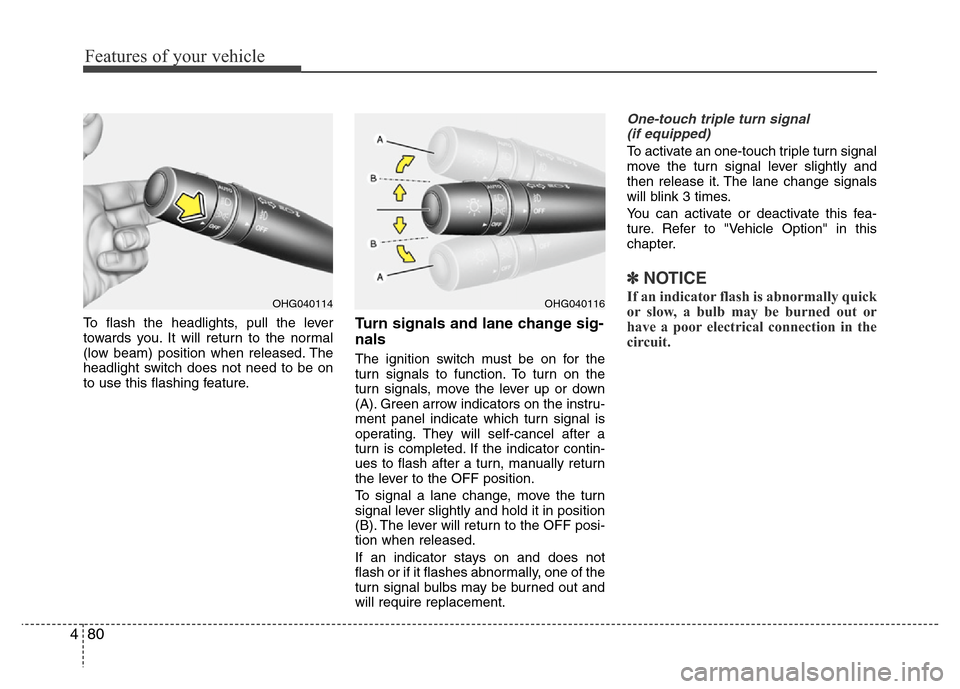
To flash the headlights, pull the lever
towards you. It will return to the normal
(low beam) position when released. The
headlight switch does not need to be on
to use this flashing feature.Turn signals and lane change sig-
nals
The ignition switch must be on for the
turn signals to function. To turn on the
turn signals, move the lever up or down
(A). Green arrow indicators on the instru-
ment panel indicate which turn signal is
operating. They will self-cancel after a
turn is completed. If the indicator contin-
ues to flash after a turn, manually return
the lever to the OFF position.
To signal a lane change, move the turn
signal lever slightly and hold it in position
(B). The lever will return to the OFF posi-
tion when released.
If an indicator stays on and does not
flash or if it flashes abnormally, one of the
turn signal bulbs may be burned out and
will require replacement.
One-touch triple turn signal
(if equipped)
To activate an one-touch triple turn signal
move the turn signal lever slightly and
then release it. The lane change signals
will blink 3 times.
You can activate or deactivate this fea-
ture. Refer to "Vehicle Option" in this
chapter.
✽NOTICE
If an indicator flash is abnormally quick
or slow, a bulb may be burned out or
have a poor electrical connection in the
circuit.OHG040116OHG040114
Page 201 of 403
4125
Features of your vehicle
✽NOTICE
• If you install an aftermarket HID
head lamp, your vehicle’s audio and
electronic device may malfunction.
• Prevent chemicals such as perfume,
cosmetic oil, sun cream, hand cleaner,
and air freshener from contacting the
interior parts because they may cause
damage or discoloration.
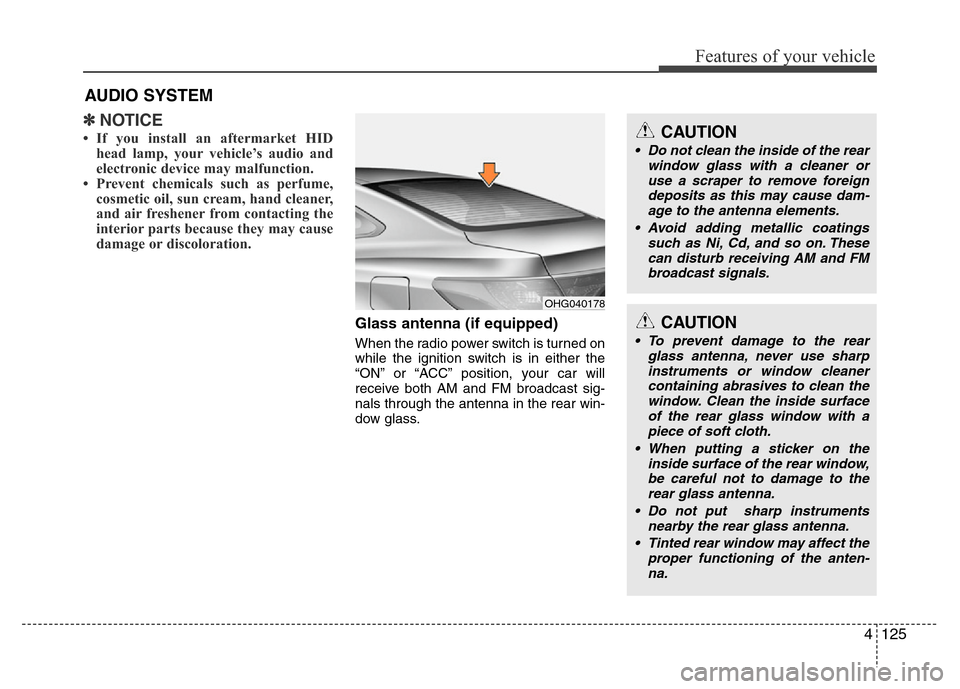
Glass antenna (if equipped)
When the radio power switch is turned on
while the ignition switch is in either the
“ON” or “ACC” position, your car will
receive both AM and FM broadcast sig-
nals through the antenna in the rear win-
dow glass.
AUDIO SYSTEM
OHG040178
CAUTION
• Do not clean the inside of the rear
window glass with a cleaner or
use a scraper to remove foreign
deposits as this may cause dam-
age to the antenna elements.
• Avoid adding metallic coatings
such as Ni, Cd, and so on. These
can disturb receiving AM and FM
broadcast signals.
CAUTION
• To prevent damage to the rear
glass antenna, never use sharp
instruments or window cleaner
containing abrasives to clean the
window. Clean the inside surface
of the rear glass window with a
piece of soft cloth.
• When putting a sticker on the
inside surface of the rear window,
be careful not to damage to the
rear glass antenna.
• Do not put sharp instruments
nearby the rear glass antenna.
• Tinted rear window may affect the
proper functioning of the anten-
na.
Page 289 of 403
What to do in an emergency
2 6
ROAD WARNING
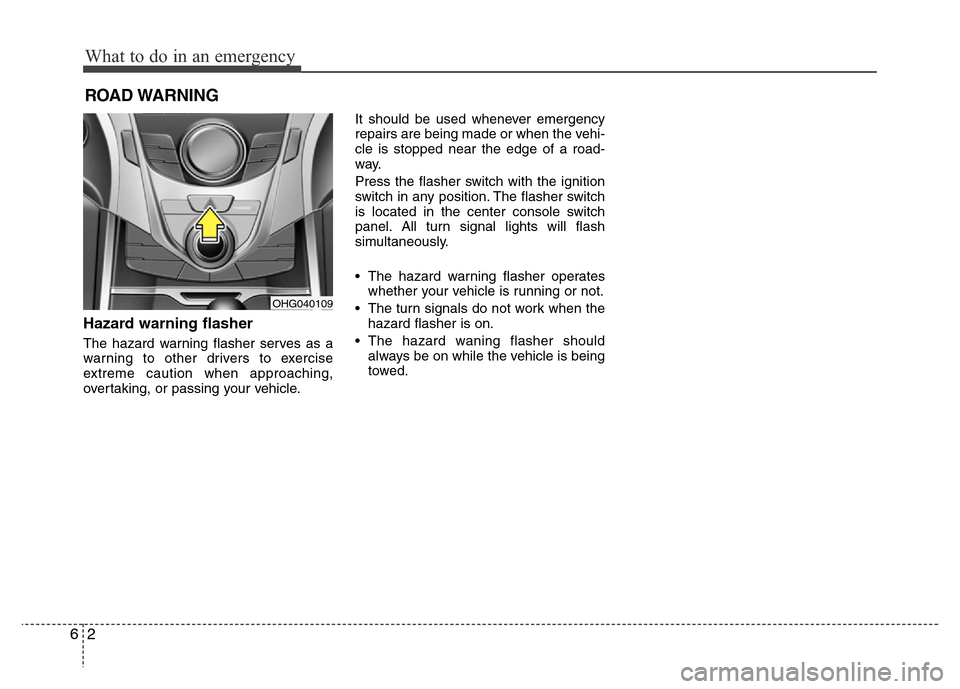
Hazard warning flasher
The hazard warning flasher serves as a
warning to other drivers to exercise
extreme caution when approaching,
overtaking, or passing your vehicle.It should be used whenever emergency
repairs are being made or when the vehi-
cle is stopped near the edge of a road-
way.
Press the flasher switch with the ignition
switch in any position. The flasher switch
is located in the center console switch
panel. All turn signal lights will flash
simultaneously.
• The hazard warning flasher operates
whether your vehicle is running or not.
• The turn signals do not work when the
hazard flasher is on.
• The hazard waning flasher should
always be on while the vehicle is being
towed.
OHG040109