ad blue Hyundai Azera 2015 Owner's Manual
[x] Cancel search | Manufacturer: HYUNDAI, Model Year: 2015, Model line: Azera, Model: Hyundai Azera 2015Pages: 473, PDF Size: 11.92 MB
Page 232 of 473
✽NOTICE - USING THE iPod®
DEVICE
•iPod®is a registered trademark of
Apple Inc.
• In order to use the iPod
®while
operating the keys, you must use a
dedicated iPod
®cable. (the cable
that is supplied when purchasing
iPod
®/iPhone products)
• If the iPod®is connected to the
vehicle while it is playing, a high
pitch sound could occur for approx-
imately 1-2 seconds immediately
after connecting. If possible, con-
nect the iPod
®to the vehicle with
the iPod®stopped/paused.
• During ACC ON state, connecting
the iPod
®through the iPod®cable
will charge the iPod®through the
car audio system.
• When connecting with the iPod
®
cable, make sure to fully insert the
jack to prevent communication
interference.
(Continued)(Continued)
• When the EQ features of an exter-
nal device, such as the iPod
®, and
the audio system are both active,
EQ effects could overlap and cause
sound deterioration and distortion.
Whenever possible, turn off the EQ
feature within the external device
upon use by connecting with the
audio system.
• Noise may occur when an iPod
®or
AUX device is connected. When
such devices are not being used, dis-
connect the device for storage.
• When the iPod
®or AUX device
power is connected to the power
jack, playing the external device
may result in noise. In such cases,
disconnect the power connection
before use.
• Skipping or improper operation
may occur depending on the char-
acteristics of your iPod
®/Phone
device.
(Continued)(Continued)
• If your iPhone is connected to both
the Bluetooth
®Wireless Technology
and USB, the sound may not be
properly played. In your iPhone,
select the Dock connector or
Bluetooth
®Wireless Technology to
change the sound output (source).
•iPod
®mode cannot be operated
when the iPod®cannot be recog-
nized due to versions that do not
support communication protocols.
• For fifth generation iPod
®Nano
devices, the iPod®may not be rec-
ognized when the battery level is
low. Please charge the iPod
®for
use.
• Search/play orders shown within the
iPod
®device may differ with the
orders shown within the audio sys-
tem.
• If the iPod
®malfunctions due to an
iPod®device defect, reset the iPod®
and try again. (To learn more, refer
to your iPod®manual)
(Continued)
Features of your vehicle
155 4
Page 233 of 473
(Continued)
• Some iPods may not sync with the
System depending on its version. If
the Media is removed before the
Media is recognized, then the system
may not properly restore the previ-
ously operated mode. (iPad charging
is not supported.)✽NOTICE - USING THE
Bluetooth®Wireless
Technology Audio Mode
•Bluetooth®Wireless Technology Audio
Mode can be used only when a
Bluetooth
®Wireless Technology phone
has been connected.
•Bluetooth
®Wireless Technology Audio
Mode will not be available when con-
necting mobile phones that do not sup-
port this feature.
• While Bluetooth
®Wireless Technology
Audio is playing, if the Bluetooth®
Wireless Technology phone is connect-
ed, then the music will also stop.
• Moving the Track up/down while play-
ing Bluetooth
®Wireless Technology
audio mode may result in pop noises in
some mobile phones.
•Bluetooth
®Wireless Technology stream-
ing audio may not be supported in some
mobile phones.
(Continued)(Continued)
• When returning to Bluetooth
®Wireless
Technology Audio mode after ending a
call, the mode may not automatically
restart in some mobile phones.
• Receiving an incoming call or making an
outgoing call while playing Bluetooth
®
Wireless Technology Audio may result
in audio interference.
4156
Features of your vehicle
Page 234 of 473
✽NOTICE- USING UPON CON-
NECTING
Bluetooth®Wireless
Technology PHONE
• Before connecting the car audio sys-
tem with the mobile phone, check to
see that the mobile phone supports
Bluetooth
®Wireless Technology fea-
tures.
• Even if the phone supports Bluetooth
®
Wireless Technology, the phone will
not be found during device searches if
the phone has been set to hidden state
or the Bluetooth
®Wireless Technology
power is turned off. Disable the hid-
den state or turn on the Bluetooth
®
Wireless Technology power prior to
searching/connecting with the car
audio system.
• If you do not want to automatically
connect yourBluetooth
®Wireless
Technology phone, try the following.
1. Turn off the Bluetooth
®feature in
your mobile phone.
(Continued)(Continued)
-For more information on Bluetooth
®
Wireless Technology features within
your mobile, refer to your mobile
phone user’s manual.
2.Turn off the Bluetooth
®Wireless
Technology feature in your car
audio system.
-To turn off the Bluetooth
®Wireless
Technology feature in your car audio
system, go to [Phone] and
[turn off] the Bluetooth
®Wireless
Technology feature.
• Park the vehicle when connecting the
car audio system with your mobile
phone.
•Bluetooth
®Wireless Technology con-
nection may become intermittently
disconnected in some mobile phones.
Follow these steps to try again.
1.Turn the Bluetooth
®Wireless
Technology function within the
mobile phone off/on and try again.
2.Turn the mobile phone power
Off/On and try again.
(Continued)(Continued)
3.Completely remove the mobile
phone battery, reboot, and then
again.
4.Reboot the audio system and try
again.
5.Delete all paired devices, pair and
try again.
• The Handsfree call volume and quali-
ty may differ depending on the mobile
phone.
•Bluetooth
®Wireless Technology fea-
tures supported within the vehicle are
as follows. Some features may not be
supported depending on your
Bluetooth
®Wireless Technologydevice.
- Answering and placing Bluetooth®
Wireless Technology Handsfree calls
- Menu operation during call (Switch
to Private, Switch to call waiting,
Outgoing volume)
- Download Call History
- Download Mobile Phone book
- Phone book/Call History Auto
Download
(Continued)
SETUP
Features of your vehicle
157 4
Page 235 of 473
Features of your vehicle
158 4
(Continued)
• It is possible to pair up to five
Bluetooth
®Wireless Technology
devices to the car system.
• Only one Bluetooth
®Wireless Technology
device can be connected at a time.
• Other devices cannot be paired while
aBluetooth
®Wireless Technologydevice
is already connected.
• When a Bluetooth
®Wireless Technology
device is being connected, the connection
process cannot be canceled.
•Only Bluetooth
®Wireless Technology
Handsfree and Bluetooth®Wireless
Technology audio related features will
operate within this system.
• Normal operation is possible only for
devices that support Handsfree or
audio features, such as a Bluetooth
®
Wireless Technology mobile phone or a
Bluetooth®Wireless Technology audio
device.
(Continued)(Continued)
• Only one function can be used at a
time between the Bluetooth
®Wireless
Technology Handsfree and Bluetooth®
Wireless Technology audio. (While
playing Bluetooth®Wireless Technology
audio, streaming will end upon enter-
ing the Bluetooth
®Wireless Technology
phone screen.)
• If a connected Bluetooth
®Wireless
Technology device becomes discon-
nected for various reasons, such as
being out of range, turning the device
OFF, or a Bluetooth
®Wireless
Technology communication error,
Bluetooth
®Wireless Technology devices
are automatically searched and con-
nected.
•Bluetooth
®Handsfree is a feature that
enables drivers to practice safe driving.
Connecting the head unit with a
Bluetooth
®phone allows the user to
conveniently make calls, receive calls,
and manage the phone book. Before
using the Bluetooth
®, carefully read the
contents of this user’s manual.
Page 240 of 473
(5)
• When pressed shortly.
- When pressed in the phone screen,
displays call history screen.
- When pressed in the dial screen,
makes a call.
- When pressed in the incoming call
screen, answers the call.
- When pressed during call waiting,
switches to waiting call (Call
Waiting).
• When pressed and held (over 0.8 sec-
onds).
- When pressed in the
Bluetooth®
Wireless Technology Handsfree wait
mode, redials the last call.
- When pressed during a
Bluetooth®
Wireless Technology Handsfree call,
switches call back to mobile phone
(Private).
- When pressed while calling on the
mobile phone, switches call back to
Bluetooth®Wireless Technology
Handsfree (Operates only when
Bluetooth®Wireless Technology
Handsfree is connected).(6)
Ends phone call.
Features of your vehicle
163 4
Page 264 of 473
Bluetooth®Wireless
Technology AUDIO MODE
Using Bluetooth®Wireless
Technology Audio Mode
Playing/Pausing Bluetooth®Wireless
TechnologyAudio
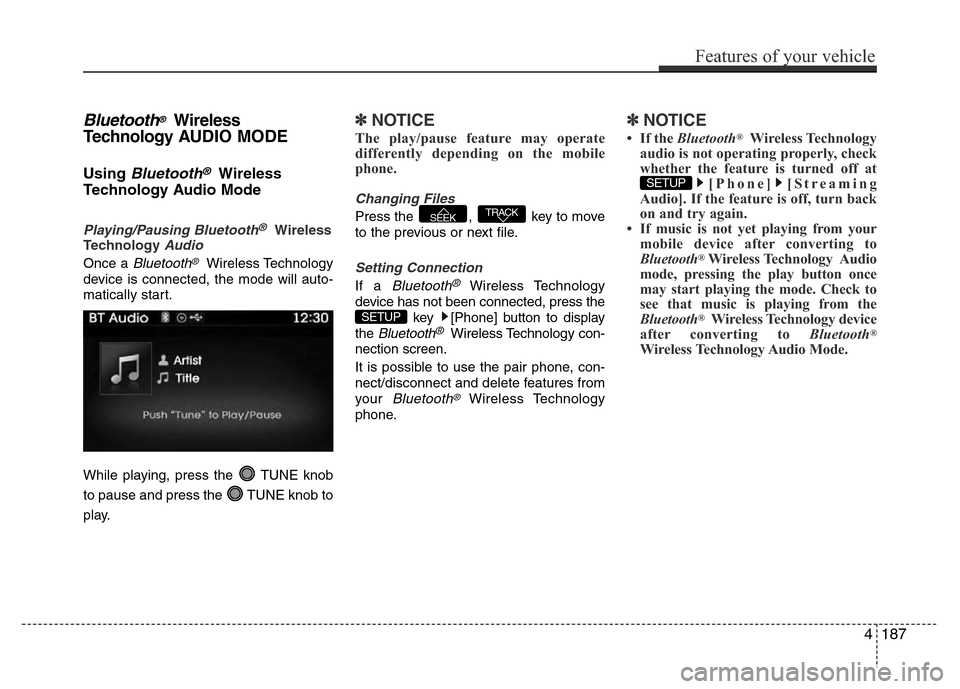
Once a Bluetooth®Wireless Technology
device is connected, the mode will auto-
matically start.
While playing, press the TUNE knob
to pause and press the TUNE knob to
play.
✽NOTICE
The play/pause feature may operate
differently depending on the mobile
phone.
Changing Files
Press the , key to move
to the previous or next file.
Setting Connection
If a Bluetooth®Wireless Technology
device has not been connected, press the
key [Phone] button to display
the
Bluetooth®Wireless Technology con-
nection screen.
It is possible to use the pair phone, con-
nect/disconnect and delete features from
your
Bluetooth®Wireless Technology
phone.
✽NOTICE
• If the Bluetooth®Wireless Technology
audio is not operating properly, check
whether the feature is turned off at
[Phone] [Streaming
Audio]. If the feature is off, turn back
on and try again.
• If music is not yet playing from your
mobile device after converting to
Bluetooth
®Wireless Technology Audio
mode, pressing the play button once
may start playing the mode. Check to
see that music is playing from the
Bluetooth
®Wireless Technology device
after converting to Bluetooth®
Wireless Technology Audio Mode.
SETUP
SETUP
TRACKSEEK
Features of your vehicle
187 4
Page 265 of 473
4188
Features of your vehicle
Pairing a Bluetooth®Wireless
Technology Device
What is Bluetooth® Wireless
Technology Pairing?
Pairing refers to the process of synchro-
nizing your
Bluetooth®Wireless
Technology phone or device with the car
audio system for connection. Pairing is
necessary to connect and use the
Bluetooth®Wireless Technology feature.
Pairing Key / Key on
the Steering Remote Controller
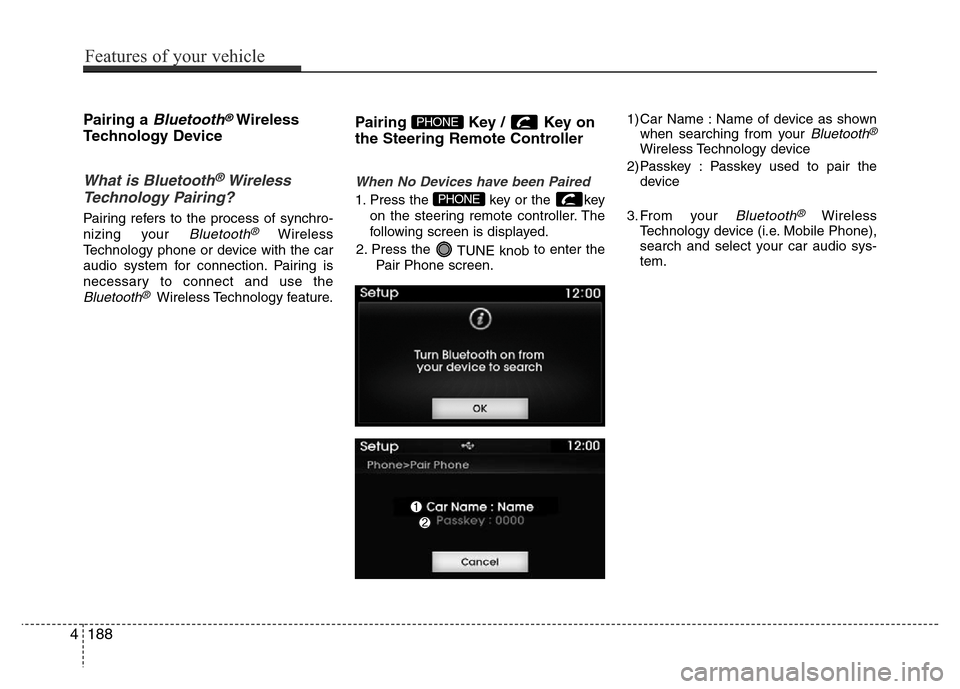
When No Devices have been Paired
1. Press the key or the key
on the steering remote controller. The
following screen is displayed.
2. Press the
TUNE knobto enter the
Pair Phone screen.1) Car Name : Name of device as shown
when searching from your
Bluetooth®
Wireless Technology device
2) Passkey : Passkey used to pair the
device
3. From your
Bluetooth®Wireless
Technology device (i.e. Mobile Phone),
search and select your car audio sys-
tem.
PHONE
PHONE
Page 266 of 473
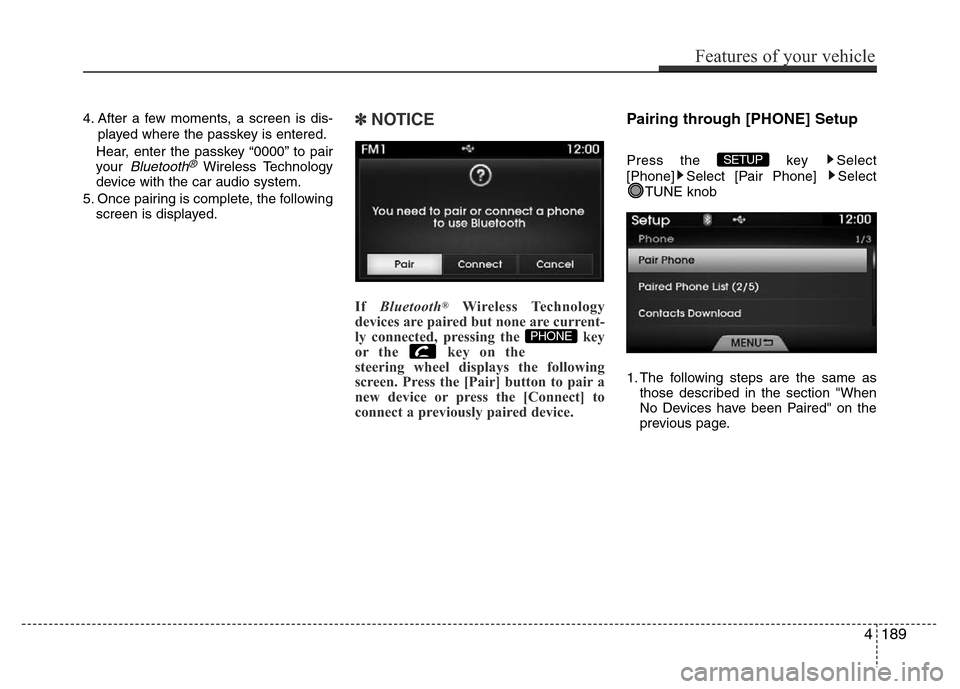
4. After a few moments, a screen is dis-
played where the passkey is entered.
Hear, enter the passkey “0000” to pair
your
Bluetooth®Wireless Technology
device with the car audio system.
5. Once pairing is complete, the following
screen is displayed.
✽NOTICE
If Bluetooth®Wireless Technology
devices are paired but none are current-
ly connected, pressing the key
or the key on the
steering wheel displays the following
screen. Press the [Pair] button to pair a
new device or press the [Connect] to
connect a previously paired device.
Pairing through [PHONE] Setup
Press the key Select
[Phone] Select [Pair Phone] Select
TUNE knob
1. The following steps are the same as
those described in the section "When
No Devices have been Paired" on the
previous page.SETUP
PHONE
Features of your vehicle
189 4
Page 267 of 473
✽NOTICE
• Bluetooth®Wireless Technology fea-
tures supported within the vehicle are
as follows. Some features may not be
supported depending on your
Bluetooth
®Wireless Technology device.
- Outgoing/Incoming Handsfree calls
- Operations during a call (Switch to
Private, Switch to call waiting, MIC
on/off)
- Downloading Call History
- Downloading Mobile Contacts
-Bluetooth
®Wireless Technology
device auto connection
- Bluetooth Audio Streaming
• Up to five Bluetooth
®Wireless
Technology devices can be paired to
the Car Handsfree system.
• Only one Bluetooth
®Wireless
Technology device can be connected at
a time.
• Other devices cannot be paired while
a Bluetooth
®Wireless Technology
device is connected.
•Only Bluetooth
®Wireless Technology
Handsfree and Bluetooth audio relat-
ed features are supported.
(Continued)(Continued)
• Bluetooth related operations are pos-
sible only within devices that support
Handsfree or audio features, such as a
Bluetooth
®Wireless Technology
mobile phone or a Bluetooth audio
device.
• If a connected Bluetooth
®Wireless
Technology device becomes discon-
nected due to being out of communi-
cation range, turning the device OFF,
or a Bluetooth
®Wireless Technology
communication error, corresponding
Bluetooth
®Wireless Technology
devices are automatically searched
and reconnected.
• If the system becomes unstable due to
communication errors between the
car Handsfree and the Bluetooth
®
Wireless Technology device, reset the
device by turning off and back on
again. Upon resetting Bluetooth
®
Wireless Technology device, the sys-
tem will be restored.
(Continued)(Continued)
• After pairing is complete, a contacts
download request is sent once to the
mobile phone. Some mobile phones
may require confirmation upon
receiving a download request, ensure
your mobile phone accepts the con-
nection. Refer to your phones user’s
manual for additional information
regarding phone pairing and connec-
tions.
4190
Features of your vehicle
Page 268 of 473
![Hyundai Azera 2015 Owners Manual Connecting a Device
Press the key Select
[Phone] Select [Paired Phone List]
1) Connected Phone : Device that is cur-
rently connected
2) Paired Phone : Device that is paired
but not connectedFrom th](/img/35/14466/w960_14466-267.png "Hyundai Azera 2015 Owners Manual Connecting a Device
Press the key Select
[Phone] Select [Paired Phone List]
1) Connected Phone : Device that is cur-
rently connected
2) Paired Phone : Device that is paired
but not connectedFrom th")
Connecting a Device
Press the key Select
[Phone] Select [Paired Phone List]
1) Connected Phone : Device that is cur-
rently connected
2) Paired Phone : Device that is paired
but not connectedFrom the paired phone list, select the
device you want to connect and Select
the button.
Changing Priority
What is Priority?
It is possible to pair up to five Bluetooth®
Wireless Technology devices with the car
audio system. The "Change Priority" fea-
ture is used to set the connection priority
of paired phones.
Press the key Select [Phone]
Select [Paired Phone List]
SETUP
ConnectSETUP
Features of your vehicle
191 4