engine Hyundai Azera 2017 User Guide
[x] Cancel search | Manufacturer: HYUNDAI, Model Year: 2017, Model line: Azera, Model: Hyundai Azera 2017Pages: 520, PDF Size: 16.33 MB
Page 65 of 520
Safety features of your vehicle
46
3
When an adult is seated in the front
passenger seat, if the PASSENGER
AIR BAG “OFF” indicator is on,
change the ignition switch to the OFF
position and ask the passenger to sit
properly (sitting upright with the seat
back in an upright position, centered
on the seat cushion with their seat
belt on, legs comfortably extended
and their feet on the floor). Restart
the engine and have the person
remain in that position. This will allow
the system to detect the person and
to enable the passenger air bag. If the PASSENGER AIR BAG “OFF”
indicator is still on, ask the passen-
ger to move to the rear seat.
✽ ✽
NOTICE
The PASSENGER AIR BAG “OFF”
indicator illuminates for about 4 sec-
onds after the ignition switch is
changed to the ON position or after
the engine is started. If the front
passenger seat is occupied, the occu-
pant classification sensor will then
classify the front passenger after
several more seconds.
B990A01O
WARNING - AIR BAG
"OFF" light
Do not allow an adult passenger
to ride in the front seat when the
PASSENGER AIR BAG “OFF”
indicator is illuminated,
because the air bag will not
deploy in the event of a crash.
The driver must instruct the
passenger to reposition himself
in the seat. Failure to properly
position yourself may lead to
airbag deactivation resulting in
airbag non-deployment in a col-
lision. If the PASSENGER AIR
BAG “OFF” indicator remains
illuminated after the passenger
repositions themselves proper-
ly and the vehicle is restarted, it
is recommended the passenger
move to the rear seat because
the passenger's front air bag
will not deploy.
Page 77 of 520
Safety features of your vehicle
58
3
SRS Care
The SRS is virtually maintenance-free
and so there are no parts you can
safely service by yourself. If the SRS
air bag warning light ( ) does not illu-
minate when you turn the ignition ON,
or if it continuously remains on, have
your vehicle immediately inspected by
an authorized HYUNDAI dealer.
Any work on the SRS system, such
as removing, installing, repairing, or
any work on the steering wheel, the
front passenger's panel, front seats
and roof rails must be performed by
an authorized HYUNDAI dealer.
Improper handling of the SRS system
may result in serious personal injury.
For cleaning the air bag pad covers,
use only a soft, dry cloth or one which
has been moistened with plain water.
Solvents or cleaners could adversely
affect the air bag covers and proper
deployment of the system.
✽ ✽
NOTICE
• If the air bags inflate, they must
be replaced by an authorized
HYUNDAI dealer.
• If your vehicle was flooded and has soaked carpeting or water on
the flooring, you should not try to
start the engine; have the vehicle
towed to an authorized
HYUNDAI dealer.WARNING
Modification to SRS compo-
nents or wiring, including the
addition of any kind of badges
to the pad covers or modifica-
tions to the body structure, can
adversely affect SRS perform-
ance and lead to possible injury.
No objects (such as crash pad cover, cellular phone holder,
cup holder, perfume or stick-
ers) should be placed over or
near the air bag modules on
the steering wheel, instrument
panel, windshield glass, and
the front passenger's panel
above the glove box. Such
objects could cause harm if
the vehicle is in a crash
severe enough to cause the
air bags to deploy.
WARNING - Tampering
with SRS
Do not tamper with or discon-
nect SRS wiring, or other com-
ponents of the SRS system.
Doing so could result in the
accidental inflation of the air
bags or render the SRS inoper-
ative and lead to possible seri-
ous injury.
Page 82 of 520
43
Features of your vehicle
Record your key number
The key code number
is stamped or printed
on the key code tag
attached to the key
set. Should you lose your keys, con-
tact an authorized HYUNDAI dealer.
Remove the key code tag and store it
in a safe place. Also, record the key
code number and keep it in a safe
and handy place, but not in the vehi-
cle. Key operations
• Used to start the engine.
Used to lock and unlock the doors.
Used to lock and unlock the glove
box.
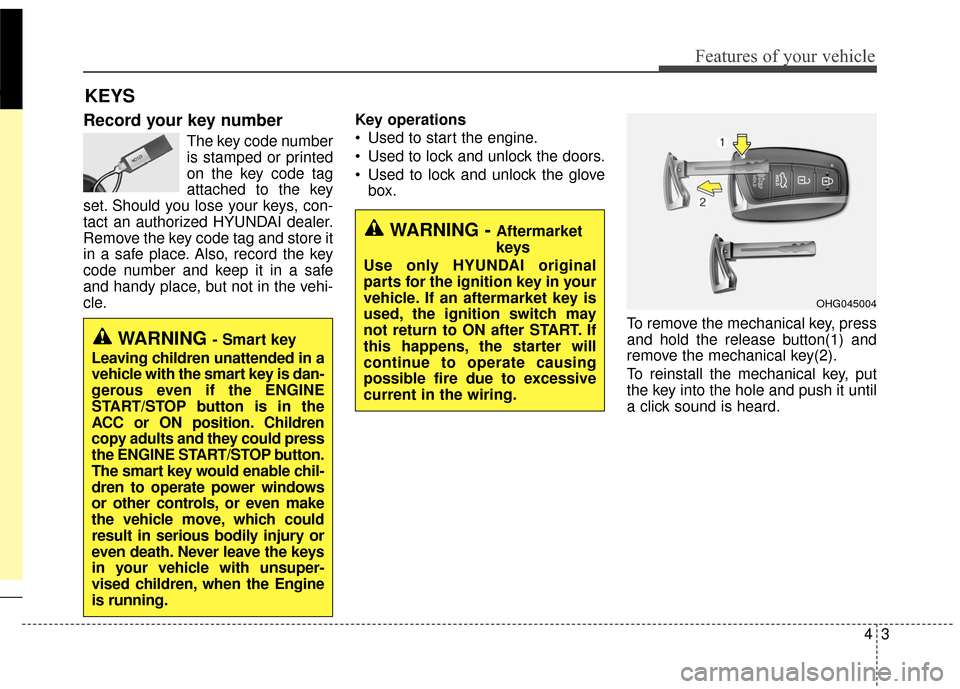
To remove the mechanical key, press
and hold the release button(1) and
remove the mechanical key(2).
To reinstall the mechanical key, put
the key into the hole and push it until
a click sound is heard.
KEYS
WARNING - Aftermarket
keys
Use only HYUNDAI original
parts for the ignition key in your
vehicle. If an aftermarket key is
used, the ignition switch may
not return to ON after START. If
this happens, the starter will
continue to operate causing
possible fire due to excessive
current in the wiring.
WARNING - Smart key
Leaving children unattended in a
vehicle with the smart key is dan-
gerous even if the ENGINE
START/STOP button is in the
ACC or ON position. Children
copy adults and they could press
the ENGINE START/STOP button.
The smart key would enable chil-
dren to operate power windows
or other controls, or even make
the vehicle move, which could
result in serious bodily injury or
even death. Never leave the keys
in your vehicle with unsuper-
vised children, when the Engine
is running.
OHG045004
Page 83 of 520
Features of your vehicle
44
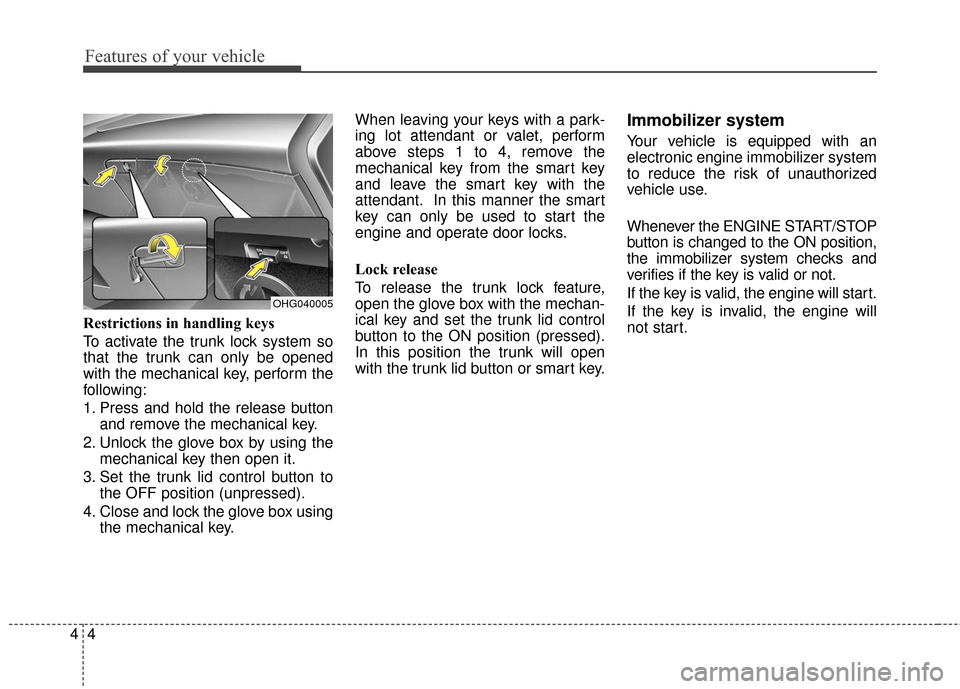
Restrictions in handling keys
To activate the trunk lock system so
that the trunk can only be opened
with the mechanical key, perform the
following:
1.
Press and hold the release button
and remove the mechanical key.
2. Unlock the glove box by using themechanical key then open it.
3. Set the trunk lid control button to the OFF position (unpressed).
4. Close and lock the glove box using the mechanical key. When leaving your keys with a park-
ing lot attendant or valet, perform
above steps 1 to 4, remove the
mechanical key from the smart key
and leave the smart key with the
attendant. In this manner the smart
key can only be used to start the
engine and operate door locks.
Lock release
To release the trunk lock feature,
open the glove box with the mechan-
ical key and set the trunk lid control
button to the ON position (pressed).
In this position the trunk will open
with the trunk lid button or smart key.
Immobilizer system
Your vehicle is equipped with an
electronic engine immobilizer system
to reduce the risk of unauthorized
vehicle use.
Whenever the ENGINE START/STOP
button is changed to the ON position,
the immobilizer system checks and
verifies if the key is valid or not.
If the key is valid, the engine will start.
If the key is invalid, the engine will
not start.
OHG040005
Page 84 of 520
45
Features of your vehicle
To deactivate the immobilizersystem
Change the ENGINE START/STOP
button to the ON position.
To activate the immobilizer system
Change the ENGINE START/STOP
button to the OFF position. The immo-
bilizer system activates automatically.
Without a valid smart key for your
vehicle, the engine will not start.
✽ ✽ NOTICE
Your immobilizer password is a cus-
tomer unique password and should
be kept confidential. Do not leave this
number anywhere in your vehicle.
If you need additional keys or lose
your keys, consult an authorized
HYUNDAI dealer. This device complies with Part 15
of the FCC rules.
Operation is subject to the following
two conditions:
1. This device may not cause harm-
ful interference, and
2. This device must accept any inter- ference received, including inter-
ference that may cause undesired
operation.
CAUTION - Immobilizer
damage
Do not expose your immobilizersystem to moisture, static elec-tricity and rough handling. Thismay damage your immobilizer.
CAUTION - Immobilizer
alterations
Do not change, alter or adjustthe immobilizer system becauseit could cause the immobilizersystem to malfunction.
CAUTION
Changes or modifications notexpressly approved by the partyresponsible for compliancecould void the user's authorityto operate the equipment.
CAUTION
Keep each key separate in orderto avoid a starting malfunction.
CAUTION
Do not put metal accessoriesnear the smart key.
The engine may not start becausethe metal accessories may inter-rupt the transponder signal fromtransmitting normally.
Page 85 of 520
Features of your vehicle
64
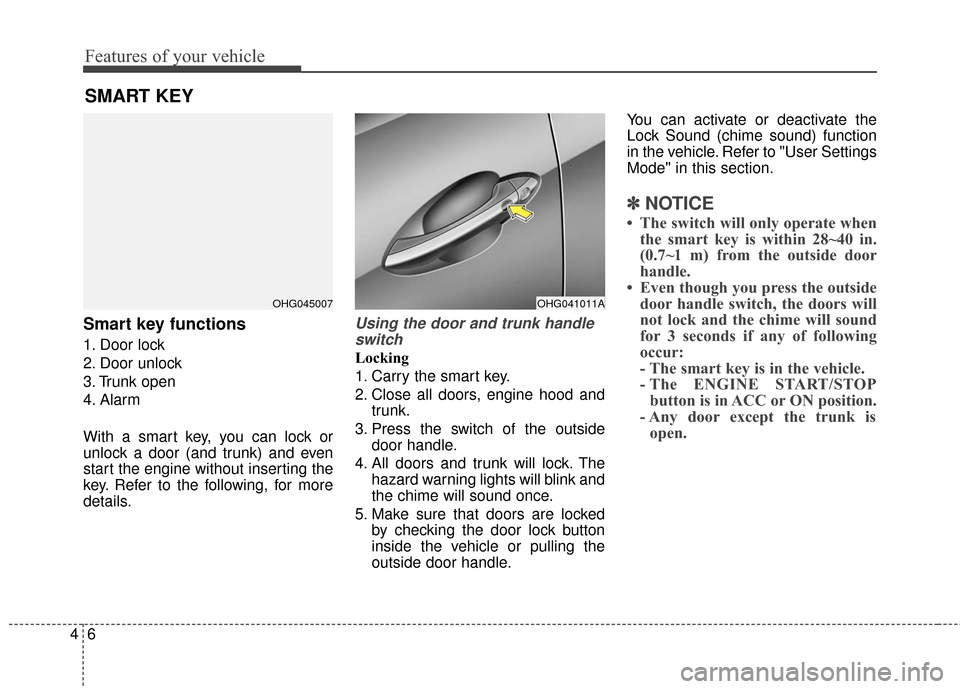
Smart key functions
1. Door lock
2. Door unlock
3. Trunk open
4. Alarm
With a smart key, you can lock or
unlock a door (and trunk) and even
start the engine without inserting the
key. Refer to the following, for more
details.
Using the door and trunk handleswitch
Locking
1. Carry the smart key.
2. Close all doors, engine hood and trunk.
3. Press the switch of the outside door handle.
4. All doors and trunk will lock. The hazard warning lights will blink and
the chime will sound once.
5. Make sure that doors are locked by checking the door lock button
inside the vehicle or pulling the
outside door handle. You can activate or deactivate the
Lock Sound (chime sound) function
in the vehicle. Refer to "User Settings
Mode" in this section.
✽ ✽
NOTICE
• The switch will only operate when
the smart key is within 28~40 in.
(0.7~1 m) from the outside door
handle.
• Even though you press the outside door handle switch, the doors will
not lock and the chime will sound
for 3 seconds if any of following
occur:
- The smart key is in the vehicle.
- The ENGINE START/STOPbutton is in ACC or ON position.
- Any door except the trunk is open.
SMART KEY
OHG045007OHG041011A
Page 86 of 520
47
Features of your vehicle
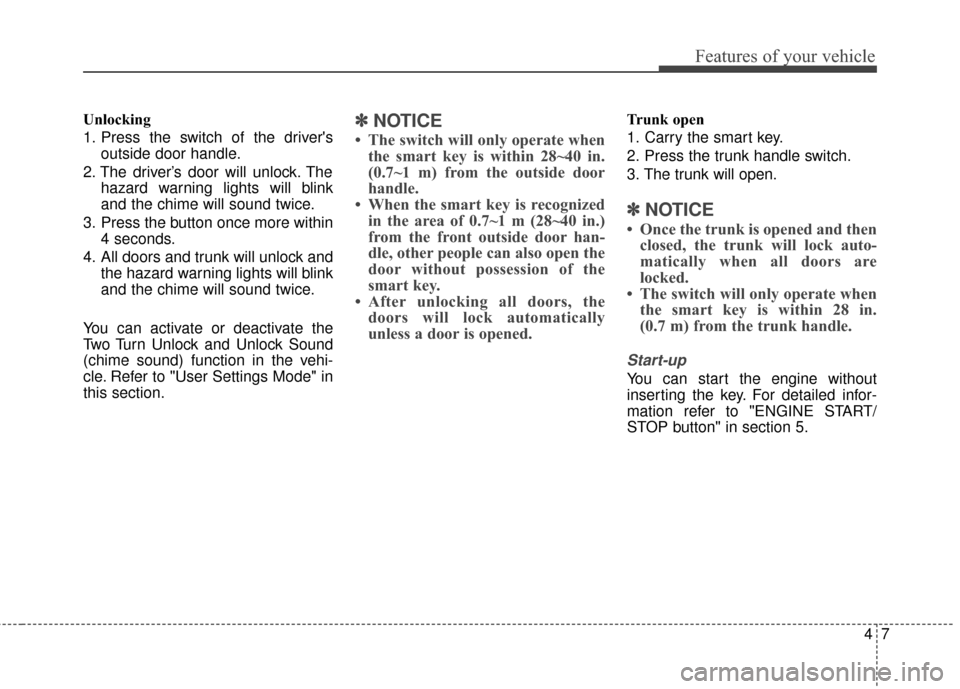
Unlocking
1. Press the switch of the driver'soutside door handle.
2. The driver’s door will unlock. The hazard warning lights will blink
and the chime will sound twice.
3. Press the button once more within 4 seconds.
4. All doors and trunk will unlock and the hazard warning lights will blink
and the chime will sound twice.
You can activate or deactivate the
Two Turn Unlock and Unlock Sound
(chime sound) function in the vehi-
cle. Refer to "User Settings Mode" in
this section.✽ ✽ NOTICE
• The switch will only operate when
the smart key is within 28~40 in.
(0.7~1 m) from the outside door
handle.
• When the smart key is recognized in the area of 0.7~1 m (28~40 in.)
from the front outside door han-
dle, other people can also open the
door without possession of the
smart key.
• After unlocking all doors, the doors will lock automatically
unless a door is opened.
Trunk open
1. Carry the smart key.
2. Press the trunk handle switch.
3. The trunk will open.
✽ ✽ NOTICE
• Once the trunk is opened and then
closed, the trunk will lock auto-
matically when all doors are
locked.
• The switch will only operate when the smart key is within 28 in.
(0.7 m) from the trunk handle.
Start-up
You can start the engine without
inserting the key. For detailed infor-
mation refer to "ENGINE START/
STOP button" in section 5.
Page 87 of 520
Features of your vehicle
84
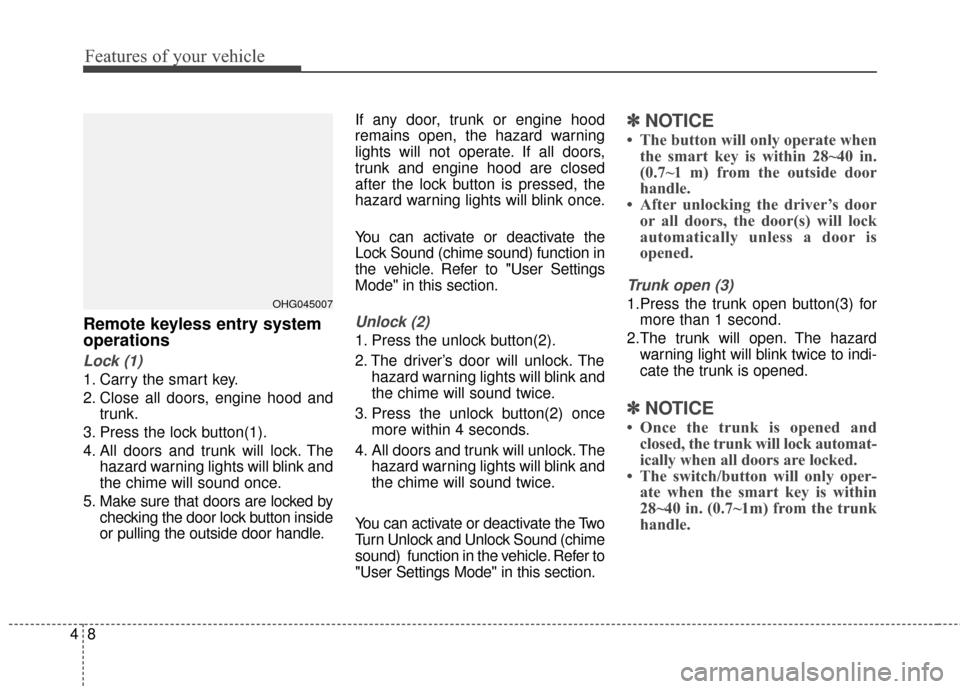
Remote keyless entry system
operations
Lock (1)
1. Carry the smart key.
2. Close all doors, engine hood andtrunk.
3. Press the lock button(1).
4. All doors and trunk will lock. The hazard warning lights will blink and
the chime will sound once.
5. Make sure that doors are locked by checking the door lock button inside
or pulling the outside door handle. If any door, trunk or engine hood
remains open, the hazard warning
lights will not operate. If all doors,
trunk and engine hood are closed
after the lock button is pressed, the
hazard warning lights will blink once.
You can activate or deactivate the
Lock Sound (chime sound) function in
the vehicle. Refer to "User Settings
Mode" in this section.
Unlock (2)
1. Press the unlock button(2).
2. The driver’s door will unlock. The
hazard warning lights will blink and
the chime will sound twice.
3. Press the unlock button(2) once more within 4 seconds.
4. All doors and trunk will unlock. The hazard warning lights will blink and
the chime will sound twice.
You can activate or deactivate the Two
Turn Unlock and Unlock Sound (chime
sound) function in the vehicle. Refer to
"User Settings Mode" in this section.
✽ ✽ NOTICE
• The button will only operate when
the smart key is within 28~40 in.
(0.7~1 m) from the outside door
handle.
• After unlocking the driver’s door or all doors, the door(s) will lock
automatically unless a door is
opened.
Trunk open (3)
1.Press the trunk open button(3) for
more than 1 second.
2.The trunk will open. The hazard warning light will blink twice to indi-
cate the trunk is opened.
✽ ✽ NOTICE
• Once the trunk is opened and
closed, the trunk will lock automat-
ically when all doors are locked.
• The switch/button will only oper- ate when the smart key is within
28~40 in. (0.7~1m) from the trunk
handle.
OHG045007
Page 88 of 520
49
Features of your vehicle
Alarm (4)
1. Press the alarm button(4) for morethan 1 second.
2. The horn sounds and hazard warning light flashes for about 30
seconds.
To stop the horn and lights, press
any button on the smart key.
Smart key precautions
If you lose your smart key, you will not be able to start the engine. Tow
the vehicle, if necessary, and con-
tact an authorized HYUNDAI dealer.
A maximum of 2 smart keys can be registered to a single vehicle. If you
lose a smart key, you should imme-
diately take the vehicle and the
second key to your authorized
HYUNDAI dealer to protect it from
potential theft.
The smart key will not work if any of following occurs:
- The smart key is close to a radiotransmitter such as a radio sta-
tion or an airport which can inter-
fere with normal operation of the
smart key.
- The smart key is near a mobile two-way radio system or a cellular
phone.
- Another vehicle’s smart key is being operated close to your vehicle.
When the smart key does not work
correctly, open and close the door
with the mechanical key. If you have
a problem with the smart key, con-
tact an authorized HYUNDAI dealer. If the smart key is in close proximity
to your cell phone or smart phone,
the signal from the smart key could
be blocked by normal operation of
your cell phone or smart phone.
This is especially important when
the phone is active such as making
call, receiving calls, text messaging,
and/or sending/receiving emails.
Avoid placing the smart key and your
cell phone or smart phone in the
same pants or jacket pocket and
maintain adequate distance between
the two devices.
CAUTION - Smart key
Keep the smart key away fromwater or any liquid and fire. Ifthe inside of the smart key getsdamp (due to drinks or mois-ture), or is heated, internal cir-cuit may malfunction, excludingthe car from the warranty.
Page 91 of 520
Features of your vehicle
12
4
THEFT-ALARM SYSTEM (IF EQUIPPED)
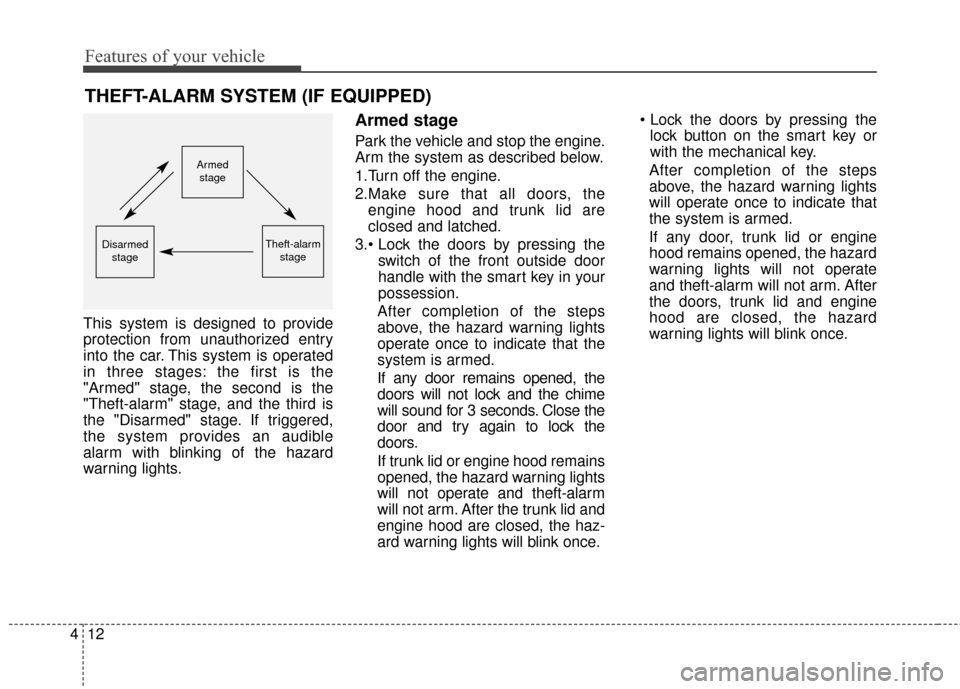
This system is designed to provide
protection from unauthorized entry
into the car. This system is operated
in three stages: the first is the
"Armed" stage, the second is the
"Theft-alarm" stage, and the third is
the "Disarmed" stage. If triggered,
the system provides an audible
alarm with blinking of the hazard
warning lights.
Armed stage
Park the vehicle and stop the engine.
Arm the system as described below.
1.Turn off the engine.
2.Make sure that all doors, the
engine hood and trunk lid are
closed and latched.
3. switch of the front outside door
handle with the smart key in your
possession.
After completion of the steps
above, the hazard warning lights
operate once to indicate that the
system is armed.
If any door remains opened, the
doors will not lock and the chime
will sound for 3 seconds. Close the
door and try again to lock the
doors.
If trunk lid or engine hood remains
opened, the hazard warning lights
will not operate and theft-alarm
will not arm. After the trunk lid and
engine hood are closed, the haz-
ard warning lights will blink once.
lock button on the smart key or
with the mechanical key.
After completion of the steps
above, the hazard warning lights
will operate once to indicate that
the system is armed.
If any door, trunk lid or engine
hood remains opened, the hazard
warning lights will not operate
and theft-alarm will not arm. After
the doors, trunk lid and engine
hood are closed, the hazard
warning lights will blink once.
Armed
stage
Theft-alarm stageDisarmedstage