steering Hyundai Azera 2017 Owner's Guide
[x] Cancel search | Manufacturer: HYUNDAI, Model Year: 2017, Model line: Azera, Model: Hyundai Azera 2017Pages: 520, PDF Size: 16.33 MB
Page 152 of 520
473
Features of your vehicle
TRIP COMPUTER
Overview
Description
The trip computer is a microcomput-
er-controlled driver information sys-
tem that displays information related
to driving.
✽ ✽NOTICE
Some driving information stored in
the trip computer (for example
Average Vehicle Speed) resets if the
battery is disconnected.
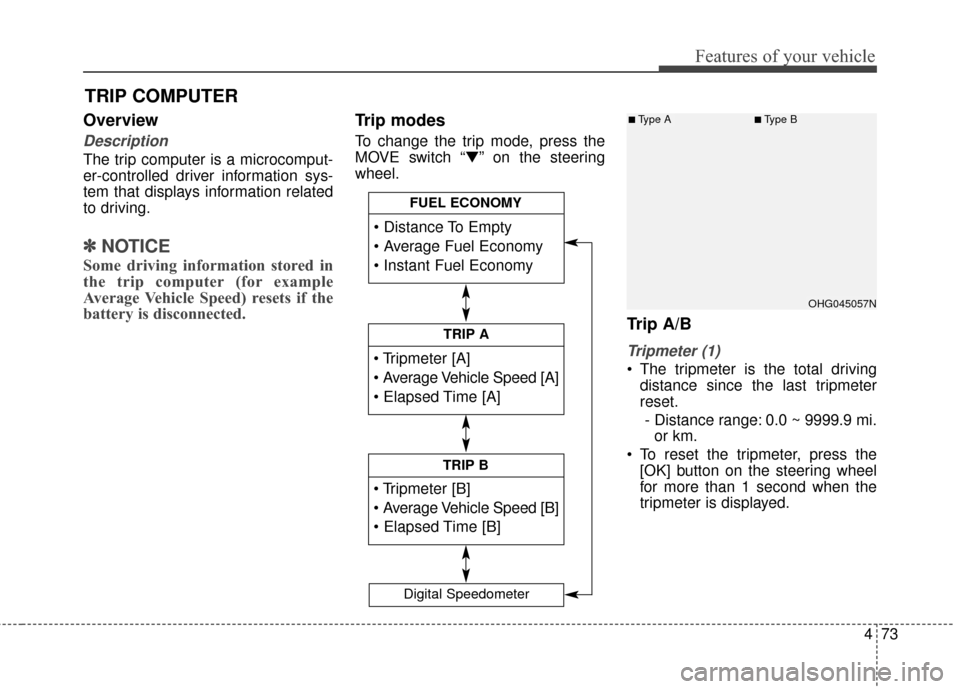
Trip modes
To change the trip mode, press the
MOVE switch “▼” on the steering
wheel.
Trip A/B
Tripmeter (1)
The tripmeter is the total driving
distance since the last tripmeter
reset.
- Distance range: 0.0 ~ 9999.9 mi. or km.
To reset the tripmeter, press the [OK] button on the steering wheel
for more than 1 second when the
tripmeter is displayed.
TRIP A
TRIP B
FUEL ECONOMY
Digital Speedometer
OHG045057N
■Type A■Type B
Page 153 of 520
Features of your vehicle
74
4
Average Vehicle Speed (2)
The average vehicle speed is cal-
culated by the total driving dis-
tance and driving time since the
last average vehicle speed reset.
- Speed range: 0 ~ 999 MPH or km/h
To reset the average vehicle speed, press the [OK] button on the steer-
ing wheel for more than 1 second
when the average vehicle speed is
displayed.
✽ ✽ NOTICE
• The average vehicle speed is not dis-
played if the driving distance is less
than 0.19 miles (300 meters) or the
driving time is less than 10 seconds
since the Engine Start/Stop button is
turned to ON.
• Even if the vehicle is not in motion, the average vehicle speed
keeps calculating while the engine
is running.
Elapsed Time (3)
The elapsed time is the total driv-
ing time since the last elapsed time
reset.
- Time range (hh:mm): 00:00 ~ 99:59
To reset the elapsed time, press the [OK] button on the steering
wheel for more than 1 second
when the elapsed time is dis-
played.
✽ ✽ NOTICE
Even if the vehicle is not in motion,
the elapsed time keeps calculating
while the engine is running.Fuel economy
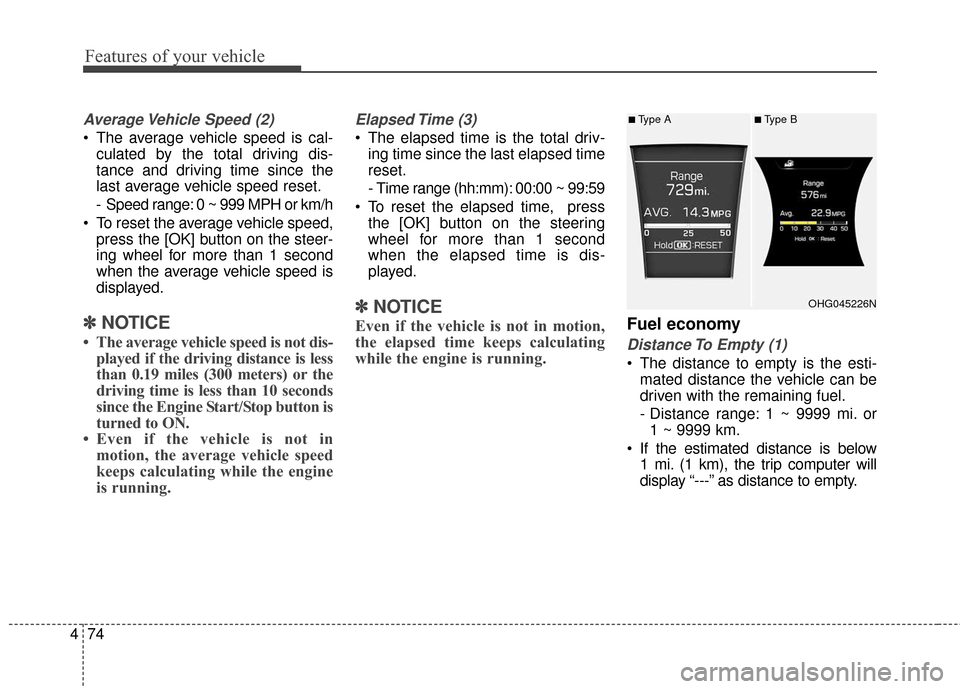
Distance To Empty (1)
The distance to empty is the esti-
mated distance the vehicle can be
driven with the remaining fuel.
- Distance range: 1 ~ 9999 mi. or1 ~ 9999 km.
If the estimated distance is below 1 mi. (1 km), the trip computer will
display “---” as distance to empty.
OHG045226N
■Type A■Type B
Page 154 of 520
475
Features of your vehicle
✽
✽NOTICE
• If the vehicle is not on level ground
or the battery power has been
interrupted, the distance to empty
function may not operate correct-
ly.
• The distance to empty may differ from the actual driving distance as
it is an estimate of the available
driving distance.
• The trip computer may not regis- ter additional fuel if less than 1.6
gallons (6 liters) of fuel are added
to the vehicle.
• The fuel economy and distance to empty may vary significantly
based on driving conditions, driv-
ing habits, and condition of the
vehicle.
Average Fuel Economy (2)
The average fuel economy is calcu-
lated by the total driving distance
and fuel consumption since the last
average fuel economy reset.
- Fuel economy range: 0.0 ~ 99.9MPG or L/100km, km/L
The average fuel economy can be reset both manually and automati-
cally.
Manual reset
To clear the average fuel economy
manually, press the [OK] button on
the steering wheel for more than 1
second when the average fuel econo-
my is displayed. Automatic reset
To make the average fuel economy
be reset automatically whenever refu-
eling, select the “Auto Reset” mode in
User Setting menu of the LCD display
(Refer to “LCD Display”).
Under “Auto Reset” mode, the aver-
age fuel economy will be cleared to
zero (---) when the vehicle speed
exceeds 1 km/h after refueling more
than 1.6 gallons (6 liters).
✽ ✽
NOTICE
The average fuel economy is not dis-
played for more accurate calculation
if the vehicle does not drive more
than 10 seconds or 0.19 miles (300
meters) since the Engine Start/Stop
button is turned to ON.
Instant Fuel Economy (3)
This mode displays the instant fuel
economy during the last few sec-
onds when the vehicle speed is
more than 6.2 MPH (10 km/h).
- Fuel economy range: 0 ~ 50 MPGor 0 ~ 30 L/100km
Page 162 of 520
483
Features of your vehicle
EPB (Electric ParkingBrake) malfunction indi-cator (if equipped)
The EPB malfunction indicator will
illuminate when the ignition switch is
turned ON, but should go off after
approximately 3 seconds. If the
warning light does not come on, or
continuously remains on take your
vehicle to an authorized HYUNDAI
dealer and have the system
checked.
Also, the EPB malfunction indicator
may illuminate when the ESC indica-
tor comes on to indicate that the
ESC is not working properly, but if
this occurs, it does not indicate the
EPB has malfunctioned.
AUTO HOLD indicatorlight (if equipped)
If you press the AUTO HOLD switch,
the AUTO HOLD indicator on the
cluster comes on white. And when
you stop the vehicle completely by
pressing the brake pedal, the indica-
tor changes from white to green.
If the AUTO HOLD malfunction indi-
cator lights up yellow, the AUTO
HOLD is not working properly. Take
your vehicle to an authorized
HYUNDAI dealer and have the sys-
tem checked.
For more information, refer to
"AUTO HOLD" in section 5.
EPS (Electronic PowerSteering) system warn-ing light
This indicator light comes on after
the ignition key is turned to the ON
position and then goes out after
approximately 6 seconds.
This light also comes on when the
EPS has some problems. If it comes
on while driving, have your vehicle
checked by an authorized HYUNDAI
dealer.
Engine coolant tempera-ture warning light
The warning light illuminates if the
temperature of the engine coolant is
above 257±4.5°F (125±2.5°C).
Do not continue driving with an over-
heated engine. If your vehicle over-
heats, refer to "Overheating" in sec-
tion 6.
EPBAUTO
HOLD
Page 165 of 520
Features of your vehicle
86
4
Cruise indicator (if equipped)
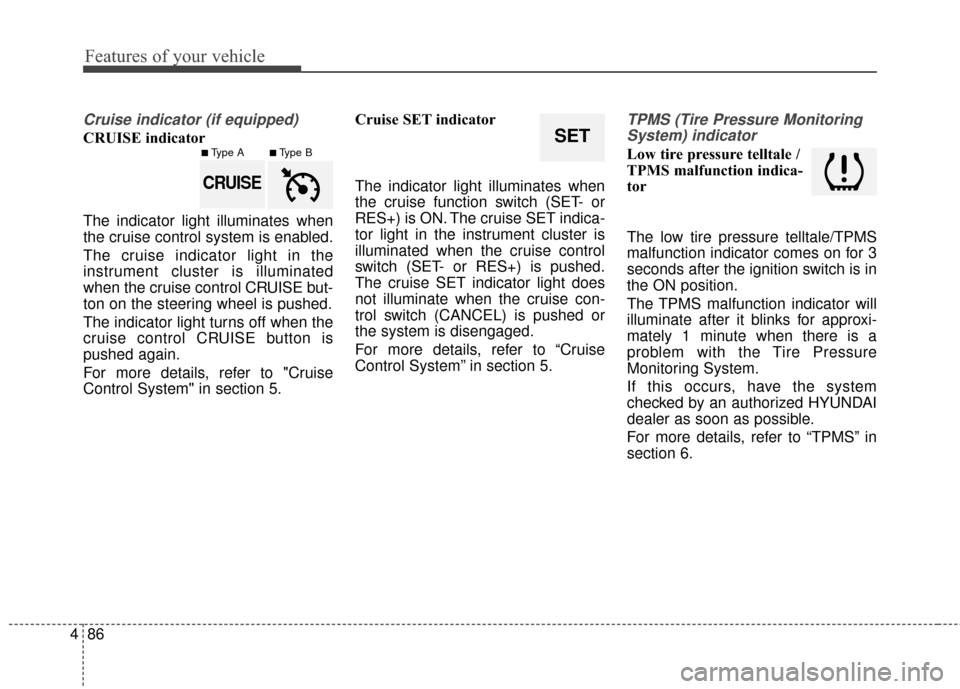
CRUISE indicator
The indicator light illuminates when
the cruise control system is enabled.
The cruise indicator light in the
instrument cluster is illuminated
when the cruise control CRUISE but-
ton on the steering wheel is pushed.
The indicator light turns off when the
cruise control CRUISE button is
pushed again.
For more details, refer to "Cruise
Control System" in section 5. Cruise SET indicator
The indicator light illuminates when
the cruise function switch (SET- or
RES+) is ON. The cruise SET indica-
tor light in the instrument cluster is
illuminated when the cruise control
switch (SET- or RES+) is pushed.
The cruise SET indicator light does
not illuminate when the cruise con-
trol switch (CANCEL) is pushed or
the system is disengaged.
For more details, refer to “Cruise
Control System” in section 5.
TPMS (Tire Pressure Monitoring
System) indicator
Low tire pressure telltale /
TPMS malfunction indica-
tor
The low tire pressure telltale/TPMS
malfunction indicator comes on for 3
seconds after the ignition switch is in
the ON position.
The TPMS malfunction indicator will
illuminate after it blinks for approxi-
mately 1 minute when there is a
problem with the Tire Pressure
Monitoring System.
If this occurs, have the system
checked by an authorized HYUNDAI
dealer as soon as possible.
For more details, refer to “TPMS” in
section 6.
SET
CRUISE
■Type A■Type B
Page 172 of 520
493
Features of your vehicle
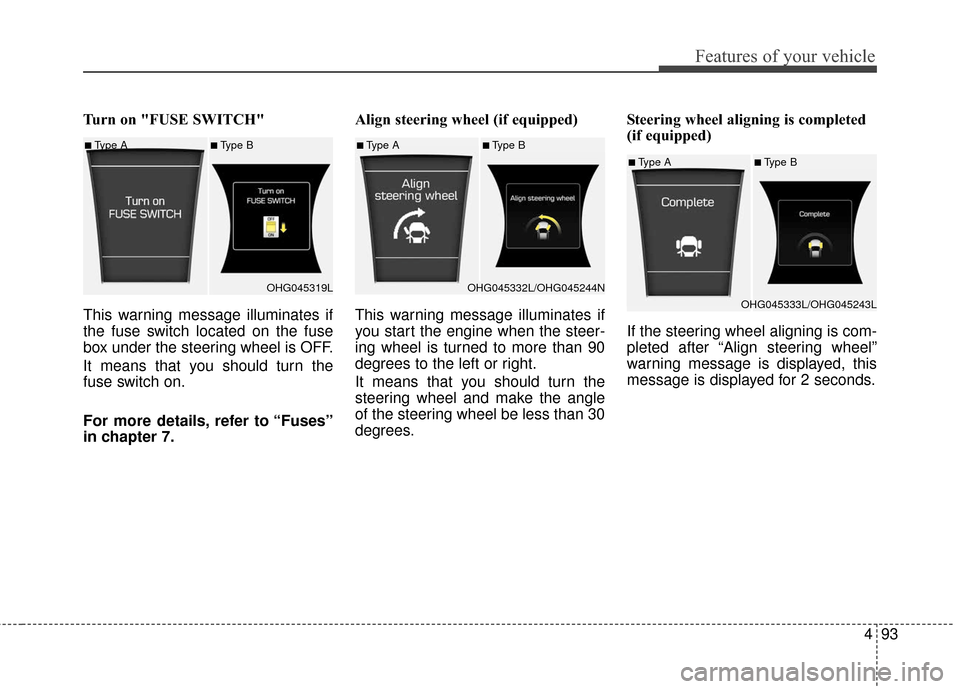
Turn on "FUSE SWITCH"
This warning message illuminates if
the fuse switch located on the fuse
box under the steering wheel is OFF.
It means that you should turn the
fuse switch on.
For more details, refer to “Fuses”
in chapter 7.Align steering wheel (if equipped)
This warning message illuminates if
you start the engine when the steer-
ing wheel is turned to more than 90
degrees to the left or right.
It means that you should turn the
steering wheel and make the angle
of the steering wheel be less than 30
degrees.
Steering wheel aligning is completed
(if equipped)
If the steering wheel aligning is com-
pleted after “Align steering wheel”
warning message is displayed, this
message is displayed for 2 seconds.
■Type A■Type B
OHG045319L■Type A■Type B
OHG045332L/OHG045244N
■Type A■Type B
OHG045333L/OHG045243L
Page 179 of 520
Features of your vehicle
100
4
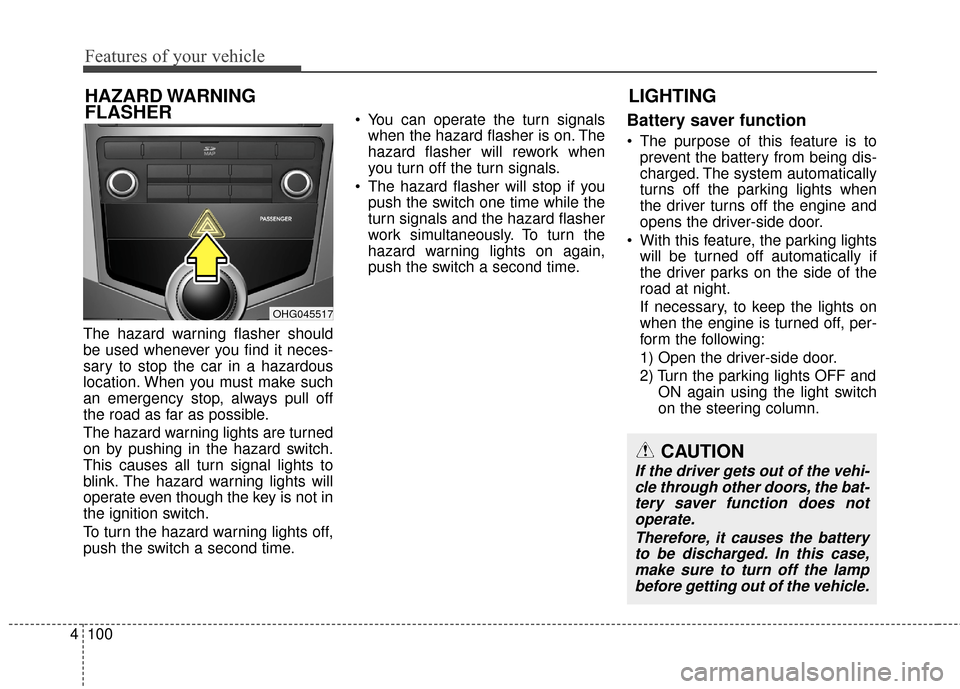
The hazard warning flasher should
be used whenever you find it neces-
sary to stop the car in a hazardous
location. When you must make such
an emergency stop, always pull off
the road as far as possible.
The hazard warning lights are turned
on by pushing in the hazard switch.
This causes all turn signal lights to
blink. The hazard warning lights will
operate even though the key is not in
the ignition switch.
To turn the hazard warning lights off,
push the switch a second time. You can operate the turn signals
when the hazard flasher is on. The
hazard flasher will rework when
you turn off the turn signals.
The hazard flasher will stop if you push the switch one time while the
turn signals and the hazard flasher
work simultaneously. To turn the
hazard warning lights on again,
push the switch a second time.
Battery saver function
The purpose of this feature is toprevent the battery from being dis-
charged. The system automatically
turns off the parking lights when
the driver turns off the engine and
opens the driver-side door.
With this feature, the parking lights will be turned off automatically if
the driver parks on the side of the
road at night.
If necessary, to keep the lights on
when the engine is turned off, per-
form the following:
1) Open the driver-side door.
2) Turn the parking lights OFF and ON again using the light switch
on the steering column.
LIGHTING
HAZARD WARNING
FLASHER
CAUTION
If the driver gets out of the vehi-
cle through other doors, the bat-tery saver function does notoperate.
Therefore, it causes the batteryto be discharged. In this case,make sure to turn off the lampbefore getting out of the vehicle.
OHG045517
Page 221 of 520
Features of your vehicle
142
4
The power outlet is designed to pro-
vide power for mobile telephones or
other devices designed to operate
with vehicle electrical systems. The
devices should draw less than 10
amps with the engine running.
Use the power outlet only when the
engine is running and remove the
accessory plug after use. Using the
accessory plug for prolonged peri-
ods of time with the engine off could
cause the battery to discharge.
Only use 12V electric accessories which are less than 10A in electric
capacity. If not, it could lead to an
overheated power outlet or electric
wiring in the vehicle and electric
systems may malfunction.
Adjust the air-conditioner or heater to the lowest operating level when
using the power outlet.
Close the cover when not in use.
Some electronic devices can cause electronic interference when
plugged into a vehicle’s power
outlet. These devices may cause
excessive audio static and malfunc-
tions in other electronic systems or
devices used in your vehicle.Digital clock (if equipped)
Whenever the battery terminals or
related fuses are disconnected, you
must reset the time.
Detailed information on setting the
clock is described in Audio system
section 4.
WARNING
Do not adjust the clock while
driving. You may lose your
steering control and cause an
accident that results in severe
personal injury or death.
WARNING - Electricshock
Do not put fingers or objects
(pin, coin, etc.) into a power out-
let and do not touch with wet
hands. You may get an electric
shock.
CAUTION
Make sure that the electric devices are plugged in secure-ly. If not, it could cause a mal-function of electric systems.
If you use an electric device with a battery, electric currentmay flow from the electricdevice into the vehicle andmay cause a malfunction ofelectric systems. Only useelectric devices which couldprevent inverse current.
Page 225 of 520
Features of your vehicle
146
4
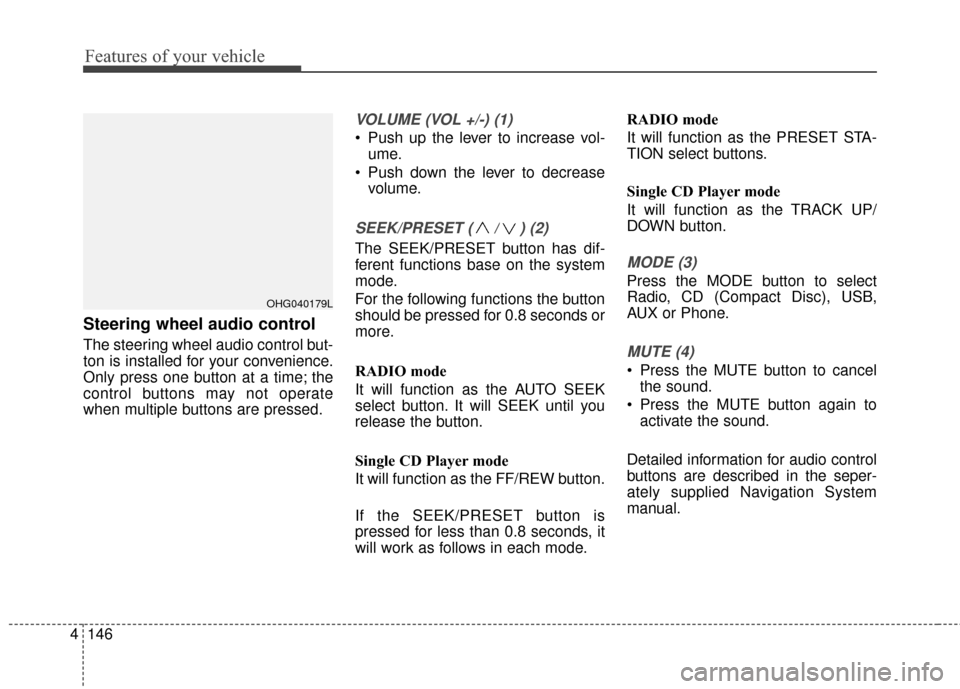
Steering wheel audio control
The steering wheel audio control but-
ton is installed for your convenience.
Only press one button at a time; the
control buttons may not operate
when multiple buttons are pressed.
VOLUME (VOL +/-) (1)
Push up the lever to increase vol-
ume.
Push down the lever to decrease volume.
SEEK/PRESET ( / ) (2)
The SEEK/PRESET button has dif-
ferent functions base on the system
mode.
For the following functions the button
should be pressed for 0.8 seconds or
more.
RADIO mode
It will function as the AUTO SEEK
select button. It will SEEK until you
release the button.
Single CD Player mode
It will function as the FF/REW button.
If the SEEK/PRESET button is
pressed for less than 0.8 seconds, it
will work as follows in each mode. RADIO mode
It will function as the PRESET STA-
TION select buttons.
Single CD Player mode
It will function as the TRACK UP/
DOWN button.MODE (3)
Press the MODE button to select
Radio, CD (Compact Disc), USB,
AUX or Phone.
MUTE (4)
Press the MUTE button to cancel
the sound.
Press the MUTE button again to activate the sound.
Detailed information for audio control
buttons are described in the seper-
ately supplied Navigation System
manual.
OHG040179L
Page 245 of 520
4166
Features of your vehicle
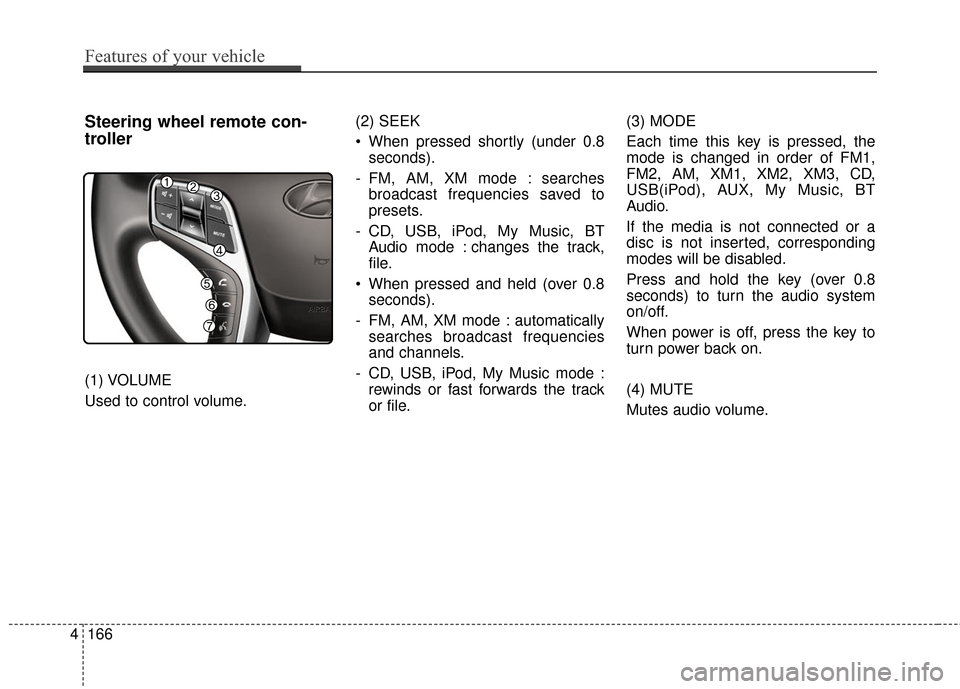
Steering wheel remote con-
troller
(1) VOLUME
Used to control volume.(2) SEEK
When pressed shortly (under 0.8
seconds).
- FM, AM, XM mode : searches broadcast frequencies saved to
presets.
- CD, USB, iPod, My Music, BT Audio mode : changes the track,
file.
When pressed and held (over 0.8 seconds).
- FM, AM, XM mode : automatically searches broadcast frequencies
and channels.
- CD, USB, iPod, My Music mode : rewinds or fast forwards the track
or file. (3) MODE
Each time this key is pressed, the
mode is changed in order of FM1,
FM2, AM, XM1, XM2, XM3, CD,
USB(iPod), AUX, My Music, BT
Audio.
If the media is not connected or a
disc is not inserted, corresponding
modes will be disabled.
Press and hold the key (over 0.8
seconds) to turn the audio system
on/off.
When power is off, press the key to
turn power back on.
(4) MUTE
Mutes audio volume.