tow Hyundai Azera 2017 Owner's Guide
[x] Cancel search | Manufacturer: HYUNDAI, Model Year: 2017, Model line: Azera, Model: Hyundai Azera 2017Pages: 520, PDF Size: 16.33 MB
Page 227 of 520
Features of your vehicle
148
4
How vehicle audio works
AM and FM radio signals are broad-
cast from transmitter towers located
around your city. They are intercept-
ed by the radio antenna on your vehi-
cle. This signal is then processed by
the radio and sent to your vehicle
speakers.
When a strong radio signal has
reached your vehicle, the precise
engineering of your audio system
ensures the best possible quality
reproduction. However, in some cas-
es the signal coming to your vehicle
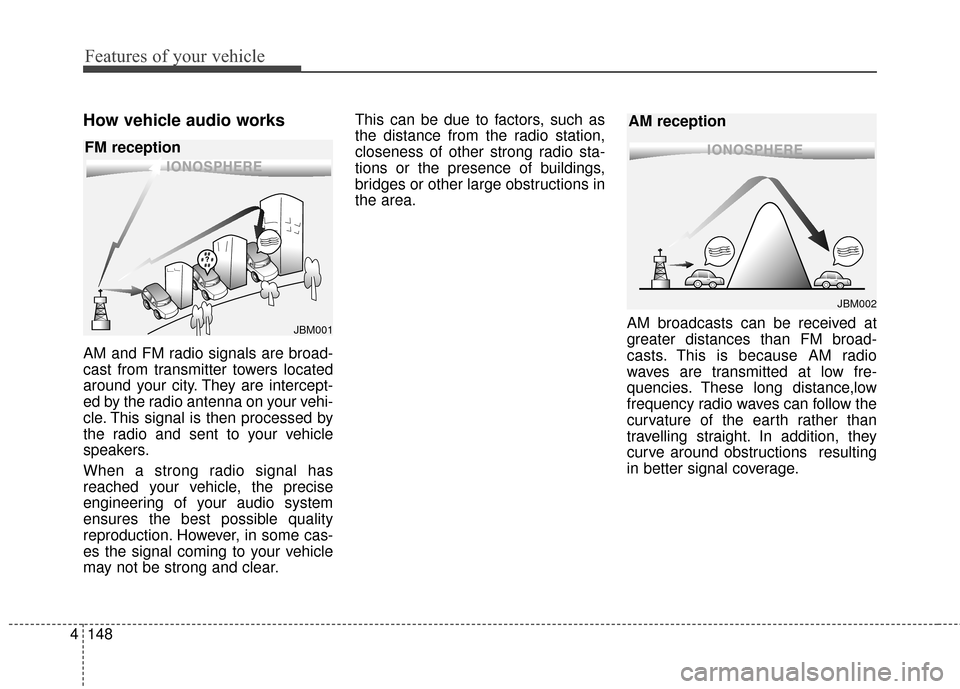
may not be strong and clear. This can be due to factors, such as
the distance from the radio station,
closeness of other strong radio sta-
tions or the presence of buildings,
bridges or other large obstructions in
the area.
AM broadcasts can be received at
greater distances than FM broad-
casts. This is because AM radio
waves are transmitted at low fre-
quencies. These long distance,low
frequency radio waves can follow the
curvature of the earth rather than
travelling straight. In addition, they
curve around obstructions resulting
in better signal coverage.
¢¢¢¢¢¢
JBM002
AM reception
¢¢¢
JBM001
FM reception
Page 305 of 520
Driving your vehicle
Before driving . . . . . . . . . . . . . . . . . . . . . . . . . . . . . . 5-3
Engine start/stop button . . . . . . . . . . . . . . . . . . . . . 5-5
• Illuminated ENGINE START/STOP button . . . . . . . 5-5
. . . . . . . . . . . 5-5
. . . . . . . . . . . . . . . . . . . . . . . . . . . . 5-7
Automatic transaxle . . . . . . . . . . . . . . . . . . . . . . . . 5-10
. . . . . . . . . . . . . . . . . . 5-10
Brake system . . . . . . . . . . . . . . . . . . . . . . . . . . . . . . 5-16
. . . . . . . . . . . . . . . . . . . . . . . . . . . . . . . . 5-16
. . . . . . . . . . . . . . . . . . . . . . . . . . . . . . . 5-18
. . . . . . . . . . . . . . . . 5-19
. . . . . . . . . . . . . . . . . . . . . . . . . . . . . . . . . . . 5-\
25
. . . . . . . . . . . . . . . . . . 5-28
. . . . . . . . . . . . . . . 5-30
. . . . . . . . . . . . 5-34
. . . . . . . . . . . . . . . . . . 5-35
Cruise control system. . . . . . . . . . . . . . . . . . . . . . . 5-38
Smart cruise control system . . . . . . . . . . . . . . . . . 5-42
Active ECO system. . . . . . . . . . . . . . . . . . . . . . . . . 5-56
Blind spot detection system (BSD) . . . . . . . . . . . . 5-57
LCA (Lane Change Assist) . . . . . . . . . . . . . . . . . . . . 5-58
. . . . . . . . . . . . . . . . . . . . . . . . . . . . 5-63
Lane departure warning system (LDWS) . . . . . . 5-65
Forward collision warning system (FCWS). . . . . 5-69
Economical operation . . . . . . . . . . . . . . . . . . . . . . 5-73
Special driving conditions . . . . . . . . . . . . . . . . . . . 5-75
. . . . . . . . . . . . . . . . . . 5-75
. . . . . . . . . . . . . . . . . . . . . . . . . . . 5-75
. . . . . . . . . . . . . . . . . . . . . . . . . . . . 5-76
. . . . . . . . . . . . . . . . . . . . . . . . . . . . . . 5-76
. . . . . . . . . . . . . . . . . . . . . . . . . . . . 5-77
. . . . . . . . . . . . . . . . . . . . . . . 5-77
. . . . . . . . . . . . . . . . . . . . . . . . . . . . . . 5-77
. . . . . . . . . . . . . . . . . . . . . . . . . . . . . 5-78
Winter driving . . . . . . . . . . . . . . . . . . . . . . . . . . . . 5-79
Vehicle load limit . . . . . . . . . . . . . . . . . . . . . . . . . . 5-83
. . . . . . . . . . . . . . 5-83
. . . . . . . . . . . . . . . . . . . . . . . . . . . . 5-86
Vehicle weight . . . . . . . . . . . . . . . . . . . . . . . . . . . . . 5-87
. . . . . . . . . . . . . . . . . . . . . . . . . . . . 5-87
. . . . . . . . . . . . . . . . . . . . . . . . . . . 5-87
. . . . . . . . . . . . . . . . . . . . . . . . . . . . . . . . 5-87
. . . . . . . . . . . . . . . . . . . . . . 5-87
. . . . . . . . . . . . . . . 5-87
. . . . . . . . . . . . . . . . . . . 5-87
. . . . . . . . . . . . 5-87
Trailer Towing . . . . . . . . . . . . . . . . . . . . . . . . . . . . 5-88
5
Page 325 of 520
521
Driving your vehicle
✽
✽NOTICE
• For your safety, you can engage
the EPB even though the ignition
switch or ENGINE STOP/START
button is in the OFF position, but
you cannot release it.
• For your safety, depress the brake pedal and release the parking
brake manually with the EPB
switch when you drive downhill or
when backing up the vehicle.
When the EPB (Electronic Parking
Brake) does not release:
We recommend that you contact an
authorized HYUNDAI dealer by load-
ing the vehicle on a flatbed tow truck
and have the system checked.
EPB (Electronic Parking Brake) may
be automatically applied when:
The rear brake is overheated
Requested by other systems
The engine is turned off with the
EPB applied
✽ ✽ NOTICE
If the driver turns the engine off
while Auto Hold is operating, EPB
will be automatically applied.
However, if you press the EPB
switch for about one second within 3
seconds after the engine is turned
off, the EPB will not be applied.
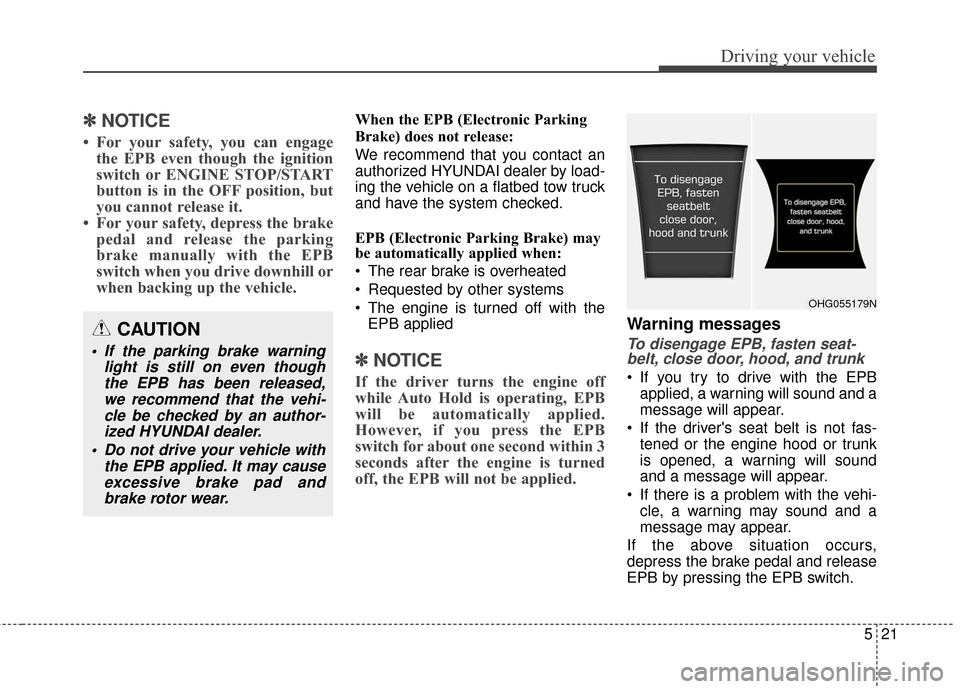
Warning messages
To disengage EPB, fasten seat-
belt, close door, hood, and trunk
If you try to drive with the EPB
applied, a warning will sound and a
message will appear.
If the driver's seat belt is not fas- tened or the engine hood or trunk
is opened, a warning will sound
and a message will appear.
If there is a problem with the vehi- cle, a warning may sound and a
message may appear.
If the above situation occurs,
depress the brake pedal and release
EPB by pressing the EPB switch.
CAUTION
If the parking brake warning light is still on even thoughthe EPB has been released,we recommend that the vehi-cle be checked by an author-ized HYUNDAI dealer.
Do not drive your vehicle with the EPB applied. It may causeexcessive brake pad andbrake rotor wear.
OHG055179N
Page 342 of 520
Driving your vehicle
38
5
CRUISE CONTROL SYSTEM
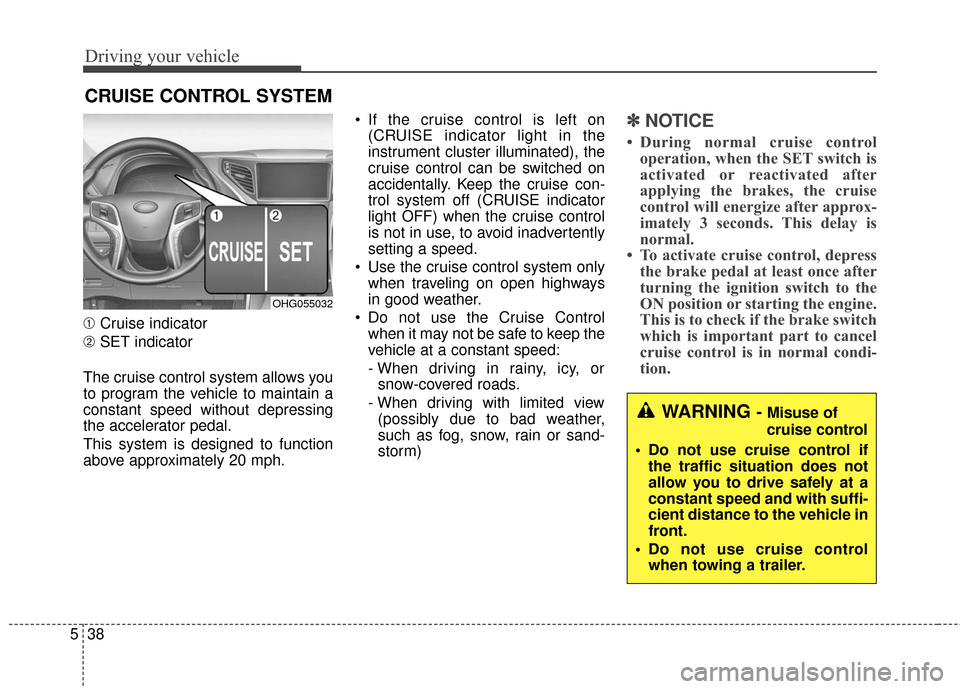
➀ Cruise indicator
➁ SET indicator
The cruise control system allows you
to program the vehicle to maintain a
constant speed without depressing
the accelerator pedal.
This system is designed to function
above approximately 20 mph. If the cruise control is left on
(CRUISE indicator light in the
instrument cluster illuminated), the
cruise control can be switched on
accidentally. Keep the cruise con-
trol system off (CRUISE indicator
light OFF) when the cruise control
is not in use, to avoid inadvertently
setting a speed.
Use the cruise control system only when traveling on open highways
in good weather.
Do not use the Cruise Control when it may not be safe to keep the
vehicle at a constant speed:
- When driving in rainy, icy, orsnow-covered roads.
- When driving with limited view (possibly due to bad weather,
such as fog, snow, rain or sand-
storm)
✽ ✽ NOTICE
• During normal cruise control
operation, when the SET switch is
activated or reactivated after
applying the brakes, the cruise
control will energize after approx-
imately 3 seconds. This delay is
normal.
• To activate cruise control, depress the brake pedal at least once after
turning the ignition switch to the
ON position or starting the engine.
This is to check if the brake switch
which is important part to cancel
cruise control is in normal condi-
tion.
WARNING - Misuse of
cruise control
Do not use cruise control if the traffic situation does not
allow you to drive safely at a
constant speed and with suffi-
cient distance to the vehicle in
front.
Do not use cruise control when towing a trailer.
OHG055032
Page 375 of 520
571
Driving your vehicle
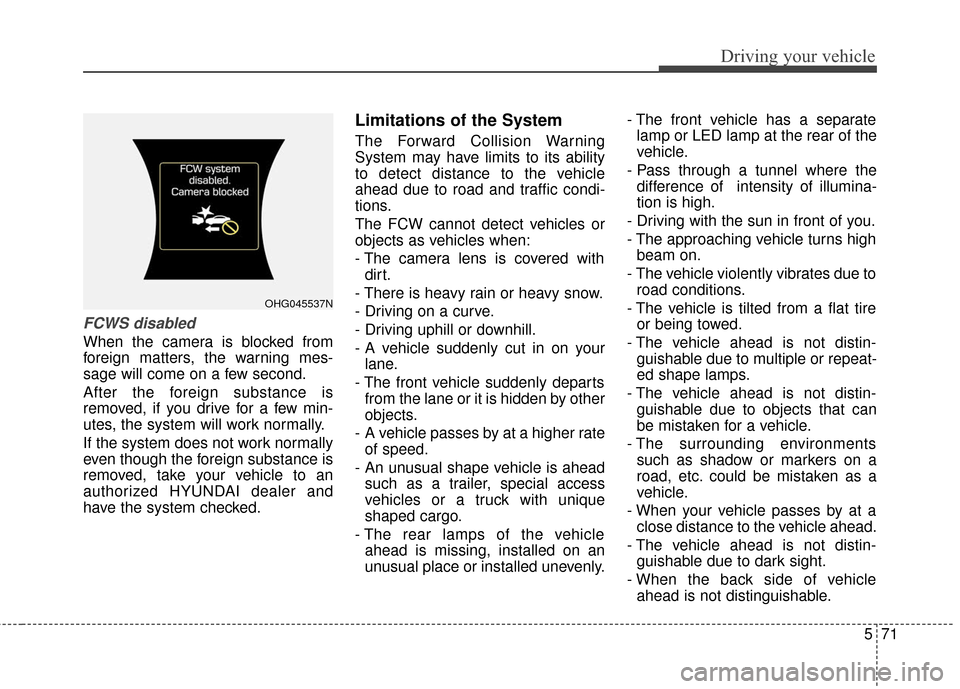
FCWS disabled
When the camera is blocked from
foreign matters, the warning mes-
sage will come on a few second.
After the foreign substance is
removed, if you drive for a few min-
utes, the system will work normally.
If the system does not work normally
even though the foreign substance is
removed, take your vehicle to an
authorized HYUNDAI dealer and
have the system checked.
Limitations of the System
The Forward Collision Warning
System may have limits to its ability
to detect distance to the vehicle
ahead due to road and traffic condi-
tions.
The FCW cannot detect vehicles or
objects as vehicles when:
- The camera lens is covered withdirt.
- There is heavy rain or heavy snow.
- Driving on a curve.
- Driving uphill or downhill.
- A vehicle suddenly cut in on your lane.
- The front vehicle suddenly departs from the lane or it is hidden by other
objects.
- A vehicle passes by at a higher rate of speed.
- An unusual shape vehicle is ahead such as a trailer, special access
vehicles or a truck with unique
shaped cargo.
- The rear lamps of the vehicle ahead is missing, installed on an
unusual place or installed unevenly. - The front vehicle has a separate
lamp or LED lamp at the rear of the
vehicle.
- Pass through a tunnel where the difference of intensity of illumina-
tion is high.
- Driving with the sun in front of you.
- The approaching vehicle turns high beam on.
- The vehicle violently vibrates due to road conditions.
- The vehicle is tilted from a flat tire or being towed.
- The vehicle ahead is not distin- guishable due to multiple or repeat-
ed shape lamps.
- The vehicle ahead is not distin- guishable due to objects that can
be mistaken for a vehicle.
- The surrounding environments such as shadow or markers on a
road, etc. could be mistaken as a
vehicle.
- When your vehicle passes by at a close distance to the vehicle ahead.
- The vehicle ahead is not distin- guishable due to dark sight.
- When the back side of vehicle ahead is not distinguishable.
OHG045537N
Page 379 of 520
575
Driving your vehicle
Hazardous driving conditions
When hazardous driving conditions
are encountered such as water,
snow, ice, mud, sand, or similar haz-
ards, follow these suggestions:
Drive cautiously and allow extradistance for braking.
Avoid sudden movements in brak- ing or steering.
Do not pump the brake pedal on a vehicle equipped with ABS.
If stalled in snow, mud, or sand, use second gear. Accelerate slowly to
avoid spinning the drive wheels.
Use sand, rock salt, tire chains, or other non-slip material under the
drive wheels to provide traction
when stalled in ice, snow, or mud.
Leave the ESC system on for best traction when attempting to get
vehicle unstuck.
Rocking the vehicle
If it is necessary to rock the vehicle
to free it from snow, sand, or mud,
first turn the steering wheel right and
left to clear the area around your
front wheels. Then, shift back and
forth between R (Reverse) and any
forward gear in vehicles equipped
with an automatic transaxle. Do not
race the engine, and spin the wheels
as little as possible. If you are still
stuck after a few tries, have the vehi-
cle pulled out by a tow vehicle to
avoid engine overheating and possi-
ble damage to the transaxle.
The ESC system should be turned
OFF prior to rocking the vehicle.
SPECIAL DRIVING CONDITIONS
WARNING - Downshifting
Do not downshift with an auto-
matic transaxle while driving on
slippery surfaces. The sudden
change in tire speed could cause
the tires to skid and result in an
accident.
CAUTION - Vehicle rocking
Prolonged rocking may cause engine overheating, transaxledamage or failure, and tire dam-age.
Page 386 of 520
Driving your vehicle
82
5
To keep locks from freezing
To keep the locks from freezing,
squirt an approved de-icer fluid or
glycerine into the key opening. If a
lock is covered with ice, squirt it with
an approved de-icing fluid to remove
the ice. If the lock is frozen internally,
you may be able to thaw it out by
using a heated key. Handle the heat-
ed key with care to avoid injury.
Use approved window washer
anti-freeze in system
To keep the water in the window
washer system from freezing, add an
approved window washer anti-freeze
solution in accordance with instruc-
tions on the container. Window wash-
er anti-freeze is available from an
authorized HYUNDAI dealer and
most auto parts outlets. Do not use
engine coolant or other types of anti-
freeze as these may damage the
paint finish.
Don't let your parking brake
freeze
Under some conditions your parking
brake can freeze in the engaged posi-
tion. This is most likely to happen
when there is an accumulation of
snow or ice around or near the rear
brakes or if the brakes are wet. If there
is a risk the parking brake may freeze,
apply it only temporarily while you put
the shift lever in P (Park) and block
the rear wheels so the vehicle cannot
roll. Then release the parking brake.
Don't let ice and snow accu-
mulate underneath
Under some conditions, snow and
ice can build up under the fenders
and interfere with the steering. When
driving in severe winter conditions
where this may happen, you should
periodically check underneath the
vehicle to be sure the movement of
the front wheels and the steering
components is not obstructed.
Carry emergency equipment
Depending on the severity of the
weather where you drive your vehicle,
you should carry appropriate emer-
gency equipment. Some of the items
you may want to carry include tire
chains, tow straps or chains, flash-
light, emergency flares, sand, shovel,
jumper cables, window scraper,
gloves, ground cloth, coveralls, blan-
ket, etc.
Don't place foreign objects or
materials in the engine com-
partment
Placement of foreign objects or
materials which prevent cooling of
the engine, in the engine compart-
ment, may cause a failure or com-
bustion. The manufacturer is not
responsible for the damage caused
by such placement.
Page 387 of 520
583
Driving your vehicle
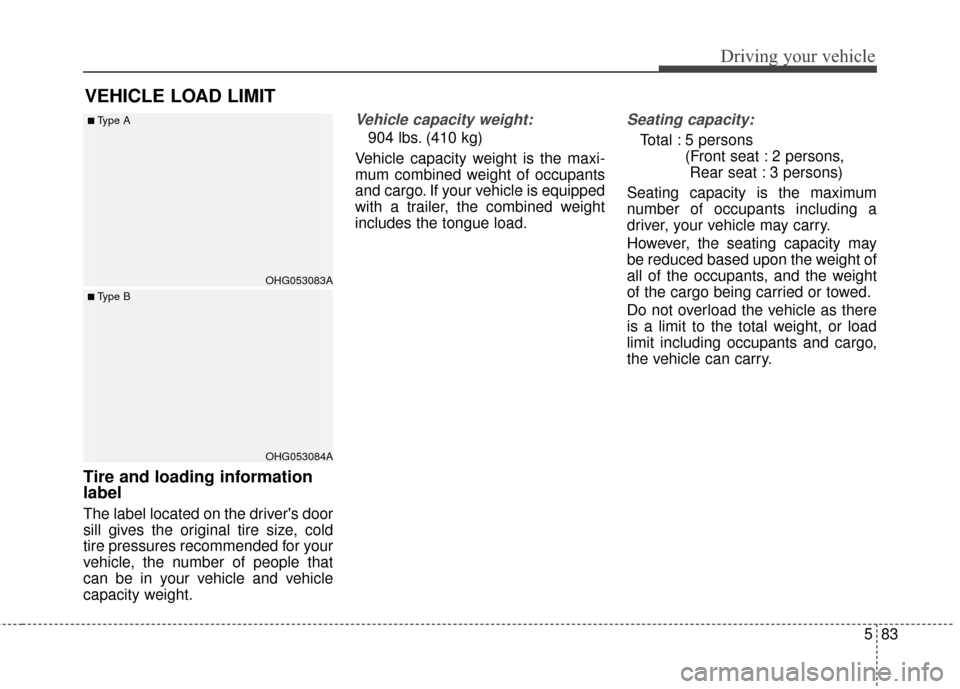
Tire and loading information
label
The label located on the driver's door
sill gives the original tire size, cold
tire pressures recommended for your
vehicle, the number of people that
can be in your vehicle and vehicle
capacity weight.
Vehicle capacity weight:
904 lbs. (410 kg)
Vehicle capacity weight is the maxi-
mum combined weight of occupants
and cargo. If your vehicle is equipped
with a trailer, the combined weight
includes the tongue load.
Seating capacity:
Total : 5 persons (Front seat : 2 persons, Rear seat : 3 persons)
Seating capacity is the maximum
number of occupants including a
driver, your vehicle may carry.
However, the seating capacity may
be reduced based upon the weight of
all of the occupants, and the weight
of the cargo being carried or towed.
Do not overload the vehicle as there
is a limit to the total weight, or load
limit including occupants and cargo,
the vehicle can carry.
VEHICLE LOAD LIMIT
OHG053083A
OHG053084A
■Type A
■ Type B
Page 388 of 520
Driving your vehicle
84
5
Towing capacity:
We do not recommend using this
vehicle for trailer towing.
Cargo capacity:
The cargo capacity of your vehicle
will increase or decrease depending
on the weight and the number of
occupants and the tongue load, if
your vehicle is equipped with a trailer.
Steps for determining correct
load limit
1. Locate the statement "The com-
bined weight of occupants and
cargo should never exceed XXX
kg or XXX lbs.'' on your vehicle's
placard.
2. Determine the combined weight of the driver and passengers that will
be riding in your vehicle.
3. Subtract the combined weight of the driver and passengers from
XXX kg or XXX lbs.
4. The resulting figure equals the available amount of cargo and lug-
gage load capacity. For example, if
the "XXX" amount equals 1400
lbs. and there will be five 150 lbs.
passengers in your vehicle, the
amount of available cargo and lug-
gage load capacity is 650 lbs.
(1400-750 (5 x 150) = 650 lbs.) 5. Determine the combined weight of
luggage and cargo being loaded
on the vehicle. That weight may
not safely exceed the available
cargo and luggage load capacity
calculated in Step 4.
6. If your vehicle will be towing a trail- er, load from your trailer will be
transferred to your vehicle. Consult
this manual to determine how this
reduces the available cargo and
luggage load capacity of your
vehicle.
Page 392 of 520
TRAILER TOWING
We do not recommend using this
vehicle for trailer towing.
588
Driving your vehicle