light Hyundai Azera 2017 Manual PDF
[x] Cancel search | Manufacturer: HYUNDAI, Model Year: 2017, Model line: Azera, Model: Hyundai Azera 2017Pages: 520, PDF Size: 16.33 MB
Page 199 of 520
Features of your vehicle
120
4
It should be noted that prolonged
operation of the heating in recirculat-
ed air position will cause fogging of
the windshield and side windows and
the air within the passenger com-
partment will become stale.
In addition, prolonged use of the air
conditioning with the recirculated air
position selected, will result in exces-
sively dry air in the passenger com-
partment.
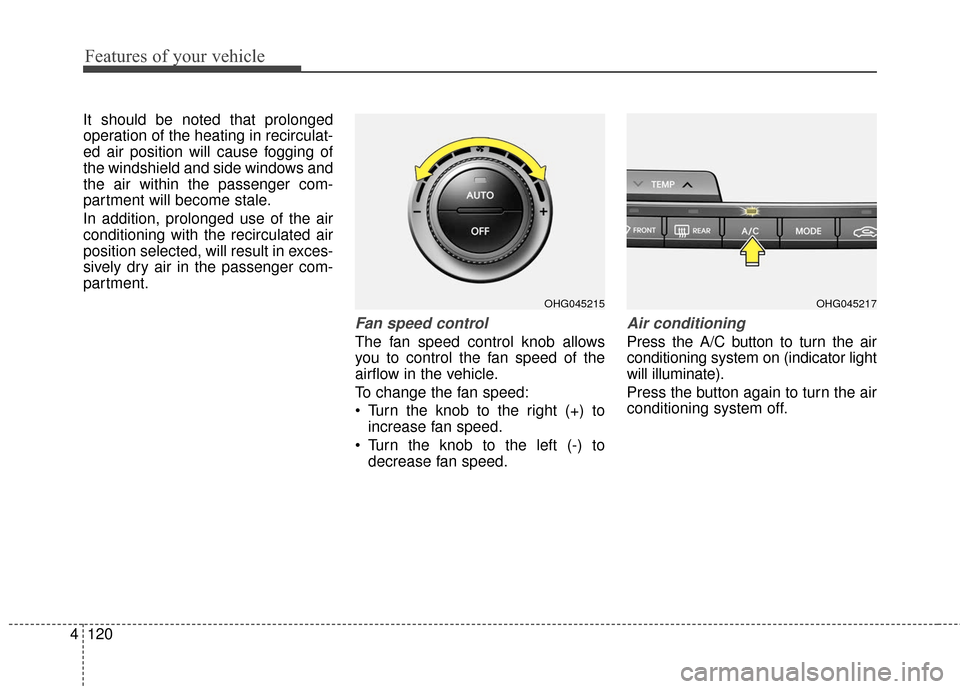
Fan speed control
The fan speed control knob allows
you to control the fan speed of the
airflow in the vehicle.
To change the fan speed:
Turn the knob to the right (+) to
increase fan speed.
Turn the knob to the left (-) to decrease fan speed.
Air conditioning
Press the A/C button to turn the air
conditioning system on (indicator light
will illuminate).
Press the button again to turn the air
conditioning system off.
OHG045217OHG045215
Page 201 of 520
Features of your vehicle
122
4
Air conditioning
HYUNDAI Air Conditioning Systems
are filled with environmentally friend-
ly R-134a refrigerant.
1. Start the engine. Press the air
conditioning button.
2. Set the mode to the position.
3. Set the air intake control to the outside air or recirculated air posi-
tion.
4. Adjust the fan speed control and temperature control to maintain
maximum comfort.
✽ ✽NOTICE- Excessive A/C
When using the air conditioning sys-
tem, monitor the engine coolant
closely while driving up hills or in
heavy traffic when outside tempera-
tures are high. Air conditioning sys-
tem operation may cause engine
overheating and potential engine
damage. Continue to use the blower
fan but turn the air conditioning
system off if the engine coolant tem-
perature gauge indicates engine
overheating.
Air conditioning system operation tips
If the vehicle has been parked in
direct sunlight during hot weather,
open the windows for a short time
to let the hot air inside the vehicle
escape.
To help reduce moisture inside of the windows on rainy or humid
days, decrease the humidity inside
the vehicle by operating the air
conditioning system.
During air conditioning system operation, you may occasionally
notice a slight change in engine
speed as the air conditioning com-
pressor cycles. This is a normal
system operation characteristic.
Use the air conditioning system every month only for a few minutes
to ensure maximum system per-
formance.
When using the air conditioning system, you may notice clear water
dripping (or even puddling) on the
ground under the passenger side
of the vehicle. This is a normal sys-
tem operation characteristic. Operating the air conditioning sys-
tem in the recirculated air position
provides maximum cooling, how-
ever, continual operation in this
mode may cause the air inside the
vehicle to become stale.
After sufficient cooling has been
achieved, switch back from the
recirculated air to the fresh outside
air position.
During cooling operation, you may occasionally notice a misty air flow
because of rapid cooling and
humid air intake. This is a normal
system operation characteristic.
Page 210 of 520
4131
Features of your vehicle
It should be noted that prolonged
operation of the heating in recirculat-
ed air position will cause fogging of
the windshield and side windows and
the air within the passenger com-
partment will become stale.
In addition, prolonged use of the air
conditioning with the recirculated air
position selected, will result in exces-
sively dry air in the passenger com-
partment.
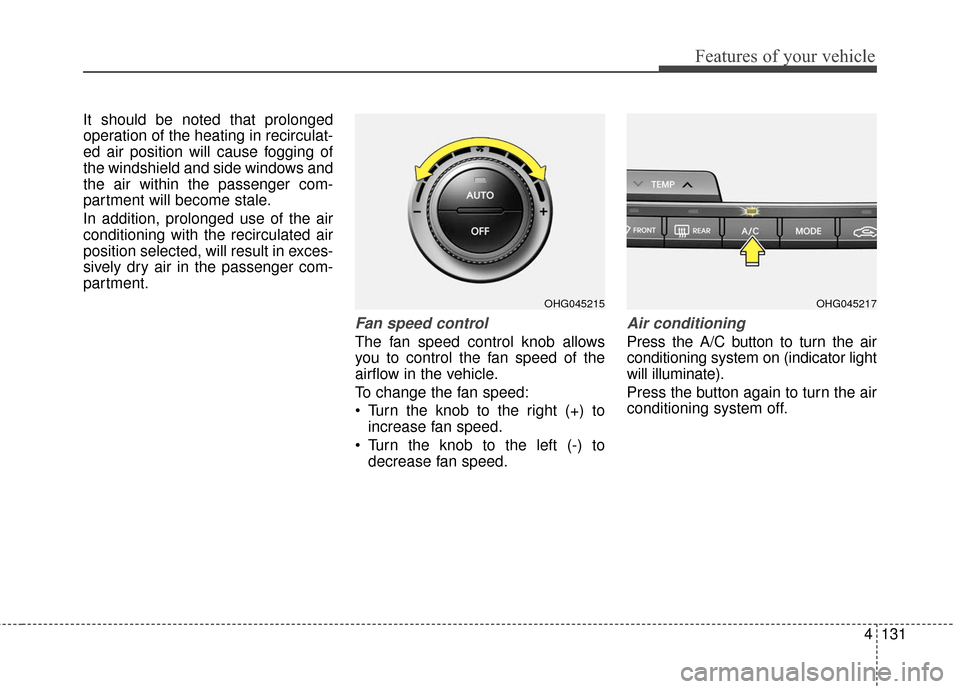
Fan speed control
The fan speed control knob allows
you to control the fan speed of the
airflow in the vehicle.
To change the fan speed:
Turn the knob to the right (+) toincrease fan speed.
Turn the knob to the left (-) to decrease fan speed.
Air conditioning
Press the A/C button to turn the air
conditioning system on (indicator light
will illuminate).
Press the button again to turn the air
conditioning system off.
OHG045217OHG045215
Page 212 of 520
4133
Features of your vehicle
Operation Tips
To keep dust or unpleasant fumesfrom entering the vehicle through
the ventilation system, temporarily
set the air intake control to the
recirculated air position. Be sure to
return the control to the fresh air
position when the irritation has
passed to keep fresh air in the
vehicle. This will help keep the driv-
er alert and comfortable.
Air for the heating/cooling system is drawn in through the grilles just
ahead of the windshield. Care
should be taken that these are not
blocked by leaves, snow, ice or
other obstructions.
To prevent interior fog on the wind- shield, set the air intake control to
the fresh air position and fan speed
to the desired position, turn on the
air conditioning system, and adjust
the temperature control to desired
temperature.Air conditioning
HYUNDAI Air Conditioning Systems
are filled with environmentally friendly
R-134a refrigerant.
1. Start the engine. Press the air con- ditioning button.
2. Set the mode to the position.
3. Set the air intake control to the out- side air or recirculated air position.
4. Adjust the fan speed control and temperature control to maintain
maximum comfort.
✽ ✽NOTICE- Excessive A/C
When using the air conditioning sys-
tem, monitor the engine coolant
closely while driving up hills or in
heavy traffic when outside tempera-
tures are high. Air conditioning sys-
tem operation may cause engine
overheating and potential engine
damage. Continue to use the blower
fan but turn the air conditioning
system off if the engine coolant tem-
perature gauge indicates engine
overheating.
Air conditioning system operation tips
If the vehicle has been parked in
direct sunlight during hot weather,
open the windows for a short time
to let the hot air inside the vehicle
escape.
To help reduce moisture inside of the windows on rainy or humid
days, decrease the humidity inside
the vehicle by operating the air
conditioning system.
During air conditioning system operation, you may occasionally
notice a slight change in engine
speed as the air conditioning com-
pressor cycles. This is a normal
system operation characteristic.
Use the air conditioning system every month only for a few minutes
to ensure maximum system per-
formance.
When using the air conditioning system, you may notice clear water
dripping (or even puddling) on the
ground under the passenger side
of the vehicle. This is a normal sys-
tem operation characteristic.
Page 217 of 520
Features of your vehicle
138
4
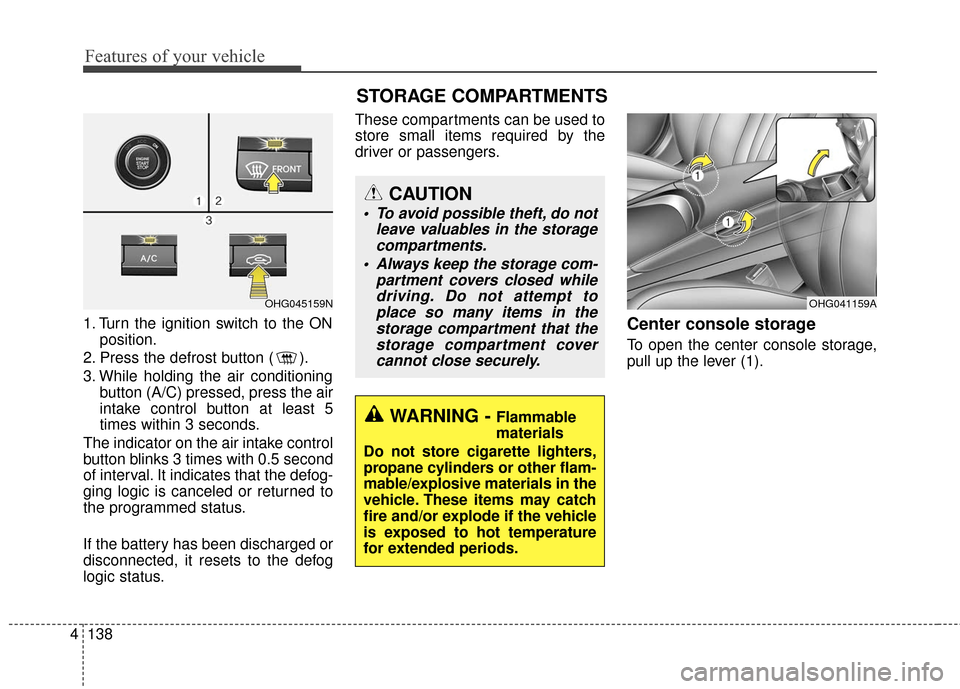
1. Turn the ignition switch to the ON
position.
2. Press the defrost button ( ).
3. While holding the air conditioning button (A/C) pressed, press the air
intake control button at least 5
times within 3 seconds.
The indicator on the air intake control
button blinks 3 times with 0.5 second
of interval. It indicates that the defog-
ging logic is canceled or returned to
the programmed status.
If the battery has been discharged or
disconnected, it resets to the defog
logic status. These compartments can be used to
store small items required by the
driver or passengers.Center console storage
To open the center console storage,
pull up the lever (1).
OHG041159A
WARNING - Flammable
materials
Do not store cigarette lighters,
propane cylinders or other flam-
mable/explosive materials in the
vehicle. These items may catch
fire and/or explode if the vehicle
is exposed to hot temperature
for extended periods.
CAUTION
To avoid possible theft, do not leave valuables in the storagecompartments.
Always keep the storage com- partment covers closed whiledriving. Do not attempt toplace so many items in thestorage compartment that thestorage compartment covercannot close securely.
OHG045159N
STORAGE COMPARTMENTS
Page 219 of 520
Features of your vehicle
140
4
INTERIOR FEATURES
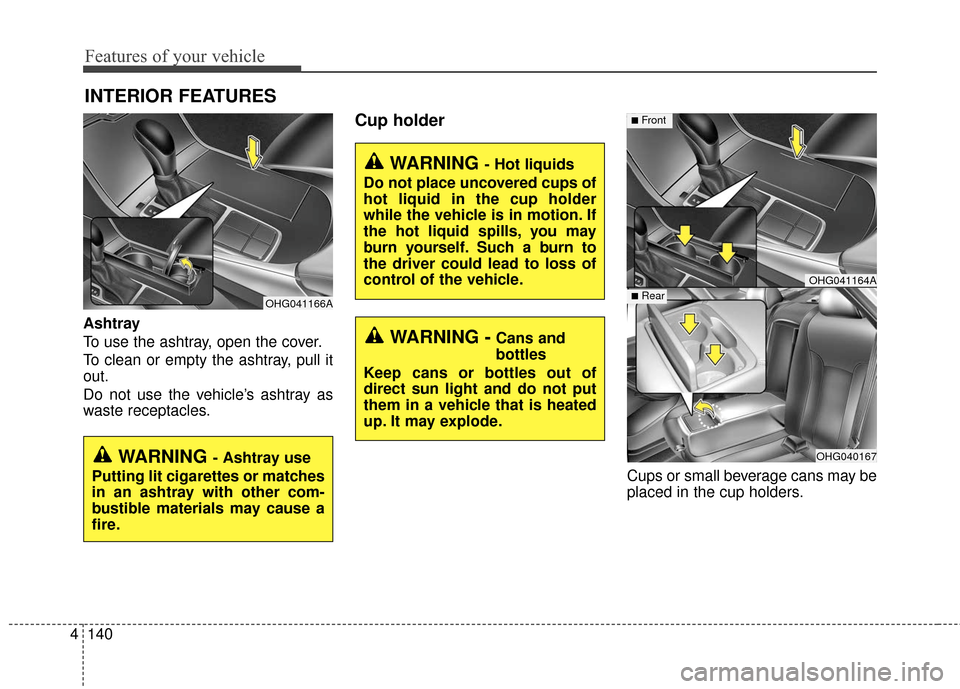
Ashtray
To use the ashtray, open the cover.
To clean or empty the ashtray, pull it
out.
Do not use the vehicle’s ashtray as
waste receptacles.
Cup holder
Cups or small beverage cans may be
placed in the cup holders.
OHG041164A
OHG040167
■Front
■Rear
WARNING - Hot liquids
Do not place uncovered cups of
hot liquid in the cup holder
while the vehicle is in motion. If
the hot liquid spills, you may
burn yourself. Such a burn to
the driver could lead to loss of
control of the vehicle.
WARNING -Cans and
bottles
Keep cans or bottles out of
direct sun light and do not put
them in a vehicle that is heated
up. It may explode.
OHG041166A
WARNING - Ashtray use
Putting lit cigarettes or matches
in an ashtray with other com-
bustible materials may cause a
fire.
Page 220 of 520
4141
Features of your vehicle
Sunvisor
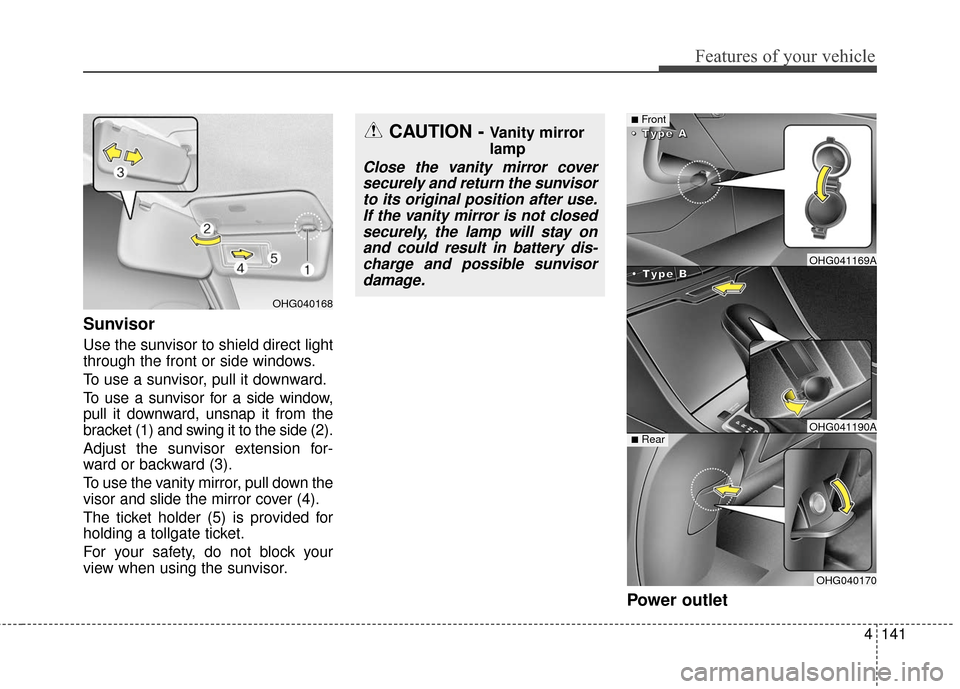
Use the sunvisor to shield direct light
through the front or side windows.
To use a sunvisor, pull it downward.
To use a sunvisor for a side window,
pull it downward, unsnap it from the
bracket (1) and swing it to the side (2).
Adjust the sunvisor extension for-
ward or backward (3).
To use the vanity mirror, pull down the
visor and slide the mirror cover (4).
The ticket holder (5) is provided for
holding a tollgate ticket.
For your safety, do not block your
view when using the sunvisor.
Power outlet
OHG040168
CAUTION - Vanity mirror
lamp
Close the vanity mirror coversecurely and return the sunvisorto its original position after use.If the vanity mirror is not closedsecurely, the lamp will stay onand could result in battery dis-charge and possible sunvisordamage.
■Front
•
•
•
•
T
T
T
T
y
y
y
y
p
p
p
p
e
e
e
e
B
B
B
B
•
•
•
•
T
T
T
T
y
y
y
y
p
p
p
p
e
e
e
e
A
A
A
A
■Rear
OHG041169A
OHG041190A
OHG040170
Page 232 of 520
CAUTION
Operating the device whiledriving could lead to acci-dents due to a lack of atten-tion to external surroundings.First park the vehicle beforeoperating the device.
Adjust the volume to levels that allow the driver to hearsounds from outside of thevehicle. Driving in a statewhere external sounds cannotbe heard may lead to acci-dents.
Pay attention to the volume setting when turning thedevice on. A sudden output ofextreme volume upon turningthe device on could lead tohearing impairment. (Adjustthe volume to a suitable levelsbefore turning off the device.)
(Continued)
WARNING
Do not stare at the screenwhile driving. Staring at the
screen for prolonged periods
of time could lead to traffic
accidents.
Do not disassemble, assem- ble, or modify the audio sys-
tem. Such acts could result in
accidents, fire, or electric
shock.
Using the phone while driving may lead to a lack of attention
of traffic conditions and
increase the likelihood of
accidents. Use the phone
feature after parking the vehi-
cle.
Heed caution not to spill water or introduce foreign objects
into the device. Such acts
could lead to smoke, fire, or
product malfunction.
(Continued)
(Continued)
Please refrain from use if thescreen is blank or no sound
can be heard as these signs
may indicate product mal-
function. Continued use in
such conditions could lead to
accidents(fires, electric
shock) or product malfunc-
tions.
Do not touch the antenna dur- ing thunder or lightening as
such acts may lead to light-
ning induced electric shock.
Do not stop or park in park- ing-restricted areas to operate
the product. Such acts could
lead to traffic accidents.
Use the system with the vehi- cle ignition turned on.
Prolonged use with the igni-
tion turned off could result in
battery discharge.
Features of your vehicle
153
4
Page 266 of 520
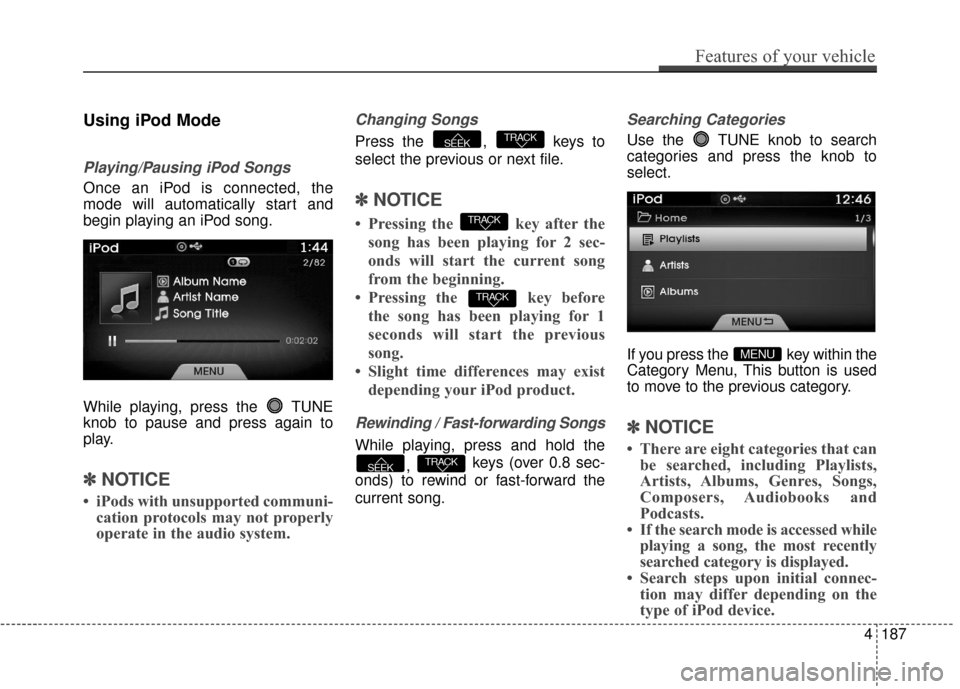
Using iPod Mode
Playing/Pausing iPod Songs
Once an iPod is connected, the
mode will automatically start and
begin playing an iPod song.
While playing, press the TUNE
knob to pause and press again to
play.
✽ ✽NOTICE
• iPods with unsupported communi-
cation protocols may not properly
operate in the audio system.
Changing Songs
Press the , keys to
select the previous or next file.
✽ ✽ NOTICE
• Pressing the key after the
song has been playing for 2 sec-
onds will start the current song
from the beginning.
• Pressing the key before the song has been playing for 1
seconds will start the previous
song.
• Slight time differences may exist depending your iPod product.
Rewinding / Fast-forwarding Songs
While playing, press and hold the
, keys (over 0.8 sec-
onds) to rewind or fast-forward the
current song.
Searching Categories
Use the TUNE knob to search
categories and press the knob to
select.
If you press the key within the
Category Menu, This button is used
to move to the previous category.
✽ ✽ NOTICE
• There are eight categories that can
be searched, including Playlists,
Artists, Albums, Genres, Songs,
Composers, Audiobooks and
Podcasts.
• If the search mode is accessed while playing a song, the most recently
searched category is displayed.
• Search steps upon initial connec- tion may differ depending on the
type of iPod device.
MENU
TRACKSEEK
TRACK
TRACK
TRACKSEEK
Features of your vehicle
187
4
Page 291 of 520
![Hyundai Azera 2017 Manual PDF Features of your vehicle
212
4
USING SETUP
Starting Mode
Press the key to display the
Setup screen.
You can select and control options
related to [Display], [Sound], [Clock /
Calendar], [Phone] and [](/img/35/14459/w960_14459-290.png "Hyundai Azera 2017 Manual PDF Features of your vehicle
212
4
USING SETUP
Starting Mode
Press the key to display the
Setup screen.
You can select and control options
related to [Display], [Sound], [Clock /
Calendar], [Phone] and [")
Features of your vehicle
212
4
USING SETUP
Starting Mode
Press the key to display the
Setup screen.
You can select and control options
related to [Display], [Sound], [Clock /
Calendar], [Phone] and [System].
✽ ✽
NOTICE
Once settings have been changed,
press the key to return to the
previous menu.
Display Settings
Adjusting the Brightness
Press the key Select [Display]
Select [Brightness]
Use the TUNE knob to adjust the
screen brightness or set the
Brightness on Automatic, Daylight, or
Nightmode.
(1) Automatic : Adjusts the bright- ness automatically
(2) Day : Always maintains the bright- ness on high
(3) Night : Always maintains the brightness on low
Mode Pop-up
Press the key Select [Display]
Select [Mode Pop up]
This feature is used to display the
Mode Pop-up screen when entering
radio and media modes.
When this feature is turned on,
pressing the or key
will display the Mode Pop-up screen.
✽ ✽ NOTICE
The media Mode Pop-up screen can
be displayed only when two or more
media modes have been connected.
MEDIA RADIO
SETUP
SETUP
MENU
SETUP