air conditioning HYUNDAI COUPE 2012 User Guide
[x] Cancel search | Manufacturer: HYUNDAI, Model Year: 2012, Model line: COUPE, Model: HYUNDAI COUPE 2012Pages: 391, PDF Size: 6.88 MB
Page 158 of 391
481
Features of your vehicle
D240200ABH
Manual heating and air condition-
ing
The heating and cooling system can be
controlled manually by pushing buttons
other than the AUTO button. In this case,
the system works sequentially according
to the order of buttons selected.
When pressing any button except the
AUTO button while using automatic oper-
ation, the functions not selected will be
controlled automatically.
1. Start the engine.
2. Set the mode to the desired position.For improving the effectiveness of
heating and cooling;
- Heating:
- Cooling:
3. Set the temperature control to the desired position.
4. Set the air intake control to the outside (fresh) air position.
5. Set the fan speed control to the desired speed.
6. If air conditioning is desired, turn the air conditioning system on.
Press the AUTO button in order to con-
vert to full automatic control of the sys-
tem.
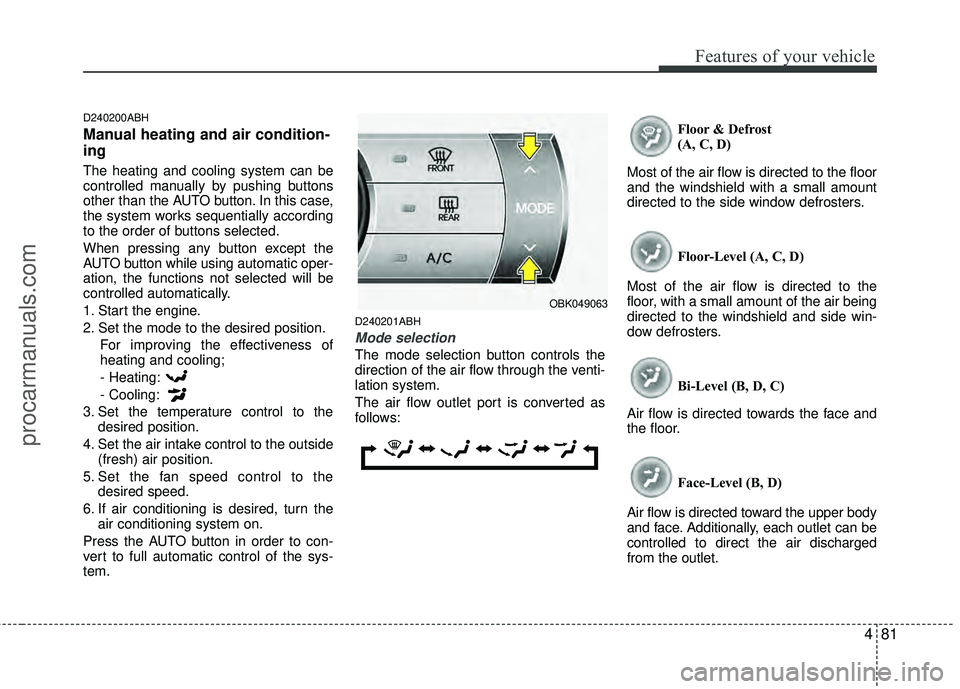
D240201ABH
Mode selection
The mode selection button controls the
direction of the air flow through the venti-
lation system.
The air flow outlet port is converted as
follows: Floor & Defrost
(A, C, D)
Most of the air flow is directed to the floor
and the windshield with a small amount
directed to the side window defrosters.
Floor-Level (A, C, D)
Most of the air flow is directed to the
floor, with a small amount of the air being
directed to the windshield and side win-
dow defrosters.
Bi-Level (B, D, C)
Air flow is directed towards the face and
the floor.
Face-Level (B, D)
Air flow is directed toward the upper body
and face. Additionally, each outlet can be
controlled to direct the air discharged
from the outlet.
OBK049063
procarmanuals.com
Page 161 of 391
Features of your vehicle
84
4
✽
✽
NOTICE
Prolonged operation of the heater in the
recirculated air position (without air
conditioning selected) may cause fog-
ging of the windshield and side windows
and the air within the passenger com-
partment may become stale.
In addition, prolonged use of the air con-
ditioning with the recirculated air posi-
tion selected will result in excessively dry
air in the passenger compartment.
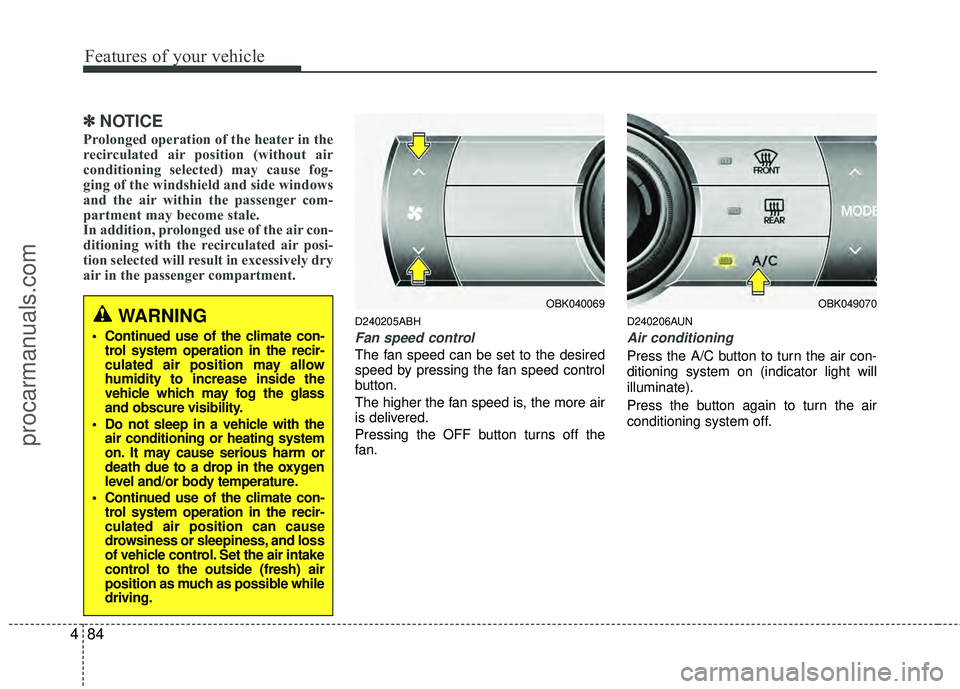
D240205ABH
Fan speed control
The fan speed can be set to the desired
speed by pressing the fan speed control
button.
The higher the fan speed is, the more air
is delivered.
Pressing the OFF button turns off the
fan.
D240206AUN
Air conditioning
Press the A/C button to turn the air con-
ditioning system on (indicator light will
illuminate).
Press the button again to turn the air
conditioning system off.
WARNING
Continued use of the climate con-
trol system operation in the recir-
culated air position may allow
humidity to increase inside the
vehicle which may fog the glass
and obscure visibility.
Do not sleep in a vehicle with the air conditioning or heating system
on. It may cause serious harm or
death due to a drop in the oxygen
level and/or body temperature.
Continued use of the climate con- trol system operation in the recir-
culated air position can cause
drowsiness or sleepiness, and loss
of vehicle control. Set the air intake
control to the outside (fresh) air
position as much as possible while
driving.
OBK040069OBK049070
procarmanuals.com
Page 162 of 391
485
Features of your vehicle
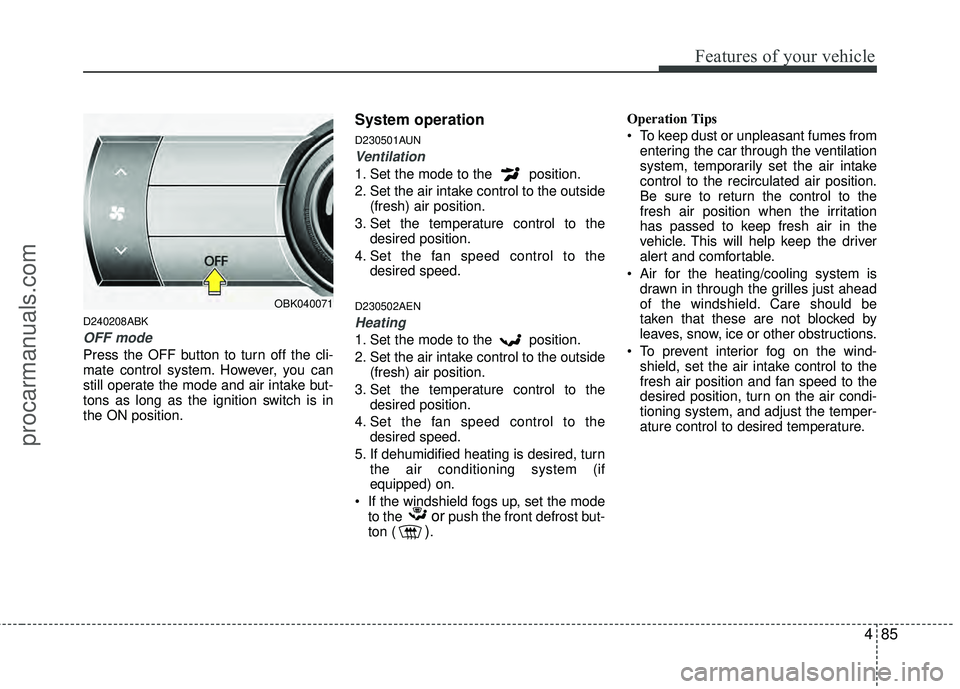
D240208ABK
OFF mode
Press the OFF button to turn off the cli-
mate control system. However, you can
still operate the mode and air intake but-
tons as long as the ignition switch is in
the ON position.
System operation
D230501AUN
Ventilation
1. Set the mode to the position.
2. Set the air intake control to the outside(fresh) air position.
3. Set the temperature control to the desired position.
4. Set the fan speed control to the desired speed.
D230502AEN
Heating
1. Set the mode to the position.
2. Set the air intake control to the outside(fresh) air position.
3. Set the temperature control to the desired position.
4. Set the fan speed control to the desired speed.
5. If dehumidified heating is desired, turn the air conditioning system (if
equipped) on.
If the windshield fogs up, set the mode to the
orpush the front defrost but-
ton (). Operation Tips
To keep dust or unpleasant fumes from
entering the car through the ventilation
system, temporarily set the air intake
control to the recirculated air position.
Be sure to return the control to the
fresh air position when the irritation
has passed to keep fresh air in the
vehicle. This will help keep the driver
alert and comfortable.
Air for the heating/cooling system is drawn in through the grilles just ahead
of the windshield. Care should be
taken that these are not blocked by
leaves, snow, ice or other obstructions.
To prevent interior fog on the wind- shield, set the air intake control to the
fresh air position and fan speed to the
desired position, turn on the air condi-
tioning system, and adjust the temper-
ature control to desired temperature.
OBK040071
procarmanuals.com
Page 163 of 391
Features of your vehicle
86
4
D230503AEN
Air conditioning (if equipped)
All HYUNDAI Air Conditioning Systems
are filled with environmentally friendly
R-134a refrigerant which does not dam-
age the ozone layer.
1. Start the engine. Push the air condi-
tioning button.
2. Set the mode to the position.
3. Set the air intake control to the outside air or recirculated air position.
4. Adjust the fan speed control and tem- perature control to maintain maximum
comfort.
✽ ✽NOTICE
• When using the air conditioning sys-
tem, monitor the temperature gauge
closely while driving up hills or in
heavy traffic when outside tempera-
tures are high. Air conditioning sys-
tem operation may cause engine over-
heating. Continue to use the blower
fan but turn the air conditioning sys-
tem off if the temperature gauge indi-
cates engine overheating.
• When opening the windows in humid weather air conditioning may create
water droplets inside the vehicle.
Since excessive water droplets may
cause damage to electrical equipment,
air conditioning should only be run
with the windows closed.
Air conditioning system operation tips
If the vehicle has been parked in direct
sunlight during hot weather, open the
windows for a short time to let the hot
air inside the vehicle escape.
To help reduce moisture inside of the windows on rainy or humid days,
decrease the humidity inside the vehi-
cle by operating the air conditioning
system.
During air conditioning system opera- tion, you may occasionally notice a
slight change in engine speed as the
air conditioning compressor cycles.
This is a normal system operation
characteristic.
Use the air conditioning system every month, even if only for a few minutes,
to ensure maximum system perform-
ance.
procarmanuals.com
Page 164 of 391
487
Features of your vehicle
When using the air conditioning sys-tem, you may notice clear water drip-
ping (or even puddling) on the ground
under the passenger side of the vehi-
cle. This is a normal system operation
characteristic.
Operating the air conditioning system in the recirculated air position provides
maximum cooling, however, continual
operation in this mode may cause the
air inside the vehicle to become stale.
During cooling operation, you may occasionally notice a misty air flow
because of rapid cooling and humid air
intake. This is a normal system opera-
tion characteristics.
D230300AEN
Climate control air filter
(if equipped)
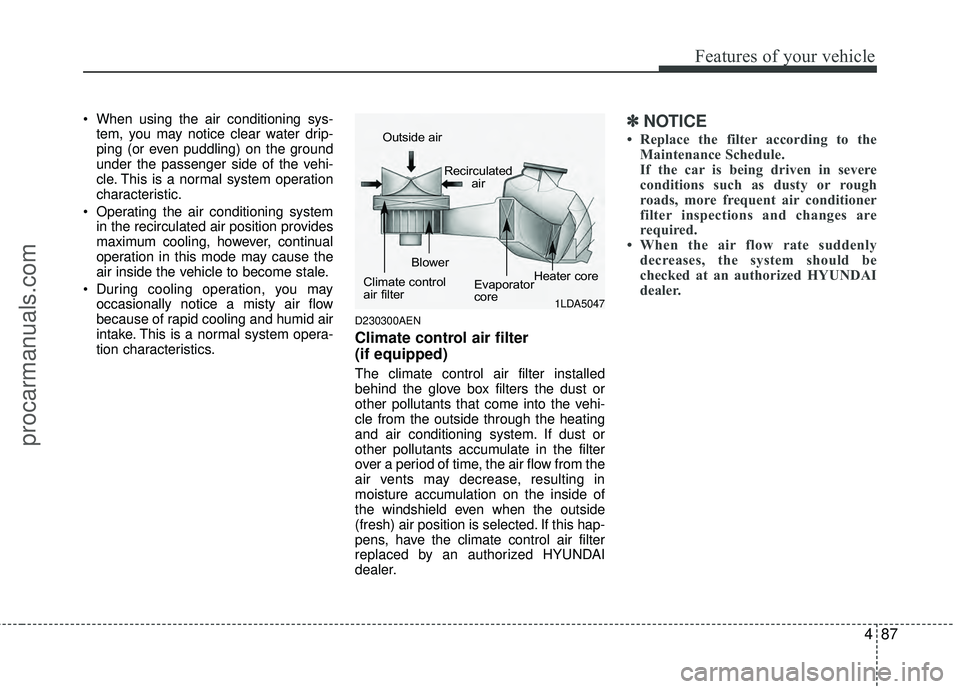
The climate control air filter installed
behind the glove box filters the dust or
other pollutants that come into the vehi-
cle from the outside through the heating
and air conditioning system. If dust or
other pollutants accumulate in the filter
over a period of time, the air flow from the
air vents may decrease, resulting in
moisture accumulation on the inside of
the windshield even when the outside
(fresh) air position is selected. If this hap-
pens, have the climate control air filter
replaced by an authorized HYUNDAI
dealer.
✽ ✽ NOTICE
• Replace the filter according to the
Maintenance Schedule.
If the car is being driven in severe
conditions such as dusty or rough
roads, more frequent air conditioner
filter inspections and changes are
required.
• When the air flow rate suddenly decreases, the system should be
checked at an authorized HYUNDAI
dealer.
1LDA5047
Outside air
Recirculatedair
Climate control
air filter Blower
Evaporator
coreHeater core
procarmanuals.com
Page 165 of 391
Features of your vehicle
88
4
D230400AEN
Checking the amount of air con-
ditioner refrigerant and compres-
sor lubricant
When the amount of refrigerant is low,
the performance of the air conditioning is
reduced. Overfilling also has a negative
impact on the air conditioning system.
Therefore, if abnormal operation is
found, have the system inspected by an
authorized HYUNDAI dealer.
✽ ✽
NOTICE
It is important when servicing the air
conditioning system that the correct
type and amount of oil and refrigerant is
used. Otherwise, damage to the com-
pressor and abnormal system operation
may occur.
WARNING
The air conditioning system should
be serviced by an authorized
HYUNDAI dealer. Improper service
may cause serious injury to the
person performing the service.
procarmanuals.com
Page 168 of 391
491
Features of your vehicle
D250300AUN-EU
Defogging logic
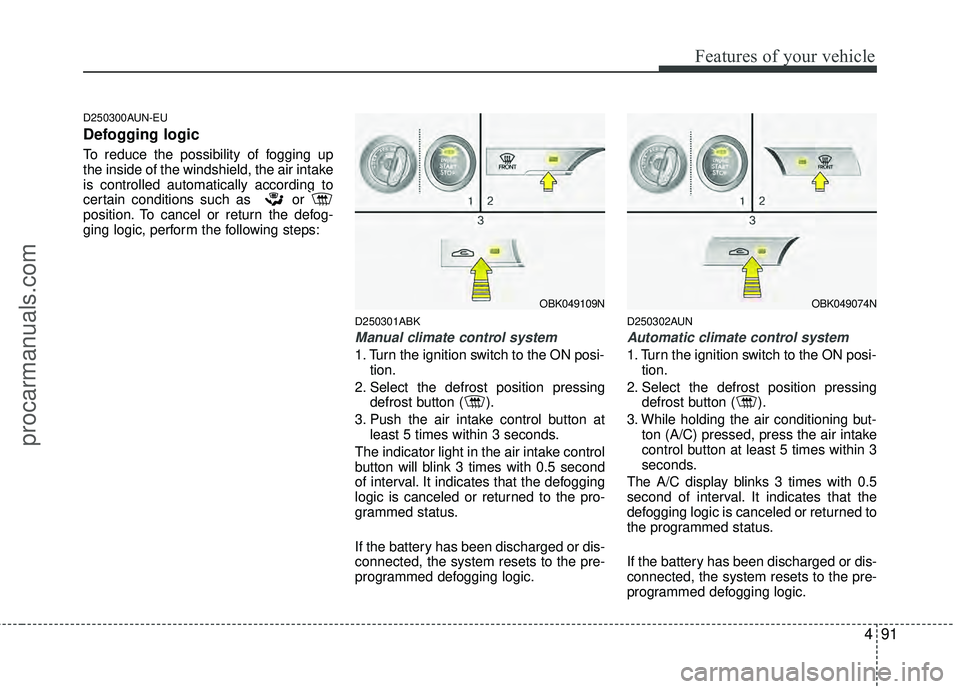
To reduce the possibility of fogging up
the inside of the windshield, the air intake
is controlled automatically according to
certain conditions such as or
position. To cancel or return the defog-
ging logic, perform the following steps:
D250301ABK
Manual climate control system
1. Turn the ignition switch to the ON posi-tion.
2. Select the defrost position pressing defrost button ( ).
3. Push the air intake control button at least 5 times within 3 seconds.
The indicator light in the air intake control
button will blink 3 times with 0.5 second
of interval. It indicates that the defogging
logic is canceled or returned to the pro-
grammed status.
If the battery has been discharged or dis-
connected, the system resets to the pre-
programmed defogging logic.
D250302AUN
Automatic climate control system
1. Turn the ignition switch to the ON posi- tion.
2. Select the defrost position pressing defrost button ( ).
3. While holding the air conditioning but- ton (A/C) pressed, press the air intake
control button at least 5 times within 3
seconds.
The A/C display blinks 3 times with 0.5
second of interval. It indicates that the
defogging logic is canceled or returned to
the programmed status.
If the battery has been discharged or dis-
connected, the system resets to the pre-
programmed defogging logic.
OBK049109NOBK049074N
procarmanuals.com
Page 203 of 391
Features of your vehicle
126
4
■Talking on the Phone
When talking on the phone, “Active Calls”
message and the other party’s phone
number (if available) are displayed on the
audio.
-
Press button for 0.8 second or longer
on the steering wheel.
✽ ✽ NOTICE
In the following situations, you or the
other party may have difficulty hearing
each other:
1. Speaking at the same time, your voice
may not reach the other parties. (This
is not a malfunction.) Speak alter-
nately with the other party on the
phone.
2. Keep the Bluetooth
®wireless technol-
ogy volume to a low level. High-level
volume may result in distortion and
echo.
3. When driving on a rough road.
4. When driving at high speeds.
5. When the window is open.
6. When the air conditioning vents are facing the microphone.
7. When the sound of the air condition- ing fan is loud.
■Bluetooth®wireless technology
Audio Music Streaming
The audio system supports Bluetooth®
wireless technology A2DP (Audio
Advanced Distribution Profile) and
AVRCP (Audio Video Remote Control
Profile) technologies.
Both profiles provide steaming of music
via compatible “PAIRED” Bluetooth
®
wireless technology Cellular phone.
To stream music from the Bluetooth®
wireless technology cellular phone, play
your music files on your cellular phone
according to your cellular phone user’s
manual and press the [CD/AUX] button
on the audio system until “MP3 play” is
displayed on the LCD.
The audio system head unit displays
‘MP3 MODE’.
NOTE:
all music and sound files your cellu-
lar phone supports can be played
by the audio system.
®wireless technology
compatible cellular phones must
include A2DP and AVRCP capabili-
ties.
AVRCP compatible Bluetooth
®wireless technology cel-
lular phones may not play music
through the audio system initially.
These cellular phones may need to
have the Bluetooth
®wireless tech-
nology streaming enabled, for
example;
i.e : Menu
➟ ➟Filemanager➟
➟Music➟
➟
Option➟
➟Play via Bluetooth
cellular phone for more information.
To cancel Bluetooth
®wireless tech-
nology cellular phone music
streaming, stop music playback on
the cellular phone or change the
audio mode to AM/FM, XM, CD, iPod,
ect.
procarmanuals.com
Page 226 of 391
4149
Features of your vehicle
■Talking on the Phone
When talking on the phone, “Active Calls”
message and the other party’s phone
number (if available) are displayed on the
audio.
-
Press button for 0.8 second or longer
on the steering wheel.
✽ ✽ NOTICE
In the following situations, you or the
other party may have difficulty hearing
each other:
1. Speaking at the same time, your voice
may not reach the other parties. (This
is not a malfunction.) Speak alter-
nately with the other party on the
phone.
2. Keep the Bluetooth
®wireless technol-
ogy volume to a low level. High-level
volume may result in distortion and
echo.
3. When driving on a rough road.
4. When driving at high speeds.
5. When the window is open.
6. When the air conditioning vents are facing the microphone.
7. When the sound of the air condition- ing fan is loud.
■Bluetooth®wireless technology
Audio Music Streaming
The audio system supports Bluetooth®
wireless technology A2DP (Audio
Advanced Distribution Profile) and
AVRCP (Audio Video Remote Control
Profile) technologies.
Both profiles provide steaming of music
via compatible “PAIRED” Bluetooth
®
wireless technology Cellular phone.
To stream music from the Bluetooth®
wireless technology cellular phone, play
your music files on your cellular phone
according to your cellular phone user’s
manual and press the [CD/AUX] button
on the audio system until “MP3 play” is
displayed on the LCD.
The audio system head unit displays
‘MP3 MODE’.
NOTE:
all music and sound files your cellu-
lar phone supports can be played
by the audio system.
®wireless technology
compatible cellular phones must
include A2DP and AVRCP capabili-
ties.
AVRCP compatible Bluetooth
®wireless technology cel-
lular phones may not play music
through the audio system initially.
These cellular phones may need to
have the Bluetooth
®wireless tech-
nology streaming enabled, for
example;
i.e : Menu
➟ ➟Filemanager➟
➟Music➟
➟
Option➟
➟Play via Bluetooth
cellular phone for more information.
To cancel Bluetooth
®wireless tech-
nology cellular phone music
streaming, stop music playback on
the cellular phone or change the
audio mode to AM/FM, XM, CD, iPod,
ect.
procarmanuals.com
Page 264 of 391
537
Driving your vehicle
Remember, your vehicle does notrequire extended warm-up. After the
engine has started, allow the engine to
run for 10 to 20 seconds prior to plac-
ing the vehicle in gear. In very cold
weather, however, give your engine a
slightly longer warm-up period.
Don't "lug" or "over-rev" the engine. Lugging is driving too slowly in too high
a gear resulting in the engine bucking.
If this happens, shift to a lower gear.
Over-revving is racing the engine
beyond its safe limit. This can be avoid-
ed by shifting at the recommended
speeds. Use your air conditioning sparingly.
The air conditioning system is operat-
ed by engine power so your fuel econ-
omy is reduced when you use it.
Open windows at high speeds can reduce fuel economy.
Fuel economy is less in crosswinds and headwinds. To help offset some of
this loss, slow down when driving in
these conditions.
Keeping a vehicle in good operating con-
dition is important both for economy and
safety. Therefore, have an authorized
HYUNDAI dealer perform scheduled
inspections and maintenance.
WARNING - Engine off dur- ing motion
Never turn the engine off to coast
down hills or anytime the vehicle is
in motion. The power steering and
power brakes will not function
properly without the engine run-
ning. Instead, keep the engine on
and downshift to an appropriate
gear for engine braking effect. In
addition, turning off the ignition
while driving could engage the
steering wheel lock resulting in
loss of vehicle steering which
could cause serious injury or
death.
procarmanuals.com