warning HYUNDAI COUPE 2014 Owners Manual
[x] Cancel search | Manufacturer: HYUNDAI, Model Year: 2014, Model line: COUPE, Model: HYUNDAI COUPE 2014Pages: 546, PDF Size: 14.38 MB
Page 263 of 546
3-172
Convenient features of your vehicle
INTERIOR FEATURES
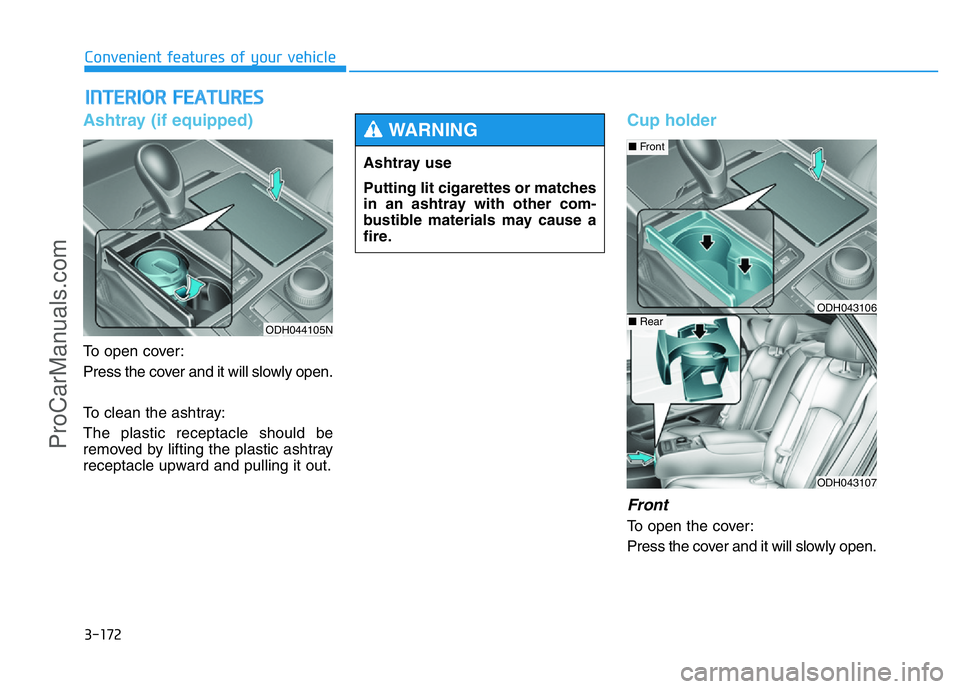
Ashtray (if equipped)
To open cover:
Press the cover and it will slowly open.
To clean the ashtray:
The plastic receptacle should be
removed by lifting the plastic ashtray
receptacle upward and pulling it out.
Cup holder
Front
To open the cover:
Press the cover and it will slowly open.
ODH044105N
Ashtray use
Putting lit cigarettes or matches
in an ashtray with other com-
bustible materials may cause a
fire.
WARNING
ODH043107
■Front
■RearODH043106
ProCarManuals.com
Page 264 of 546
3-173
Convenient features of your vehicle
3
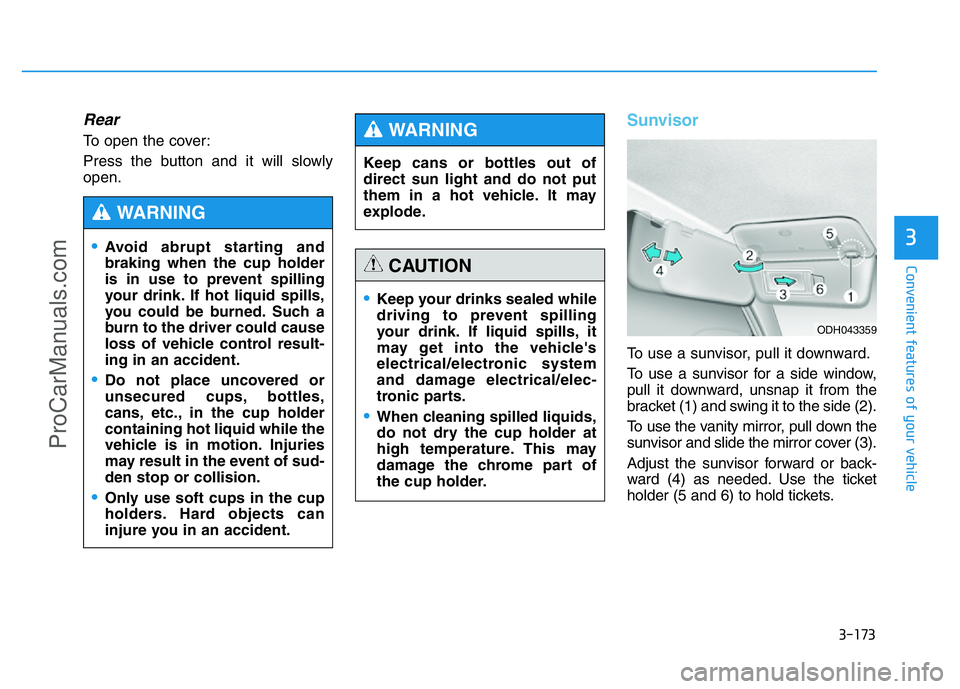
Rear
To open the cover:
Press the button and it will slowly
open.
Sunvisor
To use a sunvisor, pull it downward.
To use a sunvisor for a side window,
pull it downward, unsnap it from the
bracket (1) and swing it to the side (2).
To use the vanity mirror, pull down the
sunvisor and slide the mirror cover (3).
Adjust the sunvisor forward or back-
ward (4) as needed. Use the ticket
holder (5 and 6) to hold tickets.
•Keep your drinks sealed while
driving to prevent spilling
your drink. If liquid spills, it
may get into the vehicle's
electrical/electronic system
and damage electrical/elec-
tronic parts.
•When cleaning spilled liquids,
do not dry the cup holder at
high temperature. This may
damage the chrome part of
the cup holder.
CAUTION
•Avoid abrupt starting and
braking when the cup holder
is in use to prevent spilling
your drink. If hot liquid spills,
you could be burned. Such a
burn to the driver could cause
loss of vehicle control result-
ing in an accident.
•Do not place uncovered or
unsecured cups, bottles,
cans, etc., in the cup holder
containing hot liquid while the
vehicle is in motion. Injuries
may result in the event of sud-
den stop or collision.
•Only use soft cups in the cup
holders. Hard objects can
injure you in an accident.
WARNING
Keep cans or bottles out of
direct sun light and do not put
them in a hot vehicle. It may
explode.
WARNING
ODH043359
ProCarManuals.com
Page 265 of 546
3-174
Convenient features of your vehicle
✽NOTICE
Close the vanity mirror cover
securely and return the sunvisor to
its original position after use.
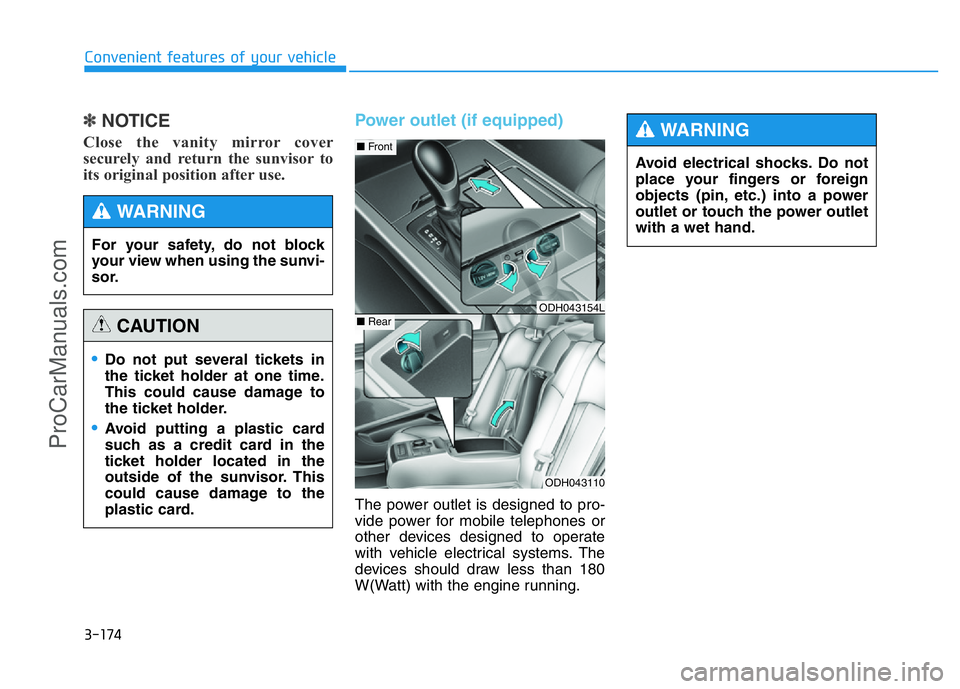
Power outlet (if equipped)
The power outlet is designed to pro-
vide power for mobile telephones or
other devices designed to operate
with vehicle electrical systems. The
devices should draw less than 180
W(Watt) with the engine running.
•Do not put several tickets in
the ticket holder at one time.
This could cause damage to
the ticket holder.
•Avoid putting a plastic card
such as a credit card in the
ticket holder located in the
outside of the sunvisor. This
could cause damage to the
plastic card.
CAUTION
For your safety, do not block
your view when using the sunvi-
sor.
WARNING
ODH043110
■Front
■RearODH043154L
Avoid electrical shocks. Do not
place your fingers or foreign
objects (pin, etc.) into a power
outlet or touch the power outlet
with a wet hand.
WARNING
ProCarManuals.com
Page 266 of 546
3-175
Convenient features of your vehicle
3
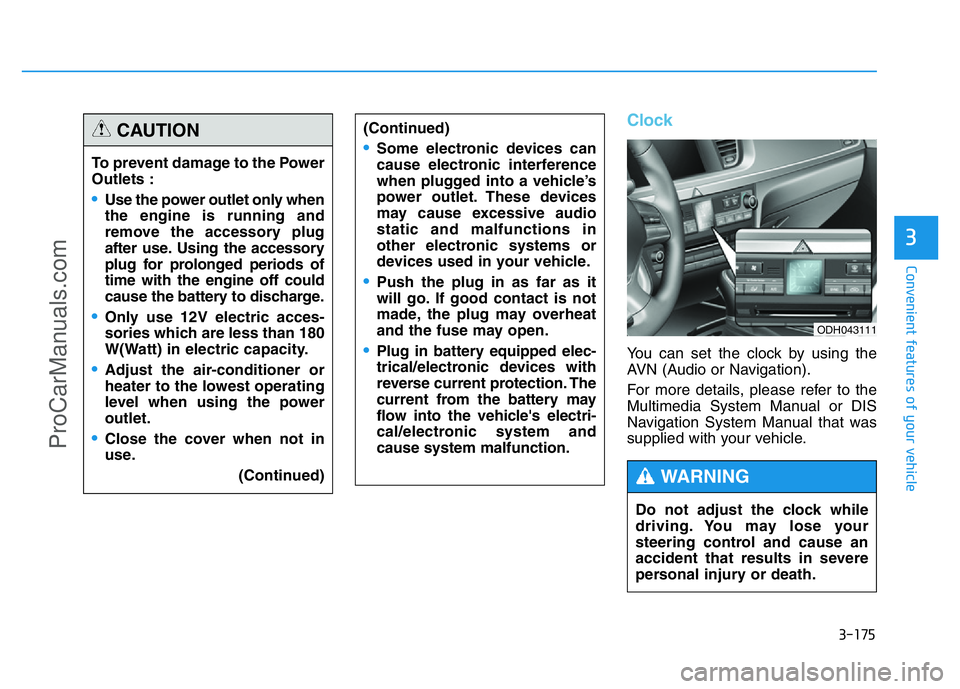
Clock
You can set the clock by using the
AVN (Audio or Navigation).
For more details, please refer to the
Multimedia System Manual or DIS
Navigation System Manual that was
supplied with your vehicle. To prevent damage to the Power
Outlets :
•Use the power outlet only when
the engine is running and
remove the accessory plug
after use. Using the accessory
plug for prolonged periods of
time with the engine off could
cause the battery to discharge.
•Only use 12V electric acces-
sories which are less than 180
W(Watt) in electric capacity.
•Adjust the air-conditioner or
heater to the lowest operating
level when using the power
outlet.
•Close the cover when not in
use.
(Continued)
(Continued)
•Some electronic devices can
cause electronic interference
when plugged into a vehicle’s
power outlet. These devices
may cause excessive audio
static and malfunctions in
other electronic systems or
devices used in your vehicle.
•Push the plug in as far as it
will go. If good contact is not
made, the plug may overheat
and the fuse may open.
•Plug in battery equipped elec-
trical/electronic devices with
reverse current protection. The
current from the battery may
flow into the vehicle's electri-
cal/electronic system and
cause system malfunction.
CAUTION
Do not adjust the clock while
driving. You may lose your
steering control and cause an
accident that results in severe
personal injury or death.
WARNING
ODH043111
ProCarManuals.com
Page 267 of 546
3-176
Convenient features of your vehicle
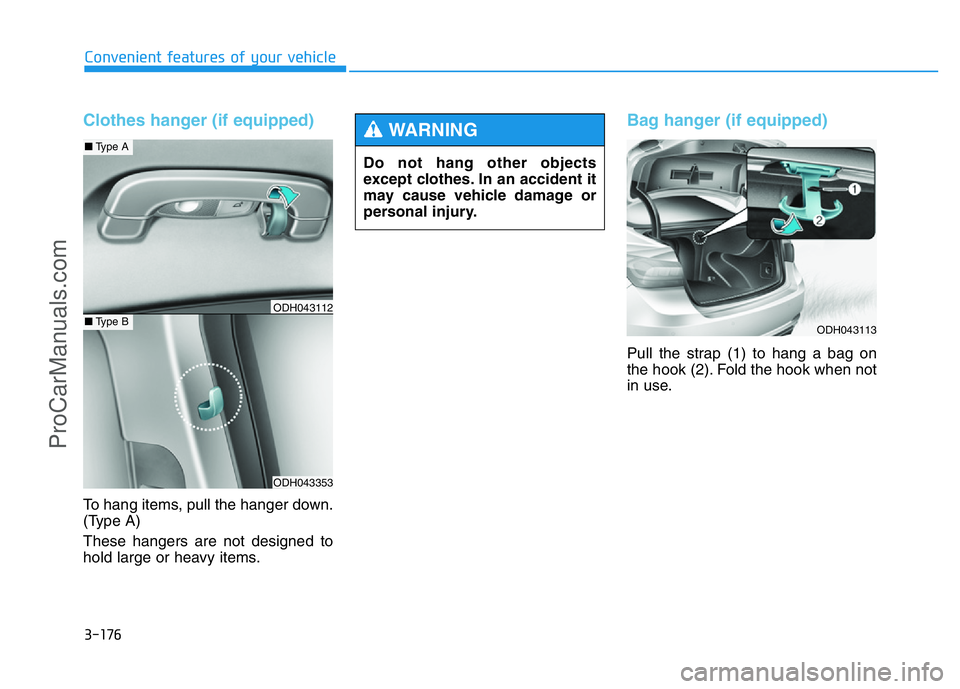
Clothes hanger (if equipped)
To hang items, pull the hanger down.
(Type A)
These hangers are not designed to
hold large or heavy items.
Bag hanger (if equipped)
Pull the strap (1) to hang a bag on
the hook (2). Fold the hook when not
in use.
ODH043353
■Type A
■Type BODH043112
Do not hang other objects
except clothes. In an accident it
may cause vehicle damage or
personal injury.
WARNING
ODH043113
ProCarManuals.com
Page 268 of 546
3-177
Convenient features of your vehicle
3
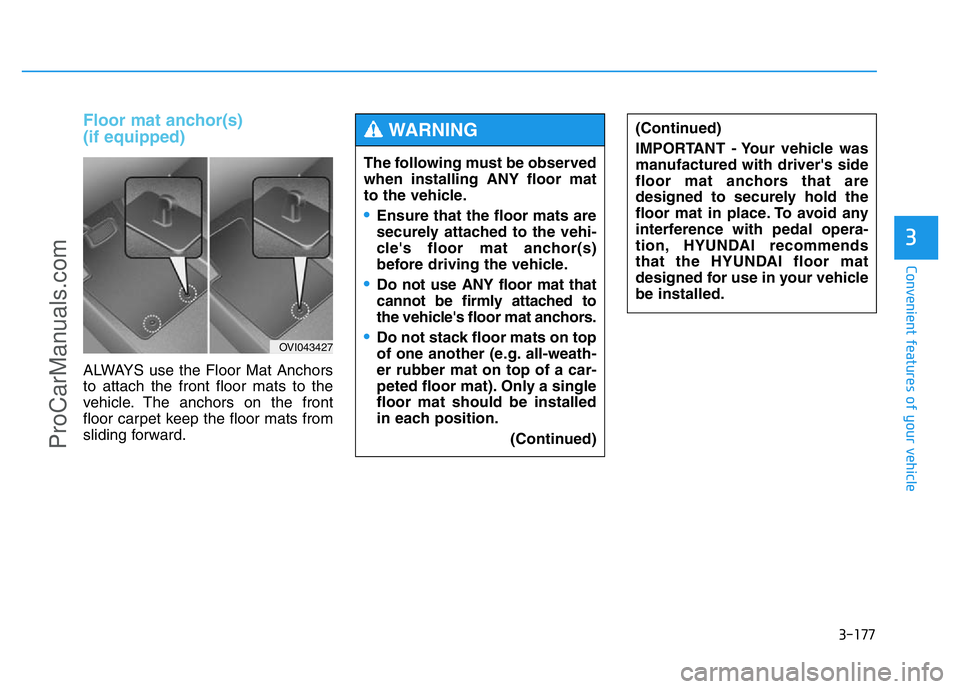
Floor mat anchor(s)
(if equipped)
ALWAYS use the Floor Mat Anchors
to attach the front floor mats to the
vehicle. The anchors on the front
floor carpet keep the floor mats from
sliding forward.
OVI043427
The following must be observed
when installing ANY floor mat
to the vehicle.
•Ensure that the floor mats are
securely attached to the vehi-
cle's floor mat anchor(s)
before driving the vehicle.
•Do not use ANY floor mat that
cannot be firmly attached to
the vehicle's floor mat anchors.
•Do not stack floor mats on top
of one another (e.g. all-weath-
er rubber mat on top of a car-
peted floor mat). Only a single
floor mat should be installed
in each position.
(Continued)
(Continued)
IMPORTANT - Your vehicle was
manufactured with driver's side
floor mat anchors that are
designed to securely hold the
floor mat in place. To avoid any
interference with pedal opera-
tion, HYUNDAI recommends
that the HYUNDAI floor mat
designed for use in your vehicle
be installed.WARNING
ProCarManuals.com
Page 270 of 546
3-179
Convenient features of your vehicle
3
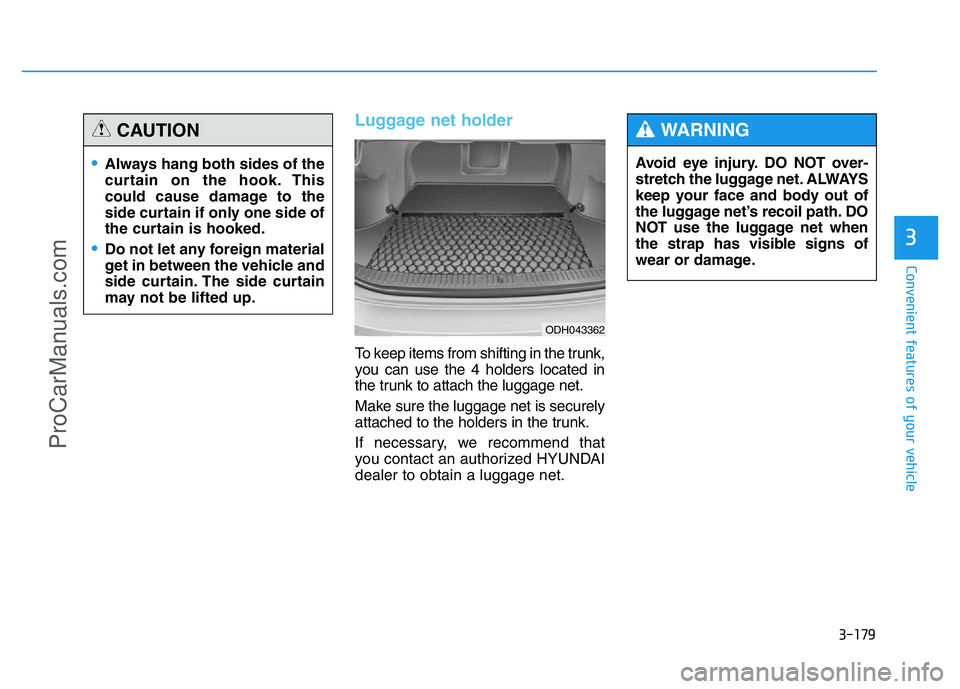
Luggage net holder
To keep items from shifting in the trunk,
you can use the 4 holders located in
the trunk to attach the luggage net.
Make sure the luggage net is securely
attached to the holders in the trunk.
If necessary, we recommend that
you contact an authorized HYUNDAI
dealer to obtain a luggage net.
•Always hang both sides of the
curtain on the hook. This
could cause damage to the
side curtain if only one side of
the curtain is hooked.
•Do not let any foreign material
get in between the vehicle and
side curtain. The side curtain
may not be lifted up.
CAUTION
Avoid eye injury. DO NOT over-
stretch the luggage net. ALWAYS
keep your face and body out of
the luggage net’s recoil path. DO
NOT use the luggage net when
the strap has visible signs of
wear or damage.
WARNING
ODH043362
ProCarManuals.com
Page 277 of 546
Driving your vehicle
Before driving.........................................................5-4
Before entering the vehicle ...........................................5-4
Before starting...................................................................5-4
Engine Start/Stop button ................................................5-5
Automatic transmission .......................................5-11
Automatic transmission operation .............................5-11
Parking ...............................................................................5-17
Good driving practices ...................................................5-17
All wheel drive (AWD) .........................................5-19
Using All Wheel Drive (AWD) .......................................5-19
Emergency precautions .................................................5-21
Braking system ...................................................5-23
Power brakes ..................................................................5-23
Disc brakes wear indicator ..........................................5-24
Foot parking brake ........................................................5-24
Electric parking brake (EPB) ........................................5-26
AUTO HOLD .....................................................................5-31
Anti-lock Brake System (ABS) ....................................5-35
Electronic Stability Control (ESC)................................5-37
Hill-Start Assist Control (HAC) ...................................5-40
Emergency Stop Signal (ESS) .....................................5-41
Good braking practices..................................................5-42
Drive mode integrated control system .............5-43
Electronic control suspension (ECS).................5-45
ECS malfunction indicator.............................................5-45
Autonomous emergency braking (AEB) ............5-46
AEB operation ..................................................................5-47
To cancel the AEB ..........................................................5-48
Malfunction indicator.....................................................5-49
Cruise control .......................................................5-51
Cruise control operation................................................5-51
Advanced smart cruise control system ............5-55
To convert to cruise control mode .............................5-56
Smart cruise control speed ..........................................5-56
Cancelled automatically .................................................5-59
Smart cruise control vehicle-to-vehicle distance.....5-61
Sensor to detect distance to the vehicle ahead .....5-63
Limitations of the system .............................................5-65
Lane departure warning system (LDWS) .........5-70
LDWS operation...............................................................5-71
Warning indicator ..........................................................5-72
Lane keeping assist system (LKAS) ..................5-74
LKAS operation ................................................................5-75
LKAS malfunction............................................................5-80
LKAS function change ..................................................5-81
Blind spot detection system (BSD) ...................5-83
BSD (Blind Spot Detection) /
LCA (Lane Change Assist) .............................................5-84
RCTA (Rear Cross Traffic Alert) ..................................5-87
5
ProCarManuals.com
Page 279 of 546
5-3
Driving your vehicle
5
Carbon monoxide (CO) gas is toxic. Breathing CO can cause unconsciousness and death.
Engine exhaust contains carbon monoxide which cannot be seen or smelled.
Do not inhale engine exhaust.
If at any time you smell engine exhaust inside the vehicle, open the windows immediately. Exposure to CO can cause
unconsciousness and death by asphyxiation.
Be sure the exhaust system does not leak.
The exhaust system should be checked whenever the vehicle is raised to change the oil or for any other purpose. If
you hear a change in the sound of the exhaust or if you drive over something that strikes the underneath side of the
vehicle, we recommend that the exhaust system be checked as soon as possible by an authorized HYUNDAI dealer.
Do not run the engine in an enclosed area.
Letting the engine idle in your garage, even with the garage door open, is a hazardous practice. Run the engine only
long enough to start the engine and to move the vehicle out of the garage.
Avoid idling the engine for prolonged periods with people inside the vehicle.
If it is necessary to idle the engine for a prolonged period with people inside the vehicle , be sure to do so only in an
open area with the air intake set at "Fresh" and fan control set to high so fresh air is drawn into the interior.
Keep the air intakes clear.
To assure proper operation of the ventilation system, keep the ventilation air intakes located in front of the windshield
clear of snow, ice, leaves, or other obstructions.
If you must drive with the trunk open:
Close all windows.
Open instrument panel air vents.
Set the air intake control at "Fresh", the air flow control at "Floor" or "Face", and the fan control set to high.
WARNING
ProCarManuals.com
Page 280 of 546
5-4
Driving your vehicle
Before entering the vehicle
• Be sure all windows, outside mir-
ror(s), and outside lights are clean
and unobstructed.
• Remove frost, snow, or ice.
• Visually check the tires for uneven
wear and damage.
• Check under the vehicle for any
sign of leaks.
• Be sure there are no obstacles
behind you if you intend to back up.
Before starting
• Make sure the hood, the trunk, and
the doors are securely closed and
locked.
• Adjust the position of the seat and
steering wheel.
• Adjust the inside and outside
rearview mirrors.
• Verify all the lights work.
• Fasten your seatbelt. Check that all
passengers have fastened their
seatbelts.
• Check the gauges and indicators in
the instrument panel and the mes-
sages on the instrument display
when the Engine Start/Stop button
is in the ON position.
• Check that any items you are car-
rying are stored properly or fas-
tened down securely.
BEFORE DRIVING
To reduce the risk of SERIOUS
INJURY or DEATH, take the fol-
lowing precautions:
•ALWAYS wear your seat belt.
All passengers must be prop-
erly belted whenever the vehi-
cle is moving. For more infor-
mation, refer to “Seat Belts” in
chapter 2.
•Always drive defensively.
Assume other drivers or
pedestrians may be careless
and make mistakes.
•Stay focused on the task of
driving. Driver distraction can
cause accidents.
•Leave plenty of space
between you and the vehicle
in front of you.
WARNING
ProCarManuals.com