lights HYUNDAI COUPE 2014 User Guide
[x] Cancel search | Manufacturer: HYUNDAI, Model Year: 2014, Model line: COUPE, Model: HYUNDAI COUPE 2014Pages: 546, PDF Size: 14.38 MB
Page 178 of 546
3-87
Convenient features of your vehicle
3
✽NOTICE- Electronic Brake
force Distribution
(EBD) System
Warning Light
When the ABS Warning Light is on
or both ABS and Parking Brake &
Brake Fluid Warning Lights are on,
the speedometer, odometer, or trip-
meter may not work. Also, the EPS
Warning Light may illuminate and
the steering effort may increase or
decrease.
In this case, we recommend you
have the vehicle inspected by an
authorized HYUNDAI dealer as
soon as possible.
Electric Parking Brake
(EPB) Warning Light
(if equipped)
This warning light illuminates:
• Once you set the Engine
Start/Stop button to the ON posi-
tion.
- It illuminates for approximately 3
seconds and then goes off.
• When there is a malfunction with
the EPB.
In this case, we recommend that
you have the vehicle inspected by
an authorized HYUNDAI dealer.
✽NOTICE- Electric Parking
Brake (EPB)
Warning Light
The Electric Parking Brake (EPB)
Warning Light may illuminate when
the Electronic Stability control
(ESC) Indicator Light comes on to
indicates that the ESC is not work-
ing properly (This does not indicate
malfunction of the EPB).
Electronic Brake force
Distribution (EBD) System
Warning Light
When both ABS and Parking
Brake & Brake Fluid Warning
Lights are on, the brake system
will not work normally and you
may experience an unexpected
and dangerous situation during
sudden braking.
In this case, avoid high speed
driving and abrupt braking.
We recommend you have the
vehicle inspected by an author-
ized HYUNDAI dealer as soon
as possible.
WARNINGEPB
ProCarManuals.com
Page 184 of 546
3-93
Convenient features of your vehicle
3
Indicator Lights
Electronic Stability
Control (ESC) Indicator
Light
This indicator light illuminates:
• Once you set the Engine
Start/Stop button to the ON posi-
tion.
- It illuminates for approximately 3
seconds and then goes off.
• When there is a malfunction with
the ESC system.
In this case, we recommend that
you have the vehicle inspected by
an authorized HYUNDAI dealer.
This indicator light blinks:
While the ESC is operating.
For more details, refer to “Electronic
Stability Control (ESC)” in chapter 5.
Electronic Stability
Control (ESC) OFF
Indicator Light
This indicator light illuminates:
• Once you set the Engine
Start/Stop button to the ON posi-
tion.
- It illuminates for approximately
3 seconds and then goes off.
• When you deactivate the ESC sys-
tem by selecting the “ESC OFF”
item on the User Settings Mode in
the cluster.
For more details, refer to “Electronic
Stability Control (ESC)” in chapter 5.
Immobilizer Indicator
Light (With Smart Key)
This indicator light illuminates for
up to 30 seconds:
• When the vehicle detects the
smart key in the vehicle properly
while the Engine Start/Stop button
is ACC or ON.
- At this time, you can start the
engine.
- The indicator light goes off after
starting the engine.
This indicator light blinks for a few
seconds:
• When the smart key is not in the
vehicle.
- At this time, you can not start the
engine.
ProCarManuals.com
Page 185 of 546
3-94
Convenient features of your vehicle
This indicator light illuminates for
2 seconds and goes off:
• When the vehicle can not detect
the smart key which is in the vehi-
cle while the Engine Start/Stop
button is ON.
In this case, we recommend that
you have the vehicle inspected by
an authorized HYUNDAI dealer.
This indicator light blinks:
• When the battery of the smart key
is weak.
- At this time, you can not start the
engine. However, you can start
the engine if you press the Engine
Start/Stop button with the smart
key. (For more details, refer to
“Starting the Engine” in section 5).
• When there is a malfunction with
the immobilizer system.
In this case, we recommend that
you have the vehicle inspected by
an authorized HYUNDAI dealer.
Turn Signal Indicator
Light
This indicator light blinks:
• When you turn the turn signal light
on.
If any of the following occurs, there
may a malfunction with the turn signal
system. In this case, we recommend
that you have the vehicle inspected by
an authorized HYUNDAI dealer.
- The indicator light does not blink
but illuminates.
- The indicator light blinks more
rapidly.
- The indicator light does not illumi-
nate at all.
Low Beam Indicator
Light (if equipped)
This indicator light illuminates:
• When the headlights are on.
High Beam Indicator
Light
This indicator light illuminates:
• When the headlights are on and in
the high beam position
• When the turn signal lever is pulled
into the Flash-to-Pass position.
ProCarManuals.com
Page 186 of 546
3-95
Convenient features of your vehicle
3
Light ON Indicator
Light
This indicator light illuminates:
• When the tail lights or headlights
are on.
Front Fog Indicator
Light (if equipped)
This indicator light illuminates:
• When the front fog lights are on.
Rear Fog Indicator
Light (if equipped)
This indicator light illuminates:
• When the rear fog lights are on.
Smart High Beam
Indicator
This warning light illuminates:
• When the high-beam is on with the
light switch in the AUTO light position.
• If your vehicle detects oncoming or
preceding vehicles, the smart high
beam system will switch the high
beam to low beam automatically.
For more details, refer to “Smart High
Beam” in this chapter.
Cruise Indicator Light
(if equipped)
This indicator light illuminates:
• When the cruise control system is
enabled.
For more details, refer to “Cruise
Control System” in chapter 5.
Cruise SET Indicator
Light (if equipped)
This indicator light illuminates:
• When the cruise control speed is
set.
For more details, refer to “Cruise
Control System” in chapter 5.
SET
ProCarManuals.com
Page 191 of 546
3-100
Convenient features of your vehicle
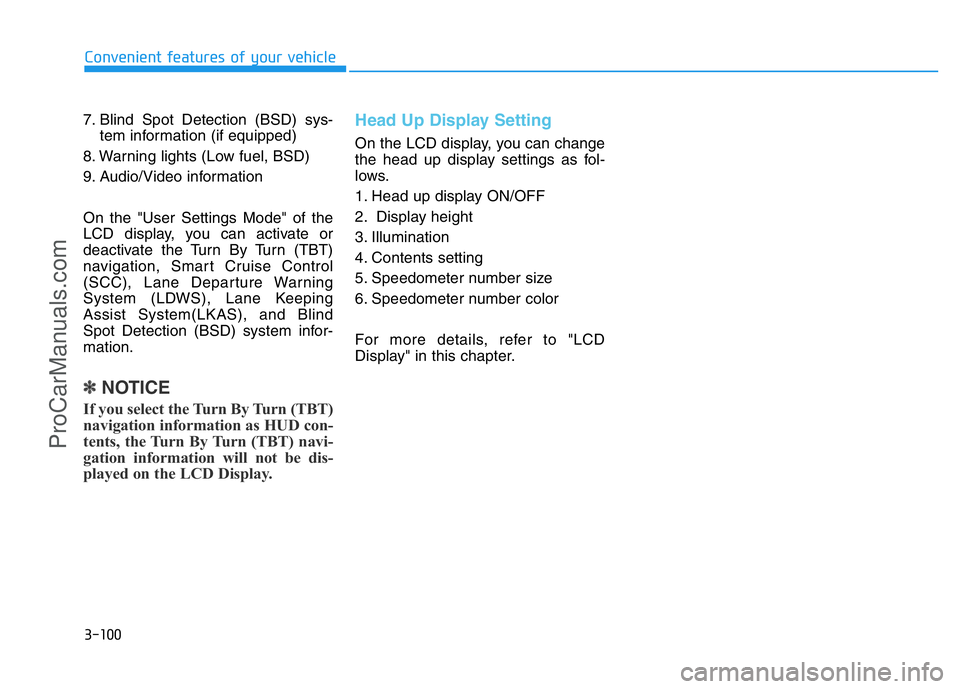
7. Blind Spot Detection (BSD) sys-
tem information (if equipped)
8. Warning lights (Low fuel, BSD)
9. Audio/Video information
On the "User Settings Mode" of the
LCD display, you can activate or
deactivate the Turn By Turn (TBT)
navigation, Smart Cruise Control
(SCC), Lane Departure Warning
System (LDWS), Lane Keeping
Assist System(LKAS), and Blind
Spot Detection (BSD) system infor-
mation.
✽NOTICE
If you select the Turn By Turn (TBT)
navigation information as HUD con-
tents, the Turn By Turn (TBT) navi-
gation information will not be dis-
played on the LCD Display.
Head Up Display Setting
On the LCD display, you can change
the head up display settings as fol-
lows.
1. Head up display ON/OFF
2. Display height
3. Illumination
4. Contents setting
5. Speedometer number size
6. Speedometer number color
For more details, refer to "LCD
Display" in this chapter.
ProCarManuals.com
Page 192 of 546
3-101
Convenient features of your vehicle
3
Exterior lights
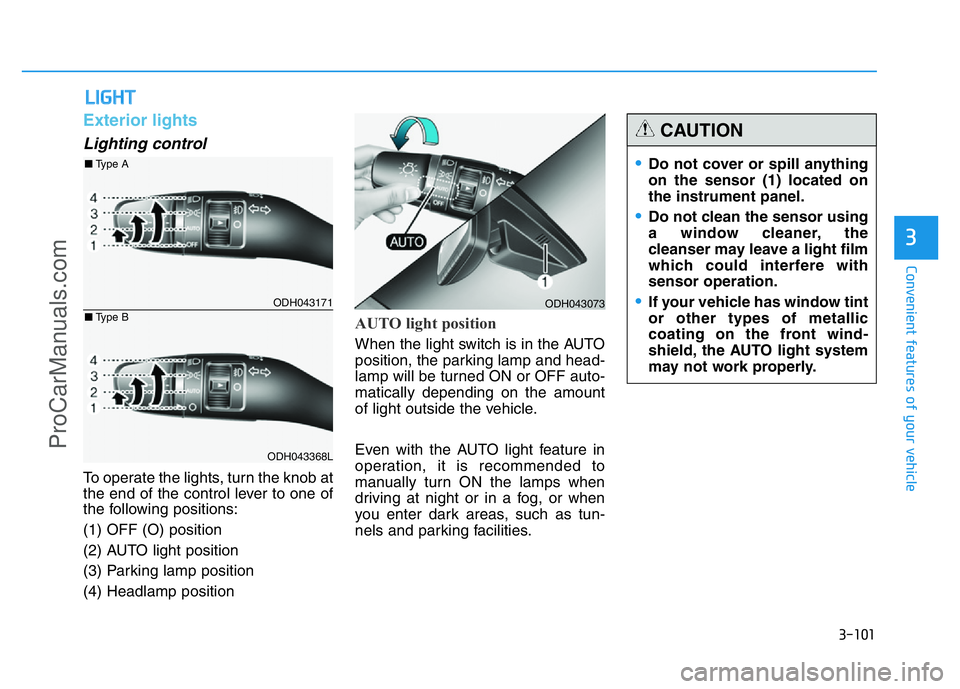
Lighting control
To operate the lights, turn the knob at
the end of the control lever to one of
the following positions:
(1) OFF (O) position
(2) AUTO light position
(3) Parking lamp position
(4) Headlamp position
AUTO light position
When the light switch is in the AUTO
position, the parking lamp and head-
lamp will be turned ON or OFF auto-
matically depending on the amount
of light outside the vehicle.
Even with the AUTO light feature in
operation, it is recommended to
manually turn ON the lamps when
driving at night or in a fog, or when
you enter dark areas, such as tun-
nels and parking facilities.
LIGHT
ODH043073
•Do not cover or spill anything
on the sensor (1) located on
the instrument panel.
•Do not clean the sensor using
a window cleaner, the
cleanser may leave a light film
which could interfere with
sensor operation.
•If your vehicle has window tint
or other types of metallic
coating on the front wind-
shield, the AUTO light system
may not work properly.
CAUTION
ODH043171
ODH043368L
■Type A
■Type B
ProCarManuals.com
Page 195 of 546
3-104
Convenient features of your vehicle
The high beam switches to low beam
in the below conditions.
- When the Smart High Beam is off.
- When the light switch is not in the
AUTO position.
- When the headlamp is detected
from the on-coming vehicle.
- When the tail lamp is detected
from the front vehicle.
- When the surrounding is bright
enough high beams are not need-
ed.
- When streetlights or other lights
are detected.
- When vehicle speed is below
35km/h (22 mph).The system may not operate nor-
mally in the below conditions.
•When the light from the on-
coming or front vehicle is not
detected because of lamp dam-
age, hidden from sight, etc.
•When the lamp of the on-com-
ing or front vehicle is covered
with dust, snow or water.
•When the light from the on-
coming or front vehicle is not
detected because of exhaust
fume, smoke, fog, snow, etc.
•When the front window is cov-
ered with foreign matters such
as ice, dust, fog, or is damaged.
•When there is a similar shape
lamp with the front vehicle’s
lamps.
•When it is hard to see because
of fog, heavy rain or snow.
•When the headlamp is not
repaired or replaced at an
authorized dealer.
(continued)
CAUTION(continued)
•When headlamp aiming is not
properly adjusted.
•When driving on a narrow
curved road or rough road.
•When driving downhill or uphill.
•When only part of the vehicle
in front is visible on a cross-
road or curved road.
•When there is a traffic light,
reflecting sign, flashing sign
or mirror.
•When the road conditions are
bad such as being wet or cov-
ered with snow.
•When the front vehicle’s head-
lamps are off but the fog lamps
on.
•When a vehicle suddenly
appears from a curve.
•When the vehicle is tilted from
a flat tire or being towed.
•When the LDWS (Lane
Departure Warning System)
warning light illuminates. (if
equipped)
ProCarManuals.com
Page 199 of 546
3-108
Convenient features of your vehicle
Daytime running light (DRL)
(if equipped)
The Daytime Running Lights (DRL)
can make it easier for others to see
the front of your vehicle during the
day, especially after dawn and before
sunset.
The DRL system will turn the dedi-
cated lamp OFF when:
1. The light switch is in the front fog
lamp or headlamp position, includ-
ing the operation that the head-
lamp is turned on automatically in
the AUTO light position.
2. The engine is turned off.
3. The hazard warning flasher is on.
4. You turn the turn signal light on.
- If you turn on the turn signal light,
only the corresponding daytime
running lights will turn off.
- If you turn on turn signal light with
the position light turned on, the
daytime running lights will turn off
but the position light remains on.
Headlamp leveling device
(if equipped)
It automatically adjusts the headlamp
beam level according to the number
of passengers and loading weight in
the luggage area.
And it offers proper headlamp beam
under various conditions. If the driver gets out of the vehi-
cle through other doors (except
driver's door), the battery saver
function does not operate and
the headlamp delay function
does not turn off automatically.
Therefore, It causes the battery
to be discharged. In this case,
make sure to turn off the lamp
before getting out of the vehicle.
CAUTION
If it does not work properly even
though your car is inclined
backward according to passen-
ger's posture, or the headlight
beam is irradiated to the high or
low position, we recommend
that the system be inspected by
an authorized HYUNDAI dealer.
Do not attempt to inspect or
replace the wiring yourself.
WARNING
ProCarManuals.com
Page 202 of 546
3-111
Convenient features of your vehicle
3
Interior lightsInterior lamp AUTO cut
The interior lamps will automatically
go off approximately 20 minutes after
the engine is turned off and the
doors closed. If a door is opened, the
lamp will go off 40 minutes after the
engine is turned off. If the doors are
locked by the smart key and the vehi-
cle enters the armed stage of the
theft alarm system, the lamps will go
off five seconds later.
Front lamps
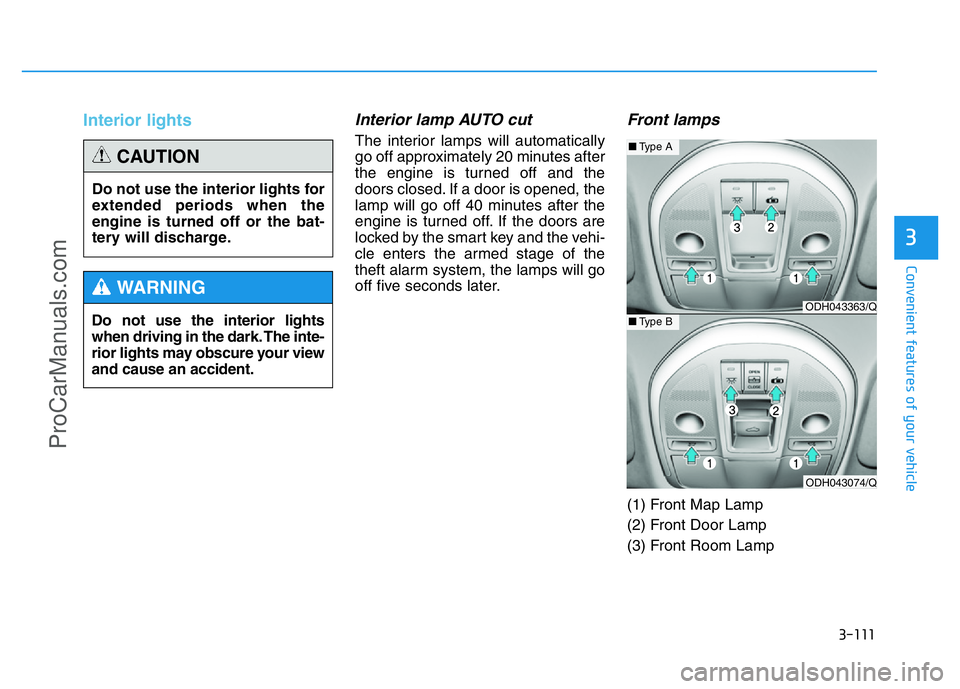
(1) Front Map Lamp
(2) Front Door Lamp
(3) Front Room Lamp Do not use the interior lights
when driving in the dark. The inte-
rior lights may obscure your view
and cause an accident.
WARNING
Do not use the interior lights for
extended periods when the
engine is turned off or the bat-
tery will discharge.
CAUTION
ODH043363/Q
ODH043074/Q
■Type A
■Type B
ProCarManuals.com
Page 280 of 546
5-4
Driving your vehicle
Before entering the vehicle
• Be sure all windows, outside mir-
ror(s), and outside lights are clean
and unobstructed.
• Remove frost, snow, or ice.
• Visually check the tires for uneven
wear and damage.
• Check under the vehicle for any
sign of leaks.
• Be sure there are no obstacles
behind you if you intend to back up.
Before starting
• Make sure the hood, the trunk, and
the doors are securely closed and
locked.
• Adjust the position of the seat and
steering wheel.
• Adjust the inside and outside
rearview mirrors.
• Verify all the lights work.
• Fasten your seatbelt. Check that all
passengers have fastened their
seatbelts.
• Check the gauges and indicators in
the instrument panel and the mes-
sages on the instrument display
when the Engine Start/Stop button
is in the ON position.
• Check that any items you are car-
rying are stored properly or fas-
tened down securely.
BEFORE DRIVING
To reduce the risk of SERIOUS
INJURY or DEATH, take the fol-
lowing precautions:
•ALWAYS wear your seat belt.
All passengers must be prop-
erly belted whenever the vehi-
cle is moving. For more infor-
mation, refer to “Seat Belts” in
chapter 2.
•Always drive defensively.
Assume other drivers or
pedestrians may be careless
and make mistakes.
•Stay focused on the task of
driving. Driver distraction can
cause accidents.
•Leave plenty of space
between you and the vehicle
in front of you.
WARNING
ProCarManuals.com