door lock HYUNDAI COUPE 2016 Owners Manual
[x] Cancel search | Manufacturer: HYUNDAI, Model Year: 2016, Model line: COUPE, Model: HYUNDAI COUPE 2016Pages: 475, PDF Size: 14.78 MB
Page 7 of 475

1
2
3
4
5
6
7
8I
IntroductionHow to use this manual / Fuel requirements / Vehicle break-in process / Vehicle data collection and event data recorders / Indicator symbols on t\
he instrument cluster
Your vehicle at a glance
Exterior overview / Interior overview / Instrument panel overview / Engi\
ne compartment
Safety features of your vehicle
Seats / Seat belts / Child restraint system / Air bag
Features of your vehicleKeys / Door locks / Trunk / Windows / Hood / Fuel filler lid / Sunroof / Steering wheel / Mirrors /
Instrument cluster / Multigauge / Lighting / Wipers & Washers / Climate control system / Etc.
Driving your vehicleBefore driving / Engine start/stop button / Transmission / Brake system / Cruise control system /
Winter driving / Vehicle load limit / Etc.
What to do in an emergencyRoad warning / Emergency while driving / Emergency starting / Engine overheat / TPMS / Flat tire / Towing / Etc.
MaintenanceEngine compartment / Maintenance service / Engine oil / Engine coolant /\
Brake fluid / Washer fluid /
Parking brake / Air cleaner / Wiper blades / Battery / Tire and wheels / Fuses / Light bulbs / Etc.
Specifications, Consumer information and Reporting safety defects
Index
table of contents
procarmanuals.com
Page 16 of 475
Your vehicle at a glance
22
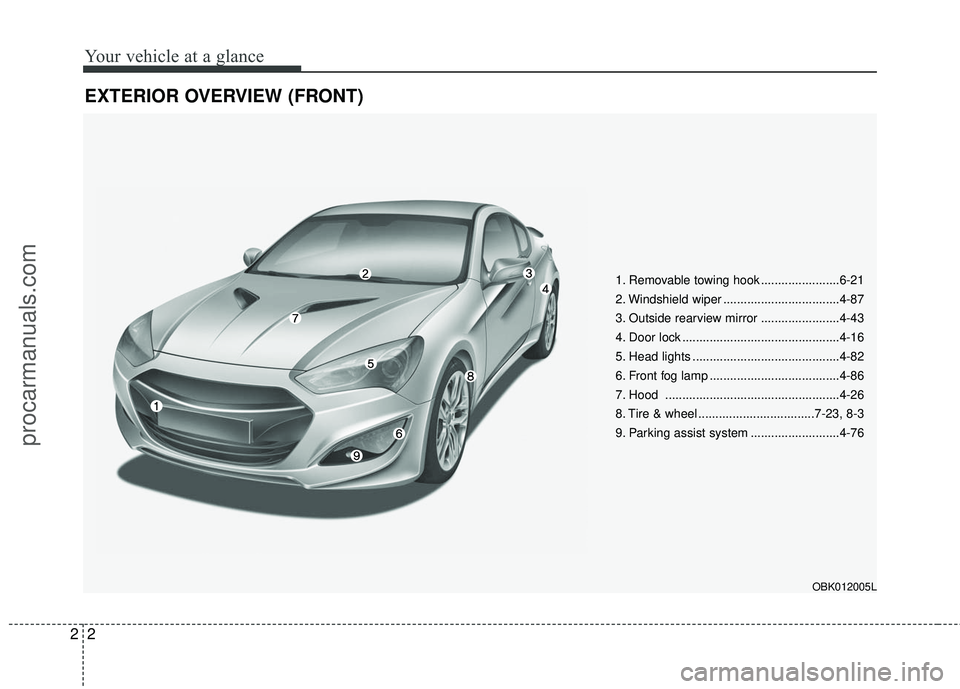
EXTERIOR OVERVIEW (FRONT)
1. Removable towing hook .......................6-21
2. Windshield wiper ..................................4-87
3. Outside rearview mirror .......................4-43
4. Door lock ..............................................4-16
5. Head lights ...........................................4-82
6. Front fog lamp ......................................4-86
7. Hood ...................................................4-26
8. Tire & wheel ..................................7-23, 8-3
9. Parking assist system ..........................4-76
OBK012005L
procarmanuals.com
Page 18 of 475
Your vehicle at a glance
42
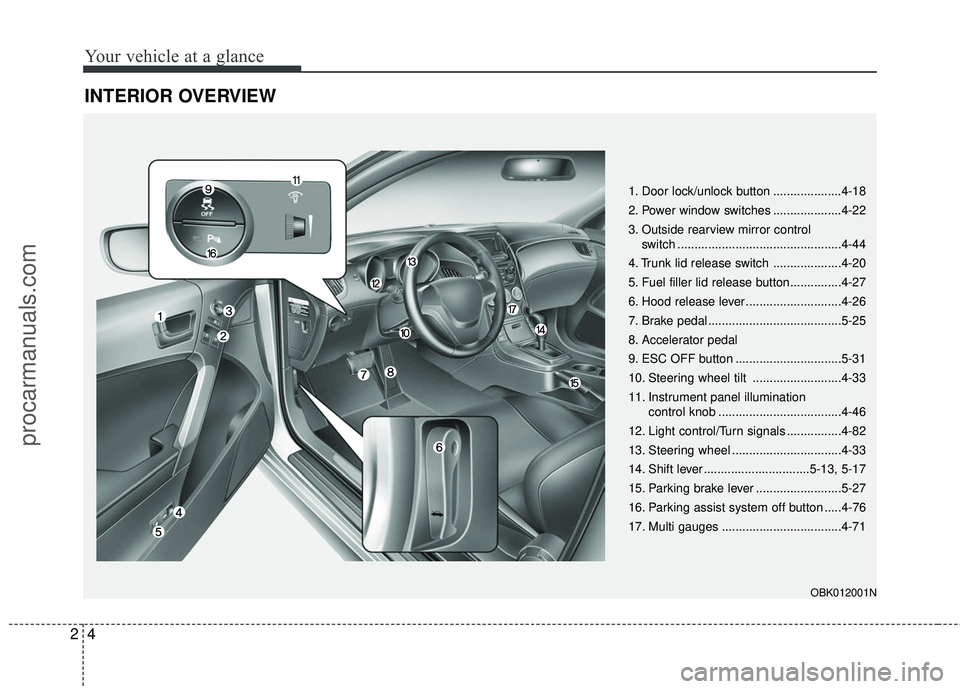
INTERIOR OVERVIEW
1. Door lock/unlock button ....................4-18
2. Power window switches ....................4-22
3. Outside rearview mirror control switch ................................................4-44
4. Trunk lid release switch ....................4-20
5. Fuel filler lid release button...............4-27
6. Hood release lever ............................4-26
7. Brake pedal .......................................5-25
8. Accelerator pedal
9. ESC OFF button ...............................5-31
10. Steering wheel tilt ..........................4-33
11. Instrument panel illumination control knob ....................................4-46
12. Light control/Turn signals ................4-82
13. Steering wheel ................................4-33
14. Shift lever ...............................5-13, 5-17
15. Parking brake lever .........................5-27
16. Parking assist system off button .....4-76
17. Multi gauges ...................................4-71
OBK012001N
procarmanuals.com
Page 38 of 475
Safety features of your vehicle
18
3
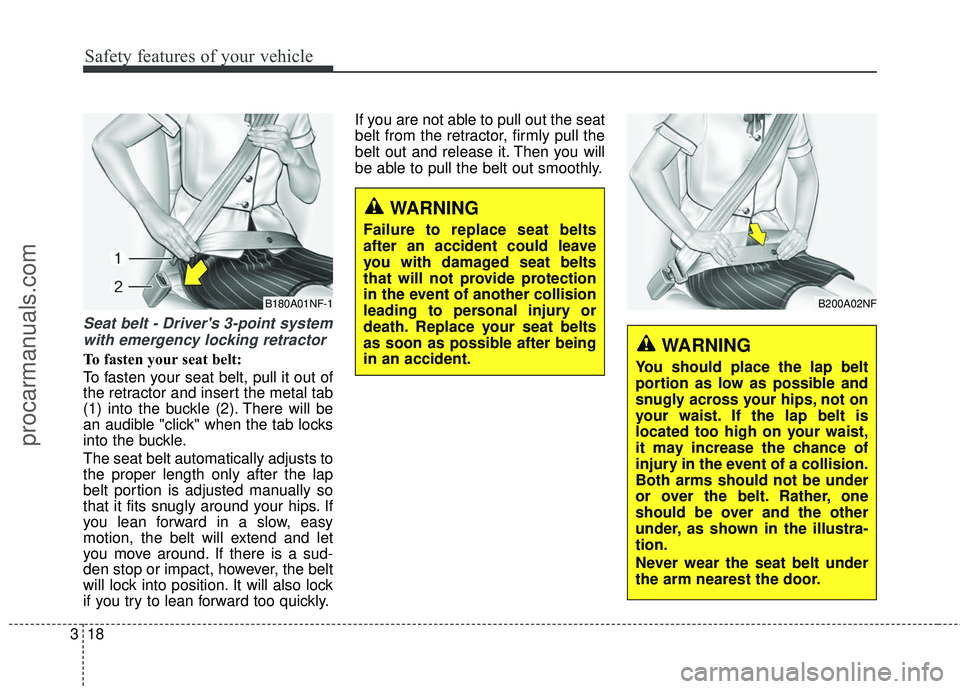
Seat belt - Driver's 3-point system
with emergency locking retractor
To fasten your seat belt:
To fasten your seat belt, pull it out of
the retractor and insert the metal tab
(1) into the buckle (2). There will be
an audible "click" when the tab locks
into the buckle.
The seat belt automatically adjusts to
the proper length only after the lap
belt portion is adjusted manually so
that it fits snugly around your hips. If
you lean forward in a slow, easy
motion, the belt will extend and let
you move around. If there is a sud-
den stop or impact, however, the belt
will lock into position. It will also lock
if you try to lean forward too quickly. If you are not able to pull out the seat
belt from the retractor, firmly pull the
belt out and release it. Then you will
be able to pull the belt out smoothly.
WARNING
Failure to replace seat belts
after an accident could leave
you with damaged seat belts
that will not provide protection
in the event of another collision
leading to personal injury or
death. Replace your seat belts
as soon as possible after being
in an accident.
B200A02NF
WARNING
You should place the lap belt
portion as low as possible and
snugly across your hips, not on
your waist. If the lap belt is
located too high on your waist,
it may increase the chance of
injury in the event of a collision.
Both arms should not be under
or over the belt. Rather, one
should be over and the other
under, as shown in the illustra-
tion.
Never wear the seat belt under
the arm nearest the door.
B180A01NF-1
procarmanuals.com
Page 84 of 475

Features of your vehicle
Keys . . . . . . . . . . . . . . . . . . . . . . . . . . . . . . . . . . . . \
. . 4-3
• Record your key number . . . . . . . . . . . . . . . . . . . . . . . 4-3
. . . . . . . . . . . . . . . . . . . . . . . . . . . . . . . . 4-3
. . . . . . . . . . . . . . . . . . . . . . . . . . . . 4-4
Smart key . . . . . . . . . . . . . . . . . . . . . . . . . . . . . . . . . 4-6
. . . . . . . . . . . . . . . . . . . . . . . . . . . 4-6
. . . . . . . . . . . . . . . . . . . . . . . . . 4-7
. . . . . . . . . . . . . . . . . . . . . . . . . . . 4-8
. . . . . . 4-10
Remote keyless entry . . . . . . . . . . . . . . . . . . . . . . . 4-11
. . . . . . . . . . 4-11
. . . . . . . . . . . . . . . . . . . . . . . 4-12
. . . . . . . . . . . . . . . . . . . . . . . . . . 4-13
Theft-alarm system . . . . . . . . . . . . . . . . . . . . . . . . 4-14
Door locks . . . . . . . . . . . . . . . . . . . . . . . . . . . . . . . . 4-16
. . . . . . . . . . . . . . . . . . . . . . . . . . . 4-16
. . . . . . . . . . . . . . . . . . . . . . . . . . . . . 4-18
. . . . . . . . . . . . . . . . . 4-19
Trunk . . . . . . . . . . . . . . . . . . . . . . . . . . . . . . . . . . . . \
4-20
Windows . . . . . . . . . . . . . . . . . . . . . . . . . . . . . . . . . 4-22
Hood. . . . . . . . . . . . . . . . . . . . . . . . . . . . . . . . . . . . \
. 4-26Fuel filler lid . . . . . . . . . . . . . . . . . . . . . . . . . . . . . . 4-27
Sunroof . . . . . . . . . . . . . . . . . . . . . . . . . . . . . . . . . . 4-30\
Steering wheel . . . . . . . . . . . . . . . . . . . . . . . . . . . . . 4-33
. . . . . . . . . . . . . . . . . . . . . . . . . . . . . . . 4-33
. . . . . . . . . . . . . . . . . . . . . 4-34
. . . . . . . . . . . . . . . . . . . . . . . . . . . . . . . . . . . . \
. . . 4-34
Mirrors . . . . . . . . . . . . . . . . . . . . . . . . . . . . . . . . . . 4-35\
. . . . . . . . . . . . . . . . . . . . . . . . 4-35
. . . . . . . . . . . . . . . . . . . . . . . 4-44
Instrument cluster . . . . . . . . . . . . . . . . . . . . . . . . . 4-45
. . . . . . . . . . . . . . . . . . 4-46
. . . . . . . . . . . . . . . . . . . . . . . . . . . . . . . . . . . . \
. 4-46
- Trip computer . . . . . . . . . . . . . . . . . . . . . . . . . . . . . . 4-49
- User settings mode . . . . . . . . . . . . . . . . . . . . . . . . . . 4-53
- LCD display warnings . . . . . . . . . . . . . . . . . . . . . . . 4-56
. . . . . . . 4-61
Multi gauge . . . . . . . . . . . . . . . . . . . . . . . . . . . . . . . 4-71
Rear parking assist system . . . . . . . . . . . . . . . . . . 4-73
Parking assist system . . . . . . . . . . . . . . . . . . . . . . . 4-76
Rear camera display . . . . . . . . . . . . . . . . . . . . . . . 4-80
Hazard warning flasher . . . . . . . . . . . . . . . . . . . . . 4-81
4
procarmanuals.com
Page 86 of 475
43
Features of your vehicle
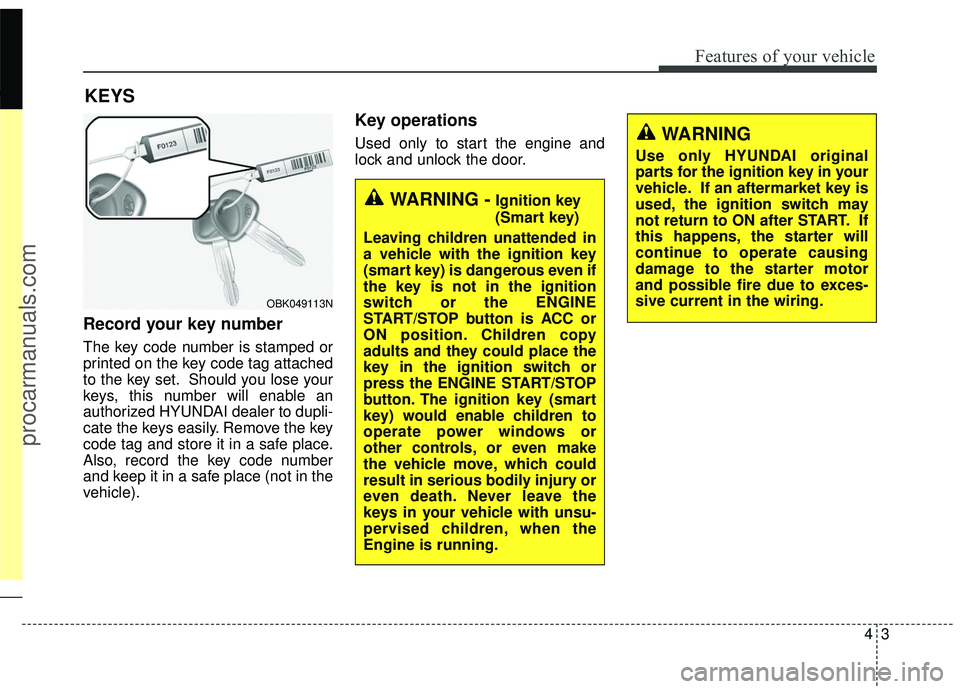
Record your key number
The key code number is stamped or
printed on the key code tag attached
to the key set. Should you lose your
keys, this number will enable an
authorized HYUNDAI dealer to dupli-
cate the keys easily. Remove the key
code tag and store it in a safe place.
Also, record the key code number
and keep it in a safe place (not in the
vehicle).
Key operations
Used only to start the engine and
lock and unlock the door.
KEYS
WARNING -Ignition key
(Smart key)
Leaving children unattended in
a vehicle with the ignition key
(smart key) is dangerous even if
the key is not in the ignition
switch or the ENGINE
START/STOP button is ACC or
ON position. Children copy
adults and they could place the
key in the ignition switch or
press the ENGINE START/STOP
button. The ignition key (smart
key) would enable children to
operate power windows or
other controls, or even make
the vehicle move, which could
result in serious bodily injury or
even death. Never leave the
keys in your vehicle with unsu-
pervised children, when the
Engine is running.
WARNING
Use only HYUNDAI original
parts for the ignition key in your
vehicle. If an aftermarket key is
used, the ignition switch may
not return to ON after START. If
this happens, the starter will
continue to operate causing
damage to the starter motor
and possible fire due to exces-
sive current in the wiring.
OBK049113N
procarmanuals.com
Page 89 of 475
Features of your vehicle
64
SMART KEY (IF EQUIPPED)
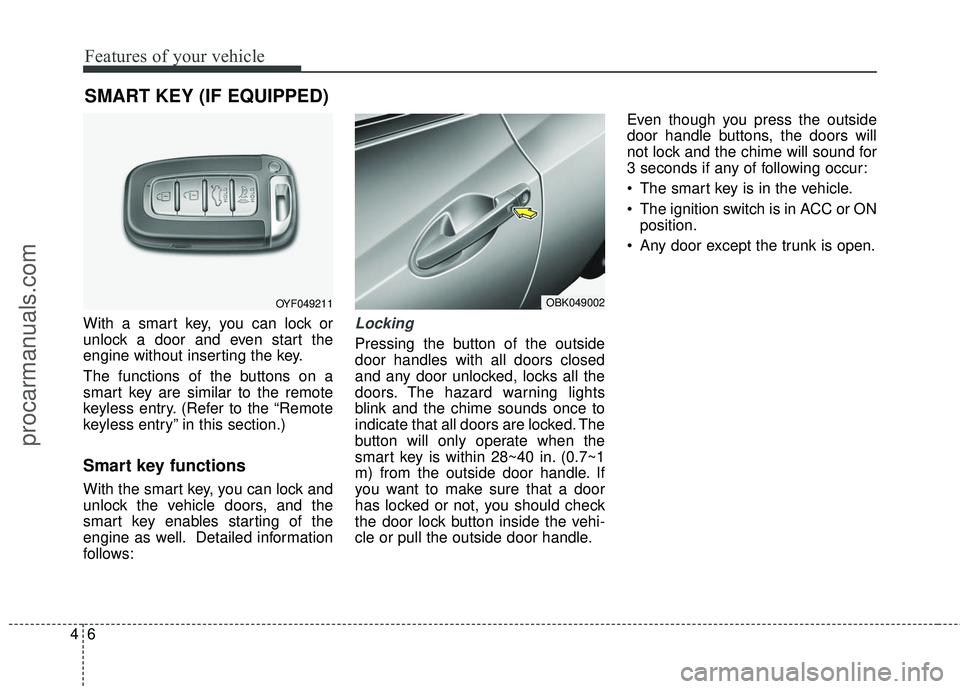
With a smart key, you can lock or
unlock a door and even start the
engine without inserting the key.
The functions of the buttons on a
smart key are similar to the remote
keyless entry. (Refer to the “Remote
keyless entry” in this section.)
Smart key functions
With the smart key, you can lock and
unlock the vehicle doors, and the
smart key enables starting of the
engine as well. Detailed information
follows:
Locking
Pressing the button of the outside
door handles with all doors closed
and any door unlocked, locks all the
doors. The hazard warning lights
blink and the chime sounds once to
indicate that all doors are locked. The
button will only operate when the
smart key is within 28~40 in. (0.7~1
m) from the outside door handle. If
you want to make sure that a door
has locked or not, you should check
the door lock button inside the vehi-
cle or pull the outside door handle.Even though you press the outside
door handle buttons, the doors will
not lock and the chime will sound for
3 seconds if any of following occur:
The smart key is in the vehicle.
The ignition switch is in ACC or ON
position.
Any door except the trunk is open.
OYF049211OBK049002
procarmanuals.com
Page 90 of 475
47
Features of your vehicle
Unlocking
Pressing the button of the driver’s
outside door handle with all doors
closed and locked, unlocks the dri-
ver’s door. The hazard warning lights
blink and the chime sounds twice to
indicate that the driver’s door is
unlocked. All doors are unlocked if
the button is pressed once more
within 4 seconds. The hazard warn-
ing lights will blink and the chime will
sound twice to indicate that all doors
are unlocked.
Pressing the button of the front pas-
senger’s outside door handle with all
doors closed and locked, unlocks all
doors. The hazard warning lights
blink and the chime sounds once to
indicate that all doors are unlocked.
The button will only operate when
the smart key is within 28~40 in.
(0.7~1 m) from the outside door han-
dle.
When the smart key is recognized in
the area of 28~40 in. (0.7~1 m) from
the front outside door handle, other
people can also open the doors with-
out possession of the smart key.
Start-up
You can start the engine without
inserting the key. For detailed infor-
mation refer to the “Engine start/stop
button” in section 5.
Smart key precautions
✽ ✽NOTICE
• If, for some reason, you happen to
lose your smart key, you will not
be able to start the engine. Tow
the vehicle, if necessary, and con-
tact an authorized HYUNDAI
dealer.
• A maximum of 2 smart keys can be registered to a single vehicle. If
you lose a smart key, you should
immediately take the vehicle and
key to your authorized HYUNDAI
dealer to protect it from potential
theft.
• The smart key will not work if any of following occur:
- The smart key is close to a radiotransmitter such as a radio sta-
tion or an airport which can
interfere with normal operation
of the smart key.
- You keep the smart key near a mobile two-way radio system or
a cellular phone.
- Another vehicle’s smart key is being operated close to your
vehicle. (Continued)
procarmanuals.com
Page 91 of 475
Features of your vehicle
84
(Continued)When the smart key does not work
correctly, open and close the door
with the mechanical key. If you
have a problem with the smart
key, contact an authorized
HYUNDAI dealer.
• If the smart key is in close proxim- ity to your cell phone or smart
phone, the signal from the smart
key could be blocked by normal
operation of your cell phone or
smart phone. This is especially
important when the phone is
active such as making call, receiv-
ing calls, text messaging, and/or
sending/ receiving emails. Avoid
placing the smart key and your
cell phone or smart phone in the
same pants or jacket pocket and
maintain adequate distance
between the two devices. This device complies with Part 15
of the FCC rules.
Operation is subject to the following
two conditions:
1. This device may not cause harm-
ful interference, and
2. This device must accept any inter- ference received, including inter-
ference that may cause undesired
operation.Battery replacement
A smart key battery should last for
several years, but if the smart key is
not working properly, try replacing
the battery with a new one. If you are
unsure how to use your smart key or
replace the battery, contact an
authorized HYUNDAI dealer.
CAUTION
Keep the smart key away fromwater or any liquid and fire. Ifthe inside of the smart key getsdamp (due to drinks or mois-ture), or is heated, internal cir-cuit may malfunction, excludingthe car from the warranty.
CAUTION
Changes or modifications not
expressly approved by the partyresponsible for compliancecould void the user’s authorityto operate the equipment. If thekeyless entry system is inopera-tive due to changes or modifica-tions not expressly approved bythe party responsible for com-pliance, it will not be covered byyour manufacturer’s vehiclewarranty.
procarmanuals.com
Page 93 of 475
Features of your vehicle
10
4
✽
✽
NOTICE
• Using the wrong battery can cause
the smart key to malfunction. Be
sure to use the correct battery.
• Circuits inside the smart key may develop problems when dropped,
exposed to moisture or static elec-
tricity.
• If you suspect that your smart key might have sustained some dam-
age, or you feel your smart key is
not working correctly, contact an
authorized HYUNDAI dealer.
Door lock/unlock in an emer-
gency situation
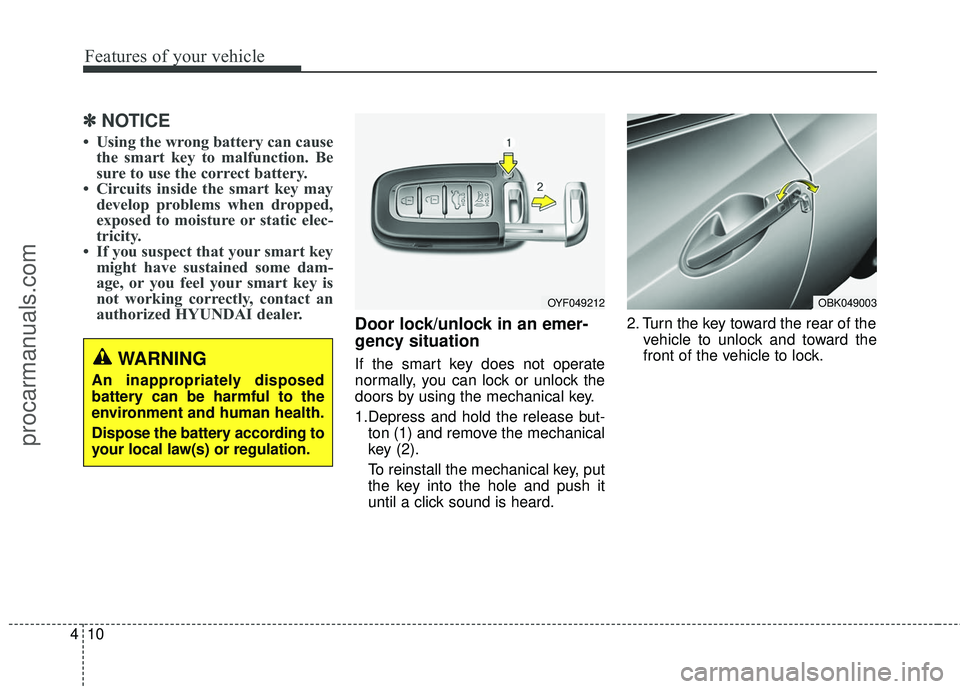
If the smart key does not operate
normally, you can lock or unlock the
doors by using the mechanical key.
1.Depress and hold the release but-
ton (1) and remove the mechanical
key (2).
To reinstall the mechanical key, put
the key into the hole and push it
until a click sound is heard. 2. Turn the key toward the rear of the
vehicle to unlock and toward the
front of the vehicle to lock.
OYF049212OBK049003
WARNING
An inappropriately disposed
battery can be harmful to the
environment and human health.
Dispose the battery according to
your local law(s) or regulation.
procarmanuals.com