steering wheel Hyundai Creta 2018 User Guide
[x] Cancel search | Manufacturer: HYUNDAI, Model Year: 2018, Model line: Creta, Model: Hyundai Creta 2018Pages: 472, PDF Size: 11.87 MB
Page 83 of 472
2-63
Safety system of your vehicle
2
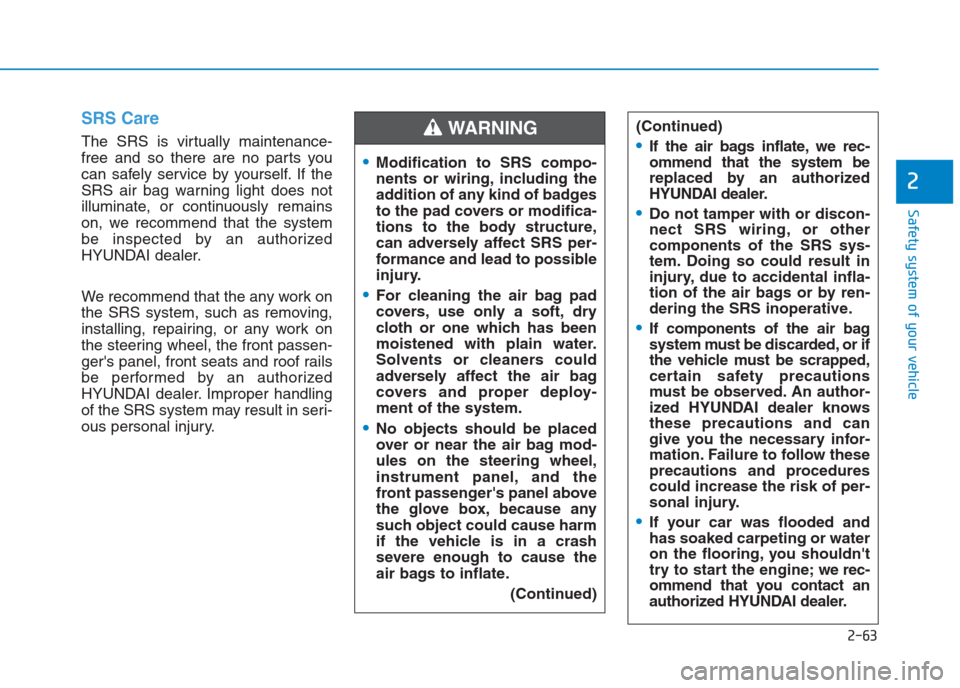
SRS Care
The SRS is virtually maintenance-
free and so there are no parts you
can safely service by yourself. If the
SRS air bag warning light does not
illuminate, or continuously remains
on, we recommend that the system
be inspected by an authorized
HYUNDAI dealer.
We recommend that the any work on
the SRS system, such as removing,
installing, repairing, or any work on
the steering wheel, the front passen-
ger's panel, front seats and roof rails
be performed by an authorized
HYUNDAI dealer. Improper handling
of the SRS system may result in seri-
ous personal injury.(Continued)If the air bags inflate, we rec-
ommend that the system be
replaced by an authorized
HYUNDAI dealer.
Do not tamper with or discon-
nect SRS wiring, or other
components of the SRS sys-
tem. Doing so could result in
injury, due to accidental infla-
tion of the air bags or by ren-
dering the SRS inoperative.
If components of the air bag
system must be discarded, or if
the vehicle must be scrapped,
certain safety precautions
must be observed. An author-
ized HYUNDAI dealer knows
these precautions and can
give you the necessary infor-
mation. Failure to follow these
precautions and procedures
could increase the risk of per-
sonal injury.
If your car was flooded and
has soaked carpeting or water
on the flooring, you shouldn't
try to start the engine; we rec-
ommend that you contact an
authorized HYUNDAI dealer.
Modification to SRS compo-
nents or wiring, including the
addition of any kind of badges
to the pad covers or modifica-
tions to the body structure,
can adversely affect SRS per-
formance and lead to possible
injury.
For cleaning the air bag pad
covers, use only a soft, dry
cloth or one which has been
moistened with plain water.
Solvents or cleaners could
adversely affect the air bag
covers and proper deploy-
ment of the system.
No objects should be placed
over or near the air bag mod-
ules on the steering wheel,
instrument panel, and the
front passenger's panel above
the glove box, because any
such object could cause harm
if the vehicle is in a crash
severe enough to cause the
air bags to inflate.
(Continued)
WARNING
Page 86 of 472
Convenient features of your vehicle
Accessing your vehicle .........................................3-3
Remote key .........................................................................3-3
Remote key precautions..................................................3-5
Smart key ............................................................................3-7
Smart key precautions...................................................3-10
Immobilizer system .........................................................3-12
Door locks .............................................................3-13
Operating door locks from outside the vehicle ......3-13
Operating door locks from inside the vehicle .........3-15
Auto door lock/unlock features..................................3-17
Child-protector rear door locks ..................................3-17
Theft-alarm system.............................................3-18
Windows ................................................................3-19
Power windows ................................................................3-19
Sunroof..................................................................3-24
Sunroof opening and closing .......................................3-25
Tilting the sunroof ..........................................................3-25
Sunshade ...........................................................................3-26
Resetting the sunroof ....................................................3-26
Sunroof open warning ...................................................3-27
Hood.......................................................................3-28
Opening the hood ...........................................................3-28
Closing the hood .............................................................3-29
Fuel filler door .....................................................3-30
Opening the fuel filler door .........................................3-30
Closing the fuel filler door ...........................................3-31
Tailgate ..................................................................3-33
Opening the tailgate .......................................................3-33
Closing the tailgate .........................................................3-33
Emergency tailgate safety release .............................3-34
Steering wheel......................................................3-36
Electric power steering (EPS) ......................................3-36
Tilt steering.......................................................................3-37
Horn ....................................................................................3-37
Mirrors ...................................................................3-38
Inside rearview mirror....................................................3-38
Outside rearview mirror ................................................3-40
Instrument cluster................................................3-43
Instrument Cluster Control............................................3-44
Gauges ...............................................................................3-45
Transaxle shift indicator ...............................................3-48
Warning and indicator lights ........................................3-50
Warning Messages (for Type B) .................................3-61
LCD display .......................................................................3-67
Trip computer ...................................................................3-74
3
Page 121 of 472
3-36
Convenient features of your vehicle
Electric power steering (EPS)
(if equipped)
The system assists you with steering
the vehicle. If the engine is off or if
the power steering system becomes
inoperative, the vehicle may still be
steered, but it will require increased
steering effort.
Also, the steering effort becomes
heavier as the vehicle’s speed
increases and becomes lighter as
the vehicle’s speed decreases for
better control of the steering wheel.
Should you notice any change in the
effort required to steer during normal
vehicle operation, we recommend
that the system be checked by an
authorized HYUNDAI dealer.If the Electric Power Steering
System does not operate normal-
ly, the warning light ( ) will illu-
minate on the instrument cluster.
The steering wheel may become
difficult to control or operate. Take
your vehicle to an authorized
HYUNDAI dealer and have the sys-
tem checked as soon as possible.
Information
The following symptoms may occur
during normal vehicle operation:
• The steering effort may be high
immediately after placing the igni-
tion switch in the ON position.
This happens as the system per-
forms the EPS system diagnostics.
When the diagnostics is completed,
the steering wheel will return to its
normal condition.
• A click noise may be heard from the
EPS relay after the ignition switch is
placed to the ON or LOCK/OFF
position.
• Motor noise may be heard when the
vehicle is at stop or at a low driving
speed.
• When you operate the steering
wheel in low temperature, abnormal
noise may occur. If temperature
rises, the noise will disappear. This
is a normal condition.
iNOTICE
S ST
TE
EE
ER
RI
IN
NG
G
W
WH
HE
EE
EL
L
Page 122 of 472
3-37
Convenient features of your vehicle
3
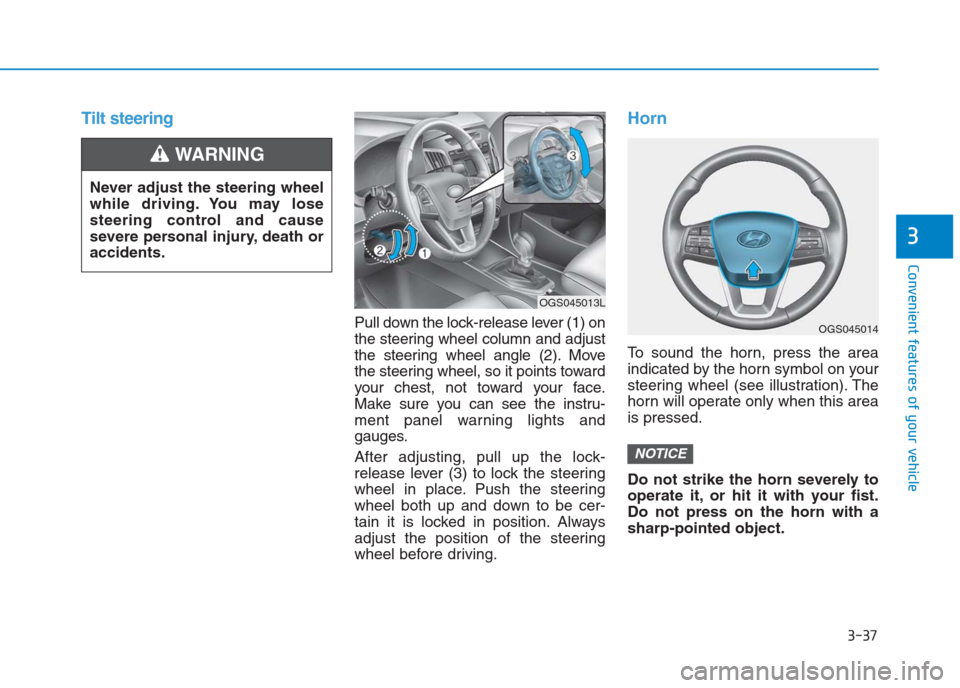
Tilt steering
Pull down the lock-release lever (1) on
the steering wheel column and adjust
the steering wheel angle (2). Move
the steering wheel, so it points toward
your chest, not toward your face.
Make sure you can see the instru-
ment panel warning lights and
gauges.
After adjusting, pull up the lock-
release lever (3) to lock the steering
wheel in place. Push the steering
wheel both up and down to be cer-
tain it is locked in position. Always
adjust the position of the steering
wheel before driving.
Horn
To sound the horn, press the area
indicated by the horn symbol on your
steering wheel (see illustration). The
horn will operate only when this area
is pressed.
Do not strike the horn severely to
operate it, or hit it with your fist.
Do not press on the horn with a
sharp-pointed object.
NOTICE
Never adjust the steering wheel
while driving. You may lose
steering control and cause
severe personal injury, death or
accidents.
WARNING
OGS045014
OGS045013L
Page 147 of 472
3-62
Convenient features of your vehicle
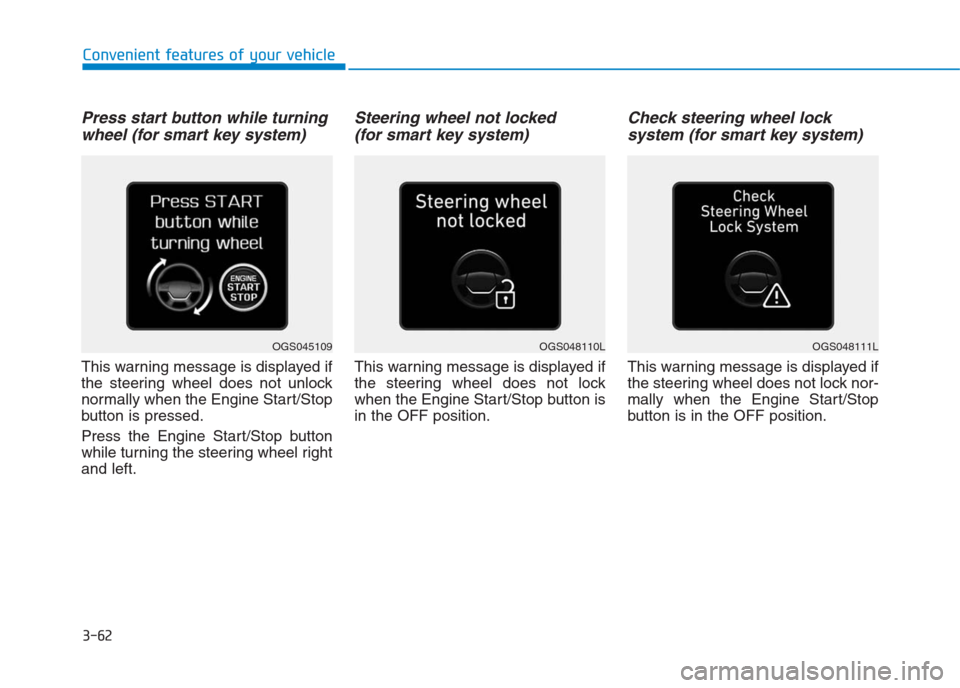
Press start button while turning
wheel (for smart key system)
This warning message is displayed if
the steering wheel does not unlock
normally when the Engine Start/Stop
button is pressed.
Press the Engine Start/Stop button
while turning the steering wheel right
and left.
Steering wheel not locked
(for smart key system)
This warning message is displayed if
the steering wheel does not lock
when the Engine Start/Stop button is
in the OFF position.
Check steering wheel lock
system (for smart key system)
This warning message is displayed if
the steering wheel does not lock nor-
mally when the Engine Start/Stop
button is in the OFF position.
OGS048110LOGS048111LOGS045109
Page 160 of 472
3-75
Convenient features of your vehicle
3
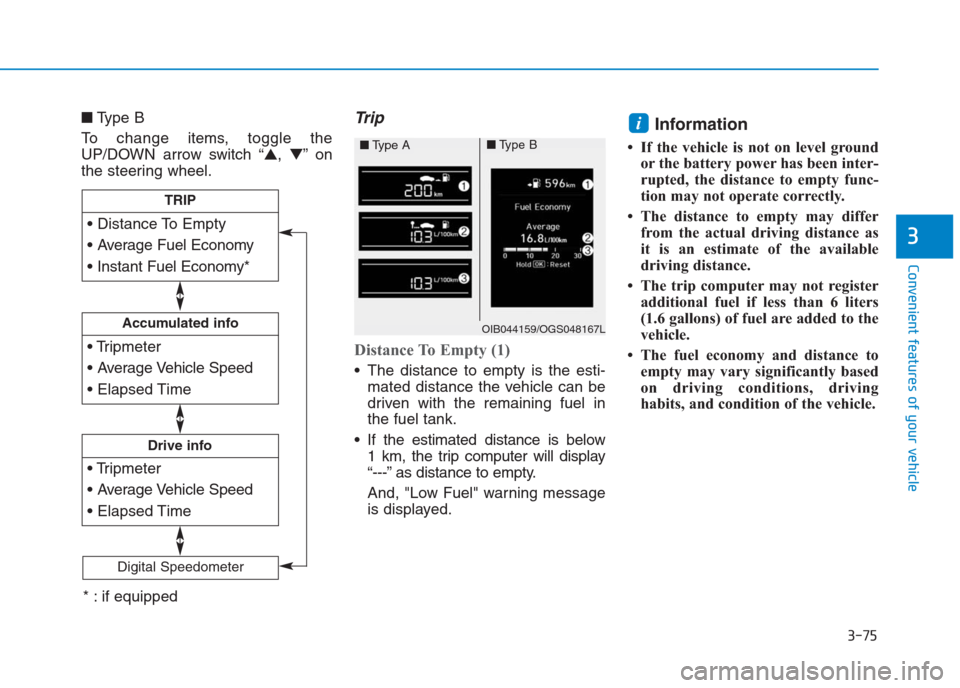
■Type B
To change items, toggle the
UP/DOWN arrow switch “▲,▼”on
the steering wheel.Trip
Distance To Empty (1)
The distance to empty is the esti-
mated distance the vehicle can be
driven with the remaining fuel in
the fuel tank.
If the estimated distance is below
1 km, the trip computer will display
“---” as distance to empty.
And, "Low Fuel" warning message
is displayed.
Information
• If the vehicle is not on level ground
or the battery power has been inter-
rupted, the distance to empty func-
tion may not operate correctly.
• The distance to empty may differ
from the actual driving distance as
it is an estimate of the available
driving distance.
• The trip computer may not register
additional fuel if less than 6 liters
(1.6 gallons) of fuel are added to the
vehicle.
• The fuel economy and distance to
empty may vary significantly based
on driving conditions, driving
habits, and condition of the vehicle.
i
Accumulated info
Drive info
TRIP
Digital Speedometer
OIB044159/OGS048167L
■Type A■Type B
* : if equipped
Page 161 of 472
3-76
Convenient features of your vehicle
Average Fuel Economy (2)
The average fuel economy is calcu-
lated by the total driving distance
and fuel consumption since the last
average fuel economy reset.
The average fuel economy can be
reset both manually and automati-
cally.
Manual reset
To clear the average fuel economy
manually, press the OK button (or
RESET button) on the steering wheel
for more than 1 second when the
average fuel economy is displayed.
Automatic reset
To automatically reset the average
fuel economy after refueling, select
the “After Refueling” feature in the
User Settings Mode on the LCD dis-
play (Refer to "LCD Display“ in this
chapter).
If the “After Refueling” feature is
selected, the average fuel economy
will be cleared to zero (---), when
driving speed exceeds 1km/h, after
refueling more than 6 liters.
Information
The vehicle must be driven for a min-
imum of 300 meters since the last igni-
tion key cycle before the average fuel
economy is recalculated.
Instant Fuel Economy (3)
This mode displays the instantaneous
fuel economy while driving when the
vehicle speed is greater than 10 km/h.
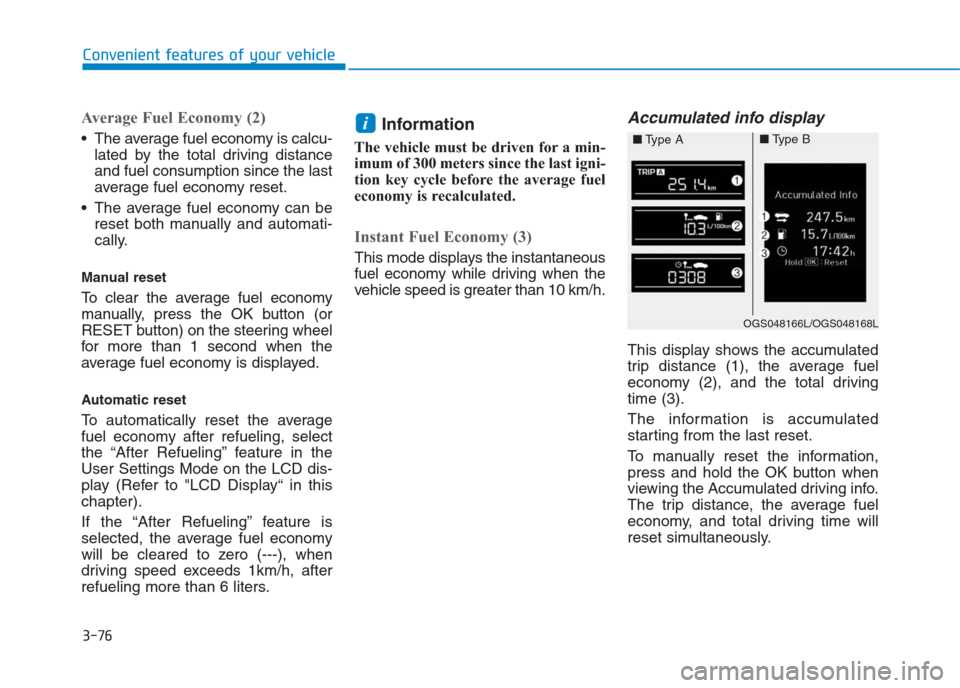
Accumulated info display
This display shows the accumulated
trip distance (1), the average fuel
economy (2), and the total driving
time (3).
The information is accumulated
starting from the last reset.
To manually reset the information,
press and hold the OK button when
viewing the Accumulated driving info.
The trip distance, the average fuel
economy, and total driving time will
reset simultaneously.
i
OGS048166L/OGS048168L
■Type A■Type B
Page 215 of 472
Multimedia System
Multimedia system .................................................4-2
USB and iPod®port ..........................................................4-2
Antenna ...............................................................................4-2
Steering wheel audio control .........................................4-3
Bluetooth
®Wireless Technology Hands-Free ...........4-4
How vehicle audio works ................................................4-5
Audio (Without Touch Screen) ............................4-8
Feature of Your Audio .....................................................4-9
Radio...................................................................................4-14
Radio Mode.......................................................................4-14
Media..................................................................................4-15
Phone .................................................................................4-22
Setup ..................................................................................4-30
Audio (With Touch Screen) ................................4-33
Feature of Your Audio ...................................................4-34
Radio...................................................................................4-38
Media..................................................................................4-40
Phone ................................................................................4-49
Setup ..................................................................................4-57
Declaration of conformity ..................................4-59
CE REd For EU .................................................................4-59
FCC Warning .....................................................................4-60
IFETEL for Mexico ..........................................................4-61
4
Page 217 of 472
4-3
Multimedia System
4
Type B (if equipped)
Along with AM and FM broadcast sig-
nals, the shark fin antenna will receive
the transmit data.
(for example : GPS (Global Positioning
System)
Before entering a place with a
low height clearance, be sure
that the antenna is removed.
Be sure to remove the antenna
before washing the vehicle in an
automatic car wash or it may be
damaged.
(Continued)(Continued)
When reinstalling your antenna,
it is important that it is fully tight-
ened and adjusted to the upright
position to ensure proper recep-
tion. But it could be removed
when parking the vehicle.
Installation of aftermarket antenna
may result in water leakage, wind
noise, rattling & improper radio
operation. We recommend to use
the antenna available with an
authorized HYUNDAI dealer.
Information
Some models do not have audio (plas-
tic blanking cover) system, and will
not supply radio main cable. Thus if
you want to insert Aftermarket audio
or OEM audio to listen radio broad-
casting service, we recommend to use
the feeder cable available with an
authorized HYUNDAI dealer.
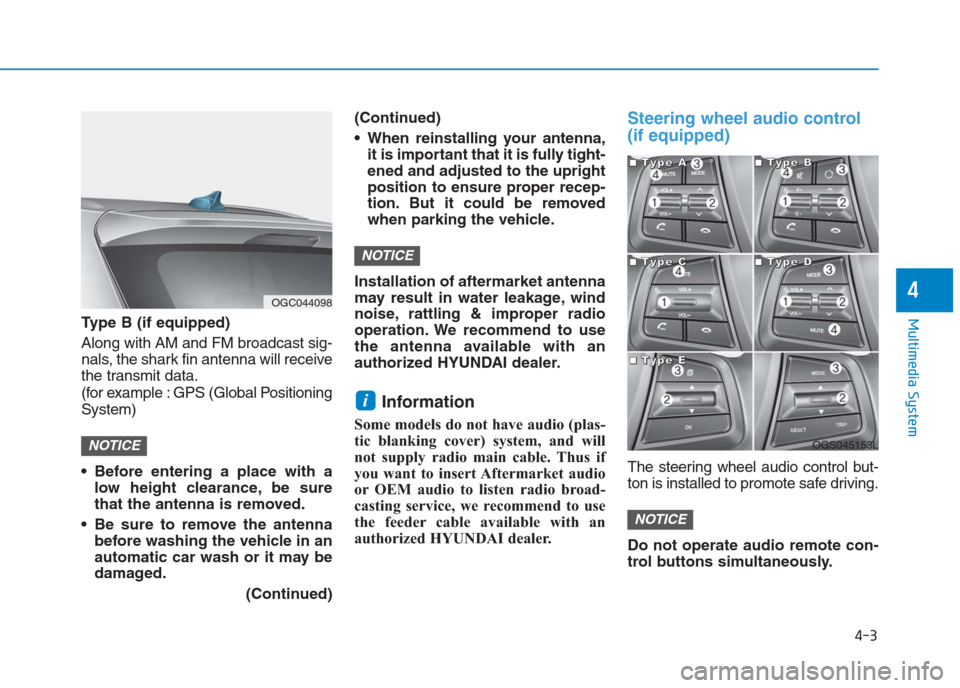
Steering wheel audio control
(if equipped)
The steering wheel audio control but-
ton is installed to promote safe driving.
Do not operate audio remote con-
trol buttons simultaneously.
NOTICE
i
NOTICE
NOTICE
OGC044098
OGS045153L
■ ■ ■ ■T
T T T
y y y y
p p p p
e e e e
A A A A■
■ ■ ■T
T T T
y y y y
p p p p
e e e e
B B B B
■
■ ■ ■T
T T T
y y y y
p p p p
e e e e
C C C C■
■ ■ ■T
T T T
y y y y
p p p p
e e e e
D D D D
■
■ ■ ■T
T T T
y y y y
p p p p
e e e e
E E E E
Page 225 of 472
4-11
Multimedia System
4
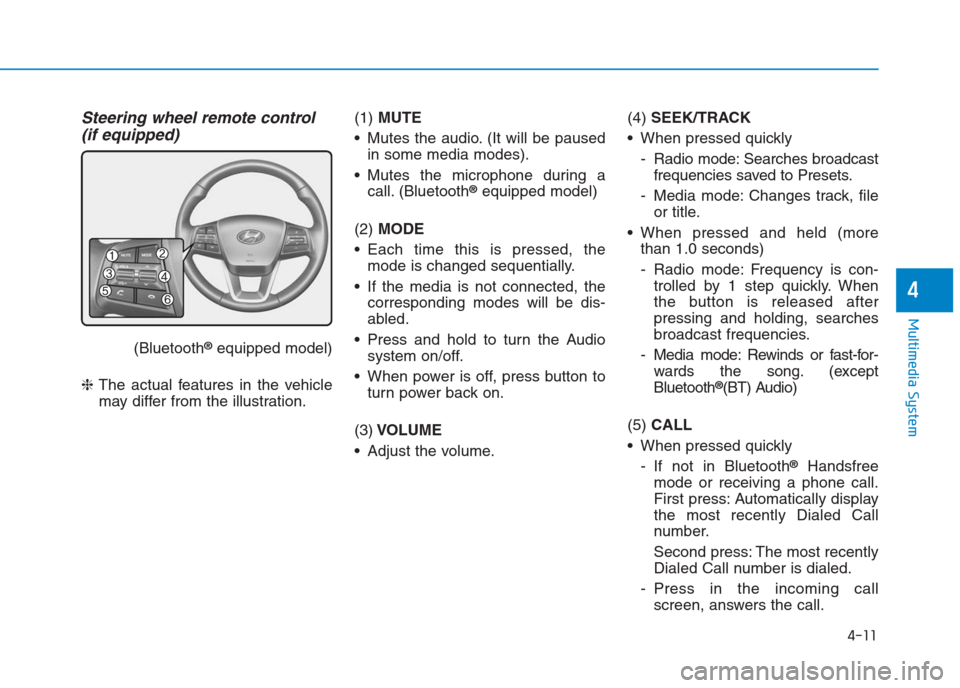
Steering wheel remote control
(if equipped)
(Bluetooth®equipped model)
❈The actual features in the vehicle
may differ from the illustration.(1) MUTE
Mutes the audio. (It will be paused
in some media modes).
Mutes the microphone during a
call. (Bluetooth
®equipped model)
(2) MODE
Each time this is pressed, the
mode is changed sequentially.
If the media is not connected, the
corresponding modes will be dis-
abled.
Press and hold to turn the Audio
system on/off.
When power is off, press button to
turn power back on.
(3)VOLUME
Adjust the volume.(4) SEEK/TRACK
When pressed quickly
- Radio mode: Searches broadcast
frequencies saved to Presets.
- Media mode: Changes track, file
or title.
When pressed and held (more
than 1.0 seconds)
- Radio mode: Frequency is con-
trolled by 1 step quickly. When
the button is released after
pressing and holding, searches
broadcast frequencies.
- Media mode: Rewinds or fast-for-
wards the song. (except
Bluetooth
®(BT) Audio)
(5) CALL
When pressed quickly
- If not in Bluetooth
®Handsfree
mode or receiving a phone call.
First press: Automatically display
the most recently Dialed Call
number.
Second press: The most recently
Dialed Call number is dialed.
- Press in the incoming call
screen, answers the call.