USB Hyundai Creta 2018 Owner's Guide
[x] Cancel search | Manufacturer: HYUNDAI, Model Year: 2018, Model line: Creta, Model: Hyundai Creta 2018Pages: 472, PDF Size: 11.87 MB
Page 258 of 472
![Hyundai Creta 2018 Owners Guide 4-44
Multimedia System
Playing in random order
On the USB mode screen, select
[Shuffle]. The shuffle play mode is
activated or deactivated each time
you press it. When you activate the
shuffle mode, t](/img/35/14530/w960_14530-257.png "Hyundai Creta 2018 Owners Guide 4-44
Multimedia System
Playing in random order
On the USB mode screen, select
[Shuffle]. The shuffle play mode is
activated or deactivated each time
you press it. When you activate the
shuffle mode, t")
4-44
Multimedia System
Playing in random order
On the USB mode screen, select
[Shuffle]. The shuffle play mode is
activated or deactivated each time
you press it. When you activate the
shuffle mode, the corresponding
mode icon will be displayed on the
screen.
Menu
Select [Menu], and select the desired
function.
Information: Detailed information
on the currently playing song is dis-
played.
Sound Settings: Audio sound set-
tings can be changed.
Information
- Using the iPod®Devices
• To use the audio system’s iPod
®con-
trol function, use the dedicated
cable provided with your iPod
®.
• Connecting the iPod
®to the vehicle
during play may result in a loud
noise that lasts about one to two sec-
onds. Connect the iPod
®to the vehi-
cle after stopping or pausing play.
• Connect the iPod
®with the vehicle in
the ACC ON state to begin charging.
• When connecting the iPod
®cable,
be sure to fully push the cable into
the port.
• When Equalizer effects are enabled
simultaneously on external devices,
such as iPod
®s and the audio sys-
tem, the Equalizer effects may over-
lap, causing sound quality deterio-
ration or distortion. Deactivate the
Equalizer function for all external
devices, if possible.
• There may be noise if the audio sys-
tem is used with an iPod
®. In these
cases, disconnect the iPod®or exter-
nal device from the power jack.
(Continued)(Continued)
• Play may be interrupted, or device
malfunctions may occur depending
on the characteristics of your
iPod
®/iPhone®/iPad®.
• Play may fail if your iPhone
®is con-
nected through both Bluetooth®and
USB. In this case, select Dock con-
nector or Bluetooth
®on your
iPhone®to change the sound output
settings.
• If your software version does not
support the communication proto-
col or your iPod
®is not recognized
due to device failure, anomalies or
defects, iPod
®mode cannot be used.
• iPod
®nano (5th generation) devices
may not be recognized if the battery
is low. Charge sufficiently before use.
• The search and song play order in
the iPod
®device may be different
from the search order in the audio
system.
• If the iPod
®has failed due to an
internal defect, please reset the
iPod
®(consult your iPod®manual).
(Continued)
i
Page 259 of 472
4-45
Multimedia System
4
(Continued)
• Depending on the software version,
the iPod
®may fail to sync with the
system. If the media is removed or
disconnected before recognition, the
previous mode may not be restored
(iPad
®cannot be charged).
• Cables other than the 1-meter cable
provided with iPod
®/iPhone®/iPad®
products may not be recognized.
• When other music apps are used on
your iPod
®, the system sync func-
tion may fail due to malfunction of
the iPod
®application.
iPod®
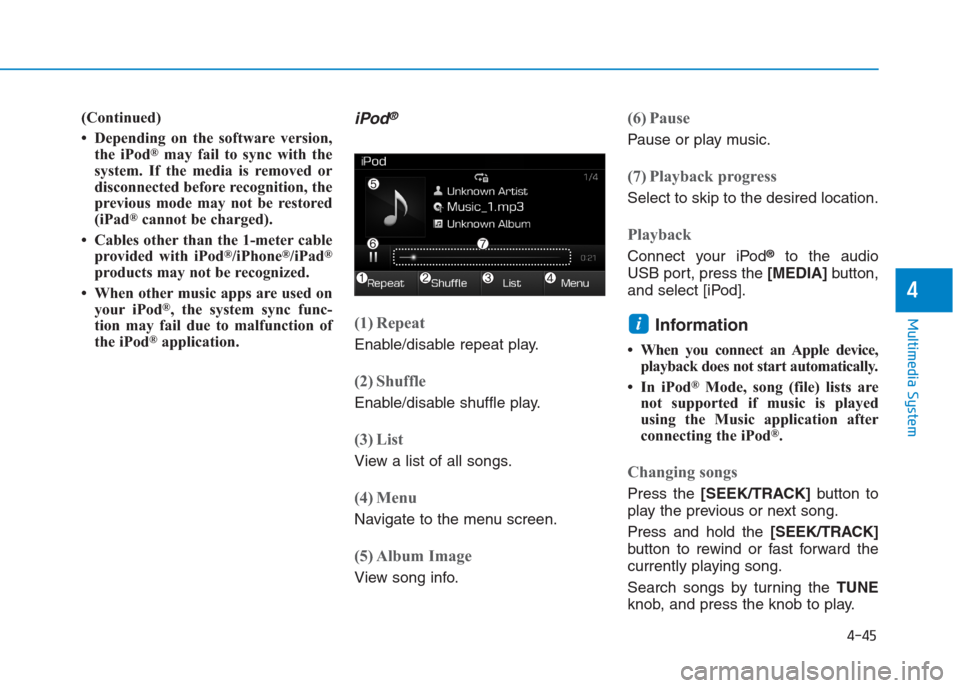
(1) Repeat
Enable/disable repeat play.
(2) Shuffle
Enable/disable shuffle play.
(3) List
View a list of all songs.
(4) Menu
Navigate to the menu screen.
(5) Album Image
View song info.
(6) Pause
Pause or play music.
(7) Playback progress
Select to skip to the desired location.
Playback
Connect your iPod®to the audio
USB port, press the [MEDIA]button,
and select [iPod].
Information
• When you connect an Apple device,
playback does not start automatically.
• In iPod
®Mode, song (file) lists are
not supported if music is played
using the Music application after
connecting the iPod
®.
Changing songs
Press the [SEEK/TRACK]button to
play the previous or next song.
Press and hold the [SEEK/TRACK]
button to rewind or fast forward the
currently playing song.
Search songs by turning the TUNE
knob, and press the knob to play.
i
Page 469 of 472
I-5
If the engine overheats ...................................................6-8
If the engine will not start ..............................................6-4
If the engine doesn't turn over or turns over ..............6-4
If the engine turns over normally but doesn't start ......6-4
If you have a flat tire ....................................................6-16
Changing tires ...........................................................6-17
Jack and tools ...........................................................6-16
Jack label ...................................................................6-21
Removing and storing the spare tire ..........................6-16
Ignition switch ................................................................5-5
Engine Start/Stop button ..............................................5-9
Key ignition switch......................................................5-5
In case of an emergency while driving ..........................6-3
If the engine stalls at a crossroad or crossing..............6-3
If the engine stalls while driving .................................6-3
If you have a flat tire while driving.............................6-3
Instrument cluster .........................................................3-43
Gauges .......................................................................3-45
Instrument Cluster Control ........................................3-44
LCD display ...............................................................3-67
Transaxle shift indicator ............................................3-48
Trip computer ............................................................3-74
Warning and indicator lights......................................3-50
Warning Messages (for Type B) ................................3-61Instrument panel overview (I) ........................................1-6
Instrument panel overview (II) .......................................1-7
Interior features...........................................................3-122
Ashtray .....................................................................3-123
Cargo area cover ......................................................3-129
Cigarette lighter .......................................................3-122
Clothes hanger .........................................................3-127
Cup holder ...............................................................3-124
Digital clock.............................................................3-122
Floor mat anchor(s) .................................................3-127
Luggage net holder ..................................................3-128
Power outlet/USB charger .......................................3-125
Sunvisor ...................................................................3-125
Interior overview (I) .......................................................1-4
Interior overview (II) ......................................................1-5
Jump starting...................................................................6-5
I
Index
I
J
Page 470 of 472

I-6
Light........................................................................\
......3-78Exterior lights ............................................................3-78
Interior lights .............................................................3-85
Light bulbs ....................................................................7-77\
Headlight, position light, turn signal light, and front fog light bulb replacement .......................7-78
High mounted stop light ............................................7-85
Interior light bulb replacement ..................................7-86
License plate light bulb replacement ........................7-86
Rear combination light bulb replacement..................7-83
Side repeater light bulb replacement .........................7-83
Maintenance services......................................................7-5 Owner maintenance precautions ................................7-5
Owner's responsibility .................................................7-5
Manual transaxle...........................................................5-19 Good driving practices...............................................5-21
Manual transaxle operation .......................................5-19
Mirrors ........................................................................\
..3-38 Inside rearview mirror ...............................................3-38
Outside rearview mirror.............................................3-40 Multimedia system .........................................................4-2
Antenna ........................................................................\
4-2
Bluetooth®Wireless Technology Hands-Free .............4-4
How vehicle audio works ............................................4-5
Steering wheel audio control .......................................4-3
USB and iPod
®port.....................................................4-2
Owner maintenance ........................................................7-8 Owner maintenance schedule .....................................7-8
Parking brake ................................................................7-39 Checking the parking brake .......................................7-39
Recommended lubricants and capacities........................8-5 Recommended sae viscosity number...........................8-7
Index
L
O
P
M
R