automatic Hyundai Creta 2018 Repair Manual
[x] Cancel search | Manufacturer: HYUNDAI, Model Year: 2018, Model line: Creta, Model: Hyundai Creta 2018Pages: 472, PDF Size: 11.87 MB
Page 276 of 472
Driving your vehicle
5
Before driving.........................................................5-3
Before entering the vehicle ...........................................5-3
Before starting...................................................................5-3
Ignition switch ........................................................5-5
Key ignition switch ............................................................5-5
Engine Start/Stop button ................................................5-9
Manual transaxle .................................................5-19
Manual transaxle operation .........................................5-19
Good driving practices ...................................................5-21
Automatic transaxle ............................................5-23
Automatic transaxle operation ....................................5-24
Parking ...............................................................................5-28
Good driving practices ...................................................5-28
Braking system.....................................................5-30
Power brakes ...................................................................5-30
Disc brakes wear indicator ...........................................5-31
Rear drum brakes ...........................................................5-31
Parking brake ...................................................................5-31
Anti-lock Brake System (ABS) ....................................5-34
Electronic Stability Control (ESC)................................5-36
Vehicle Stability Management......................................5-40
Hill-Start Assist Control (HAC) ....................................5-41
Good braking practices..................................................5-42
Cruise control .......................................................5-43
Cruise control operation................................................5-43
Special driving conditions ...................................5-48
Hazardous driving conditions.......................................5-48
Rocking the vehicle ........................................................5-48
Smooth cornering ...........................................................5-49
Driving at night ................................................................5-49
Driving in the rain ...........................................................5-50
Driving in flooded areas ................................................5-50
Highway driving ...............................................................5-51
Winter driving .......................................................5-52
Snow or icy conditions ..................................................5-52
Winter precautions .........................................................5-54
Vehicle weight ......................................................5-56
Overloading.......................................................................5-56
Page 280 of 472
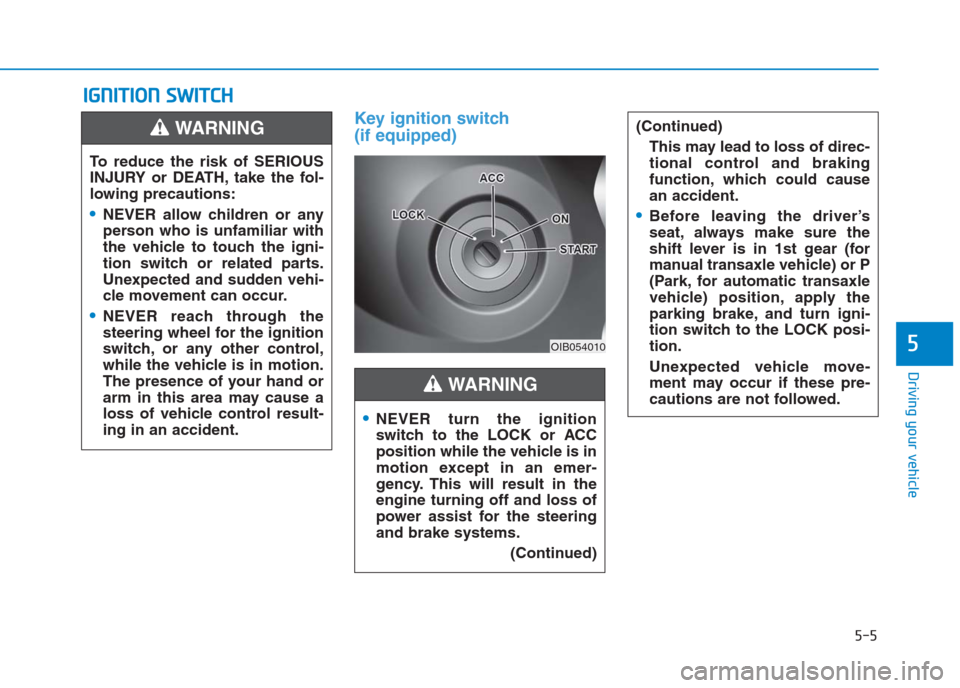
Key ignition switch
(if equipped)
I IG
GN
NI
IT
TI
IO
ON
N
S
SW
WI
IT
TC
CH
H
5-5
Driving your vehicle
5OIB054010
To reduce the risk of SERIOUS
INJURY or DEATH, take the fol-
lowing precautions:
NEVER allow children or any
person who is unfamiliar with
the vehicle to touch the igni-
tion switch or related parts.
Unexpected and sudden vehi-
cle movement can occur.
NEVER reach through the
steering wheel for the ignition
switch, or any other control,
while the vehicle is in motion.
The presence of your hand or
arm in this area may cause a
loss of vehicle control result-
ing in an accident.
WARNING
NEVER turn the ignition
switch to the LOCK or ACC
position while the vehicle is in
motion except in an emer-
gency. This will result in the
engine turning off and loss of
power assist for the steering
and brake systems.
(Continued)
(Continued)
This may lead to loss of direc-
tional control and braking
function, which could cause
an accident.
Before leaving the driver’s
seat, always make sure the
shift lever is in 1st gear (for
manual transaxle vehicle) or P
(Park, for automatic transaxle
vehicle) position, apply the
parking brake, and turn igni-
tion switch to the LOCK posi-
tion.
Unexpected vehicle move-
ment may occur if these pre-
cautions are not followed.
WARNING
Page 282 of 472

5-7
Driving your vehicle
5
Starting the engine Starting the gasoline engine
Vehicle with manual transaxle:
1. Make sure the parking brake is
applied.
2. Make sure the shift lever is in neu-
tral.
3. Depress the clutch and brake ped-
als.
4. Turn the ignition switch to the
START position. Hold the key
(maximum of 10 seconds) until the
engine starts and release it.Vehicle with automatic transaxle:
1. Make sure the parking brake is
applied.
2. Make sure the shift lever is in P
(Park).
3. Depress the brake pedal.
4. Turn the ignition switch to the
START position. Hold the key
(maximum of 10 seconds) until the
engine starts and release it.
Always wear appropriate
shoes when operating your
vehicle. Unsuitable shoes,
such as high heels, ski boots,
sandals, flip-flops, etc., may
interfere with your ability to
use the brake, accelerator and
clutch pedals.
Do not start the vehicle with the
accelerator pedal depressed.
The vehicle can move and lead
to an accident.
Wait until the engine rpm is
normal. The vehicle may sud-
denly move if the brake padel
is released when the rpm is
high.
WARNING
Page 286 of 472
5-11
Driving your vehicle
5
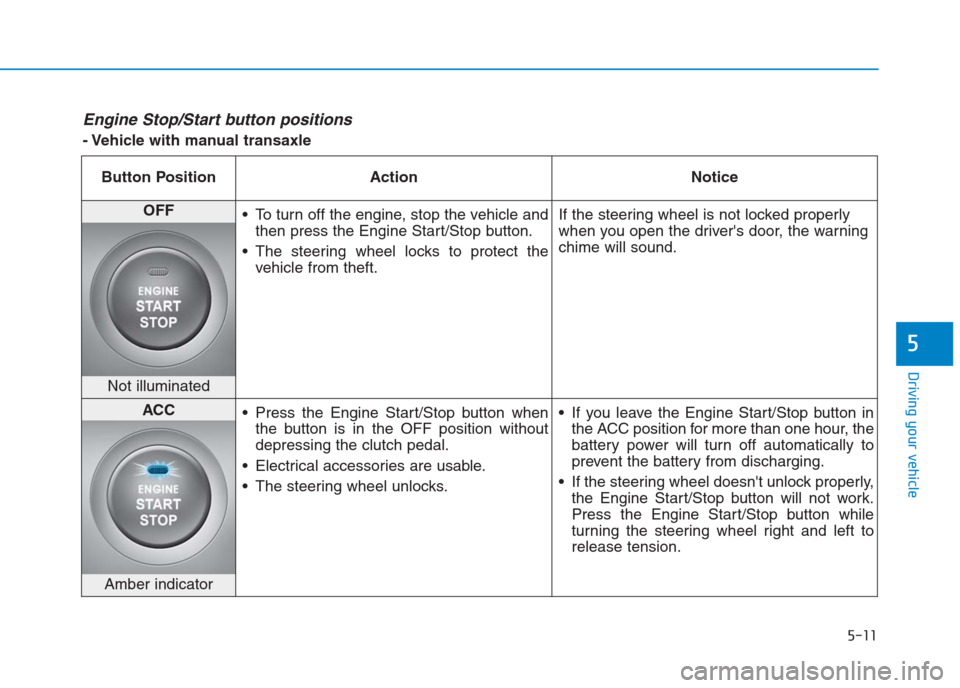
Engine Stop/Start button positions
- Vehicle with manual transaxle
Button Position Action Notice
OFF
To turn off the engine, stop the vehicle and
then press the Engine Start/Stop button.
The steering wheel locks to protect the
vehicle from theft.If the steering wheel is not locked properly
when you open the driver's door, the warning
chime will sound.
Not illuminated
ACC
Press the Engine Start/Stop button when
the button is in the OFF position without
depressing the clutch pedal.
Electrical accessories are usable.
The steering wheel unlocks. If you leave the Engine Start/Stop button in
the ACC position for more than one hour, the
battery power will turn off automatically to
prevent the battery from discharging.
If the steering wheel doesn't unlock properly,
the Engine Start/Stop button will not work.
Press the Engine Start/Stop button while
turning the steering wheel right and left to
release tension.
Amber indicator
Page 288 of 472
5-13
Driving your vehicle
5
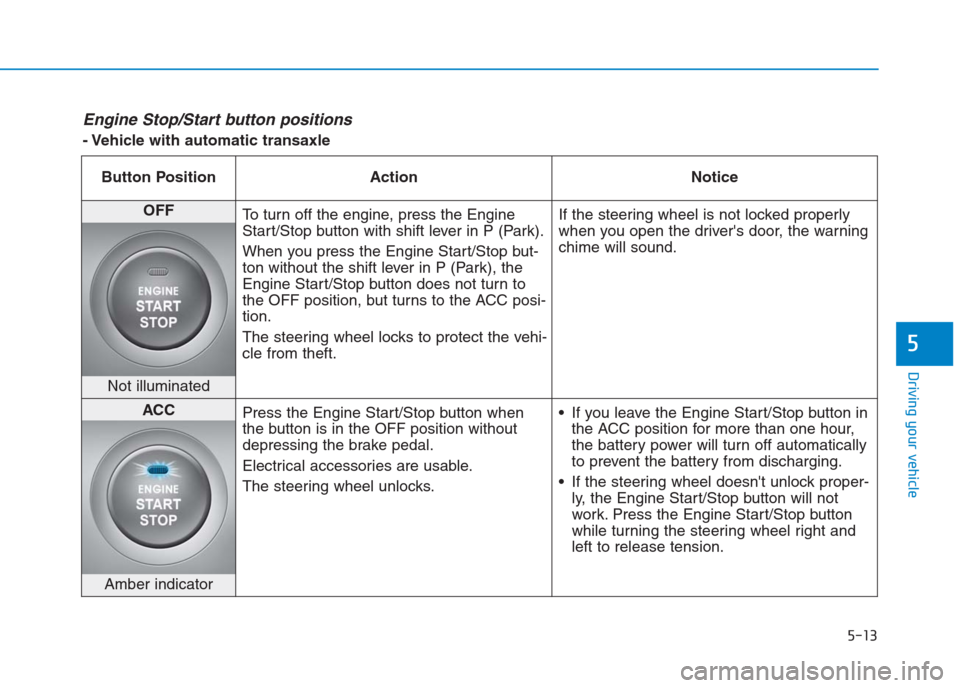
Engine Stop/Start button positions
- Vehicle with automatic transaxle
Button Position Action Notice
OFF
To turn off the engine, press the Engine
Start/Stop button with shift lever in P (Park).
When you press the Engine Start/Stop but-
ton without the shift lever in P (Park), the
Engine Start/Stop button does not turn to
the OFF position, but turns to the ACC posi-
tion.
The steering wheel locks to protect the vehi-
cle from theft.If the steering wheel is not locked properly
when you open the driver's door, the warning
chime will sound.
Not illuminated
ACC
Press the Engine Start/Stop button when
the button is in the OFF position without
depressing the brake pedal.
Electrical accessories are usable.
The steering wheel unlocks. If you leave the Engine Start/Stop button in
the ACC position for more than one hour,
the battery power will turn off automatically
to prevent the battery from discharging.
If the steering wheel doesn't unlock proper-
ly, the Engine Start/Stop button will not
work. Press the Engine Start/Stop button
while turning the steering wheel right and
left to release tension.
Amber indicator
Page 289 of 472
5-14
Driving your vehicle
- Vehicle with automatic transaxle
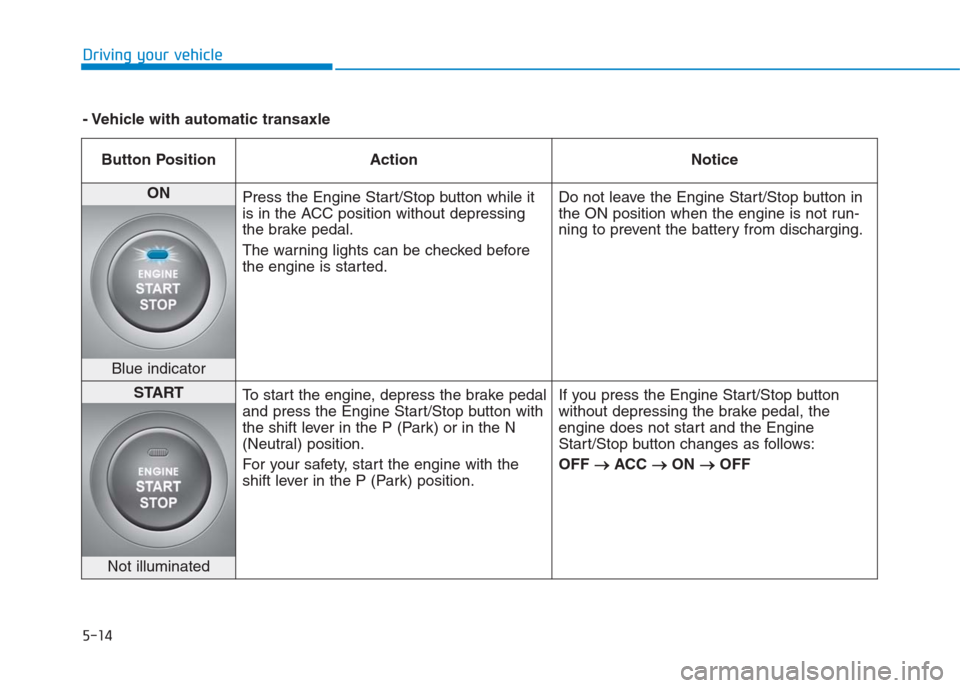
Button Position Action Notice
ON
Press the Engine Start/Stop button while it
is in the ACC position without depressing
the brake pedal.
The warning lights can be checked before
the engine is started.Do not leave the Engine Start/Stop button in
the ON position when the engine is not run-
ning to prevent the battery from discharging.
Blue indicator
START
To start the engine, depress the brake pedal
and press the Engine Start/Stop button with
the shift lever in the P (Park) or in the N
(Neutral) position.
For your safety, start the engine with the
shift lever in the P (Park) position.If you press the Engine Start/Stop button
without depressing the brake pedal, the
engine does not start and the Engine
Start/Stop button changes as follows:
OFF → →
ACC → →
ON → →
OFF
Not illuminated
Page 291 of 472
5-16
Driving your vehicle
Vehicle with automatic transaxle:
1. Always carry the smart key with
you.
2. Make sure the parking brake is
applied.
3. Make sure the shift lever is in P
(Park).
4. Depress the brake pedal.
5 Press the Engine Start/Stop but-
ton.
Information
• Do not wait for the engine to warm
up while the vehicle remains station-
ary.
Start driving at moderate engine
speeds. (Steep accelerating and
decelerating should be avoided.)
• Always start the vehicle with your
foot on the brake pedal. Do not
depress the accelerator while start-
ing the vehicle. Do not race the
engine while warming it up.
Starting the diesel engine
To start the diesel engine when the
engine is cold, it has to be pre-heat-
ed before starting the engine and
then have to be warmed up before
starting to drive.
Vehicle with manual transaxle:
1. Always carry the smart key with
you.
2. Make sure the parking brake is
applied.
3. Make sure the shift lever is in neu-
tral.
4. Depress the clutch and brake ped-
als.
5. Press the Engine Start/Stop but-
ton.
6. Continue depressing the brake
pedal until the glow indicator light
( ) goes out.
7. When the glow indicator light ( )
goes out, the engine will start.Information
If the Engine Start/Stop button is
pressed while the engine is pre-heat-
ing, the engine may start.
i
i
Page 299 of 472
5-24
Driving your vehicle
Automatic transaxle operation
The automatic transaxle has six for-
ward speeds and one reverse speed.
The individual speeds are selected
automatically in the D (Drive) posi-
tion.The indicator in the instrument clus-
ter displays the shift lever position
when the ignition switch is in the ON
position.
P (Park)
Always come to a complete stop
before shifting into P (Park).
To shift from P (Park), you must
depress firmly on the brake pedal
and make sure your foot is off the
accelerator pedal.
If you have done all of the above and
still cannot shift the lever out of P
(Park), see “Shift-Lock Release” on
page 5-27.
The shift lever must be in P (Park)
before turning the engine off. To reduce the risk of serious
injury or death:
ALWAYS check the surround-
ing areas near your vehicle for
people, especially children,
before shifting a vehicle into
D (Drive) or R (Reverse).
Before leaving the driver’s
seat, always make sure the
shift lever is in the P (Park)
position, then set the parking
brake, and place the ignition
switch in the LOCK/OFF posi-
tion. Unexpected and sudden
vehicle movement can occur
if these precautions are not
followed.
Do not use engine braking
(shifting from a high gear to
lower gear) rapidly on slip-
pery roads. The vehicle may
slip causing an accident.
WARNING
Page 301 of 472
5-26
Driving your vehicle
D (Drive)
This is the normal driving position.
The transaxle will automatically shift
through a 6-gear sequence, provid-
ing the best fuel economy and
power.
For extra power when passing anoth-
er vehicle or driving uphill, depress
the accelerator further until you feel
the transaxle downshift to a lower
gear.
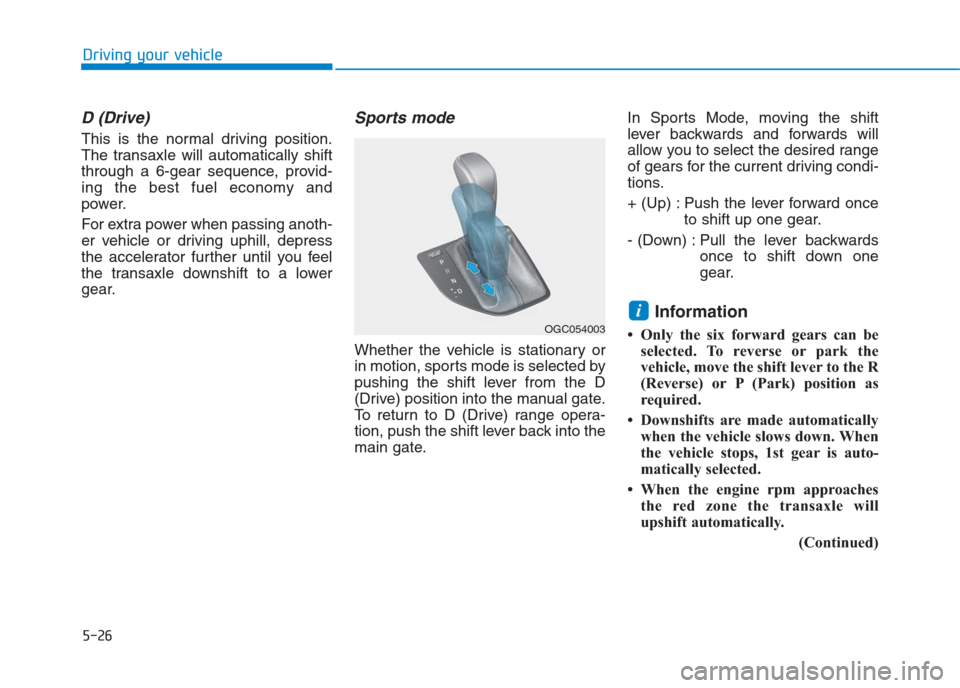
Sports mode
Whether the vehicle is stationary or
in motion, sports mode is selected by
pushing the shift lever from the D
(Drive) position into the manual gate.
To return to D (Drive) range opera-
tion, push the shift lever back into the
main gate.In Sports Mode, moving the shift
lever backwards and forwards will
allow you to select the desired range
of gears for the current driving condi-
tions.
+ (Up) : Push the lever forward once
to shift up one gear.
- (Down) : Pull the lever backwards
once to shift down one
gear.
Information
• Only the six forward gears can be
selected. To reverse or park the
vehicle, move the shift lever to the R
(Reverse) or P (Park) position as
required.
• Downshifts are made automatically
when the vehicle slows down. When
the vehicle stops, 1st gear is auto-
matically selected.
• When the engine rpm approaches
the red zone the transaxle will
upshift automatically.
(Continued)
i
OGC054003
Page 302 of 472
5-27
Driving your vehicle
5
(Continued)
• If the driver presses the lever to
+ (Up) or - (Down) position, the
transaxle may not make the request-
ed gear change if the next gear is
outside of the allowable engine rpm
range. The driver must execute
upshifts in accordance with road
conditions, taking care to keep the
engine rpms below the red zone.
• When accelerating from a stop on a
slippery road, push the shift lever
forward into the + (Up) position.
This allows the transaxle to shift
into the 2nd gear which is better for
smooth driving on a slippery road.
Push the shift lever to the - (Down)
side to shift back to the 1st gear.Shift-lock system
For your safety, the automatic
transaxle has a shift-lock system
which prevents shifting the transaxle
from P (Park) into R (Reverse)
unless the brake pedal is depressed.
To shift the transaxle from P (Park)
into R (Reverse):
1. Depress and hold the brake pedal.
2. Start the engine or place the igni-
tion switch in the ON position.
3. Move the shift lever.
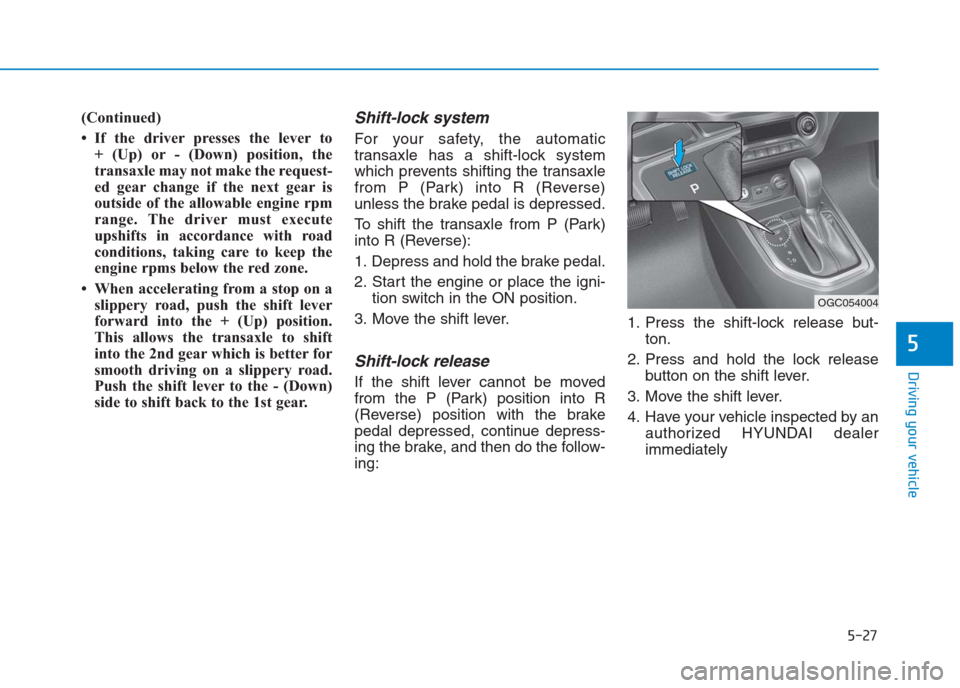
Shift-lock release
If the shift lever cannot be moved
from the P (Park) position into R
(Reverse) position with the brake
pedal depressed, continue depress-
ing the brake, and then do the follow-
ing:1. Press the shift-lock release but-
ton.
2. Press and hold the lock release
button on the shift lever.
3. Move the shift lever.
4. Have your vehicle inspected by an
authorized HYUNDAI dealer
immediately
OGC054004