service Hyundai Creta 2019 User Guide
[x] Cancel search | Manufacturer: HYUNDAI, Model Year: 2019, Model line: Creta, Model: Hyundai Creta 2019Pages: 472, PDF Size: 13.39 MB
Page 155 of 472
3-70
Convenient features of your vehicle
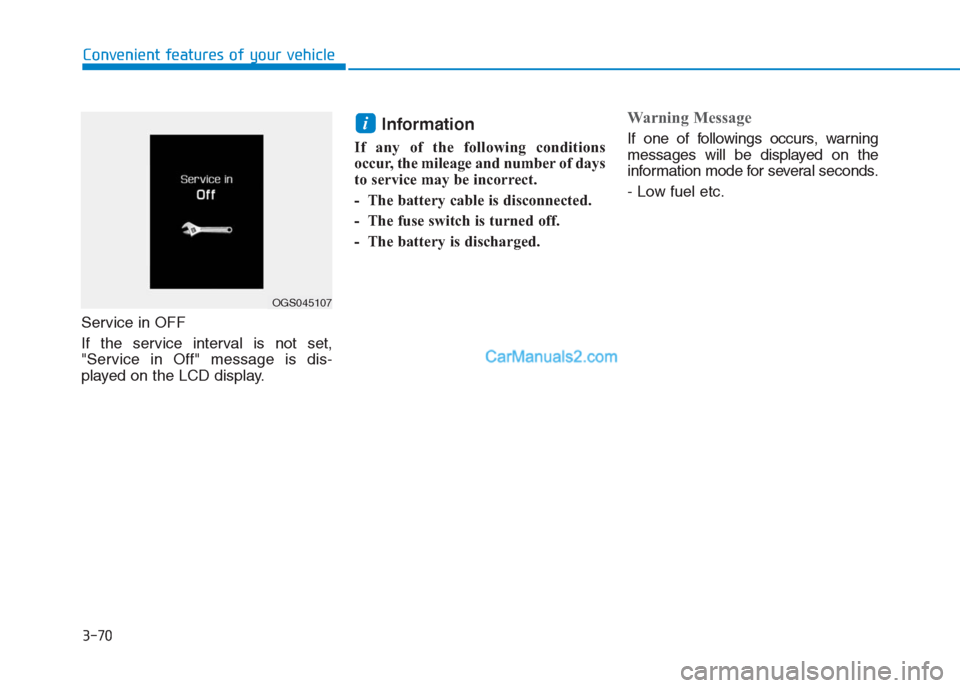
Service in OFF
If the service interval is not set,
"Service in Off" message is dis-
played on the LCD display.
Information
If any of the following conditions
occur, the mileage and number of days
to service may be incorrect.
- The battery cable is disconnected.
- The fuse switch is turned off.
- The battery is discharged.
Warning Message
If one of followings occurs, warning
messages will be displayed on the
information mode for several seconds.
- Low fuel etc.i
OGS045107
Page 158 of 472
3-73
Convenient features of your vehicle
3
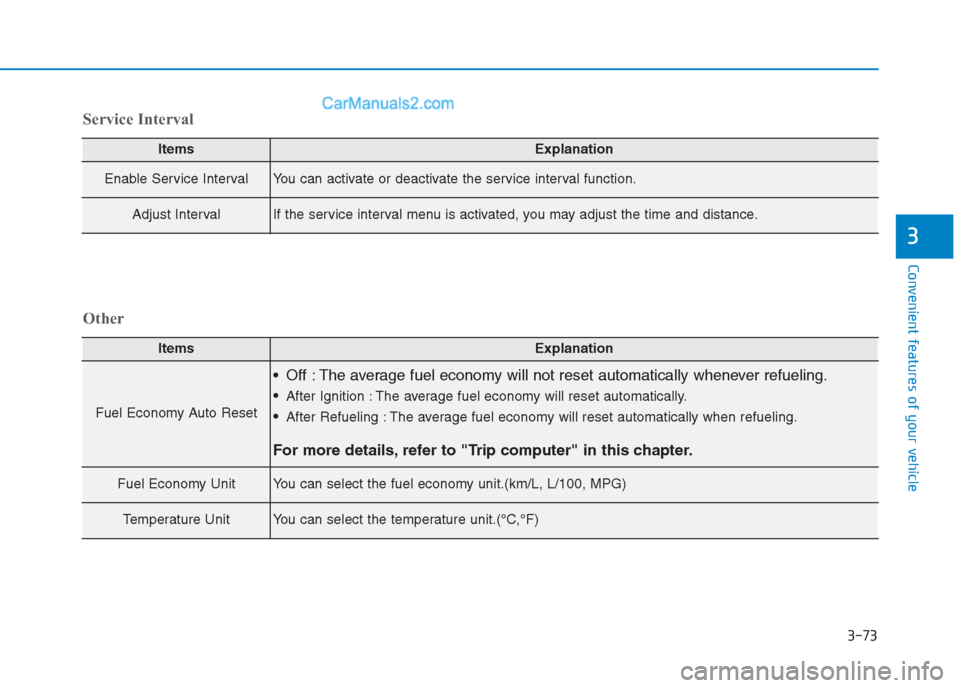
ItemsExplanation
Enable Service IntervalYou can activate or deactivate the service interval function.
Adjust IntervalIf the service interval menu is activated, you may adjust the time and distance.
Service Interval
ItemsExplanation
Fuel Economy Auto Reset
Off : The average fuel economy will not reset automatically whenever refueling.
After Ignition : The average fuel economy will reset automatically.
After Refueling : The average fuel economy will reset automatically when refueling.
For more details, refer to "Trip computer" in this chapter.
Fuel Economy UnitYou can select the fuel economy unit.(km/L, L/100, MPG)
Temperature UnitYou can select the temperature unit.(°C,°F)
Other
Page 189 of 472
3-104
Convenient features of your vehicle
If the air flow rate suddenly decreas-
es, we recommendthe system be
checked at an authorized HYUNDAI
dealer.
Checking the amount of air
conditioner refrigerant and
compressor lubricant
When the amount of refrigerant is
low, the performance of the air con-
ditioning is reduced. Overfilling also
has a bad influence on the air condi-
tioning system.
Therefore, if abnormal operation is
found, we recommend that the system
be inspected by an authorized
HYUNDAI dealer.
Information
It is important that the correct type
and amount of oil and refrigerant is
used. Otherwise, damage to the com-
pressor and abnormal system opera-
tion may occur.We recommend the air conditioning
system be serviced by an authorized
HYUNDAI dealer.
i
Because the refriger-
ant is at very high
pressure, the air con-
ditioning system
should only be serv-
iced by trained and certified
technicians. It is important that
the correct type and amount of
oil and refrigerant is used, oth-
erwise damage to the vehicle
and personal injury may occur.
WARNING
Page 200 of 472
3-115
Convenient features of your vehicle
3
System maintenance
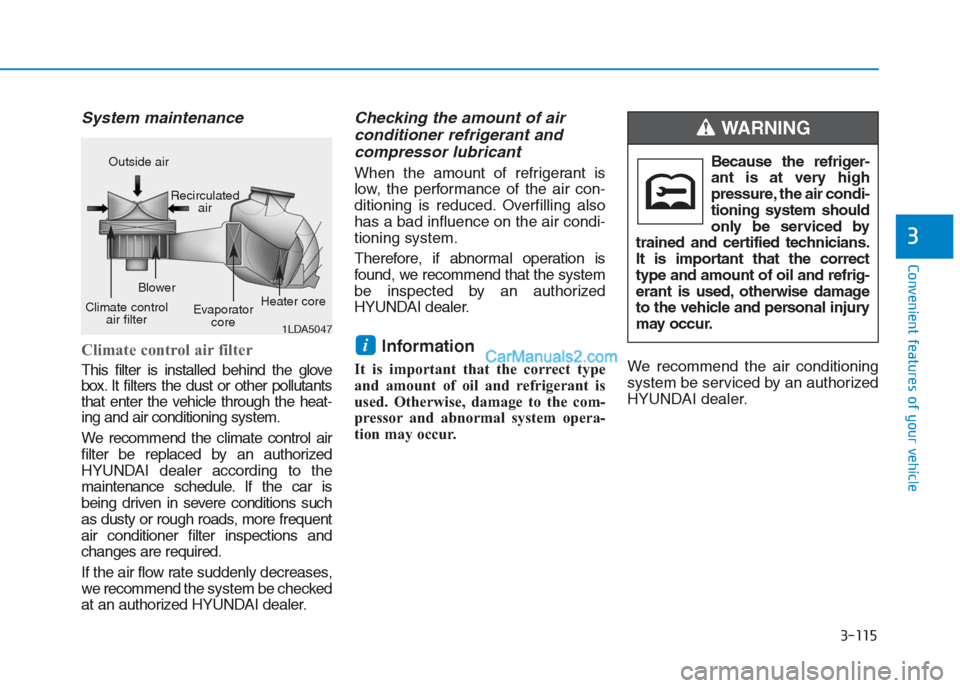
Climate control air filter
This filter is installed behind the glove
box. It filters the dust or other pollutants
that enter the vehicle through the heat-
ing and air conditioning system.
We recommend the climate control air
filter be replaced by an authorized
HYUNDAI dealer according to the
maintenance schedule. If the car is
being driven in severe conditions such
as dusty or rough roads, more frequent
air conditioner filter inspections and
changes are required.
If the air flow rate suddenly decreases,
we recommendthe system be checked
at an authorized HYUNDAI dealer.
Checking the amount of air
conditioner refrigerant and
compressor lubricant
When the amount of refrigerant is
low, the performance of the air con-
ditioning is reduced. Overfilling also
has a bad influence on the air condi-
tioning system.
Therefore, if abnormal operation is
found, we recommend that the system
be inspected by an authorized
HYUNDAI dealer.
Information
It is important that the correct type
and amount of oil and refrigerant is
used. Otherwise, damage to the com-
pressor and abnormal system opera-
tion may occur.We recommend the air conditioning
system be serviced by an authorized
HYUNDAI dealer.
i
1LDA5047
Outside air
Recirculated
air
Climate control
air filterBlower
Evaporator
coreHeater coreBecause the refriger-
ant is at very high
pressure, the air condi-
tioning system should
only be serviced by
trained and certified technicians.
It is important that the correct
type and amount of oil and refrig-
erant is used, otherwise damage
to the vehicle and personal injury
may occur.
WARNING
Page 217 of 472
4-3
Multimedia System
4
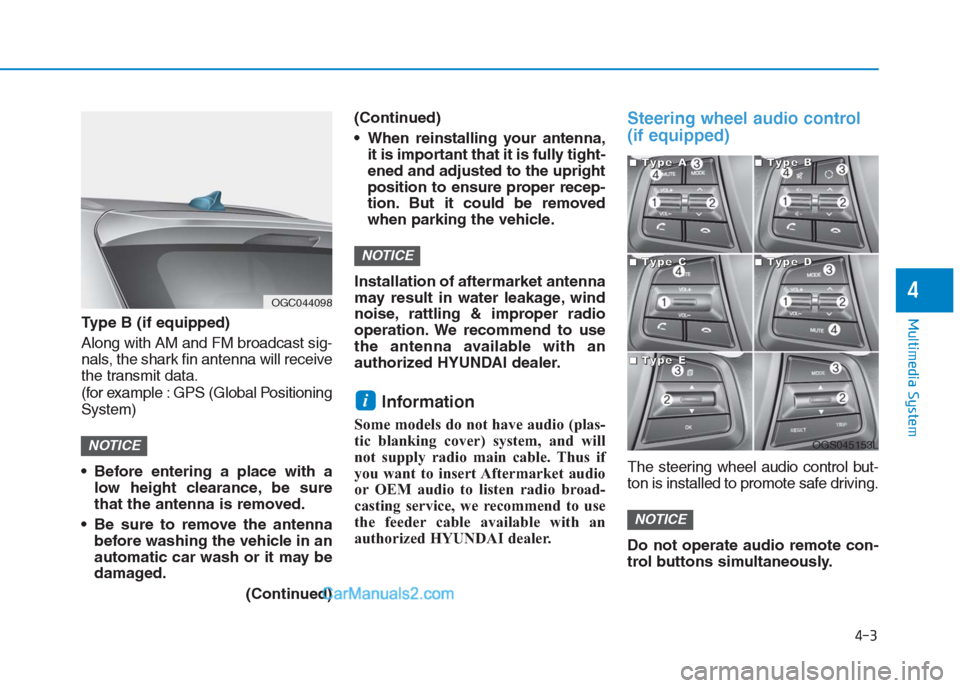
Type B (if equipped)
Along with AM and FM broadcast sig-
nals, the shark fin antenna will receive
the transmit data.
(for example : GPS (Global Positioning
System)
Before entering a place with a
low height clearance, be sure
that the antenna is removed.
Be sure to remove the antenna
before washing the vehicle in an
automatic car wash or it may be
damaged.
(Continued)(Continued)
When reinstalling your antenna,
it is important that it is fully tight-
ened and adjusted to the upright
position to ensure proper recep-
tion. But it could be removed
when parking the vehicle.
Installation of aftermarket antenna
may result in water leakage, wind
noise, rattling & improper radio
operation. We recommend to use
the antenna available with an
authorized HYUNDAI dealer.
Information
Some models do not have audio (plas-
tic blanking cover) system, and will
not supply radio main cable. Thus if
you want to insert Aftermarket audio
or OEM audio to listen radio broad-
casting service, we recommend to use
the feeder cable available with an
authorized HYUNDAI dealer.
Steering wheel audio control
(if equipped)
The steering wheel audio control but-
ton is installed to promote safe driving.
Do not operate audio remote con-
trol buttons simultaneously.
NOTICE
i
NOTICE
NOTICE
OGC044098
OGS045153L
■ ■ ■ ■T
T T T
y y y y
p p p p
e e e e
A A A A■
■ ■ ■T
T T T
y y y y
p p p p
e e e e
B B B B
■
■ ■ ■T
T T T
y y y y
p p p p
e e e e
C C C C■
■ ■ ■T
T T T
y y y y
p p p p
e e e e
D D D D
■
■ ■ ■T
T T T
y y y y
p p p p
e e e e
E E E E
Page 227 of 472
4-13
Multimedia System
4
Operating the device while driv-
ing could lead to accidents due
to a lack of attention to external
surroundings. First park the
vehicle before operating the
device.
Adjust the volume to levels that
allow the driver to hear sounds
from outside of the vehicle.
Driving in a state where external
sounds cannot be heard may
lead to accidents.
Pay attention to the volume set-
ting when turning the device on.
A sudden output of extreme vol-
ume upon turning the device on
could lead to hearing impair-
ment. (Adjust the volume to a
suitable level before turning off
the device.)
Turn on the car engine before
using this device. Do not oper-
ate the audio system for long
periods of time only with the
ignition turned on as such oper-
ations may lead to battery dis-
charge.
(Continued)(Continued)
Do not subject the device to
severe shock or impact. Direct
pressure onto the front side of
the monitor may cause damage
to the LCD.
When cleaning the device, make
sure to turn off the device and
use a dry and smooth cloth.
Never use tough materials,
chemical cloths, or solvents
(alcohol, benzene, thinners, etc.).
As such materials may damage
the device panel or cause
color/quality deterioration.
Do not place beverages close to
the audio system. Spilling bever-
ages may lead to system mal-
function.
In this case of product malfunc-
tion, please contact your place of
purchase or After Service center.
Placing the audio system within
an electromagnetic environment
may result in noise interference.
Prevent caustic solutions such
as perfume and cosmetic oil
from contacting the dashboard
because they may cause dam-
age or discoloration.
NOTICE
Driving while distracted can
result in a loss of vehicle con-
trol that may lead to an acci-
dent, severe personal injury,
and death. The driver’s primary
responsibility is in the safe and
legal operation of a vehicle, and
use of any handheld devices,
other equipment, or vehicle sys-
tems which take the driver’s
eyes, attention and focus away
from the safe operation of a
vehicle or which are not permis-
sible by law should never be
used during operation of the
vehicle.
WARNING
Page 238 of 472
4-24
Multimedia System
(Continued)
If you do not want automatic
connection with your Bluetooth
®
device, turn the Bluetooth®fea-
ture off in the Bluetooth®device.
Only one Bluetooth
®device can
be connected at a time.
Bluetooth
®connection may
become intermittently discon-
nected in some Bluetooth
®
devices. Follow these steps to
try again.
1. Turn the Bluetooth
®function
within the Bluetooth®device
OFF/ON and try again.
2. Turn the Bluetooth
®device
power OFF/ON and try again.
3. Completely remove the
Bluetooth
®device battery,
reboot, and then again.
4. Reboot the Multimedia System
and try again.
5. Delete all paired devices from
both of Bluetooth
®device and
Head Unit sides and then try
again. If the Bluetooth
®device is not
connected, it is not possible to
enter Phone mode. After con-
necting your Bluetooth
®device
to your car, use the Bluetooth®
features.
You will not be able to use the
handsfree feature when your
phone is outside of the cellular
service area (e.g. in a tunnel, in a
underground, in a mountainous
area, etc.).
If the cellular phone signal is
poor or the vehicles interior
noise is too loud, it may be diffi-
cult to hear the other person’s
voice during a call.
Do not place the Bluetooth
®
device near or inside metallic
objects, otherwise communica-
tions with Bluetooth
®system or
cellular service stations can be
disturbed.
Placing the audio system within
an electromagnetic environment
may result in noise interference.
(Continued)(Continued)
Some Bluetooth
®devices may
cause interference noise or mal-
function to audio system. In this
case, store the device in a differ-
ent location may resolve the
condition.
While a device is connected
through Bluetooth
®, your device
may discharge quicker than
usual for additional Bluetooth
®-
related operations.
The handsfree call volume and
quality may differ depending on
the Bluetooth
®device.
If Connection Priority is set
upon vehicle ignition (IGN/ACC
ON), the Bluetooth
®device will
be automatically connected.
Even if you are outside, the
Bluetooth
®device will be auto-
matically connected once you
are in the vicinity of the vehicle.
If you do not want to automati-
cally connect your Bluetooth
®
device, turn off the Bluetooth®
feature in your Bluetooth®
device.
(Continued)
NOTICE
Page 251 of 472
4-37
Multimedia System
4
Operating the device while driv-
ing could lead to accidents due
to a lack of attention to external
surroundings. First park the
vehicle before operating the
device.
Adjust the volume to levels that
allow the driver to hear sounds
from outside of the vehicle.
Driving in a state where external
sounds cannot be heard may
lead to accidents.
Pay attention to the volume set-
ting when turning the device on.
A sudden output of extreme vol-
ume upon turning the device on
could lead to hearing impair-
ment. (Adjust the volume to a
suitable level before turning off
the device.)
Turn on the car engine before
using this device. Do not oper-
ate the audio system for long
periods of time only with the
ignition turned on as such oper-
ations may lead to battery dis-
charge.
(Continued)(Continued)
Do not subject the device to
severe shock or impact. Direct
pressure onto the front side of
the monitor may cause damage
to the LCD.
When cleaning the device, make
sure to turn off the device and
use a dry and smooth cloth.
Never use tough materials,
chemical cloths, or solvents
(alcohol, benzene, thinners,
etc.). As such materials may
damage the device panel or
cause color/quality deterioration
Do not place beverages close to
the audio system. Spilling bever-
ages may lead to system mal-
function.
In this case of product malfunc-
tion, please contact your place of
purchase or After Service center.
Placing the audio system within
an electromagnetic environment
may result in noise interference.
Prevent caustic solutions such
as perfume and cosmetic oil
from contacting the dashboard
because they may cause dam-
age or discoloration.
NOTICE
Driving while distracted can
result in a loss of vehicle con-
trol that may lead to an acci-
dent, severe personal injury,
and death. The driver’s primary
responsibility is in the safe and
legal operation of a vehicle, and
use of any handheld devices,
other equipment, or vehicle sys-
tems which take the driver’s
eyes, attention and focus away
from the safe operation of a
vehicle or which are not permis-
sible by law should never be
used during operation of the
vehicle.
WARNING
Page 268 of 472
![Hyundai Creta 2019 User Guide 4-54
Multimedia System
Operation during calls
Incoming call with Bluetooth®con-
nected ➟Select [Accept].
(1) Display Call duration: Call dura-
tion display.
(2) Caller name: If the caller number i](/img/35/14529/w960_14529-267.png "Hyundai Creta 2019 User Guide 4-54
Multimedia System
Operation during calls
Incoming call with Bluetooth®con-
nected ➟Select [Accept].
(1) Display Call duration: Call dura-
tion display.
(2) Caller name: If the caller number i")
4-54
Multimedia System
Operation during calls
Incoming call with Bluetooth®con-
nected ➟Select [Accept].
(1) Display Call duration: Call dura-
tion display.
(2) Caller name: If the caller number is
in your contacts, the corresponding
name is displayed.
(3) Incoming phone number: Incoming
phone number is displayed.
(4) Keypad: Number keypad for
Automatic Response Service input
is displayed.
(5) Private: Call is transferred to a
cell phone.
(6) Outgoing Volume: Adjust outgo-
ing voice volume.
(7) End: End call.Information
• Some Bluetooth®devices may not
support the Private function.
• The outgoing voice volume may
vary depending on the type of
Bluetooth
®device. If the outgoing
voice volume is too high or low,
adjust the Outgoing Volume.
Favorites
Press the [PHONE]button on the
audio system ➟Select [Favorites] ➟
Favorites list displayed.
(1) Favorites list: A list of paired
favorites is displayed.
Connect a call when selected.
(2) Add to Favorites: Add a down-
loaded phone number to favorites.
(3) Delete: Delete a saved favorite.
i
Page 329 of 472
When using tire chains:
Wrong size chains or improperly
installed chains can damage
your vehicle's brake lines, sus-
pension, body and wheels.
Use SAE “S” class or wire
chains.
If you hear noise caused by
chains contacting the body,
retighten the chain to prevent
contact with the vehicle body.
To prevent body damage,
retighten the chains after driving
0.5~1.0 km (0.3~0.6 miles).
Do not use tire chains on vehi-
cles equipped with aluminum
wheels. If unavoidable, use a
wire type chain.
Use wire chains less than 15 mm
(0.59 in) wide to prevent damage
to the chain’s connection.
Winter precautions
Use high quality ethylene glycol
coolant
Your vehicle is delivered with high
quality ethylene glycol coolant in the
cooling system. It is the only type of
coolant that should be used because
it helps prevent corrosion in the cool-
ing system, lubricates the water
pump and prevents freezing. Be sure
to replace or replenish your coolant
in accordance with the maintenance
schedule in chapter 7. Before winter,
have your coolant tested to assure
that its freezing point is sufficient for
the temperatures anticipated during
the winter.
Check battery and cables
Winter puts additional burdens on
the battery system. Visually inspect
the battery and cables as described
in chapter 7. The level of charge in
your battery can be checked by an
authorized HYUNDAI dealer or a
service station.
Change to "winter weight" oil if
necessary
In some climates it is recommended
that a lower viscosity "winter weight"
oil be used during cold weather. See
chapter 8 for recommendations. If
you aren't sure what weight oil you
should use, we recommend that you
consult with an authorized HYUNDAI
dealer.
Check spark plugs and ignition
system
Inspect your spark plugs as
described in chapter 7 and replace
them if necessary. Also check all
ignition wiring and components to be
sure they are not cracked, worn or
damaged in any way.
NOTICE
Driving your vehicle
5-54