Start Hyundai Creta 2019 Owner's Guide
[x] Cancel search | Manufacturer: HYUNDAI, Model Year: 2019, Model line: Creta, Model: Hyundai Creta 2019Pages: 472, PDF Size: 13.39 MB
Page 149 of 472
3-64
Convenient features of your vehicle
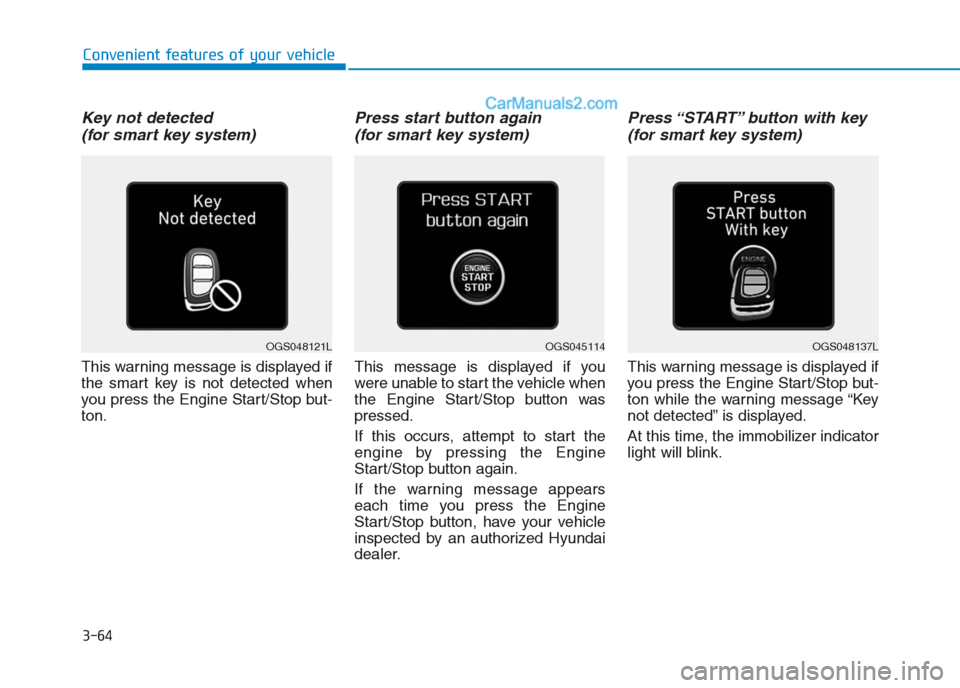
Key not detected
(for smart key system)
This warning message is displayed if
the smart key is not detected when
you press the Engine Start/Stop but-
ton.
Press start button again
(for smart key system)
This message is displayed if you
were unable to start the vehicle when
the Engine Start/Stop button was
pressed.
If this occurs, attempt to start the
engine by pressing the Engine
Start/Stop button again.
If the warning message appears
each time you press the Engine
Start/Stop button, have your vehicle
inspected by an authorized Hyundai
dealer.
Press “START” button with key
(for smart key system)
This warning message is displayed if
you press the Engine Start/Stop but-
ton while the warning message “Key
not detected” is displayed.
At this time, the immobilizer indicator
light will blink.
OGS045114OGS048137LOGS048121L
Page 150 of 472
3-65
Convenient features of your vehicle
3
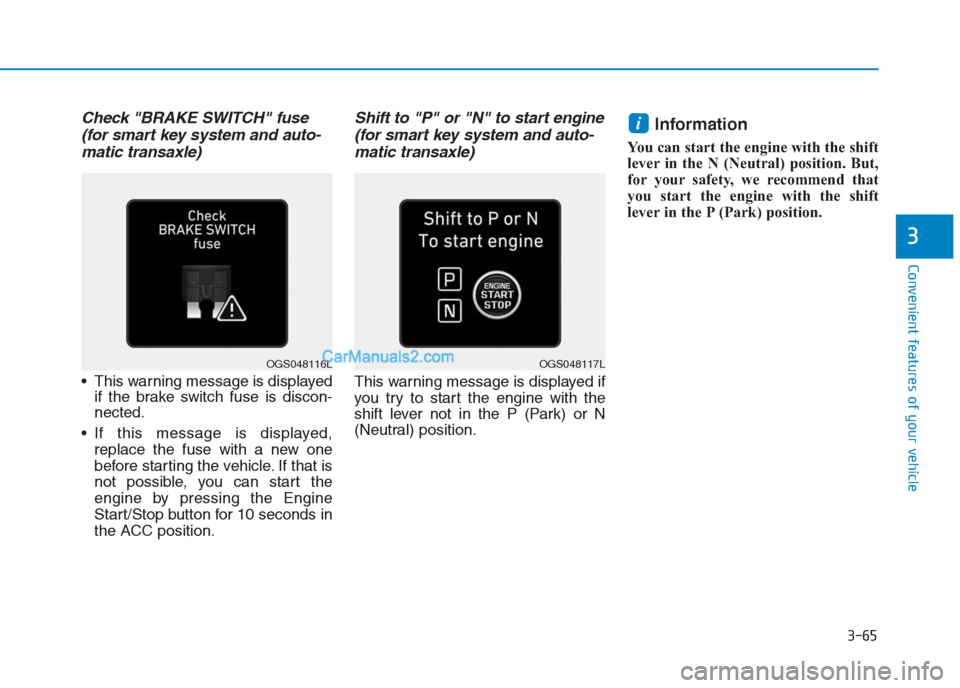
Check "BRAKE SWITCH" fuse
(for smart key system and auto-
matic transaxle)
This warning message is displayed
if the brake switch fuse is discon-
nected.
If this message is displayed,
replace the fuse with a new one
before starting the vehicle. If that is
not possible, you can start the
engine by pressing the Engine
Start/Stop button for 10 seconds in
the ACC position.
Shift to "P" or "N" to start engine
(for smart key system and auto-
matic transaxle)
This warning message is displayed if
you try to start the engine with the
shift lever not in the P (Park) or N
(Neutral) position.
Information
You can start the engine with the shift
lever in the N (Neutral) position. But,
for your safety, we recommend that
you start the engine with the shift
lever in the P (Park) position.
i
OGS048117LOGS048116L
Page 161 of 472
3-76
Convenient features of your vehicle
Average Fuel Economy (2)
The average fuel economy is calcu-
lated by the total driving distance
and fuel consumption since the last
average fuel economy reset.
The average fuel economy can be
reset both manually and automati-
cally.
Manual reset
To clear the average fuel economy
manually, press the OK button (or
RESET button) on the steering wheel
for more than 1 second when the
average fuel economy is displayed.
Automatic reset
To automatically reset the average
fuel economy after refueling, select
the “After Refueling” feature in the
User Settings Mode on the LCD dis-
play (Refer to "LCD Display“ in this
chapter).
If the “After Refueling” feature is
selected, the average fuel economy
will be cleared to zero (---), when
driving speed exceeds 1km/h, after
refueling more than 6 liters.
Information
The vehicle must be driven for a min-
imum of 300 meters since the last igni-
tion key cycle before the average fuel
economy is recalculated.
Instant Fuel Economy (3)
This mode displays the instantaneous
fuel economy while driving when the
vehicle speed is greater than 10 km/h.
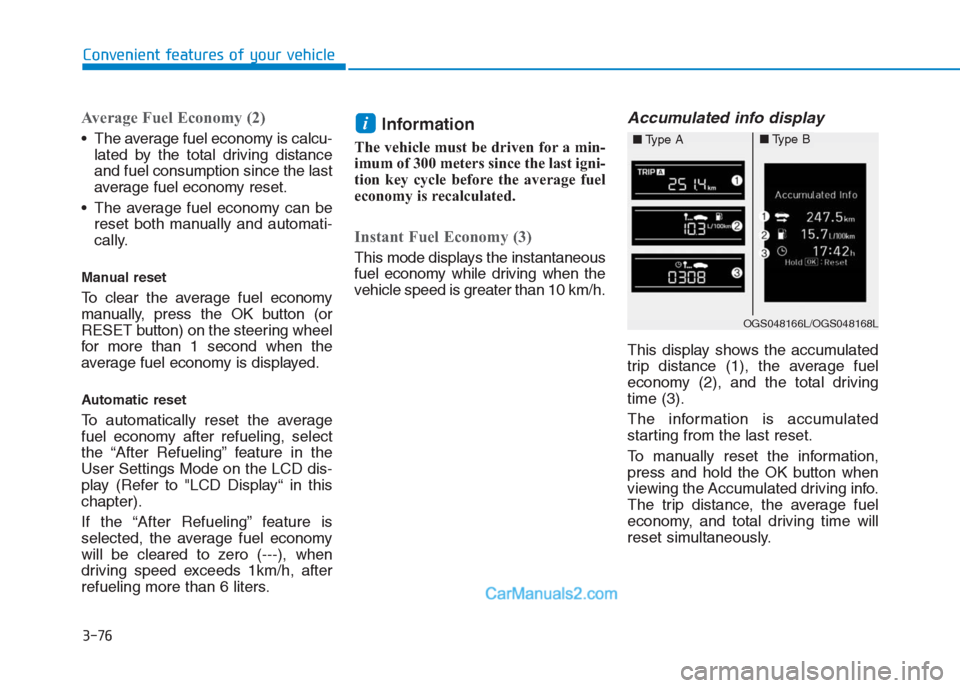
Accumulated info display
This display shows the accumulated
trip distance (1), the average fuel
economy (2), and the total driving
time (3).
The information is accumulated
starting from the last reset.
To manually reset the information,
press and hold the OK button when
viewing the Accumulated driving info.
The trip distance, the average fuel
economy, and total driving time will
reset simultaneously.
i
OGS048166L/OGS048168L
■Type A■Type B
Page 182 of 472
3-97
Convenient features of your vehicle
3
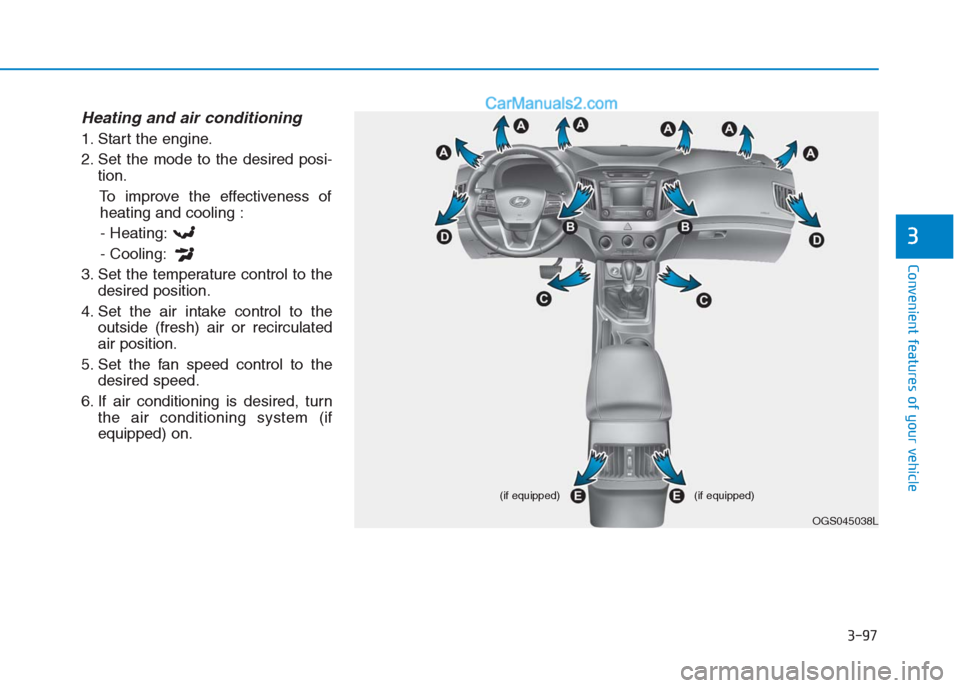
Heating and air conditioning
1. Start the engine.
2. Set the mode to the desired posi-
tion.
To improve the effectiveness of
heating and cooling :
- Heating:
- Cooling:
3. Set the temperature control to the
desired position.
4. Set the air intake control to the
outside (fresh) air or recirculated
air position.
5. Set the fan speed control to the
desired speed.
6. If air conditioning is desired, turn
the air conditioning system (if
equipped) on.
OGS045038L (if equipped) (if equipped)
Page 187 of 472
3-102
Convenient features of your vehicle
Operation Tips
To keep dust or unpleasant fumes
from entering the car through the
ventilation system, temporarily set
the air intake control to the recircu-
lated air position. Return the con-
trol to the fresh air position when
the irritation has passed. This will
help keep the driver alert and com-
fortable.
To prevent inside of the windshield
from fogging, set the air intake con-
trol to the fresh air position and fan
speed to the desired position, turn
on the air conditioning system, and
adjust the temperature control to
desired temperature.
Air conditioning (if equipped)
HYUNDAI Air Conditioning Systems
are filled with environmentally friendly
refrigerant.
1. Start the engine.
2. Push the air conditioning button.
3. Set the mode to the Face Level
mode.
4. Set the air intake control to the
recirculated air position. However,
prolonged operation of the recircu-
lated air position will excessively
dry the air. In this case, change the
air position.
5. Adjust the fan speed control and
temperature control to maintain
maximum comfort.
When maximum cooling is desired,
set the temperature control to the
extreme left position then set the fan
speed control to the highest speed.When using the air conditioning
system, monitor the temperature
gauge closely while driving up
hills or in heavy traffic when out-
side temperatures are high. Air
conditioning system operation
may cause engine overheating.
Continue to use the blower fan but
turn the air conditioning system
off if the engine temperature
gauge indicates engine overheat-
ing.
NOTICE
Page 192 of 472
3-107
Convenient features of your vehicle
3
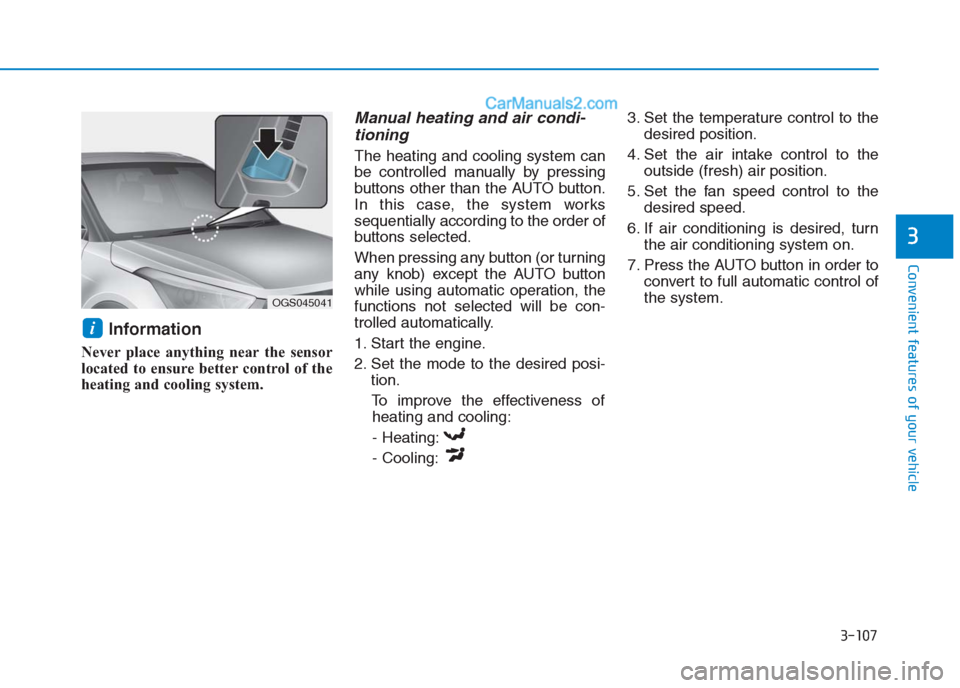
Information
Never place anything near the sensor
located to ensure better control of the
heating and cooling system.
Manual heating and air condi-
tioning
The heating and cooling system can
be controlled manually by pressing
buttons other than the AUTO button.
In this case, the system works
sequentially according to the order of
buttons selected.
When pressing any button (or turning
any knob) except the AUTO button
while using automatic operation, the
functions not selected will be con-
trolled automatically.
1. Start the engine.
2. Set the mode to the desired posi-
tion.
To improve the effectiveness of
heating and cooling:
- Heating:
- Cooling:3. Set the temperature control to the
desired position.
4. Set the air intake control to the
outside (fresh) air position.
5. Set the fan speed control to the
desired speed.
6. If air conditioning is desired, turn
the air conditioning system on.
7. Press the AUTO button in order to
convert to full automatic control of
the system.
i
OGS045041
Page 198 of 472
3-113
Convenient features of your vehicle
3
System operation
Ventilation
1. Select the Face Level mode.
2. Set the air intake control to the
outside (fresh) air position.
3. Set the temperature control to the
desired position.
4. Set the fan speed control to the
desired speed.
Heating
1. Select the Floor Level mode.
2. Set the air intake control to the
outside (fresh) air position.
3. Set the temperature control to the
desired position.
4. Set the fan speed control to the
desired speed.
5. If dehumidified heating is desired,
turn the air conditioning system (if
equipped) on.
If the windshield fogs up, select the
Front Defroster mode.Operation Tips
To keep dust or unpleasant fumes
from entering the car through the
ventilation system, temporarily set
the air intake control to the recircu-
lated air position. Return the con-
trol to the fresh air position when
the irritation has passed. This will
help keep the driver alert and com-
fortable.
To prevent inside of the windshield
from fogging, set the air intake con-
trol to the fresh air position and fan
speed to the desired position, turn
on the air conditioning system, and
adjust the temperature control to
desired temperature.
Air conditioning (if equipped)
HYUNDAI Air Conditioning Systems
are filled with a R-134a refrigerant.
1. Start the engine.
2. Push the air conditioning button.
3. Set the mode to the Face Level
mode.
4. Set the air intake control to the
recirculated air position. However,
prolonged operation of the recircu-
lated air position will excessively
dry the air. In this case, change the
air position.
5. Adjust the fan speed control and
temperature control to maintain
maximum comfort.
When maximum cooling is desired,
set the temperature control to the
lowest setting (LO) then set the fan
speed control to the highest speed.
Page 201 of 472
3-116
Convenient features of your vehicle
Windshield defrosting and
defogging For maximum defrosting, set the
temperature control to the extreme
right/hot position and the fan speed
control to the highest speed.
If warm air to the floor is desired
while defrosting or defogging, set
the mode to the floor-defrost posi-
tion.
Before driving, clear all snow and
ice from the windshield, rear win-
dow, outside rear view mirrors, and
all side windows.
Clear all snow and ice from the
hood and air inlet at the buttom of
the windshield.
If the engine temperature is still
cold after starting, then a brief
engine warm up period may be
required for the vented air flow to
become warm or hot.Manual climate control system
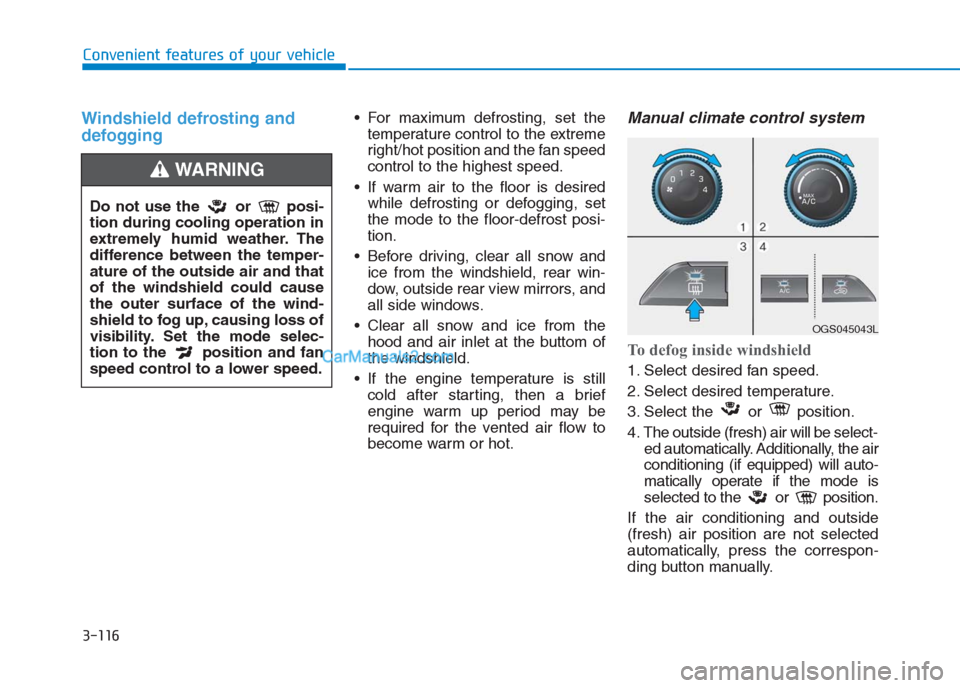
To defog inside windshield
1. Select desired fan speed.
2. Select desired temperature.
3. Select the or position.
4. The outside (fresh) air will be select-
ed automatically. Additionally, the air
conditioning (if equipped) will auto-
matically operate if the mode is
selected to the or position.
If the air conditioning and outside
(fresh) air position are not selected
automatically, press the correspon-
ding button manually.
Do not use the or posi-
tion during cooling operation in
extremely humid weather. The
difference between the temper-
ature of the outside air and that
of the windshield could cause
the outer surface of the wind-
shield to fog up, causing loss of
visibility. Set the mode selec-
tion to the position and fan
speed control to a lower speed.
WARNING
OGS045043L
Page 209 of 472
3-124
Convenient features of your vehicle
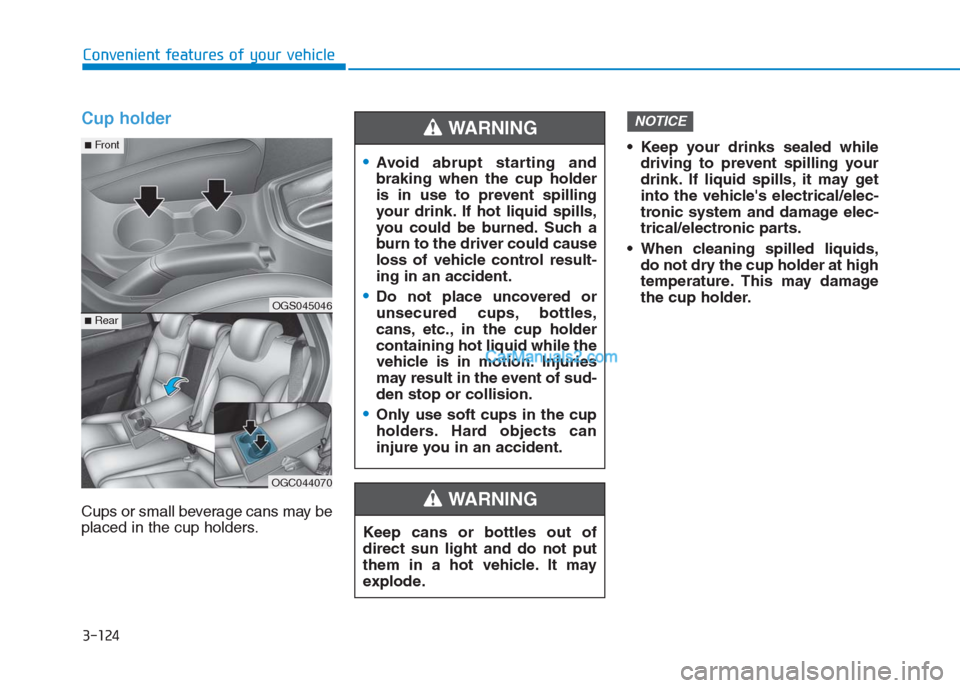
Cup holder
Cups or small beverage cans may be
placed in the cup holders. Keep your drinks sealed while
driving to prevent spilling your
drink. If liquid spills, it may get
into the vehicle's electrical/elec-
tronic system and damage elec-
trical/electronic parts.
When cleaning spilled liquids,
do not dry the cup holder at high
temperature. This may damage
the cup holder.
NOTICE
Keep cans or bottles out of
direct sun light and do not put
them in a hot vehicle. It may
explode.
WARNING
Avoid abrupt starting and
braking when the cup holder
is in use to prevent spilling
your drink. If hot liquid spills,
you could be burned. Such a
burn to the driver could cause
loss of vehicle control result-
ing in an accident.
Do not place uncovered or
unsecured cups, bottles,
cans, etc., in the cup holder
containing hot liquid while the
vehicle is in motion. Injuries
may result in the event of sud-
den stop or collision.
Only use soft cups in the cup
holders. Hard objects can
injure you in an accident.
WARNING
OGS045046
OGC044070
■Rear
■Front
Page 233 of 472
4-19
Multimedia System
4
(Continued)
• If your iPhone
®is connected to both
the Bluetooth®and USB, the sound
may not be properly played. In your
iPhone
®, select the Dock connector
or Bluetooth®to change the sound
output (source).
• iPod
®mode cannot be operated
when the iPod®cannot be recog-
nized due to the playing of versions
that do not support communication
protocols, cases of iPod
®abnormali-
ties and defects.
• For fifth generation iPod
®Nano
devices, the iPod®may not be recog-
nized when the battery level is low.
Please charge the iPod
®for use.
• The search/play orders shown with-
in the iPod
®device may differ from
the orders shown within the audio
system.
• If the iPod
®malfunctions due to an
iPod®device defect, reset the iPod®
and try again. (To learn more, refer
to your iPod®manual)
(Continued)(Continued)
• Some iPod
®s may not sync with the
System depending on the version. If
the Media is removed before the
Media is recognized, then the sys-
tem may not properly restore the
previously operated mode. (iPad
®
charging is not supported.)
• Use an iPod
®cable shorter than 1
meter in length such as the one orig-
inally supplied with a new iPod
®,
longer cables may lead to the audio
system not recognizing the iPod
®.
Information
- Using Bluetooth®(BT) Audio
• Bluetooth
®Audio Mode can be used
only when a Bluetooth®phone has
been connected.
• Bluetooth
®Audio Mode will not be
available when connecting mobile
phones that do not support this fea-
ture.
• If a Bluetooth
®Phone is being used
to play music and receives an
incoming or outgoing phone call,
then the music will stop.
• Moving the Track up/down while
playing Bluetooth
®audio mode may
result in pop noises with some
mobile phones.
• Bluetooth
®streaming audio may not
be supported in some mobile phones.
• When returning to Bluetooth
®
Audio mode after ending a call, the
mode may not automatically restart
in some mobile phones.
• Receiving an incoming call or mak-
ing an outgoing call while playing
Bluetooth
®Audio may result in
audio interference.
i