lock Hyundai Creta 2019 Repair Manual
[x] Cancel search | Manufacturer: HYUNDAI, Model Year: 2019, Model line: Creta, Model: Hyundai Creta 2019Pages: 472, PDF Size: 13.39 MB
Page 169 of 472
Headlamp delay function
(if equipped)
If the key is removed from the ignition
switch or placed in the ACC or
LOCK/OFF position with the head-
lights ON, the headlights (and/or
parking lights) remain on for about 5
minutes. However, with the engine off
if the driver’s door is opened and
closed, the headlights (and/or parking
lights) are turned off after 15 seconds.
The headlights (and/or parking
lights) can be turned off by pressing
the lock button on the remote key (or
smart key) twice or turning the light
switch to the OFF or AUTO position.
However, if you turn the light switch
to the AUTO position when it is dark
outside, the headlights will not be
turned off.If the driver gets out of the vehicle
through other doors (except dri-
ver's door), the battery saver func-
tion does not operate and the
headlamp delay function does not
turn off automatically. Therefore, It
causes the battery to be dis-
charged. In this case, make sure
to turn off the lamp before getting
out of the vehicle.
Daytime running light (DRL)
(if equipped)
The Daytime Running Lights (DRL)
can make it easier for others to see
the front of your vehicle during the
day, especially after dawn and before
sunset.
The DRL system will turn the dedi-
cated lamp OFF when:
1. The headlights or front fog lights
are in the ON position.
2. The engine is turned off.
NOTICE
3-84
Convenient features of your vehicle
Page 170 of 472
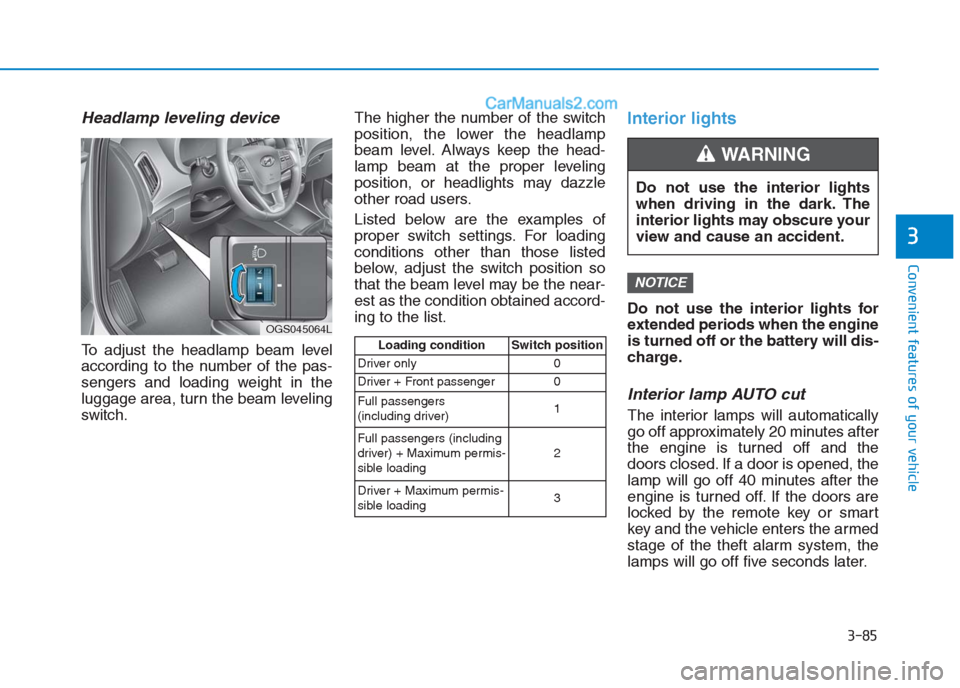
Headlamp leveling device
To adjust the headlamp beam level
according to the number of the pas-
sengers and loading weight in the
luggage area, turn the beam leveling
switch.The higher the number of the switch
position, the lower the headlamp
beam level. Always keep the head-
lamp beam at the proper leveling
position, or headlights may dazzle
other road users.
Listed below are the examples of
proper switch settings. For loading
conditions other than those listed
below, adjust the switch position so
that the beam level may be the near-
est as the condition obtained accord-
ing to the list.
Interior lights
Do not use the interior lights for
extended periods when the engine
is turned off or the battery will dis-
charge.
Interior lamp AUTO cut
The interior lamps will automatically
go off approximately 20 minutes after
the engine is turned off and the
doors closed. If a door is opened, the
lamp will go off 40 minutes after the
engine is turned off. If the doors are
locked by the remote key or smart
key and the vehicle enters the armed
stage of the theft alarm system, the
lamps will go off five seconds later.
NOTICE
3-85
Convenient features of your vehicle
3
OGS045064L
Loading condition Switch position
Driver only 0
Driver + Front passenger 0
Full passengers
(including driver)1
Full passengers (including
driver) + Maximum permis-
sible loading2
Driver + Maximum permis-
sible loading 3
Do not use the interior lights
when driving in the dark. The
interior lights may obscure your
view and cause an accident.
WARNING
Page 171 of 472
Front lamps
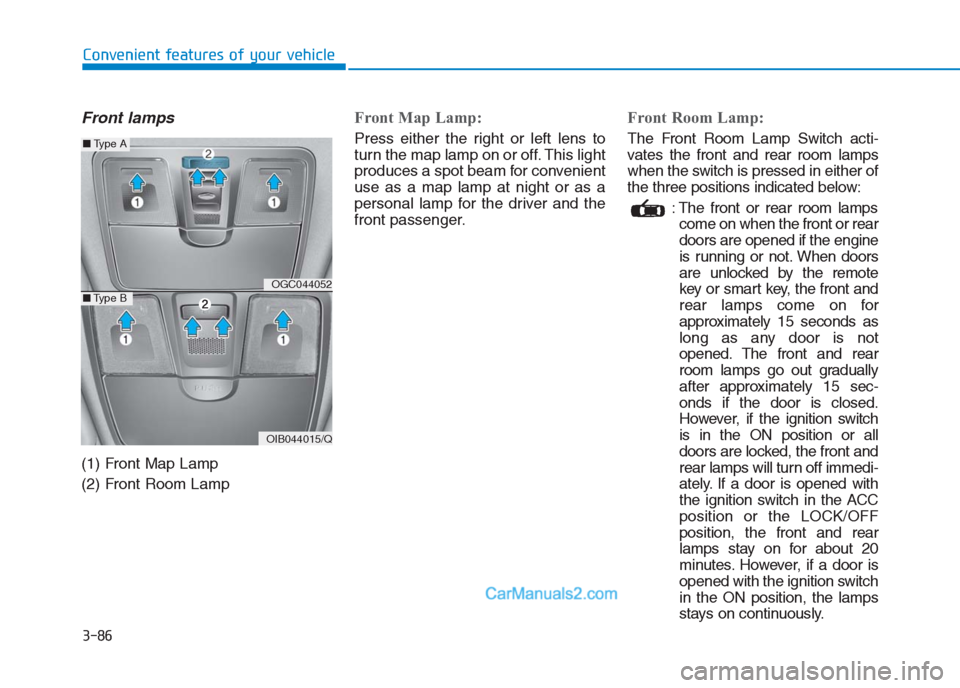
(1) Front Map Lamp
(2) Front Room Lamp
Front Map Lamp:
Press either the right or left lens to
turn the map lamp on or off. This light
produces a spot beam for convenient
use as a map lamp at night or as a
personal lamp for the driver and the
front passenger.
Front Room Lamp:
The Front Room Lamp Switch acti-
vates the front and rear room lamps
when the switch is pressed in either of
the three positions indicated below:
: The front or rear room lamps
come on when the front or rear
doors are opened if the engine
is running or not. When doors
are unlocked by the remote
key or smart key, the front and
rear lamps come on for
approximately 15 seconds as
long as any door is not
opened. The front and rear
room lamps go out gradually
after approximately 15 sec-
onds if the door is closed.
However, if the ignition switch
is in the ON position or all
doors are locked, the front and
rear lamps will turn off immedi-
ately. If a door is opened with
the ignition switch in the ACC
position or the LOCK/OFF
position, the front and rear
lamps stay on for about 20
minutes. However, if a door is
opened with the ignition switch
in the ON position, the lamps
stays on continuously.
3-86
Convenient features of your vehicle
OGC044052
OIB044015/Q
■Type A
■Type B
Page 178 of 472
3-93
Convenient features of your vehicle
3
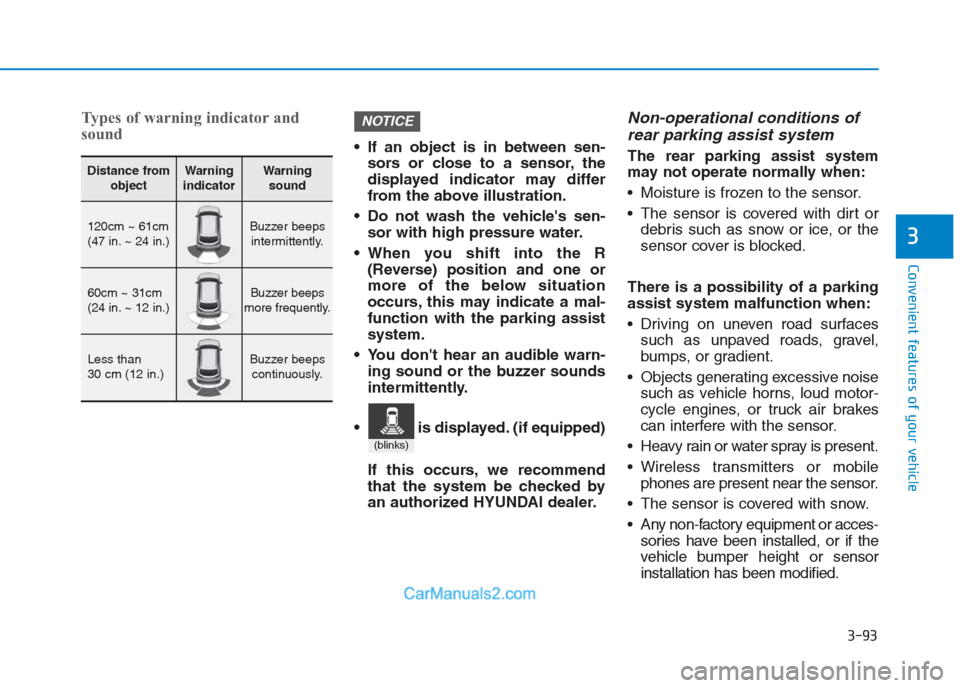
Types of warning indicator and
sound
If an object is in between sen-
sors or close to a sensor, the
displayed indicator may differ
from the above illustration.
Do not wash the vehicle's sen-
sor with high pressure water.
When you shift into the R
(Reverse) position and one or
more of the below situation
occurs, this may indicate a mal-
function with the parking assist
system.
You don't hear an audible warn-
ing sound or the buzzer sounds
intermittently.
If this occurs, we recommend
that the system be checked by
an authorized HYUNDAI dealer.
Non-operational conditions of
rear parking assist system
The rear parking assist system
may not operate normally when:
Moisture is frozen to the sensor.
The sensor is covered with dirt or
debris such as snow or ice, or the
sensor cover is blocked.
There is a possibility of a parking
assist system malfunction when:
Driving on uneven road surfaces
such as unpaved roads, gravel,
bumps, or gradient.
Objects generating excessive noise
such as vehicle horns, loud motor-
cycle engines, or truck air brakes
can interfere with the sensor.
Heavy rain or water spray is present.
Wireless transmitters or mobile
phones are present near the sensor.
The sensor is covered with snow.
Any non-factory equipment or acces-
sories have been installed, or if the
vehicle bumper height or sensor
installation has been modified.
NOTICE
Distance from
objectWarning
indicatorWarning
sound
120cm ~ 61cm
(47 in. ~ 24 in.)Buzzer beeps
intermittently.
60cm ~ 31cm
(24 in. ~ 12 in.)Buzzer beeps
more frequently.
Less than
30 cm (12 in.)Buzzer beeps
continuously.
(blinks)
is displayed. (if equipped)
Page 206 of 472
3-121
Convenient features of your vehicle
3
Glove box
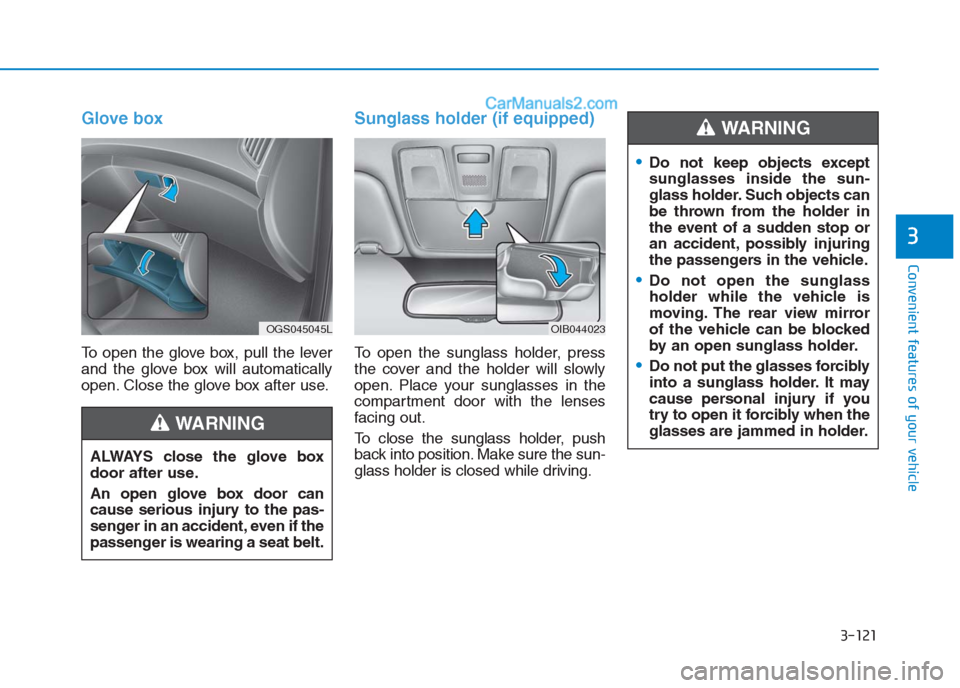
To open the glove box, pull the lever
and the glove box will automatically
open. Close the glove box after use.
Sunglass holder (if equipped)
To open the sunglass holder, press
the cover and the holder will slowly
open. Place your sunglasses in the
compartment door with the lenses
facing out.
To close the sunglass holder, push
back into position. Make sure the sun-
glass holder is closed while driving. ALWAYS close the glove box
door after use.
An open glove box door can
cause serious injury to the pas-
senger in an accident, even if the
passenger is wearing a seat belt.
WARNING
Do not keep objects except
sunglasses inside the sun-
glass holder. Such objects can
be thrown from the holder in
the event of a sudden stop or
an accident, possibly injuring
the passengers in the vehicle.
Do not open the sunglass
holder while the vehicle is
moving. The rear view mirror
of the vehicle can be blocked
by an open sunglass holder.
Do not put the glasses forcibly
into a sunglass holder. It may
cause personal injury if you
try to open it forcibly when the
glasses are jammed in holder.
WARNING
OGS045045LOIB044023
Page 207 of 472
3-122
Convenient features of your vehicle
I IN
NT
TE
ER
RI
IO
OR
R
F
FE
EA
AT
TU
UR
RE
ES
S
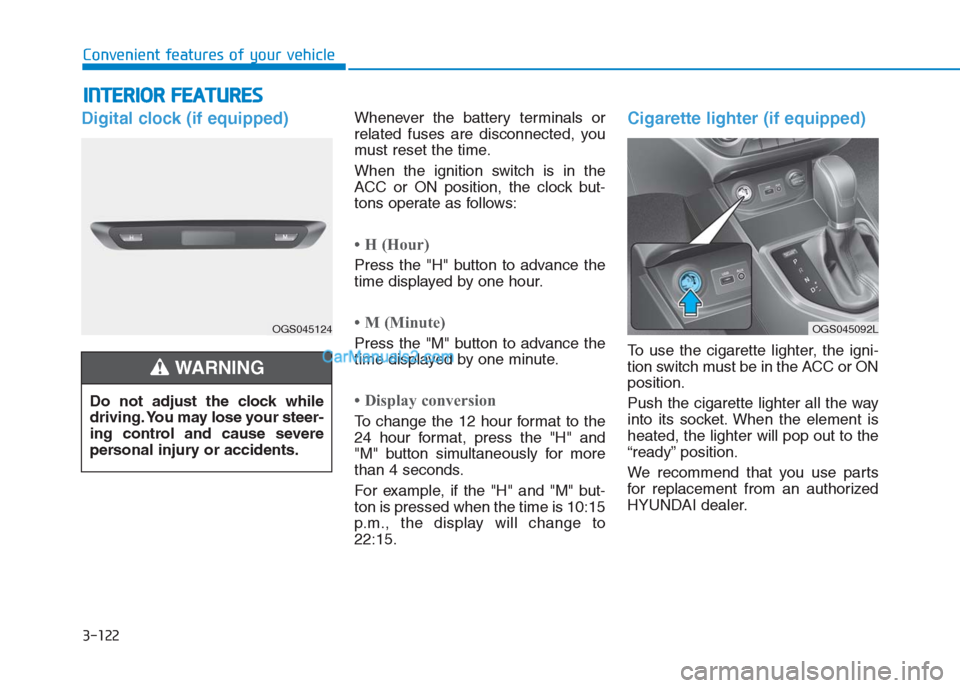
Digital clock (if equipped)Whenever the battery terminals or
related fuses are disconnected, you
must reset the time.
When the ignition switch is in the
ACC or ON position, the clock but-
tons operate as follows:
• H (Hour)
Press the "H" button to advance the
time displayed by one hour.
• M (Minute)
Press the "M" button to advance the
time displayed by one minute.
• Display conversion
To change the 12 hour format to the
24 hour format, press the "H" and
"M" button simultaneously for more
than 4 seconds.
For example, if the "H" and "M" but-
ton is pressed when the time is 10:15
p.m., the display will change to
22:15.
Cigarette lighter (if equipped)
To use the cigarette lighter, the igni-
tion switch must be in the ACC or ON
position.
Push the cigarette lighter all the way
into its socket. When the element is
heated, the lighter will pop out to the
“ready” position.
We recommend that you use parts
for replacement from an authorized
HYUNDAI dealer. Do not adjust the clock while
driving. You may lose your steer-
ing control and cause severe
personal injury or accidents.
WARNING
OGS045124OGS045092L
Page 210 of 472
3-125
Convenient features of your vehicle
3
Sunvisor
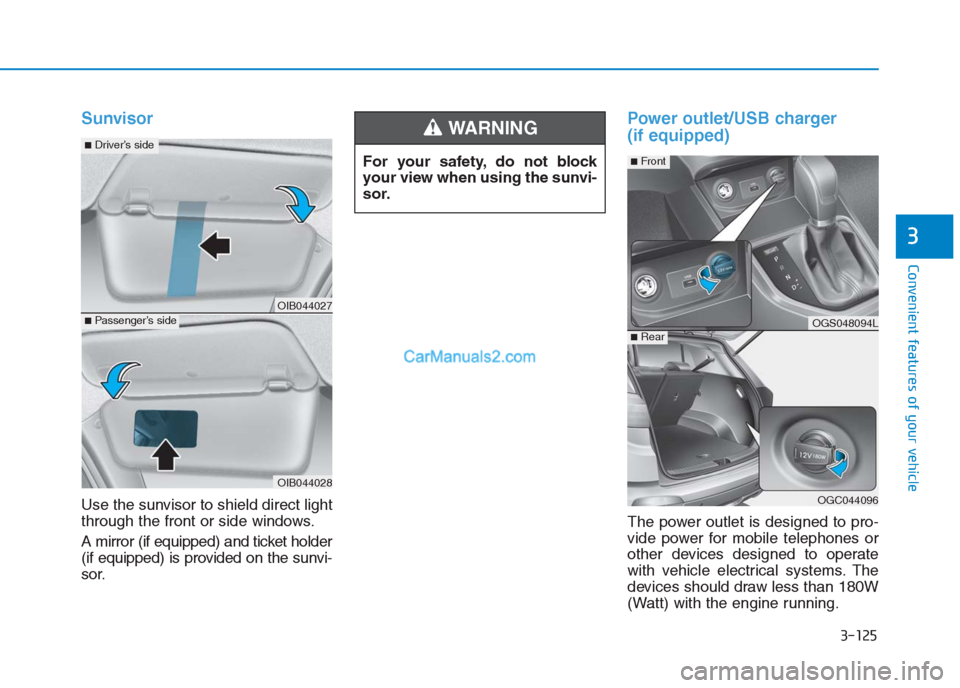
Use the sunvisor to shield direct light
through the front or side windows.
A mirror (if equipped) and ticket holder
(if equipped) is provided on the sunvi-
sor.
Power outlet/USB charger
(if equipped)
The power outlet is designed to pro-
vide power for mobile telephones or
other devices designed to operate
with vehicle electrical systems. The
devices should draw less than 180W
(Watt) with the engine running. For your safety, do not block
your view when using the sunvi-
sor.
WARNING
OIB044027
OIB044028
■Passenger’s side
■Driver’s side
OGS048094L
OGC044096
■Rear
■Front
Page 216 of 472
• If you install an aftermarket HID
head lamp, your vehicle’s audio
and electronic device may mal-
function.
Prevent chemicals such as per-
fume, cosmetic oil, sun cream,
hand cleaner, and air freshener
from contacting the interior
parts because they may cause
damage or discoloration.
USB and iPod®port
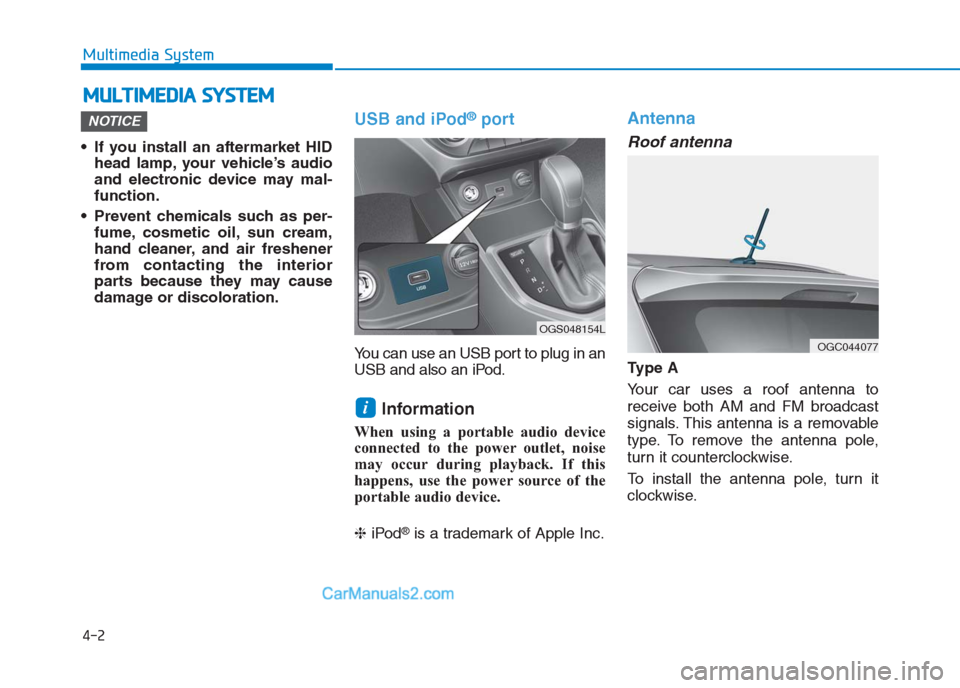
You can use an USB port to plug in an
USB and also an iPod.
Information
When using a portable audio device
connected to the power outlet, noise
may occur during playback. If this
happens, use the power source of the
portable audio device.
❈iPod
®is a trademark of Apple Inc.
Antenna
Roof antenna
Ty p e A
Your car uses a roof antenna to
receive both AM and FM broadcast
signals. This antenna is a removable
type. To remove the antenna pole,
turn it counterclockwise.
To install the antenna pole, turn it
clockwise.
i
NOTICE
M MU
UL
LT
TI
IM
ME
ED
DI
IA
A
S
SY
YS
ST
TE
EM
M
4-2
Multimedia System
OGS048154L
OGC044077
Page 221 of 472
4-7
Multimedia System
4
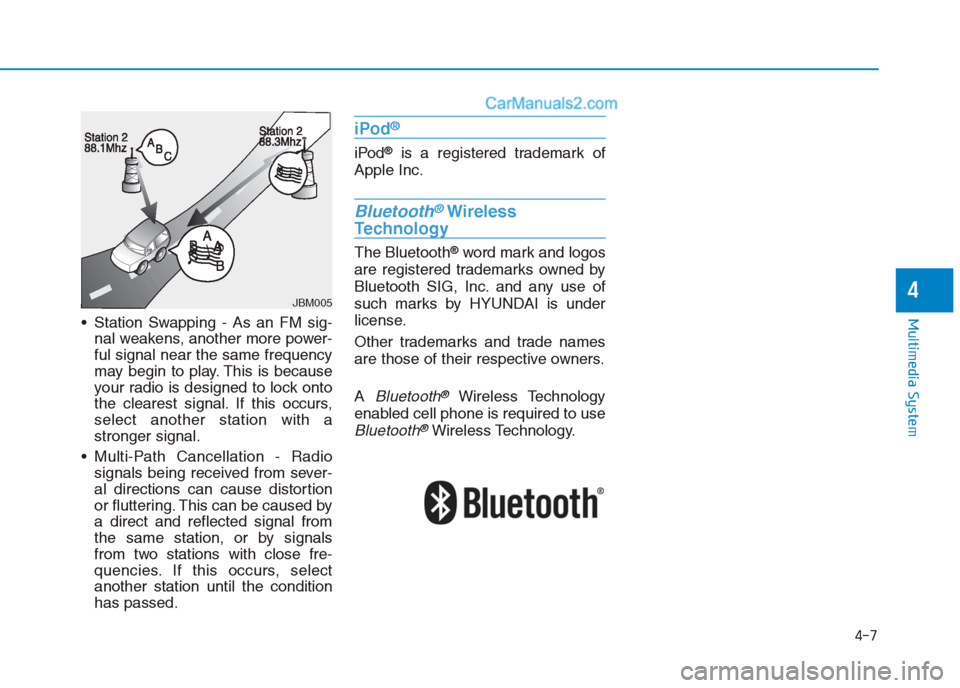
Station Swapping - As an FM sig-
nal weakens, another more power-
ful signal near the same frequency
may begin to play. This is because
your radio is designed to lock onto
the clearest signal. If this occurs,
select another station with a
stronger signal.
Multi-Path Cancellation - Radio
signals being received from sever-
al directions can cause distortion
or fluttering. This can be caused by
a direct and reflected signal from
the same station, or by signals
from two stations with close fre-
quencies. If this occurs, select
another station until the condition
has passed.
iPod®
iPod®is a registered trademark of
Apple Inc.
Bluetooth®Wireless
Technology
The Bluetooth®word mark and logos
are registered trademarks owned by
Bluetooth SIG, Inc. and any use of
such marks by HYUNDAI is under
license.
Other trademarks and trade names
are those of their respective owners.
A
Bluetooth®Wireless Technology
enabled cell phone is required to use
Bluetooth®Wireless Technology.
JBM005
Page 231 of 472
4-17
Multimedia System
4
(Continued)
• Some USB devices may not be sup-
ported due to compatibility issues.
• Avoid contact between the USB con-
nector and bodily parts or foreign
objects.
• Repeated connecting/disconnecting
of USB devices within short periods
of time may result in product mal-
function.
• A strange noise may occur when dis-
connecting the USB.
• Make sure to connect/disconnect
external USB devices with the audio
power turned off.
• The amount of time required to rec-
ognize the USB device may differ
depending on the type, size or file
formats stored on the USB. Such
differences in time are not indica-
tions of malfunctions.
• The vehicle audio system only sup-
ports USB devices designed to play
music files.
• USB images and videos are not sup-
ported.
(Continued)(Continued)
• Do not use the USB interface to
charge batteries or USB accessories
that generate heat. Doing so may
lead to worsened performance or
damage to the audio system.
• The audio system may not recognize
the USB device if separately pur-
chased USB hubs and extension
cables are being used. Connect the
USB device directly with the USB
port of the vehicle.
• When using mass storage USB
devices with separate logical drives,
only files saved to the root drive can
be played.
• Files may not properly operate if
application programs are installed
on the USBs.
• The audio system may not operate
normally if MP3 Players, cellular
phones, digital cameras, or other
electronic devices (USB devices not
recognized as portable disk drives)
are connected with the audio sys-
tem.
(Continued)(Continued)
• Charging through the USB may not
work for some mobile devices.
• The device may not support normal
operation when using an atypical
USB memory device (miniature,
keychain, etc.). For best results, use
a typical USB device that has a
metal case.
• The device may not support normal
operation when using formats such
as HDD Type, CF, or SD Memory.
• The device will not support files
locked by DRM (Digital Rights
Management.).
• USB memory sticks used by con-
necting an Adaptor (SD Type or CF
Type) may not be properly recog-
nized.
• The device may not operate proper-
ly when using USB HDDs or USBs
subject to connection failures
caused by vehicle vibrations. (e.g. i-
stick type)
(Continued)