power window Hyundai Creta 2019 Owner's Manual
[x] Cancel search | Manufacturer: HYUNDAI, Model Year: 2019, Model line: Creta, Model: Hyundai Creta 2019Pages: 472, PDF Size: 13.39 MB
Page 15 of 472
1-4
Your vehicle at a glance
I IN
NT
TE
ER
RI
IO
OR
R
O
OV
VE
ER
RV
VI
IE
EW
W
(
(I
I)
)
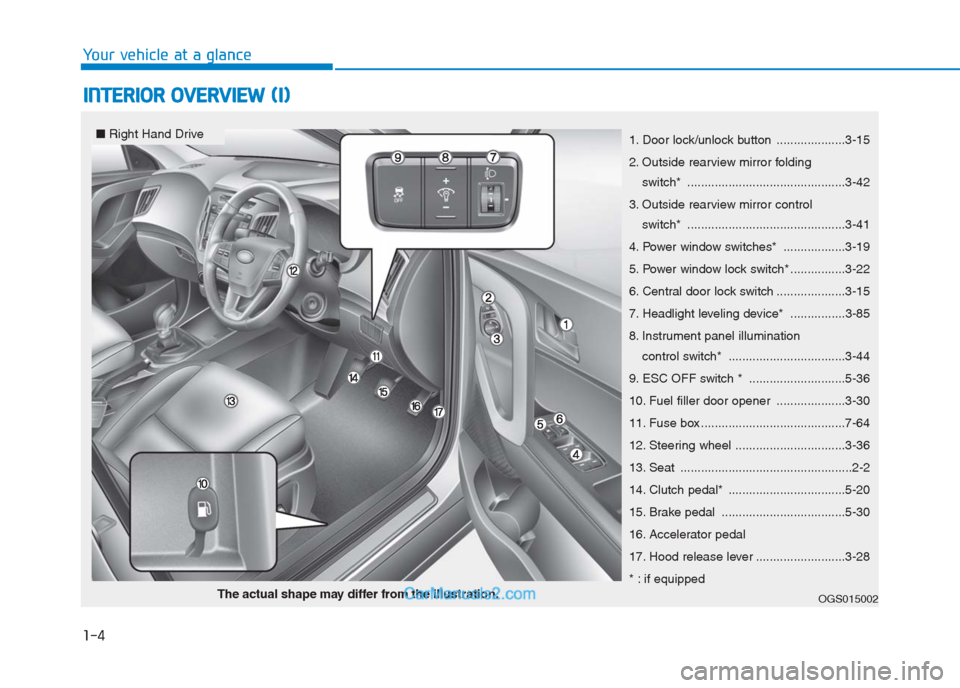
1. Door lock/unlock button ....................3-15
2. Outside rearview mirror folding
switch* ..............................................3-42
3. Outside rearview mirror control
switch* ..............................................3-41
4. Power window switches* ..................3-19
5. Power window lock switch* ................3-22
6. Central door lock switch ....................3-15
7. Headlight leveling device* ................3-85
8. Instrument panel illumination
control switch* ..................................3-44
9. ESC OFF switch * ............................5-36
10. Fuel filler door opener ....................3-30
11. Fuse box ..........................................7-64
12. Steering wheel ................................3-36
13. Seat ..................................................2-2
14. Clutch pedal* ..................................5-20
15. Brake pedal ....................................5-30
16. Accelerator pedal
17. Hood release lever ..........................3-28
* : if equipped
OGS015002The actual shape may differ from the illustration.
■Right Hand Drive
Page 16 of 472
1-5
Your vehicle at a glance
I IN
NT
TE
ER
RI
IO
OR
R
O
OV
VE
ER
RV
VI
IE
EW
W
(
(I
II
I)
)
1
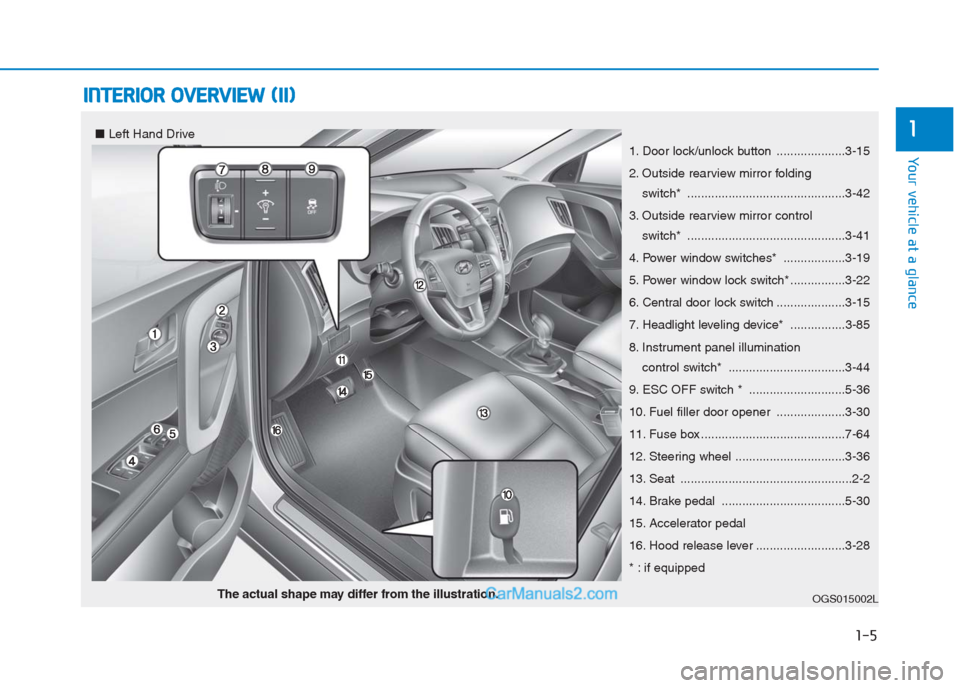
1. Door lock/unlock button ....................3-15
2. Outside rearview mirror folding
switch* ..............................................3-42
3. Outside rearview mirror control
switch* ..............................................3-41
4. Power window switches* ..................3-19
5. Power window lock switch* ................3-22
6. Central door lock switch ....................3-15
7. Headlight leveling device* ................3-85
8. Instrument panel illumination
control switch* ..................................3-44
9. ESC OFF switch * ............................5-36
10. Fuel filler door opener ....................3-30
11. Fuse box ..........................................7-64
12. Steering wheel ................................3-36
13. Seat ..................................................2-2
14. Brake pedal ....................................5-30
15. Accelerator pedal
16. Hood release lever ..........................3-28
* : if equipped
OGS015002LThe actual shape may differ from the illustration.
■Left Hand Drive
Page 86 of 472
Convenient features of your vehicle
Accessing your vehicle .........................................3-3
Remote key .........................................................................3-3
Remote key precautions..................................................3-5
Smart key ............................................................................3-7
Smart key precautions...................................................3-10
Immobilizer system .........................................................3-12
Door locks .............................................................3-13
Operating door locks from outside the vehicle ......3-13
Operating door locks from inside the vehicle .........3-15
Auto door lock/unlock features..................................3-17
Child-protector rear door locks ..................................3-17
Theft-alarm system.............................................3-18
Windows ................................................................3-19
Power windows ................................................................3-19
Sunroof..................................................................3-24
Sunroof opening and closing .......................................3-25
Tilting the sunroof ..........................................................3-25
Sunshade ...........................................................................3-26
Resetting the sunroof ....................................................3-26
Sunroof open warning ...................................................3-27
Hood.......................................................................3-28
Opening the hood ...........................................................3-28
Closing the hood .............................................................3-29
Fuel filler door .....................................................3-30
Opening the fuel filler door .........................................3-30
Closing the fuel filler door ...........................................3-31
Tailgate ..................................................................3-33
Opening the tailgate .......................................................3-33
Closing the tailgate .........................................................3-33
Emergency tailgate safety release .............................3-34
Steering wheel......................................................3-36
Electric power steering (EPS) ......................................3-36
Tilt steering.......................................................................3-37
Horn ....................................................................................3-37
Mirrors ...................................................................3-38
Inside rearview mirror....................................................3-38
Outside rearview mirror ................................................3-40
Instrument cluster................................................3-43
Instrument Cluster Control............................................3-44
Gauges ...............................................................................3-45
Transaxle shift indicator ...............................................3-48
Warning and indicator lights ........................................3-50
Warning Messages (for Type B) .................................3-61
LCD display .......................................................................3-67
Trip computer ...................................................................3-74
3
Page 87 of 472
Light .......................................................................3-78
Exterior lights ..................................................................3-78
Interior lights ....................................................................3-85
Wipers and washers ............................................3-88
Windshield wipers ...........................................................3-89
Windshield washers ........................................................3-89
Rear window wiper and washer switch.....................3-90
Driver assist system ............................................3-91
Rear view camera ...........................................................3-91
Rear parking assist system ..........................................3-92
Climate control system........................................3-95
Defroster ...........................................................................3-95
Manual climate control system ...................................3-96
Automatic climate control system ............................3-105
Windshield defrosting and defogging .....................3-116
Storage compartment ........................................3-120
Center console storage ...............................................3-120
Glove box ........................................................................3-121
Sunglass holder .............................................................3-121
Interior features.................................................3-122
Digital clock ....................................................................3-122
Cigarette lighter ............................................................3-122
Ashtray ............................................................................3-123
Cup holder.......................................................................3-124
Sunvisor ...........................................................................3-125
Power outlet/USB charger .........................................3-125
Clothes hanger ..............................................................3-127
Floor mat anchor(s)......................................................3-127
Luggage net holder ......................................................3-128
Cargo area cover ..........................................................3-129
3
Page 88 of 472
3-3
Convenient features of your vehicle
3
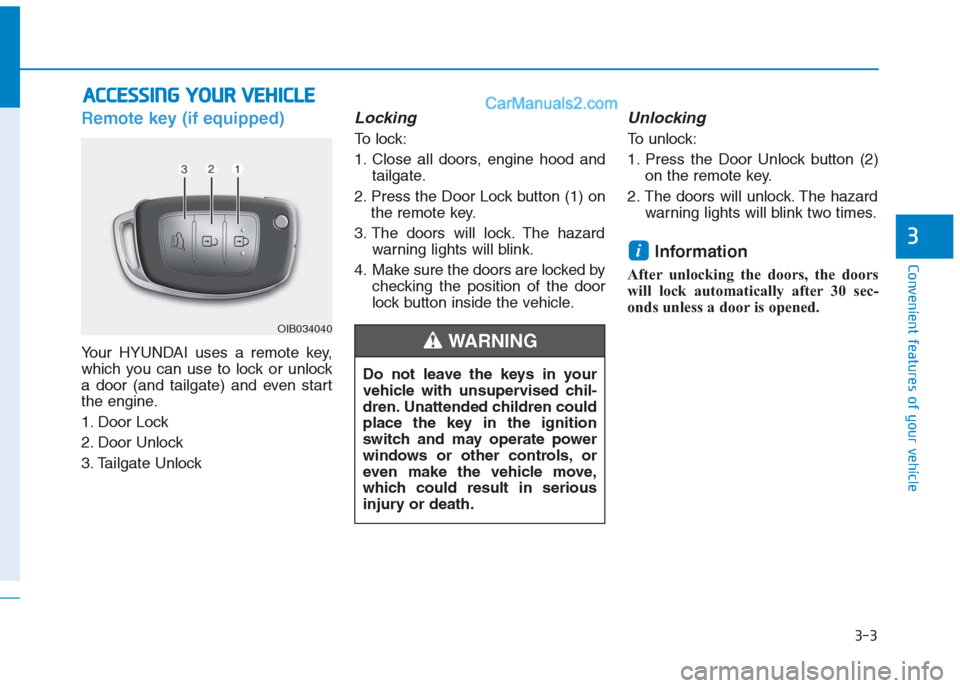
Remote key (if equipped)
Your HYUNDAI uses a remote key,
which you can use to lock or unlock
a door (and tailgate) and even start
the engine.
1. Door Lock
2. Door Unlock
3. Tailgate Unlock
Locking
To lock:
1. Close all doors, engine hood and
tailgate.
2. Press the Door Lock button (1) on
the remote key.
3. The doors will lock. The hazard
warning lights will blink.
4. Make sure the doors are locked by
checking the position of the door
lock button inside the vehicle.
Unlocking
To unlock:
1. Press the Door Unlock button (2)
on the remote key.
2. The doors will unlock. The hazard
warning lights will blink two times.
Information
After unlocking the doors, the doors
will lock automatically after 30 sec-
onds unless a door is opened.
i
A AC
CC
CE
ES
SS
SI
IN
NG
G
Y
YO
OU
UR
R
V
VE
EH
HI
IC
CL
LE
E
Do not leave the keys in your
vehicle with unsupervised chil-
dren. Unattended children could
place the key in the ignition
switch and may operate power
windows or other controls, or
even make the vehicle move,
which could result in serious
injury or death.
WARNING OIB034040
Page 93 of 472
3-8
Convenient features of your vehicle
Even though you press the outside
door handle button, the doors will not
lock and the chime will sound for
three seconds if any of the following
occur:
The Smart Key is in the vehicle.
The Engine Start/Stop button is in
ACC or ON position.
Any door except the tailgate is
open.
Unlocking
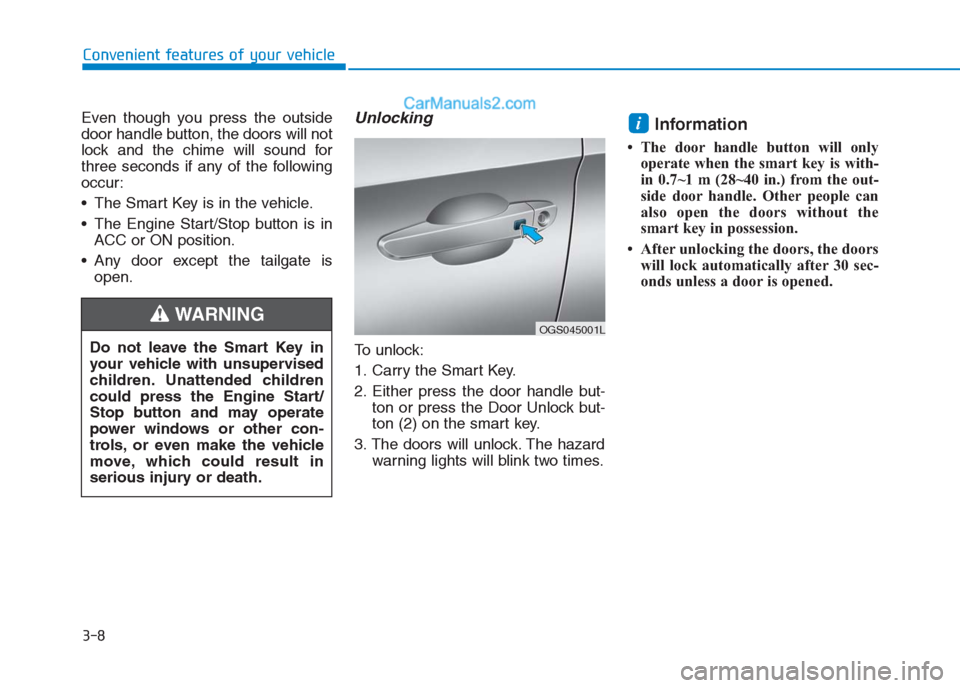
To unlock:
1. Carry the Smart Key.
2. Either press the door handle but-
ton or press the Door Unlock but-
ton (2) on the smart key.
3. The doors will unlock. The hazard
warning lights will blink two times.
Information
• The door handle button will only
operate when the smart key is with-
in 0.7~1 m (28~40 in.) from the out-
side door handle. Other people can
also open the doors without the
smart key in possession.
• After unlocking the doors, the doors
will lock automatically after 30 sec-
onds unless a door is opened.
i
Do not leave the Smart Key in
your vehicle with unsupervised
children. Unattended children
could press the Engine Start/
Stop button and may operate
power windows or other con-
trols, or even make the vehicle
move, which could result in
serious injury or death.
WARNING OGS045001L
Page 100 of 472
3-15
Convenient features of your vehicle
3
Operating door locks from
inside the vehicle
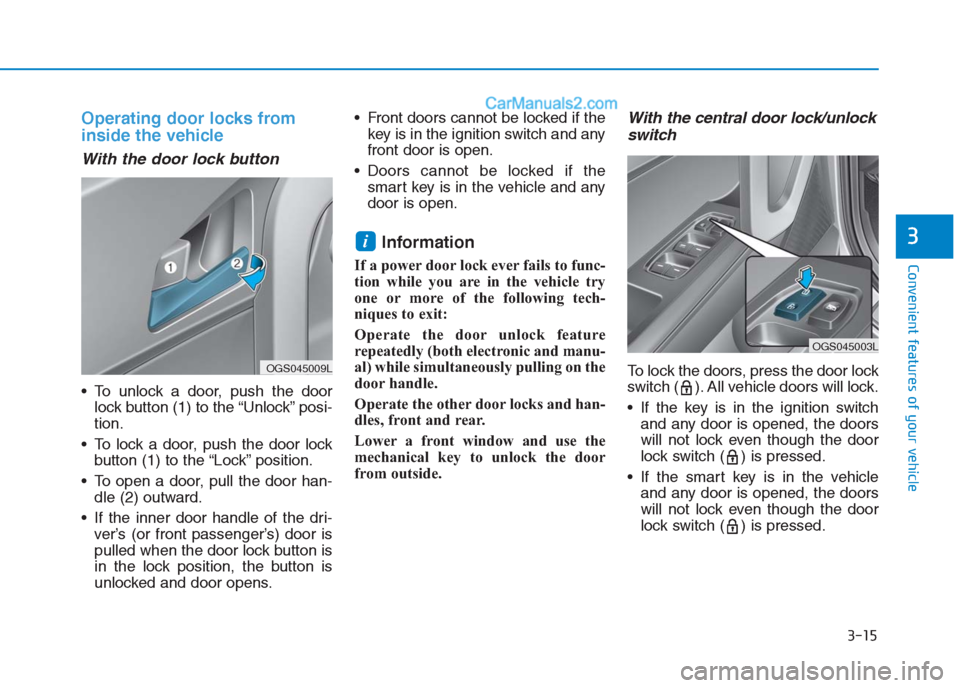
With the door lock button
To unlock a door, push the door
lock button (1) to the “Unlock” posi-
tion.
To lock a door, push the door lock
button (1) to the “Lock” position.
To open a door, pull the door han-
dle (2) outward.
If the inner door handle of the dri-
ver’s (or front passenger’s) door is
pulled when the door lock button is
in the lock position, the button is
unlocked and door opens. Front doors cannot be locked if the
key is in the ignition switch and any
front door is open.
Doors cannot be locked if the
smart key is in the vehicle and any
door is open.
Information
If a power door lock ever fails to func-
tion while you are in the vehicle try
one or more of the following tech-
niques to exit:
Operate the door unlock feature
repeatedly (both electronic and manu-
al) while simultaneously pulling on the
door handle.
Operate the other door locks and han-
dles, front and rear.
Lower a front window and use the
mechanical key to unlock the door
from outside.
With the central door lock/unlock
switch
To lock the doors, press the door lock
switch ( ). All vehicle doors will lock.
If the key is in the ignition switch
and any door is opened, the doors
will not lock even though the door
lock switch ( ) is pressed.
If the smart key is in the vehicle
and any door is opened, the doors
will not lock even though the door
lock switch ( ) is pressed.
i
OGS045009L
OGS045003L
Page 104 of 472
3-19
Convenient features of your vehicle
3
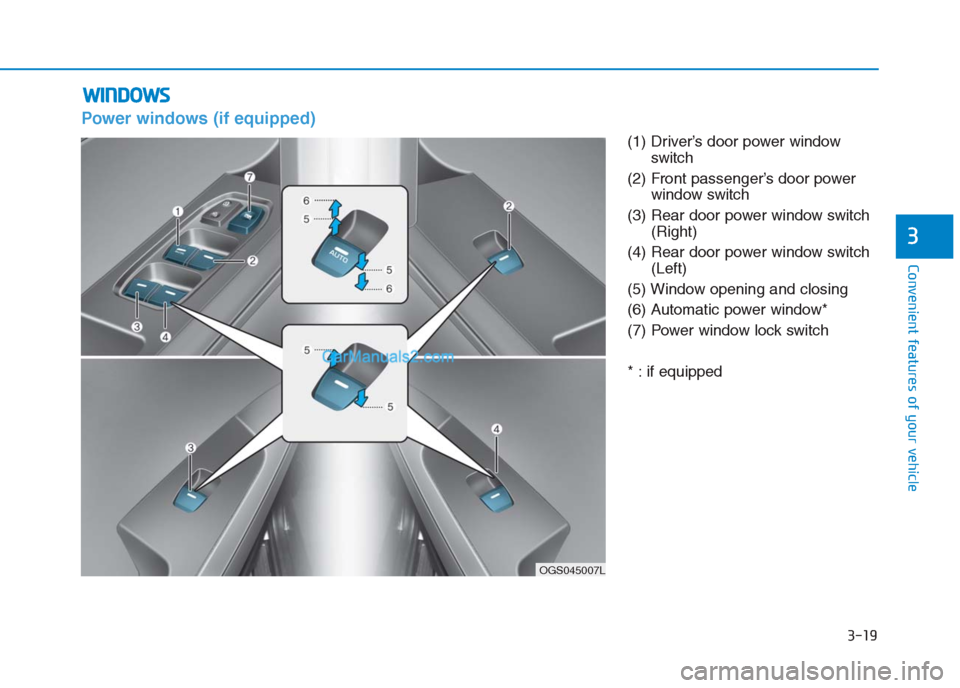
Power windows (if equipped)
(1) Driver’s door power window
switch
(2) Front passenger’s door power
window switch
(3) Rear door power window switch
(Right)
(4) Rear door power window switch
(Left)
(5) Window opening and closing
(6) Automatic power window*
(7) Power window lock switch
* : if equipped
W WI
IN
ND
DO
OW
WS
S
OGS045007L
Page 105 of 472
3-20
Convenient features of your vehicle
The ignition switch must be in the ON
position to be able to raise or lower
the windows. Each door has a Power
Window switch to control that door's
window. The driver has a Power
Window Lock switch which can block
the operation of passenger windows.
The power windows will operate for
approximately 30 seconds after the
ignition switch is placed in the ACC
or LOCK/OFF position. However, if
the front doors are opened, the
Power Windows cannot be operated
even within the 30 second period.
Information
• In cold and wet climates, power win-
dows may not work properly due to
freezing conditions.
• While driving with the rear windows
down, your vehicle may demonstrate
a wind buffeting or pulsation noise.
This noise is normal and can be
reduced or eliminated by taking the
following actions. If the noise occurs
with one or both of the rear windows
down, partially lower both front win-
dows approximately one inch.
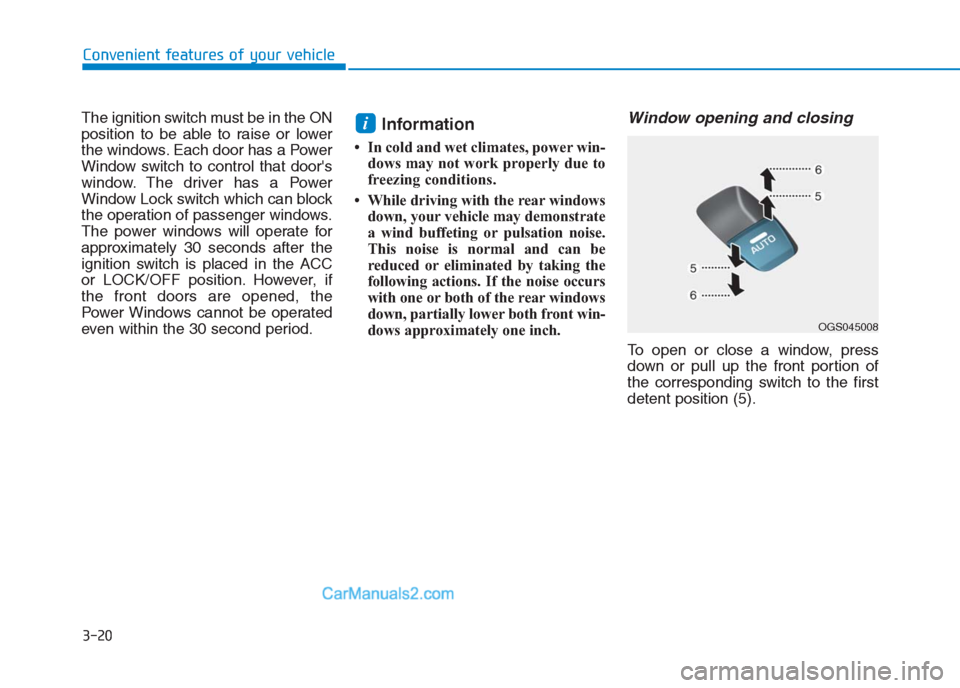
Window opening and closing
To open or close a window, press
down or pull up the front portion of
the corresponding switch to the first
detent position (5).
i
OGS045008
Page 106 of 472
3-21
Convenient features of your vehicle
3
Auto up/down window
(if equipped)
Pressing or pulling up the power win-
dow switch momentarily to the sec-
ond detent position (6) completely
lowers or lifts the window even when
the switch is released. To stop the
window at the desired position while
the window is in operation, pull up or
press down and release the switch.
To reset the power windows
If the power windows do not operate
normally, the automatic power win-
dow system must be reset as follows:
1. Place the ignition switch to the ON
position.
2. Close the window and continue
pulling up on the power window
switch for at least 1 second.
If the power windows do not operate
properly after resetting, it is recom-
mended that the system be checked
by an authorized HYUNDAI dealer.
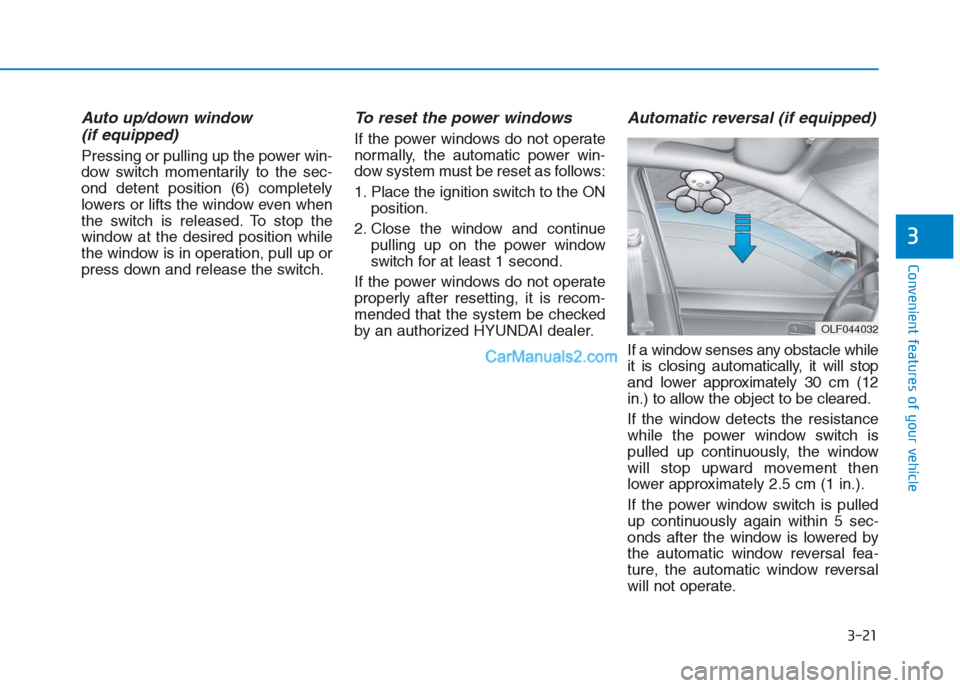
Automatic reversal (if equipped)
If a window senses any obstacle while
it is closing automatically, it will stop
and lower approximately 30 cm (12
in.) to allow the object to be cleared.
If the window detects the resistance
while the power window switch is
pulled up continuously, the window
will stop upward movement then
lower approximately 2.5 cm (1 in.).
If the power window switch is pulled
up continuously again within 5 sec-
onds after the window is lowered by
the automatic window reversal fea-
ture, the automatic window reversal
will not operate.
OLF044032