key Hyundai Elantra 2012 Owner's Manual - RHD (UK. Australia)
[x] Cancel search | Manufacturer: HYUNDAI, Model Year: 2012, Model line: Elantra, Model: Hyundai Elantra 2012Pages: 384, PDF Size: 26.92 MB
Page 60 of 384
Safety features of your vehicle
44
3
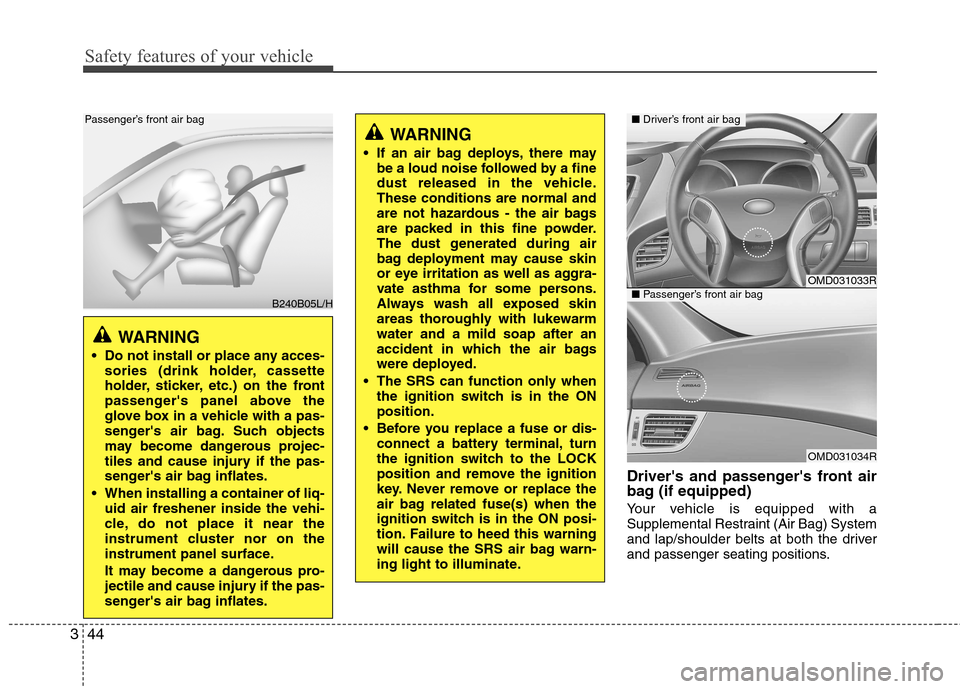
Driver's and passenger's front air
bag (if equipped)
Your vehicle is equipped with a
Supplemental Restraint (Air Bag) System
and lap/shoulder belts at both the driver
and passenger seating positions.
WARNING
If an air bag deploys, there may be a loud noise followed by a fine
dust released in the vehicle.These conditions are normal and
are not hazardous - the air bags
are packed in this fine powder.
The dust generated during air
bag deployment may cause skin
or eye irritation as well as aggra-
vate asthma for some persons.
Always wash all exposed skin
areas thoroughly with lukewarmwater and a mild soap after an
accident in which the air bags
were deployed.
The SRS can function only when the ignition switch is in the ONposition.
Before you replace a fuse or dis- connect a battery terminal, turn
the ignition switch to the LOCK
position and remove the ignition
key. Never remove or replace the
air bag related fuse(s) when the
ignition switch is in the ON posi-
tion. Failure to heed this warning
will cause the SRS air bag warn-
ing light to illuminate.
OMD031033R
OMD031034R
■Driver’s front air bag
■Passenger’s front air bag
WARNING
Do not install or place any acces- sories (drink holder, cassette
holder, sticker, etc.) on the front
passenger's panel above the
glove box in a vehicle with a pas-
senger's air bag. Such objects
may become dangerous projec-
tiles and cause injury if the pas-
senger's air bag inflates.
When installing a container of liq- uid air freshener inside the vehi-
cle, do not place it near the
instrument cluster nor on the
instrument panel surface.
It may become a dangerous pro-
jectile and cause injury if the pas-
senger's air bag inflates.
B240B05L/H
Passenger’s front air bag
Page 63 of 384
347
Safety features of your vehicle
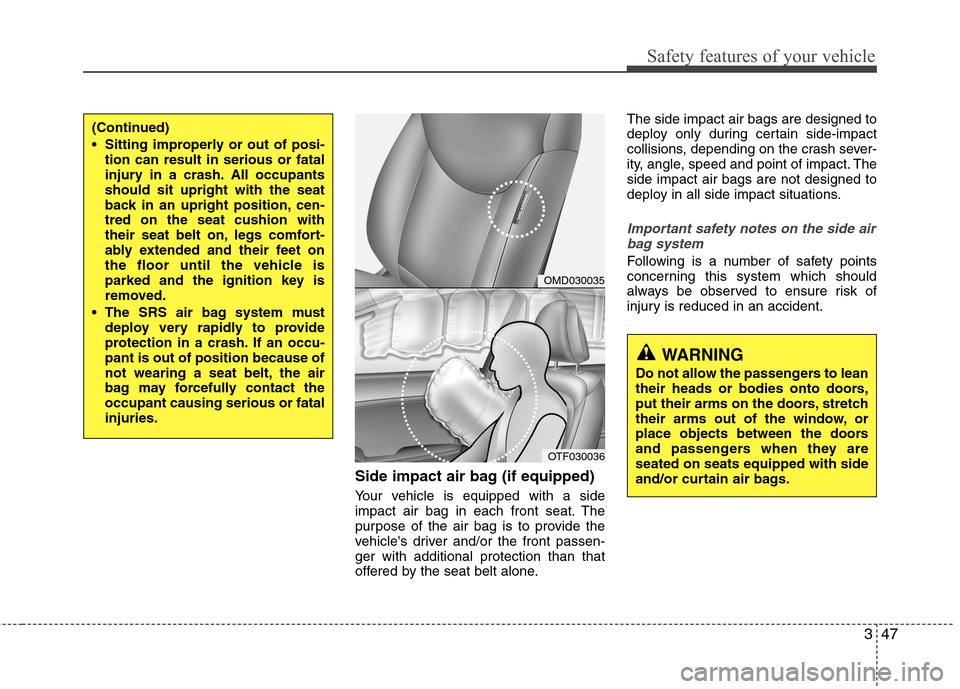
Side impact air bag (if equipped)
Your vehicle is equipped with a side
impact air bag in each front seat. The
purpose of the air bag is to provide the
vehicle's driver and/or the front passen-ger with additional protection than that
offered by the seat belt alone.The side impact air bags are designed to
deploy only during certain side-impact
collisions, depending on the crash sever-
ity, angle, speed and point of impact. Theside impact air bags are not designed to
deploy in all side impact situations.
Important safety notes on the side air
bag system
Following is a number of safety points
concerning this system which should
always be observed to ensure risk of
injury is reduced in an accident.
(Continued)
Sitting improperly or out of posi- tion can result in serious or fatal
injury in a crash. All occupantsshould sit upright with the seat
back in an upright position, cen-tred on the seat cushion with
their seat belt on, legs comfort-
ably extended and their feet on
the floor until the vehicle is
parked and the ignition key is
removed.
The SRS air bag system must deploy very rapidly to provide
protection in a crash. If an occu-pant is out of position because of
not wearing a seat belt, the air
bag may forcefully contact theoccupant causing serious or fatalinjuries.
OMD030035
OTF030036
WARNING
Do not allow the passengers to lean
their heads or bodies onto doors,
put their arms on the doors, stretch
their arms out of the window, or
place objects between the doors
and passengers when they areseated on seats equipped with side
and/or curtain air bags.
Page 75 of 384
4
Keys / 4-2
Smart key / 4-5
Remote keyless entry / 4-11
Theft-alarm system / 4-13
Door locks / 4-16
Boot / 4-20
Windows / 4-22
Bonnet / 4-27
Fuel filler lid / 4-29
Sunroof / 4-32
Steering wheel / 4-36
Mirrors / 4-38
Instrument cluster / 4-42
Rear parking assist system / 4-65
Rearview camera / 4-68
Hazard warning flasher / 4-69
Lighting / 4-70
Wipers and washers / 4-75
Interior light / 4-78
Defroster / 4-80
Manual climate control system / 4-81
Automatic climate control system / 4-90
Windscreen defrosting and defogging / 4-98
Storage compartment / 4-102
Interior features / 4-104
Audio system / 4-111
Features of your vehicle
Page 76 of 384
Features of your vehicle
2
4
KEYS
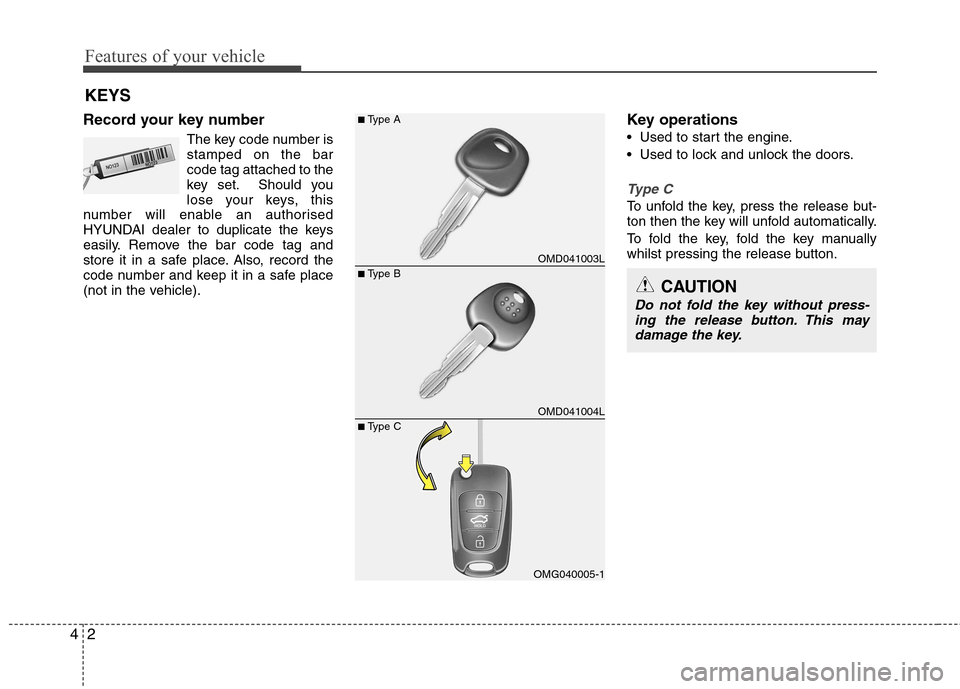
Record your key number The key code number is stamped on the barcode tag attached to the
key set. Should you
lose your keys, this
number will enable an authorised
HYUNDAI dealer to duplicate the keys
easily. Remove the bar code tag and
store it in a safe place. Also, record the
code number and keep it in a safe place
(not in the vehicle). Key operations
• Used to start the engine.
Used to lock and unlock the doors.
Type C
To unfold the key, press the release but-
ton then the key will unfold automatically.
To fold the key, fold the key manually
whilst pressing the release button.
OMD041003L
OMD041004L
OMG040005-1
■
Type B
■
Type A
■ Type CCAUTION
Do not fold the key without press-
ing the release button. This may damage the key.
Page 77 of 384
43
Features of your vehicle
Immobiliser system
Your vehicle may be equipped with an electronic engine immobiliser system to
reduce the risk of unauthorised vehicle
use.
Your immobiliser system is comprised of
a small transponder in the ignition key
and electronic devices inside the vehicle.
With the immobiliser system, whenever
you insert your ignition key into the igni-
tion switch and turn it to ON, it checks
and determines and verifies if the ignition
key is valid or not.
If the key is determined to be valid, the
engine will start.
If the key is determined to be invalid, the
engine will not start.To deactivate the immobiliser sys-tem:
Insert the ignition key into the key cylin-
der and turn it to the ON position.
To activate the immobiliser system:
Turn the ignition key to the OFF position.
The immobiliser system activates auto-
matically. Without a valid ignition key for
your vehicle, the engine will not start.
WARNING - Ignition key
Leaving children unattended in a
vehicle with the ignition key is dan-
gerous even if the key is not in the
ignition switch. Children copy
adults and they could place the key
in the ignition switch. The ignition
key would enable children to oper-
ate power windows or other con-
trols, or even make the vehicle
move, which could result in serious
bodily injury or even death. Never
leave the keys in your vehicle with
unsupervised children.
WARNING
Use only HYUNDAI original parts
for the ignition key in your vehicle.
If an aftermarket key is used, the
ignition switch may not return to
ON after START. If this happens,
the starter will continue to operate
causing damage to the starter
motor and possible fire due to
excessive current in the wiring.
WARNING
In order to prevent theft of your
vehicle, do not leave spare keys
anywhere in your vehicle.
Page 78 of 384
Features of your vehicle
4
4
✽✽
NOTICE
When starting the engine, do not use the
key with other immobiliser keys around.
Otherwise the engine may not start or
may stop soon after it starts. Keep each
key separately in order to avoid a start-
ing malfunction.
✽
✽ NOTICE
If you need additional keys or lose your
keys, consult an authorised HYUNDAI
dealer.
CAUTION
The transponder in your ignition key is an important part of the
immobiliser system. It is designedto give years of trouble-free service,however you should avoid expo- sure to moisture, static electricity
and rough handling. Immobilisersystem malfunction could occur.
CAUTION
Do not change, alter or adjust the
immobiliser system because itcould cause the immobiliser sys-tem to malfunction and should only be serviced by an authorised
HYUNDAI dealer.
Malfunctions caused by improperalterations, adjustments or modifi- cations to the immobiliser systemare not covered by your vehicle
manufacturer warranty.
CAUTION
Do not put metal accessories nearthe ignition switch. Metal acces- sories may interrupt the transpon-der signal and may prevent theengine from being started.
Page 79 of 384
45
Features of your vehicle
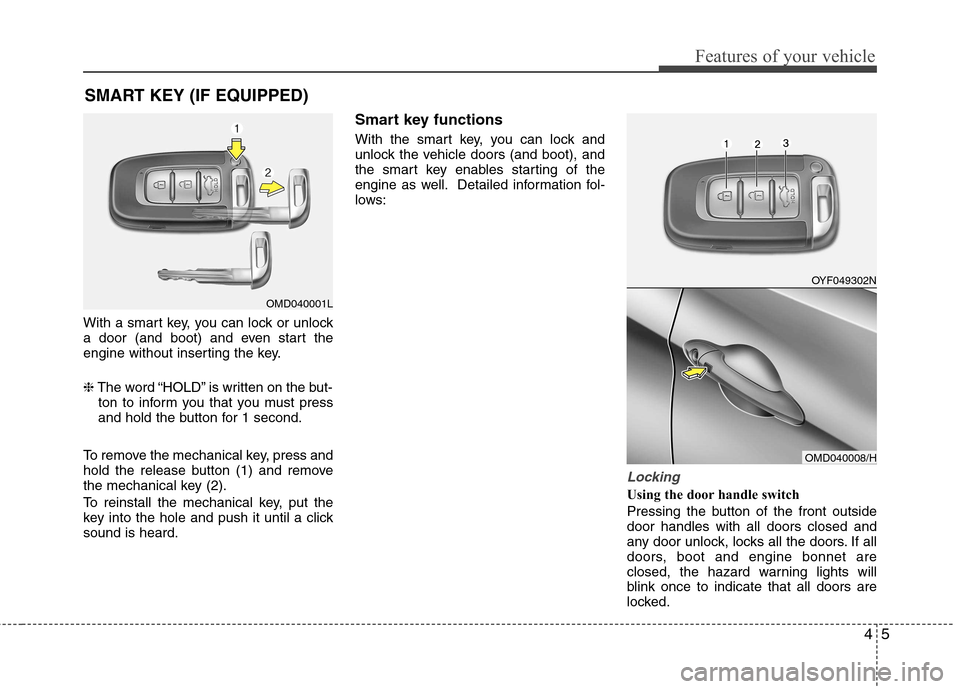
With a smart key, you can lock or unlock
a door (and boot) and even start the
engine without inserting the key. ❈The word “HOLD” is written on the but-
ton to inform you that you must press
and hold the button for 1 second.
To remove the mechanical key, press and
hold the release button (1) and remove
the mechanical key (2).
To reinstall the mechanical key, put the
key into the hole and push it until a clicksound is heard. Smart key functions
With the smart key, you can lock and
unlock the vehicle doors (and boot), and
the smart key enables starting of the
engine as well. Detailed information fol-
lows:
Locking
Using the door handle switch
Pressing the button of the front outside door handles with all doors closed and
any door unlock, locks all the doors. If all
doors, boot and engine bonnet are
closed, the hazard warning lights will
blink once to indicate that all doors are
locked.
SMART KEY (IF EQUIPPED)
OMD040001L
OYF049302N
OMD040008/H
Page 80 of 384
Features of your vehicle
6
4
However, if any door remains open, the
doors won't lock and the chime will sound
for 3 seconds. Close the door and try
again to lock the doors. If boot lid or engine bonnet remains
open, the hazard warning light won't
operate. After this, if boot lid and engine
bonnet are closed, the hazard warning
lights blink once.
The button will only operate when the
smart key is within 0.7~1 m (28~40 in.)
from the outside door handle. If you want
to make sure that a door has locked or
not, you should check the door lock but-
ton inside the vehicle or pull the outside
door handle.
Even though you press the outside door
handle buttons, the doors will not lock
and the chime will sound for 3 seconds if
any of following occur:
The smart key is in the vehicle.
The engine start/stop button is in ACC
or ON position.
Any door except the boot is open. Using the button on the smart key
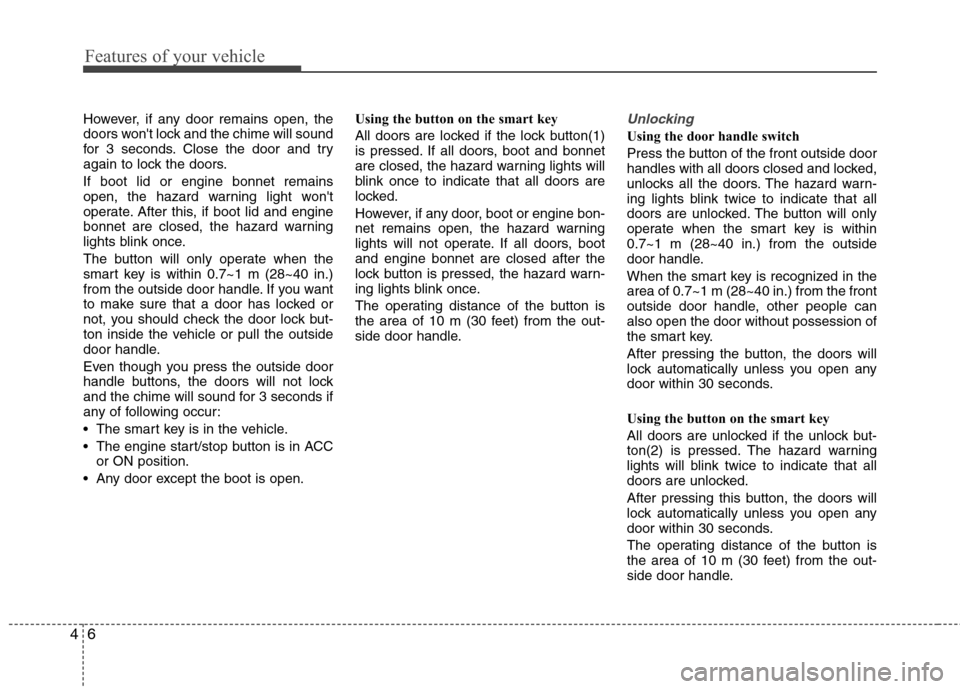
All doors are locked if the lock button(1)
is pressed. If all doors, boot and bonnet
are closed, the hazard warning lights will
blink once to indicate that all doors are
locked.
However, if any door, boot or engine bon-
net remains open, the hazard warning
lights will not operate. If all doors, bootand engine bonnet are closed after the
lock button is pressed, the hazard warn-
ing lights blink once.
The operating distance of the button is
the area of 10 m (30 feet) from the out-
side door handle.Unlocking
Using the door handle switch
Press the button of the front outside door
handles with all doors closed and locked,
unlocks all the doors. The hazard warn-
ing lights blink twice to indicate that all
doors are unlocked. The button will only
operate when the smart key is within0.7~1 m (28~40 in.) from the outside
door handle.
When the smart key is recognized in the area of 0.7~1 m (28~40 in.) from the front
outside door handle, other people canalso open the door without possession of
the smart key.
After pressing the button, the doors will
lock automatically unless you open any
door within 30 seconds.
Using the button on the smart key
All doors are unlocked if the unlock but-
ton(2) is pressed. The hazard warning
lights will blink twice to indicate that all
doors are unlocked.
After pressing this button, the doors will
lock automatically unless you open any
door within 30 seconds.
The operating distance of the button is
the area of 10 m (30 feet) from the out-
side door handle.
Page 81 of 384
47
Features of your vehicle
Boot-lid unlocking
Using the boot-lid handle switch
If you are within 0.7~1 m (28~40 in.) of
the outside boot handle with your smart
key in your possession, the boot will
unlock and open when you press the
boot handle switch.
Also, once the boot is opened and then
closed, the boot will be locked automati-
cally.
Using the button on the smart key
The boot is opened if the boot unlock but-
ton(3) is pressed for more than 1 second. Once the boot is opened and then
closed, the boot will lock automatically.
The operating distance of the button is
the area of 10 m (30 feet) from the boot.
Start-up
You can start the engine without inserting
the key. For detailed information refer to
“Engine start/stop button” in section 5.Smart key precautions
✽✽
NOTICE
If, for some reason, you happen to lose your smart key, you will not be able to
start the engine. Tow the vehicle, if
necessary, and contact an authorised
HYUNDAI dealer.
A maximum of 2 smart keys can be
registered to a single vehicle. If you
lose a smart key, you should immedi-
ately take the vehicle and key to your
authorised HYUNDAI dealer to pro-
tect it from potential theft.
The smart key will not work if any of
following occur:
- The smart key is close to a radiotransmitter such as a radio station or
an airport which can interfere with
normal operation of the smart key.
- You keep the smart key near a
mobile two-way radio system or a
mobile phone.
- Another vehicle’s smart key is being operated close to your vehicle.
- You exceed the operating distance limit.
When the smart key does not work
correctly, open and close the door with
the mechanical key. If you have a
problem with the smart key, contact
an authorised HYUNDAI dealer.CAUTION
Keep the smart key away from
water or any liquid. If the keyless
entry system is inoperative due to exposure to water or liquids, it willnot be covered by your manufactur- er’s vehicle warranty.
WARNING - Smart key
Leaving children unattended in a
vehicle with the smart key is dan-
gerous. Children copy adults and
they could press the engine
start/stop button. It would enable
children to operate power windows
or other controls, or even make the
vehicle move, which could result in
serious bodily injury or even death.
Never leave the keys in your vehicle
with unsupervised children.
Page 82 of 384
Features of your vehicle
8
4
Battery replacement
A smart key battery should last for sever-
al years, but if the smart key is not work-
ing properly, try replacing the battery with
a new one. If you are unsure how to use
your smart key or replace the battery,
contact an authorised HYUNDAI dealer.
✽✽
NOTICE
The circuit inside the smart key can
have a problem if exposed to moisture
or static electricity. If you are unsure
how to use your smart key or replace the
battery, contact an authorised
HYUNDAI dealer.
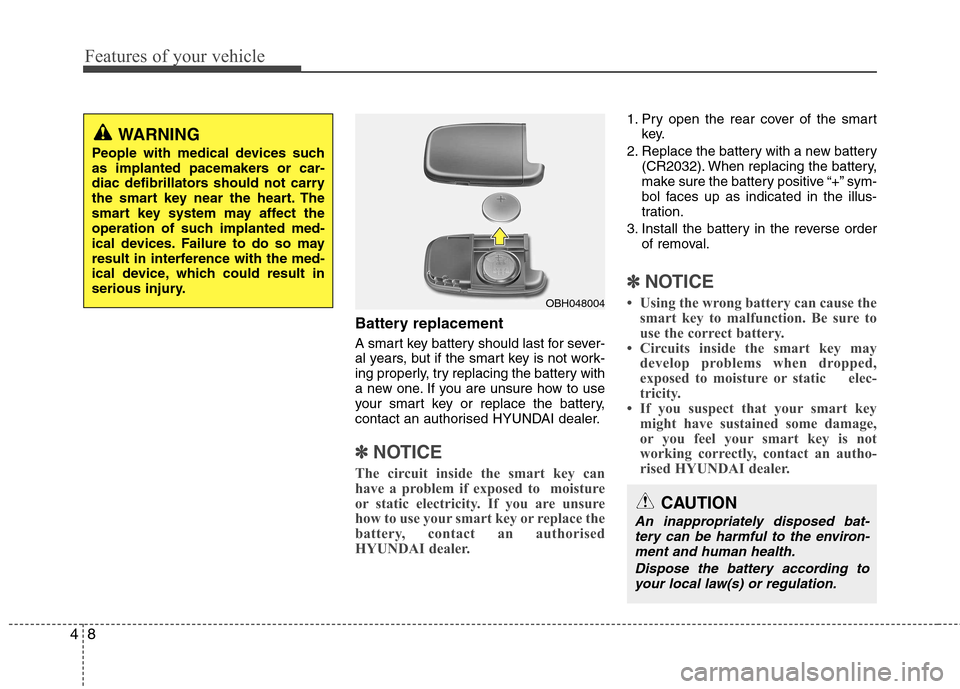
1. Pry open the rear cover of the smart key.
2. Replace the battery with a new battery (CR2032). When replacing the battery,
make sure the battery positive “+” sym-
bol faces up as indicated in the illus-
tration.
3. Install the battery in the reverse order of removal.
✽✽ NOTICE
Using the wrong battery can cause the smart key to malfunction. Be sure to
use the correct battery.
Circuits inside the smart key may
develop problems when dropped,
exposed to moisture or static elec-
tricity.
If you suspect that your smart key might have sustained some damage,
or you feel your smart key is not
working correctly, contact an autho-
rised HYUNDAI dealer.
OBH048004
WARNING
People with medical devices such
as implanted pacemakers or car-
diac defibrillators should not carry
the smart key near the heart. The
smart key system may affect the
operation of such implanted med-
ical devices. Failure to do so may
result in interference with the med-
ical device, which could result in
serious injury.
CAUTION
An inappropriately disposed bat- tery can be harmful to the environ-ment and human health.
Dispose the battery according toyour local law(s) or regulation.