turn signal Hyundai Elantra 2012 Owner's Manual - RHD (UK. Australia)
[x] Cancel search | Manufacturer: HYUNDAI, Model Year: 2012, Model line: Elantra, Model: Hyundai Elantra 2012Pages: 384, PDF Size: 26.92 MB
Page 12 of 384
15
Introduction
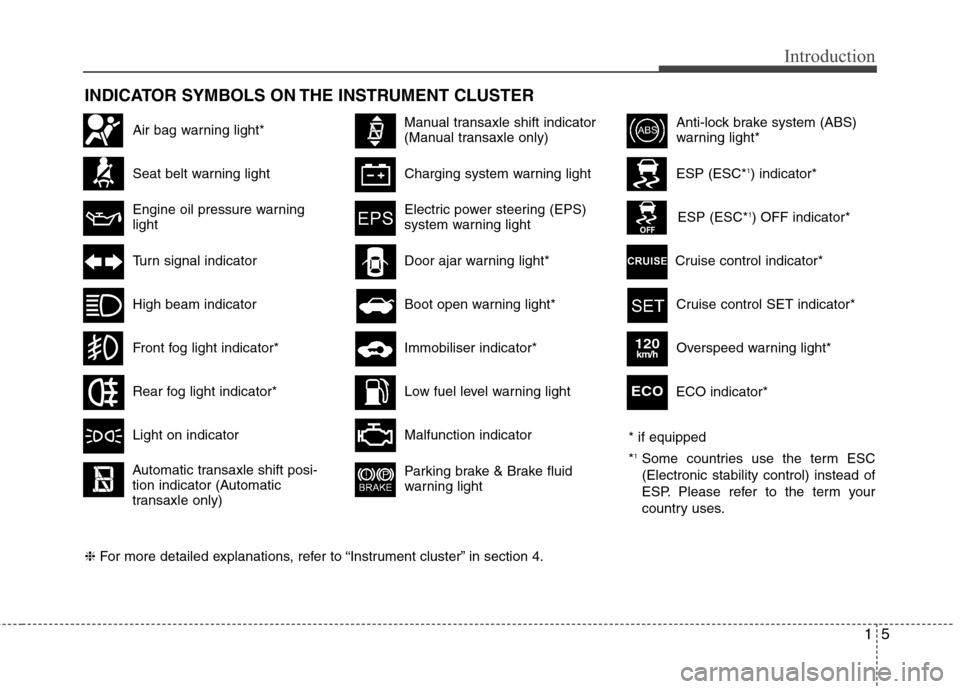
INDICATOR SYMBOLS ON THE INSTRUMENT CLUSTER
Seat belt warning light
High beam indicator
Turn signal indicator
Anti-lock brake system (ABS)
warning light*
Parking brake & Brake fluid
warning light
Malfunction indicator
Immobiliser indicator*
Boot open warning light*
Charging system warning light
Door ajar warning light*
ESP (ESC*
1
) indicator*
ESP (ESC* 1
) OFF indicator*
Front fog light indicator*
Engine oil pressure warning lightElectric power steering (EPS)
system warning light
Air bag warning light*
Rear fog light indicator*
Cruise control SET indicator*
Cruise control indicator*
Light on indicator
Automatic transaxle shift posi-
tion indicator (Automatic
transaxle only)
Manual transaxle shift indicator
(Manual transaxle only)
Low fuel level warning light
❈ For more detailed explanations, refer to “Instrument cluster” in section 4. ECO indicator*ECO
Overspeed warning light*120km/h
* if equipped *
1
Some countries use the term ESC (Electronic stability control) instead of
ESP. Please refer to the term your
country uses.
Page 15 of 384
23
Your vehicle at a glance
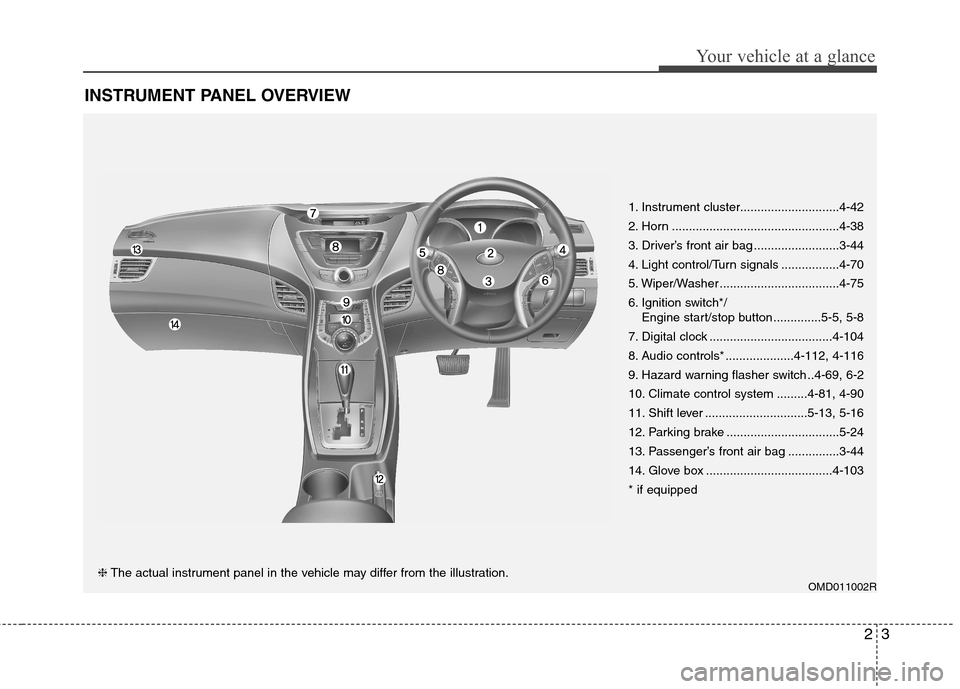
INSTRUMENT PANEL OVERVIEW
OMD011002R
1. Instrument cluster.............................4-42
2. Horn .................................................4-38
3. Driver’s front air bag .........................3-44
4. Light control/Turn signals .................4-70
5. Wiper/Washer ...................................4-75
6. Ignition switch*/
Engine start/stop button ..............5-5, 5-8
7. Digital clock ....................................4-104
8. Audio controls* ....................4-112, 4-116
9. Hazard warning flasher switch ..4-69, 6-2
10. Climate control system .........4-81, 4-90
11. Shift lever ..............................5-13, 5-16
12. Parking brake .................................5-24
13. Passenger’s front air bag ...............3-44
14. Glove box .....................................4-103* if equipped❈ The actual instrument panel in the vehicle may differ from the illustration.
Page 55 of 384
339
Safety features of your vehicle
How does the air bag system operate
Air bags are activated (able to inflate ifnecessary) only when the ignition
switch is turned to the ON or STARTposition.
Air bags inflate instantly in the event of serious frontal or side collision in order
to help protect the occupants from seri-
ous physical injury.
There is no single speed at which the air bags will inflate.
Generally, air bags are designed to
inflate based upon the severity of a col-
lision and its direction. These two fac-
tors determine whether the sensors
produce an electronic deployment/inflation signal.
Air bag deployment depends on a number of factors including vehiclespeed, angles of impact and the densi-
ty and stiffness of the vehicles or
objects which your vehicle hits in the
collision. The determining, factors are
not limited to those mentioned above.
The front air bags will completely inflate and deflate in an instant.
It is virtually impossible for you to see
the air bags inflate during an accident. It is much more likely that you will sim-ply see the deflated air bags hanging
out of their storage compartments afterthe collision.
In order to help provide protection in a severe collision, the air bags must
inflate rapidly. The speed of air bag
inflation is a consequence of extreme-
ly short time in which a collision occursand the need to get the air bag
between the occupant and the vehicle
structures before the occupant impacts
those structures. This speed of inflation
reduces the risk of serious or life-
threatening injuries in a severe colli-
sion and is thus a necessary part of airbag design.
However, air bag inflation can also
cause injuries which can include facial
abrasions, bruises and broken bonesbecause the inflation speed also caus-
es the air bags to expand with a great
deal of force.
There are even circumstances under which contact with the steer-
ing wheel air bag can cause fatal
injuries, especially if the occupant
is positioned excessively close tothe steering wheel.
WARNING
To avoid severe personal injury or death caused by deploying air
bags in a collision, the driver
should sit as far back from the
steering wheel air bag as possible
(at least 250 mm (10 inches)
away). The front passenger should
always move their seat as far
back as possible and sit back intheir seat.
Air bag inflates instantly in an event of a collision, passengers
may be injured by the air bag
expansion force if they are not in
a proper position.
Air bag inflation may cause injuries including facial or bodily
abrasions, injuries from broken
glasses or burns.
Page 83 of 384
49
Features of your vehicle
Immobiliser system
Your vehicle is equipped with an electron- ic engine immobiliser system to reduce
the risk of unauthorised vehicle use.
Your immobiliser system is comprised of
a small transponder in the smart key and
electronic devices inside the vehicle.
With the immobiliser system, whenever
you turn the engine start/stop button to
the ON position by pressing the button
whilst carrying the smart key, it checks
and determines and verifies if the smart
key is valid or not.
If the key is determined to be valid, the
engine will start.
If the key is determined to be invalid, the
engine will not start.To deactivate the immobiliser sys-tem:
Turn the engine start/stop button to the
ON position by pressing the button whilst
carrying the smart key.
To activate the immobiliser system:
Turn the engine start/stop button to the
OFF position. The immobiliser system
activates automatically. Without a valid
smart key for your vehicle, the engine will
not start.
✽✽ NOTICE
When starting the engine, do not use the
key with other immobiliser keys around.
Otherwise the engine may not start or
may stop soon after it starts. Keep each
key separate in order to avoid a starting
malfunction.
WARNING
In order to prevent theft of your
vehicle, do not leave spare keys
anywhere in your vehicle.
CAUTION
Do not put metal accessories near the smart key.
The engine may not start becausethe metal accessories may interrupt
the transponder signal from trans-mitting normally.
Page 116 of 384
Features of your vehicle
42
4
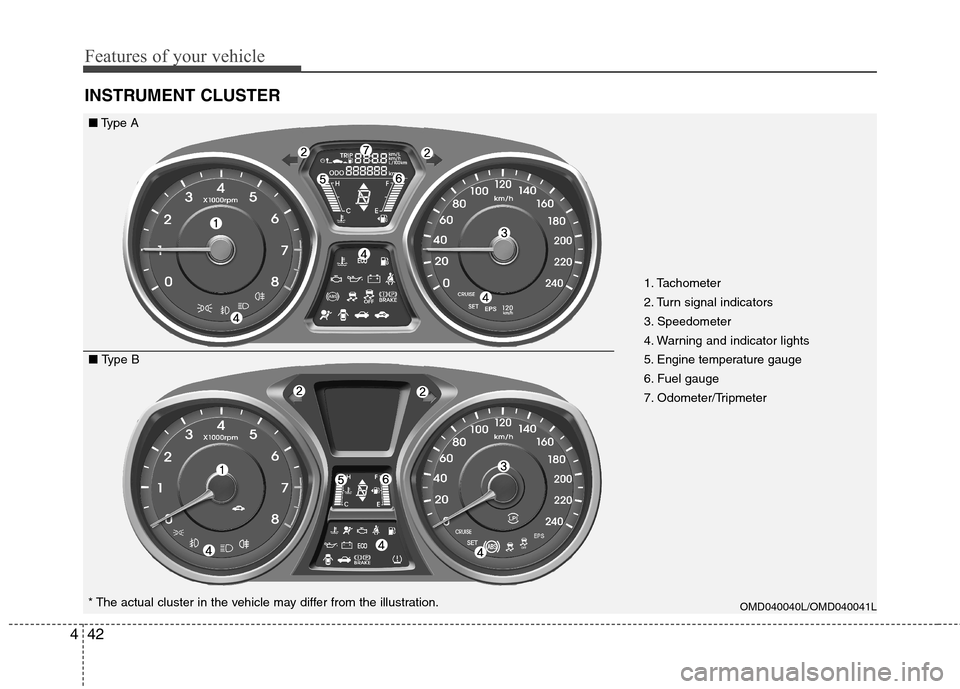
INSTRUMENT CLUSTER
OMD040040L/OMD040041L* The actual cluster in the vehicle may differ from the illustration.
■ Type A
■ Type B 1. Tachometer
2. Turn signal indicators
3. Speedometer
4. Warning and indicator lights
5. Engine temperature gauge
6. Fuel gauge
7. Odometer/Tripmeter
Page 125 of 384
451
Features of your vehicle
Auto door lock
Off - The auto door lock operation will becanceled.
Speed - All doors will be automatically locked when the vehicle speed
exceeds 15km/h (9.3mph).
Shift Lever - All doors will be automati- cally locked if the shift lever
is shifted from the P(Park)
position to the R(Reverse),
N(Neutral) or D(Drive) posi-tion.
Auto door unlock
Off - The auto door unlock operation willbe canceled.
Key Out - All doors will be automatically unlocked when the ignition key
is removed from ignition switch
(or engine is turned OFF).
Drive Door - All doors will be automati- cally unlocked if the driver's
door is unlocked.
Shift Lever - All doors will be automati- cally unlocked if the shift
lever is shifted to the
P(Park) position.
Headlamp delay (if equipped)
On - The Headlamp delay andHeadlamp Welcome function will be
activated.
Off - The Headlamp delay and
Headlamp Welcome function will be
inactivated.
Auto Triple Turn (One-touch triple
turn signal)
On - The lane change signals will blink 3 times when the turn signal lever is
moved slightly.
Off - The Auto Triple Turn function will be inactivated.
Page 128 of 384
Features of your vehicle
54
4
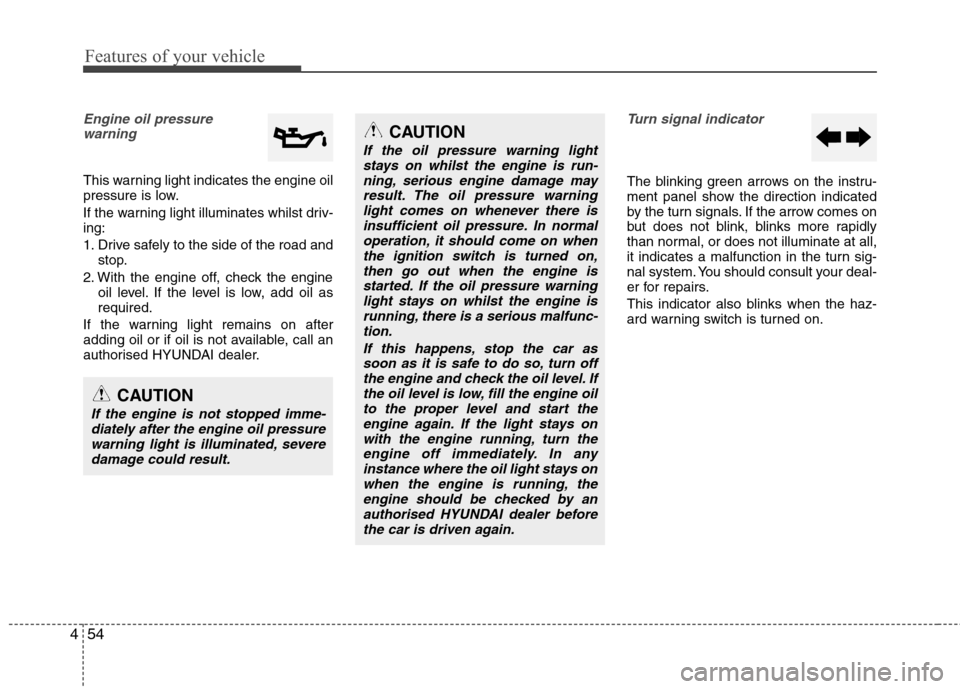
Engine oil pressure
warning
This warning light indicates the engine oil
pressure is low.
If the warning light illuminates whilst driv- ing:
1. Drive safely to the side of the road and stop.
2. With the engine off, check the engine oil level. If the level is low, add oil as required.
If the warning light remains on after
adding oil or if oil is not available, call an
authorised HYUNDAI dealer.
Turn signal indicator
The blinking green arrows on the instru-
ment panel show the direction indicated
by the turn signals. If the arrow comes on
but does not blink, blinks more rapidly
than normal, or does not illuminate at all,
it indicates a malfunction in the turn sig-
nal system. You should consult your deal-
er for repairs.
This indicator also blinks when the haz-
ard warning switch is turned on.
CAUTION
If the engine is not stopped imme- diately after the engine oil pressure
warning light is illuminated, severe damage could result.
CAUTION
If the oil pressure warning lightstays on whilst the engine is run-
ning, serious engine damage mayresult. The oil pressure warninglight comes on whenever there is insufficient oil pressure. In normal
operation, it should come on whenthe ignition switch is turned on,then go out when the engine is
started. If the oil pressure warninglight stays on whilst the engine isrunning, there is a serious malfunc-tion.
If this happens, stop the car assoon as it is safe to do so, turn off the engine and check the oil level. Ifthe oil level is low, fill the engine oilto the proper level and start the
engine again. If the light stays onwith the engine running, turn theengine off immediately. In anyinstance where the oil light stays on
when the engine is running, theengine should be checked by anauthorised HYUNDAI dealer before the car is driven again.
Page 129 of 384
455
Features of your vehicle
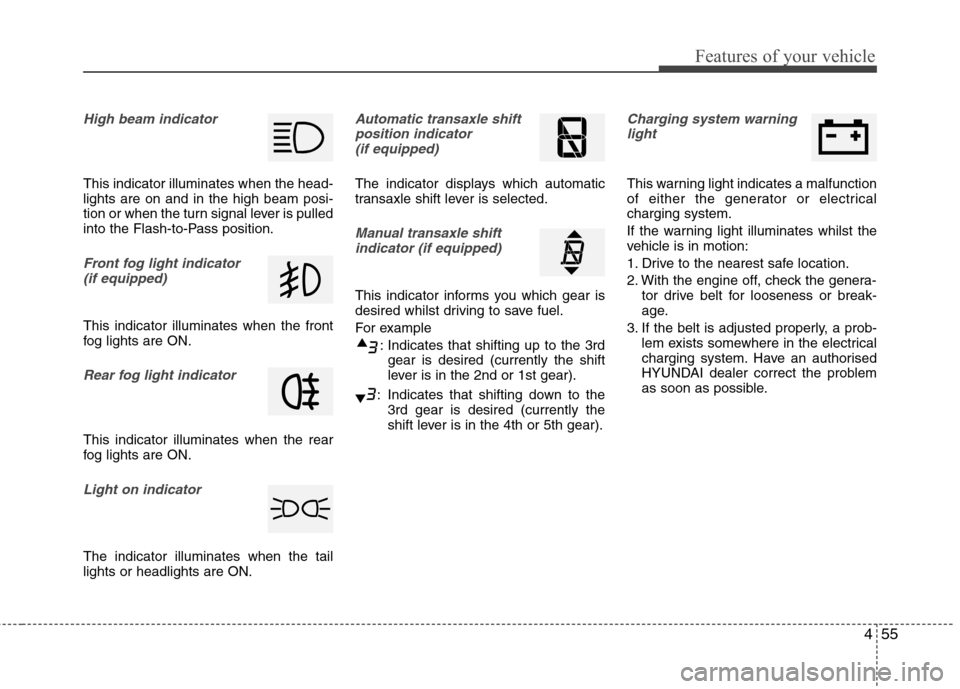
High beam indicator
This indicator illuminates when the head- lights are on and in the high beam posi-
tion or when the turn signal lever is pulled
into the Flash-to-Pass position.
Front fog light indicator (if equipped)
This indicator illuminates when the front
fog lights are ON.
Rear fog light indicator
This indicator illuminates when the rear
fog lights are ON.
Light on indicator
The indicator illuminates when the tail lights or headlights are ON.
Automatic transaxle shiftposition indicator (if equipped)
The indicator displays which automatic
transaxle shift lever is selected.
Manual transaxle shiftindicator (if equipped)
This indicator informs you which gear is
desired whilst driving to save fuel.
For example
: Indicates that shifting up to the 3rdgear is desired (currently the shift
lever is in the 2nd or 1st gear).
: Indicates that shifting down to the 3rd gear is desired (currently the
shift lever is in the 4th or 5th gear).
Charging system warning
light
This warning light indicates a malfunction
of either the generator or electricalcharging system.
If the warning light illuminates whilst the
vehicle is in motion:
1. Drive to the nearest safe location.
2. With the engine off, check the genera- tor drive belt for looseness or break-
age.
3. If the belt is adjusted properly, a prob- lem exists somewhere in the electrical
charging system. Have an authorised
HYUNDAI dealer correct the problem
as soon as possible.
Page 143 of 384
469
Features of your vehicle
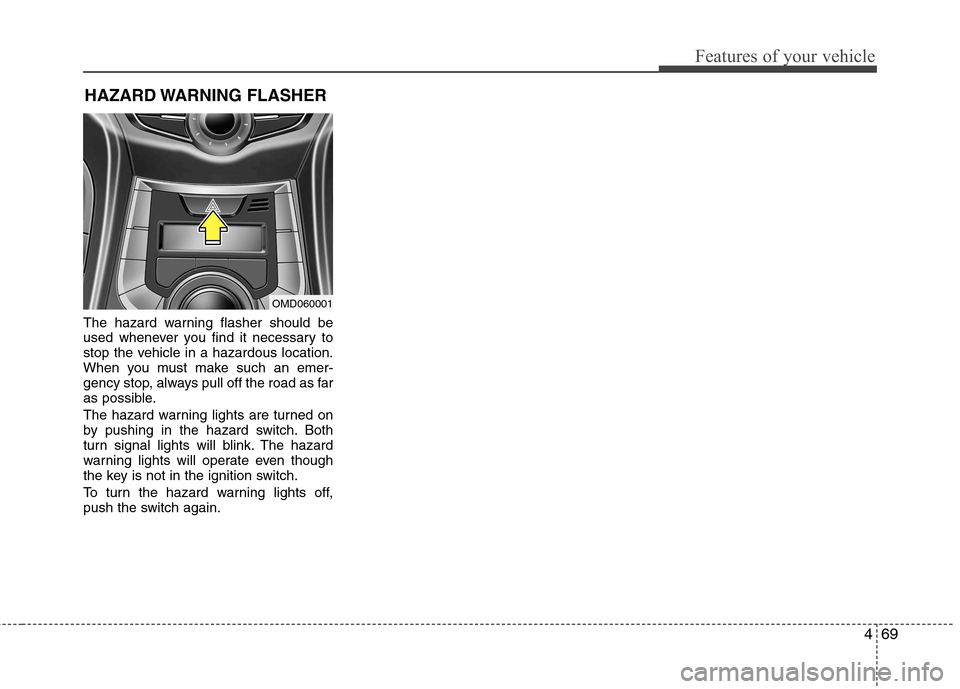
The hazard warning flasher should be
used whenever you find it necessary to
stop the vehicle in a hazardous location.
When you must make such an emer-
gency stop, always pull off the road as far
as possible.
The hazard warning lights are turned on
by pushing in the hazard switch. Both
turn signal lights will blink. The hazard
warning lights will operate even though
the key is not in the ignition switch.
To turn the hazard warning lights off,
push the switch again.HAZARD WARNING FLASHER
OMD060001
Page 147 of 384
473
Features of your vehicle
Turn signals and lane change sig- nals
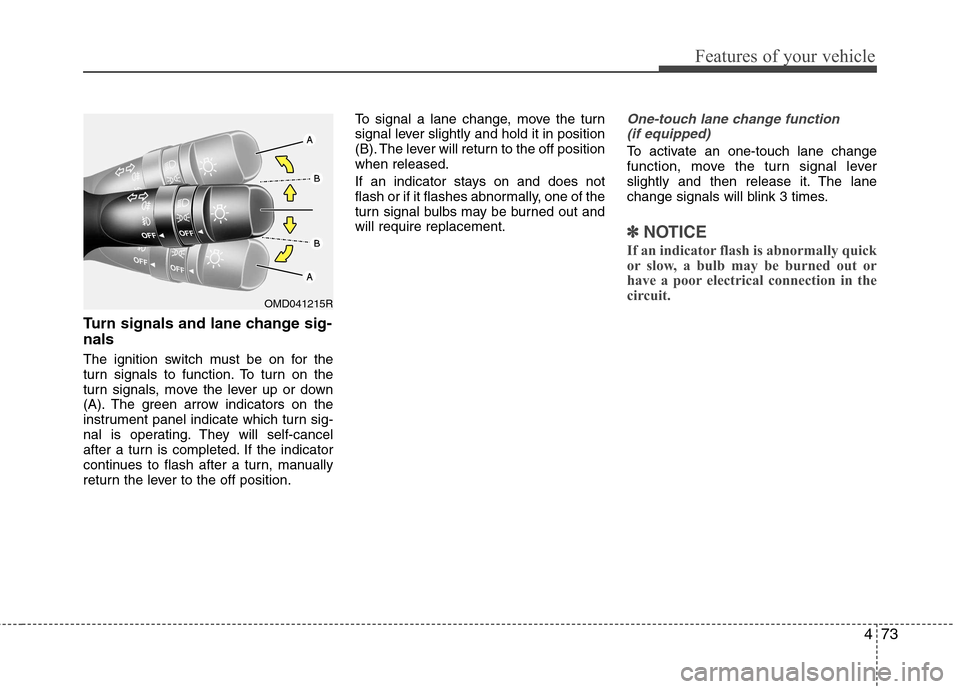
The ignition switch must be on for the
turn signals to function. To turn on the
turn signals, move the lever up or down
(A). The green arrow indicators on the
instrument panel indicate which turn sig-
nal is operating. They will self-cancel
after a turn is completed. If the indicator
continues to flash after a turn, manually
return the lever to the off position.To signal a lane change, move the turn
signal lever slightly and hold it in position
(B). The lever will return to the off positionwhen released.
If an indicator stays on and does not
flash or if it flashes abnormally, one of the
turn signal bulbs may be burned out andwill require replacement.
One-touch lane change function
(if equipped)
To activate an one-touch lane change
function, move the turn signal lever
slightly and then release it. The lane
change signals will blink 3 times.
✽✽ NOTICE
If an indicator flash is abnormally quick
or slow, a bulb may be burned out or
have a poor electrical connection in the
circuit.
OMD041215R