ERS Hyundai Elantra 2012 Workshop Manual
[x] Cancel search | Manufacturer: HYUNDAI, Model Year: 2012, Model line: Elantra, Model: Hyundai Elantra 2012Pages: 383, PDF Size: 8.94 MB
Page 91 of 383
413
Features of your vehicle
Transmitter precautions
✽ ✽
NOTICE
The transmitter will not work if any of
following occur:
• The ignition key is in ignition switch.
• You exceed the operating distance
limit (about 90 feet [30 m]).
• The battery in the transmitter is
weak.
• Other vehicles or objects may be
blocking the signal.
• The weather is extremely cold.
• The transmitter is close to a radio
transmitter such as a radio station or
an airport which can interfere with
normal operation of the transmitter.
When the transmitter does not work
correctly, open and close the door with
the ignition key. If you have a problem
with the transmitter, contact an author-
ized HYUNDAI dealer.
This device complies with Part 15 of
the FCC rules.
Operation is subject to the following two
conditions:
1. This device may not cause harmful
interference, and
2. This device must accept any interfer-
ence received, including interference
that may cause undesired operation.
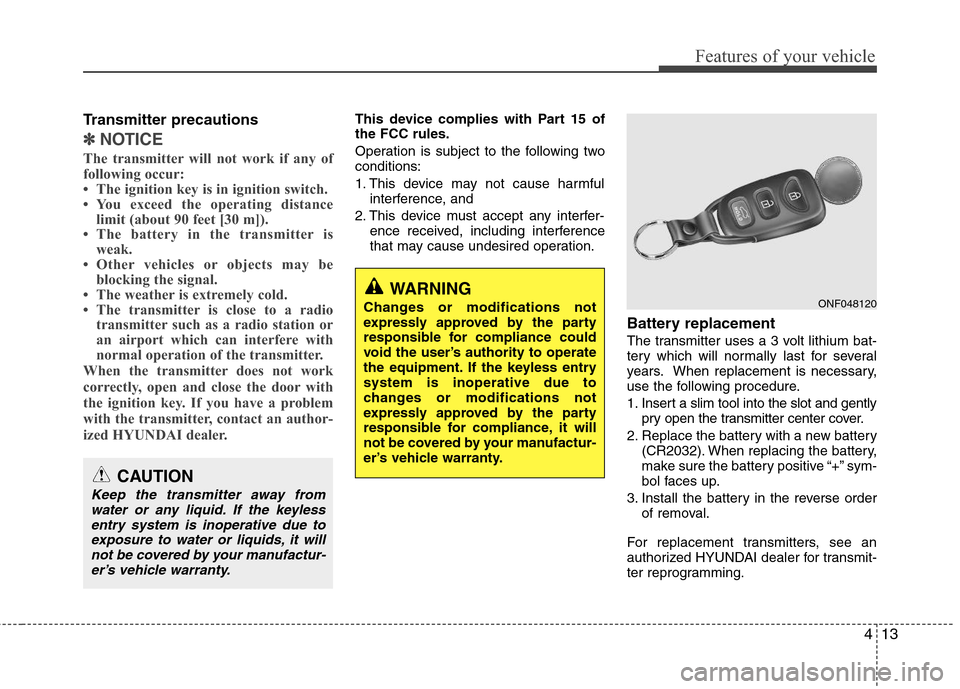
Battery replacement
The transmitter uses a 3 volt lithium bat-
tery which will normally last for several
years. When replacement is necessary,
use the following procedure.
1. Insert a slim tool into the slot and gently
pry open the transmitter center cover.
2. Replace the battery with a new battery
(CR2032). When replacing the battery,
make sure the battery positive “+” sym-
bol faces up.
3. Install the battery in the reverse order
of removal.
For replacement transmitters, see an
authorized HYUNDAI dealer for transmit-
ter reprogramming.
CAUTION
Keep the transmitter away from
water or any liquid. If the keyless
entry system is inoperative due to
exposure to water or liquids, it will
not be covered by your manufactur-
er’s vehicle warranty.
WARNING
Changes or modifications not
expressly approved by the party
responsible for compliance could
void the user’s authority to operate
the equipment. If the keyless entry
system is inoperative due to
changes or modifications not
expressly approved by the party
responsible for compliance, it will
not be covered by your manufactur-
er’s vehicle warranty.ONF048120
Page 94 of 383
Features of your vehicle
16 4
Using the transmitter (if equipped)
Park the vehicle and stop the engine.
Arm the system as described below.
1. Turn off the engine and remove the
ignition key from the ignition switch.
2. Make sure that all doors, the engine
hood and trunk lid are closed and
latched.
3. Lock the doors by pressing the lock
button on the transmitter.
After completion of the steps above, the
hazard warning lights will blink once to
indicate that the system is armed. If the
lock button is pressed once more within 4
seconds, hazard warning lights blink and
the horn sounds once to confirm that the
system is armed.
If any door, trunk lid or engine hood
remains open, the hazard warning lights
(or/and horn) won't operate and theft-
alarm will not arm. After you close all
doors, trunk lid and engine hood, the
hazard warning lights blink once.
Using the mechanical key
Park the vehicle and stop the engine.
Arm the system as described below.
1. Turn off the engine and remove the key
from the ignition switch(if equipped).
2. Make sure that all doors, the engine
hood and trunk lid are closed and
latched.
3. Lock the doors by inserting the key into
the key hole on the front outside door
handle and turning the key toward the
front of the vehicle.
If any door, trunk lid or engine hood
remains open, the theft-alarm will not
arm.
✽ ✽
NOTICE
If you lock or unlock the doors by using
the mechanical key, the hazard warning
light won't operate.
Do not arm the system until all pas-
sengers have left the vehicle. If the
system is armed while a passenger(s)
remains in the vehicle, the alarm may
be activated when the remaining pas-
senger(s) leave the vehicle. If any
door (or trunk) or engine hood is
opened within 30 seconds after the
system enters the armed stage, the
system is disarmed to prevent an
unnecessary alarm.
Page 99 of 383
421
Features of your vehicle
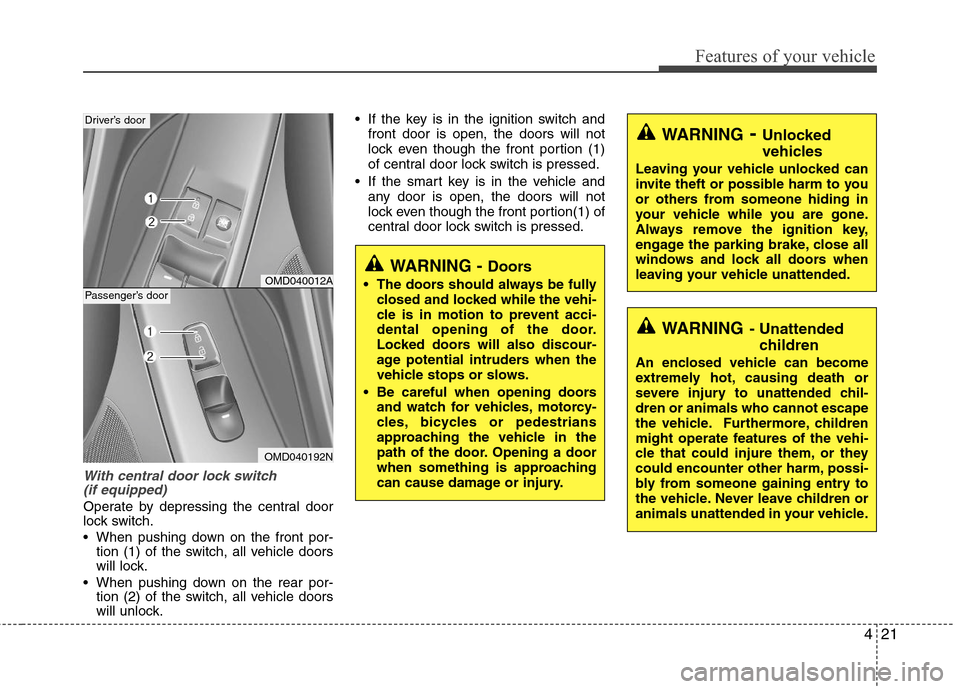
With central door lock switch
(if equipped)
Operate by depressing the central door
lock switch.
When pushing down on the front por-
tion (1) of the switch, all vehicle doors
will lock.
When pushing down on the rear por-
tion (2) of the switch, all vehicle doors
will unlock. If the key is in the ignition switch and
front door is open, the doors will not
lock even though the front portion (1)
of central door lock switch is pressed.
If the smart key is in the vehicle and
any door is open, the doors will not
lock even though the front portion(1) of
central door lock switch is pressed.
WARNING- Unlocked
vehicles
Leaving your vehicle unlocked can
invite theft or possible harm to you
or others from someone hiding in
your vehicle while you are gone.
Always remove the ignition key,
engage the parking brake, close all
windows and lock all doors when
leaving your vehicle unattended.
WARNING- Unattended
children
An enclosed vehicle can become
extremely hot, causing death or
severe injury to unattended chil-
dren or animals who cannot escape
the vehicle. Furthermore, children
might operate features of the vehi-
cle that could injure them, or they
could encounter other harm, possi-
bly from someone gaining entry to
the vehicle. Never leave children or
animals unattended in your vehicle.
WARNING - Doors
The doors should always be fully
closed and locked while the vehi-
cle is in motion to prevent acci-
dental opening of the door.
Locked doors will also discour-
age potential intruders when the
vehicle stops or slows.
Be careful when opening doors
and watch for vehicles, motorcy-
cles, bicycles or pedestrians
approaching the vehicle in the
path of the door. Opening a door
when something is approaching
can cause damage or injury.OMD040012A
Driver’s door
OMD040192N
Passenger’s door
Page 101 of 383
423
Features of your vehicle
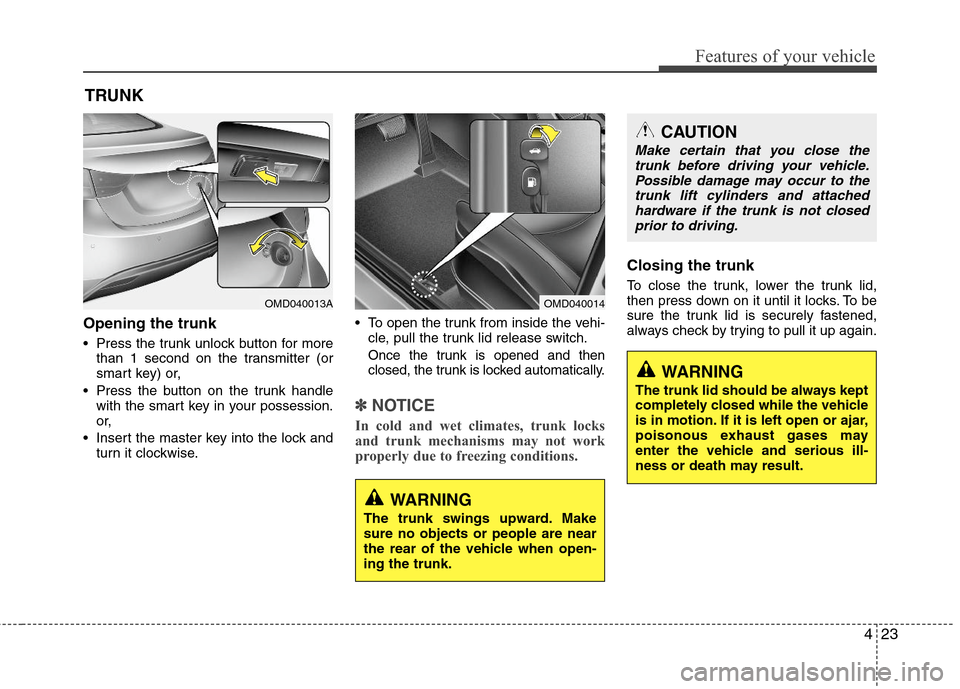
Opening the trunk
Press the trunk unlock button for more
than 1 second on the transmitter (or
smart key) or,
Press the button on the trunk handle
with the smart key in your possession.
or,
Insert the master key into the lock and
turn it clockwise. To open the trunk from inside the vehi-
cle, pull the trunk lid release switch.Once the trunk is opened and then
closed, the trunk is locked automatically.
✽ ✽
NOTICE
In cold and wet climates, trunk locks
and trunk mechanisms may not work
properly due to freezing conditions.
Closing the trunk
To close the trunk, lower the trunk lid,
then press down on it until it locks. To be
sure the trunk lid is securely fastened,
always check by trying to pull it up again.
TRUNK
OMD040014
CAUTION
Make certain that you close the
trunk before driving your vehicle.
Possible damage may occur to the
trunk lift cylinders and attached
hardware if the trunk is not closed
prior to driving.
WARNING
The trunk swings upward. Make
sure no objects or people are near
the rear of the vehicle when open-
ing the trunk.
WARNING
The trunk lid should be always kept
completely closed while the vehicle
is in motion. If it is left open or ajar,
poisonous exhaust gases may
enter the vehicle and serious ill-
ness or death may result.
OMD040013A
Page 102 of 383
Features of your vehicle
24 4
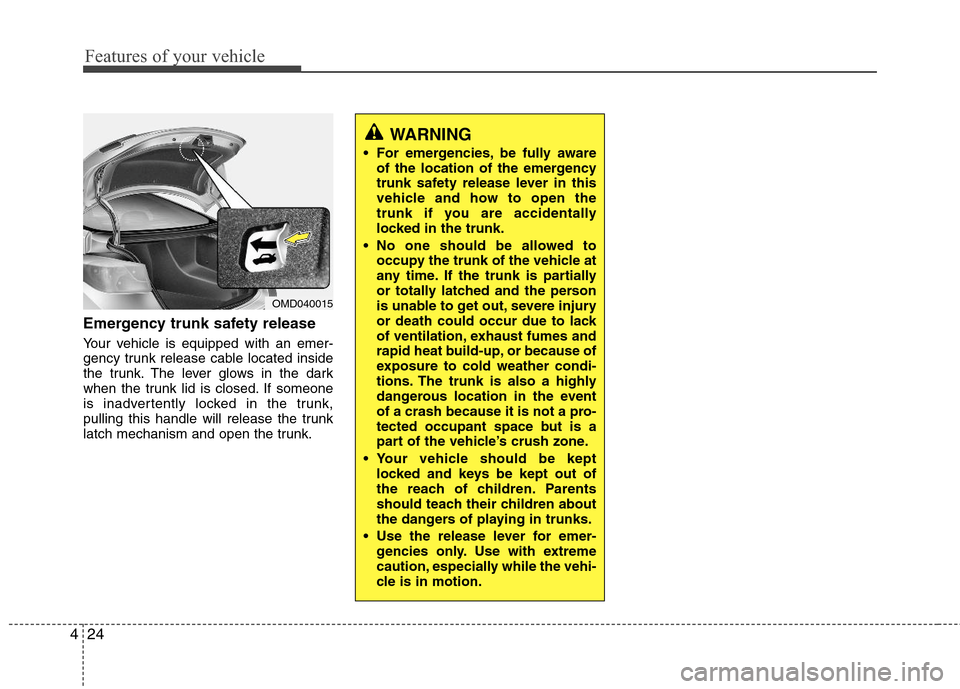
Emergency trunk safety release
Your vehicle is equipped with an emer-
gency trunk release cable located inside
the trunk. The lever glows in the dark
when the trunk lid is closed. If someone
is inadvertently locked in the trunk,
pulling this handle will release the trunk
latch mechanism and open the trunk.
OMD040015
WARNING
For emergencies, be fully aware
of the location of the emergency
trunk safety release lever in this
vehicle and how to open the
trunk if you are accidentally
locked in the trunk.
No one should be allowed to
occupy the trunk of the vehicle at
any time. If the trunk is partially
or totally latched and the person
is unable to get out, severe injury
or death could occur due to lack
of ventilation, exhaust fumes and
rapid heat build-up, or because of
exposure to cold weather condi-
tions. The trunk is also a highly
dangerous location in the event
of a crash because it is not a pro-
tected occupant space but is a
part of the vehicle’s crush zone.
Your vehicle should be kept
locked and keys be kept out of
the reach of children. Parents
should teach their children about
the dangers of playing in trunks.
Use the release lever for emer-
gencies only. Use with extreme
caution, especially while the vehi-
cle is in motion.
Page 104 of 383
Features of your vehicle
26 4
Power windows
The ignition switch must be in the ON
position for power windows to operate.
Each door has a power window switch
that controls that door's window. The driv-
er has a power window lock switch which
can block the operation of passenger
windows. The driver’s door has a master
power window switch that controls all the
windows in the vehicle. The power win-
dows can be operated for approximately
30 seconds after the ignition key is
removed or turned to the ACC or LOCK
position. However, if the front doors
open, the power windows cannot be
operated within the 30 second period.
✽ ✽
NOTICE
While driving with the rear windows
down or with the sunroof (if equipped) in
an open (or partially open) position, your
vehicle may demonstrate a wind buffet-
ing or pulsation noise. This noise is a
normal occurrence and can be reduced
or eliminated by taking the following
actions. 1If the noise occurs with one or
both of the rear windows down, partially
lower both front windows approximate-
ly one inch. If you experience the noise
with the sunroof open, slightly reduce the
size of the sunroof opening.
Window opening and closing
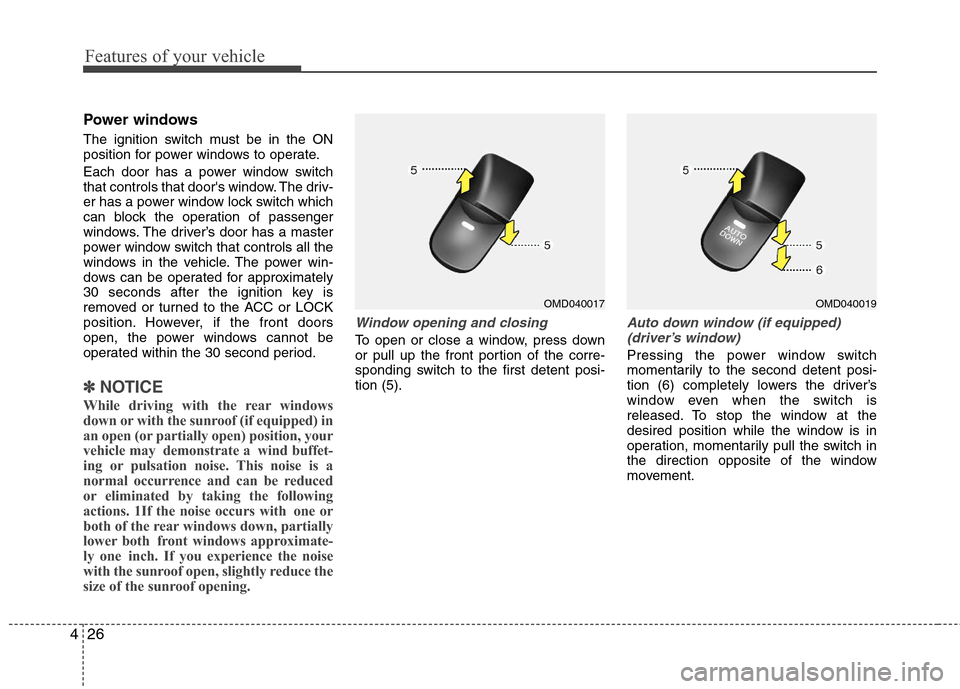
To open or close a window, press down
or pull up the front portion of the corre-
sponding switch to the first detent posi-
tion (5).
Auto down window (if equipped)
(driver’s window)
Pressing the power window switch
momentarily to the second detent posi-
tion (6) completely lowers the driver’s
window even when the switch is
released. To stop the window at the
desired position while the window is in
operation, momentarily pull the switch in
the direction opposite of the window
movement.
OMD040017OMD040019
Page 105 of 383
427
Features of your vehicle
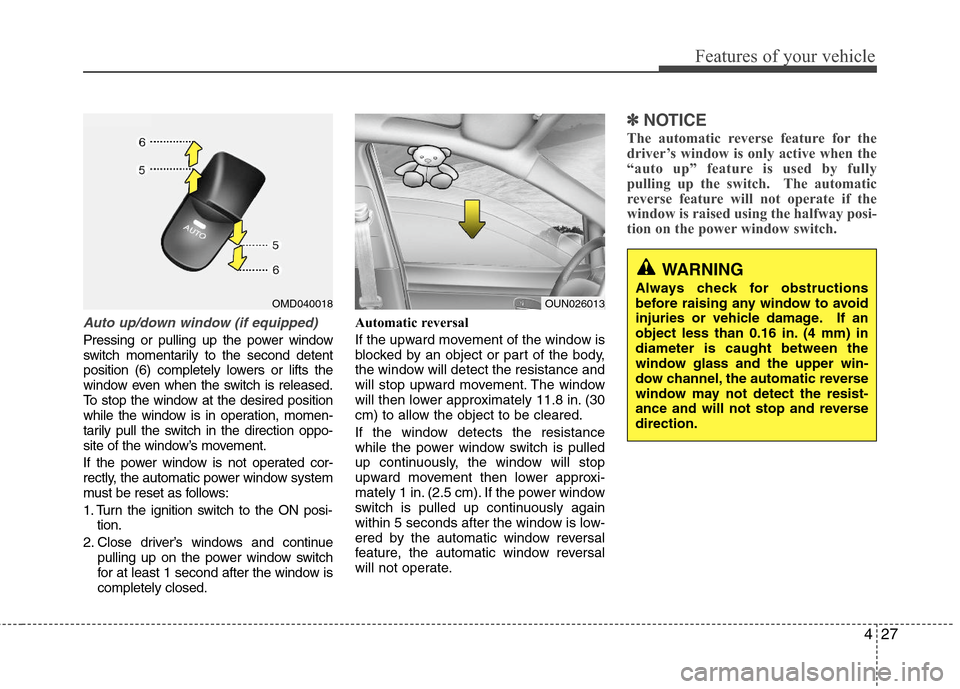
Auto up/down window (if equipped)
Pressing or pulling up the power window
switch momentarily to the second detent
position (6) completely lowers or lifts the
window even when the switch is released.
To stop the window at the desired position
while the window is in operation, momen-
tarily pull the switch in the direction oppo-
site of the window’s movement.
If the power window is not operated cor-
rectly, the automatic power window system
must be reset as follows:
1. Turn the ignition switch to the ON posi-
tion.
2. Close driver’s windows and continue
pulling up on the power window switch
for at least 1 second after the window is
completely closed.Automatic reversal
If the upward movement of the window is
blocked by an object or part of the body,
the window will detect the resistance and
will stop upward movement. The window
will then lower approximately 11.8 in. (30
cm) to allow the object to be cleared.
If the window detects the resistance
while the power window switch is pulled
up continuously, the window will stop
upward movement then lower approxi-
mately 1 in. (2.5 cm). If the power window
switch is pulled up continuously again
within 5 seconds after the window is low-
ered by the automatic window reversal
feature, the automatic window reversal
will not operate.
✽ ✽
NOTICE
The automatic reverse feature for the
driver’s window is only active when the
“auto up” feature is used by fully
pulling up the switch. The automatic
reverse feature will not operate if the
window is raised using the halfway posi-
tion on the power window switch.
WARNING
Always check for obstructions
before raising any window to avoid
injuries or vehicle damage. If an
object less than 0.16 in. (4 mm) in
diameter is caught between the
window glass and the upper win-
dow channel, the automatic reverse
window may not detect the resist-
ance and will not stop and reverse
direction.OUN026013OMD040018
Page 106 of 383
Features of your vehicle
28 4
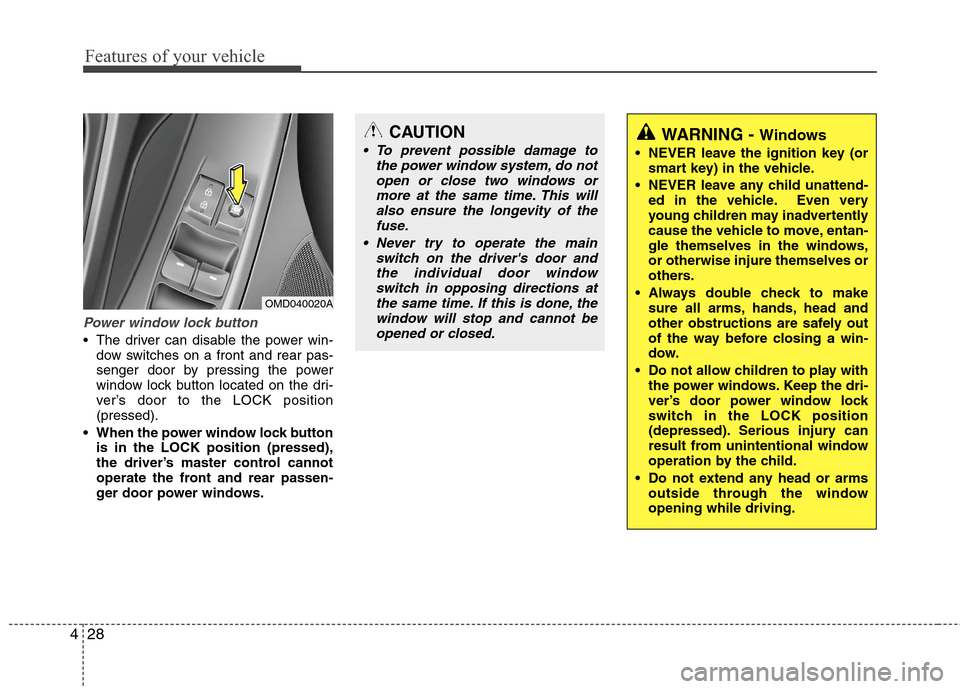
Power window lock button
The driver can disable the power win-
dow switches on a front and rear pas-
senger door by pressing the power
window lock button located on the dri-
ver’s door to the LOCK position
(pressed).
When the power window lock button
is in the LOCK position (pressed),
the driver’s master control cannot
operate the front and rear passen-
ger door power windows.
OMD040020A
CAUTION
To prevent possible damage to
the power window system, do not
open or close two windows or
more at the same time. This will
also ensure the longevity of the
fuse.
Never try to operate the main
switch on the driver's door and
the individual door window
switch in opposing directions at
the same time. If this is done, the
window will stop and cannot be
opened or closed.WARNING - Windows
NEVER leave the ignition key (or
smart key) in the vehicle.
NEVER leave any child unattend-
ed in the vehicle. Even very
young children may inadvertently
cause the vehicle to move, entan-
gle themselves in the windows,
or otherwise injure themselves or
others.
Always double check to make
sure all arms, hands, head and
other obstructions are safely out
of the way before closing a win-
dow.
Do not allow children to play with
the power windows. Keep the dri-
ver’s door power window lock
switch in the LOCK position
(depressed). Serious injury can
result from unintentional window
operation by the child.
Do not extend any head or arms
outside through the window
opening while driving.
Page 107 of 383
429
Features of your vehicle
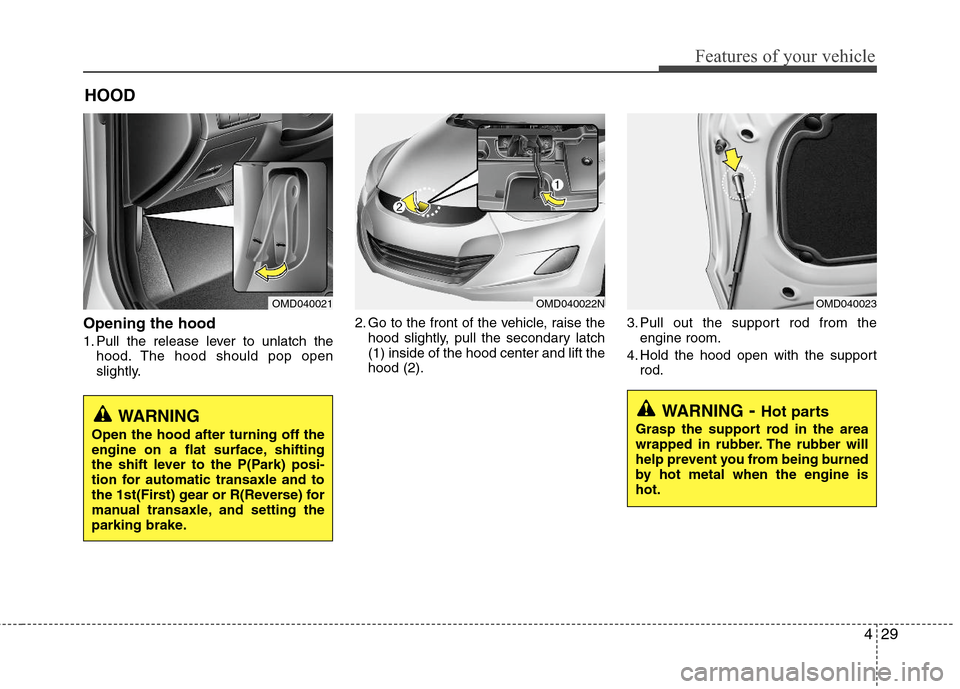
Opening the hood
1. Pull the release lever to unlatch the
hood. The hood should pop open
slightly.2. Go to the front of the vehicle, raise the
hood slightly, pull the secondary latch
(1) inside of the hood center and lift the
hood (2).3. Pull out the support rod from the
engine room.
4. Hold the hood open with the support
rod.
HOOD
OMD040021OMD040022NOMD040023
WARNING- Hot parts
Grasp the support rod in the area
wrapped in rubber. The rubber will
help prevent you from being burned
by hot metal when the engine is
hot.WARNING
Open the hood after turning off the
engine on a flat surface, shifting
the shift lever to the P(Park) posi-
tion for automatic transaxle and to
the 1st(First) gear or R(Reverse) for
manual transaxle, and setting the
parking brake.
Page 108 of 383
Features of your vehicle
30 4
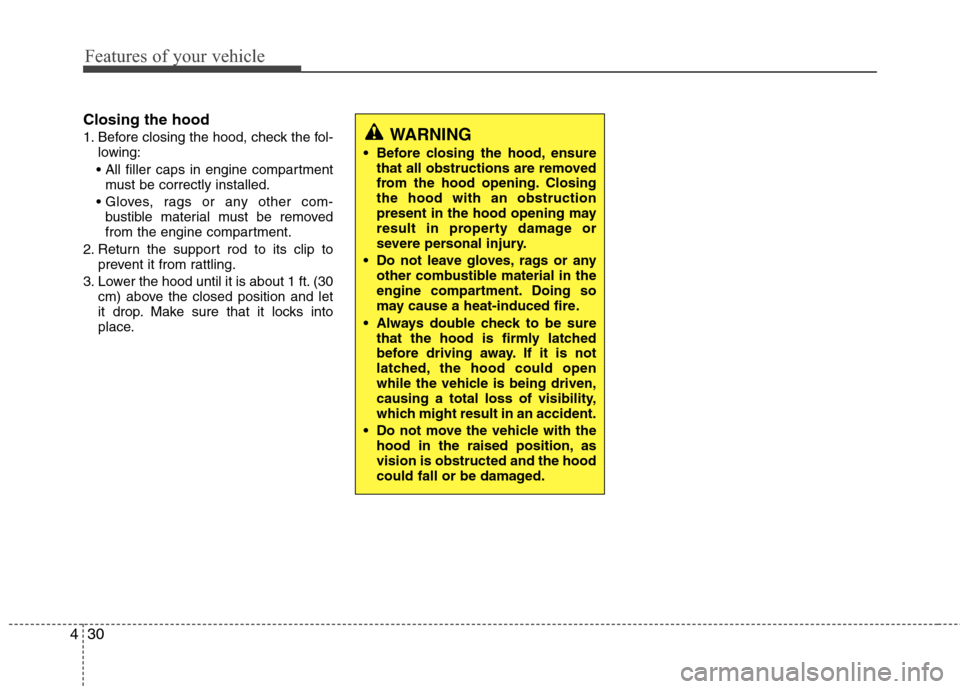
Closing the hood
1. Before closing the hood, check the fol-
lowing:
must be correctly installed.
bustible material must be removed
from the engine compartment.
2. Return the support rod to its clip to
prevent it from rattling.
3. Lower the hood until it is about 1 ft. (30
cm) above the closed position and let
it drop. Make sure that it locks into
place.WARNING
Before closing the hood, ensure
that all obstructions are removed
from the hood opening. Closing
the hood with an obstruction
present in the hood opening may
result in property damage or
severe personal injury.
Do not leave gloves, rags or any
other combustible material in the
engine compartment. Doing so
may cause a heat-induced fire.
Always double check to be sure
that the hood is firmly latched
before driving away. If it is not
latched, the hood could open
while the vehicle is being driven,
causing a total loss of visibility,
which might result in an accident.
Do not move the vehicle with the
hood in the raised position, as
vision is obstructed and the hood
could fall or be damaged.