key Hyundai Elantra 2014 Owner's Guide
[x] Cancel search | Manufacturer: HYUNDAI, Model Year: 2014, Model line: Elantra, Model: Hyundai Elantra 2014Pages: 668, PDF Size: 35.58 MB
Page 106 of 668
Features of your vehicle
20
4
This system helps to protect your
vehicle and valuables. The horn will
sound and the hazard warning lights
will blink continuously if any of the
following occurs:
- A door is opened without using the
remote key or smart key.
- The trunk is opened without using the remote key or smart key.
- The engine hood is opened.
The alarm continues for 30 seconds,
then the system resets. To turn off
the alarm, unlock the doors with the
remote key or smart key.
The Theft Alarm System automati-
cally sets 30 seconds after you lock
the doors and the trunk. For the sys-
tem to activate, you must lock the
doors and the trunk from outside the
vehicle with the remote key or smart
key or by pressing the button on the
outside of the door handles with the
smart key in your possession.
The hazard warning lights will blink
and the chime will sound once to
indicate the system is armed. Once the security system is set, open-
ing any door, the trunk, or the hood
without using the remote key or smart
key will cause the alarm to activate.
The Theft Alarm System will not set if
the hood, the trunk, or any door is
not fully closed. If the system will not
set, check the hood, the trunk, or the
doors are fully closed.
Do not attempt to alter this system or
add other devices to it.✽ ✽
NOTICE
• Do not lock the doors until all pas-
sengers have left the vehicle. If the
remaining passenger leaves the
vehicle when the system is armed,
the alarm will be activated.
• If the vehicle is not disarmed with the remote key or smart key, open
the doors by using the mechanical
key and place the ignition switch in
the ON position (for remote key)
or start the engine (for smart key)
by directly pressing the Engine
Start/Stop button with the smart
key.
• When the system is disarmed but a door or trunk is not opened within
30 seconds, the system will be
rearmed.
THEFT-ALARM SYSTEM
Page 107 of 668
421
Features of your vehicle
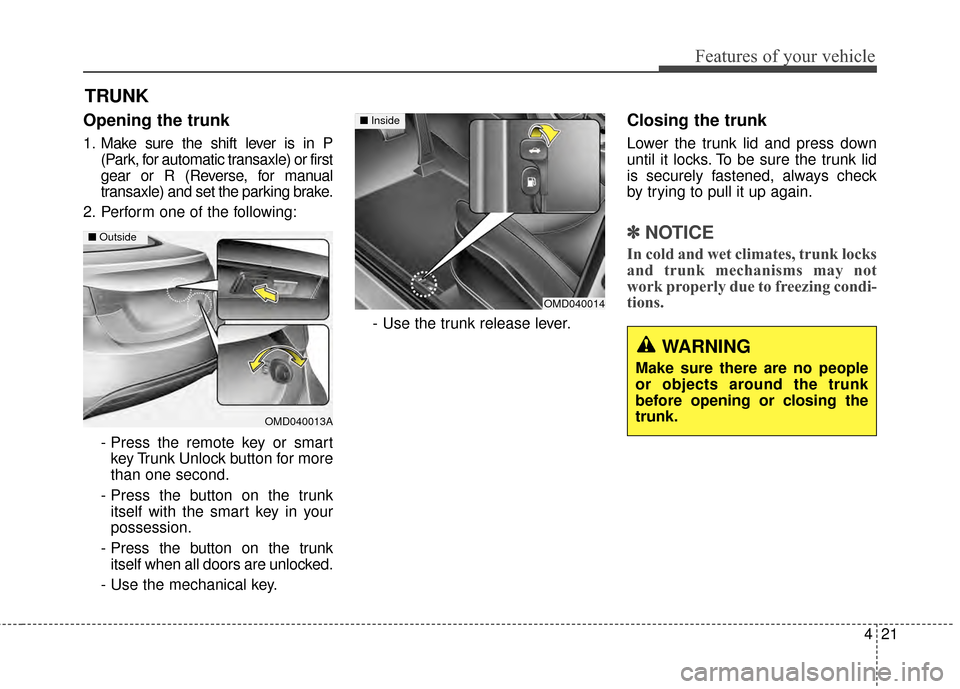
Opening the trunk
1. Make sure the shift lever is in P(Park, for automatic transaxle) or first
gear or R (Reverse, for manual
transaxle) and set the parking brake.
2. Perform one of the following:
- Press the remote key or smartkey Trunk Unlock button for more
than one second.
- Press the button on the trunk itself with the smart key in your
possession.
- Press the button on the trunk itself when all doors are unlocked.
- Use the mechanical key. - Use the trunk release lever.
Closing the trunk
Lower the trunk lid and press down
until it locks. To be sure the trunk lid
is securely fastened, always check
by trying to pull it up again.
✽ ✽
NOTICE
In cold and wet climates, trunk locks
and trunk mechanisms may not
work properly due to freezing condi-
tions.
TRUNK
OMD040013A
■ Outside
WARNING
Make sure there are no people
or objects around the trunk
before opening or closing the
trunk.
OMD040014
■ Inside
Page 109 of 668
423
Features of your vehicle
WARNING
You and your passengersmust be aware of the location
of the Emergency Trunk
Safety Release lever in this
vehicle and how to open the
trunk in case you are acciden-
tally locked in the trunk.
NEVER allow anyone to occu- py the trunk of the vehicle at
any time. If the trunk is partial-
ly or totally latched and the per-
son is unable to get out, seri-
ous injury or death could occur
due to lack of ventilation,
exhaust fumes and rapid heat
build-up, or because of expo-
sure to cold weather condi-
tions. The trunk is also a highly
dangerous location in the
event of a crash because it is
not a protected occupant
space but is a part of the vehi-
cle’s crush zone.
(Continued)
(Continued)
Your vehicle should be keptlocked and the key should be
kept out of the reach of chil-
dren. Parents should teach
their children about the dan-
gers of playing in the trunk.
Use the release lever for emergencies only.
Page 114 of 668
Features of your vehicle
28
4
WARNING - Windows
NEVER leave the keys in your vehicle with unsupervised
children, when the engine is
running.
NEVER leave any child unat- tended in the vehicle. Even
very young children may inad-
vertently cause the vehicle to
move, entangle themselves in
the windows, or otherwise
injure themselves or others.
Always double check to make sure all arms, hands, head
and other obstructions are
safely out of the way before
closing a window.
Do not allow children to play with the power windows. Keep
the driver’s door power window
lock switch in the LOCK posi-
tion (pressed). Serious injury
can result from unintentional
window operation by the child.
Do not extend your head, arms or body outside the win-
dows while driving.CAUTION
To prevent possible damage to the power window system,do not open or close two win-dows or more at the sametime. This will also ensure thelongevity of the fuse.
Never try to operate the main switch on the driver's doorand the individual door win-dow switch in opposite direc-tions at the same time. If this isdone, the window will stop andcannot be opened or closed.
Page 154 of 668
Features of your vehicle
68
4
ECO Indicator Light
(if equipped)
This indicator light illuminates:
When you activate the active ECO
system by pressing the ACTIVE
ECO button.
For more details, refer to “Active
ECO System” in chapter 5.
Immobilizer IndicatorLight (Without Smart Key)(if equipped)
This indicator light illuminates:
When the vehicle detects the immo-
bilizer in your key properly while the
ignition switch is ON.
- At this time, you can start the engine.
- The indicator light goes off after starting the engine.
This indicator light blinks:
When there is a malfunction with the
immobilizer system.
In this case, have your vehicle
inspected by an authorized
HYUNDAI dealer.
Immobilizer Indicator Light (With Smart Key) (if equipped)
This indicator light illuminates for up
to 30 seconds:
When the vehicle detects the smart
key in the vehicle properly while the
Engine Start/Stop Button is ACC or
ON.
- At this time, you can start the engine.
- The indicator light goes off after starting the engine.
This indicator light blinks for a few
seconds:
When the smart key is not in the
vehicle.
- At this time, you can not start the engine.
ECO
Page 155 of 668
469
Features of your vehicle
This indicator light illuminates for 2
seconds and goes off:
When the vehicle can not detect the
smart key which is in the vehicle
while the Engine Start/Stop Button is
ON.
In this case, have your vehicle
inspected by an authorized
HYUNDAI dealer.This indicator light blinks:
When the battery of the smart key
is weak.
- At this time, you can not start theengine. However, you can start
the engine if you press the Engine
Start/Stop Button with the smart
key. (For more details, refer to
“Starting the Engine” in section 5).
When there is a malfunction with the immobilizer system.
In this case, have your vehicle
inspected by an authorized
HYUNDAI dealer.Turn Signal Indicator
Light
This indicator light blinks:
When you turn the turn signal light
on.
If any of the following occurs, there
may be a malfunction with the turn
signal system. In this case, have your
vehicle inspected by an authorized
HYUNDAI dealer.
- The indicator light does not blinkbut illuminates.
- The indicator light blinks more rapidly.
- The indicator light does not illumi- nate at all.
Page 157 of 668
471
Features of your vehicle
KEY OUT Indicator Light(if equipped)
When the ENGINE START/STOP
button is in the ACC or ON position,
if any door is open, the system
checks for the smart key.
This indicator light blinks:
When the smart key is not in the
vehicle and any door is open with the
ignition switch or Engine Start/Stop
button in the ACC or ON position.
- At this time, if you close all doors, the chime will also sound for
approximately 5 seconds.
- The indicator will go off while the vehicle is moving.
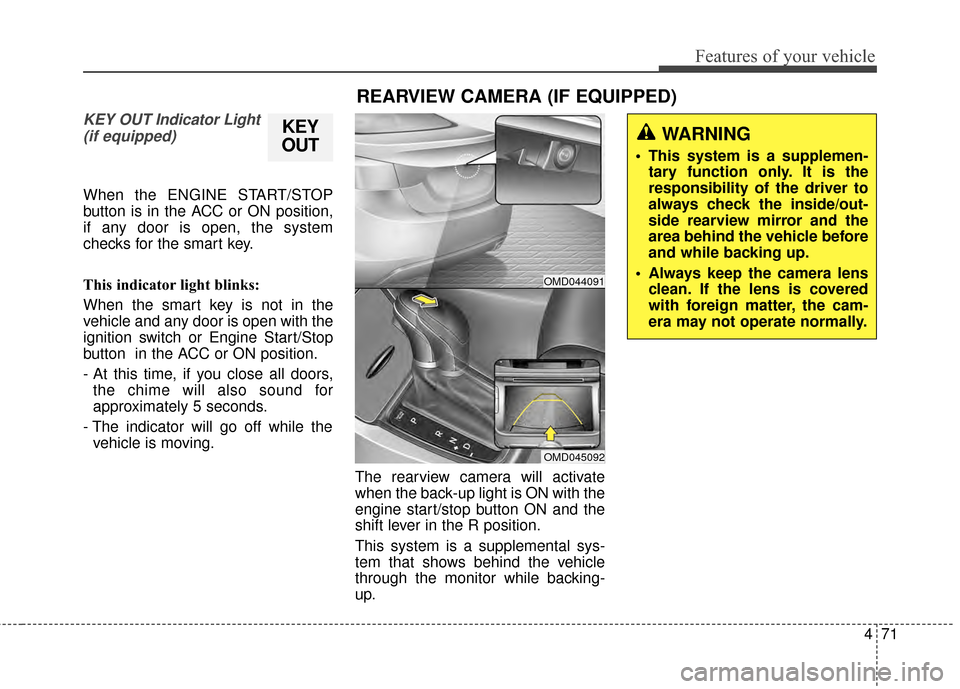
The rearview camera will activate
when the back-up light is ON with the
engine start/stop button ON and the
shift lever in the R position.
This system is a supplemental sys-
tem that shows behind the vehicle
through the monitor while backing-
up.
KEY
OUT
REARVIEW CAMERA (IF EQUIPPED)
WARNING
This system is a supplemen-
tary function only. It is the
responsibility of the driver to
always check the inside/out-
side rearview mirror and the
area behind the vehicle before
and while backing up.
Always keep the camera lens clean. If the lens is covered
with foreign matter, the cam-
era may not operate normally.
OMD044091
OMD045092
Page 163 of 668
477
Features of your vehicle
Battery saver function
The purpose of this feature is to pre-
vent the battery from being dis-
charged. The system automatically
turns off the parking lights when the
driver removes the ignition key or
turns the engine off (for smart key)
and opens the driver-side door.
With this feature, the parking lights
will turn off automatically if the driver
parks on the side of road at night.
If necessary, to keep the lights on
when the ignition key is removed or
the engine is turned off (for smart
key), perform the following:
1) Open the driver-side door.
2) Turn the parking lights OFF andON again using the light switch on
the steering column.
Headlight escort function
If the key is removed from the ignition
switch or placed in the ACC position
or the LOCK/OFF position with the
headlights ON, the headlights (and/or
parking lights) remain on for about 5
minutes. However, if the driver’s door
is opened and closed, the headlights
are turned off after 15 seconds.
The headlights can be turned off by
pressing the LOCK button on the
remote key or smart key twice or
turning the light switch to the OFF or
AUTO position. However, if you turn
the light switch to the AUTO position
when it is dark outside, the head-
lights will not be turned off.
CAUTION
If the driver gets out of the vehi-cle through other doors (exceptdriver's door), the battery saverfunction does not operate andthe headlamp delay functiondoes not turn off automatically.Therefore, It causes the batteryto be discharged. In this case,make sure to turn off the lampbefore getting out of the vehicle.
Page 164 of 668
Features of your vehicle
78
4
Daytime running light (DRL)
(if equipped)
The Daytime Running Lights (DRL)
can make it easier for others to see
the front of your vehicle during the
day, especially after dawn and before
sunset.
Type A
The DRL will turn off when:
1. The headlight is ON.
2. The light switch is in the DRL OFF position.
3. The parking brake is applied.
4. The engine is turned OFF.
Type B
The DRL will turn off when:
1. The headlight is ON.
2. The light switch is in the OFF posi- tion.
3. The parking brake is applied.
4. The engine is turned OFF.
Interior lightsAutomatic turn off function (if equipped)
When all doors are closed, if you lock
the vehicle by using the remote key
or smart key, all interior lamp will be
off within 5 seconds.
If you do not operate anything in the
vehicle after turning off the engine,
the lights will turn off after 20 minutes.
CAUTION
Do not use the interior lights forextended periods when theengine is turned off or the bat-tery will discharge.
WARNING
Do not use the interior lights
when driving in the dark. The
interior lights may obscure your
view and cause an accident.
Page 165 of 668
479
Features of your vehicle
Front lamps
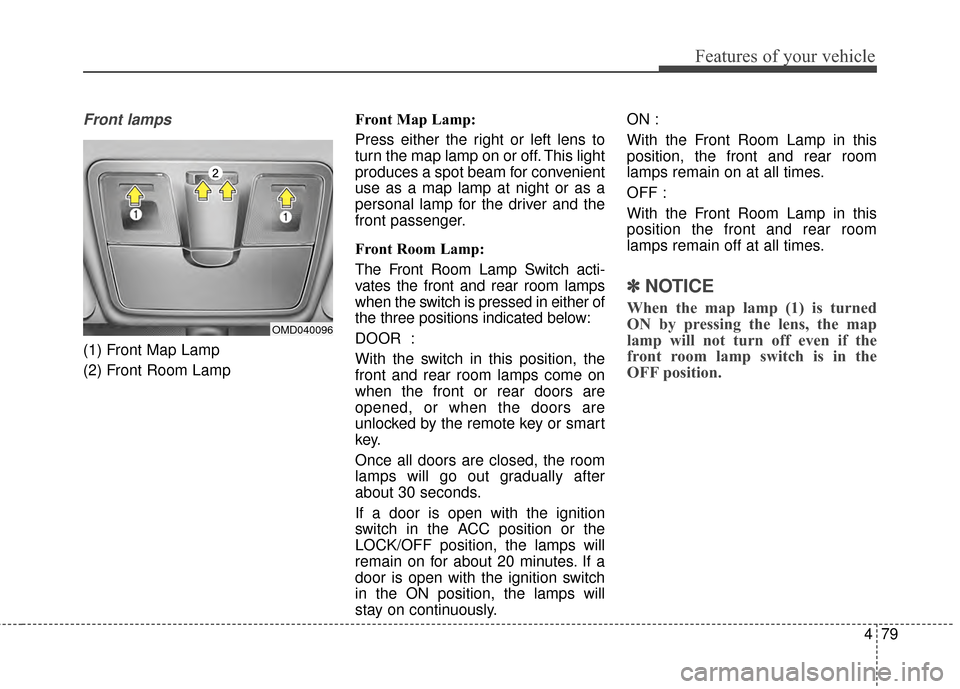
(1) Front Map Lamp
(2) Front Room LampFront Map Lamp:
Press either the right or left lens to
turn the map lamp on or off. This light
produces a spot beam for convenient
use as a map lamp at night or as a
personal lamp for the driver and the
front passenger.
Front Room Lamp:
The Front Room Lamp Switch acti-
vates the front and rear room lamps
when the switch is pressed in either of
the three positions indicated below:
DOOR :
With the switch in this position, the
front and rear room lamps come on
when the front or rear doors are
opened, or when the doors are
unlocked by the remote key or smart
key.
Once all doors are closed, the room
lamps will go out gradually after
about 30 seconds.
If a door is open with the ignition
switch in the ACC position or the
LOCK/OFF position, the lamps will
remain on for about 20 minutes. If a
door is open with the ignition switch
in the ON position, the lamps will
stay on continuously.ON :
With the Front Room Lamp in this
position, the front and rear room
lamps remain on at all times.
OFF :
With the Front Room Lamp in this
position the front and rear room
lamps remain off at all times.
✽ ✽
NOTICE
When the map lamp (1) is turned
ON by pressing the lens, the map
lamp will not turn off even if the
front room lamp switch is in the
OFF position.
OMD040096