AUX Hyundai Elantra 2014 Owner's Guide
[x] Cancel search | Manufacturer: HYUNDAI, Model Year: 2014, Model line: Elantra, Model: Hyundai Elantra 2014Pages: 668, PDF Size: 35.58 MB
Page 419 of 668
4333
Features of your vehicle
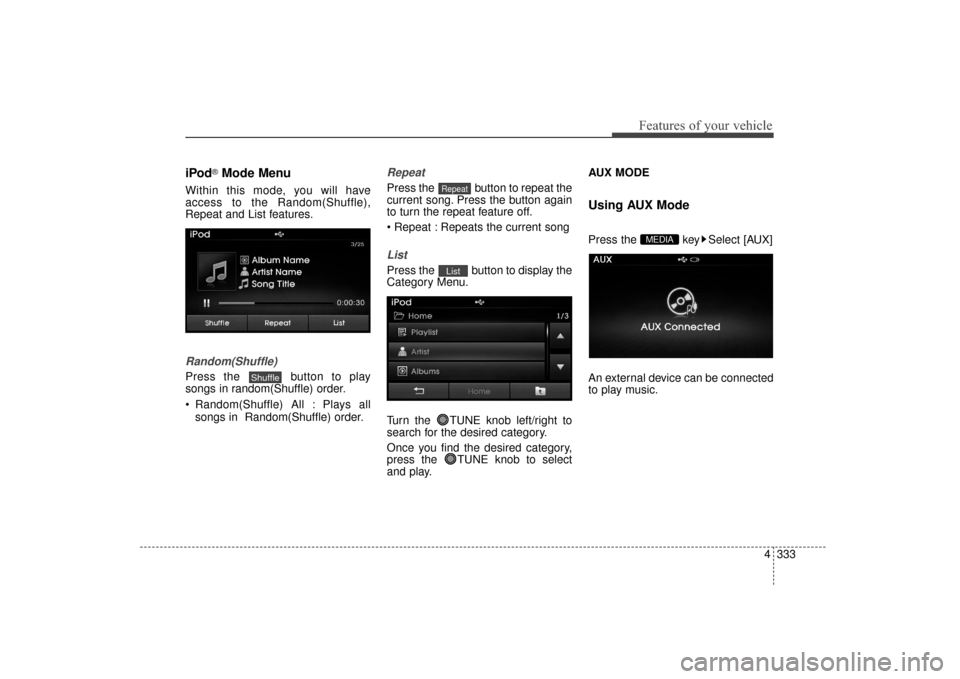
iPod®Mode Menu
Within this mode, you will have
access to the Random(Shuffle),
Repeat and List features.
Random(Shuffle)
Press the button to play
songs in random(Shuffle) order.
Random(Shuffle) All : Plays allsongs in Random(Shuffle) order.
Repeat
Press the button to repeat the
current song. Press the button again
to turn the repeat feature off.
Repeats the current song
List
Press the button to display the
Category Menu.
Turn the TUNE knob left/right to
search for the desired category.
Once you find the desired category,
press the TUNE knob to select
and play. AUX MODE
Using AUX Mode
Press the key Select [AUX]
An external device can be connected
to play music.MEDIA
List
Repeat
Shuffle
UD(FL) HMA 4C(254~AUDIO2).QXP 8/28/2014 5:28 PM Page 333
Page 420 of 668
Features of your vehicle
334
4
Connecting an External Device
External audio players (Camcorders,
car VCR, etc.) can be played through
a dedicated cable.
✽ ✽
NOTICE
• If an external device connector is
connected with the AUX terminal,
then AUX mode will automatically
operate. Once the connector is dis-
connected, the previous mode will
be restored.
• AUX mode can be used only when an external audio player (cam-
corder, car VCR, etc.) has been
connected.
• The AUX volume can be con- trolled separately from other
audio modes.
• Connecting a connector jack to the AUX terminal without an external
device will convert the system to
AUX mode, but only output noise.
When an external device is not
being used, also remove the con-
nector jack.
• When the external device power is connected to the power jack, play-
ing the external device may output
noise. In such cases, disconnect the
power connection before use.
• Fully insert the AUX cable to the AUX jack upon use.
UD(FL) HMA 4C(254~AUDIO2).QXP 8/28/2014 5:28 PM Page 334
Page 443 of 668
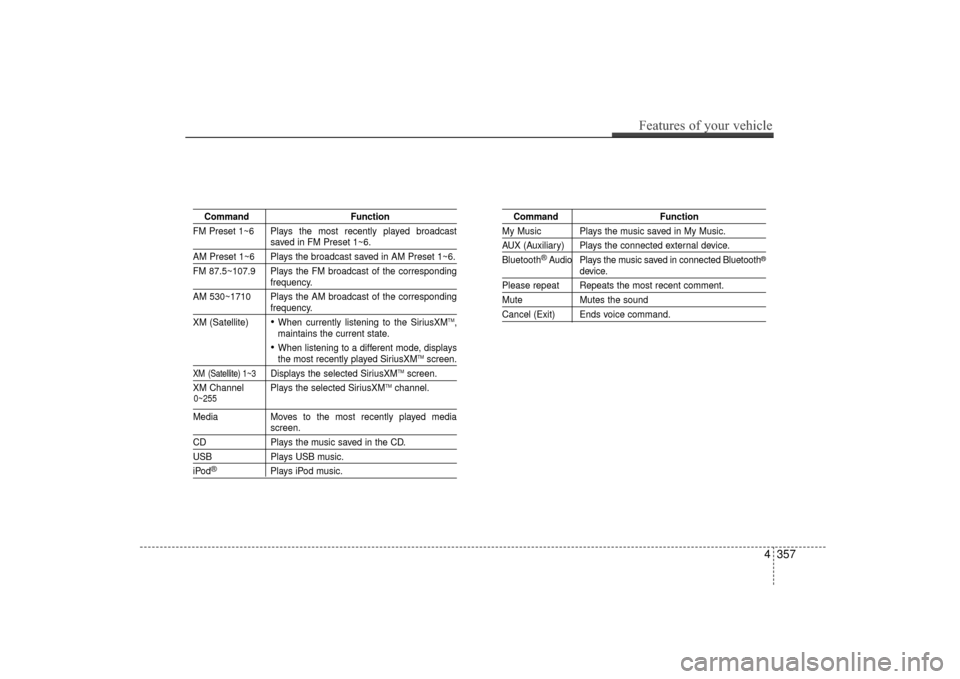
CommandFunction
FM Preset 1~6 Plays the most recently played broadcast
saved in FM Preset 1~6.
AM Preset 1~6 Plays the broadcast saved in AM Preset 1~6.
FM 87.5~107.9 Plays the FM broadcast of the corresponding
frequency.
AM 530~1710 Plays the AM broadcast of the corresponding
frequency.
XM (Satellite)
When currently listening to the SiriusXMTM,
maintains the current state.
When listening to a different mode, displaysthe most recently played SiriusXMTMscreen.
XM (Satellite) 1~3Displays the selected SiriusXMTMscreen.
XM Channel Plays the selected SiriusXMTMchannel.
Media Moves to the most recently played mediascreen.
CD Plays the music saved in the CD.
USBPlays USB music.
iPod®Plays iPod music.
Command Function
My Music Plays the music saved in My Music.
AUX (Auxiliary) Plays the connected external device.
Bluetooth
®Audio Plays the music saved in connected Bluetooth®
device.
Please repeat Repeats the most recent comment.
Mute Mutes the sound
Cancel (Exit) Ends voice command.
0~255
Features of your vehicle
357
4
UD(FL) HMA 4C(254~AUDIO2).QXP 8/28/2014 5:29 PM Page 357
Page 658 of 668
I3
Index
Manual heating and air conditioning ..........................4-96
Mode selection ............................................................4-96
OFF mode ..................................................................4-101
Temperature control ....................................................4-97
Automatic transaxle ........................................................5-22 Good driving practices ................................................5-27
Ignition key interlock system ......................................5-27
Parking ........................................................................\
5-27
Shift lock system ........................................................5-25
Shift-lock release ........................................................5-26
Sports mode ................................................................5-24
Automatic turn off function ............................................4-78
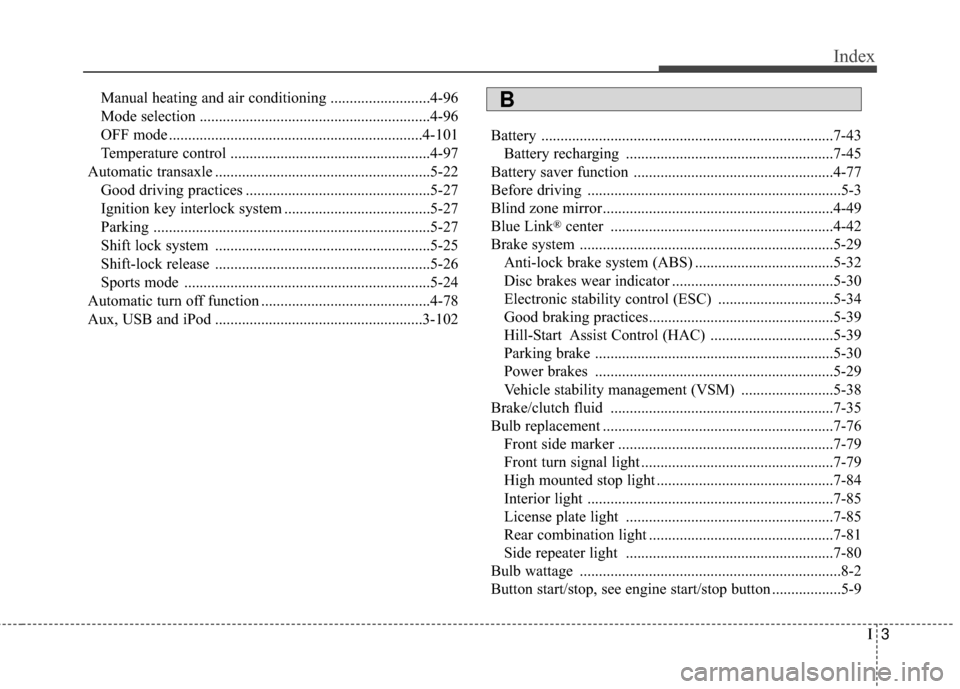
Aux, USB and iPod ......................................................3-102 Battery ........................................................................\
....7-43
Battery recharging ......................................................7-45
Battery saver function ....................................................4-77
Before driving ..................................................................5-3
Blind zone mirror............................................................4-49
Blue Link
®center ..........................................................4-42
Brake system ..................................................................5-29 Anti-lock brake system (ABS) ....................................5-32
Disc brakes wear indicator ..........................................5-30
Electronic stability control (ESC) ..............................5-34
Good braking practices................................................5-39
Hill-Start Assist Control (HAC) ................................5-39
Parking brake ..............................................................5-30
Power brakes ..............................................................5-29
Vehicle stability management (VSM) ........................5-38
Brake/clutch fluid ..........................................................7-35
Bulb replacement ............................................................7-76 Front side marker ........................................................7-79
Front turn signal light ..................................................7-79
High mounted stop light ..............................................7-84
Interior light ................................................................7-85
License plate light ......................................................7-85
Rear combination light ................................................7-81
Side repeater light ......................................................7-80
Bulb wattage ....................................................................8-2
Button start/stop, see engine start/stop button ..................5-9
B
Page 662 of 668
I7
Index
If the engine doesn't turn over or turns over slowly ........6-4
If the engine overheats ......................................................6-8
If the engine stalls at a crossroad or crossing ..................6-3
If the engine stalls while driving ......................................6-3
If the engine turns over normally but doesn’t start ..........6-4
If the engine will not start ................................................6-4
If you have a flat tire ......................................................6-15
If you have a flat tire while driving ..................................6-3
Ignition key interlock system ........................................5-27
Ignition switch ..................................................................5-5Engine Start/Stop button................................................5-9
Key ignition switch ......................................................5-5
Immobilizer system ........................................................4-12
Impact sensing door unlock system ................................4-18
Improtant safety precautions ............................................3-2 Air bag hazards..............................................................3-2
Always wear your seat belt ..........................................3-2
Control your speed ........................................................3-3
Driver distraction ..........................................................3-2
Keep your vehicle in safe condition..............................3-3
Restrain all children ......................................................3-2
In case of emergency while driving..................................6-3
Inside rearview mirror ....................................................4-42 Instrument cluster ..........................................................4-51
ECO ON/OFF mode ....................................................4-59
Gauges ........................................................................\
4-53
Instrument panel illumination ....................................4-45
Manual transaxle shift indicator ..................................4-59
Transaxle shift indicator ..............................................4-56
Trip computer ..............................................................4-93
Warnings and indicators ..............................................4-60
Instrument panel fuse......................................................7-64
Instrument panel overview ..............................................2-5
Interior care ....................................................................7-92\
Interior features ............................................................4-113 Aux, USB and iPod ..................................................4-102
Clock ........................................................................\
..4-113
Clothes hanger ..........................................................4-117
Cup holder ................................................................4-115
Floor mat anchor(s) ..................................................4-118
Luggage net (holder) ................................................4-119
Outside temperature ..................................................4-114
Power outlet ..............................................................4-116
Sunvisor ....................................................................4-116
Interior lights ..................................................................4-78
Interior overview ..............................................................2-4
I