change time Hyundai Elantra 2014 Service Manual
[x] Cancel search | Manufacturer: HYUNDAI, Model Year: 2014, Model line: Elantra, Model: Hyundai Elantra 2014Pages: 668, PDF Size: 35.58 MB
Page 403 of 668
4317
Features of your vehicle
AUDIO CD MODE
Basic Mode Screen
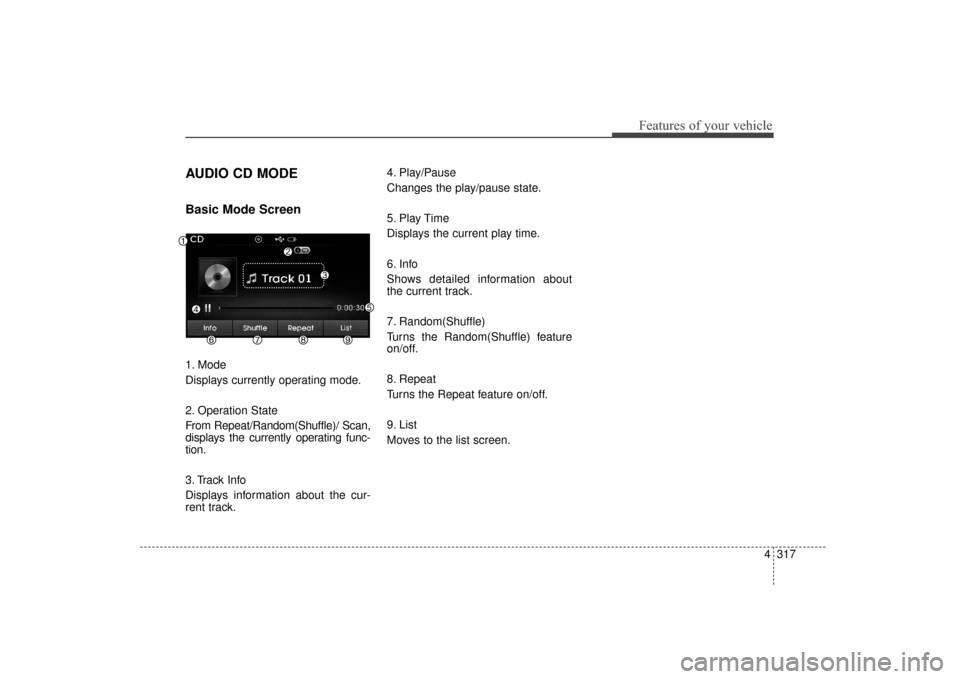
1. Mode
Displays currently operating mode.
2. Operation State
From Repeat/Random(Shuffle)/ Scan,
displays the currently operating func-
tion.
3. Track Info
Displays information about the cur-
rent track.4. Play/Pause
Changes the play/pause state.
5. Play Time
Displays the current play time.
6. Info
Shows detailed information about
the current track.
7. Random(Shuffle)
Turns the Random(Shuffle) feature
on/off.
8. Repeat
Turns the Repeat feature on/off.
9. List
Moves to the list screen.
UD(FL) HMA 4C(254~AUDIO2).QXP 8/28/2014 5:28 PM Page 317
Page 406 of 668
Features of your vehicle
320
4
MP3 CD MODE
Basic Mode Screen
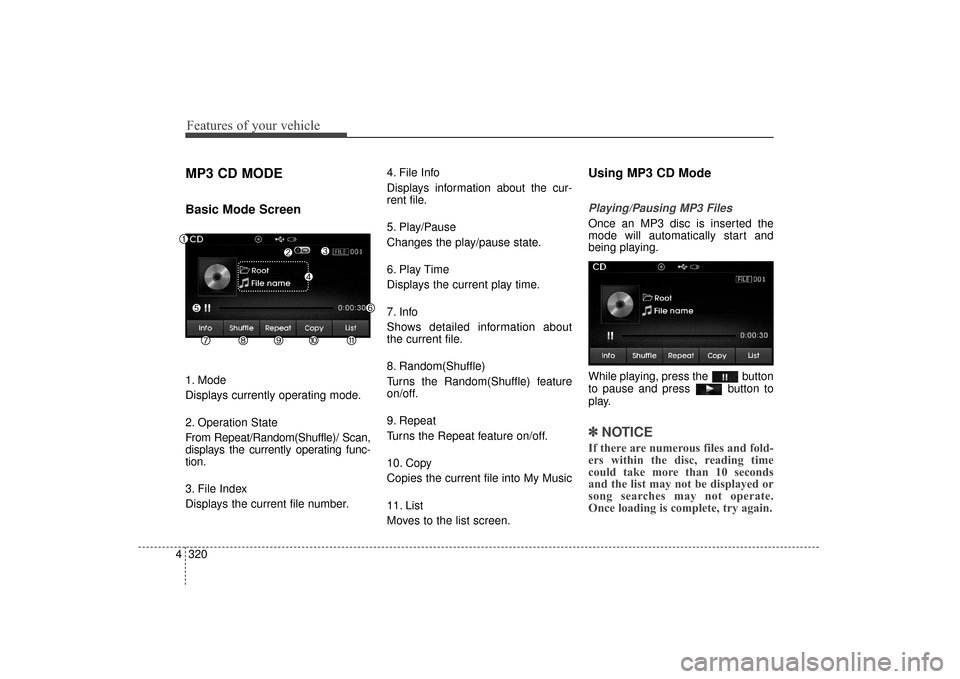
1. Mode
Displays currently operating mode.
2. Operation State
From Repeat/Random(Shuffle)/ Scan,
displays the currently operating func-
tion.
3. File Index
Displays the current file number. 4. File Info
Displays information about the cur-
rent file.
5. Play/Pause
Changes the play/pause state.
6. Play Time
Displays the current play time.
7. Info
Shows detailed information about
the current file.
8. Random(Shuffle)
Turns the Random(Shuffle) feature
on/off.
9. Repeat
Turns the Repeat feature on/off.
10. Copy
Copies the current file into My Music
11. List
Moves to the list screen.
Using MP3 CD Mode
Playing/Pausing MP3 Files
Once an MP3 disc is inserted the
mode will automatically start and
being playing.
While playing, press the button
to pause and press button to
play.
✽ ✽
NOTICE
If there are numerous files and fold-
ers within the disc, reading time
could take more than 10 seconds
and the list may not be displayed or
song searches may not operate.
Once loading is complete, try again.
UD(FL) HMA 4C(254~AUDIO2).QXP 8/28/2014 5:28 PM Page 320
Page 408 of 668
Features of your vehicle
322
4
✽
✽
NOTICE
• When the ‘Folder File’ option is
set as the default display within
Display setup, the album/artist/file
information are displayed as
detailed file information.
• When the ‘Album Artist Song’ option is set as the default display,
the folder name/file name are dis-
played as detailed file information.
• The title, artist and album info are displayed only when such infor-
mation are recorded within the
MP3 file ID3 tag.
Random(Shuffle)
Press the button to play files
in random(Shuffle) order.
Each time the button is pressed, the
feature changes in order of Random
(Shuffle) Folder
➟ Random (Shuffle)
All
➟ Off.
Random(Shuffle) Folder : Plays all files within the current folder in
Random (Shuffle) order.
Random(Shuffle) All : Plays all files in Random(Shuffle) order.
Repeat
Press the button to repeat the
current file or folder.
Each time the button is pressed, the
feature changes in order of Repeat
➟Repeat Folder➟Off.
Repeat: Repeats the current file.
Repeat Folder: Repeats all files within the current Folder.
Copying Files
Press the button to copy the
current file into My Music.
✽ ✽ NOTICE
Selecting another feature during
copying will display a pop-up asking
whether you wish to cancel copying.
To cancel, select 'Yes’.
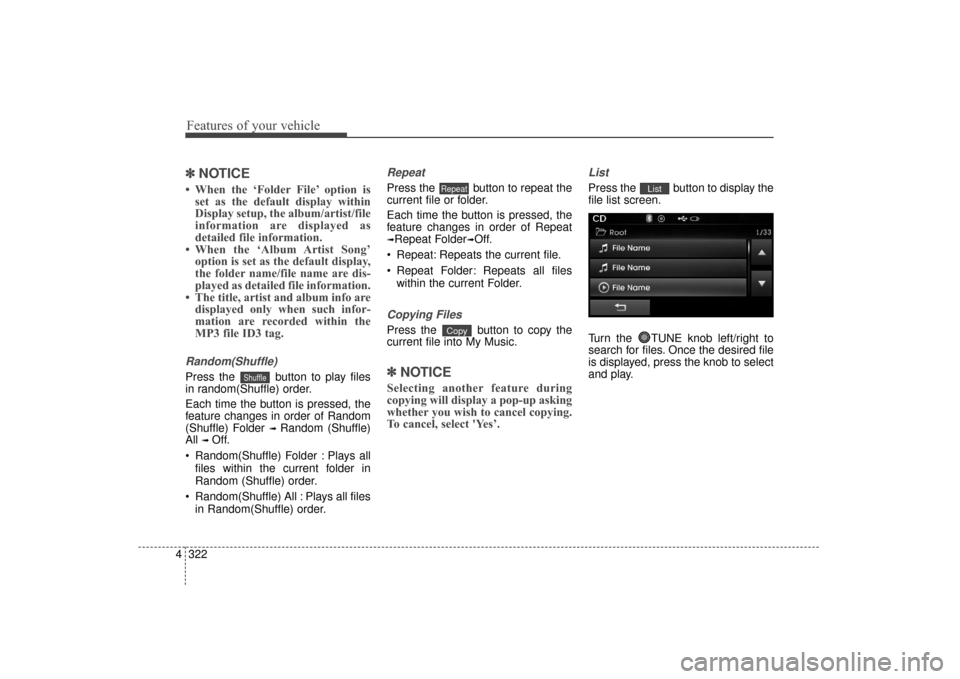
List
Press the button to display the
file list screen.
Turn the TUNE knob left/right to
search for files. Once the desired file
is displayed, press the knob to select
and play.List
Copy
Repeat
Shuffle
UD(FL) HMA 4C(254~AUDIO2).QXP 8/28/2014 5:28 PM Page 322
Page 411 of 668
4325
Features of your vehicle
USB MODE
Basic Mode Screen
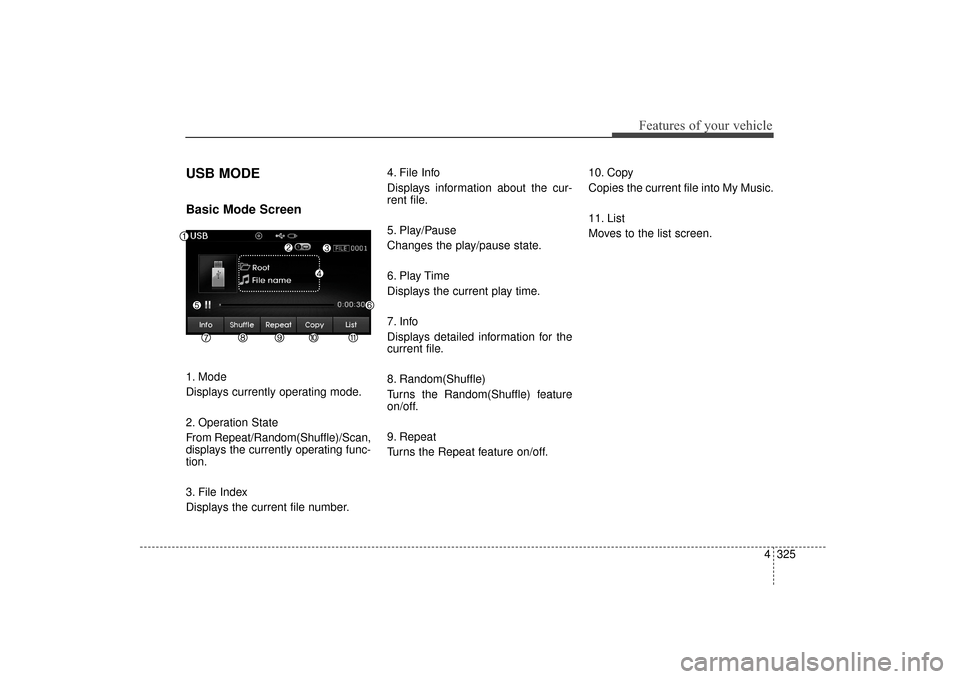
1. Mode
Displays currently operating mode.
2. Operation State
From Repeat/Random(Shuffle)/Scan,
displays the currently operating func-
tion.
3. File Index
Displays the current file number.4. File Info
Displays information about the cur-
rent file.
5. Play/Pause
Changes the play/pause state.
6. Play Time
Displays the current play time.
7. Info
Displays detailed information for the
current file.
8. Random(Shuffle)
Turns the Random(Shuffle) feature
on/off.
9. Repeat
Turns the Repeat feature on/off.
10. Copy
Copies the current file into My Music.
11. List
Moves to the list screen.
UD(FL) HMA 4C(254~AUDIO2).QXP 8/28/2014 5:28 PM Page 325
Page 413 of 668
4327
Features of your vehicle
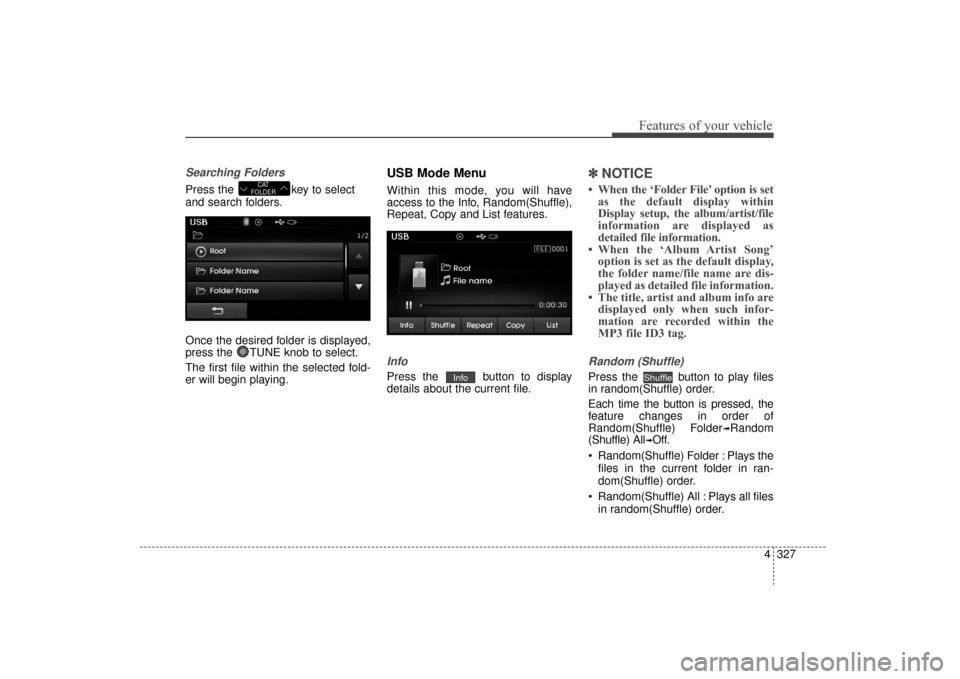
Searching Folders
Press the key to select
and search folders.
Once the desired folder is displayed,
press the TUNE knob to select.
The first file within the selected fold-
er will begin playing.
USB Mode Menu
Within this mode, you will have
access to the Info, Random(Shuffle),
Repeat, Copy and List features.
Info
Press the button to display
details about the current file.
✽ ✽NOTICE
• When the ‘Folder File’ option is set
as the default display within
Display setup, the album/artist/file
information are displayed as
detailed file information.
• When the ‘Album Artist Song’ option is set as the default display,
the folder name/file name are dis-
played as detailed file information.
• The title, artist and album info are displayed only when such infor-
mation are recorded within the
MP3 file ID3 tag.
Random (Shuffle)
Press the button to play files
in random(Shuffle) order.
Each time the button is pressed, the
feature changes in order of
Random(Shuffle) Folder
➟Random
(Shuffle) All
➟Off.
Random(Shuffle) Folder : Plays the files in the current folder in ran-
dom(Shuffle) order.
Random(Shuffle) All : Plays all files in random(Shuffle) order.
ShuffleInfo
CAT
FOLDER
UD(FL) HMA 4C(254~AUDIO2).QXP 8/28/2014 5:28 PM Page 327
Page 414 of 668
Features of your vehicle
328
4
Repeat
Press the button to repeat the
current file or folder.
Each time the button is pressed, the
feature changes in order of Repeat➟
Repeat Folder ➟ Off.
Repeat (Icon) : Repeats the cur- rent file.
Repeat Folder (Icon) : Repeats all files within the current folder.
Copying Files
Press the button to copy the
current file into My Music.
✽ ✽ NOTICE
Selecting another feature during
copying will display a pop-up asking
whether you wish to cancel copying.
To cancel, select 'Yes’.
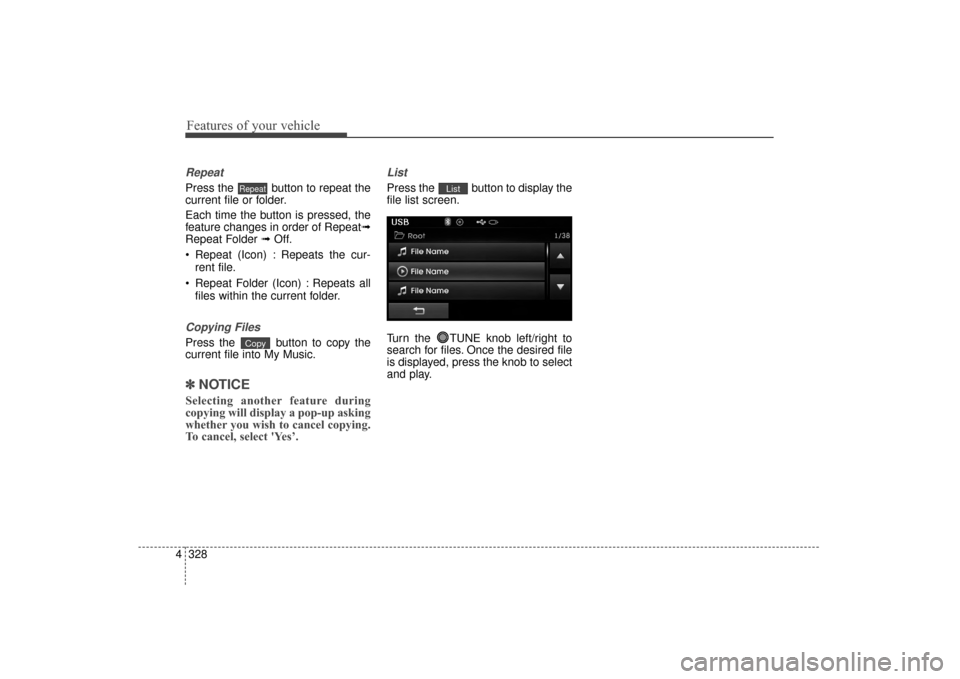
List
Press the button to display the
file list screen.
Turn the TUNE knob left/right to
search for files. Once the desired file
is displayed, press the knob to select
and play.List
Copy
Repeat
UD(FL) HMA 4C(254~AUDIO2).QXP 8/28/2014 5:28 PM Page 328
Page 416 of 668
Features of your vehicle
330
4
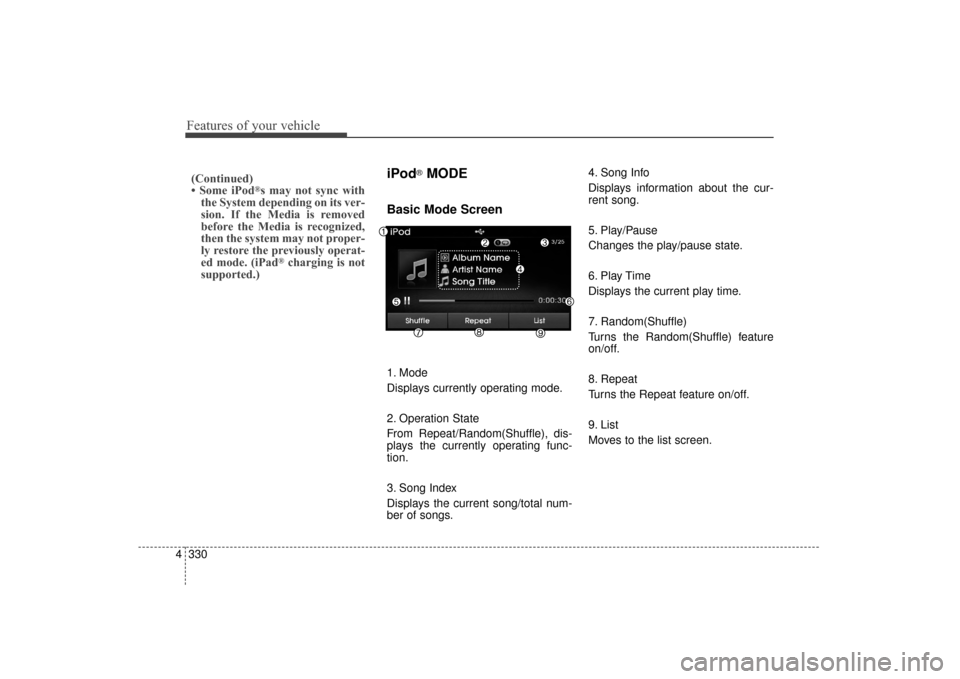
iPod®MODE
Basic Mode Screen
1. Mode
Displays currently operating mode.
2. Operation State
From Repeat/Random(Shuffle), dis-
plays the currently operating func-
tion.
3. Song Index
Displays the current song/total num-
ber of songs. 4. Song Info
Displays information about the cur-
rent song.
5. Play/Pause
Changes the play/pause state.
6. Play Time
Displays the current play time.
7. Random(Shuffle)
Turns the Random(Shuffle) feature
on/off.
8. Repeat
Turns the Repeat feature on/off.
9. List
Moves to the list screen.
(Continued)
• Some iPod®s may not sync with
the System depending on its ver-
sion. If the Media is removed
before the Media is recognized,
then the system may not proper-
ly restore the previously operat-
ed mode. (iPad
®charging is not
supported.)
UD(FL) HMA 4C(254~AUDIO2).QXP 8/28/2014 5:28 PM Page 330
Page 421 of 668
4335
Features of your vehicle
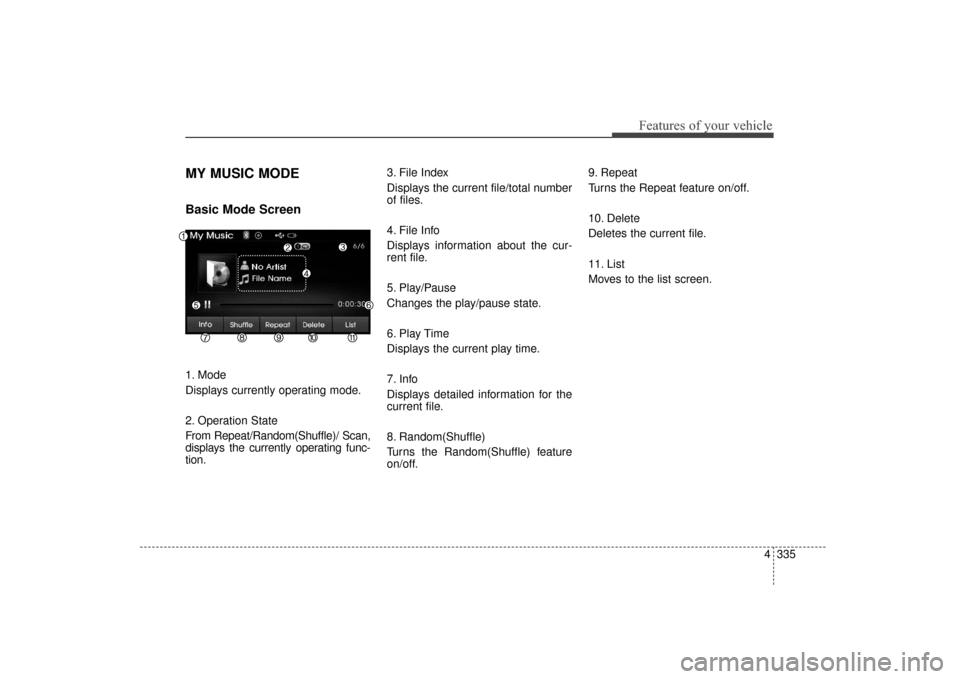
MY MUSIC MODE
Basic Mode Screen
1. Mode
Displays currently operating mode.
2. Operation State
From Repeat/Random(Shuffle)/ Scan,
displays the currently operating func-
tion.3. File Index
Displays the current file/total number
of files.
4. File Info
Displays information about the cur-
rent file.
5. Play/Pause
Changes the play/pause state.
6. Play Time
Displays the current play time.
7. Info
Displays detailed information for the
current file.
8. Random(Shuffle)
Turns the Random(Shuffle) feature
on/off.9. Repeat
Turns the Repeat feature on/off.
10. Delete
Deletes the current file.
11. List
Moves to the list screen.
UD(FL) HMA 4C(254~AUDIO2).QXP 8/28/2014 5:28 PM Page 335
Page 458 of 668
Driving your vehicle
25
WARNING
Carbon monoxide (CO) gas is toxic. Breathing CO can cause unconsciousness and death.
Engine exhaust contains carbon monoxide which cannot be seen or smelled.
Do not inhale engine exhaust.
If at any time you smell engine exhaust inside the vehicle, open the windows immediately. Exposure to CO can cause
unconsciousness and death by asphyxiation.
Be sure the exhaust system does not leak.
The exhaust system should be checked whenever the vehicle is raised to change the oil or for any other purpose. If
you hear a change in the sound of the exhaust or if you drive over something that strikes the underneath side of the
vehicle, have the exhaust system checked as soon as possible by an authorized HYUNDAI dealer.
Do not run the engine in an enclosed area.
Letting the engine idle in your garage, even with the garage door open, is a hazardous practice. Run the engine only
long enough to start the engine and to move the vehicle out of the garage.
Avoid idling the engine for prolonged periods with people inside the vehicle.
If it is necessary to idle the engine for a prolonged period with people inside the vehicle , be sure to do so only in an
open area with the air intake set at "Fresh" and fan control set to high so fresh air is drawn into the interior.
Keep the air intakes clear.
To assure proper operation of the ventilation system, keep the ventilation air intakes located in front of the windshield
clear of snow, ice, leaves, or other obstructions.
If you must drive with the trunk open:
Close all windows.
Open instrument panel air vents.
Set the air intake control at "Fresh", the air flow control at "Floor" or "Face", and the fan control set to high.
UD(FL) HMA 5.qxp 6/26/2014 3:21 PM Page 2
Page 476 of 668
Driving your vehicle
20
5
Good driving practices
Never take the vehicle out of gear
and coast down a hill. This is
extremely dangerous.
Don't "ride" the brakes. This can cause the brakes and related parts
to overheat and malfunction.
When you are driving down a long
hill, slow down and shift to a lower
gear. Engine braking will help slow
down the vehicle.
Slow down before shifting to a lower gear. This will help avoid
over-revving the engine, which can
cause damage.
Slow down when you encounter cross winds. This gives you much
better control of your vehicle.
Be sure the vehicle is completely stopped before you shift into R
(Reverse) to prevent damage to
the transaxle. Exercise extreme caution when
driving on a slippery surface. Be
especially careful when braking,
accelerating or shifting gears. On a
slippery surface, an abrupt change
in vehicle speed can cause the
drive wheels to lose traction and
may cause loss of vehicle control
resulting in an accidentCAUTION
To prevent damage to theengine, clutch and transaxle:
When downshifting from 5th gear to 4th gear, be careful notto inadvertently push the shiftlever sideways engaging the2nd gear. A drastic downshiftmay cause the engine speedto increase to the point thetachometer will enter the red-zone.
Do not downshift more than two gear at a time or down-shift the gear when the engineis running at high speed(5,000 RPM or higher).
WARNING
Do not use the engine brake
(shifting from a higher gear to
lower gear) rapidly on slippery
roads. The vehicle may slip
causing an accident.
UD(FL) HMA 5.qxp 6/26/2014 3:22 PM Page 20