trip computer Hyundai Elantra 2015 Owner's Manual - RHD (UK. Australia)
[x] Cancel search | Manufacturer: HYUNDAI, Model Year: 2015, Model line: Elantra, Model: Hyundai Elantra 2015Pages: 498, PDF Size: 9.45 MB
Page 81 of 498
Features of your vehicle
Accessing your vehicle . . . . . . . . . . . . . . . . . . . . . . . 4-3
• Remote key . . . . . . . . . . . . . . . . . . . . . . . . . . . . . . . . . . . 4-3
• Smart key . . . . . . . . . . . . . . . . . . . . . . . . . . . . . . . . . . . . 4-7
• Immobiliser system . . . . . . . . . . . . . . . . . . . . . . . . . . . 4-12
Door locks . . . . . . . . . . . . . . . . . . . . . . . . . . . . . . . . 4-13
• Outside the vehicle . . . . . . . . . . . . . . . . . . . . . . . . . . . 4-13
• Inside the vehicle . . . . . . . . . . . . . . . . . . . . . . . . . . . . . 4-14
• Auto door lock/unlock features . . . . . . . . . . . . . . . . . 4-17
• Child-protector rear door locks . . . . . . . . . . . . . . . . . 4-17
Theft-alarm system . . . . . . . . . . . . . . . . . . . . . . . . 4-19
Boot . . . . . . . . . . . . . . . . . . . . . . . . . . . . . . . . . . . . . 4-20
Windows . . . . . . . . . . . . . . . . . . . . . . . . . . . . . . . . . 4-22
• Power windows . . . . . . . . . . . . . . . . . . . . . . . . . . . . . . 4-22
• Manual windows . . . . . . . . . . . . . . . . . . . . . . . . . . . . . 4-26
Bonnet.. . . . . . . . . . . . . . . . . . . . . . . . . . . . . . . . . . . 4-27
Fuel filler door . . . . . . . . . . . . . . . . . . . . . . . . . . . . 4-29
Sunroof . . . . . . . . . . . . . . . . . . . . . . . . . . . . . . . . . . 4-32
• Sunroof opening and closing . . . . . . . . . . . . . . . . . . . 4-32
• Sliding the sunroof . . . . . . . . . . . . . . . . . . . . . . . . . . . 4-32
• Tilting the sunroof . . . . . . . . . . . . . . . . . . . . . . . . . . . . 4-33
• Sunshade . . . . . . . . . . . . . . . . . . . . . . . . . . . . . . . . . . . 4-34
• Resetting the sunroof . . . . . . . . . . . . . . . . . . . . . . . . . 4-34
Steering wheel . . . . . . . . . . . . . . . . . . . . . . . . . . . . . 4-36
• Electric power steering (EPS) . . . . . . . . . . . . . . . . . . 4-36• Tilt steering / Telescope steering . . . . . . . . . . . . . . . . 4-37
• Heated steering wheel . . . . . . . . . . . . . . . . . . . . . . . . . 4-37
• Flex steering wheel . . . . . . . . . . . . . . . . . . . . . . . . . . . 4-38
• Horn . . . . . . . . . . . . . . . . . . . . . . . . . . . . . . . . . . . . . . . 4-40
Mirrors . . . . . . . . . . . . . . . . . . . . . . . . . . . . . . . . . . 4-40
• Inside rearview mirror . . . . . . . . . . . . . . . . . . . . . . . . 4-40
• Outside rearview mirror . . . . . . . . . . . . . . . . . . . . . . . 4-43
Instrument cluster . . . . . . . . . . . . . . . . . . . . . . . . . 4-46
• Instrument cluster control . . . . . . . . . . . . . . . . . . . . . 4-47
• Gauges . . . . . . . . . . . . . . . . . . . . . . . . . . . . . . . . . . . . . 4-48
• Transaxle shift indicator . . . . . . . . . . . . . . . . . . . . . . . 4-52
• Trip computer . . . . . . . . . . . . . . . . . . . . . . . . . . . . . . . 4-53
• User settings mode. . . . . . . . . . . . . . . . . . . . . . . . . . . . 4-57
• Warning messages . . . . . . . . . . . . . . . . . . . . . . . . . . . . 4-60
• Warning and indicator lights . . . . . . . . . . . . . . . . . . . 4-66
Light. . . . . . . . . . . . . . . . . . . . . . . . . . . . . . . . . . . . . 4-78
• Exterior lights . . . . . . . . . . . . . . . . . . . . . . . . . . . . . . . 4-78
• Interior lights . . . . . . . . . . . . . . . . . . . . . . . . . . . . . . . . 4-83
Wipers and washers . . . . . . . . . . . . . . . . . . . . . . . . 4-87
• Windscreen wipers . . . . . . . . . . . . . . . . . . . . . . . . . . . 4-87
• Windscreen washers . . . . . . . . . . . . . . . . . . . . . . . . . . 4-89
Defroster . . . . . . . . . . . . . . . . . . . . . . . . . . . . . . . . . 4-91
• Rear window defroster . . . . . . . . . . . . . . . . . . . . . . . . 4-91
Manual climate control system . . . . . . . . . . . . . . . 4-93
• Heating and air conditioning . . . . . . . . . . . . . . . . . . . 4-94
4
Page 126 of 498
Features of your vehicle
46 4
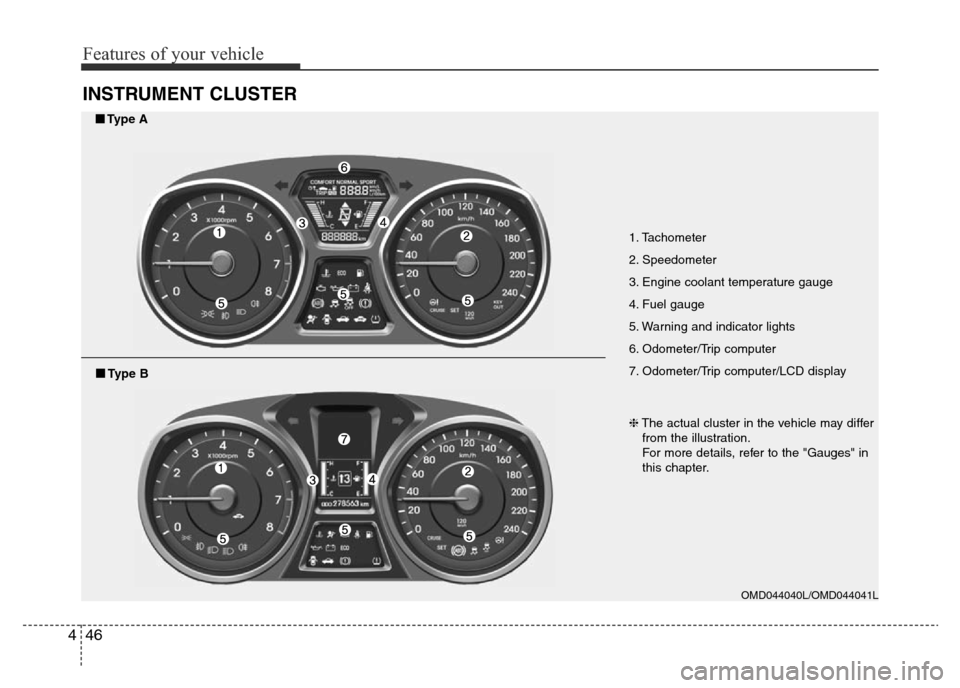
INSTRUMENT CLUSTER
1. Tachometer
2. Speedometer
3. Engine coolant temperature gauge
4. Fuel gauge
5. Warning and indicator lights
6. Odometer/Trip computer
7. Odometer/Trip computer/LCD display
OMD044040L/OMD044041L
■Type A
❈The actual cluster in the vehicle may differ
from the illustration.
For more details, refer to the "Gauges" in
this chapter.
■Type B
Page 133 of 498
453
Features of your vehicle
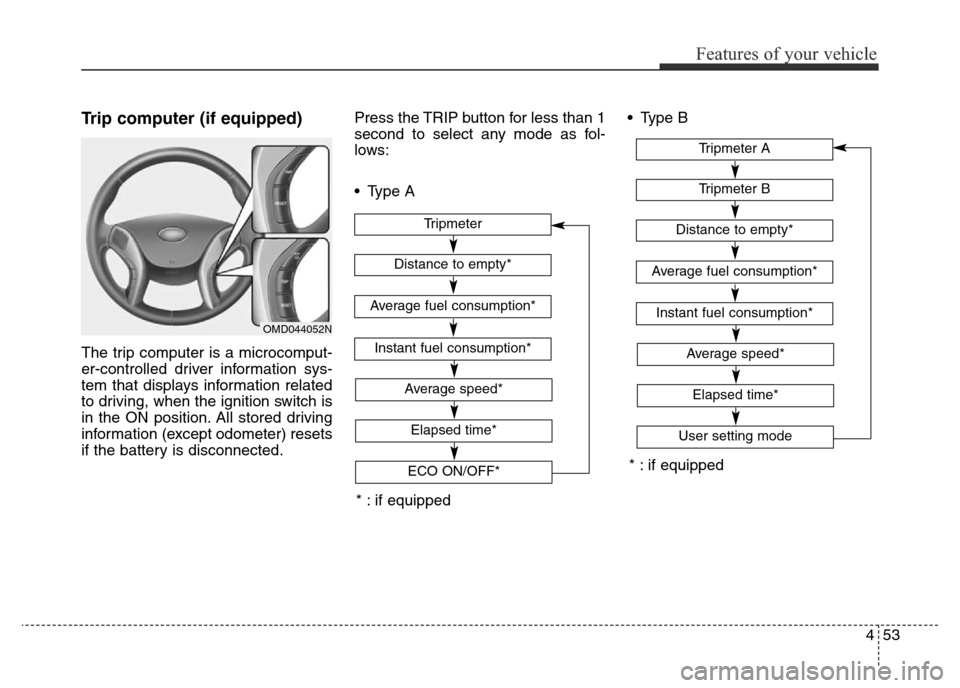
Trip computer (if equipped)
The trip computer is a microcomput-
er-controlled driver information sys-
tem that displays information related
to driving, when the ignition switch is
in the ON position. All stored driving
information (except odometer) resets
if the battery is disconnected.Press the TRIP button for less than 1
second to select any mode as fol-
lows:
• Type A• Type B
OMD044052N
* : if equipped
* : if equipped
Tripmeter B
Instant fuel consumption*
Tripmeter A
Distance to empty*
Average fuel consumption*
Elapsed time*
Average speed*
User setting mode
Tripmeter
Instant fuel consumption*
Distance to empty*
Average fuel consumption*
Elapsed time*
Average speed*
ECO ON/OFF*
Page 135 of 498
455
Features of your vehicle
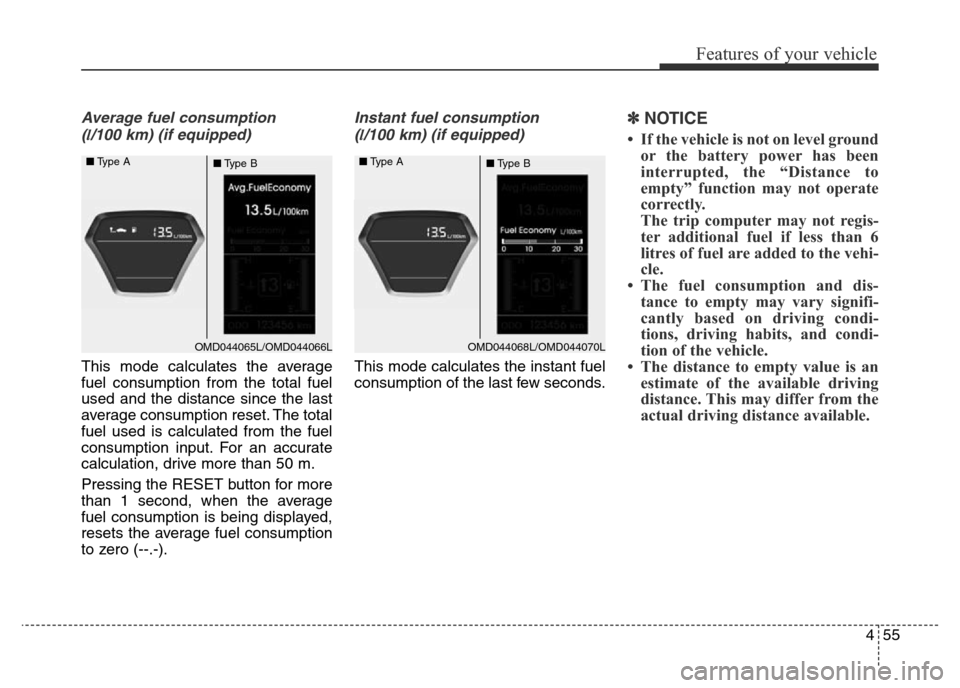
Average fuel consumption
(
l/100 km) (if equipped)
This mode calculates the average
fuel consumption from the total fuel
used and the distance since the last
average consumption reset. The total
fuel used is calculated from the fuel
consumption input. For an accurate
calculation, drive more than 50 m.
Pressing the RESET button for more
than 1 second, when the average
fuel consumption is being displayed,
resets the average fuel consumption
to zero (--.-).
Instant fuel consumption
(
l/100 km) (if equipped)
This mode calculates the instant fuel
consumption of the last few seconds.
✽NOTICE
• If the vehicle is not on level ground
or the battery power has been
interrupted, the “Distance to
empty” function may not operate
correctly.
The trip computer may not regis-
ter additional fuel if less than 6
litres of fuel are added to the vehi-
cle.
• The fuel consumption and dis-
tance to empty may vary signifi-
cantly based on driving condi-
tions, driving habits, and condi-
tion of the vehicle.
• The distance to empty value is an
estimate of the available driving
distance. This may differ from the
actual driving distance available.
OMD044065L/OMD044066L ■Type A
■Type BOMD044068L/OMD044070L ■Type A
■Type B
Page 139 of 498
459
Features of your vehicle
Shift Indicator (if equipped)
If this item is checked, the shift indi-
cator function will be activated.
Fuel ECO Auto Reset
• Auto Reset:
The average fuel economy will
reset automatically when refu-
elling.
• Manual Reset:
The average fuel economy will not
reset automatically whenever refu-
elling.
For more details, refer to “Trip
Computer” in this chapter.Steering position (if equipped)
If this item is checked, when starting
the engine, the alignement status of
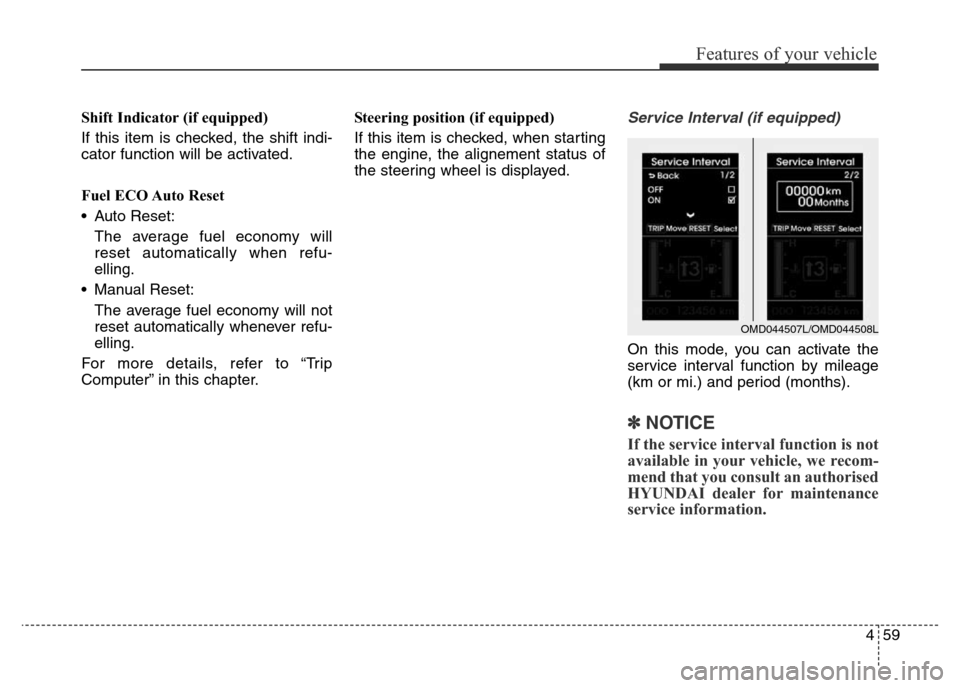
the steering wheel is displayed.Service Interval (if equipped)
On this mode, you can activate the
service interval function by mileage
(km or mi.) and period (months).
✽NOTICE
If the service interval function is not
available in your vehicle, we recom-
mend that you consult an authorised
HYUNDAI dealer for maintenance
service information.
OMD044507L/OMD044508L
Page 154 of 498
Features of your vehicle
74 4
ECO indicator
(if equipped)
The ECO indicator is a system that
informs you to drive economically.
When ON, it is displayed when you
drive fuel efficiently.
• The ECO indicator (green) will turn
on when you are driving fuel effi-
ciently in the ECO ON mode.
If you don't want the indicator dis-
played, turn the ECO ON mode to
OFF mode by pressing the RESET
button of the trip computer for more
than 1 second.
• Fuel-efficiency can be altered by
the driver's driving habits and road
conditions.
• It does not function when in P
(Park), N (Neutral), R (Reverse) or
sports mode.
• Whilst the instant fuel consumption
mode is displayed on the LCD
screen, the ECO indicator turns off.
Immobiliser Indicator
Light (without smart
key) (if equipped)
This indicator light illuminates:
When the vehicle detects the immo-
biliser in your key whilst the ignition
switch is ON.
- At this time, you can start the
engine.
- The indicator light goes off after
starting the engine.
This indicator light blinks:
When there is a malfunction with the
immobiliser system.
In this case, we recommend that you
have the vehicle inspected by an
authorised HYUNDAI dealer.
ECOWARNING
Don't keep watching the indica-
tor whilst driving. It will distract
you whilst driving and cause an
accident that may result in
severe personal injury.
Page 435 of 498
Maintenance
40 7
Reset items
Items should be reset after the bat-
tery has been discharged or the bat-
tery has been disconnected.
• Auto up/down window (See sec-
tion 4)
• Sunroof (See section 4)
• Trip computer (See section 4)
• Climate control system
(See section 4)
• Clock (See section 4)
• Audio (See section 4)WARNING
• Before performing mainte-
nance or recharging the bat-
tery, turn off all accessories
and stop the engine.
• The negative battery cable
must be removed first and
installed last when the battery
is disconnected.