electric system Hyundai Elantra 2015 User Guide
[x] Cancel search | Manufacturer: HYUNDAI, Model Year: 2015, Model line: Elantra, Model: Hyundai Elantra 2015Pages: 668, PDF Size: 35.58 MB
Page 202 of 668
Features of your vehicle
116
4
Sunvisor
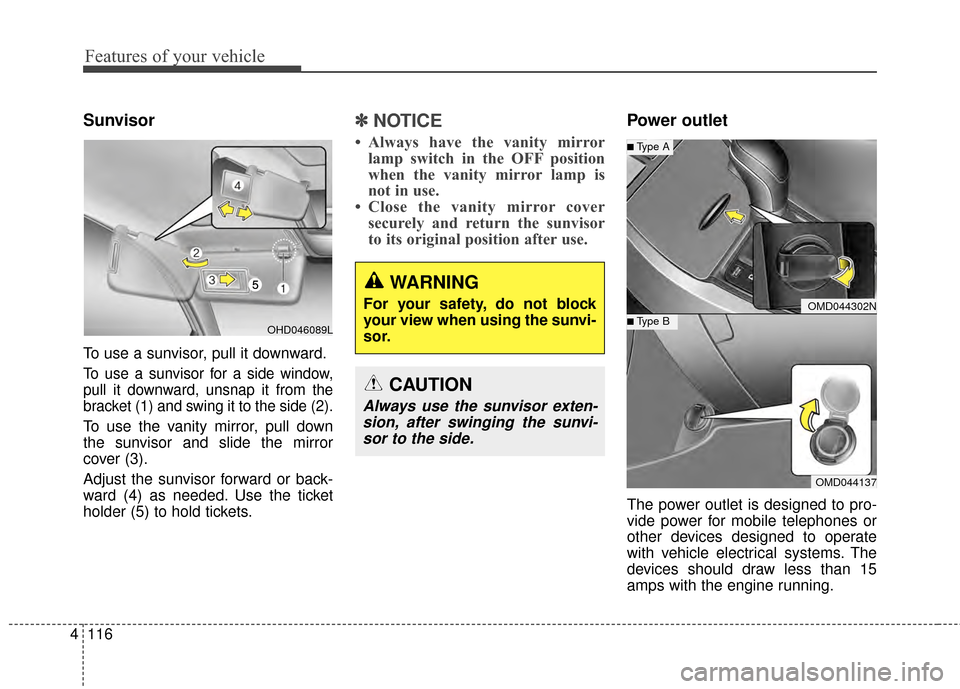
To use a sunvisor, pull it downward.
To use a sunvisor for a side window,
pull it downward, unsnap it from the
bracket (1) and swing it to the side (2).
To use the vanity mirror, pull down
the sunvisor and slide the mirror
cover (3).
Adjust the sunvisor forward or back-
ward (4) as needed. Use the ticket
holder (5) to hold tickets.
✽ ✽
NOTICE
• Always have the vanity mirror
lamp switch in the OFF position
when the vanity mirror lamp is
not in use.
• Close the vanity mirror cover securely and return the sunvisor
to its original position after use.
Power outlet
The power outlet is designed to pro-
vide power for mobile telephones or
other devices designed to operate
with vehicle electrical systems. The
devices should draw less than 15
amps with the engine running.
WARNING
For your safety, do not block
your view when using the sunvi-
sor.
CAUTION
Always use the sunvisor exten-
sion, after swinging the sunvi-sor to the side.
OMD044302N
OMD044137
■Type B
■Type A
OHD046089L
Page 203 of 668
4117
Features of your vehicle
Clothes hanger (if equipped)
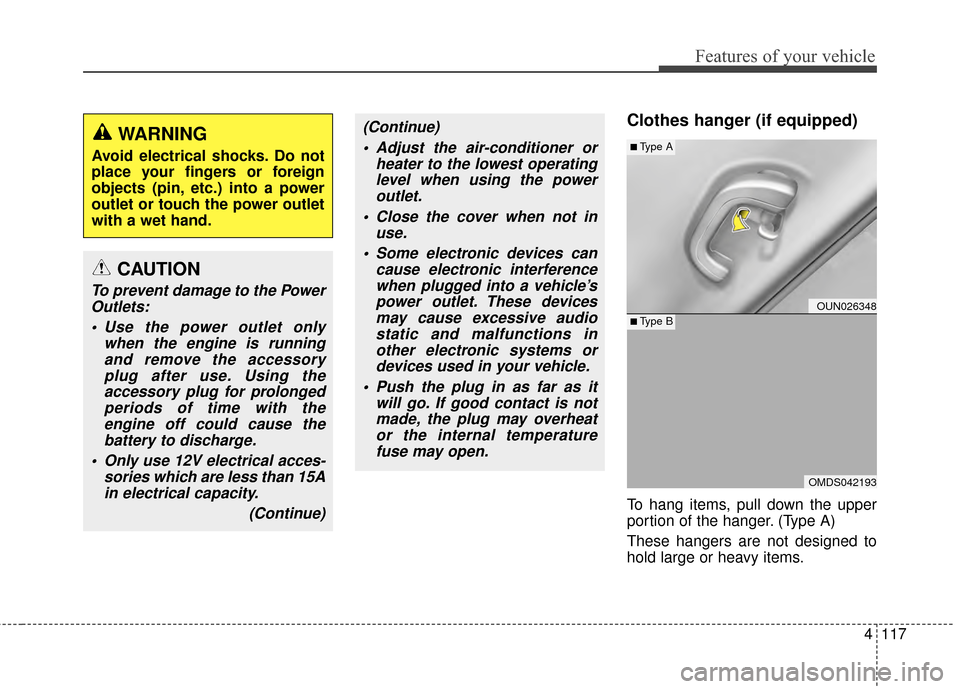
To hang items, pull down the upper
portion of the hanger. (Type A)
These hangers are not designed to
hold large or heavy items.
CAUTION
To prevent damage to the PowerOutlets:
Use the power outlet only when the engine is runningand remove the accessoryplug after use. Using theaccessory plug for prolongedperiods of time with theengine off could cause thebattery to discharge.
Only use 12V electrical acces- sories which are less than 15Ain electrical capacity.
(Continue)
(Continue) Adjust the air-conditioner or heater to the lowest operatinglevel when using the poweroutlet.
Close the cover when not in use.
Some electronic devices can cause electronic interferencewhen plugged into a vehicle’spower outlet. These devicesmay cause excessive audiostatic and malfunctions inother electronic systems ordevices used in your vehicle.
Push the plug in as far as it will go. If good contact is notmade, the plug may overheator the internal temperaturefuse may open.WARNING
Avoid electrical shocks. Do not
place your fingers or foreign
objects (pin, etc.) into a power
outlet or touch the power outlet
with a wet hand.
OUN026348
OMDS042193
■Type A
■Type B
Page 212 of 668
Features of your vehicle
126
4
WARNING
Do not stare at the screen
while driving. Staring at the
screen for prolonged periods
of time could lead to traffic
accidents.
Do not disassemble, assem- ble, or modify the audio sys-
tem. Such acts could result in
accidents, fire, or electric
shock.
Using the phone while driving may lead to a lack of attention of
traffic conditions and increase
the likelihood of accidents.
Use the phone feature after
parking the vehicle.
Heed caution not to spill water or introduce foreign objects
into the device. Such acts
could lead to smoke, fire, or
product malfunction.
(Continued)
(Continued)
Please refrain from use if the screen is blank or no sound
can be heard as these signs
may indicate product malfunc-
tion. Continued use in such
conditions could lead to acci-
dents(fires, electric shock) or
product malfunctions.
Do not touch the antenna dur- ing thunder or lightening as
such acts may lead to light-
ning induced electric shock.
Do not stop or park in park- ing-restricted areas to operate
the product. Such acts could
lead to traffic accidents.
Use the system with the vehi- cle ignition turned on.
Prolonged use with the igni-
tion turned off could result in
battery discharge.
Page 214 of 668
Features of your vehicle
128
4
✽
✽
NOTICE - USING THE
USB DEVICE
• To use an external USB device,
make sure the device is not con-
nected when starting up the
vehicle. Connect the device after
starting up.
• If you start the engine when the USB device is connected, it may
damage the USB device. (USB
flashdrives are very sensitive to
electric shock.)
• If the engine is started up or turned off while the external USB
device is connected, the external
USB device may not work.
• The System may not play unau- thenticated MP3 or WMA files.1) It can only play MP3 files with the compression rate
between 8Kbps~320Kbps.
2) It can only play WMA music files with the compression
rate between
8Kbps~320Kbps.
• Take precautions for static elec- tricity when connecting or dis-
connecting the external USB
device. (Continued)(Continued)
• An encrypted MP3 PLAYER is
not recognizable.
• Depending on the condition of the external USB device, the
connected external USB device
can be unrecognizable.
• When the formatted byte/sector setting of External USB device
is not either 512BYTE or
2048BYTE, then the device will
not be recognized.
• Use only a USB device format- ted to FAT 12/16/32.
• USB devices without USB I/F authentication may not be rec-
ognizable.
• Make sure the USB connection terminal does not come in con-
tact with the human body or
other objects.
• If you repeatedly connect or dis- connect the USB device in a
short period of time, it may
break the device.
• You may hear a strange noise when connecting or disconnect-
ing a USB device. (Continued)(Continued)
• If you disconnect the external
USB device during playback in
USB mode, the external USB
device can be damaged or may
malfunction. Therefore, discon-
nect the external USB device
when the audio is turned off or
in another mode. (e.g, Radio,
CD)
• Depending on the type and capacity of the external USB
device or the type of the files
stored in the device, there is a
difference in the time taken for
recognition of the device.
• Do not use the USB device for purposes other than playing
music files.
• Playing videos through the USB is not supported.
• Use of USB accessories such as rechargers or heaters using USB
I/F may lower performance or
cause trouble. (Continued)
Page 523 of 668
✽
✽NOTICE
An inappropriately disposed
battery can be harmful to
the environment and human
health. Dispose the battery
according to your local
law(s) or regulation.
Jump starting procedure
1.Position the vehicles close enough
that the jumper cables will reach,
but do not allow the vehicles to
touch.
2.Avoid fans or any moving parts in the engine compartment at all
times, even when the vehicles are
turned off.
3.Turn off all electrical devices such as radios, lights, air conditioning,
etc. Put the vehicles in P (Park, for
automatic transaxle vehicle) or
neutral (for manual transaxle vehi-
cle), and set the parking brakes.
Turn both vehicles OFF.
What to do in an emergency
66
(Continued)
NEVER attempt to rechargethe battery when the vehicle’s
battery cables are connected
to the battery.
The electrical ignition system works with high voltage.
NEVER touch these compo-
nents with the engine running
or when the ignition switch is
in the ON position.
Pb
CAUTION
To prevent damage to your vehi-cle:
Only use a 12-volt power sup- ply (battery or jumper system)to jump start your vehicle.
Do not attempt to jump start your vehicle by push-starting.
Page 580 of 668
Maintenance
32
7
ENGINE COOLANT
The high-pressure cooling system
has a reservoir filled with year-round
antifreeze coolant. The reservoir is
filled at the factory.
Check the antifreeze protection and
coolant level at least once a year, at
the beginning of the winter season
and before traveling to a colder cli-
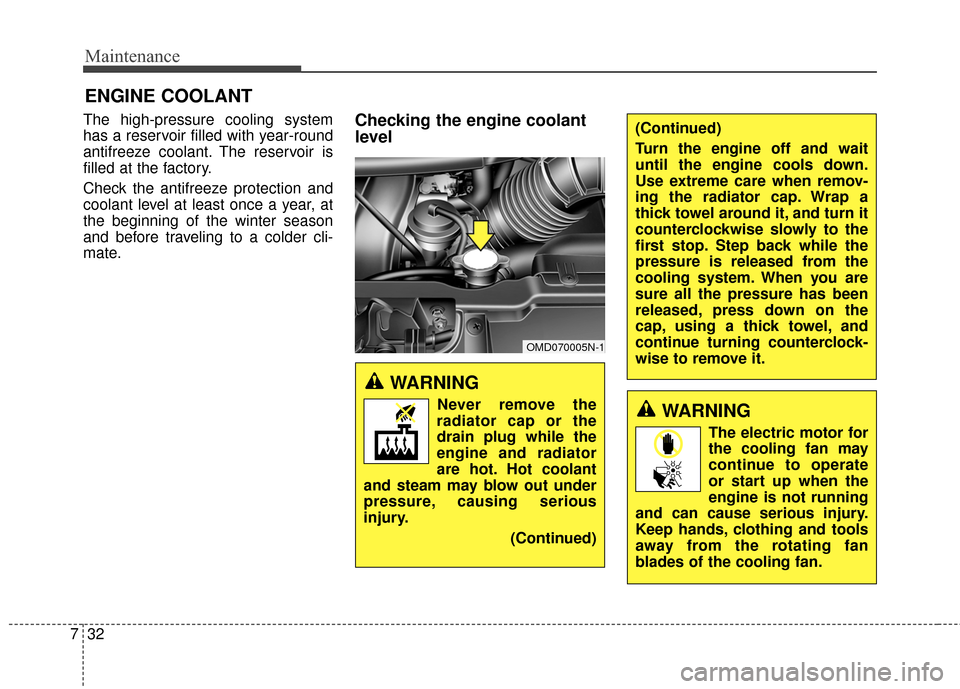
mate.Checking the engine coolant
level
WARNING
Never remove the
radiator cap or the
drain plug while the
engine and radiator
are hot. Hot coolant
and steam may blow out under
pressure, causing serious
injury.
(Continued)
OMD070005N-1
(Continued)
Turn the engine off and wait
until the engine cools down.
Use extreme care when remov-
ing the radiator cap. Wrap a
thick towel around it, and turn it
counterclockwise slowly to the
first stop. Step back while the
pressure is released from the
cooling system. When you are
sure all the pressure has been
released, press down on the
cap, using a thick towel, and
continue turning counterclock-
wise to remove it.
WARNING
The electric motor for
the cooling fan may
continue to operate
or start up when the
engine is not running
and can cause serious injury.
Keep hands, clothing and tools
away from the rotating fan
blades of the cooling fan.
Page 581 of 668
733
Maintenance
The electric motor for the cooling fan
is controlled by engine coolant tem-
perature, refrigerant pressure and
vehicle speed. As the engine coolant
temperature decreases, the electric
motor will automatically shut off. This
is a normal condition. If your vehicle
is equipped with GDI, the electric
motor for the cooling fan may begin
to operate at any time and continue
to operate until you disconnect the
negative battery cable.Check the condition and connections
of all cooling system hoses and
heater hoses. Replace any swollen
or deteriorated hoses.
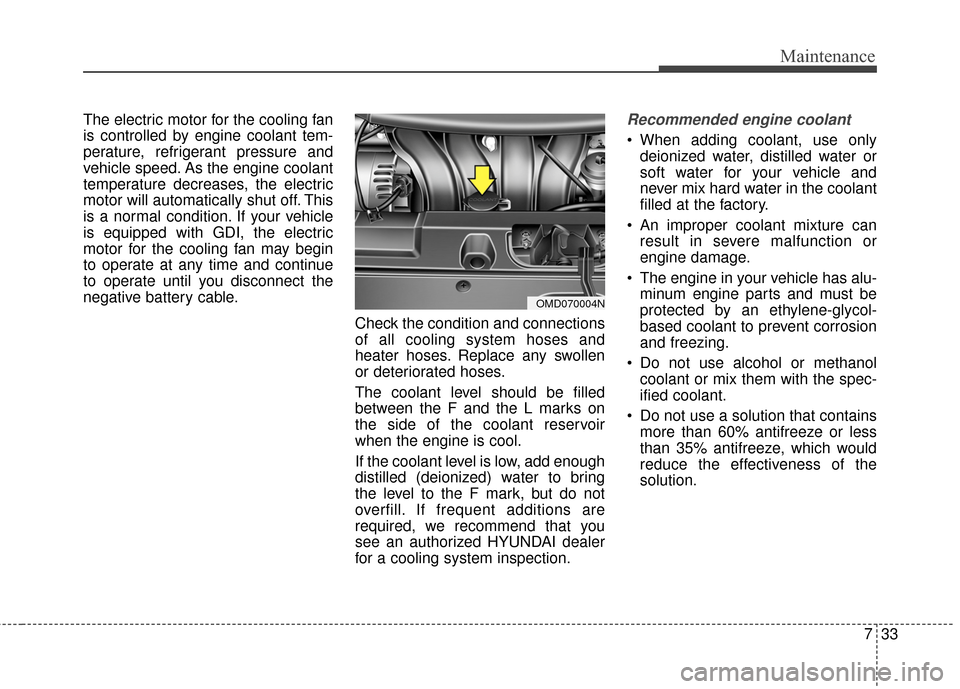
The coolant level should be filled
between the F and the L marks on
the side of the coolant reservoir
when the engine is cool.
If the coolant level is low, add enough
distilled (deionized) water to bring
the level to the F mark, but do not
overfill. If frequent additions are
required, we recommend that you
see an authorized HYUNDAI dealer
for a cooling system inspection.Recommended engine coolant
When adding coolant, use onlydeionized water, distilled water or
soft water for your vehicle and
never mix hard water in the coolant
filled at the factory.
An improper coolant mixture can result in severe malfunction or
engine damage.
The engine in your vehicle has alu- minum engine parts and must be
protected by an ethylene-glycol-
based coolant to prevent corrosion
and freezing.
Do not use alcohol or methanol coolant or mix them with the spec-
ified coolant.
Do not use a solution that contains more than 60% antifreeze or less
than 35% antifreeze, which would
reduce the effectiveness of the
solution.
OMD070004N
Page 592 of 668
Maintenance
44
7
For best battery service
Keep the battery securely mount-
ed.
Keep the battery top clean and dry.
Keep the terminals and connec- tions clean, tight, and coated with
petroleum jelly or terminal grease.
Rinse any spilled acid from the bat- tery immediately with a solution of
water and baking soda.(Continued)
NEVER attempt to rechargethe battery when the vehicle’s
battery cables are connected
to the battery.
The electrical ignition system works with high voltage.
NEVER touch these compo-
nents with the engine running
or when the ignition switch is
in the ON position.
WARNING- CALIFORNIA
PROPOSITION 65 WARNING
Battery posts, terminals, and
related accessories contain
lead and lead compounds,
chemicals known to the State of
California to cause cancer, birth
defects and reproductive harm.
Batteries also contain other
chemicals known to the State of
California to cause cancer.
Wash hands after handling.
CAUTION
When you do not use the vehi- cle for a long time in a lowtemperature area, disconnectthe battery and keep itindoors.
Always charge the battery fully to prevent battery casedamage in low temperatureareas.
Page 611 of 668
763
Maintenance
FUSES
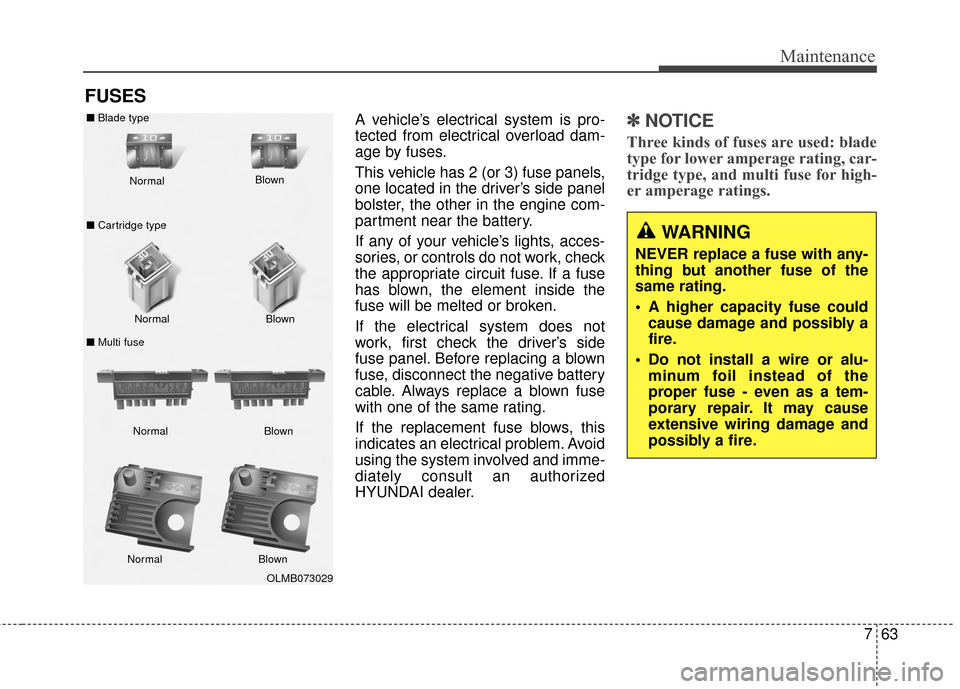
A vehicle’s electrical system is pro-
tected from electrical overload dam-
age by fuses.
This vehicle has 2 (or 3) fuse panels,
one located in the driver’s side panel
bolster, the other in the engine com-
partment near the battery.
If any of your vehicle’s lights, acces-
sories, or controls do not work, check
the appropriate circuit fuse. If a fuse
has blown, the element inside the
fuse will be melted or broken.
If the electrical system does not
work, first check the driver’s side
fuse panel. Before replacing a blown
fuse, disconnect the negative battery
cable. Always replace a blown fuse
with one of the same rating.
If the replacement fuse blows, this
indicates an electrical problem. Avoid
using the system involved and imme-
diately consult an authorized
HYUNDAI dealer.✽ ✽NOTICE
Three kinds of fuses are used: blade
type for lower amperage rating, car-
tridge type, and multi fuse for high-
er amperage ratings.
OLMB073029
Normal
Normal
■
Blade type
■ Cartridge type
■ Multi fuse Blown
Blown
Normal Blown
Normal Blown
WARNING
NEVER replace a fuse with any-
thing but another fuse of the
same rating.
A higher capacity fuse could
cause damage and possibly a
fire.
Do not install a wire or alu- minum foil instead of the
proper fuse - even as a tem-
porary repair. It may cause
extensive wiring damage and
possibly a fire.
Page 660 of 668

I5
Index
Door locks ......................................................................4-\
14Auto door lock/unlock features ..................................4-18
Central door lock switch ............................................4-17
Child-safety rear door lock..........................................4-19
Door lock button..........................................................4-16
Impact sensing door unlock system ............................4-18
Remote key ..................................................................4-14
Smart key ....................................................................4-15\
Speed sensing door lock system..................................4-18
Drinks holders, see cup holders ....................................4-115
Driver selectable steering mode ....................................4-39
Driver’s air bag ..............................................................3-47
Driving assist system Active ECO system ....................................................5-41
Driving at night ..............................................................5-49
Driving in flooded areas ................................................5-51
Driving in the rain ..........................................................5-50 Electric chromic mirror (ECM) with compass and
HomeLink
®system ......................................................4-43
Electric power steering (EPS) ........................................4-38
Electronic stability control (ESC) ..................................5-34
Emergency towing ..........................................................6-29
Emission control system ................................................7-94 Crankcase emission control system ............................7-94
Evaporative emission control system ..........................7-94
Exhaust emission control system ................................7-95
Engine compartment..................................................2-6, 7-2
Engine compartment panel fuse ....................................7-66
Engine coolant ................................................................7-32
Engine coolant temperature gauge ................................4-54
Engine number ..................................................................8-7
Engine oil ........................................................................\
7-30
Engine Start/Stop button ..................................................5-9
Evaporative emission control system ............................7-94
Exhaust emission control system....................................7-95
Explanation of scheduled maintenance items ................7-26
Exterior care....................................................................7-87\
Exterior lights ................................................................4-72
Exterior overview Front ........................................................................\
......2-2
Rear........................................................................\
........2-3
E