reset Hyundai Elantra 2015 Workshop Manual
[x] Cancel search | Manufacturer: HYUNDAI, Model Year: 2015, Model line: Elantra, Model: Hyundai Elantra 2015Pages: 668, PDF Size: 35.58 MB
Page 447 of 668
![Hyundai Elantra 2015 Workshop Manual SETUP
Starting Mode
Press the key to display the
Setup screen.
You can select and control options
related to [Display], [Sound],
[Clock/Calendar], [Phone] and
[System].
Display Settings
Adjusting the](/img/35/14562/w960_14562-446.png "Hyundai Elantra 2015 Workshop Manual SETUP
Starting Mode
Press the key to display the
Setup screen.
You can select and control options
related to [Display], [Sound],
[Clock/Calendar], [Phone] and
[System].
Display Settings
Adjusting the")
SETUP
Starting Mode
Press the key to display the
Setup screen.
You can select and control options
related to [Display], [Sound],
[Clock/Calendar], [Phone] and
[System].
Display Settings
Adjusting the Brightness
Press the key Select
[Display] Select [Brightness]
Use the , buttons to adjust the
screen brightness or set the
Brightness on Automatic, Daylight, or
Night mode.
Press the button to reset.
1) Automatic : Adjusts the brightnessautomatically
2) Daylight : Always maintains the brightness on high
3) Night : Always maintains the
brightness on low
Mode pop up
Press the key Select
[Display] Select [Mode Pop up]
This feature is used to display the
Pop-up Mode screen when entering
radio and media modes.
When this feature is turned on,
pressing the or key
will display the Pop-up Mode screen.
✽ ✽ NOTICE
The media Mode pop up screen can
be displayed only when two or more
media modes have been connected.
MEDIA RADIO
SETUP
Default
SETUP SETUP
Features of your vehicle
361
4
UD(FL) HMA 4C(254~AUDIO2).QXP 8/28/2014 5:29 PM Page 361
Page 448 of 668
![Hyundai Elantra 2015 Workshop Manual MP3 Information Display
Press the key Select
[Display] Select [Media Display]
This feature is used to change the
information displayed within USB
and MP3 CD modes.
1) Folder File : Displays file nam](/img/35/14562/w960_14562-447.png "Hyundai Elantra 2015 Workshop Manual MP3 Information Display
Press the key Select
[Display] Select [Media Display]
This feature is used to change the
information displayed within USB
and MP3 CD modes.
1) Folder File : Displays file nam")
MP3 Information Display
Press the key Select
[Display] Select [Media Display]
This feature is used to change the
information displayed within USB
and MP3 CD modes.
1) Folder File : Displays file nameand folder name
2) Album Artist Song : Displays album name/artist name/song
Sound Settings
Sound Settings
Press the key Select
[Sound] Select [Sound Setting] Use the , , , buttons to
adjust the Fader/Balance settings.
Use the , buttons to adjust the
Bass/Middle/Treble settings.
Press the button to reset.DefaultSETUP
SETUP
4 362
Features of your vehicle
UD(FL) HMA 4C(254~AUDIO2).QXP 8/28/2014 5:29 PM Page 362
Page 502 of 668
Driving your vehicle
46
5
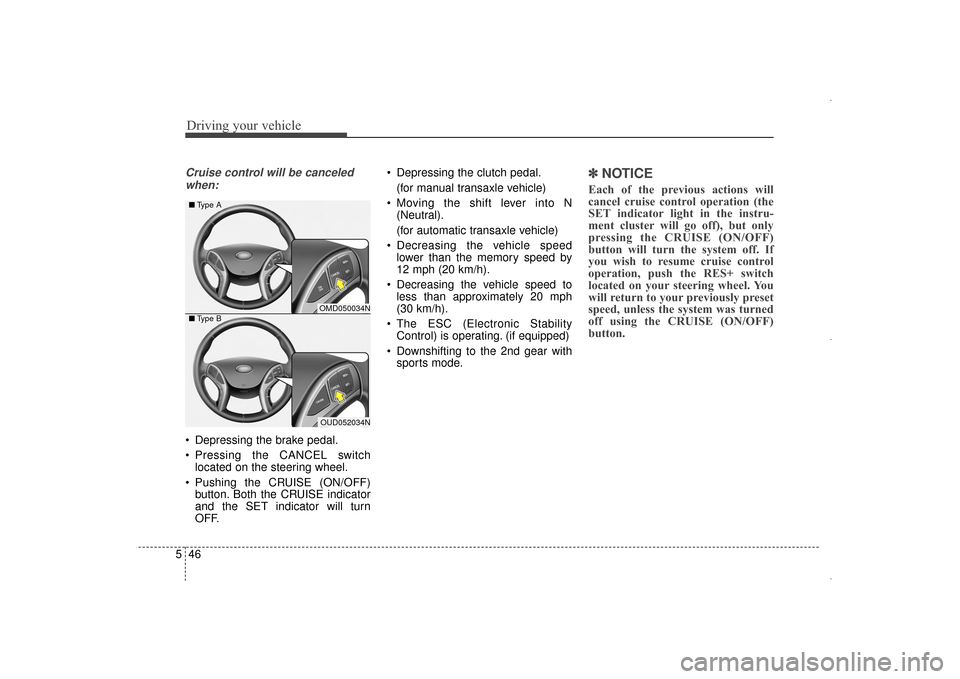
Cruise control will be canceled
when:
Depressing the brake pedal.
Pressing the CANCEL switch located on the steering wheel.
Pushing the CRUISE (ON/OFF) button. Both the CRUISE indicator
and the SET indicator will turn
OFF. Depressing the clutch pedal.
(for manual transaxle vehicle)
Moving the shift lever into N (Neutral).
(for automatic transaxle vehicle)
Decreasing the vehicle speed lower than the memory speed by
12 mph (20 km/h).
Decreasing the vehicle speed to less than approximately 20 mph
(30 km/h).
The ESC (Electronic Stability Control) is operating. (if equipped)
Downshifting to the 2nd gear with sports mode.
✽ ✽ NOTICE
Each of the previous actions will
cancel cruise control operation (the
SET indicator light in the instru-
ment cluster will go off), but only
pressing the CRUISE (ON/OFF)
button will turn the system off. If
you wish to resume cruise control
operation, push the RES+ switch
located on your steering wheel. You
will return to your previously preset
speed, unless the system was turned
off using the CRUISE (ON/OFF)
button.
OMD050034N
OUD052034N
■
Type A
■ Type B
UD(FL) HMA 5.qxp 6/26/2014 3:23 PM Page 46
Page 503 of 668
547
Driving your vehicle
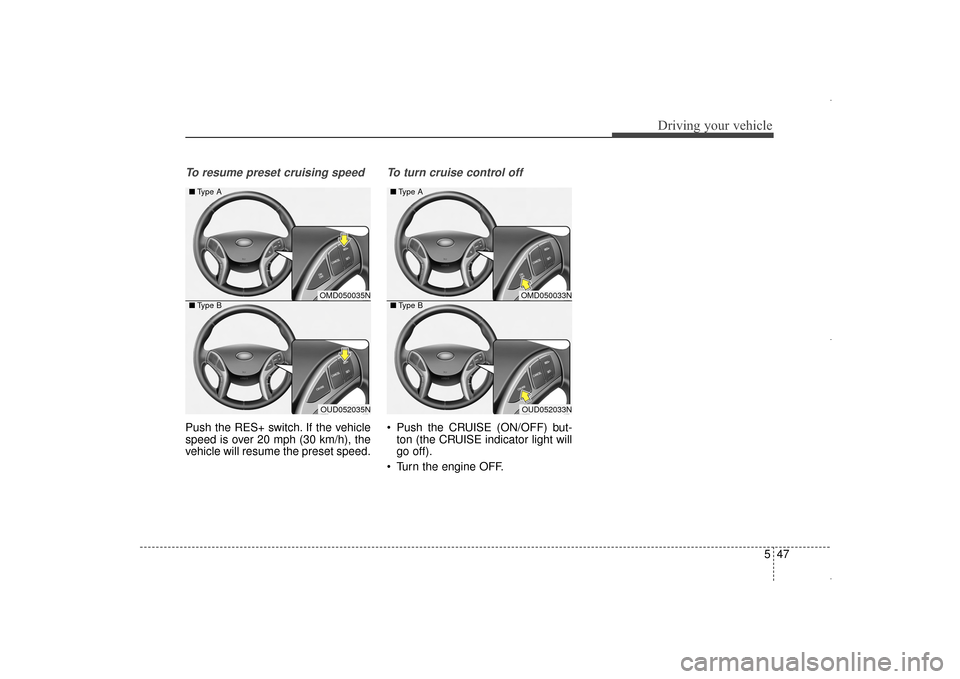
To resume preset cruising speed
Push the RES+ switch. If the vehicle
speed is over 20 mph (30 km/h), the
vehicle will resume the preset speed.
To turn cruise control off
Push the CRUISE (ON/OFF) but-ton (the CRUISE indicator light will
go off).
Turn the engine OFF.
OMD050035N
OUD052035N
■
Type A
■ Type B
OMD050033N
OUD052033N
■
Type A
■ Type B
UD(FL) HMA 5.qxp 6/26/2014 3:23 PM Page 47
Page 549 of 668
Maintenance
Engine compartment . . . . . . . . . . . . . . . . . . . . . . . . 7-3
Maintenance services . . . . . . . . . . . . . . . . . . . . . . . . 7-4
• Owner’s responsibility . . . . . . . . . . . . . . . . . . . . . . . . . 7-4
• Owner maintenance precautions . . . . . . . . . . . . . . . . . 7-4
Owner maintenance . . . . . . . . . . . . . . . . . . . . . . . . . 7-6
• Owner maintenance schedule. . . . . . . . . . . . . . . . . . . . 7-7
Scheduled maintenance services . . . . . . . . . . . . . . . 7-8
Explanation of scheduled maintenance items . . . 7-26
Engine oil. . . . . . . . . . . . . . . . . . . . . . . . . . . . . . . . . 7-30
• Checking the engine oil level . . . . . . . . . . . . . . . . . . . 7-30
• Checking the engine oil and filter . . . . . . . . . . . . . . . 7-31
Engine coolant . . . . . . . . . . . . . . . . . . . . . . . . . . . . 7-32
• Checking the engine coolant level . . . . . . . . . . . . . . . 7-32
• Changing engine coolant. . . . . . . . . . . . . . . . . . . . . . . 7-34
Brake/clutch fluid . . . . . . . . . . . . . . . . . . . . . . . . . . 7-35
• Checking the brake/clutch fluid level . . . . . . . . . . . . 7-35
Washer fluid . . . . . . . . . . . . . . . . . . . . . . . . . . . . . . 7-36
• Checking the washer fluid level . . . . . . . . . . . . . . . . . 7-36
Parking brake . . . . . . . . . . . . . . . . . . . . . . . . . . . . . 7-36
• Checking the parking brake. . . . . . . . . . . . . . . . . . . . 7-36
Air cleaner. . . . . . . . . . . . . . . . . . . . . . . . . . . . . . . . 7-37
• Filter replacement . . . . . . . . . . . . . . . . . . . . . . . . . . . . 7-37
Climate control air cleaner . . . . . . . . . . . . . . . . . . 7-39
• Filter inspection . . . . . . . . . . . . . . . . . . . . . . . . . . . . . . 7-39
Wiper blades . . . . . . . . . . . . . . . . . . . . . . . . . . . . . . 7-41
• Blade inspection . . . . . . . . . . . . . . . . . . . . . . . . . . . . . . 7-41
• Blade replacement . . . . . . . . . . . . . . . . . . . . . . . . . . . . 7-41
Battery . . . . . . . . . . . . . . . . . . . . . . . . . . . . . . . . . . . 7-\
43
• For best battery service . . . . . . . . . . . . . . . . . . . . . . . 7-44
• Battery recharging . . . . . . . . . . . . . . . . . . . . . . . . . . . 7-45
• Reset features . . . . . . . . . . . . . . . . . . . . . . . . . . . . . . . . 7-46
Tires and wheels . . . . . . . . . . . . . . . . . . . . . . . . . . . 7-47
• Tire care . . . . . . . . . . . . . . . . . . . . . . . . . . . . . . . . . . . . \
7-47
• Recommended cold tire inflation pressures . . . . . . . 7-48
• Check tire inflation pressure . . . . . . . . . . . . . . . . . . . 7-49
• Tire rotation . . . . . . . . . . . . . . . . . . . . . . . . . . . . . . . . . 7-50
• Wheel alignment and tire balance . . . . . . . . . . . . . . . 7-51
• Tire replacement . . . . . . . . . . . . . . . . . . . . . . . . . . . . . 7-51
• Wheel replacement . . . . . . . . . . . . . . . . . . . . . . . . . . . 7-52
• Tire traction . . . . . . . . . . . . . . . . . . . . . . . . . . . . . . . . . 7-52
• Tire maintenance . . . . . . . . . . . . . . . . . . . . . . . . . . . . . 7-53
• Tire sidewall labeling . . . . . . . . . . . . . . . . . . . . . . . . . 7-53
• Tire terminology and definitions . . . . . . . . . . . . . . . . 7-57
• All season tires . . . . . . . . . . . . . . . . . . . . . . . . . . . . . . . 7-60
• Summer tires . . . . . . . . . . . . . . . . . . . . . . . . . . . . . . . . 7-60
• Snow tires . . . . . . . . . . . . . . . . . . . . . . . . . . . . . . . . . . . 7-\
60
• Radial-ply tires . . . . . . . . . . . . . . . . . . . . . . . . . . . . . . 7-61
• Low aspect ratio tires . . . . . . . . . . . . . . . . . . . . . . . . . 7-61
7
Page 594 of 668
Maintenance
46
7
By jump starting
After a jump start from a good bat-
tery, drive the vehicle for 20-30 min-
utes before it is shutoff. The vehicle
may not restart if you shut it off
before the battery had a chance to
adequately recharge. See “Jump
Starting” in chapter 6 for more infor-
mation on jump starting procedures.
✽ ✽
NOTICE
An inappropriately disposed
battery can be harmful to
the environment and human
health. Dispose the battery
according to your local
law(s) or regulation.
Reset features
Some items need to be reset after
the battery has been discharged or
the battery has been disconnected.
See chapter 4 for:
Auto up/down window
Sunroof
Trip computer
Climate control system
Clock
Audio system
Page 599 of 668
751
Maintenance
Wheel alignment and tire bal-
ance
The wheels on your vehicle were
aligned and balanced carefully at the
factory to give you the longest tire life
and best overall performance.
In most cases, you will not need to
have your wheels aligned again.
However, if you notice unusual tire
wear or your vehicle pulling one way
or the other, the alignment may need
to be reset.
If you notice your vehicle vibrating
when driving on a smooth road, your
wheels may need to be rebalanced.
Tire replacement
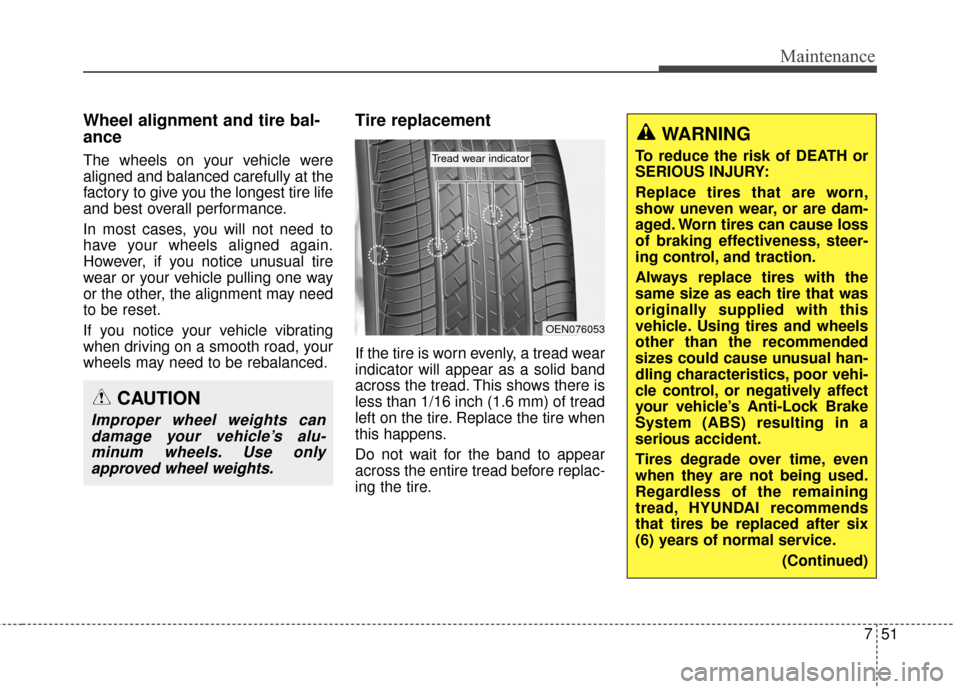
If the tire is worn evenly, a tread wear
indicator will appear as a solid band
across the tread. This shows there is
less than 1/16 inch (1.6 mm) of tread
left on the tire. Replace the tire when
this happens.
Do not wait for the band to appear
across the entire tread before replac-
ing the tire.
CAUTION
Improper wheel weights candamage your vehicle’s alu-minum wheels. Use onlyapproved wheel weights.
OEN076053
Tread wear indicator
WARNING
To reduce the risk of DEATH or
SERIOUS INJURY:
Replace tires that are worn,
show uneven wear, or are dam-
aged. Worn tires can cause loss
of braking effectiveness, steer-
ing control, and traction.
Always replace tires with the
same size as each tire that was
originally supplied with this
vehicle. Using tires and wheels
other than the recommended
sizes could cause unusual han-
dling characteristics, poor vehi-
cle control, or negatively affect
your vehicle’s Anti-Lock Brake
System (ABS) resulting in a
serious accident.
Tires degrade over time, even
when they are not being used.
Regardless of the remaining
tread, HYUNDAI recommends
that tires be replaced after six
(6) years of normal service.
(Continued)
Page 613 of 668
765
Maintenance
In an emergency, if you do not have
a spare fuse, use a fuse of the same
rating from a circuit you may not
need for operating the vehicle, such
as the cigarette lighter fuse.
If the headlights or other electrical
components do not work and the
fuses are OK, check the fuse panel
in the engine compartment. If a fuse
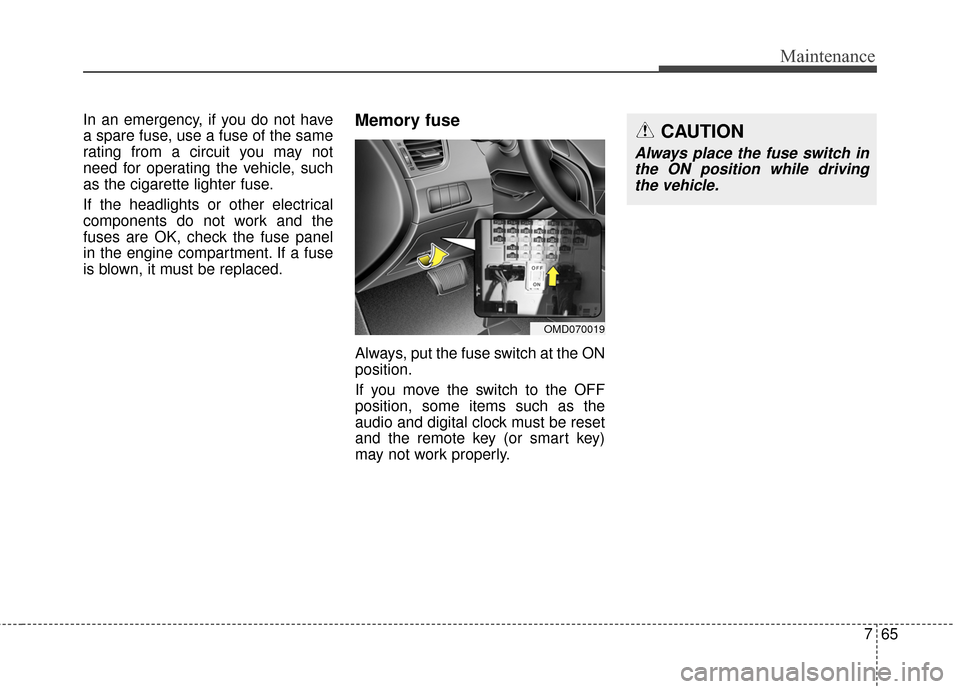
is blown, it must be replaced.Memory fuse
Always, put the fuse switch at the ON
position.
If you move the switch to the OFF
position, some items such as the
audio and digital clock must be reset
and the remote key (or smart key)
may not work properly.
OMD070019
CAUTION
Always place the fuse switch inthe ON position while drivingthe vehicle.
Page 668 of 668
I13
Index
Vanity mirror lamp..........................................................4-80
Vehicle break-in process ..................................................1-5
Vehicle certification label ................................................8-6
Vehicle data collection and event data recorders..............1-6
Vehicle identification number (VIN) ................................8-6
Vehicle load limit ............................................................5-55Certification label ........................................................5-60
Tire loading information label ....................................5-56
Vehicle stability management (VSM) ............................5-38 Warnings and indicators..................................................4-60
Washer fluid ....................................................................7-36\
Wheel alignment and tire balance ..................................7-51
Wheel replacement ........................................................7-52
Windows ........................................................................\
4-24
Auto down window ....................................................4-26
Auto up/down window ................................................4-26
Automatic reversal ......................................................4-27
Power window lock switch ........................................4-27
To reset the power windows........................................4-26
Windshield defrosting and defogging ..........................4-105
Windshield washers ......................................................4-82
Windshield wipers ........................................................4-81
Winter driving ................................................................5-51 Snow tires ....................................................................5-51\
Tire chains ..................................................................5-51
Wiper blades ..................................................................7-41
Wipers and washers ........................................................4-81 Windshield washers ....................................................4-82
Windshield wipers ......................................................4-81
VW