battery Hyundai Elantra 2017 - RHD (UK. Australia) Owner's Guide
[x] Cancel search | Manufacturer: HYUNDAI, Model Year: 2017, Model line: Elantra, Model: Hyundai Elantra 2017Pages: 571, PDF Size: 65.66 MB
Page 228 of 571
3-136
Convenient features of your vehicle
Adjusting the driver and passenger
side temperature individually
•Press the “SYNC”button again to
adjust the driver and passenger
side temperature individually. The
light in the button turns off.
•Operate the driver side tempera-
ture control knob to adjust the driv-
er side temperature.
•Operate the passenger side tem-
perature control knob to adjust the
passenger side temperature.
Temperature conversion
If the battery has been discharged or
disconnected, the temperature mode
display will reset to Centigrade.
This is a normal condition. You can
switch the temperature mode between
Centigrade and Fahrenheit as follows:
-Automatic climate control system
Whilst pressing the OFF button,
press the AUTO button for 3 sec-
onds or more. The display will
change from Centigrade to
Fahrenheit, or from Fahrenheit to
Centigrade.
-“User settings mode”in the cluster
:You can change the temperature
unit in the “Other features -
Te m p e r a t u r e u n i t ” .
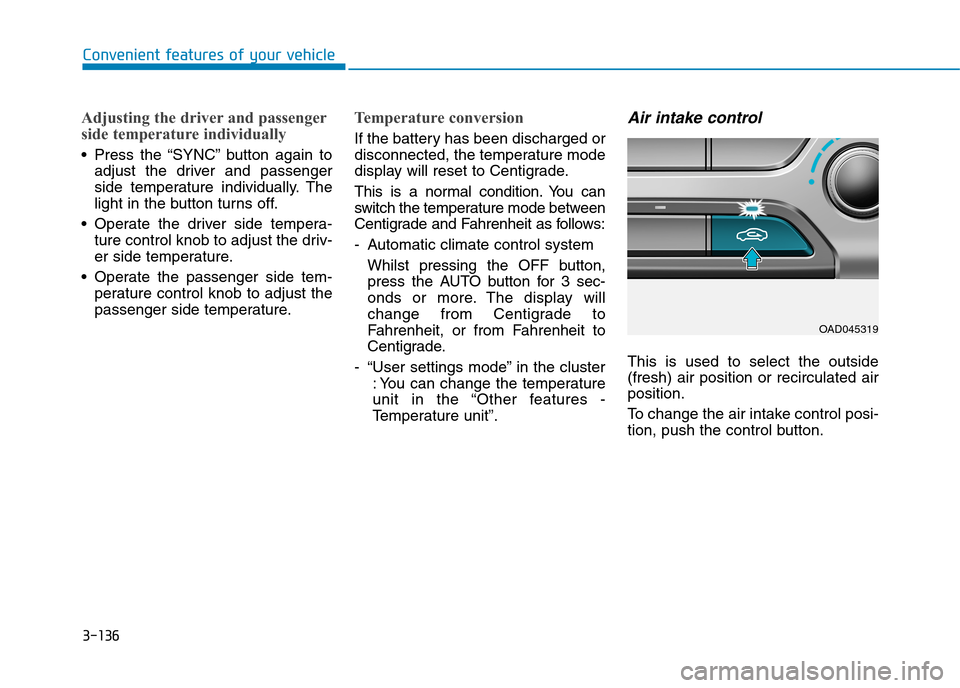
Air intake control
This is used to select the outside
(fresh) air position or recirculated air
position.
To c h a n g e t h e a i r i n t a k e c o n t r o l p o s i -
tion, push the control button.
OAD045319
Page 237 of 571

3-145
Convenient features of your vehicle
3
To d e f r o s t o u t s i d e w i n d s c r e e n
1. Set fan speed to the highest posi-
tion.
2. Set temperature to the extreme
hot position.
3. Press the defroster button ( ).
4. The air-conditioning will turn on
according to the detected ambient
temperature and outside (fresh)
air position will be selected auto-
matically.
If the position is selected, lower
fan speed is controlled to higher fan
speed.
Defogging logic (if equipped)
To r e d u c e t h e p r o b a b i l i t y o f f o g g i n g
up the inside of the windscreen, the
air intake or air conditioning are con-
trolled automatically according to
certain conditions such as or
position. To cancel or return the
defogging logic, do the following.
Manual climate control system
1. Turn the ignition switch to the ON
position.
2. Press the defroster button ( ).
3. Press the air intake control button
at least 5 times within 10 seconds.
The indicator on the air intake button
blinks 3 times. It indicates that the
defogging logic is cancelled or
returned to the programmed status.
If the battery has been discharged or
disconnected, it resets to the defog
logic status.
Automatic climate control
system
1. Turn the ignition switch to the ON
position.
2. Press the defroster button ( ).
3. Whilst pressing the air condition-
ing button (A/C), press the air
intake control button at least 5
times within 3 seconds.
The climate control information
screen will blink 3 times. It indicates
that the defogging logic is cancelled
or returned to the programmed sta-
tus.
If the battery has been discharged or
disconnected, it resets to the defog
logic status.
OAD045328
Page 245 of 571

3-153
Convenient features of your vehicle
3
Power outlet (if equipped)
The power outlet is designed to pro-
vide power for mobile telephones or
other devices designed to operate
with vehicle electrical systems. The
devices should draw less than 180
W(Watt) with the engine running.
To p r e v e n t d a m a g e t o t h e Po w e r
Outlets :
•Use the power outlet only when
the engine is running and
remove the accessory plug after
use. Using the accessory plug
for prolonged periods of time
with the engine off could cause
the battery to discharge.
•Only use 12V electric acces-
sories which are less than 180
W(Watt) in electric capacity.
•Adjust the air-conditioner or
heater to the lowest operating
level when using the power out-
let.
•Close the cover when not in use.
(Continued)
(Continued)
•Some electronic devices can
cause electronic interference
when plugged into a vehicle’s
power outlet. These devices may
cause excessive audio static
and malfunctions in other elec-
tronic systems or devices used
in your vehicle.
•Push the plug in as far as it will
go. If good contact is not made,
the plug may overheat and the
fuse may open.
•Plug in battery equipped electri-
cal/electronic devices with
reverse current protection. The
current from the battery may
flow into the vehicle's electri-
cal/electronic system and cause
system malfunction.
NOTICE
OAD045419R
Avoid electrical shocks. Do not
place your fingers or foreign
objects (pin, etc.) into a power
outlet or touch the power outlet
with a wet hand.
WA R N I N G
Page 271 of 571
4-22
Multimedia System
•Do not stare at the screen
whilst driving. Staring at the
screen for prolonged periods
of time could lead to traffic
accidents.
•Do not disassemble, assem-
ble, or modify the audio sys-
tem. Such acts could result in
accidents, fire, or electric
shock.
•Using the phone whilst driv-
ing may lead to a lack of atten-
tion of traffic conditions and
increase the likelihood of
accidents. Use the phone fea-
ture after parking the vehicle.
•Heed caution not to spill water
or introduce foreign objects
into the device. Such acts
could lead to smoke, fire, or
product malfunction.
(Continued)
WA R N I N G(Continued)
•Please refrain from use if the
screen is blank or no sound
can be heard as these signs
may indicate product malfunc-
tion. Continued use in such
conditions could lead to acci-
dents (fires, electric shock) or
product malfunctions.
•Do not touch the antenna dur-
ing thunder or lightening as
such acts may lead to light-
ning induced electric shock.
•Do not stop or park in park-
ing-restricted areas to operate
the product. Such acts could
lead to traffic accidents.
•Use the system with the vehi-
cle ignition turned on.
Prolonged use with the igni-
tion turned off could result in
battery discharge.
Driving whilst distracted can
result in a loss of vehicle con-
trol that may lead to an acci-
dent, severe personal injury,
and death. The driver’s primary
responsibility is in the safe and
legal operation of a vehicle, and
use of any handheld devices,
other equipment, or vehicle sys-
tems which take the driver’s
eyes, attention and focus away
from the safe operation of a
vehicle or which are not permis-
sible by law should never be
used during operation of the
vehicle.
WA R N I N G
Page 272 of 571
4-23
Multimedia System
4
•Operating the device whilst driv-
ing could lead to accidents due
to a lack of attention to external
surroundings. First park the
vehicle before operating the
device.
•Adjust the volume to levels that
allow the driver to hear sounds
from outside of the vehicle.
Driving in a state where external
sounds cannot be heard may
lead to accidents.
•Pay attention to the volume set-
ting when turning the device on.
A sudden output of extreme vol-
ume upon turning the device on
could lead to hearing impair-
ment. (Adjust the volume to a
suitable level before turning off
the device.)
•If you want to change the posi-
tion of device installation,
please inquire with your place of
purchase or service mainte-
nance centre. Technical expert-
ise is required to install or dis-
assemble the device.
(Continued)
(Continued)
•Turn on the ignition before using
this device. Do not operate the
audio system for long periods of
time with the ignition turned off
as such operations may lead to
battery discharge.
•Do not subject the device to
severe shock or impact. Direct
pressure onto the front side of
the monitor may cause damage
to the LCD or touch screen.
•When cleaning the device,make
sure to turn off the device and
use a dry and smooth cloth.
Never use tough materials,
chemical cloths, or solvents
(alcohol, benzene, thinners, etc.)
as such materials may damage
the device panel or cause
colour/quality deterioration.
•Do not place beverages close to
the audio system. Spilling bever-
ages may lead to system mal-
function.
(Continued)
(Continued)
•In case of product malfunction,
please contact your place of
purchase or After Service cen-
tre.
•Placing the audio system within
an electromagnetic environment
may result in noise interference.
NOTICE
Page 275 of 571
4-26
Multimedia System
Information
-Using the iPod®Device
• Some iPod®models may not sup-
port communication protocol and
files may not properly play.
Supported iPod®models :
- iPhone®3GS/4
- iPod®touch 1st~4th generation
- iPod®nano 1st~6th generation
- iPod®classic
• The order of search or playback of
songs in the iPod®can be different
from the order searched in the audio
system.
• If the iPod®is disabled due to its
own malfunction, reset the iPod®
(Reset: Refer to iPod®manual).
• An iPod®may not operate normally
on low battery.
(Continued)
(Continued)
• Some iPod®devices, such as the
iPhone®, can be connected through
the Bluetooth®Wireless Technology
interface. The device must have audio
Bluetooth®Wireless Technology capa-
bility (such as for stereo headphone
Bluetooth®Wireless Technology ). The
device can play, but it will not be con-
trolled by the audio system.
• To use iPod®features within the
audio, use the cable provided upon
purchasing an iPod®device.
•Skipping or improper operation
may occur depending on the charac-
teristics of your iPod®/iPhone®
device.
• If your iPhone®is connected to both
the Bluetooth®Wireless Technology
and USB, the sound may not be
properly played. In your iPhone®,
select the Dock connector or
Bluetooth®Wireless Technology to
change the sound output (source).
(Continued)
(Continued)
• When connecting an iPod®with the
iPod®Power Cable, insert the con-
nector to the multimedia socket
completely. If not inserted complete-
ly, communications between iPod®
and audio may be interrupted.
• When adjusting the sound effects of
the iPod®and the audio system, the
sound effects of both devices will
overlap and might reduce or distort
the quality of the sound.
• Deactivate (turn off) the equaliser
function of an iPod®when adjusting
the audio system’s volume, and turn
off the equaliser of the audio system
when using the equaliser of an
iPod®.
• When not using an iPod®with the
audio system, detach the iPod®cable
from the iPod®, otherwise the iPod®
may remain in accessory mode, and
may not work properly.
• Use only the original iPod®cable.
Other cables may not be recognised.
i
Page 278 of 571
4-29
Multimedia System
4
(Continued)
•Bluetooth®Wireless Technology
connection may become intermit-
tently disconnected in some mobile
phones. Follow these steps to try
again.
1) Turn the Bluetooth®Wireless
Technology function within the
mobile phone off/on and try
again.
2) Turn the mobile phone power
Off/On and try again.
3) Completely remove the mobile
phone battery, reboot, and then
try again.
4) Reboot the audio system and try
again.
5) Delete all paired devices, pair and
try again.
•It is possible to pair up to five
Bluetooth®Wireless Technology
devices to the audio system.
•Phone contact names should be
saved in English or they may not be
displayed correctly.
(Continued)
(Continued)
•The Handsfree call volume and
quality may differ depending on the
mobile phone.
•Only one Bluetooth®Wireless
Technology device can be connected
at a time.
• In some mobile phones, starting the
ignition whilst talking through a
Bluetooth®Wireless Technology
enabled handsfree phone, will result
in the call becoming disconnected.
(Switch the call back to your mobile
phone when starting the ignition.)
• If the mobile phone is not paired or
connected, it is not possible to enter
Phone mode. Once a phone is paired
or connected, the guidance screen
will be displayed.
•Bluetooth®Wireless Technology
Handsfree is a feature that
enables drivers to practice safe
driving. Connecting the audio
system with a Bluetooth®
Wireless Technology phone
allows the user to conveniently
make calls, receive calls, and
manage the phone book. Before
using the Bluetooth®Wireless
Te ch n o l o g y , c a r e f u l ly r e a d t h e
contents of this User Manual.
•Excessive use or operations
whilst driving may lead to negli-
gent driving practices and be
the cause of accidents.
•Do not operate the device exces-
sively whilst driving.
•Viewing the screen for pro-
longed periods of time is dan-
gerous and may lead to acci-
dents.
•When driving,view the screen
only for short periods of time.
NOTICE
Page 321 of 571
4-72
Multimedia System
(Continued)
• When the EQ features of an exter-
nal device, such as the iPod®, and
the audio system are both active, EQ
effects could overlap and cause
sound deterioration and distortion.
Whenever possible, turn off the EQ
feature within the external device
upon use by connecting with the
audio system.
• Noise may occur when an iPod®or
AUX device is connected. When
such devices are not being used, dis-
connect the device for storage.
•When the iPod®or AUX device
power is connected to the power
jack, playing the external device
may result in noise. In such cases,
disconnect the power connection
before use.
•Skipping or improper operation
may occur depending on the charac-
teristics of your iPod®/iPhone®
device.
(Continued)
(Continued)
• If your iPhone®is connected to both
the Bluetooth®Wireless Technology
and USB, the sound may not be
properly played. In your iPhone®,
select the Dock connector or
Bluetooth®Wireless Technology to
change the sound output (source).
•iPod®mode cannot be operated
when the iPod®cannot be recog-
nised due to the playing of versions
that do not support communication
protocols, cases of iPod®abnormali-
ties and defects.
•For fifth generation iPod®Nano
devices, the iPod®may not be recog-
nised when the battery level is low.
Please charge the iPod®for use.
•Search/play orders shown within
the iPod®device may differ with the
orders shown within the audio sys-
tem.
• If the iPod®malfunctions due to an
iPod®device defect, reset the iPod®
and try again. (To learn more, refer
to your iPod®manual).
(Continued)
(Continued)
• Some iPod®s may not sync with the
System depending on its version. If
the Media is removed before the
Media is recognised, then the system
may not properly restore the previ-
ously operated mode (iPad charging
is not supported).
• Use only the original iPod®cable.
Other cables may not be recognised.
Page 324 of 571
4-75
Multimedia System
4
(Continued)
• Placing the audio system within an
electromagnetic environment may
result in noise interference.
•Some mobile phones or other
devices may cause interference,
noise or malfunction to audio sys-
tem. In this case, storing the device
in a different location may resolve
the condition.
• Whilst a phone is connected through
Bluetooth®Wireless Technology
your phone may discharge quicker
than usual for additional Bluetooth®
Wireless Technology-related opera-
tions.
• If Priority is set upon vehicle igni-
tion (IGN/ACC ON), the Bluetooth®
Wireless Technology phone will be
automatically connected. Even if
you are outside, the Bluetooth®
Wireless Technology phone will be
automatically connected once you
are in the vicinity of the vehicle. If
you do not want to automatically
connect yourBluetooth®Wireless
Technology phone, try the following.
(Continued)
(Continued)
1) Turn off the Bluetooth®Wireless
Te c h n o l o g y f e a t u r e i n y o u r
mobile phone.
2) Turn off the Bluetooth®Wireless
Technology feature in your audio
system.
-To turn off the Bluetooth®
Wireless Technology feature in
your audio system, go to [SETUP]
> [Phone] and [turn off] the
Bluetooth®Wireless Technology
feature.
•Bluetooth®Wireless Technology
connection may become intermit-
tently disconnected in some mobile
phones. Follow these steps to try
again.
1) Turn the Bluetooth®Wireless
Technology function within the
mobile phone off/on and try
again.
2) Turn the mobile phone power
Off/On and try again.
3) Completely remove the mobile
phone battery, reboot, and then
try again.
(Continued)
(Continued)
4) Reboot the audio system and try
again.
5) Delete all paired devices, pair and
try again.
•It is possible to pair up to five
Bluetooth®Wireless Technology
devices to the audio system.
•Phone contact names should be
saved in English or they may not be
displayed correctly.
•The Handsfree call volume and
quality may differ depending on the
mobile phone.
•Only one Bluetooth®Wireless
Technology device can be connected
at a time.
• In some mobile phones, starting the
ignition whilst talking through a
Bluetooth®Wireless Technology
enabled handsfree phone, will result
in the call becoming disconnected.
(Switch the call back to your mobile
phone when starting the ignition.)
• If the mobile phone is not paired or
connected, it is not possible to enter
Phone mode. Once a phone is paired
or connected, the guidance screen
will be displayed.
Page 382 of 571
5-6
Driving your vehicle
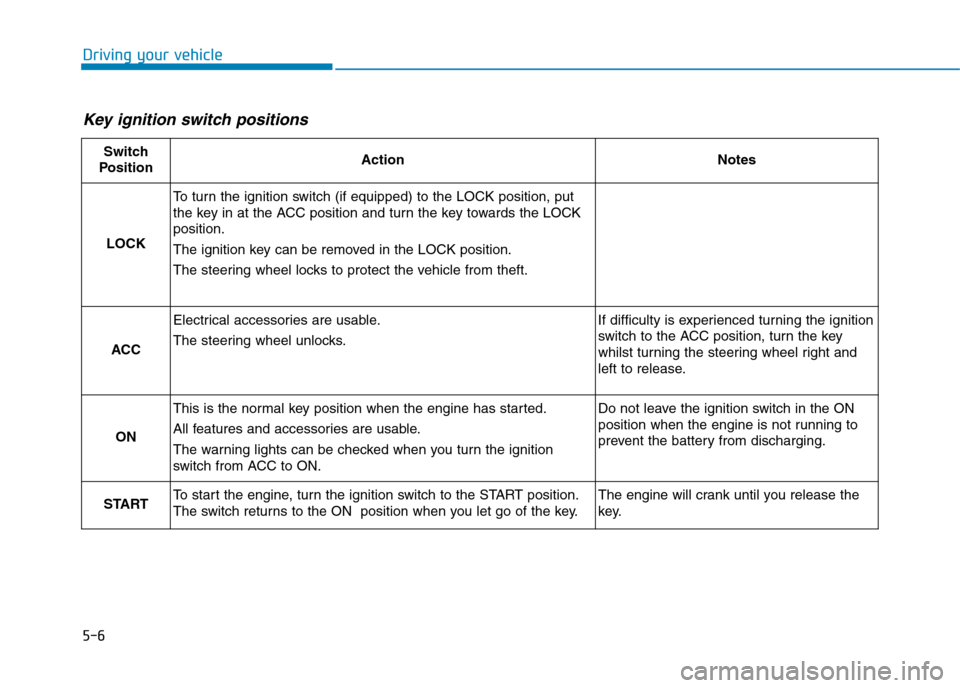
Key ignition switch positions
Switch
PositionActionNotes
LOCK
To t u r n t h e i g n i t i o n s w i t c h ( i f e q u i p p e d ) t o t h e L O C K p o s i t i o n , p u t
the key in at the ACC position and turn the key towards the LOCK
position.
The ignition key can be removed in the LOCK position.
The steering wheel locks to protect the vehicle from theft.
ACC
Electrical accessories are usable.
The steering wheel unlocks.
If difficulty is experienced turning the ignition
switch to the ACC position, tur n the key
whilst turning the steering wheel right and
left to release.
ON
This is the normal key position when the engine has started.
All features and accessories are usable.
The warning lights can be checked when you turn the ignition
switch from ACC to ON.
Do not leave the ignition switch in the ON
position when the engine is not running to
prevent the battery from discharging.
STARTTo s t a r t t h e e n g i n e , t u r n t h e i g n i t i o n s w i t c h t o t h e S TA R T p o s i t i o n .
The switch returns to the ON position when you let go of the key.
The engine will crank until you release the
key.