audio Hyundai Elantra 2017 Owner's Manual - RHD (UK. Australia)
[x] Cancel search | Manufacturer: HYUNDAI, Model Year: 2017, Model line: Elantra, Model: Hyundai Elantra 2017Pages: 571, PDF Size: 65.66 MB
Page 16 of 571
F16F16
Multimedia system .................................................4-2
Aux, USB and iPod®port ................................................4-2
Antenna ...............................................................................4-3
Steering wheel audio controls .......................................4-4
Audio / Video / Navigation system (AVN) ..................4-5
Bluetooth®Wireless Technology hands-free ............4-5
How vehicle audio works ................................................4-6
AUDIO (Without Touch Screen) ...........................4-9
Features of Your Audio .................................................4-10
Radio Mode
(Type A-1, Type A-2, Type A-3, Type A-4
with RDS)...........................................................................4-30
Radio Mode (Type A-5, Type A-6) .............................4-32
Media Mode......................................................................4-33
Phone Mode .....................................................................4-40
Setup Mode
(Type A-1, Type A-2, Type A-3, Type A-4).............4-42
Setup Mode (Type A-5, Type A-6).............................4-50
AUDIO (With Touch Screen) ...............................4-58
Features of Your Audio .................................................4-59
Radio Mode
(Type B-1, Type B-2, Type B-3, Type B-4) .............4-77
Radio Mode (Type B-5, Type B-6) .............................4-80
Media Mode......................................................................4-82
Phone Mode .....................................................................4-97
Bluetooth®Wireless Technology
(Type B-1, Type B-2, Type B-3, Type B-4) .............4-98
Bluetooth®Wireless Technology
(Type B-5, Type B-6)...................................................4-105
Setup Mode
(Type B-1, Type B-2, Type B-3, Type B-4)...........4-112
Setup Mode (Type B-5, Type B-6)) .........................4-120
4Multimedia system
Page 26 of 571
1-5
Yo u r v e h i c l e a t a g l a n c e
1
IINNSSTTRRUUMMEENNTT PPAANNEELL OOVVEERRVVIIEEWW
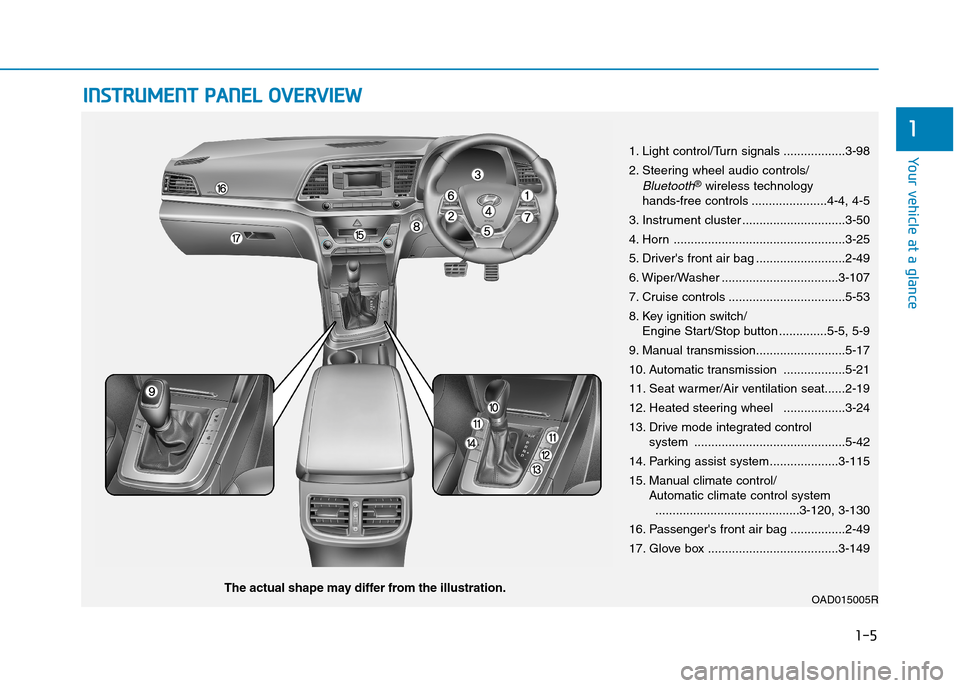
1. Light control/Turn signals ..................3-98
2. Steering wheel audio controls/
Bluetooth®wireless technology hands-free controls ......................4-4, 4-5
3. Instrument cluster ..............................3-50
4. Horn ..................................................3-25
5. Driver's front air bag ..........................2-49
6. Wiper/Washer ..................................3-107
7. Cruise controls ..................................5-53
8. Key ignition switch/Engine Start/Stop button ..............5-5, 5-9
9. Manual transmission..........................5-17
10. Automatic transmission ..................5-21
11. Seat warmer/Air ventilation seat......2-19
12. Heated steering wheel ..................3-24
13. Drive mode integrated control system ............................................5-42
14. Parking assist system....................3-115
15. Manual climate control/Automatic climate control system..........................................3-120, 3-130
16. Passenger's front air bag ................2-49
17. Glove box ......................................3-149
OAD015005RThe actual shape may differ from the illustration.
Page 245 of 571

3-153
Convenient features of your vehicle
3
Power outlet (if equipped)
The power outlet is designed to pro-
vide power for mobile telephones or
other devices designed to operate
with vehicle electrical systems. The
devices should draw less than 180
W(Watt) with the engine running.
To p r e v e n t d a m a g e t o t h e Po w e r
Outlets :
•Use the power outlet only when
the engine is running and
remove the accessory plug after
use. Using the accessory plug
for prolonged periods of time
with the engine off could cause
the battery to discharge.
•Only use 12V electric acces-
sories which are less than 180
W(Watt) in electric capacity.
•Adjust the air-conditioner or
heater to the lowest operating
level when using the power out-
let.
•Close the cover when not in use.
(Continued)
(Continued)
•Some electronic devices can
cause electronic interference
when plugged into a vehicle’s
power outlet. These devices may
cause excessive audio static
and malfunctions in other elec-
tronic systems or devices used
in your vehicle.
•Push the plug in as far as it will
go. If good contact is not made,
the plug may overheat and the
fuse may open.
•Plug in battery equipped electri-
cal/electronic devices with
reverse current protection. The
current from the battery may
flow into the vehicle's electri-
cal/electronic system and cause
system malfunction.
NOTICE
OAD045419R
Avoid electrical shocks. Do not
place your fingers or foreign
objects (pin, etc.) into a power
outlet or touch the power outlet
with a wet hand.
WA R N I N G
Page 246 of 571
3-154
Convenient features of your vehicle
USB charger (if equipped)
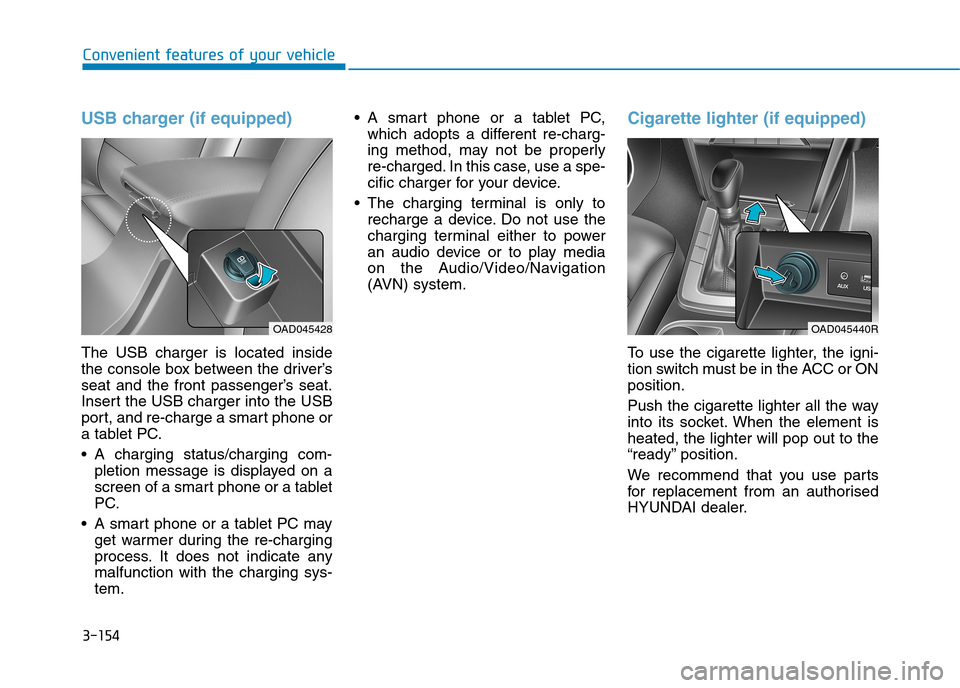
The USB charger is located inside
the console box between the driver’s
seat and the front passenger’s seat.
Insert the USB charger into the USB
port, and re-charge a smart phone or
a tablet PC.
•A charging status/charging com-
pletion message is displayed on a
screen of a smart phone or a tablet
PC.
•A smart phone or a tablet PC may
get warmer during the re-charging
process. It does not indicate any
malfunction with the charging sys-
tem.
•A smart phone or a tablet PC,
which adopts a different re-charg-
ing method, may not be properly
re-charged. In this case, use a spe-
cific charger for your device.
•The charging terminal is only to
recharge a device. Do not use the
charging terminal either to power
an audio device or to play media
on the Audio/Video/Navigation
(AVN) system.
Cigarette lighter (if equipped)
To u s e t h e c i g a r e t t e l i g h t e r , t h e i g n i -
tion switch must be in the ACC or ON
position.
Push the cigarette lighter all the way
into its socket. When the element is
heated, the lighter will pop out to the
“ready” position.
We recommend that you use par ts
for replacement from an authorised
HYUNDAI dealer.
OAD045428OAD045440R
Page 250 of 571
Multimedia System
Multimedia system .................................................4-2
Aux, USB and iPod®port ................................................4-2
Antenna ...............................................................................4-3
Steering wheel audio controls .......................................4-4
Audio / Video / Navigation system (AVN) ..................4-5
Bluetooth®Wireless Technology hands-free ............4-5
How vehicle audio works ................................................4-6
AUDIO (Without Touch Screen) ...........................4-9
Features of Your Audio .................................................4-10
Radio Mode
(Type A-1, Type A-2, Type A-3, Type A-4
with RDS)...........................................................................4-30
Radio Mode (Type A-5, Type A-6) .............................4-32
Media Mode......................................................................4-33
Phone Mode .....................................................................4-40
Setup Mode
(Type A-1, Type A-2, Type A-3, Type A-4).............4-42
Setup Mode (Type A-5, Type A-6).............................4-50
AUDIO (With Touch Screen) ...............................4-58
Features of Your Audio .................................................4-59
Radio Mode
(Type B-1, Type B-2, Type B-3, Type B-4) .............4-77
Radio Mode (Type B-5, Type B-6) .............................4-80
Media Mode......................................................................4-82
Phone Mode .....................................................................4-97
Bluetooth®Wireless Technology
(Type B-1, Type B-2, Type B-3, Type B-4) .............4-98
Bluetooth®Wireless Technology
(Type B-5, Type B-6)...................................................4-105
Setup Mode
(Type B-1, Type B-2, Type B-3, Type B-4)...........4-112
Setup Mode (Type B-5, Type B-6)) .........................4-120
4
Page 251 of 571
4-2
Multimedia System
Information
•If you install an aftermarket HID
headlamp, your vehicle’s audio and
electronic device may malfunction.
•Prevent chemicals such as perfume,
cosmetic oil, sun cream, hand clean-
er, and air freshener from contacting
the interior parts because they may
cause damage or discolouration.
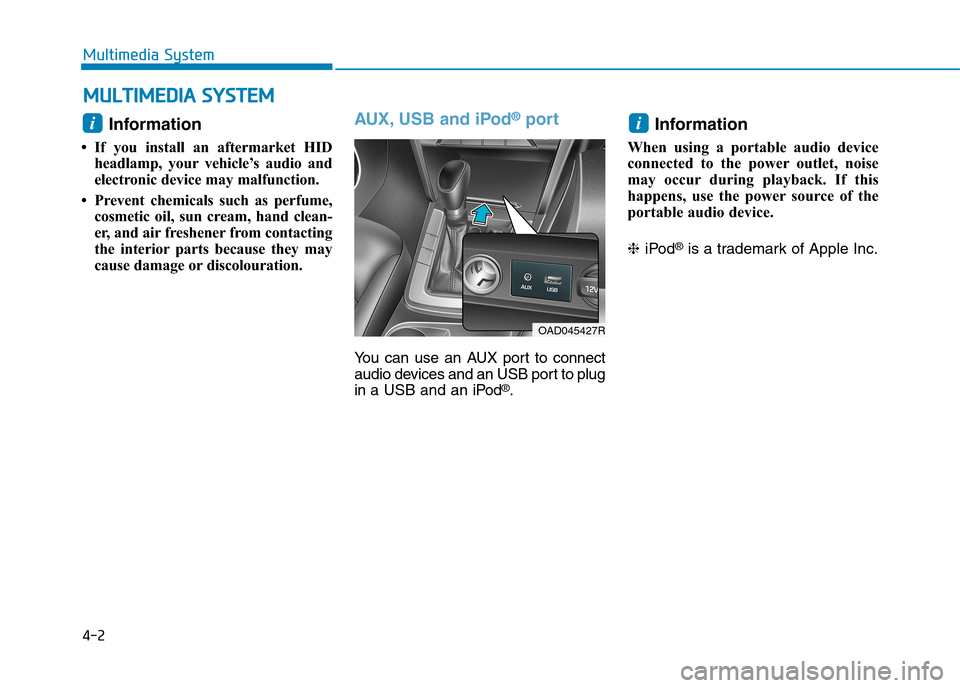
AUX, USB and iPod®port
Yo u c a n u s e a n A U X p o r t t o c o n n e c t
audio devices and an USB port to plug
in a USB and an iPod®.
Information
When using a portable audio device
connected to the power outlet, noise
may occur during playback. If this
happens, use the power source of the
portable audio device.
❈iPod®is a trademark of Apple Inc.
i
OAD045427R
i
MMUULLTTIIMMEEDDIIAA SSYYSSTTEEMM
Page 253 of 571

Steering wheel audio control
(if equipped)
The steering wheel audio control but-
ton is installed for your convenience.
Do not operate audio remote con-
trol buttons simultaneously.
VOLUME (VOL + / - ) (1)
•Move the VOLUME lever up to
increase volume.
•Move the VOLUME lever down to
decrease volume.
SEEK/PRESET ( / ) (2)
If the SEEK/PRESET lever is moved
up or down and held for 0.8 seconds
or more, it will function in the follow-
ing modes.
RADIO mode
It will function as the AUTO SEEK
select button. It will SEEK until you
release the button.
MEDIA mode
It will function as the FF/REW button.
If the SEEK/PRESET lever is moved
up or down, it will function in the fol-
lowing modes.
RADIO mode
It will function as the PRESET STA-
TION UP/DOWN button.
MEDIA mode
It will function as the TRACK UP/
DOWN button.
MODE ( ) (3)
Press the MODE button to select
Radio, Disc, or AUX.
MUTE ( ) (4)
•Press the button to mute the
sound.
•Press the button again to activate
the sound.
Information
Detailed information for audio control
buttons are described in the following
pages in this chapter.
i
NOTICE
OAD045425
OAD045444L
4-4
Multimedia System
■Ty p e A
■Ty p e B
Page 254 of 571
Audio / Video / Navigation sys-
tem (AVN)(if equipped)
Detailed information for the AVN sys-
tem is described in a separately sup-
plied manual.
Bluetooth®Wireless Technology
hands-free (if equipped)
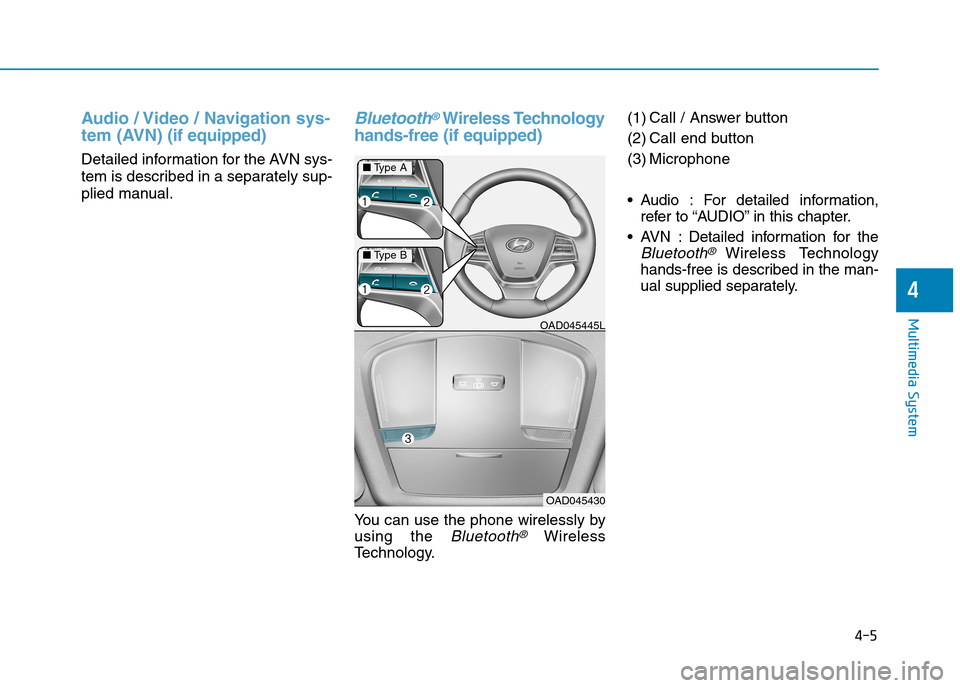
Yo u c a n u s e t h e p h o n e w i r e l e s s l y b y
using the Bluetooth®Wireless
Te c h n o l o g y.
(1) Call / Answer button
(2) Call end button
(3) Microphone
•Audio : For detailed information,
refer to “AUDIO” in this chapter.
•AVN :Detailed information for the
Bluetooth® Wireless Technology
hands-free is described in the man-
ual supplied separately.
OAD045445L
OAD045430
4-5
Multimedia System
4
■Ty p e A
■Ty p e B
Page 255 of 571

4-6
Multimedia System
How vehicle radio works
FM reception
AM and FM radio signals are broad-
cast from transmitter towers located
around your city. They are intercept-
ed by the radio antenna on your vehi-
cle. This signal is then received by
the radio and sent to your vehicle
speakers.
When a strong radio signal has
reached your vehicle, the precise
engineering of your audio system
ensures the best possible quality
reproduction. However, in some
cases the signal coming to your vehi-
cle may not be strong and clear.
This can be due to factors, such as
the distance from the radio station,
closeness of other strong radio sta-
tions or the presence of buildings,
bridges or other large obstructions in
the area.
AM (MW, LW) reception
AM broadcasts can be received at
greater distances than FM broad-
casts. This is because AM radio
waves are transmitted at low fre-
quencies. These long, low frequency
radio waves can follow the curvature
of the earth rather than travelling
straight out into the atmosphere. In
addition, they curve around obstruc-
tions so that they can provide better
signal coverage.
OJF045309L
OJF045308L
Page 257 of 571

4-8
Multimedia System
Using a mobile phone or a two-
way radio
When a mobile phone is used inside
the vehicle, noise may be produced
from the audio system. This does not
mean that something is wrong with the
audio equipment. In such a case, use
the mobile phone at a place as far as
possible from the audio equipment.
When using a communication
system such as a mobile phone or
a radio set inside the vehicle, a
separate external antenna must be
fitted. When a mobile phone or a
radio set is used with an internal
antenna alone, it may interfere
with the vehicle's electrical sys-
tem and adversely affect safe
operation of the vehicle.
NOTICE
Do not use a mobile phone
whilst driving. Stop at a safe
location to use a mobile phone.
WA R N I N G