Rear sensor Hyundai Elantra 2017 User Guide
[x] Cancel search | Manufacturer: HYUNDAI, Model Year: 2017, Model line: Elantra, Model: Hyundai Elantra 2017Pages: 637, PDF Size: 15.02 MB
Page 451 of 637

5-65
Driving your vehicle
5
• The second stage alarm may be
deactivated.
- To activate the warning chime:
Go to the User Settings Mode →
Sound and select "BSD" on the
LCD display.
- To deactivate the warning chime:
Go to the User Settings Mode →
Sound and deselect "BSD" on the
LCD display.
Information
The warning chime function helps
alert the driver. Deactivate this func-
tion only when it is necessary
Detecting sensor
The sensors are located inside the
rear bumper.
Always keep the rear bumper clean
for proper operation of the system.
Warning message
BSD canceled
• This warning message may appear
when :
- One or both of the sensors on the
rear bumper is blocked by dirt or
snow or a foreign object.
- Driving in rural areas where the
BSD sensor does not detect
another vehicle for an extended
period of time.
- When there is inclement weather
such as heavy snow or rain.
If any of these conditions occur, the
light on the BSD switch and the sys-
tem will turn off automatically.
i
OAD055031
■ Type A■ Type B
OAD055090L/OLF054217N
Page 452 of 637

5-66
Driving your vehicle
When the BSD canceled warning
message is displayed in the cluster,
check to make sure that the rear
bumper is free from any dirt or snow
in the areas where the sensor is
located. Remove any dirt, snow, or
foreign material that could interfere
with the radar sensors.
After any dirt or debris is removed,
the BSD system should operate nor-
mally after about 10 minutes of driv-
ing the vehicle.
If the system still does not operate
normally have your vehicle inspected
by an authorized HYUNDAI dealer.
Check BSD system
If there is a problem with the BSD
system, a warning message will
appear and the light on the switch
will turn off. The system will turn off
automatically. We recommend that
you have your vehicle inspected by
an authorized HYUNDAI dealer.
RCTA (Rear Cross Traffic Alert)
(if equipped)
The Rear Cross Traffic Alert feature
monitors approaching cross traffic
from the left and right side of the
vehicle when your vehicle is in
reverse.
■Type A■Type B
OAD055091L/OTLE055040
Page 453 of 637

5-67
Driving your vehicle
5
Operating conditions
To operate:
Go to the User Settings mode
(Driving Assist) and select Rear
Cross Traffic Alert on the LCD dis-
play (For more details, refer to
"LCD Display" in chapter 3.). The
system will turn on and standby to
activate. The system will activate
when vehicle speed is below 10 km/h
(6.2 mph) and with the shift lever in R
(Reverse).
Information
The Rear Cross Traffic Alert (RCTA)
detecting range is approximately
0.5 m ~ 20 m (1 ft ~ 65 ft). An
approaching vehicle will be detected if
their vehicle speed is within 4 km/h ~
36 km/h (2.5 ~ 22.5 mph ).
Note that the detecting range may
vary under certain conditions. As
always, use caution and pay close
attention to your surroundings when
backing up your vehicle.
Warning type
If the vehicle detected by the sensors
approaches your vehicle, the warn-
ing chime will sound, the warning
light on the outside rearview mirror
will blink and a message will appear
on the LCD display.
i
• Type A■ Left
■ Right
• Type B
• Type A• Type B
OAD055046L/OAD055048L
OAD055047L/OAD055049L
OAD055092L/OAD055093L
■ Type A■ Type B
Page 455 of 637
5-69
Driving your vehicle
• The system may not work prop-
erly when the bumper has been
damaged, or if the rear bumper
has been replaced or repaired.
• The sensing range differs some-
what according to the width of
the road. When the road is nar-
row, the system may detect
other vehicles in the next lane.
• The system may turn off due to
strong electromagnetic waves.
Non-operating condition
The BSD indicator on the outer side
view mirror may not illuminate
properly when:
- The outside rearview mirror hous-
ing is damaged.
- The mirror is covered with dirt,
snow, or debris.
- The window is covered with dirt,
snow, or debris.
- The window is tinted.
Limitations of the system
The driver must be cautious in the
below situations, because the sys-
tem may not detect other vehicles or
objects in certain circumstances.
- The vehicle drives on a curved road
or through a tollgate.
- The sensor is polluted with rain,
snow, mud, etc.
- The rear bumper where the sensor
is located is covered with a foreign
object such as a bumper sticker, a
bumper guard, a bike stand, etc.
- The rear bumper is damaged, or
the sensor is out of the original
default position.
- The vehicle height gets lower or
higher due to heavy loading in a
trunk, abnormal tire pressure, etc.
- The vehicle drives in inclement
weather such as heavy rain or
snow.
- There is a fixed object near the
vehicle, such as a guardrail.
- A big vehicle is near such as a bus
or truck.
NOTICE
5
Page 456 of 637

5-70
Driving your vehicle
- A motorcycle or bicycle is near.
- A flat trailer is near.
- If the vehicle has started at the
same time as the vehicle next to
you and has accelerated.
- When the other vehicle passes at a
very fast speed.
- While changing lanes.
- While going down or up a steep
road where the height of the lane is
different.
- When the other vehicle approaches
very close.
- When a trailer or carrier is installed.
- When the temperature of the rear
bumper is high.
- When the sensors are blocked by
other vehicles, walls or parking-lot
pillars.
- When the detected vehicle also
moves back, as your vehicle drives
back.
- If there are small objects in the
detecting area such as a shopping
cart or a baby carriage.- If there is a low height vehicle such
as a sports car.
- When other vehicles are close to
your vehicle.
- When the vehicle in the next lane
moves two lanes away from you
OR when the vehicle two lanes
away moves to the next lane from
you.
Page 583 of 637
Maintenance
7-72
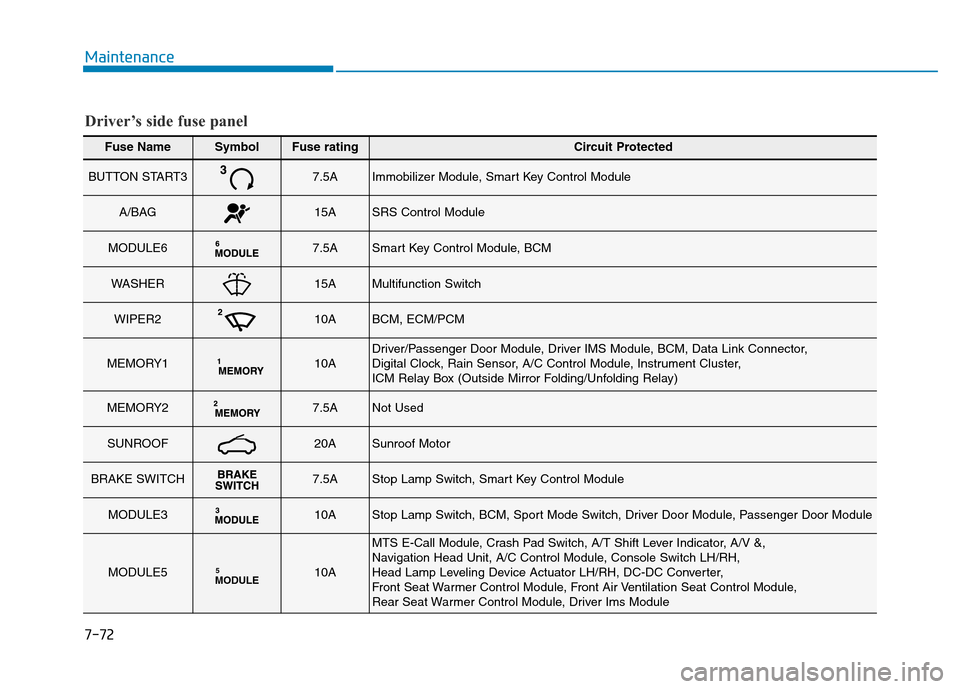
Fuse NameSymbolFuse ratingCircuit Protected
BUTTON START37.5AImmobilizer Module, Smart Key Control Module
A/BAG15ASRS Control Module
MODULE67.5ASmart Key Control Module, BCM
WASHER15AMultifunction Switch
WIPER210ABCM, ECM/PCM
MEMORY110ADriver/Passenger Door Module, Driver IMS Module, BCM, Data Link Connector,
Digital Clock, Rain Sensor, A/C Control Module, Instrument Cluster,
ICM Relay Box (Outside Mirror Folding/Unfolding Relay)
MEMORY27.5ANot Used
SUNROOF20ASunroof Motor
BRAKE SWITCH7.5AStop Lamp Switch, Smart Key Control Module
MODULE310AStop Lamp Switch, BCM, Sport Mode Switch, Driver Door Module, Passenger Door Module
MODULE5MODULE510A
MTS E-Call Module, Crash Pad Switch, A/T Shift Lever Indicator, A/V &,
Navigation Head Unit, A/C Control Module, Console Switch LH/RH,
Head Lamp Leveling Device Actuator LH/RH, DC-DC Converter,
Front Seat Warmer Control Module, Front Air Ventilation Seat Control Module,
Rear Seat Warmer Control Module, Driver Ims Module
Driver’s side fuse panel