change time Hyundai Elantra 2017 User Guide
[x] Cancel search | Manufacturer: HYUNDAI, Model Year: 2017, Model line: Elantra, Model: Hyundai Elantra 2017Pages: 637, PDF Size: 15.02 MB
Page 189 of 637
3-94
Convenient features of your vehicle
Supervision cluster
The trip computer is a microcomput-
er-controlled driver information sys-
tem that displays information related
to driving.
Information
Some driving information stored in the
trip computer (for example Average
Vehicle Speed) resets if the battery is
disconnected.
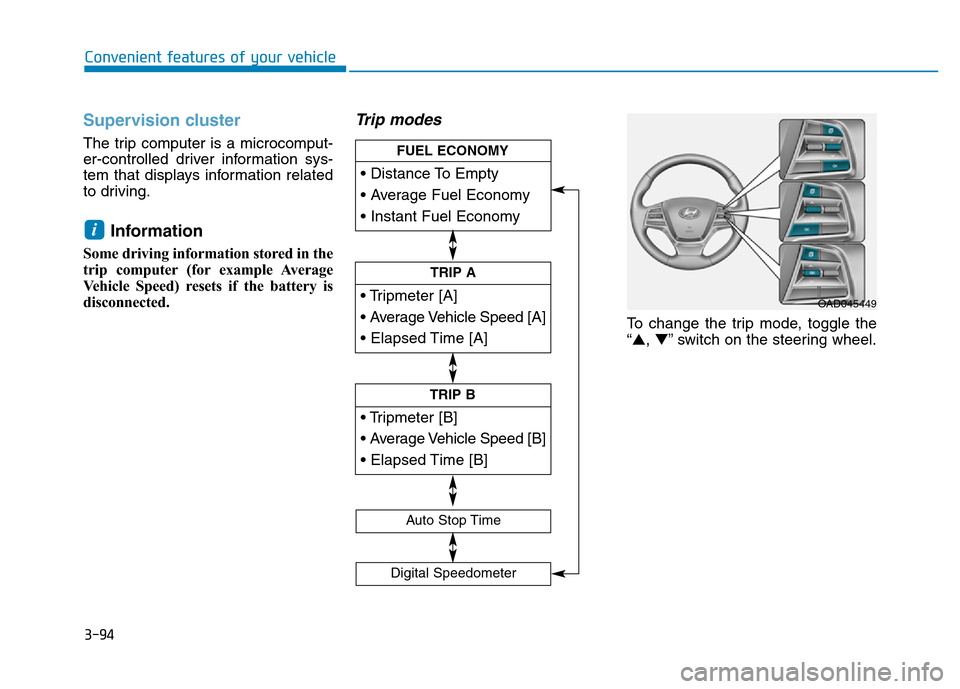
Trip modes
To change the trip mode, toggle the
“▲,▼” switch on the steering wheel.
i
• Tripmeter [A]
• Average Vehicle Speed [A]
• Elapsed Time [A]
TRIP A
• Tripmeter [B]
• Average Vehicle Speed [B]
• Elapsed Time [B]
TRIP B
• Distance To Empty
• Average Fuel Economy
• Instant Fuel Economy
FUEL ECONOMY
Digital Speedometer
Auto Stop Time
OAD045449
Page 197 of 637
3-102
Convenient features of your vehicle
Turn signals and lane change
signals
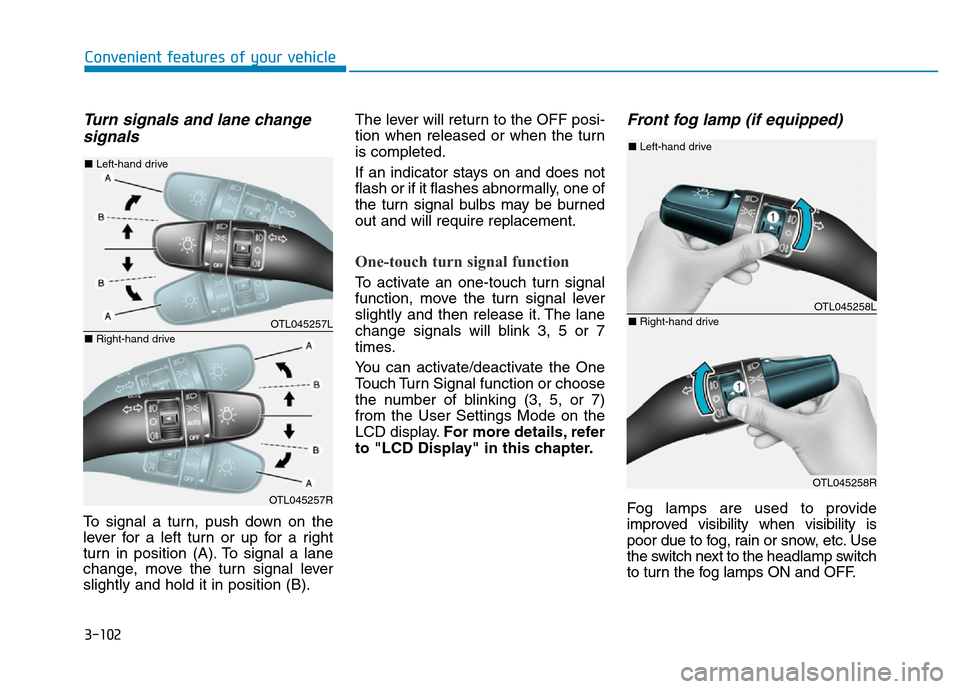
To signal a turn, push down on the
lever for a left turn or up for a right
turn in position (A). To signal a lane
change, move the turn signal lever
slightly and hold it in position (B).The lever will return to the OFF posi-
tion when released or when the turn
is completed.
If an indicator stays on and does not
flash or if it flashes abnormally, one of
the turn signal bulbs may be burned
out and will require replacement.
One-touch turn signal function
To activate an one-touch turn signal
function, move the turn signal lever
slightly and then release it. The lane
change signals will blink 3, 5 or 7
times.
You can activate/deactivate the One
Touch Turn Signal function or choose
the number of blinking (3, 5, or 7)
from the User Settings Mode on the
LCD display.For more details, refer
to "LCD Display" in this chapter.
Front fog lamp (if equipped)
Fog lamps are used to provide
improved visibility when visibility is
poor due to fog, rain or snow, etc. Use
the switch next to the headlamp switch
to turn the fog lamps ON and OFF.
OTL045257L
OTL045257R
■Left-hand drive
■Right-hand drive
OTL045258L
OTL045258R
■Left-hand drive
■Right-hand drive
Page 226 of 637
3-131
Convenient features of your vehicle
3
Information
• When using the air conditioning sys-
tem, monitor the temperature gauge
closely while driving up hills or in
heavy traffic when outside tempera-
tures are high. Air conditioning sys-
tem operation may cause engine
overheating. Continue to use the
blower fan but turn the air condi-
tioning system off if the temperature
gauge indicates engine overheating.
• When opening the windows in
humid weather air conditioning
may create water droplets inside the
vehicle. Since excessive water
droplets may cause damage to elec-
trical equipment, air conditioning
should only be used with the win-
dows closed.
Air conditioning system operation
tips
• If the vehicle has been parked in
direct sunlight during hot weather,
open the windows for a short time
to let the hot air inside the vehicle
escape.
• To help reduce moisture inside of
the windows on rainy or humid
days, decrease the humidity inside
the vehicle by operating the air
conditioning system.
• During air conditioning system
operation, you may occasionally
notice a slight change in engine
speed as the air conditioning com-
pressor cycles. This is a normal
system operation characteristic.
• Use the air conditioning system
every month only for a few minutes
to ensure maximum system per-
formance.
• When using the air conditioning
system, you may notice clear water
dripping (or even puddling) on the
ground under the passenger side
of the vehicle. This is a normal sys-
tem operation characteristic.• Operating the air conditioning sys-
tem in the recirculated air position
provides maximum cooling, how-
ever, continual operation in this
mode may cause the air inside the
vehicle to become stale.
• During cooling operation, you may
occasionally notice a misty air flow
because of rapid cooling and
humid air intake. This is a normal
system operation characteristics.
i
Page 227 of 637
3-132
Convenient features of your vehicle
System maintenance
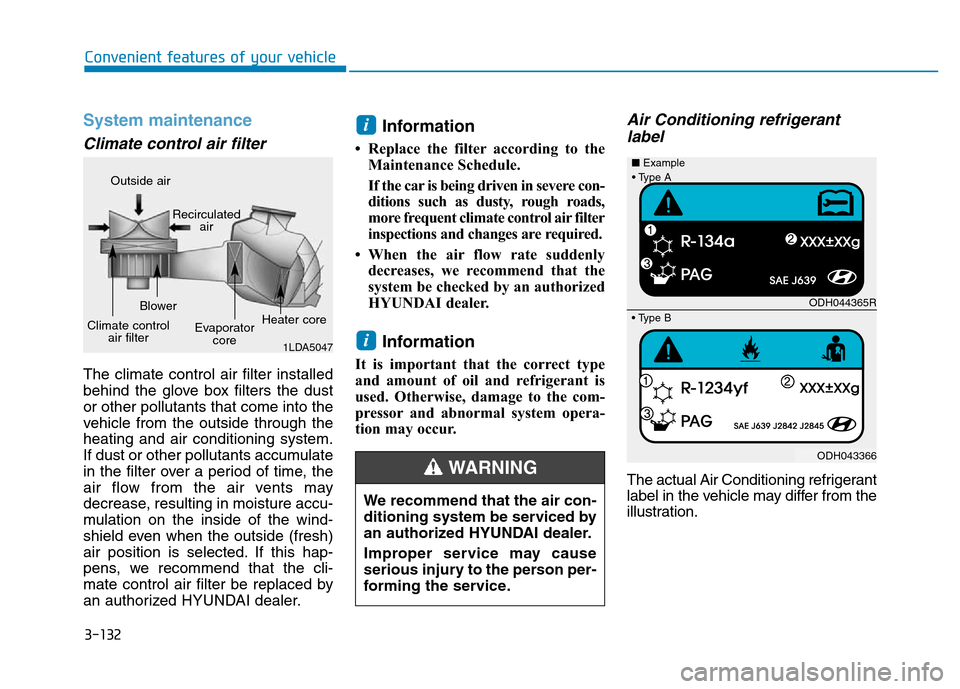
Climate control air filter
The climate control air filter installed
behind the glove box filters the dust
or other pollutants that come into the
vehicle from the outside through the
heating and air conditioning system.
If dust or other pollutants accumulate
in the filter over a period of time, the
air flow from the air vents may
decrease, resulting in moisture accu-
mulation on the inside of the wind-
shield even when the outside (fresh)
air position is selected. If this hap-
pens, we recommend that the cli-
mate control air filter be replaced by
an authorized HYUNDAI dealer.
Information
• Replace the filter according to the
Maintenance Schedule.
If the car is being driven in severe con-
ditions such as dusty, rough roads,
more frequent climate control air filter
inspections and changes are required.
• When the air flow rate suddenly
decreases, we recommend that the
system be checked by an authorized
HYUNDAI dealer.
Information
It is important that the correct type
and amount of oil and refrigerant is
used. Otherwise, damage to the com-
pressor and abnormal system opera-
tion may occur.
Air Conditioning refrigerant
label
The actual Air Conditioning refrigerant
label in the vehicle may differ from the
illustration.
i
i
We recommend that the air con-
ditioning system be serviced by
an authorized HYUNDAI dealer.
Improper service may cause
serious injury to the person per-
forming the service.
WARNING
1LDA5047
Outside air
Recirculated
air
Climate control
air filterBlower
Evaporator
coreHeater core
ODH044365R
ODH043366 ■Example
• Type B
• Type A
Page 240 of 637
3-145
Convenient features of your vehicle
3
Information
• When using the air conditioning sys-
tem, monitor the temperature gauge
closely while driving up hills or in
heavy traffic when outside tempera-
tures are high. Air conditioning sys-
tem operation may cause engine
overheating. Continue to use the
blower fan but turn the air condi-
tioning system off if the temperature
gauge indicates engine overheating.
• When opening the windows in
humid weather air conditioning
may create water droplets inside the
vehicle. Since excessive water
droplets may cause damage to elec-
trical equipment, air conditioning
should only be used with the win-
dows closed.
Air conditioning system operation
tips
• If the vehicle has been parked in
direct sunlight during hot weather,
open the windows for a short time
to let the hot air inside the vehicle
escape.
• Use air conditioning to reduce
humidity and moisture inside the
vehicle on rainy or humid days.
• During air conditioning system
operation, you may occasionally
notice a slight change in engine
speed as the air conditioning com-
pressor cycles. This is a normal
system operation characteristic.
• Use the air conditioning system
every month only for a few minutes
to ensure maximum system per-
formance.
• When using the air conditioning
system, you may notice clear water
dripping (or even puddling) on the
ground under the passenger side
of the vehicle. This is a normal sys-
tem operation characteristic.• Operating the air conditioning sys-
tem in the recirculated air position
provides maximum cooling, how-
ever, continual operation in this
mode may cause the air inside the
vehicle to become stale.
• During cooling operation, you may
occasionally notice a misty air flow
because of rapid cooling and
humid air intake. This is a normal
system operation characteristic.
i
Page 241 of 637
3-146
Convenient features of your vehicle
System maintenance
Climate control air filter
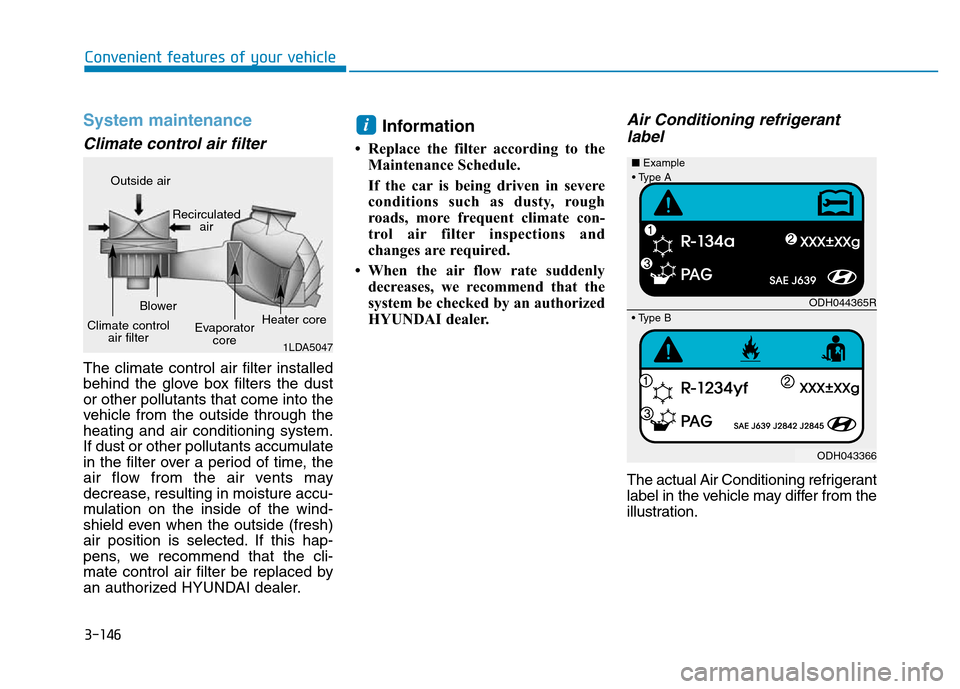
The climate control air filter installed
behind the glove box filters the dust
or other pollutants that come into the
vehicle from the outside through the
heating and air conditioning system.
If dust or other pollutants accumulate
in the filter over a period of time, the
air flow from the air vents may
decrease, resulting in moisture accu-
mulation on the inside of the wind-
shield even when the outside (fresh)
air position is selected. If this hap-
pens, we recommend that the cli-
mate control air filter be replaced by
an authorized HYUNDAI dealer.
Information
• Replace the filter according to the
Maintenance Schedule.
If the car is being driven in severe
conditions such as dusty, rough
roads, more frequent climate con-
trol air filter inspections and
changes are required.
• When the air flow rate suddenly
decreases, we recommend that the
system be checked by an authorized
HYUNDAI dealer.
Air Conditioning refrigerant
label
The actual Air Conditioning refrigerant
label in the vehicle may differ from the
illustration.
i
1LDA5047
Outside air
Recirculated
air
Climate control
air filterBlower
Evaporator
coreHeater core
ODH044365R
ODH043366 ■Example
• Type B
• Type A
Page 267 of 637
4-10
Multimedia System
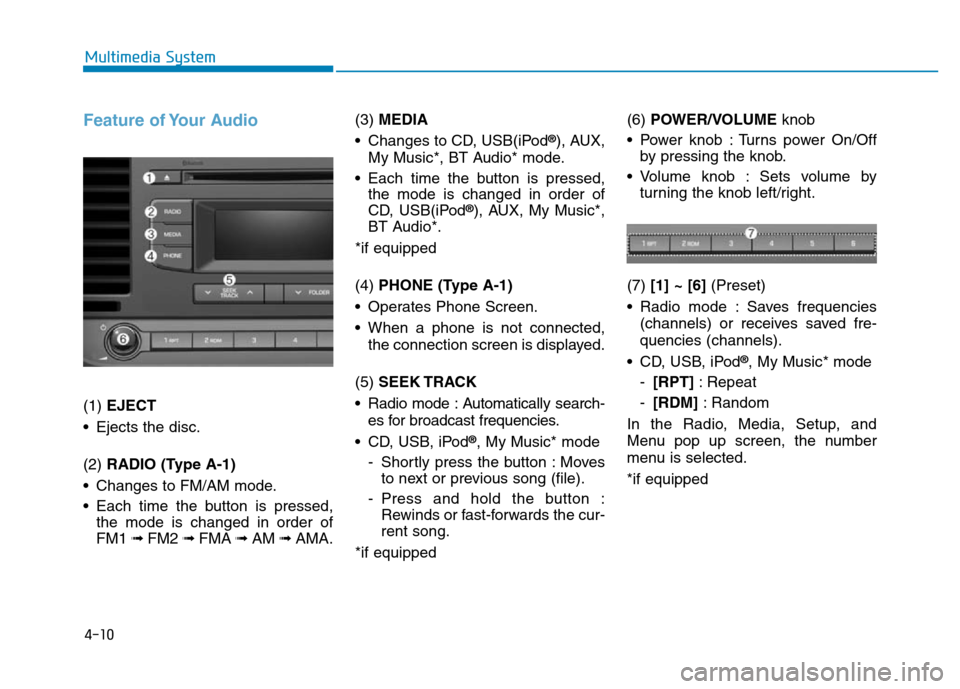
Feature of Your Audio
(1) EJECT
• Ejects the disc.
(2) RADIO (Type A-1)
• Changes to FM/AM mode.
• Each time the button is pressed,
the mode is changed in order of
FM1 ➟ FM2 ➟FMA ➟AM ➟AMA.(3) MEDIA
• Changes to CD, USB(iPod
®), AUX,
My Music*, BT Audio* mode.
• Each time the button is pressed,
the mode is changed in order of
CD, USB(iPod
®), AUX, My Music*,
BT Audio*.
*if equipped
(4) PHONE (Type A-1)
• Operates Phone Screen.
• When a phone is not connected,
the connection screen is displayed.
(5) SEEK TRACK
• Radio mode : Automatically search-
es for broadcast frequencies.
• CD, USB, iPod
®, My Music* mode
- Shortly press the button : Moves
to next or previous song (file).
- Press and hold the button :
Rewinds or fast-forwards the cur-
rent song.
*if equipped(6) POWER/VOLUMEknob
• Power knob : Turns power On/Off
by pressing the knob.
• Volume knob : Sets volume by
turning the knob left/right.
(7) [1] ~ [6](Preset)
• Radio mode : Saves frequencies
(channels) or receives saved fre-
quencies (channels).
• CD, USB, iPod
®, My Music* mode
-[RPT]: Repeat
-[RDM]: Random
In the Radio, Media, Setup, and
Menu pop up screen, the number
menu is selected.
*if equipped
Page 268 of 637
4-11
Multimedia System
4
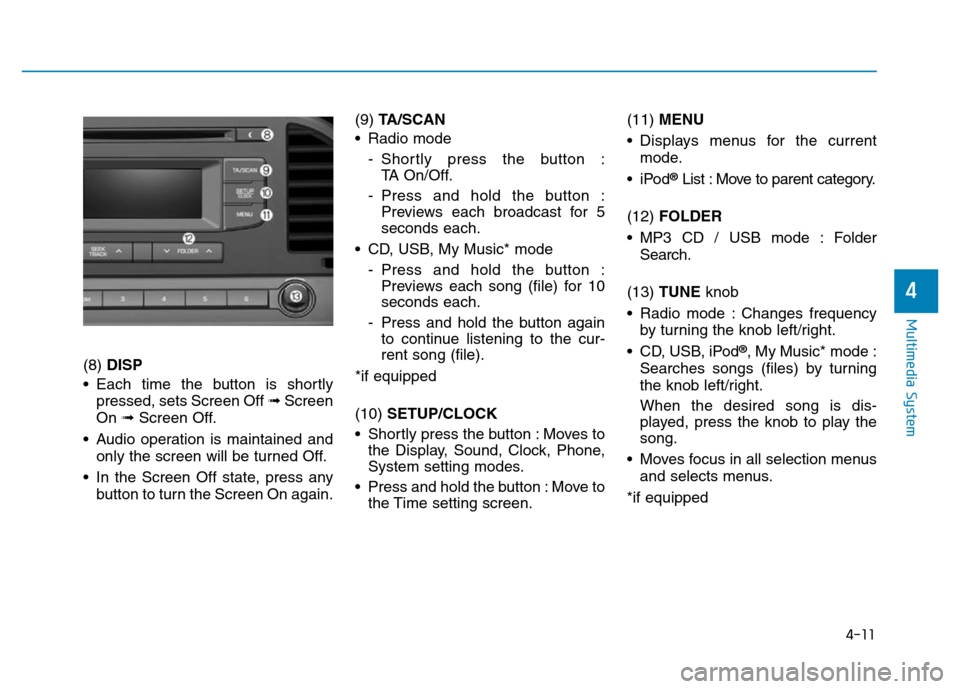
(8) DISP
• Each time the button is shortly
pressed, sets Screen Off ➟Screen
On ➟Screen Off.
• Audio operation is maintained and
only the screen will be turned Off.
• In the Screen Off state, press any
button to turn the Screen On again.(9) TA/SCAN
• Radio mode
- Shortly press the button :
TA On/Off.
- Press and hold the button :
Previews each broadcast for 5
seconds each.
• CD, USB, My Music* mode
- Press and hold the button :
Previews each song (file) for 10
seconds each.
- Press and hold the button again
to continue listening to the cur-
rent song (file).
*if equipped
(10) SETUP/CLOCK
• Shortly press the button : Moves to
the Display, Sound, Clock, Phone,
System setting modes.
• Press and hold the button : Move to
the Time setting screen.(11) MENU
• Displays menus for the current
mode.
•iPod
®List : Move to parent category.
(12) FOLDER
• MP3 CD / USB mode : Folder
Search.
(13) TUNE knob
• Radio mode : Changes frequency
by turning the knob left/right.
• CD, USB, iPod
®, My Music* mode :
Searches songs (files) by turning
the knob left/right.
When the desired song is dis-
played, press the knob to play the
song.
• Moves focus in all selection menus
and selects menus.
*if equipped
Page 269 of 637
4-12
Multimedia System
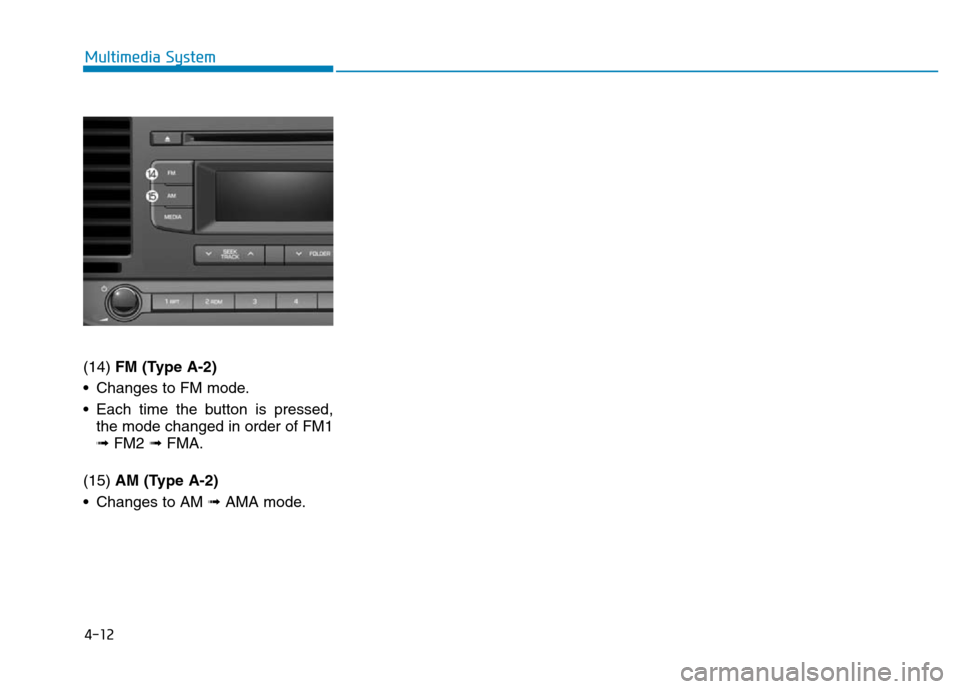
(14) FM (Type A-2)
• Changes to FM mode.
• Each time the button is pressed,
the mode changed in order of FM1
➟ FM2 ➟ FMA.
(15) AM (Type A-2)
• Changes to AM ➟ AMA mode.
Page 271 of 637
4-14
Multimedia System
Feature of Your Audio
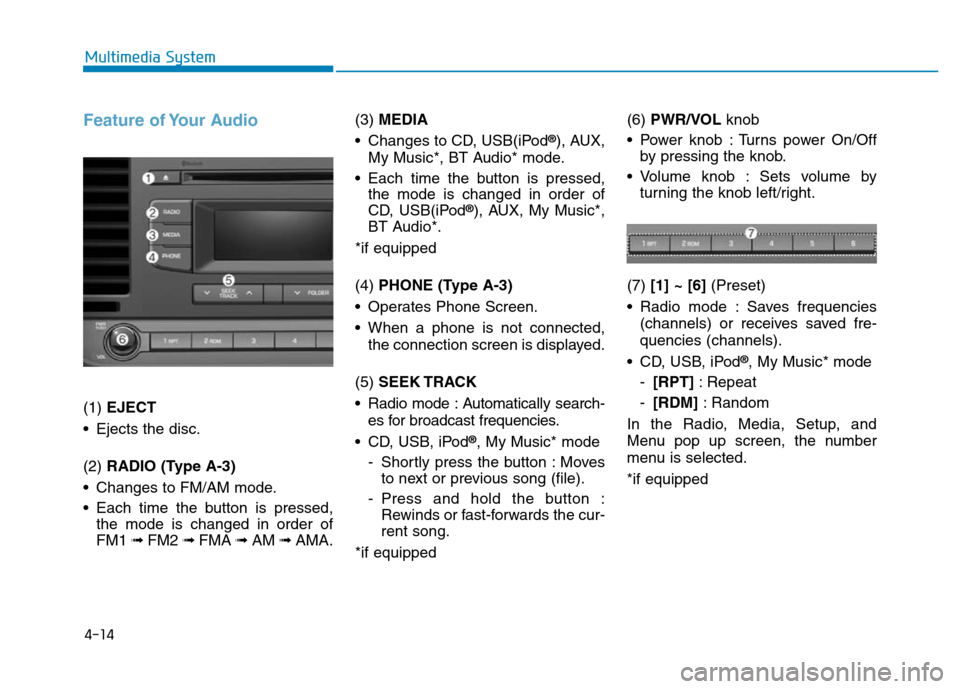
(1) EJECT
• Ejects the disc.
(2) RADIO (Type A-3)
• Changes to FM/AM mode.
• Each time the button is pressed,
the mode is changed in order of
FM1 ➟ FM2 ➟FMA ➟AM ➟AMA.(3) MEDIA
• Changes to CD, USB(iPod
®), AUX,
My Music*, BT Audio* mode.
• Each time the button is pressed,
the mode is changed in order of
CD, USB(iPod
®), AUX, My Music*,
BT Audio*.
*if equipped
(4) PHONE (Type A-3)
• Operates Phone Screen.
• When a phone is not connected,
the connection screen is displayed.
(5) SEEK TRACK
• Radio mode : Automatically search-
es for broadcast frequencies.
• CD, USB, iPod
®, My Music* mode
- Shortly press the button : Moves
to next or previous song (file).
- Press and hold the button :
Rewinds or fast-forwards the cur-
rent song.
*if equipped(6) PWR/VOL knob
• Power knob : Turns power On/Off
by pressing the knob.
• Volume knob : Sets volume by
turning the knob left/right.
(7) [1] ~ [6](Preset)
• Radio mode : Saves frequencies
(channels) or receives saved fre-
quencies (channels).
• CD, USB, iPod
®, My Music* mode
-[RPT]: Repeat
-[RDM]: Random
In the Radio, Media, Setup, and
Menu pop up screen, the number
menu is selected.
*if equipped