radio Hyundai Elantra 2017 User Guide
[x] Cancel search | Manufacturer: HYUNDAI, Model Year: 2017, Model line: Elantra, Model: Hyundai Elantra 2017Pages: 637, PDF Size: 15.02 MB
Page 265 of 637
4-8
Multimedia System
Using a cellular phone or a two-
way radio
When a cellular phone is used inside
the vehicle, noise may be produced
from the audio system. This does not
mean that something is wrong with the
audio equipment. In such a case, use
the cellular phone at a place as far as
possible from the audio equipment.
When using a communication
system such as a cellular phone
or a radio set inside the vehicle, a
separate external antenna must be
fitted. When a cellular phone or a
radio set is used with an internal
antenna alone, it may interfere
with the vehicle's electrical sys-
tem and adversely affect safe
operation of the vehicle.
NOTICE
Do not use a cellular phone
while driving. Stop at a safe
location to use a cellular phone.
WARNING
Page 267 of 637
4-10
Multimedia System
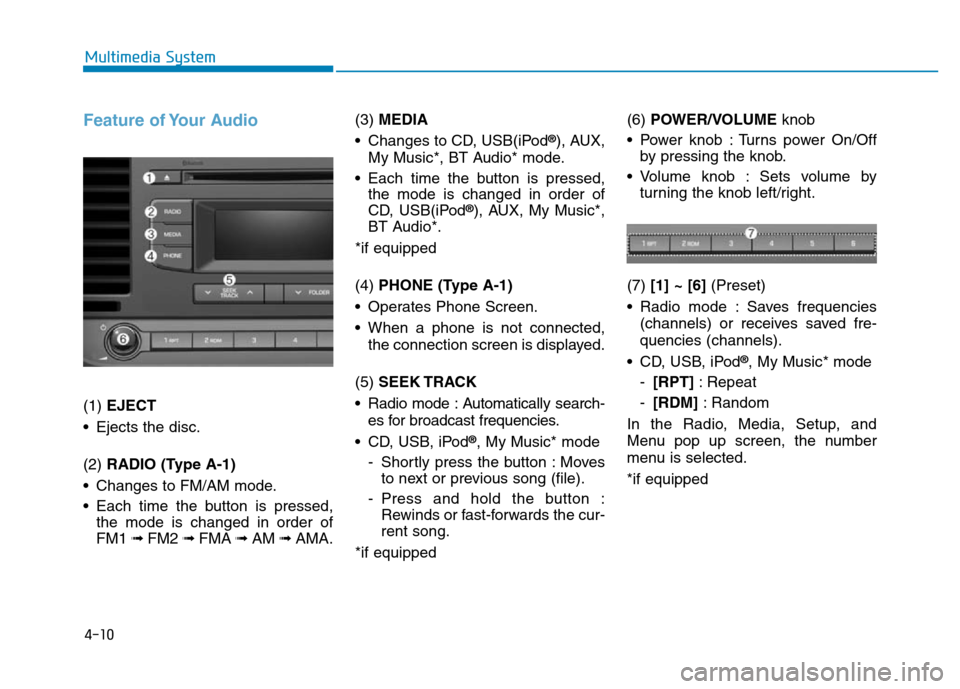
Feature of Your Audio
(1) EJECT
• Ejects the disc.
(2) RADIO (Type A-1)
• Changes to FM/AM mode.
• Each time the button is pressed,
the mode is changed in order of
FM1 ➟ FM2 ➟FMA ➟AM ➟AMA.(3) MEDIA
• Changes to CD, USB(iPod
®), AUX,
My Music*, BT Audio* mode.
• Each time the button is pressed,
the mode is changed in order of
CD, USB(iPod
®), AUX, My Music*,
BT Audio*.
*if equipped
(4) PHONE (Type A-1)
• Operates Phone Screen.
• When a phone is not connected,
the connection screen is displayed.
(5) SEEK TRACK
• Radio mode : Automatically search-
es for broadcast frequencies.
• CD, USB, iPod
®, My Music* mode
- Shortly press the button : Moves
to next or previous song (file).
- Press and hold the button :
Rewinds or fast-forwards the cur-
rent song.
*if equipped(6) POWER/VOLUMEknob
• Power knob : Turns power On/Off
by pressing the knob.
• Volume knob : Sets volume by
turning the knob left/right.
(7) [1] ~ [6](Preset)
• Radio mode : Saves frequencies
(channels) or receives saved fre-
quencies (channels).
• CD, USB, iPod
®, My Music* mode
-[RPT]: Repeat
-[RDM]: Random
In the Radio, Media, Setup, and
Menu pop up screen, the number
menu is selected.
*if equipped
Page 268 of 637
4-11
Multimedia System
4
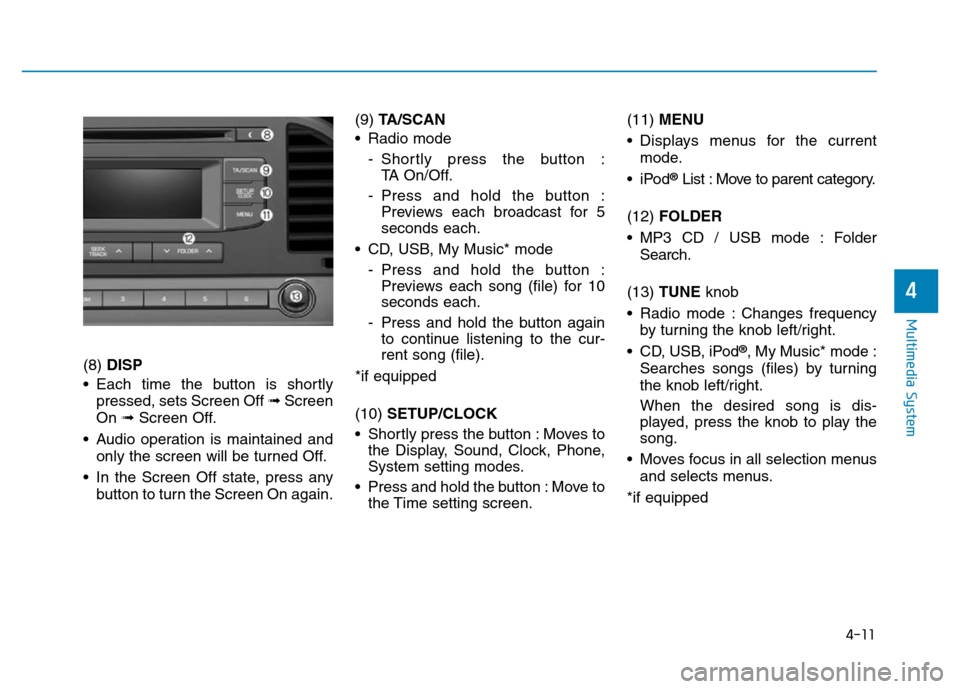
(8) DISP
• Each time the button is shortly
pressed, sets Screen Off ➟Screen
On ➟Screen Off.
• Audio operation is maintained and
only the screen will be turned Off.
• In the Screen Off state, press any
button to turn the Screen On again.(9) TA/SCAN
• Radio mode
- Shortly press the button :
TA On/Off.
- Press and hold the button :
Previews each broadcast for 5
seconds each.
• CD, USB, My Music* mode
- Press and hold the button :
Previews each song (file) for 10
seconds each.
- Press and hold the button again
to continue listening to the cur-
rent song (file).
*if equipped
(10) SETUP/CLOCK
• Shortly press the button : Moves to
the Display, Sound, Clock, Phone,
System setting modes.
• Press and hold the button : Move to
the Time setting screen.(11) MENU
• Displays menus for the current
mode.
•iPod
®List : Move to parent category.
(12) FOLDER
• MP3 CD / USB mode : Folder
Search.
(13) TUNE knob
• Radio mode : Changes frequency
by turning the knob left/right.
• CD, USB, iPod
®, My Music* mode :
Searches songs (files) by turning
the knob left/right.
When the desired song is dis-
played, press the knob to play the
song.
• Moves focus in all selection menus
and selects menus.
*if equipped
Page 271 of 637
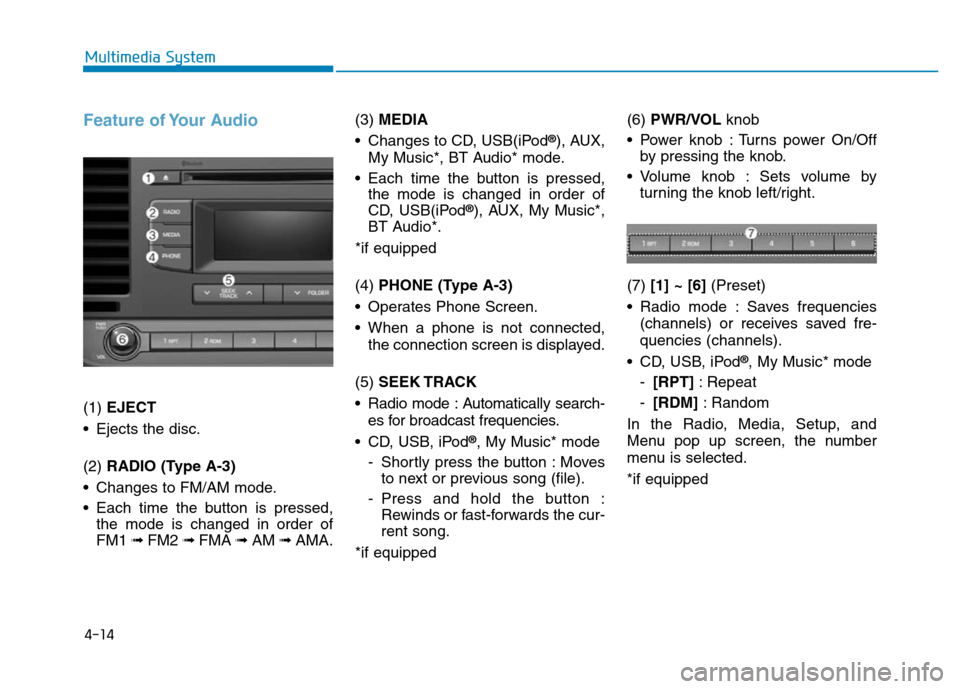
4-14
Multimedia System
Feature of Your Audio
(1) EJECT
• Ejects the disc.
(2) RADIO (Type A-3)
• Changes to FM/AM mode.
• Each time the button is pressed,
the mode is changed in order of
FM1 ➟ FM2 ➟FMA ➟AM ➟AMA.(3) MEDIA
• Changes to CD, USB(iPod
®), AUX,
My Music*, BT Audio* mode.
• Each time the button is pressed,
the mode is changed in order of
CD, USB(iPod
®), AUX, My Music*,
BT Audio*.
*if equipped
(4) PHONE (Type A-3)
• Operates Phone Screen.
• When a phone is not connected,
the connection screen is displayed.
(5) SEEK TRACK
• Radio mode : Automatically search-
es for broadcast frequencies.
• CD, USB, iPod
®, My Music* mode
- Shortly press the button : Moves
to next or previous song (file).
- Press and hold the button :
Rewinds or fast-forwards the cur-
rent song.
*if equipped(6) PWR/VOL knob
• Power knob : Turns power On/Off
by pressing the knob.
• Volume knob : Sets volume by
turning the knob left/right.
(7) [1] ~ [6](Preset)
• Radio mode : Saves frequencies
(channels) or receives saved fre-
quencies (channels).
• CD, USB, iPod
®, My Music* mode
-[RPT]: Repeat
-[RDM]: Random
In the Radio, Media, Setup, and
Menu pop up screen, the number
menu is selected.
*if equipped
Page 272 of 637
4-15
Multimedia System
4
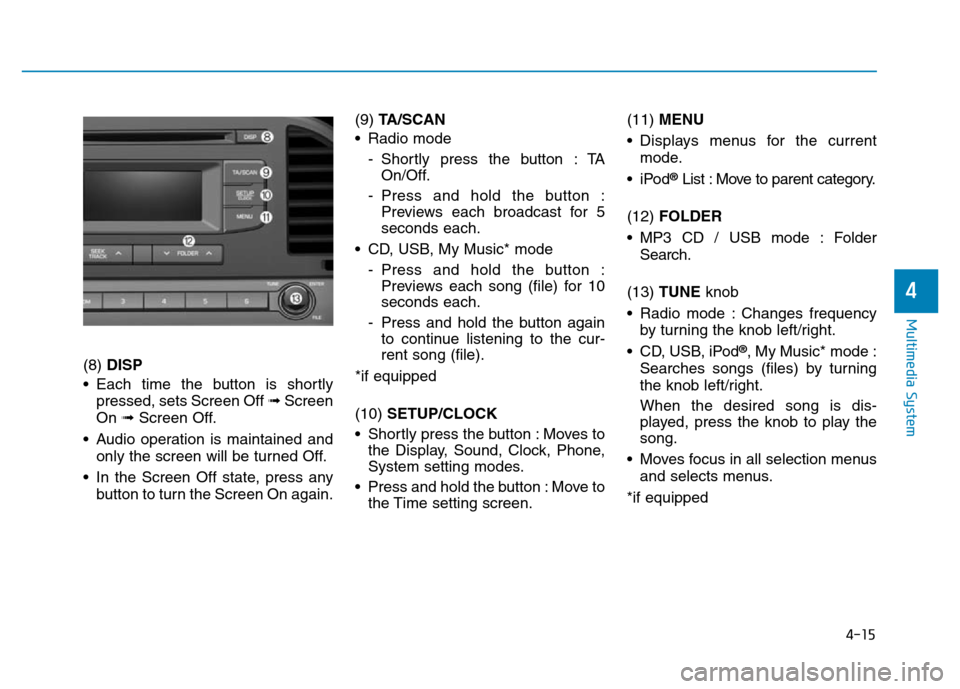
(8) DISP
• Each time the button is shortly
pressed, sets Screen Off ➟Screen
On ➟Screen Off.
• Audio operation is maintained and
only the screen will be turned Off.
• In the Screen Off state, press any
button to turn the Screen On again.(9) TA/SCAN
• Radio mode
- Shortly press the button : TA
On/Off.
- Press and hold the button :
Previews each broadcast for 5
seconds each.
• CD, USB, My Music* mode
- Press and hold the button :
Previews each song (file) for 10
seconds each.
- Press and hold the button again
to continue listening to the cur-
rent song (file).
*if equipped
(10) SETUP/CLOCK
• Shortly press the button : Moves to
the Display, Sound, Clock, Phone,
System setting modes.
• Press and hold the button : Move to
the Time setting screen.(11) MENU
• Displays menus for the current
mode.
•iPod
®List : Move to parent category.
(12) FOLDER
• MP3 CD / USB mode : Folder
Search.
(13) TUNE knob
• Radio mode : Changes frequency
by turning the knob left/right.
• CD, USB, iPod
®, My Music* mode :
Searches songs (files) by turning
the knob left/right.
When the desired song is dis-
played, press the knob to play the
song.
• Moves focus in all selection menus
and selects menus.
*if equipped
Page 275 of 637
4-18
Multimedia System
Feature of Your Audio
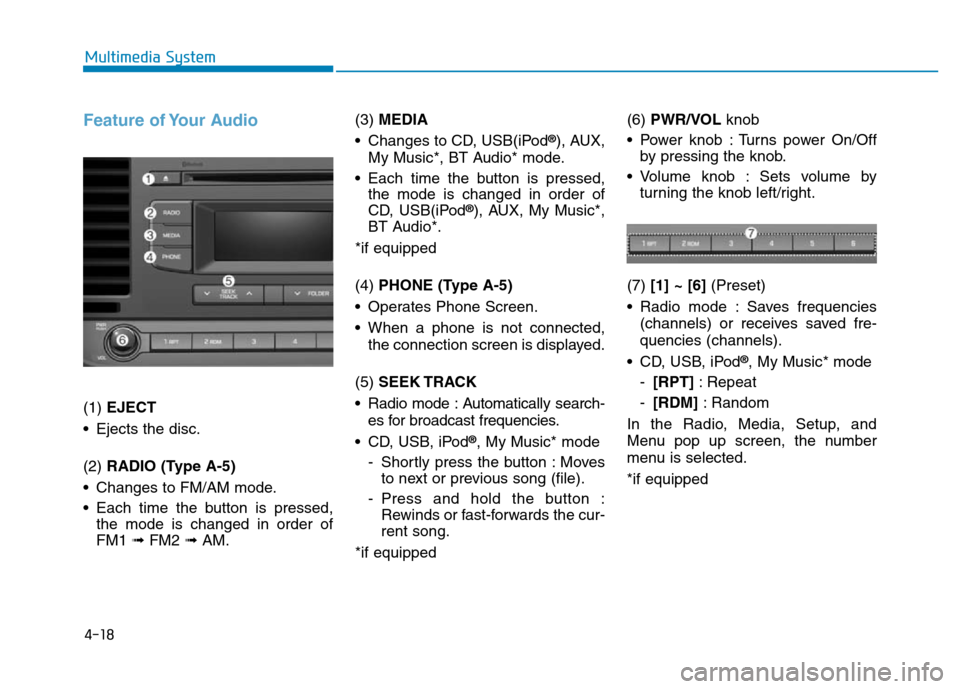
(1) EJECT
• Ejects the disc.
(2) RADIO (Type A-5)
• Changes to FM/AM mode.
• Each time the button is pressed,
the mode is changed in order of
FM1 ➟ FM2 ➟AM.(3) MEDIA
• Changes to CD, USB(iPod
®), AUX,
My Music*, BT Audio* mode.
• Each time the button is pressed,
the mode is changed in order of
CD, USB(iPod
®), AUX, My Music*,
BT Audio*.
*if equipped
(4) PHONE (Type A-5)
• Operates Phone Screen.
• When a phone is not connected,
the connection screen is displayed.
(5) SEEK TRACK
• Radio mode : Automatically search-
es for broadcast frequencies.
• CD, USB, iPod
®, My Music* mode
- Shortly press the button : Moves
to next or previous song (file).
- Press and hold the button :
Rewinds or fast-forwards the cur-
rent song.
*if equipped(6) PWR/VOL knob
• Power knob : Turns power On/Off
by pressing the knob.
• Volume knob : Sets volume by
turning the knob left/right.
(7) [1] ~ [6](Preset)
• Radio mode : Saves frequencies
(channels) or receives saved fre-
quencies (channels).
• CD, USB, iPod
®, My Music* mode
-[RPT]: Repeat
-[RDM]: Random
In the Radio, Media, Setup, and
Menu pop up screen, the number
menu is selected.
*if equipped
Page 276 of 637
4-19
Multimedia System
4
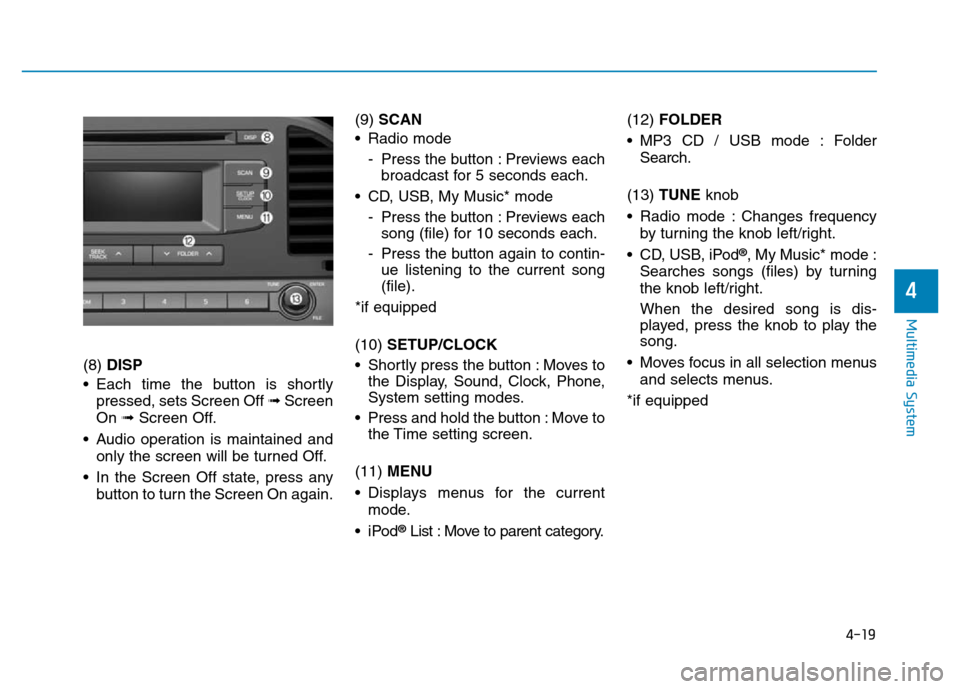
(8) DISP
• Each time the button is shortly
pressed, sets Screen Off ➟Screen
On ➟Screen Off.
• Audio operation is maintained and
only the screen will be turned Off.
• In the Screen Off state, press any
button to turn the Screen On again.(9) SCAN
• Radio mode
- Press the button : Previews each
broadcast for 5 seconds each.
• CD, USB, My Music* mode
- Press the button : Previews each
song (file) for 10 seconds each.
- Press the button again to contin-
ue listening to the current song
(file).
*if equipped
(10) SETUP/CLOCK
• Shortly press the button : Moves to
the Display, Sound, Clock, Phone,
System setting modes.
• Press and hold the button : Move to
the Time setting screen.
(11) MENU
• Displays menus for the current
mode.
•iPod
®List : Move to parent category.(12) FOLDER
• MP3 CD / USB mode : Folder
Search.
(13) TUNE knob
• Radio mode : Changes frequency
by turning the knob left/right.
• CD, USB, iPod
®, My Music* mode :
Searches songs (files) by turning
the knob left/right.
When the desired song is dis-
played, press the knob to play the
song.
• Moves focus in all selection menus
and selects menus.
*if equipped
Page 280 of 637
4-23
Multimedia System
4
Information
- Using the USB Device
• To use an external USB device,
make sure the device is not connect-
ed when starting up the vehicle.
Connect the device after starting up.
• If you start the engine when the
USB device is connected, it may
damage the USB device. (USB flash-
drives are very sensitive to electric
shock.)
• If the engine is started up or turned
off while the external USB device is
connected, the external USB device
may not work.
• The System may not play inauthen-
tic MP3 or WMA files.
1) It can only play MP3 files with the
compression rate between 8Kbps ~
320Kbps.
2) It can only play WMA music files
with the compression rate between
8Kbps ~ 320Kbps.
• Take precautions for static electrici-
ty when connecting or disconnecting
the external USB device.
(Continued)(Continued)
• An encrypted MP3 PLAYER is not
recognizable.
• Depending on the condition of the
external USB device, the connected
external USB device can be unrec-
ognizable.
• When the formatted byte/sector set-
ting of External USB device is not
either 512BYTE or 2048BYTE, then
the device will not be recognized.
• Use only a USB device formatted to
FAT 12/16/32.
• USB devices without USB I/F
authentication may not be recogniz-
able.
• Make sure the USB connection ter-
minal does not come in contact with
the human body or other objects.
• If you repeatedly connect or discon-
nect the USB device in a short peri-
od of time, it may break the device.
• You may hear a strange noise when
connecting or disconnecting a USB
device.
(Continued)(Continued)
• If you disconnect the external USB
device during playback in USB
mode, the external USB device can
be damaged or may malfunction.
Therefore, disconnect the external
USB device when the audio is
turned off or in another mode. (e.g,
Radio, CD)
• Depending on the type and capacity
of the external USB device or the
type of the files stored in the device,
there is a difference in the time
taken for recognition of the device.
• Do not use the USB device for pur-
poses other than playing music files.
• Playing videos through the USB is
not supported.
(Continued)
i
Page 285 of 637
4-28
Multimedia System
•
Bluetooth®Wireless Technology
Handsfree is a feature that
enables drivers to practice safe
driving. Connecting the car
audio system with a
Bluetooth®
Wireless Technology phone
allows the user to conveniently
make calls, receive calls, and
manage the phone book. Before
using the
Bluetooth®Wireless
Technology, carefully read the
contents of this user’s manual.
• Excessive use or operations
while driving may lead to negli-
gent driving practices and be
the cause of accidents.
• Do not operate the device exces-
sively while driving.
• Viewing the screen for pro-
longed periods of time is dan-
gerous and may lead to acci-
dents.
• When driving, view the screen
only for short periods of time.
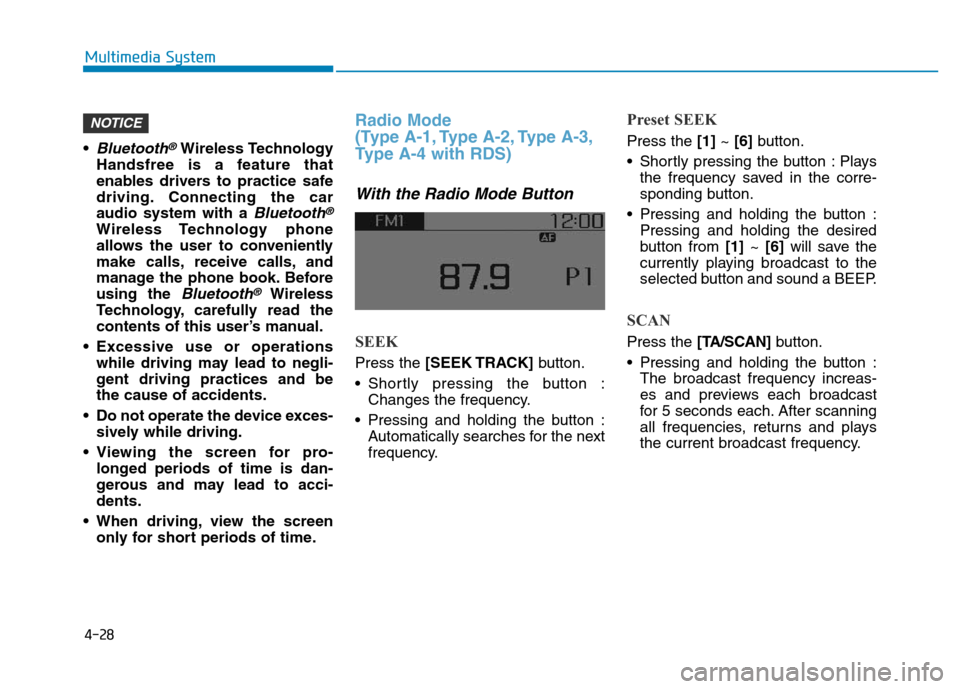
Radio Mode
(Type A-1, Type A-2, Type A-3,
Type A-4 with RDS)
With the Radio Mode Button
SEEK
Press the [SEEK TRACK]button.
• Shortly pressing the button :
Changes the frequency.
• Pressing and holding the button :
Automatically searches for the next
frequency.
Preset SEEK
Press the [1]~ [6]button.
• Shortly pressing the button : Plays
the frequency saved in the corre-
sponding button.
• Pressing and holding the button :
Pressing and holding the desired
button from [1]~ [6]will save the
currently playing broadcast to the
selected button and sound a BEEP.
SCAN
Press the [TA/SCAN]button.
• Pressing and holding the button :
The broadcast frequency increas-
es and previews each broadcast
for 5 seconds each. After scanning
all frequencies, returns and plays
the current broadcast frequency.
NOTICE
Page 286 of 637
![Hyundai Elantra 2017 User Guide 4-29
Multimedia System
4
Selecting through manual search
Turn the TUNE knob left/right to
adjust the frequency.
Traffic Announcement (TA)
Shortly pressing the [TA/SCAN]button
: Set [On/Off] TA (Traff](/img/35/14543/w960_14543-285.png "Hyundai Elantra 2017 User Guide 4-29
Multimedia System
4
Selecting through manual search
Turn the TUNE knob left/right to
adjust the frequency.
Traffic Announcement (TA)
Shortly pressing the [TA/SCAN]button
: Set [On/Off] TA (Traff")
4-29
Multimedia System
4
Selecting through manual search
Turn the TUNE knob left/right to
adjust the frequency.
Traffic Announcement (TA)
Shortly pressing the [TA/SCAN]button
: Set [On/Off] TA (Traffic Announcement)
mode.
MENU : Radio
Within [MENU] button are the AST
(Auto Store) and Info functions.
AST (Auto Store) : [1]Button
Select AST (Auto Store) to save fre-
quencies with superior reception to
presets[1] ~[6]. If no frequencies
are received, then the most recently
received frequency will be broad-
cast.
Saves only to the Preset memory [1]
~ [6]of FMA or AMA mode.
AF (Alternative Frequency) :
[2]Button
The Alternative Frequency option
can be turned On/Off.
Region : [3]Button
The Region option can be turned
On/Off.
News : [4]Button
The News option can be turned
On/Off.