smart trunk Hyundai Elantra 2017 User Guide
[x] Cancel search | Manufacturer: HYUNDAI, Model Year: 2017, Model line: Elantra, Model: Hyundai Elantra 2017Pages: 637, PDF Size: 15.02 MB
Page 142 of 637

3-47
Convenient features of your vehicle
3
Information
• If you press the door unlock button
(2), the Smart Trunk function will
be deactivated temporarily. But, if
you do not open any door for 30 sec-
onds, the smart trunk function will
be activated again.
• If you press the trunk open button
(3) for more than 1 second, the
trunk opens.
• If you press the door lock button (1)
or trunk open button (3) when the
Smart Trunk function is not in the
Detect and Alert stage, the smart
trunk function will not be deactivated.
• In case you have deactivated the
Smart Trunk function by pressing
the smart key button and opened a
door, the smart trunk function can
be activated again by closing and
locking all doors.
Detecting area
• The Smart Trunk operates with a
welcome alert if the smart key is
detected within 50~100 cm from
the trunk.
• The alert stops at once if the smart
key is positioned outside the
detecting area during the Detect
and Alert stage.
Information
• The Smart Trunk function will not
work if any of the following occurs:
- The smart key is close to a radio
transmitter such as a radio station
or an airport which can interfere
with normal operation of the
transmitter.
- The smart key is near a mobile two
way radio system or a cellular
phone.
- Another vehicle's smart key is
being operated close to your vehi-
cle.
• The detecting range may decrease
or increase when :
- One side of the tire is raised to
replace a tire or to inspect the vehi-
cle.
- The vehicle is slantingly parked on
a slope or unpaved road, etc.
ii
OAD045033
Page 170 of 637
3-75
Convenient features of your vehicle
3
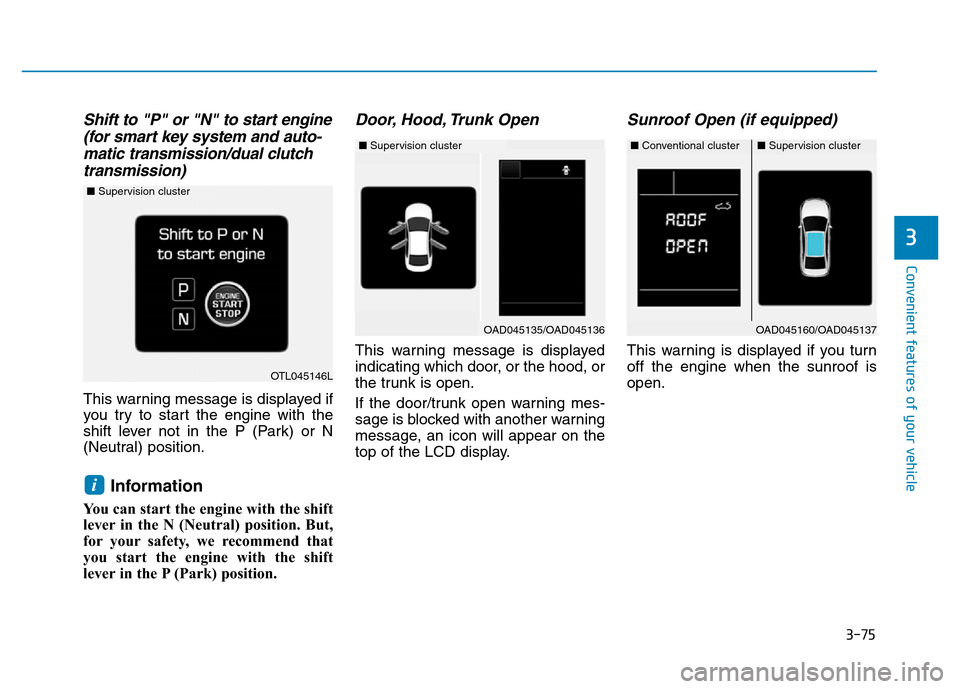
Shift to "P" or "N" to start engine
(for smart key system and auto-
matic transmission/dual clutch
transmission)
This warning message is displayed if
you try to start the engine with the
shift lever not in the P (Park) or N
(Neutral) position.
Information
You can start the engine with the shift
lever in the N (Neutral) position. But,
for your safety, we recommend that
you start the engine with the shift
lever in the P (Park) position.
Door, Hood, Trunk Open
This warning message is displayed
indicating which door, or the hood, or
the trunk is open.
If the door/trunk open warning mes-
sage is blocked with another warning
message, an icon will appear on the
top of the LCD display.
Sunroof Open (if equipped)
This warning is displayed if you turn
off the engine when the sunroof is
open.
i
OAD045160/OAD045137
OTL045146L
■Supervision cluster
■Conventional cluster■Supervision cluster
OAD045135/OAD045136
■Supervision cluster
Page 182 of 637
3-87
Convenient features of your vehicle
3
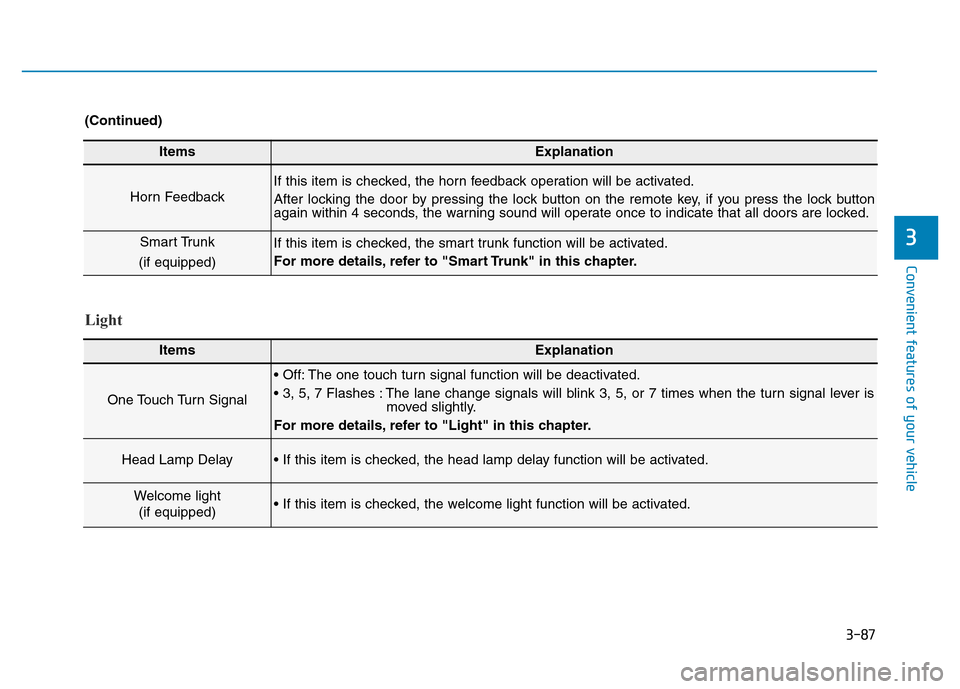
ItemsExplanation
Horn Feedback
If this item is checked, the horn feedback operation will be activated.
After locking the door by pressing the lock button on the remote key, if you press the lock button
again within 4 seconds, the warning sound will operate once to indicate that all doors are locked.
Smart Trunk
(if equipped)If this item is checked, the smart trunk function will be activated.
For more details, refer to "Smart Trunk" in this chapter.
(Continued)
Light
ItemsExplanation
One Touch Turn Signal
• Off: The one touch turn signal function will be deactivated.
• 3, 5, 7 Flashes : The lane change signals will blink 3, 5, or 7 times when the turn signal lever is
moved slightly.
For more details, refer to "Light" in this chapter.
Head Lamp Delay• If this item is checked, the head lamp delay function will be activated.
Welcome light
(if equipped)• If this item is checked, the welcome light function will be activated.
Page 201 of 637
3-106
Convenient features of your vehicle
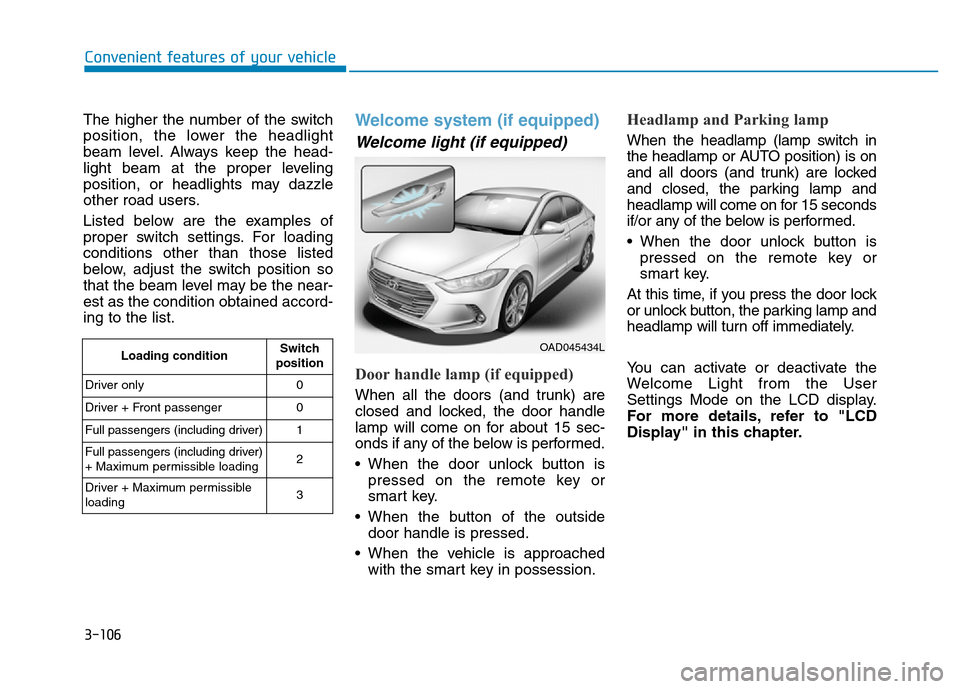
The higher the number of the switch
position, the lower the headlight
beam level. Always keep the head-
light beam at the proper leveling
position, or headlights may dazzle
other road users.
Listed below are the examples of
proper switch settings. For loading
conditions other than those listed
below, adjust the switch position so
that the beam level may be the near-
est as the condition obtained accord-
ing to the list.
Welcome system (if equipped)
Welcome light (if equipped)
Door handle lamp (if equipped)
When all the doors (and trunk) are
closed and locked, the door handle
lamp will come on for about 15 sec-
onds if any of the below is performed.
• When the door unlock button is
pressed on the remote key or
smart key.
• When the button of the outside
door handle is pressed.
• When the vehicle is approached
with the smart key in possession.
Headlamp and Parking lamp
When the headlamp (lamp switch in
the headlamp or AUTO position) is on
and all doors (and trunk) are locked
and closed, the parking lamp and
headlamp will come on for 15 seconds
if/or any of the below is performed.
• When the door unlock button is
pressed on the remote key or
smart key.
At this time, if you press the door lock
or unlock button, the parking lamp and
headlamp will turn off immediately.
You can activate or deactivate the
Welcome Light from the User
Settings Mode on the LCD display.
For more details, refer to "LCD
Display" in this chapter.
Loading conditionSwitch
position
Driver only 0
Driver + Front passenger 0
Full passengers (including driver) 1
Full passengers (including driver)
+ Maximum permissible loading2
Driver + Maximum permissible
loading 3OAD045434L
Page 202 of 637
3-107
Convenient features of your vehicle
3
Interior lamp
When the interior lamp switch is in
the DOOR position and all doors (and
trunk) are closed and locked, the
room lamp will come on for 30 sec-
onds if any of the below is performed.
• When the door unlock button is
pressed on the remote key or
smart key.
• When the button of the outside
door handle is pressed.
At this time, if you press the door lock
or unlock button, the room lamp will
turn off immediately.
Interior lights
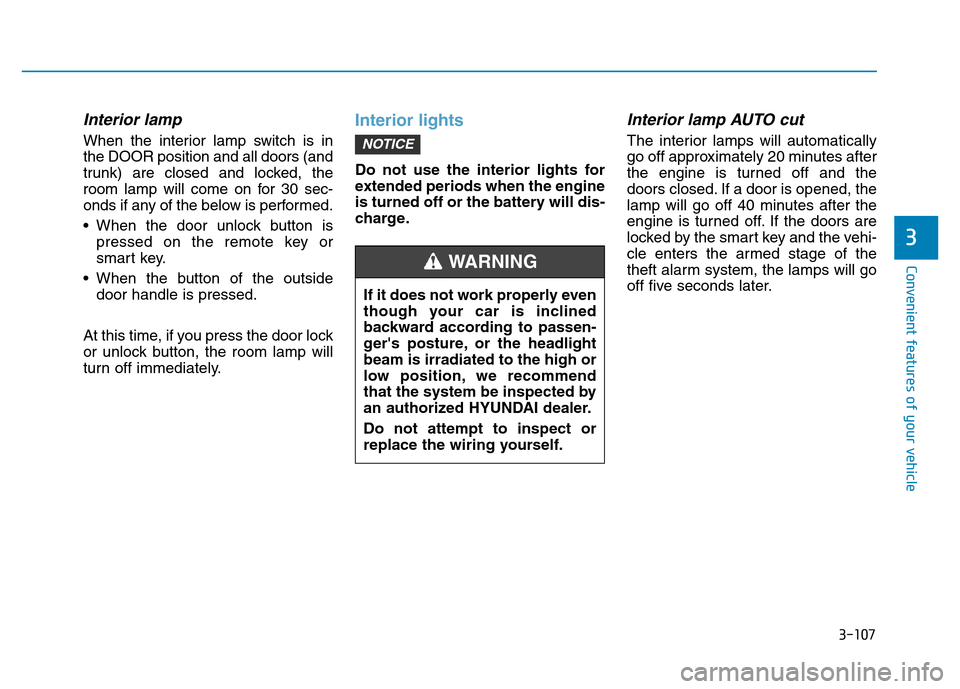
Do not use the interior lights for
extended periods when the engine
is turned off or the battery will dis-
charge.
Interior lamp AUTO cut
The interior lamps will automatically
go off approximately 20 minutes after
the engine is turned off and the
doors closed. If a door is opened, the
lamp will go off 40 minutes after the
engine is turned off. If the doors are
locked by the smart key and the vehi-
cle enters the armed stage of the
theft alarm system, the lamps will go
off five seconds later.NOTICE
If it does not work properly even
though your car is inclined
backward according to passen-
ger's posture, or the headlight
beam is irradiated to the high or
low position, we recommend
that the system be inspected by
an authorized HYUNDAI dealer.
Do not attempt to inspect or
replace the wiring yourself.
WARNING
Page 584 of 637
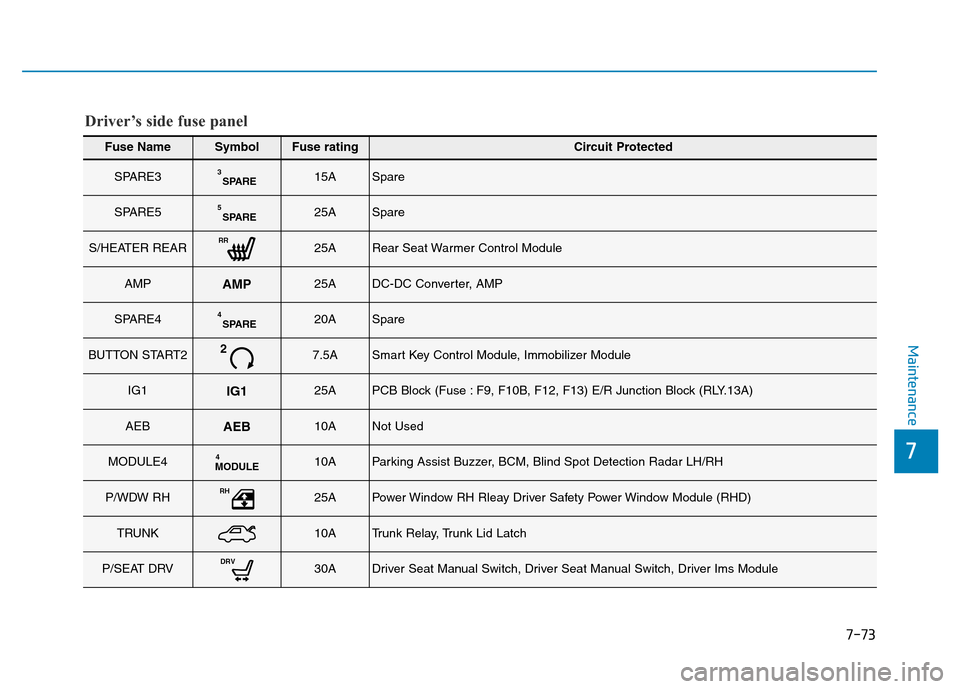
7-73
7
Maintenance
Fuse NameSymbolFuse ratingCircuit Protected
SPARE3SPARE315ASpare
SPARE5SPARE525ASpare
S/HEATER REARRR25ARear Seat Warmer Control Module
AMPAMP25ADC-DC Converter, AMP
SPARE4SPARE420ASpare
BUTTON START227.5ASmart Key Control Module, Immobilizer Module
IG1IG125APCB Block (Fuse : F9, F10B, F12, F13) E/R Junction Block (RLY.13A)
AEBAEB10ANot Used
MODULE4MODULE410AParking Assist Buzzer, BCM, Blind Spot Detection Radar LH/RH
P/WDW RHRH25APower Window RH Rleay Driver Safety Power Window Module (RHD)
TRUNK10ATrunk Relay, Trunk Lid Latch
P/SEAT DRVDRV30ADriver Seat Manual Switch, Driver Seat Manual Switch, Driver Ims Module
Driver’s side fuse panel
Page 585 of 637
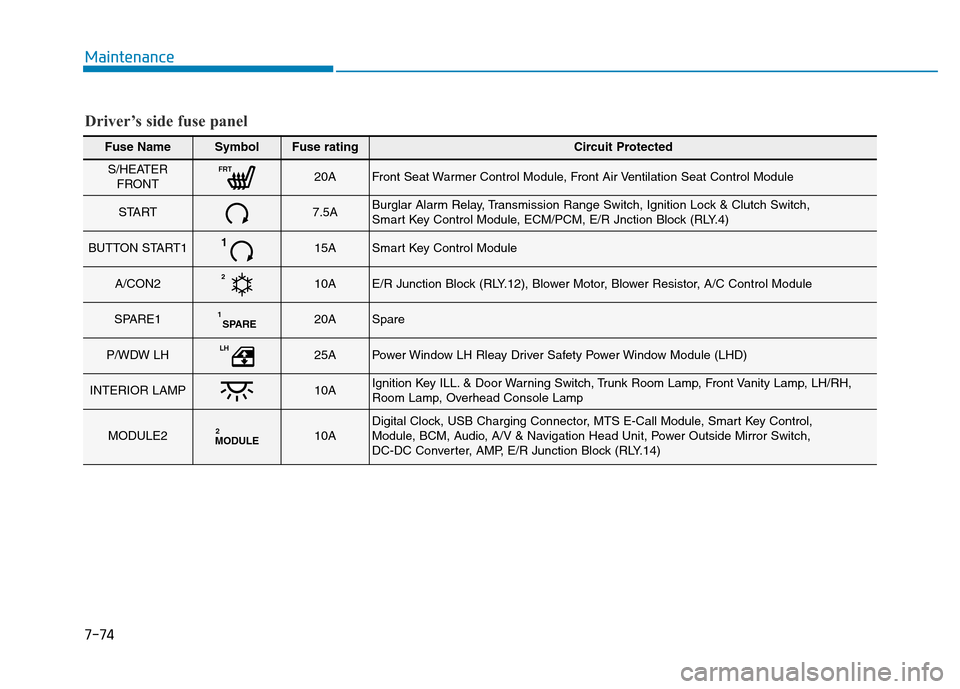
Maintenance
7-74
Fuse NameSymbolFuse ratingCircuit Protected
S/HEATER
FRONTFRT20AFront Seat Warmer Control Module, Front Air Ventilation Seat Control Module
START7.5ABurglar Alarm Relay, Transmission Range Switch, Ignition Lock & Clutch Switch,
Smart Key Control Module, ECM/PCM, E/R Jnction Block (RLY.4)
BUTTON START1115ASmart Key Control Module
A/CON2210AE/R Junction Block (RLY.12), Blower Motor, Blower Resistor, A/C Control Module
SPARE1SPARE120ASpare
P/WDW LHLH25APower Window LH Rleay Driver Safety Power Window Module (LHD)
INTERIOR LAMP10AIgnition Key ILL. & Door Warning Switch, Trunk Room Lamp, Front Vanity Lamp, LH/RH,
Room Lamp, Overhead Console Lamp
MODULE2MODULE210ADigital Clock, USB Charging Connector, MTS E-Call Module, Smart Key Control,
Module, BCM, Audio, A/V & Navigation Head Unit, Power Outside Mirror Switch,
DC-DC Converter, AMP, E/R Junction Block (RLY.14)
Driver’s side fuse panel