sunroof Hyundai Elantra 2017 User Guide
[x] Cancel search | Manufacturer: HYUNDAI, Model Year: 2017, Model line: Elantra, Model: Hyundai Elantra 2017Pages: 637, PDF Size: 15.02 MB
Page 170 of 637
3-75
Convenient features of your vehicle
3
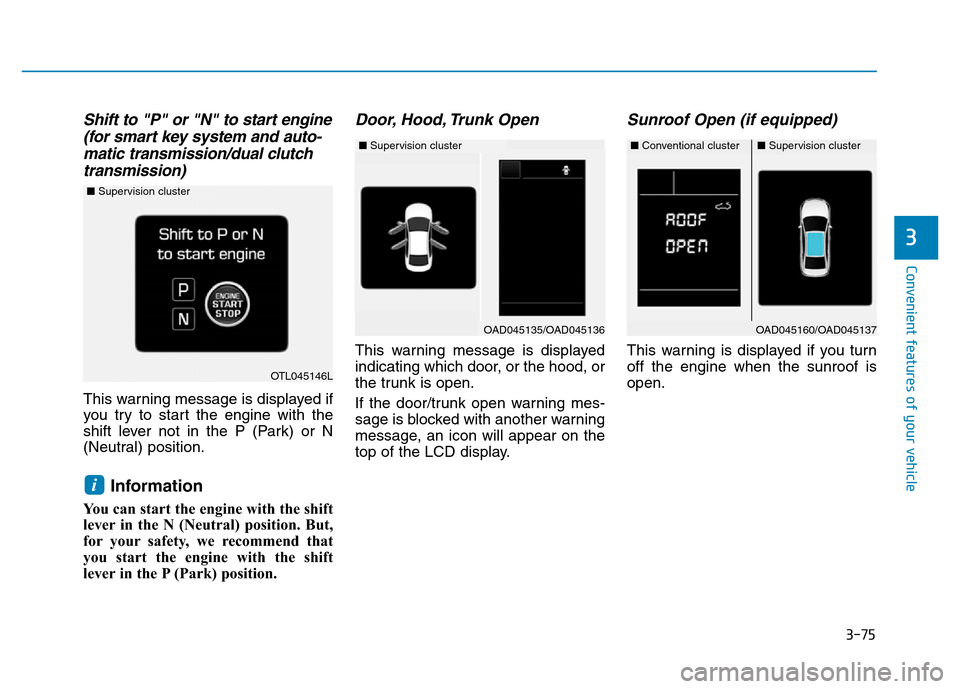
Shift to "P" or "N" to start engine
(for smart key system and auto-
matic transmission/dual clutch
transmission)
This warning message is displayed if
you try to start the engine with the
shift lever not in the P (Park) or N
(Neutral) position.
Information
You can start the engine with the shift
lever in the N (Neutral) position. But,
for your safety, we recommend that
you start the engine with the shift
lever in the P (Park) position.
Door, Hood, Trunk Open
This warning message is displayed
indicating which door, or the hood, or
the trunk is open.
If the door/trunk open warning mes-
sage is blocked with another warning
message, an icon will appear on the
top of the LCD display.
Sunroof Open (if equipped)
This warning is displayed if you turn
off the engine when the sunroof is
open.
i
OAD045160/OAD045137
OTL045146L
■Supervision cluster
■Conventional cluster■Supervision cluster
OAD045135/OAD045136
■Supervision cluster
Page 193 of 637
3-98
Convenient features of your vehicle
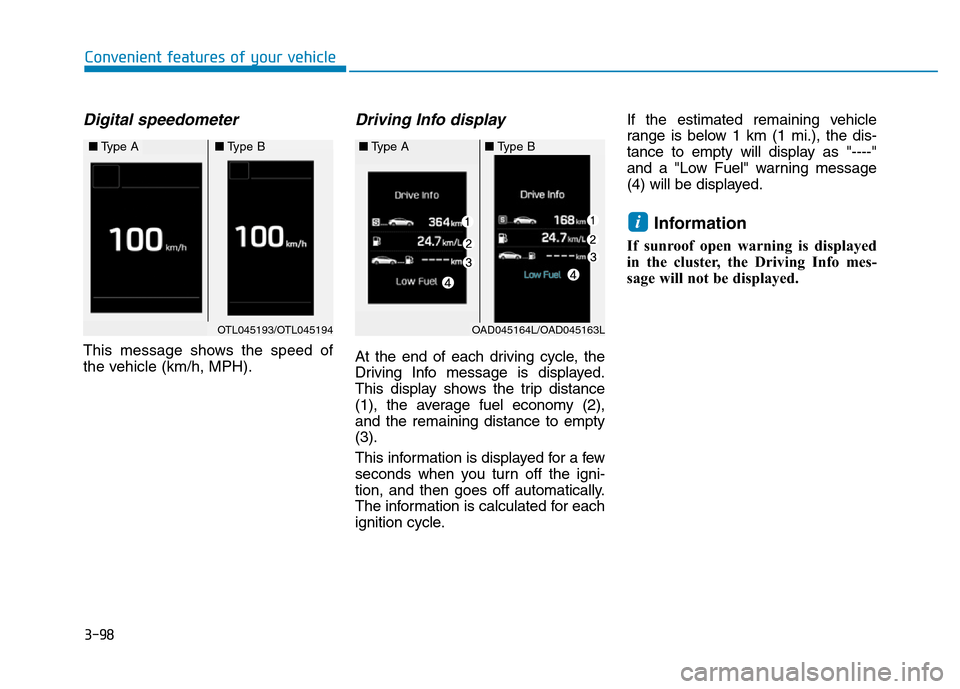
Digital speedometer
This message shows the speed of
the vehicle (km/h, MPH).
Driving Info display
At the end of each driving cycle, the
Driving Info message is displayed.
This display shows the trip distance
(1), the average fuel economy (2),
and the remaining distance to empty
(3).
This information is displayed for a few
seconds when you turn off the igni-
tion, and then goes off automatically.
The information is calculated for each
ignition cycle.If the estimated remaining vehicle
range is below 1 km (1 mi.), the dis-
tance to empty will display as "----"
and a "Low Fuel" warning message
(4) will be displayed.
Information
If sunroof open warning is displayed
in the cluster, the Driving Info mes-
sage will not be displayed.
i
OAD045164L/OAD045163L
■Type B■Type A
OTL045193/OTL045194
■Type A■Type B
Page 247 of 637
3-152
Convenient features of your vehicle
CLIMATE CONTROL ADDITIONAL FEATURES
Cluster ionizer (if equipped)
When the ignition switch is in the ON
position, the clean air function turns
on automatically.
Also, the clean air function turns off
automatically, when the ignition
switch is in the OFF position.
Sunroof inside air recirculation
(if equipped)
If the sunroof opens while the heater
or Air Conditioning system operates,
the outside (fresh) air will be select-
ed automatically for ventilating the
car. Then, if you select the recirculat-
ed air position, the outside (fresh) air
will be selected automatically after 3
minutes.
If you close the sunroof, the intake
mode will be changed to the previous
selected mode.
Page 562 of 637

7-51
7
Maintenance
Reset items
Items should be reset after the bat-
tery has been discharged or the bat-
tery has been disconnected.
• Auto up/down window
(See chapter 3)
• Sunroof (See chapter 3)
• Trip computer (See chapter 3)
• Climate control system
(See chapter 3) (Continued)•The negative battery cable
must be removed first and
installed last when the battery
is disconnected.
•Disconnect the battery charg-
er in the following order.
1. Turn off the battery charger
main switch.
2. Unhook the negative clamp
from the negative battery
terminal.
3. Unhook the positive clamp
from the positive battery
terminal.
Page 582 of 637
7-71
7
Maintenance
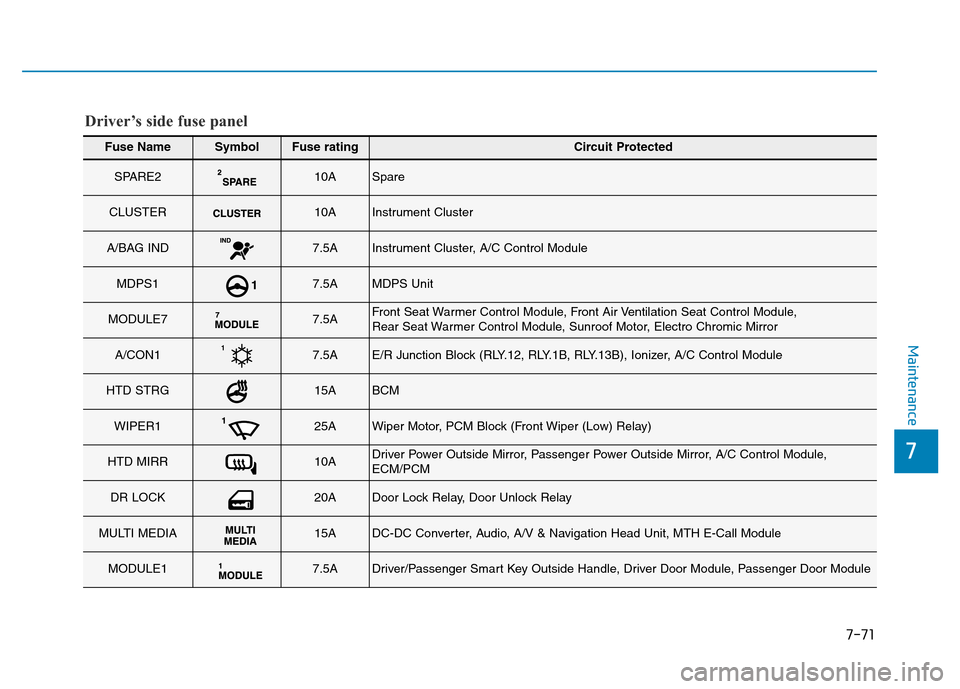
Fuse NameSymbolFuse ratingCircuit Protected
SPARE210ASpare
CLUSTER10AInstrument Cluster
A/BAG IND7.5AInstrument Cluster, A/C Control Module
MDPS17.5AMDPS Unit
MODULE77.5AFront Seat Warmer Control Module, Front Air Ventilation Seat Control Module,
Rear Seat Warmer Control Module, Sunroof Motor, Electro Chromic Mirror
A/CON17.5AE/R Junction Block (RLY.12, RLY.1B, RLY.13B), Ionizer, A/C Control Module
HTD STRG15ABCM
WIPER125AWiper Motor, PCM Block (Front Wiper (Low) Relay)
HTD MIRR10ADriver Power Outside Mirror, Passenger Power Outside Mirror, A/C Control Module,
ECM/PCM
DR LOCK20ADoor Lock Relay, Door Unlock Relay
MULTI MEDIA15ADC-DC Converter, Audio, A/V & Navigation Head Unit, MTH E-Call Module
MODULE17.5ADriver/Passenger Smart Key Outside Handle, Driver Door Module, Passenger Door Module
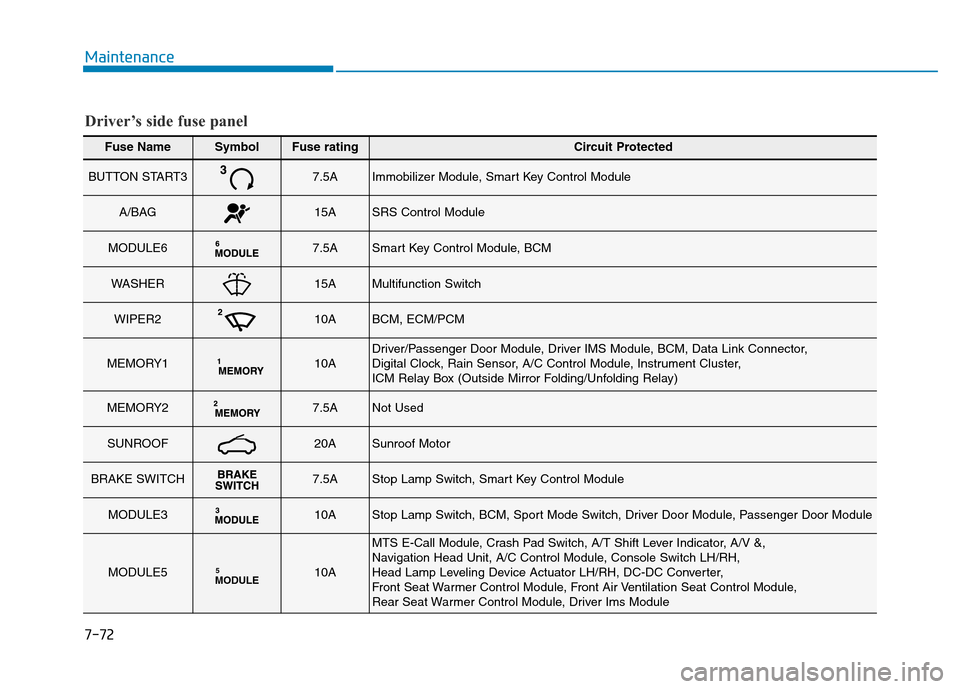
Driver’s side fuse panel
Page 583 of 637
Maintenance
7-72
Fuse NameSymbolFuse ratingCircuit Protected
BUTTON START37.5AImmobilizer Module, Smart Key Control Module
A/BAG15ASRS Control Module
MODULE67.5ASmart Key Control Module, BCM
WASHER15AMultifunction Switch
WIPER210ABCM, ECM/PCM
MEMORY110ADriver/Passenger Door Module, Driver IMS Module, BCM, Data Link Connector,
Digital Clock, Rain Sensor, A/C Control Module, Instrument Cluster,
ICM Relay Box (Outside Mirror Folding/Unfolding Relay)
MEMORY27.5ANot Used
SUNROOF20ASunroof Motor
BRAKE SWITCH7.5AStop Lamp Switch, Smart Key Control Module
MODULE310AStop Lamp Switch, BCM, Sport Mode Switch, Driver Door Module, Passenger Door Module
MODULE5MODULE510A
MTS E-Call Module, Crash Pad Switch, A/T Shift Lever Indicator, A/V &,
Navigation Head Unit, A/C Control Module, Console Switch LH/RH,
Head Lamp Leveling Device Actuator LH/RH, DC-DC Converter,
Front Seat Warmer Control Module, Front Air Ventilation Seat Control Module,
Rear Seat Warmer Control Module, Driver Ims Module
Driver’s side fuse panel