reset Hyundai Elantra 2017 Owner's Guide
[x] Cancel search | Manufacturer: HYUNDAI, Model Year: 2017, Model line: Elantra, Model: Hyundai Elantra 2017Pages: 637, PDF Size: 15.02 MB
Page 246 of 637
3-151
Convenient features of your vehicle
3
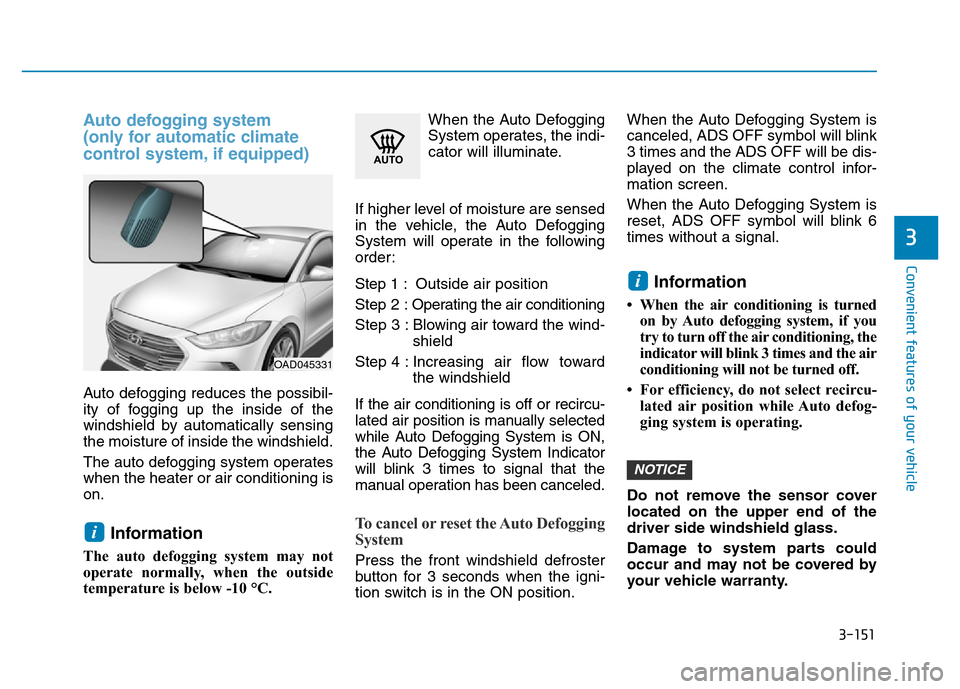
Auto defogging system
(only for automatic climate
control system, if equipped)
Auto defogging reduces the possibil-
ity of fogging up the inside of the
windshield by automatically sensing
the moisture of inside the windshield.
The auto defogging system operates
when the heater or air conditioning is
on.
Information
The auto defogging system may not
operate normally, when the outside
temperature is below -10 °C.When the Auto Defogging
System operates, the indi-
cator will illuminate.
If higher level of moisture are sensed
in the vehicle, the Auto Defogging
System will operate in the following
order:
Step 1 : Outside air position
Step 2 :Operating the air conditioning
Step 3 : Blowing air toward the wind-
shield
Step 4 : Increasing air flow toward
the windshield
If the air conditioning is off or recircu-
lated air position is manually selected
while Auto Defogging System is ON,
the Auto Defogging System Indicator
will blink 3 times to signal that the
manual operation has been canceled.
To cancel or reset the Auto Defogging
System
Press the front windshield defroster
button for 3 seconds when the igni-
tion switch is in the ON position.When the Auto Defogging System is
canceled, ADS OFF symbol will blink
3 times and the ADS OFF will be dis-
played on the climate control infor-
mation screen.
When the Auto Defogging System is
reset, ADS OFF symbol will blink 6
times without a signal.
Information
• When the air conditioning is turned
on by Auto defogging system, if you
try to turn off the air conditioning, the
indicator will blink 3 times and the air
conditioning will not be turned off.
• For efficiency, do not select recircu-
lated air position while Auto defog-
ging system is operating.
Do not remove the sensor cover
located on the upper end of the
driver side windshield glass.
Damage to system parts could
occur and may not be covered by
your vehicle warranty.
NOTICE
i
i
OAD045331
Page 261 of 637

Steering wheel audio control
(if equipped)
The steering wheel audio control but-
ton is installed for your convenience.Do not operate audio remote con-
trol buttons simultaneously.
VOLUME (VOL + / - ) (1)
• Move the VOLUME lever up to
increase volume.
• Move the VOLUME lever down to
decrease volume.
SEEK/PRESET ( / ) (2)
If the SEEK/PRESET lever is moved
up or down and held for 0.8 second
or more, it will function in the follow-
ing modes.
RADIO mode
It will function as the AUTO SEEK
select button. It will SEEK until you
release the button.
MEDIA mode
It will function as the FF/REW button.If the SEEK/PRESET lever is moved
up or down, it will function in the fol-
lowing modes.
RADIO mode
It will function as the PRESET STA-
TION UP/DOWN button.
MEDIA mode
It will function as the TRACK UP/
DOWN button.
MODE ( ) (3)
Press the MODE button to select
Radio, Disc, or AUX.
MUTE ( ) (4)
• Press the button to mute the
sound.
• Press the button again to activate
the sound.
Information
Detailed information for audio control
buttons are described in the following
pages in this chapter.
i
NOTICE
OAD045425
OAD045444L
4-4
Multimedia System
■Type A
■Type B
Page 267 of 637
4-10
Multimedia System
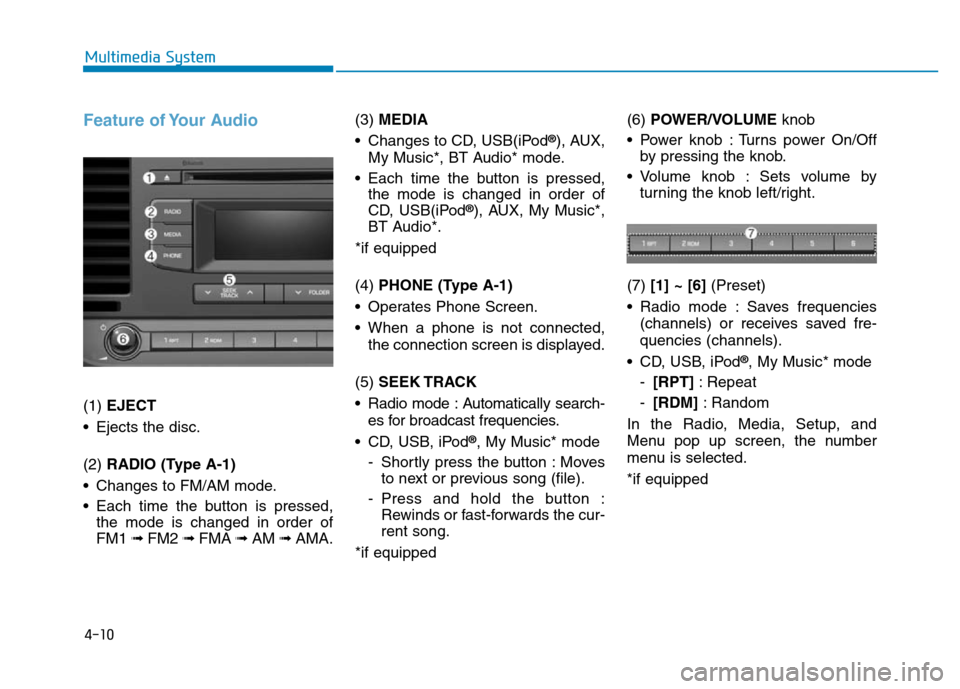
Feature of Your Audio
(1) EJECT
• Ejects the disc.
(2) RADIO (Type A-1)
• Changes to FM/AM mode.
• Each time the button is pressed,
the mode is changed in order of
FM1 ➟ FM2 ➟FMA ➟AM ➟AMA.(3) MEDIA
• Changes to CD, USB(iPod
®), AUX,
My Music*, BT Audio* mode.
• Each time the button is pressed,
the mode is changed in order of
CD, USB(iPod
®), AUX, My Music*,
BT Audio*.
*if equipped
(4) PHONE (Type A-1)
• Operates Phone Screen.
• When a phone is not connected,
the connection screen is displayed.
(5) SEEK TRACK
• Radio mode : Automatically search-
es for broadcast frequencies.
• CD, USB, iPod
®, My Music* mode
- Shortly press the button : Moves
to next or previous song (file).
- Press and hold the button :
Rewinds or fast-forwards the cur-
rent song.
*if equipped(6) POWER/VOLUMEknob
• Power knob : Turns power On/Off
by pressing the knob.
• Volume knob : Sets volume by
turning the knob left/right.
(7) [1] ~ [6](Preset)
• Radio mode : Saves frequencies
(channels) or receives saved fre-
quencies (channels).
• CD, USB, iPod
®, My Music* mode
-[RPT]: Repeat
-[RDM]: Random
In the Radio, Media, Setup, and
Menu pop up screen, the number
menu is selected.
*if equipped
Page 271 of 637
4-14
Multimedia System
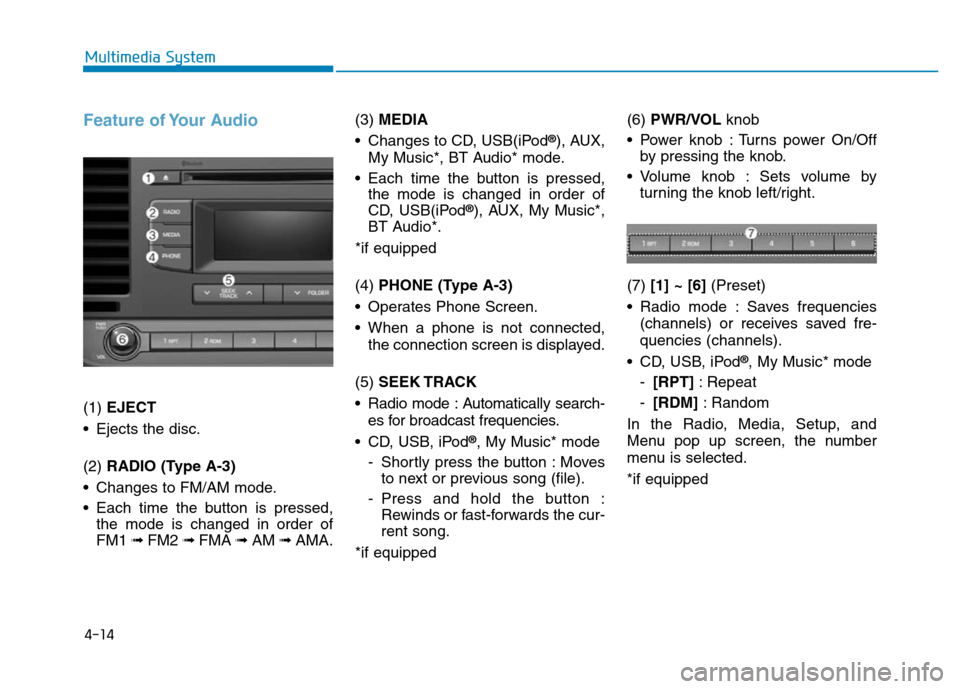
Feature of Your Audio
(1) EJECT
• Ejects the disc.
(2) RADIO (Type A-3)
• Changes to FM/AM mode.
• Each time the button is pressed,
the mode is changed in order of
FM1 ➟ FM2 ➟FMA ➟AM ➟AMA.(3) MEDIA
• Changes to CD, USB(iPod
®), AUX,
My Music*, BT Audio* mode.
• Each time the button is pressed,
the mode is changed in order of
CD, USB(iPod
®), AUX, My Music*,
BT Audio*.
*if equipped
(4) PHONE (Type A-3)
• Operates Phone Screen.
• When a phone is not connected,
the connection screen is displayed.
(5) SEEK TRACK
• Radio mode : Automatically search-
es for broadcast frequencies.
• CD, USB, iPod
®, My Music* mode
- Shortly press the button : Moves
to next or previous song (file).
- Press and hold the button :
Rewinds or fast-forwards the cur-
rent song.
*if equipped(6) PWR/VOL knob
• Power knob : Turns power On/Off
by pressing the knob.
• Volume knob : Sets volume by
turning the knob left/right.
(7) [1] ~ [6](Preset)
• Radio mode : Saves frequencies
(channels) or receives saved fre-
quencies (channels).
• CD, USB, iPod
®, My Music* mode
-[RPT]: Repeat
-[RDM]: Random
In the Radio, Media, Setup, and
Menu pop up screen, the number
menu is selected.
*if equipped
Page 275 of 637
4-18
Multimedia System
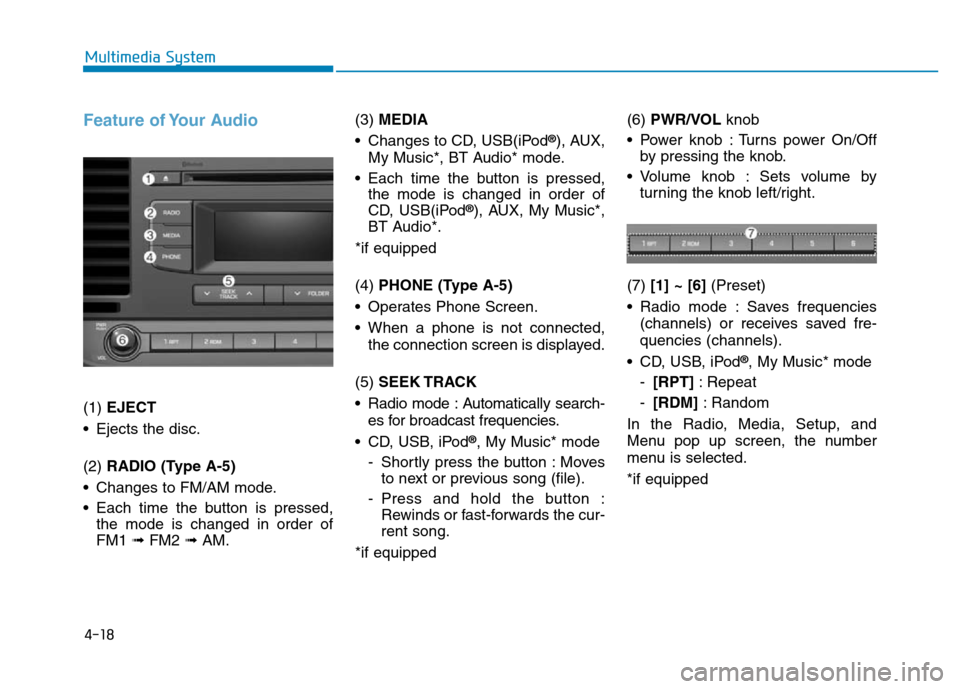
Feature of Your Audio
(1) EJECT
• Ejects the disc.
(2) RADIO (Type A-5)
• Changes to FM/AM mode.
• Each time the button is pressed,
the mode is changed in order of
FM1 ➟ FM2 ➟AM.(3) MEDIA
• Changes to CD, USB(iPod
®), AUX,
My Music*, BT Audio* mode.
• Each time the button is pressed,
the mode is changed in order of
CD, USB(iPod
®), AUX, My Music*,
BT Audio*.
*if equipped
(4) PHONE (Type A-5)
• Operates Phone Screen.
• When a phone is not connected,
the connection screen is displayed.
(5) SEEK TRACK
• Radio mode : Automatically search-
es for broadcast frequencies.
• CD, USB, iPod
®, My Music* mode
- Shortly press the button : Moves
to next or previous song (file).
- Press and hold the button :
Rewinds or fast-forwards the cur-
rent song.
*if equipped(6) PWR/VOL knob
• Power knob : Turns power On/Off
by pressing the knob.
• Volume knob : Sets volume by
turning the knob left/right.
(7) [1] ~ [6](Preset)
• Radio mode : Saves frequencies
(channels) or receives saved fre-
quencies (channels).
• CD, USB, iPod
®, My Music* mode
-[RPT]: Repeat
-[RDM]: Random
In the Radio, Media, Setup, and
Menu pop up screen, the number
menu is selected.
*if equipped
Page 281 of 637
4-24
Multimedia System
(Continued)
• Use of USB accessories such as
rechargers or heaters using USB I/F
may lower performance or cause
trouble.
• If you use devices such as a USB hub
purchased separately, the vehicle’s
audio system may not recognize the
USB device. In that case, connect
the USB device directly to the multi-
media terminal of the vehicle.
• If the USB device is divided by logi-
cal drives, only the music files on the
highest-priority drive are recog-
nized by car audio.
• Devices such as MP3 Player/
Cellular phone/Digital camera can
be unrecognizable by standard USB
I/F can be unrecognizable.
• Charging through the USB may not
be supported in some mobile
devices.
• USB HDD or USB types liable to
connection failures due to vehicle
vibrations are not supported. (i-
stick type)
(Continued)(Continued)
• Some non-standard USB devices
(METAL COVER TYPE USB) can
be unrecognizable.
• Some USB flash memory readers
(such as CF, SD, micro SD, etc.) or
external-HDD type devices can be
unrecognizable.
• Music files protected by DRM
(DIGITAL RIGHTS MANAGE-
MENT) are not recognizable.
• The data in the USB memory may
be lost while using this audio.
Always back up important data on a
personal storage device.
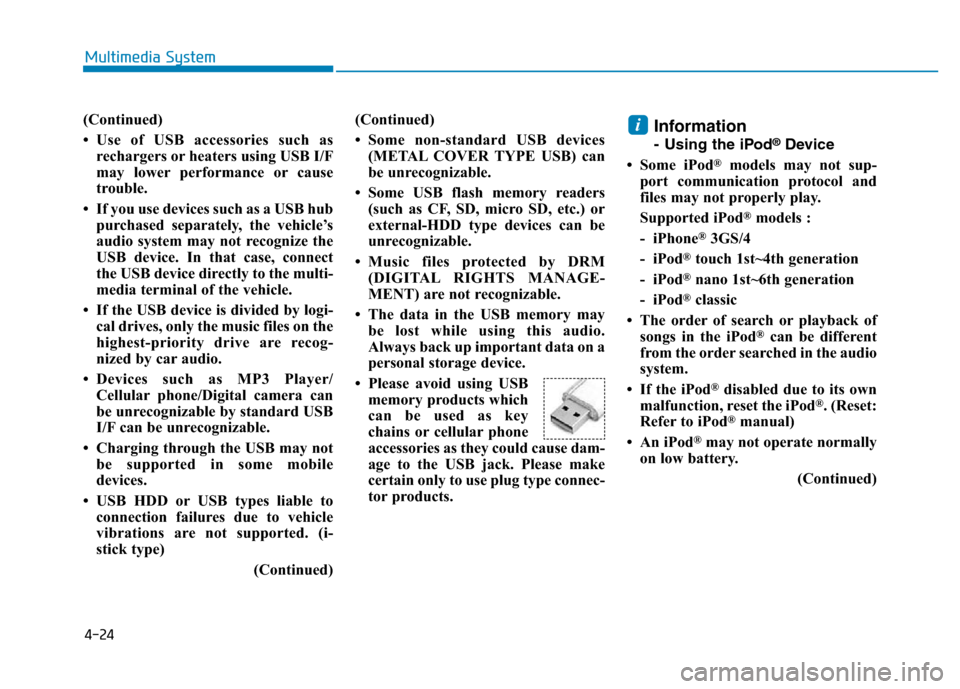
• Please avoid using USB
memory products which
can be used as key
chains or cellular phone
accessories as they could cause dam-
age to the USB jack. Please make
certain only to use plug type connec-
tor products.
Information
- Using the iPod®Device
• Some iPod
®models may not sup-
port communication protocol and
files may not properly play.
Supported iPod
®models :
- iPhone
®3GS/4
- iPod
®touch 1st~4th generation
- iPod
®nano 1st~6th generation
- iPod
®classic
• The order of search or playback of
songs in the iPod
®can be different
from the order searched in the audio
system.
• If the iPod
®disabled due to its own
malfunction, reset the iPod®. (Reset:
Refer to iPod®manual)
• An iPod
®may not operate normally
on low battery.
(Continued)
i
Page 285 of 637
4-28
Multimedia System
•
Bluetooth®Wireless Technology
Handsfree is a feature that
enables drivers to practice safe
driving. Connecting the car
audio system with a
Bluetooth®
Wireless Technology phone
allows the user to conveniently
make calls, receive calls, and
manage the phone book. Before
using the
Bluetooth®Wireless
Technology, carefully read the
contents of this user’s manual.
• Excessive use or operations
while driving may lead to negli-
gent driving practices and be
the cause of accidents.
• Do not operate the device exces-
sively while driving.
• Viewing the screen for pro-
longed periods of time is dan-
gerous and may lead to acci-
dents.
• When driving, view the screen
only for short periods of time.
Radio Mode
(Type A-1, Type A-2, Type A-3,
Type A-4 with RDS)
With the Radio Mode Button
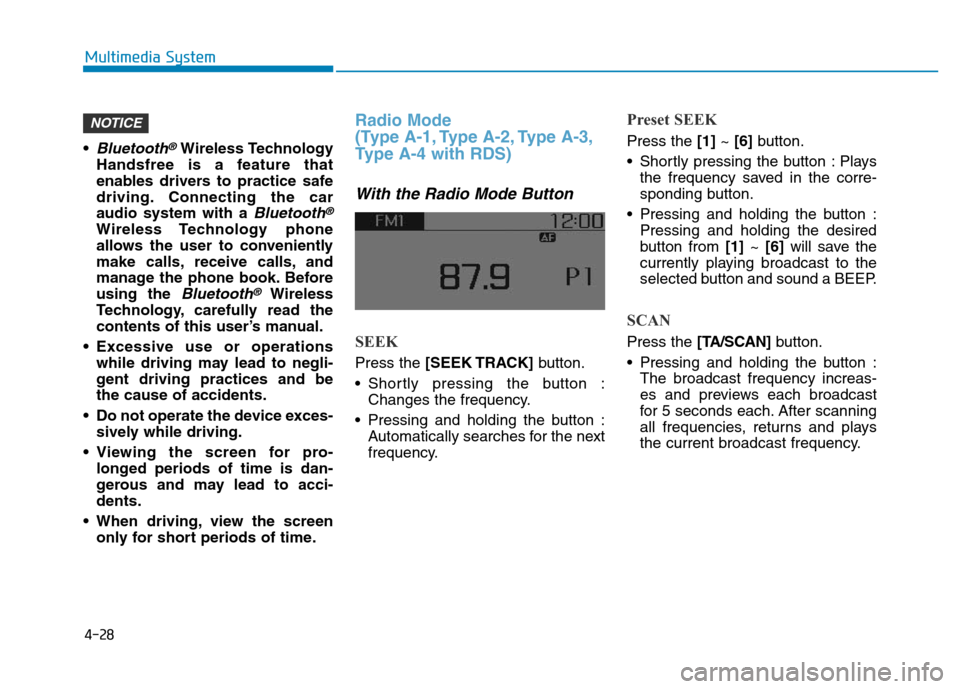
SEEK
Press the [SEEK TRACK]button.
• Shortly pressing the button :
Changes the frequency.
• Pressing and holding the button :
Automatically searches for the next
frequency.
Preset SEEK
Press the [1]~ [6]button.
• Shortly pressing the button : Plays
the frequency saved in the corre-
sponding button.
• Pressing and holding the button :
Pressing and holding the desired
button from [1]~ [6]will save the
currently playing broadcast to the
selected button and sound a BEEP.
SCAN
Press the [TA/SCAN]button.
• Pressing and holding the button :
The broadcast frequency increas-
es and previews each broadcast
for 5 seconds each. After scanning
all frequencies, returns and plays
the current broadcast frequency.
NOTICE
Page 286 of 637
![Hyundai Elantra 2017 Owners Guide 4-29
Multimedia System
4
Selecting through manual search
Turn the TUNE knob left/right to
adjust the frequency.
Traffic Announcement (TA)
Shortly pressing the [TA/SCAN]button
: Set [On/Off] TA (Traff](/img/35/14543/w960_14543-285.png "Hyundai Elantra 2017 Owners Guide 4-29
Multimedia System
4
Selecting through manual search
Turn the TUNE knob left/right to
adjust the frequency.
Traffic Announcement (TA)
Shortly pressing the [TA/SCAN]button
: Set [On/Off] TA (Traff")
4-29
Multimedia System
4
Selecting through manual search
Turn the TUNE knob left/right to
adjust the frequency.
Traffic Announcement (TA)
Shortly pressing the [TA/SCAN]button
: Set [On/Off] TA (Traffic Announcement)
mode.
MENU : Radio
Within [MENU] button are the AST
(Auto Store) and Info functions.
AST (Auto Store) : [1]Button
Select AST (Auto Store) to save fre-
quencies with superior reception to
presets[1] ~[6]. If no frequencies
are received, then the most recently
received frequency will be broad-
cast.
Saves only to the Preset memory [1]
~ [6]of FMA or AMA mode.
AF (Alternative Frequency) :
[2]Button
The Alternative Frequency option
can be turned On/Off.
Region : [3]Button
The Region option can be turned
On/Off.
News : [4]Button
The News option can be turned
On/Off.
Page 287 of 637
![Hyundai Elantra 2017 Owners Guide 4-30
Multimedia System
Radio Mode
(Type A-5, Type A-6)
With the Radio Mode Button
SEEK
Press the [SEEK TRACK]button
• Shortly pressing the button :
Changes the frequency.
• Pressing and holding th](/img/35/14543/w960_14543-286.png "Hyundai Elantra 2017 Owners Guide 4-30
Multimedia System
Radio Mode
(Type A-5, Type A-6)
With the Radio Mode Button
SEEK
Press the [SEEK TRACK]button
• Shortly pressing the button :
Changes the frequency.
• Pressing and holding th")
4-30
Multimedia System
Radio Mode
(Type A-5, Type A-6)
With the Radio Mode Button
SEEK
Press the [SEEK TRACK]button
• Shortly pressing the button :
Changes the frequency.
• Pressing and holding the button :
Automatically searches for the next
frequency.
Preset SEEK
Press the [1] ~[6]button
• Shortly pressing the button : Plays
the frequency saved in the corre-
sponding button.
• Pressing and holding the button :
Pressing and holding the desired
button from [1] ~[6]will save the
currently playing broadcast to the
selected button and sound a BEEP.
SCAN
Press the [SCAN] button
• Shortly pressing the button : The
broadcast frequency increases
and previews each broadcast for 5
seconds each. After scanning all
frequencies, returns and plays the
current broadcast frequency.
• Pressing and holding the button :
Previews the broadcasts saved in
Preset [1] ~[6]for 5 seconds
each.
Selecting through manual search
Turn the TUNE knob left/right to
adjust the frequency.
MENU : Radio
Within [MENU]button is the A.Store
(Auto Store).
A.Store (Auto Store) : [1] Button
Select A.Store(Auto Store) to save
frequencies with superior reception
to presets [1] ~[6]. If no frequencies
are received, then the most recently
received frequency will be broad-
cast.
Page 325 of 637
4-68
Multimedia System
(Continued)
• When the EQ features of an external
device, such as the iPod
®, and the
audio system are both active, EQ
effects could overlap and cause sound
deterioration and distortion.
Whenever possible, turn off the EQ
feature within the external device
upon use by connecting with the
audio system.
• Noise may occur when an iPod
®or
AUX device is connected. When such
devices are not being used, disconnect
the device for storage.
• When the iPod
®or AUX device
power is connected to the power jack,
playing the external device may
result in noise. In such cases, discon-
nect the power connection before use.
• Skipping or improper operation may
occur depending on the characteris-
tics of your iPod
®/iPhone®device.
• If your iPhone is connected to both
the Bluetooth
®Wireless Technology
and USB, the sound may not be prop-
erly played. In your iPhone
®, select
the Dock connector orBluetooth®
Wireless Technology to change the
sound output (source).
(Continued)(Continued)
• iPod
®mode cannot be operated when
the iPod®cannot be recognized due
to the playing of versions that do not
support communication protocols,
cases of iPod
®abnormalities and
defects.
• For fifth generation iPod
®Nano
devices, the iPod®may not be recog-
nized when the battery level is low.
Please charge the iPod
®for use.
• Search/play orders shown within the
iPod
®device may differ with the
orders shown within the audio sys-
tem.
• If the iPod
®malfunctions due to an
iPod®device defect, reset the iPod®
and try again. (To learn more, refer to
your iPod®manual)
• Some iPod
®s may not sync with the
System depending on its version. If
the Media is removed before the
Media is recognized, then the system
may not properly restore the previ-
ously operated mode. (iPad charging
is not supported.)
• Beside support 1M cable when pur-
chasing iPod
®/iPhone®products,
Long Cable cannot be recognized.
Information
- Using the Bluetooth®Wireless
Technology Audio Mode
•Bluetooth
®Wireless Technology
Audio Mode can be used only when
a Bluetooth
®Wireless Technology
phone has been connected.
•Bluetooth
®Wireless Technology
Audio Mode will not be available
when connecting mobile phones that
do not support this feature.
• While Bluetooth
®Wireless
Technology Audio is playing, if the
Bluetooth
®Wireless Technology
phone is connected, then the music
will also stop.
• Moving the Track up/down while
playing Bluetooth
®Wireless
Technology audio mode may result
in pop noises in some mobile
phones.
•Bluetooth
®Wireless Technology
streaming audio may not be sup-
ported in some mobile phones.
(Continued)
i