reverse Hyundai Elantra 2017 Owner's Guide
[x] Cancel search | Manufacturer: HYUNDAI, Model Year: 2017, Model line: Elantra, Model: Hyundai Elantra 2017Pages: 637, PDF Size: 15.02 MB
Page 415 of 637
5-29
Driving your vehicle
5
If you need to use the shift-lock
release, we recommend that the sys-
tem be inspected by an authorized
HYUNDAI dealer immediately.
Ignition key interlock system
(if equipped)
The ignition key cannot be removed
unless the shift lever is in the P
(Park) position.
Parking
Always come to a complete stop and
continue to depress the brake pedal.
Move the shift lever into the P (Park)
position, apply the parking brake,
and place the ignition switch in the
LOCK/OFF position. Take the Key
with you when exiting the vehicle.
Good driving practices
• Never move the shift lever from P
(Park) or N (Neutral) to any other
position with the accelerator pedal
depressed.
• Never move the shift lever into P
(Park) when the vehicle is in
motion.
Be sure the vehicle is completely
stopped before you attempt to shift
into R (Reverse) or D (Drive).
• Do not move the shift lever to N
(Neutral) when driving. Doing so
may result in an accident because
of a loss of engine braking and the
transmission could be damaged.
• Do not drive with your foot resting
on the brake pedal. Even light, but
consistent pedal pressure can
result in the brakes overheating,
brake wear and possibly even
brake failure. When you stay in the vehicle
with the engine running, be
careful not to depress the accel-
erator pedal for a long period of
time. The engine or exhaust
system may overheat and start
a fire.
The exhaust gas and the
exhaust system are very hot.
Keep away from the exhaust
system components.
Do not stop or park over flam-
mable materials, such as dry
grass, paper or leaves. They
may ignite and cause a fire.
WARNING
Page 417 of 637
5-31
Driving your vehicle
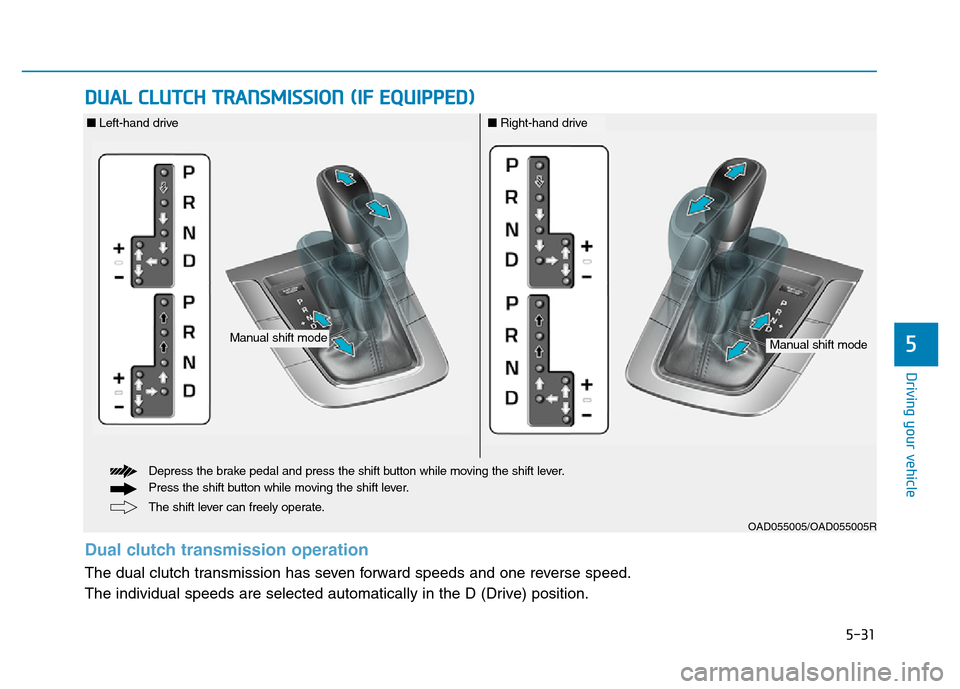
DUAL CLUTCH TRANSMISSION (IF EQUIPPED)
5
OAD055005/OAD055005R
The shift lever can freely operate. Depress the brake pedal and press the shift button while moving the shift lever.
Press the shift button while moving the shift lever.
Manual shift modeManual shift mode
■Left-hand drive■Right-hand drive
Dual clutch transmission operation
The dual clutch transmission has seven forward speeds and one reverse speed.
The individual speeds are selected automatically in the D (Drive) position.
Page 418 of 637
5-32
• The dual clutch transmission gives
the driving feel of a manual trans-
mission, yet provides the ease of a
fully automatic transmission. Unlike
a traditional automatic transmis-
sion, the gear shifting can some-
times be felt and heard on the dual
clutch transmission, as the actua-
tors engage the clutch and the
gear is selected.
The dual clutch transmission can
be thought of as an automatically
shifting manual transmission.
When D (Drive) is selected, the
transmission will automatically shift
through the gears similar to a con-
ventional automatic transmission.• The dual clutch transmission incor-
porates a dry-type dual clutch
mechanism, which allows for better
acceleration performance and
increased fuel efficiency while driv-
ing. But it differs from a conven-
tional automatic transmission in
that it does not incorporate a
torque converter. Instead, the tran-
sition from one gear to the next is
managed by clutch slip, especially
at lower speeds. As a result, shifts
are sometimes more noticeable,
and a light vibration can be felt as
the transmission shaft speed is
matched with the engine shaft
speed. This is a normal condition of
the dual clutch transmission.
• The dry-type clutch transfers
torque more directly and provides
a direct-drive feeling which may
feel different from a conventional
automatic transmission. This may
be more noticeable when launch-
ing the vehicle from a stop or when
traveling at low, stop-and-go vehi-
cle speeds.
Driving your vehicle
To reduce the risk of serious
injury or death:
•ALWAYS check the surround-
ing areas near your vehicle for
people, especially children,
before shifting a vehicle into
D (Drive) or R (Reverse).
•Before leaving the driver's
seat, always make sure the
shift lever is in the P (Park)
position, then set the parking
brake, and place the ignition
switch in the LOCK/OFF posi-
tion. Unexpected and sudden
vehicle movement can occur
if these precautions are not
followed.
(Continued)
(Continued)
•Do not use the engine brake
(shifting from a high gear to
lower gear) rapidly on slip-
pery roads. The vehicle may
slip causing an accident.
WARNING
Page 421 of 637
5-35
Driving your vehicle
(Continued)
• During the first 1,500 km (1,000
miles), you may feel that the
vehicle may not be smooth
when accelerating at low speed.
During this break-in period, the
shift quality and performance of
your new vehicle is continuous-
ly optimized.
• Always come to a complete stop
before shifting into D (Drive) or
R (Reverse).
• Do not put the shift lever in N
(Neutral) while driving.Shift lever position
The indicator in the instrument clus-
ter displays the shift lever position
when the ignition switch is in the ON
position.
P (Park)
Always come to a complete stop
before shifting into P (Park).
To shift from P (Park), you must
depress firmly on the brake pedal
and make sure your foot is off the
accelerator pedal.
If you have done all of the above
and still cannot shift the lever out
of P (Park), see "Shift-Lock
Release" in this chapter.
The shift lever must be in P (Park)
before turning the engine off.
5
•Shifting into P (Park) while the
vehicle is in motion may
cause you to lose control of
the vehicle.
•After the vehicle has stopped,
always make sure the shift
lever is in P (Park), apply the
parking brake, and turn the
engine off.
•Do not use the P (Park) posi-
tion in place of the parking
brake.
WARNING
Page 422 of 637
5-36
R (Reverse)
Use this position to drive the vehicle
backward.
Always come to a complete stop
before shifting into or out of R
(Reverse); you may damage the
transmission if you shift into R
(Reverse) while the vehicle is in
motion.
N (Neutral)
The wheels and transmission are not
engaged.
Use N (Neutral) if you need to restart
a stalled engine, or if it is necessary
to stop with the engine ON. Shift into
P (Park) if you need to leave your
vehicle for any reason.
Always depress the brake pedal
when you are shifting from N
(Neutral) to another gear.
D (Drive)
This is the normal driving position.
The transmission will automatically
shift through a 7-gear sequence, pro-
viding the best fuel economy and
power.
For extra power when passing anoth-
er vehicle or driving uphill, depress
the accelerator fully. The transmis-
sion will automatically downshift to
the next lower gear (or gears, as
appropriate).
The DRIVE MODE switch, located on
the shift lever console, allows the driv-
er to switch from NORMAL mode to
ECO or SPORT mode. (if equipped)
For more information, refer to
"Drive Mode Integrated Control
System" later in this chapter.
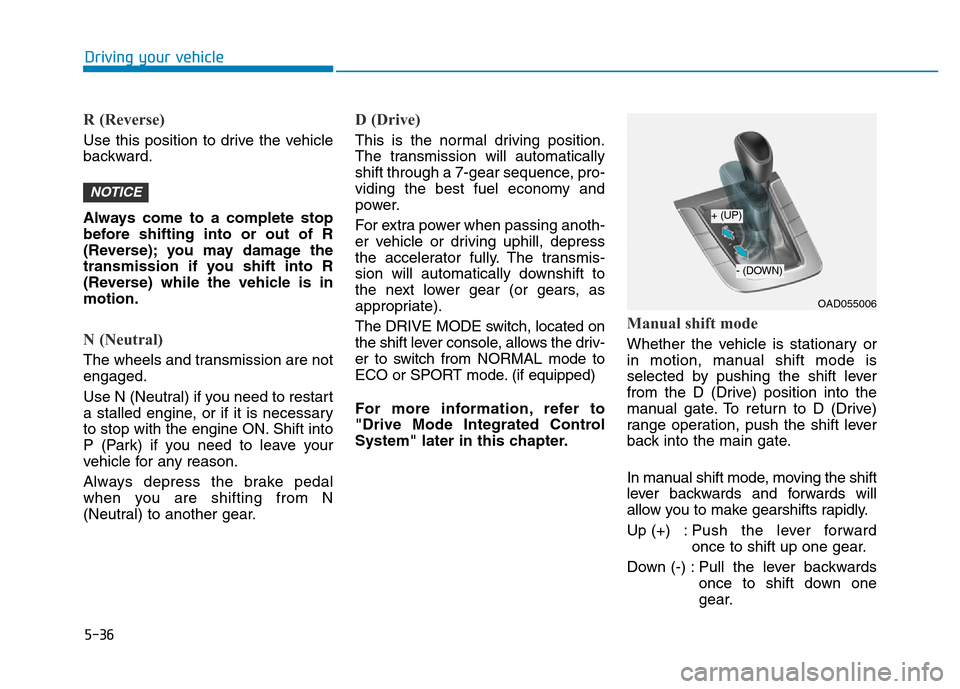
Manual shift mode
Whether the vehicle is stationary or
in motion, manual shift mode is
selected by pushing the shift lever
from the D (Drive) position into the
manual gate. To return to D (Drive)
range operation, push the shift lever
back into the main gate.
In manual shift mode, moving the shift
lever backwards and forwards will
allow you to make gearshifts rapidly.
Up (+) : Push the lever forward
once to shift up one gear.
Down (-) : Pull the lever backwards
once to shift down one
gear.
NOTICE
Driving your vehicle
OAD055006
+ (UP)
- (DOWN)
Page 423 of 637
5-37
Driving your vehicle
Information
• Only the seven forward gears can be
selected. To reverse or park the
vehicle, move the shift lever to the R
(Reverse) or P (Park) position as
required.
• Downshifts are made automatically
when the vehicle slows down. When
the vehicle stops, 1
stgear is automat-
ically selected.
• When the engine rpm approaches
the red zone the transmission will
upshift automatically.
• If the driver presses the lever to
+ (Up) or - (Down) position, the
transmission may not make the
requested gear change if the next
gear is outside of the allowable
engine rpm range. The driver must
execute upshifts in accordance with
road conditions, taking care to keep
the engine rpms below the red zone.
(Continued)(Continued)
• When driving on a slippery road,
push the shift lever forward into the
+ (Up) position. This causes the
transmission to shift into the 2
nd
gear which is better for smooth driv-
ing on a slippery road. Push the shift
lever to the - (Down) side to shift
back to the 1
stgear.
• When driving in manual shift mode,
slow down before shifting to a lower
gear. Otherwise, the lower gear may
not be engaged if the engine rpms
are outside of the allowable range.
Shift-lock system
For your safety, the dual clutch trans-
mission has a shift-lock system
which prevents shifting the transmis-
sion from P (Park) into R (Reverse)
unless the brake pedal is depressed.
To shift the transmission from P
(Park) into R (Reverse):
1. Depress and hold the brake pedal.
2. Start the engine or place the igni-
tion switch in the ON position.
3. Move the shift lever.
Shift-lock release
If the shift lever cannot be moved
from the P (Park) position into R
(Reverse) position with the brake
pedal depressed, continue depress-
ing the brake, and then do the follow-
ing:
i
5
Page 425 of 637
5-39
Driving your vehicle
Parking
Always come to a complete stop and
continue to depress the brake pedal.
Move the shift lever into the P (Park)
position, apply the parking brake,
and place the ignition switch in the
LOCK/OFF position. Take the Key
with you when exiting the vehicle.
Good driving practices
• Never move the shift lever from P
(Park) or N (Neutral) to any other
position with the accelerator pedal
depressed.
• Never move the shift lever into P
(Park) when the vehicle is in
motion.
Be sure the vehicle is completely
stopped before you attempt to shift
into R (Reverse) or D (Drive).
• Do not move the shift lever to N
(Neutral) when driving. Doing so
may result in an accident because
of a loss of engine braking and the
transmission could be damaged.
• Do not drive with your foot resting
on the brake pedal. Even light, but
consistent pedal pressure can
result in the brakes overheating,
brake wear and possibly even
brake failure.
• Always apply the parking brake
when leaving the vehicle. Do not
depend on placing the transmis-
sion in P (Park) to keep the vehicle
from moving.• Exercise extreme caution when
driving on a slippery surface. Be
especially careful when braking,
accelerating or shifting gears. On a
slippery surface, an abrupt change
in vehicle speed can cause the
drive wheels to lose traction and
may cause loss of vehicle control
resulting in an accident
• Optimum vehicle performance and
economy is obtained by smoothly
depressing and releasing the
accelerator.
5
When you stay in the vehicle
with the engine running, be
careful not to depress the accel-
erator pedal for a long period of
time. The engine or exhaust
system may overheat and start
a fire.
The exhaust gas and the
exhaust system are very hot.
Keep away from the exhaust
system components.
Do not stop or park over flam-
mable materials, such as dry
grass, paper or leaves. They
may ignite and cause a fire.
WARNING
Page 448 of 637

5-62
Driving your vehicle
The Blind Spot Detection System
(BSD) uses radar sensors in the rear
bumper to monitor and warn the driv-
er of an approaching vehicle in the
driver's blind spot area.
The system monitors the rear area of
the vehicle and provides information
to the driver with an audible alert and
a indicator on the outside side view
mirrors.(1) BSD (Blind Spot Detection)
The blind spot detection range
varies relative to vehicle speed.
Note that if your vehicle is travel-
ing much faster than the vehicles
around you, the warning will not
occur.
(2) LCA (Lane Change Assist)
The Lane Change Assist feature
will alert you when a vehicle is
approaching in an adjacent lane
at a high rate of speed. If the driv-
er activates the turn signal when
the system detects an oncoming
vehicle, the system sounds an
audible alert.
(3) RCTA (Rear Cross Traffic Alert)
The Rear Cross Traffic Alert fea-
ture monitors approaching cross
traffic from the left and right side
of the vehicle when your vehicle is
in reverse. The feature will operate
when the vehicle is moving in
reverse below about 10 km/h (6
mph). If oncoming cross traffic is
detected a warning chime will
sound.
BLIND SPOT DETECTION SYSTEM (BSD) (IF EQUIPPED)
OTL055139
Blind spot area
Closing at high speed
•Always be aware of road con-
ditions while driving and be
alert for unexpected situations
even though the Blind Spot
Detection System is operat-
ing.
•The Blind Spot Detection
System (BSD) is a supplemen-
tal system to assist you. Do
not entirely rely on the sys-
tem. Always pay attention,
while driving, for your safety.
•The Blind Spot Detection
System (BSD) is not a substi-
tute for proper and safe driving.
Always drive safely and use
caution when changing lanes
or backing up the vehicle. The
Blind Spot Detection System
(BSD) may not detect every
object alongside the vehicle.
WARNING
Page 452 of 637

5-66
Driving your vehicle
When the BSD canceled warning
message is displayed in the cluster,
check to make sure that the rear
bumper is free from any dirt or snow
in the areas where the sensor is
located. Remove any dirt, snow, or
foreign material that could interfere
with the radar sensors.
After any dirt or debris is removed,
the BSD system should operate nor-
mally after about 10 minutes of driv-
ing the vehicle.
If the system still does not operate
normally have your vehicle inspected
by an authorized HYUNDAI dealer.
Check BSD system
If there is a problem with the BSD
system, a warning message will
appear and the light on the switch
will turn off. The system will turn off
automatically. We recommend that
you have your vehicle inspected by
an authorized HYUNDAI dealer.
RCTA (Rear Cross Traffic Alert)
(if equipped)
The Rear Cross Traffic Alert feature
monitors approaching cross traffic
from the left and right side of the
vehicle when your vehicle is in
reverse.
■Type A■Type B
OAD055091L/OTLE055040
Page 453 of 637

5-67
Driving your vehicle
5
Operating conditions
To operate:
Go to the User Settings mode
(Driving Assist) and select Rear
Cross Traffic Alert on the LCD dis-
play (For more details, refer to
"LCD Display" in chapter 3.). The
system will turn on and standby to
activate. The system will activate
when vehicle speed is below 10 km/h
(6.2 mph) and with the shift lever in R
(Reverse).
Information
The Rear Cross Traffic Alert (RCTA)
detecting range is approximately
0.5 m ~ 20 m (1 ft ~ 65 ft). An
approaching vehicle will be detected if
their vehicle speed is within 4 km/h ~
36 km/h (2.5 ~ 22.5 mph ).
Note that the detecting range may
vary under certain conditions. As
always, use caution and pay close
attention to your surroundings when
backing up your vehicle.
Warning type
If the vehicle detected by the sensors
approaches your vehicle, the warn-
ing chime will sound, the warning
light on the outside rearview mirror
will blink and a message will appear
on the LCD display.
i
• Type A■ Left
■ Right
• Type B
• Type A• Type B
OAD055046L/OAD055048L
OAD055047L/OAD055049L
OAD055092L/OAD055093L
■ Type A■ Type B