trans Hyundai Elantra 2017 Owner's Guide
[x] Cancel search | Manufacturer: HYUNDAI, Model Year: 2017, Model line: Elantra, Model: Hyundai Elantra 2017Pages: 637, PDF Size: 15.02 MB
Page 169 of 637
3-74
Convenient features of your vehicle
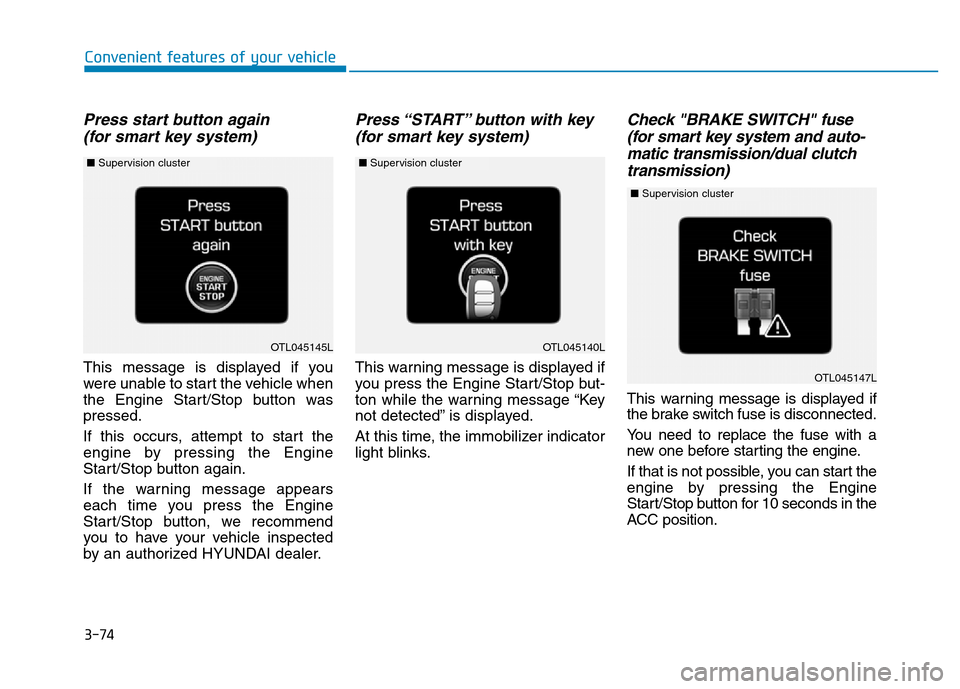
Press start button again
(for smart key system)
This message is displayed if you
were unable to start the vehicle when
the Engine Start/Stop button was
pressed.
If this occurs, attempt to start the
engine by pressing the Engine
Start/Stop button again.
If the warning message appears
each time you press the Engine
Start/Stop button, we recommend
you to have your vehicle inspected
by an authorized HYUNDAI dealer.
Press “START” button with key
(for smart key system)
This warning message is displayed if
you press the Engine Start/Stop but-
ton while the warning message “Key
not detected” is displayed.
At this time, the immobilizer indicator
light blinks.
Check "BRAKE SWITCH" fuse
(for smart key system and auto-
matic transmission/dual clutch
transmission)
This warning message is displayed if
the brake switch fuse is disconnected.
You need to replace the fuse with a
new one before starting the engine.
If that is not possible, you can start the
engine by pressing the Engine
Start/Stop button for 10 seconds in the
ACC position.
OTL045140L
OTL045147L
OTL045145L
■Supervision cluster ■Supervision cluster
■Supervision cluster
Page 170 of 637
3-75
Convenient features of your vehicle
3
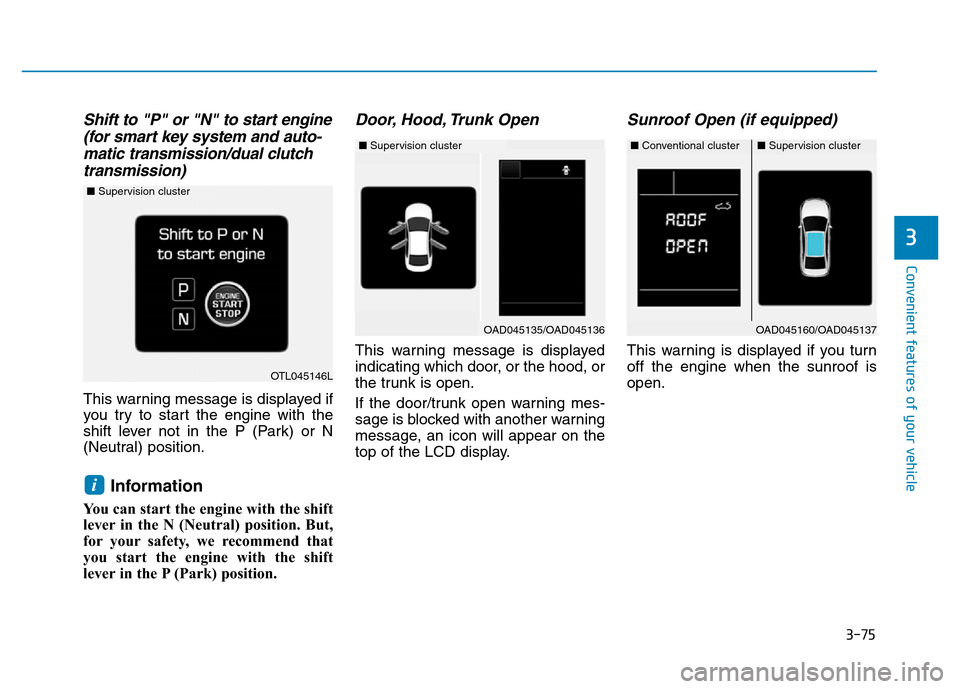
Shift to "P" or "N" to start engine
(for smart key system and auto-
matic transmission/dual clutch
transmission)
This warning message is displayed if
you try to start the engine with the
shift lever not in the P (Park) or N
(Neutral) position.
Information
You can start the engine with the shift
lever in the N (Neutral) position. But,
for your safety, we recommend that
you start the engine with the shift
lever in the P (Park) position.
Door, Hood, Trunk Open
This warning message is displayed
indicating which door, or the hood, or
the trunk is open.
If the door/trunk open warning mes-
sage is blocked with another warning
message, an icon will appear on the
top of the LCD display.
Sunroof Open (if equipped)
This warning is displayed if you turn
off the engine when the sunroof is
open.
i
OAD045160/OAD045137
OTL045146L
■Supervision cluster
■Conventional cluster■Supervision cluster
OAD045135/OAD045136
■Supervision cluster
Page 172 of 637
3-77
Convenient features of your vehicle
3
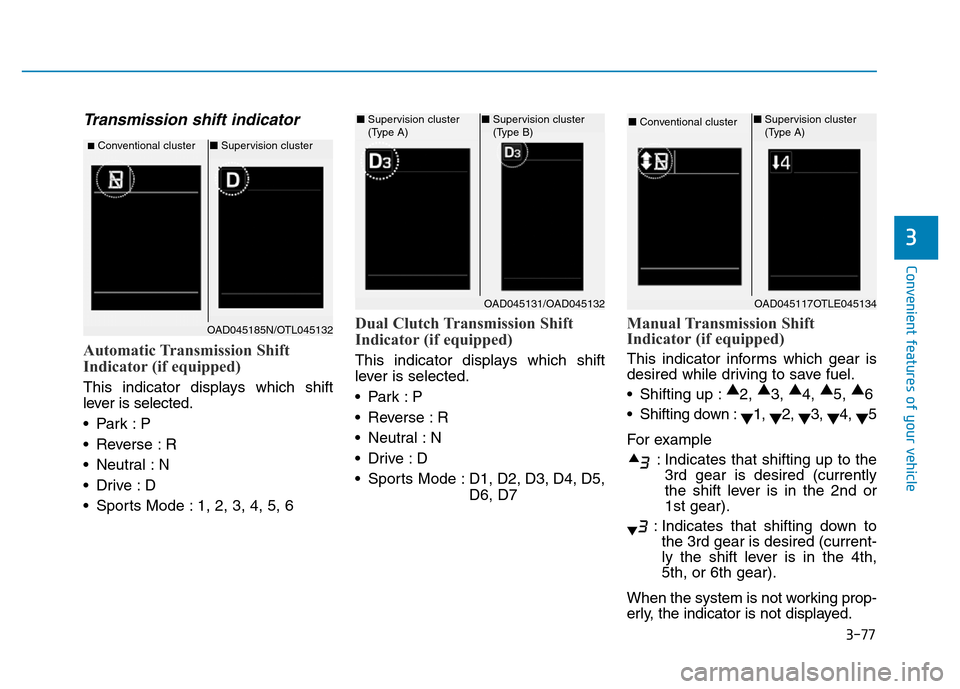
Transmission shift indicator
Automatic Transmission Shift
Indicator (if equipped)
This indicator displays which shift
lever is selected.
•Park :P
• Reverse : R
• Neutral : N
•Drive :D
• Sports Mode : 1, 2, 3, 4, 5, 6
Dual Clutch Transmission Shift
Indicator (if equipped)
This indicator displays which shift
lever is selected.
•Park :P
• Reverse : R
• Neutral : N
•Drive :D
• Sports Mode : D1, D2, D3, D4, D5,
D6, D7
Manual Transmission Shift
Indicator (if equipped)
This indicator informs which gear is
desired while driving to save fuel.
• Shifting up :▲
2, ▲
3, ▲
4, ▲
5, ▲
6
• Shifting down :
▼1,
▼2,
▼3,
▼4,
▼5
For example
: Indicates that shifting up to the
3rd gear is desired (currently
the shift lever is in the 2nd or
1st gear).
: Indicates that shifting down to
the 3rd gear is desired (current-
ly the shift lever is in the 4th,
5th, or 6th gear).
When the system is not working prop-
erly, the indicator is not displayed.
■Conventional cluster■Supervision cluster
OAD045131/OAD045132
■Supervision cluster
(Type A)■Supervision cluster
(Type B)
OAD045117OTLE045134
■Conventional cluster ■Supervision cluster
(Type A)
OAD045185N/OTL045132
Page 178 of 637
3-83
Convenient features of your vehicle
3
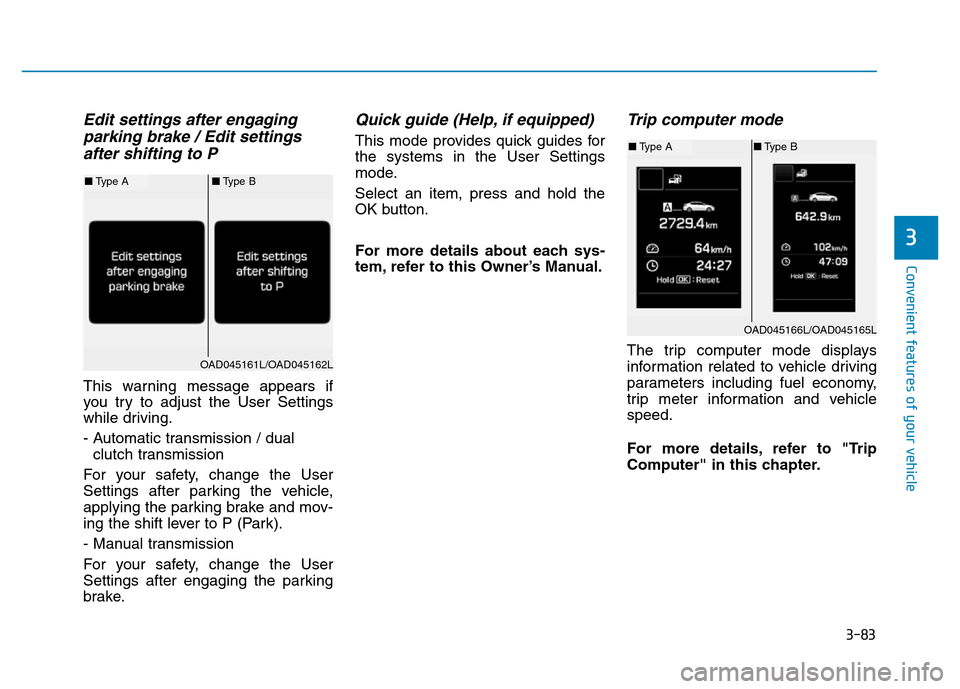
Edit settings after engaging
parking brake / Edit settings
after shifting to P
This warning message appears if
you try to adjust the User Settings
while driving.
- Automatic transmission / dual
clutch transmission
For your safety, change the User
Settings after parking the vehicle,
applying the parking brake and mov-
ing the shift lever to P (Park).
- Manual transmission
For your safety, change the User
Settings after engaging the parking
brake.
Quick guide (Help, if equipped)
This mode provides quick guides for
the systems in the User Settings
mode.
Select an item, press and hold the
OK button.
For more details about each sys-
tem, refer to this Owner’s Manual.
Trip computer mode
The trip computer mode displays
information related to vehicle driving
parameters including fuel economy,
trip meter information and vehicle
speed.
For more details, refer to "Trip
Computer" in this chapter.
OAD045166L/OAD045165L
■Type A■Type B
OAD045161L/OAD045162L
■Type A■Type B
Page 181 of 637
3-86
Convenient features of your vehicle
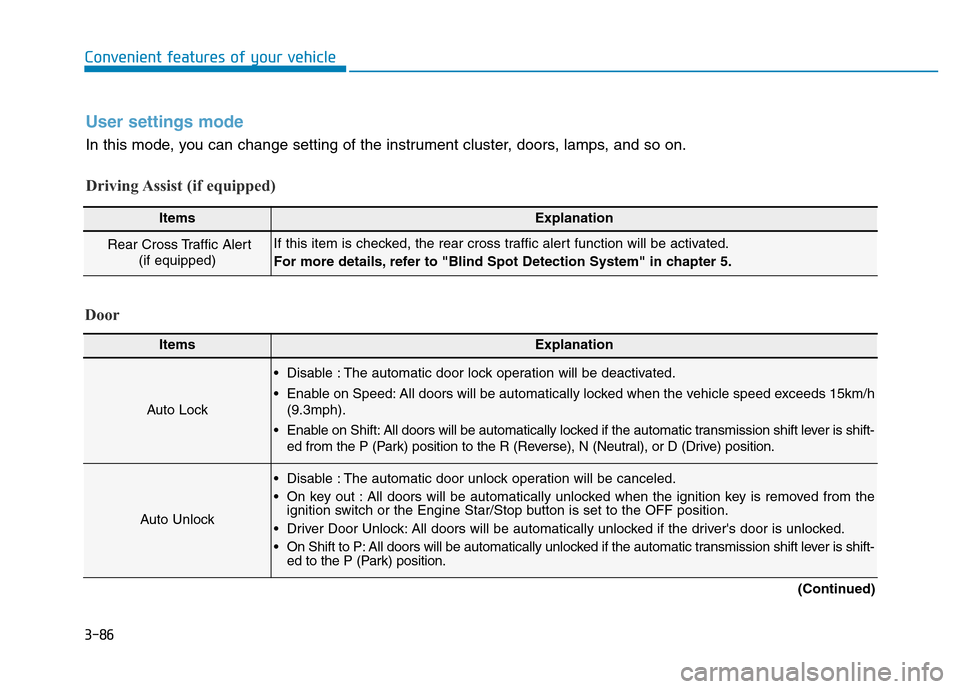
User settings mode
In this mode, you can change setting of the instrument cluster, doors, lamps, and so on.
Driving Assist (if equipped)
ItemsExplanation
Rear Cross Traffic Alert
(if equipped)If this item is checked, the rear cross traffic alert function will be activated.
For more details, refer to "Blind Spot Detection System" in chapter 5.
Door
ItemsExplanation
Auto Lock
• Disable : The automatic door lock operation will be deactivated.
• Enable on Speed: All doors will be automatically locked when the vehicle speed exceeds 15km/h
(9.3mph).
• Enable on Shift: All doors will be automatically locked if the automatic transmission shift lever is shift-
ed from the P (Park) position to the R (Reverse), N (Neutral), or D (Drive) position.
Auto Unlock
• Disable : The automatic door unlock operation will be canceled.
• On key out : All doors will be automatically unlocked when the ignition key is removed from the
ignition switch or the Engine Star/Stop button is set to the OFF position.
• Driver Door Unlock: All doors will be automatically unlocked if the driver's door is unlocked.
• On Shift to P: All doors will be automatically unlocked if the automatic transmission shift lever is shift-
ed to the P (Park) position.
(Continued)
Page 211 of 637
3-116
Convenient features of your vehicle
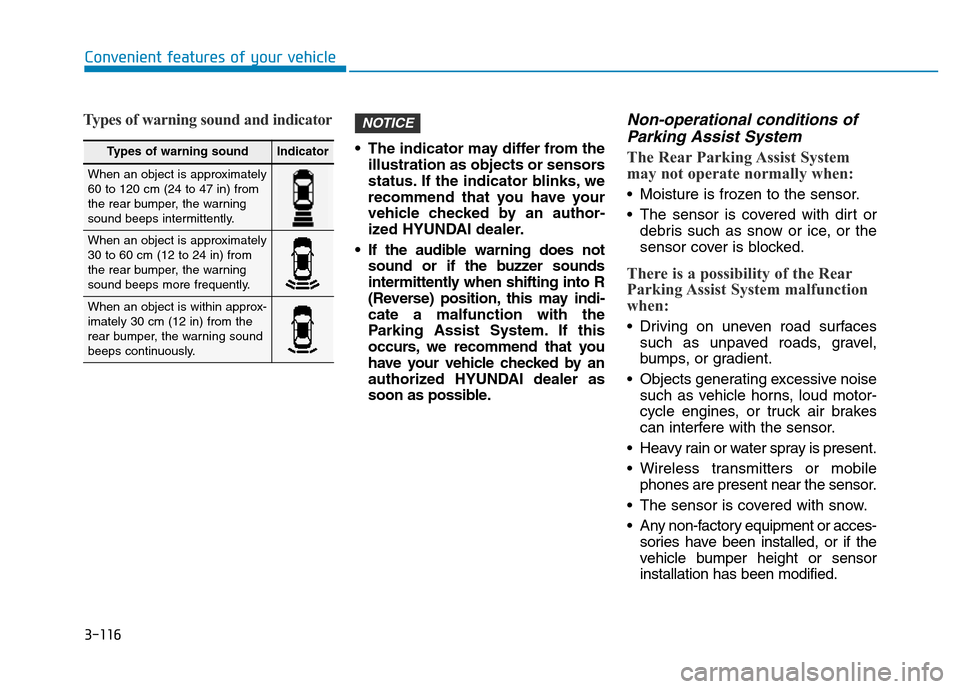
Types of warning sound and indicator
• The indicator may differ from the
illustration as objects or sensors
status. If the indicator blinks, we
recommend that you have your
vehicle checked by an author-
ized HYUNDAI dealer.
• If the audible warning does not
sound or if the buzzer sounds
intermittently when shifting into R
(Reverse) position, this may indi-
cate a malfunction with the
Parking Assist System. If this
occurs, we recommend that you
have your vehicle checked by an
authorized HYUNDAI dealer as
soon as possible.
Non-operational conditions of
Parking Assist System
The Rear Parking Assist System
may not operate normally when:
• Moisture is frozen to the sensor.
• The sensor is covered with dirt or
debris such as snow or ice, or the
sensor cover is blocked.
There is a possibility of the Rear
Parking Assist System malfunction
when:
• Driving on uneven road surfaces
such as unpaved roads, gravel,
bumps, or gradient.
• Objects generating excessive noise
such as vehicle horns, loud motor-
cycle engines, or truck air brakes
can interfere with the sensor.
• Heavy rain or water spray is present.
• Wireless transmitters or mobile
phones are present near the sensor.
• The sensor is covered with snow.
• Any non-factory equipment or acces-
sories have been installed, or if the
vehicle bumper height or sensor
installation has been modified.
NOTICE
Types of warning soundIndicator
When an object is approximately
60 to 120 cm (24 to 47 in) from
the rear bumper, the warning
sound beeps intermittently.
When an object is approximately
30 to 60 cm (12 to 24 in) from
the rear bumper, the warning
sound beeps more frequently.
When an object is within approx-
imately 30 cm (12 in) from the
rear bumper, the warning sound
beeps continuously.
Page 215 of 637
3-120
Convenient features of your vehicle
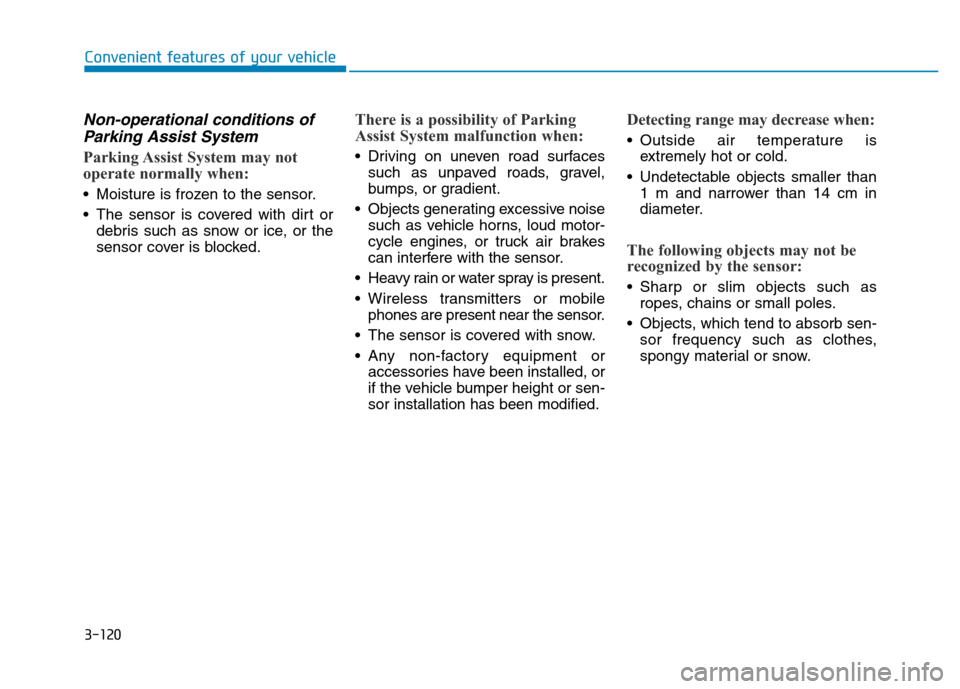
Non-operational conditions of
Parking Assist System
Parking Assist System may not
operate normally when:
• Moisture is frozen to the sensor.
• The sensor is covered with dirt or
debris such as snow or ice, or the
sensor cover is blocked.
There is a possibility of Parking
Assist System malfunction when:
• Driving on uneven road surfaces
such as unpaved roads, gravel,
bumps, or gradient.
• Objects generating excessive noise
such as vehicle horns, loud motor-
cycle engines, or truck air brakes
can interfere with the sensor.
• Heavy rain or water spray is present.
• Wireless transmitters or mobile
phones are present near the sensor.
• The sensor is covered with snow.
• Any non-factory equipment or
accessories have been installed, or
if the vehicle bumper height or sen-
sor installation has been modified.
Detecting range may decrease when:
• Outside air temperature is
extremely hot or cold.
• Undetectable objects smaller than
1 m and narrower than 14 cm in
diameter.
The following objects may not be
recognized by the sensor:
• Sharp or slim objects such as
ropes, chains or small poles.
• Objects, which tend to absorb sen-
sor frequency such as clothes,
spongy material or snow.
Page 260 of 637

4-3
Multimedia System
4
Antenna
Shark fin antenna (1, if equipped)
The shark fin antenna will receive the
transmit data.
(for example : GPS)
Glass antenna (2)
Your vehicle uses a glass antenna to
receive both AM and FM signals.• Do not clean the inside of the
rear window glass with a cleaner
or use a scraper to remove for-
eign deposits as this may cause
damage to the antenna elements.
• Avoid adding metallic coatings
such as Ni, Cd, and so on. These
can degrade the receiving AM
and FM broadcast signals.• To prevent damage to the rear
glass antenna, never use sharp
instruments or window cleaner
containing abrasives to clean
the window. Clean the inside
surface of the rear glass window
with a piece of soft cloth.
• When putting a sticker on the
inside surface of the rear win-
dow, be careful not to damage to
the rear glass antenna.
• Do not put sharp instruments
nearby the rear glass antenna.
• Tinted rear window may affect the
proper functioning of the antenna.
NOTICENOTICE
OAD045424
Page 263 of 637

4-6
Multimedia System
How vehicle radio works
FM reception
AM and FM radio signals are broad-
cast from transmitter towers located
around your city. They are intercept-
ed by the radio antenna on your vehi-
cle. This signal is then received by
the radio and sent to your vehicle
speakers.
When a strong radio signal has
reached your vehicle, the precise
engineering of your audio system
ensures the best possible quality
reproduction. However, in some
cases the signal coming to your vehi-
cle may not be strong and clear.This can be due to factors, such as
the distance from the radio station,
closeness of other strong radio sta-
tions or the presence of buildings,
bridges or other large obstructions in
the area.
AM (MW, LW) reception
AM broadcasts can be received at
greater distances than FM broad-
casts. This is because AM radio
waves are transmitted at low fre-
quencies. These long, low frequency
radio waves can follow the curvature
of the earth rather than travelling
straight out into the atmosphere. In
addition, they curve around obstruc-
tions so that they can provide better
signal coverage.
OJF045309L
OJF045308L
Page 264 of 637

4-7
Multimedia System
4
FM radio station
FM broadcasts are transmitted at
high frequencies and do not bend to
follow the earth's surface. Because
of this, FM broadcasts generally
begin to fade at short distances from
the station. Also, FM signals are eas-
ily affected by buildings, mountains,
or other obstructions. These can
result in certain listening conditions
which might lead you to believe a
problem exists with your radio. The
following conditions are normal and
do not indicate radio trouble :• Fading - As your vehicle moves
away from the radio station, the
signal will weaken and sound will
begin to fade. When this occurs,
we suggest that you select another
stronger station.
• Flutter/Static - Weak FM signals or
large obstructions between the
transmitter and your radio can dis-
turb the signal causing static or
fluttering noises to occur. Reducing
the treble level may lessen this
effect until the disturbance clears.• Station Swapping - As a FM signal
weakens, another more powerful
signal near the same frequency
may begin to play. This is because
your radio is designed to lock onto
the clearest signal. If this occurs,
select another station with a
stronger signal.
• Multi-Path Cancellation - Radio
signals being received from sever-
al directions can cause distortion
or fluttering. This can be caused by
a direct and reflected signal from
the same station, or by signals
from two stations with close fre-
quencies. If this occurs, select
another station until the condition
has passed.
OJF045311L
¢¢¢
JBM004
OJF045310L