steering Hyundai Elantra 2017 Service Manual
[x] Cancel search | Manufacturer: HYUNDAI, Model Year: 2017, Model line: Elantra, Model: Hyundai Elantra 2017Pages: 637, PDF Size: 15.02 MB
Page 392 of 637
5-6
Driving your vehicle
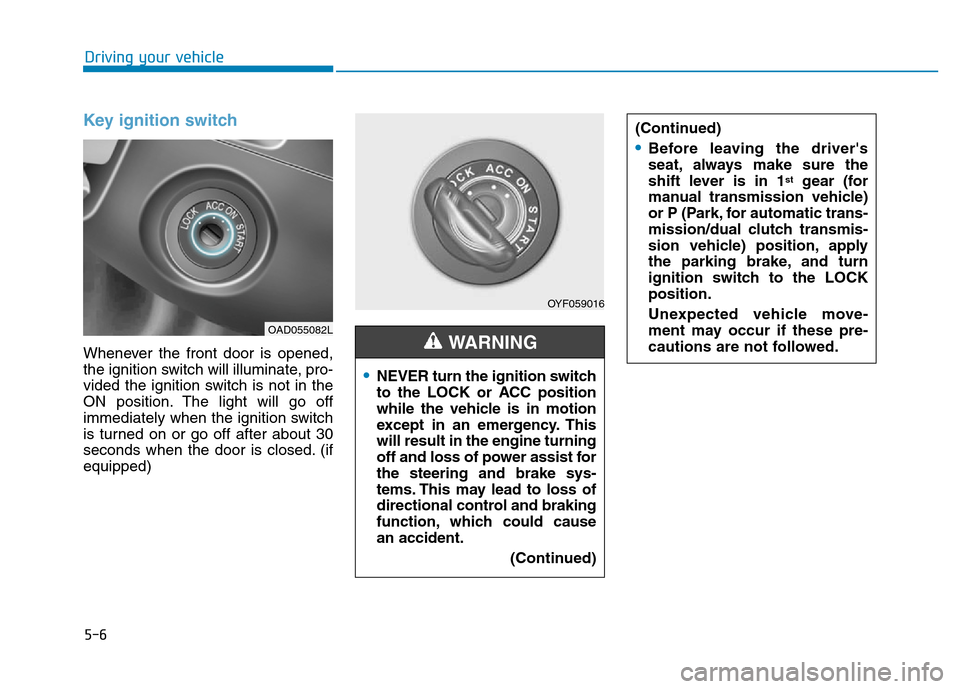
Key ignition switch
Whenever the front door is opened,
the ignition switch will illuminate, pro-
vided the ignition switch is not in the
ON position. The light will go off
immediately when the ignition switch
is turned on or go off after about 30
seconds when the door is closed. (if
equipped)
OYF059016
•NEVER turn the ignition switch
to the LOCK or ACC position
while the vehicle is in motion
except in an emergency. This
will result in the engine turning
off and loss of power assist for
the steering and brake sys-
tems. This may lead to loss of
directional control and braking
function, which could cause
an accident.
(Continued)
WARNING
(Continued)
•Before leaving the driver's
seat, always make sure the
shift lever is in 1
stgear (for
manual transmission vehicle)
or P (Park, for automatic trans-
mission/dual clutch transmis-
sion vehicle) position, apply
the parking brake, and turn
ignition switch to the LOCK
position.
Unexpected vehicle move-
ment may occur if these pre-
cautions are not followed.
OAD055082L
Page 393 of 637
5-7
Driving your vehicle
5
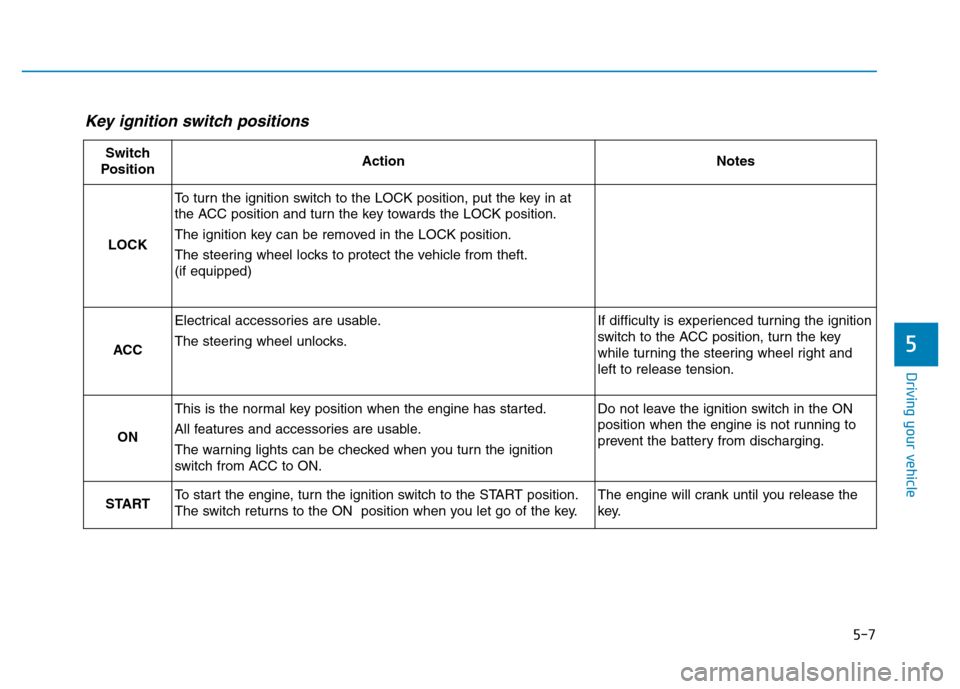
Key ignition switch positions
Switch
PositionActionNotes
LOCK
To turn the ignition switch to the LOCK position, put the key in at
the ACC position and turn the key towards the LOCK position.
The ignition key can be removed in the LOCK position.
The steering wheel locks to protect the vehicle from theft.
(if equipped)
ACC
Electrical accessories are usable.
The steering wheel unlocks.If difficulty is experienced turning the ignition
switch to the ACC position, turn the key
while turning the steering wheel right and
left to release tension.
ON
This is the normal key position when the engine has started.
All features and accessories are usable.
The warning lights can be checked when you turn the ignition
switch from ACC to ON.Do not leave the ignition switch in the ON
position when the engine is not running to
prevent the battery from discharging.
STARTTo start the engine, turn the ignition switch to the START position.
The switch returns to the ON position when you let go of the key.The engine will crank until you release the
key.
Page 397 of 637
5-11
Driving your vehicle
5
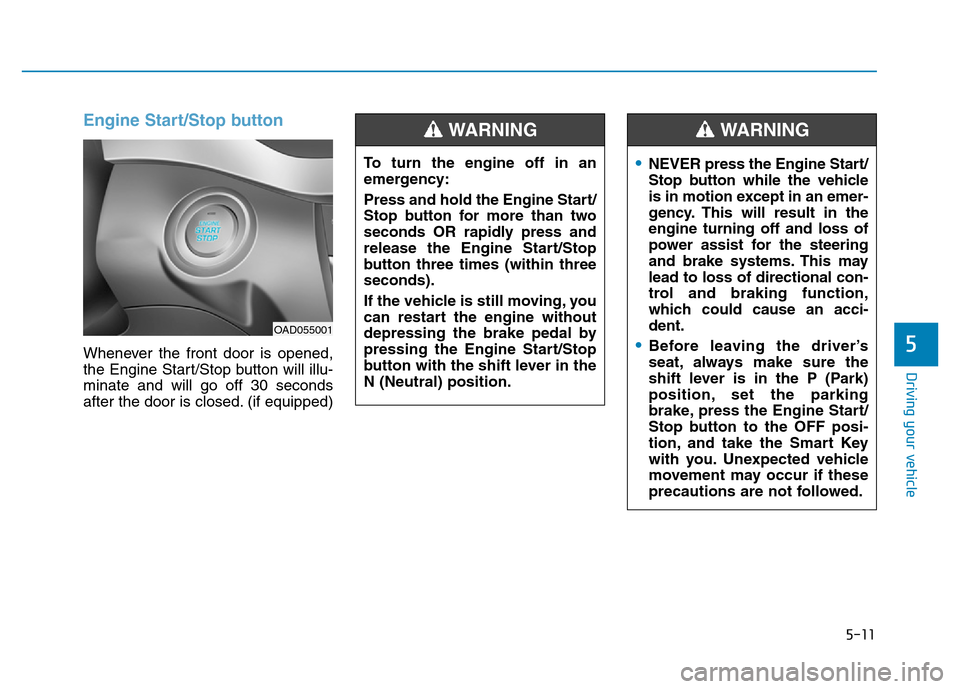
Engine Start/Stop button
Whenever the front door is opened,
the Engine Start/Stop button will illu-
minate and will go off 30 seconds
after the door is closed. (if equipped)To turn the engine off in an
emergency:
Press and hold the Engine Start/
Stop button for more than two
seconds OR rapidly press and
release the Engine Start/Stop
button three times (within three
seconds).
If the vehicle is still moving, you
can restart the engine without
depressing the brake pedal by
pressing the Engine Start/Stop
button with the shift lever in the
N (Neutral) position.
WARNING
•NEVER press the Engine Start/
Stop button while the vehicle
is in motion except in an emer-
gency. This will result in the
engine turning off and loss of
power assist for the steering
and brake systems. This may
lead to loss of directional con-
trol and braking function,
which could cause an acci-
dent.
•Before leaving the driver’s
seat, always make sure the
shift lever is in the P (Park)
position, set the parking
brake, press the Engine Start/
Stop button to the OFF posi-
tion, and take the Smart Key
with you. Unexpected vehicle
movement may occur if these
precautions are not followed.
WARNING
OAD055001
Page 398 of 637
5-12
Driving your vehicle
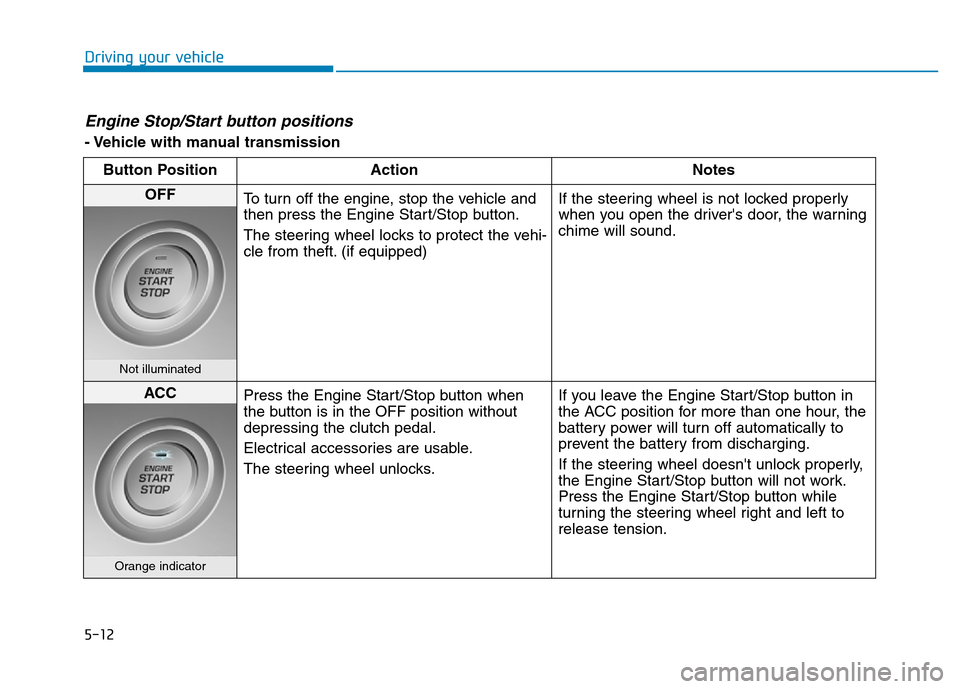
Engine Stop/Start button positions
- Vehicle with manual transmission
Button Position Action Notes
OFF
To turn off the engine, stop the vehicle and
then press the Engine Start/Stop button.
The steering wheel locks to protect the vehi-
cle from theft. (if equipped)If the steering wheel is not locked properly
when you open the driver's door, the warning
chime will sound.
Not illuminated
ACC
Press the Engine Start/Stop button when
the button is in the OFF position without
depressing the clutch pedal.
Electrical accessories are usable.
The steering wheel unlocks.If you leave the Engine Start/Stop button in
the ACC position for more than one hour, the
battery power will turn off automatically to
prevent the battery from discharging.
If the steering wheel doesn't unlock properly,
the Engine Start/Stop button will not work.
Press the Engine Start/Stop button while
turning the steering wheel right and left to
release tension.
Orange indicator
Page 400 of 637
5-14
Driving your vehicle
Engine Stop/Start button positions
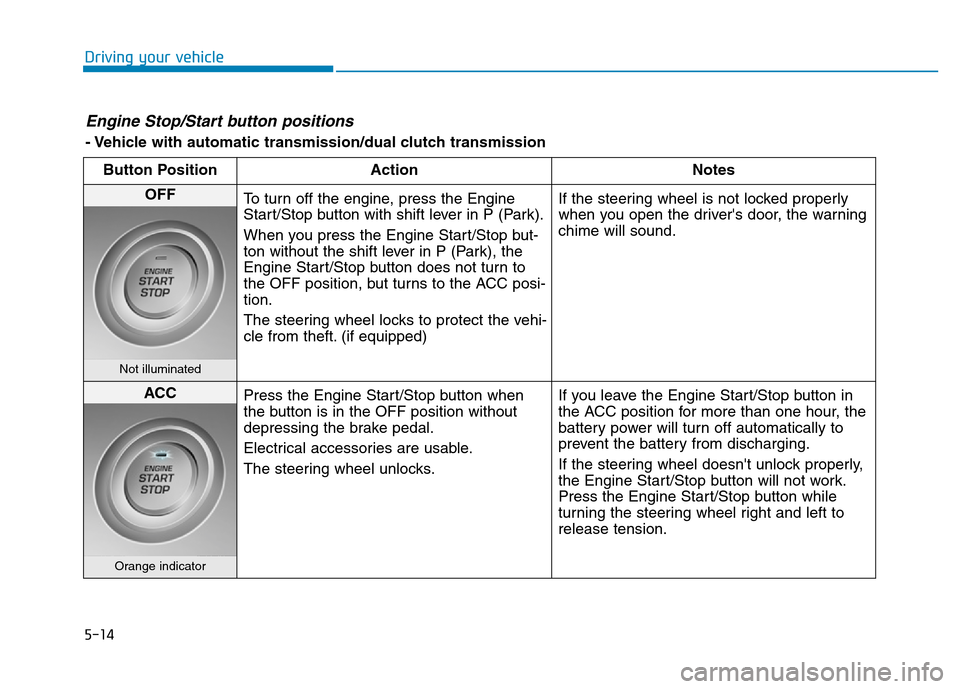
- Vehicle with automatic transmission/dual clutch transmission
Button Position Action Notes
OFF
To turn off the engine, press the Engine
Start/Stop button with shift lever in P (Park).
When you press the Engine Start/Stop but-
ton without the shift lever in P (Park), the
Engine Start/Stop button does not turn to
the OFF position, but turns to the ACC posi-
tion.
The steering wheel locks to protect the vehi-
cle from theft. (if equipped)If the steering wheel is not locked properly
when you open the driver's door, the warning
chime will sound.
Not illuminated
ACC
Press the Engine Start/Stop button when
the button is in the OFF position without
depressing the brake pedal.
Electrical accessories are usable.
The steering wheel unlocks.If you leave the Engine Start/Stop button in
the ACC position for more than one hour, the
battery power will turn off automatically to
prevent the battery from discharging.
If the steering wheel doesn't unlock properly,
the Engine Start/Stop button will not work.
Press the Engine Start/Stop button while
turning the steering wheel right and left to
release tension.
Orange indicator
Page 409 of 637
5-23
Driving your vehicle
5
To reduce the risk of SERIOUS
INJURY or DEATH:
•ALWAYS wear your seatbelt.
In a collision, an unbelted
occupant is significantly more
likely to be seriously injured
or killed than a properly belt-
ed occupant.
•Avoid high speeds when cor-
nering or turning.
•Do not make quick steering
wheel movements, such as
sharp lane changes or fast,
sharp turns.
•The risk of rollover is greatly
increased if you lose control
of your vehicle at highway
speeds.
•Loss of control often occurs if
two or more wheels drop off
the roadway and the driver
over steers to reenter the
roadway.
(Continued)
WARNING (Continued)
•In the event your vehicle
leaves the roadway, do not
steer sharply. Instead, slow
down before pulling back into
the travel lanes.
•HYUNDAI recommends you
follow all posted speed limits.
Page 416 of 637
5-30
Driving your vehicle
• Always apply the parking brake
when leaving the vehicle. Do not
depend on placing the transmis-
sion in P (Park) to keep the vehicle
from moving.
• Exercise extreme caution when
driving on a slippery surface. Be
especially careful when braking,
accelerating or shifting gears. On a
slippery surface, an abrupt change
in vehicle speed can cause the
drive wheels to lose traction and
may cause loss of vehicle control
resulting in an accident
• Optimum vehicle performance and
economy is obtained by smoothly
depressing and releasing the
accelerator.(Continued)
•In the event your vehicle
leaves the roadway, do not
steer sharply. Instead, slow
down before pulling back into
the travel lanes.
•HYUNDAI recommends you
follow all posted speed limits.
To reduce the risk of SERIOUS
INJURY or DEATH:
•ALWAYS wear your seatbelt.
In a collision, an unbelted
occupant is significantly more
likely to be seriously injured
or killed than a properly belt-
ed occupant.
•Avoid high speeds when cor-
nering or turning.
•Do not make quick steering
wheel movements, such as
sharp lane changes or fast,
sharp turns.
•The risk of rollover is greatly
increased if you lose control
of your vehicle at highway
speeds.
•Loss of control often occurs if
two or more wheels drop off
the roadway and the driver
over steers to reenter the
roadway.
(Continued)
WARNING
Page 426 of 637
5-40
Driving your vehicle
To reduce the risk of SERIOUS
INJURY or DEATH:
•ALWAYS wear your seatbelt.
In a collision, an unbelted
occupant is significantly more
likely to be seriously injured
or killed than a properly belt-
ed occupant.
•Avoid high speeds when cor-
nering or turning.
•Do not make quick steering
wheel movements, such as
sharp lane changes or fast,
sharp turns.
•The risk of rollover is greatly
increased if you lose control
of your vehicle at highway
speeds.
•Loss of control often occurs if
two or more wheels drop off
the roadway and the driver
over steers to reenter the
roadway.
(Continued)
(Continued)
•In the event your vehicle
leaves the roadway, do not
steer sharply. Instead, slow
down before pulling back into
the travel lanes.
•HYUNDAI recommends you
follow all posted speed limits.
WARNING
Page 427 of 637
5-41
Driving your vehicle
5
Power brakes
Your vehicle has power-assisted
brakes that adjust automatically
through normal usage.
If the engine is not running or is
turned off while driving, the power
assist for the brakes will not work.
You can still stop your vehicle by
applying greater force to the brake
pedal than typical. The stopping dis-
tance, however, will be longer than
with power brakes.
When the engine is not running, the
reserve brake power is partially
depleted each time the brake pedal
is applied. Do not pump the brake
pedal when the power assist has
been interrupted.
Pump the brake pedal only when
necessary to maintain steering con-
trol on slippery surfaces.
BRAKING SYSTEM
Take the following precautions:
•Do not drive with your foot
resting on the brake pedal.
This will create abnormal high
brake temperatures, exces-
sive brake lining and pad
wear, and increased stopping
distances.
•When descending down a
long or steep hill, move the
shift lever to Manual Shift
mode and manually downshift
to a lower gear in order to
control your speed without
using the brake pedal exces-
sively. Applying the brakes
continuously will cause the
brakes to overheat and could
result in a temporary loss of
braking performance.
(Continued)
(Continued)
•Wet brakes may impair the
vehicle's ability to safely slow
down; the vehicle may also
pull to one side when the
brakes are applied. Applying
the brakes lightly will indicate
whether they have been
affected in this way. Always
test your brakes in this fash-
ion after driving through deep
water. To dry the brakes, light-
ly tap the brake pedal to heat
up the brakes while maintain-
ing a safe forward speed until
brake performance returns to
normal. Avoid driving at high
speeds until the brakes func-
tion correctly.
WARNING
Page 433 of 637
5-47
Driving your vehicle
5
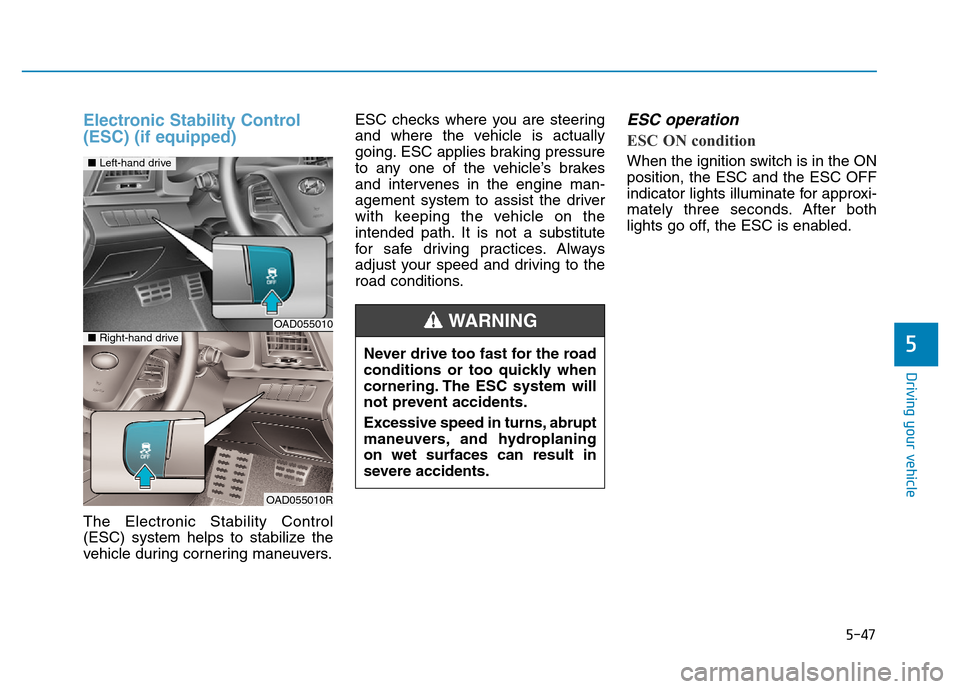
Electronic Stability Control
(ESC) (if equipped)
The Electronic Stability Control
(ESC) system helps to stabilize the
vehicle during cornering maneuvers.ESC checks where you are steering
and where the vehicle is actually
going. ESC applies braking pressure
to any one of the vehicle’s brakes
and intervenes in the engine man-
agement system to assist the driver
with keeping the vehicle on the
intended path. It is not a substitute
for safe driving practices. Always
adjust your speed and driving to the
road conditions.
ESC operation
ESC ON condition
When the ignition switch is in the ON
position, the ESC and the ESC OFF
indicator lights illuminate for approxi-
mately three seconds. After both
lights go off, the ESC is enabled.
OAD055010
OAD055010R
■Left-hand drive
■Right-hand drive
Never drive too fast for the road
conditions or too quickly when
cornering. The ESC system will
not prevent accidents.
Excessive speed in turns, abrupt
maneuvers, and hydroplaning
on wet surfaces can result in
severe accidents.
WARNING