light Hyundai Elantra 2017 Repair Manual
[x] Cancel search | Manufacturer: HYUNDAI, Model Year: 2017, Model line: Elantra, Model: Hyundai Elantra 2017Pages: 637, PDF Size: 15.02 MB
Page 175 of 637
3-80
Convenient features of your vehicle
Low Washer Fluid (if equipped)
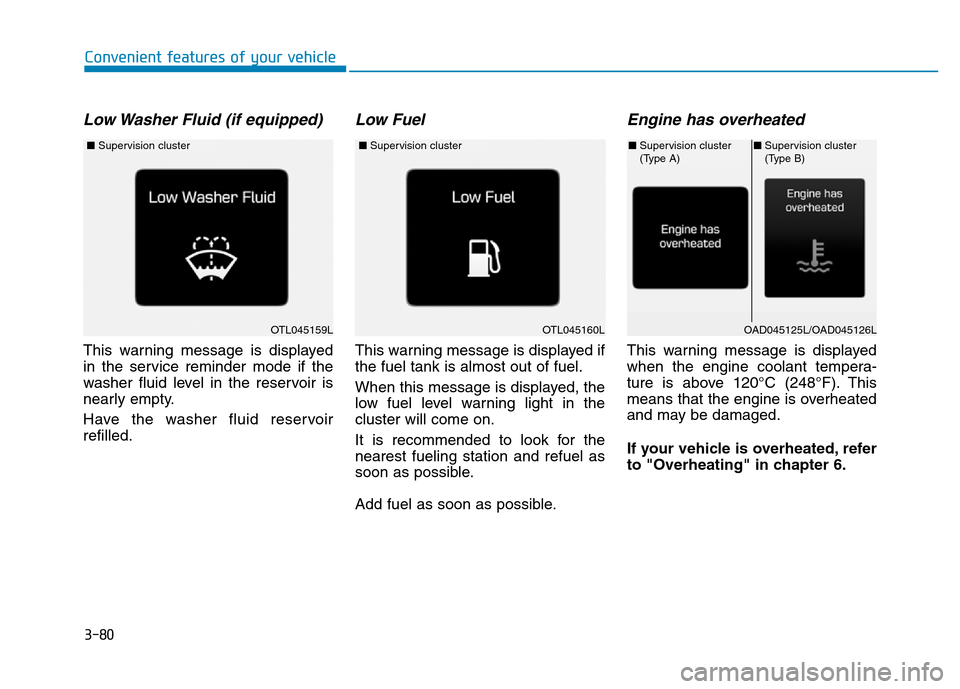
This warning message is displayed
in the service reminder mode if the
washer fluid level in the reservoir is
nearly empty.
Have the washer fluid reservoir
refilled.
Low Fuel
This warning message is displayed if
the fuel tank is almost out of fuel.
When this message is displayed, the
low fuel level warning light in the
cluster will come on.
It is recommended to look for the
nearest fueling station and refuel as
soon as possible.
Add fuel as soon as possible.
Engine has overheated
This warning message is displayed
when the engine coolant tempera-
ture is above 120°C (248°F). This
means that the engine is overheated
and may be damaged.
If your vehicle is overheated, refer
to "Overheating" in chapter 6.
OTL045160LOTL045159L
■Supervision cluster ■Supervision cluster
OAD045125L/OAD045126L
■Supervision cluster
(Type A)■Supervision cluster
(Type B)
Page 176 of 637
3-81
Convenient features of your vehicle
3
Check headlight (if equipped)
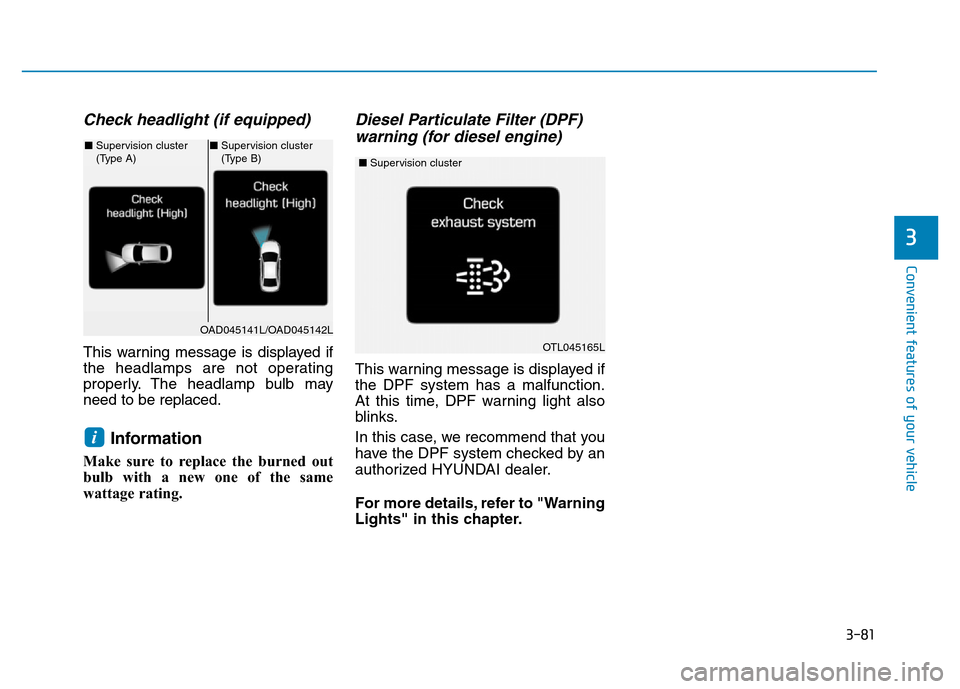
This warning message is displayed if
the headlamps are not operating
properly. The headlamp bulb may
need to be replaced.
Information
Make sure to replace the burned out
bulb with a new one of the same
wattage rating.
Diesel Particulate Filter (DPF)
warning (for diesel engine)
This warning message is displayed if
the DPF system has a malfunction.
At this time, DPF warning light also
blinks.
In this case, we recommend that you
have the DPF system checked by an
authorized HYUNDAI dealer.
For more details, refer to "Warning
Lights" in this chapter.
i
OAD045141L/OAD045142L
■Supervision cluster
(Type A)■Supervision cluster
(Type B)
OTL045165L
■Supervision cluster
Page 182 of 637
3-87
Convenient features of your vehicle
3
ItemsExplanation
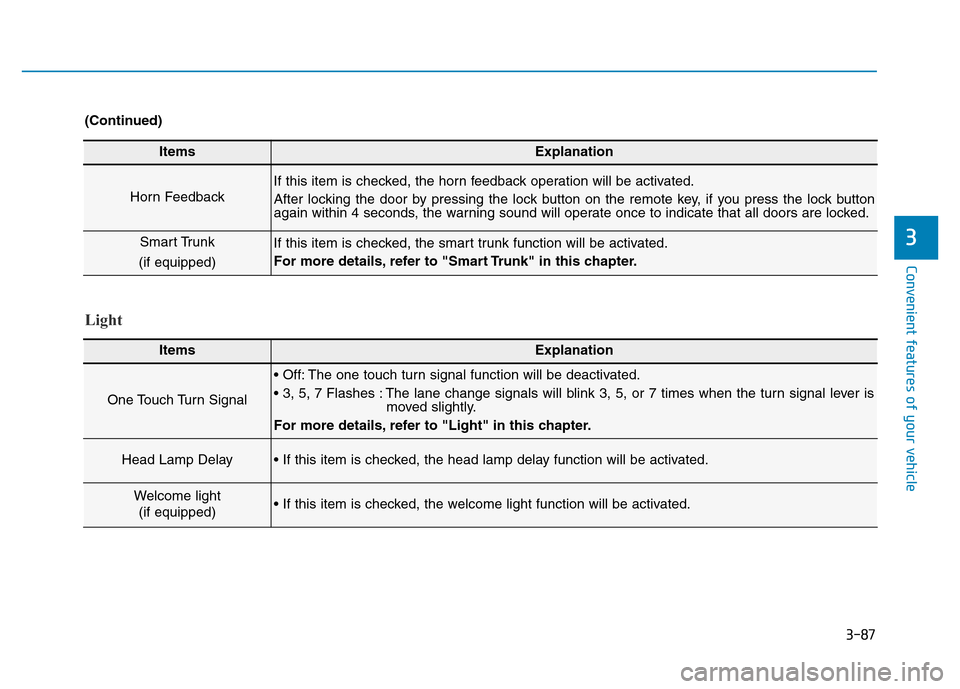
Horn Feedback
If this item is checked, the horn feedback operation will be activated.
After locking the door by pressing the lock button on the remote key, if you press the lock button
again within 4 seconds, the warning sound will operate once to indicate that all doors are locked.
Smart Trunk
(if equipped)If this item is checked, the smart trunk function will be activated.
For more details, refer to "Smart Trunk" in this chapter.
(Continued)
Light
ItemsExplanation
One Touch Turn Signal
• Off: The one touch turn signal function will be deactivated.
• 3, 5, 7 Flashes : The lane change signals will blink 3, 5, or 7 times when the turn signal lever is
moved slightly.
For more details, refer to "Light" in this chapter.
Head Lamp Delay• If this item is checked, the head lamp delay function will be activated.
Welcome light
(if equipped)• If this item is checked, the welcome light function will be activated.
Page 187 of 637

3-92
Convenient features of your vehicle
Trip A/B
Tripmeter (1)
• The tripmeter is the total driving
distance since the last tripmeter
reset.
- Distance range:
0.0 ~ 9999.9 km or mi.
• To reset the tripmeter, press the
RESET button on the steering
wheel for more than 1 second
when the tripmeter is displayed.
Average Vehicle Speed (2)
• The average vehicle speed is cal-
culated by the total driving dis-
tance and driving time since the
last average vehicle speed reset.
- Speed range:
0 ~ 240 km/h or 0 ~ 160 MPH
• To reset the average vehicle speed,
press the RESET button on the
steering wheel for more than 1 sec-
ond when the average vehicle
speed is displayed.
Information
• The average vehicle speed is not dis-
played if the driving distance is less
than 300 meters (0.19 miles) or the
driving time is less than 10 seconds
since the ignition switch or the Engine
Start/Stop button is turned to ON.
• The average vehicle speed will con-
tinue to be calculated and will start
to decrease if the vehicle is stopped
while the engine is still running (for
example, when the vehicle is in traf-
fic or stopped at a stop light.)
Elapsed Time (3)
• The elapsed time is the total driv-
ing time since the last elapsed time
reset.
- Time range (hh:mm):
00:00 ~ 99:59
• To reset the elapsed time, press the
RESET button on the steering
wheel for more than 1 second when
the elapsed time is displayed.
Information
The elapsed time will continue to be
counted while the engine is still run-
ning (for example, when the vehicle is
in traffic or stopped at a stop light.)
i
i
OAD045152
Page 192 of 637
3-97
Convenient features of your vehicle
3
Average Vehicle Speed (2)
• The average vehicle speed is cal-
culated by the total driving dis-
tance and driving time since the
last average vehicle speed reset.
- Speed range:
0~240 km/h or 0~160 MPH
• To reset the average vehicle speed,
press the [OK] button on the steer-
ing wheel for more than 1 second
when the average vehicle speed is
displayed.
Information
• The average vehicle speed is not dis-
played if the driving distance is less
than 300 meters (0.19 miles) or the
driving time is less than 10 seconds
since the ignition switch or the Engine
Start/Stop button is turned to ON.
• The average vehicle speed will con-
tinue to be calculated and will start
to decrease if the vehicle is stopped
while the engine is still running (for
example, when the vehicle is in traf-
fic or stopped at a stop light.)
Elapsed Time (3)
• The elapsed time is the total driv-
ing time since the last elapsed time
reset.
- Time range (hh:mm):
00:00 ~ 99:59
• To reset the elapsed time, press the
[OK] button on the steering wheel
for more than 1 second when the
elapsed time is displayed.
Information
The elapsed time will continue to be
counted while the engine is still run-
ning (for example, when the vehicle is
in traffic or stopped at a stop light.)
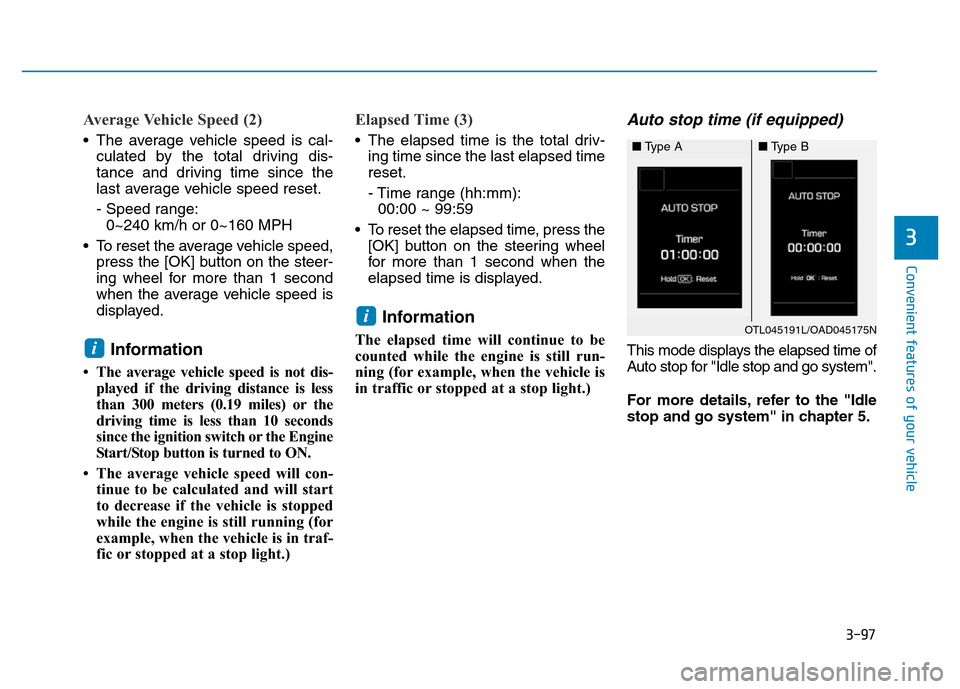
Auto stop time (if equipped)
This mode displays the elapsed time of
Auto stop for "Idle stop and go system".
For more details, refer to the "Idle
stop and go system" in chapter 5.
i
i
OTL045191L/OAD045175N
■Type A■Type B
Page 194 of 637
3-99
Convenient features of your vehicle
3
Exterior lights
Lighting control
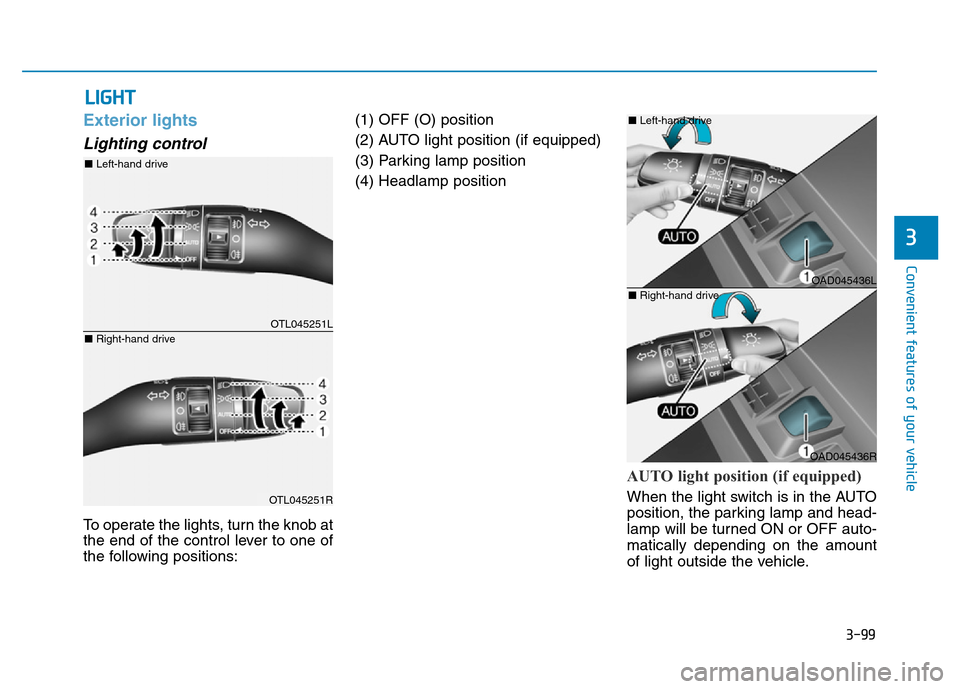
To operate the lights, turn the knob at
the end of the control lever to one of
the following positions:(1) OFF (O) position
(2) AUTO light position (if equipped)
(3) Parking lamp position
(4) Headlamp position
AUTO light position (if equipped)
When the light switch is in the AUTO
position, the parking lamp and head-
lamp will be turned ON or OFF auto-
matically depending on the amount
of light outside the vehicle.
LIGHT
OAD045436L
OAD045436R ■Left-hand drive
■Right-hand drive
OTL045251L
OTL045251R
■Left-hand drive
■Right-hand drive
Page 195 of 637
3-100
Convenient features of your vehicle
Even with the AUTO light feature in
operation, it is recommended to
manually turn ON the lamps when
driving at night or in a fog, or when
you enter dark areas, such as tun-
nels and parking facilities.
• Do not cover or spill anything on
the sensor (1) located on the
instrument panel.
• Do not clean the sensor using a
window cleaner, the cleanser
may leave a light film which
could interfere with sensor oper-
ation.
• If your vehicle has window tint
or other types of metallic coat-
ing on the front windshield, the
AUTO light system may not work
properly.
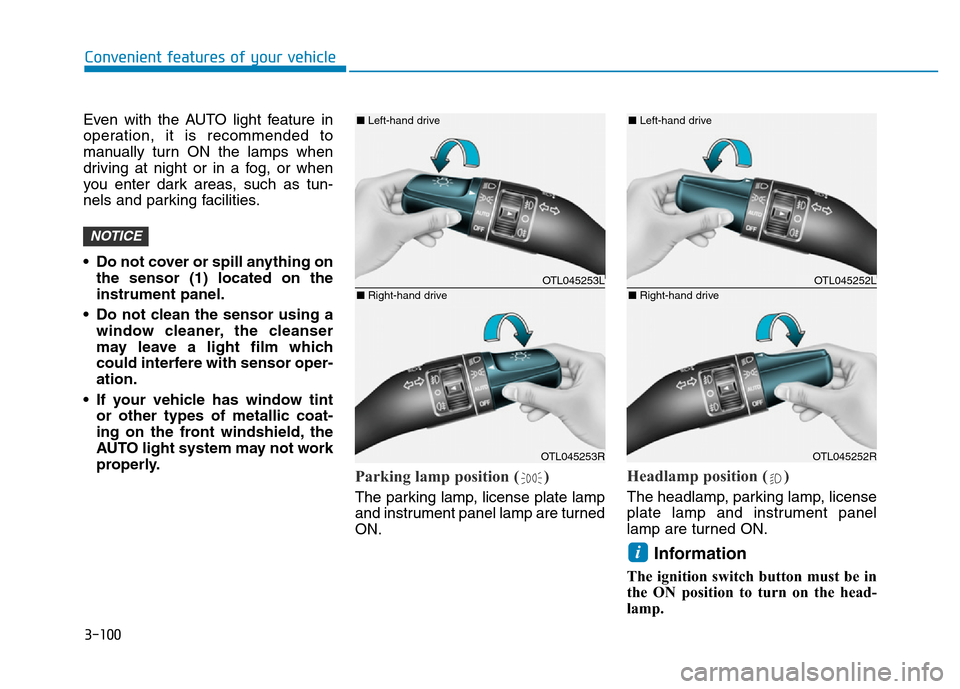
Parking lamp position ( )
The parking lamp, license plate lamp
and instrument panel lamp are turned
ON.
Headlamp position ( )
The headlamp, parking lamp, license
plate lamp and instrument panel
lamp are turned ON.
Information
The ignition switch button must be in
the ON position to turn on the head-
lamp.
i
NOTICE
OTL045253L
OTL045253R
■Left-hand drive
■Right-hand driveOTL045252L
OTL045252R
■Left-hand drive
■Right-hand drive
Page 196 of 637
3-101
Convenient features of your vehicle
3
High beam operation
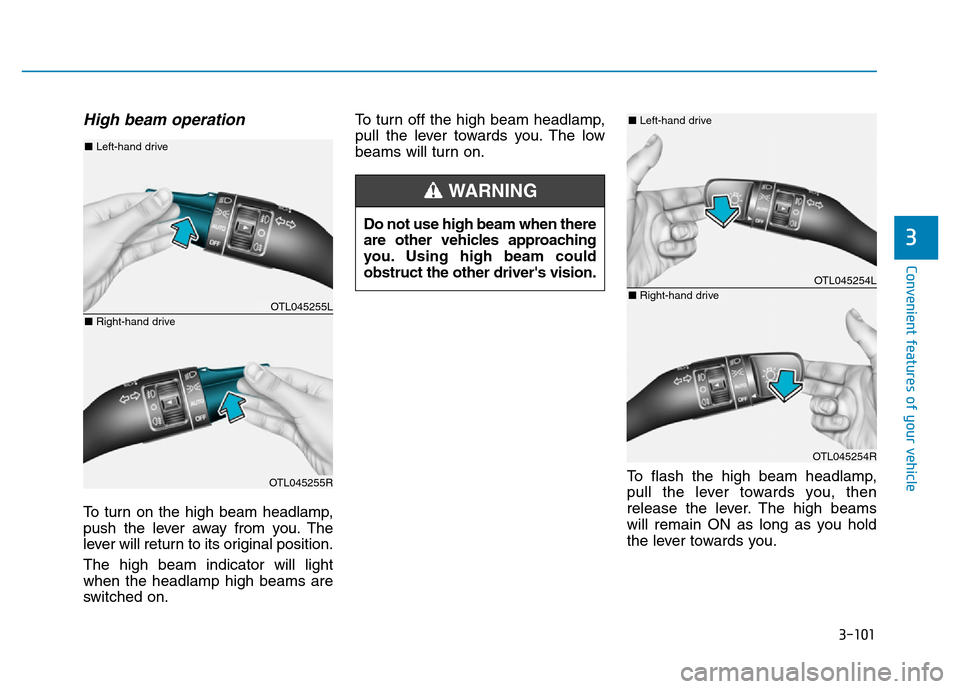
To turn on the high beam headlamp,
push the lever away from you. The
lever will return to its original position.
The high beam indicator will light
when the headlamp high beams are
switched on.To turn off the high beam headlamp,
pull the lever towards you. The low
beams will turn on.
To flash the high beam headlamp,
pull the lever towards you, then
release the lever. The high beams
will remain ON as long as you hold
the lever towards you. Do not use high beam when there
are other vehicles approaching
you. Using high beam could
obstruct the other driver's vision.
WARNING
OTL045255L
OTL045255R
■Left-hand drive
■Right-hand drive
OTL045254L
OTL045254R
■Left-hand drive
■Right-hand drive
Page 197 of 637
3-102
Convenient features of your vehicle
Turn signals and lane change
signals
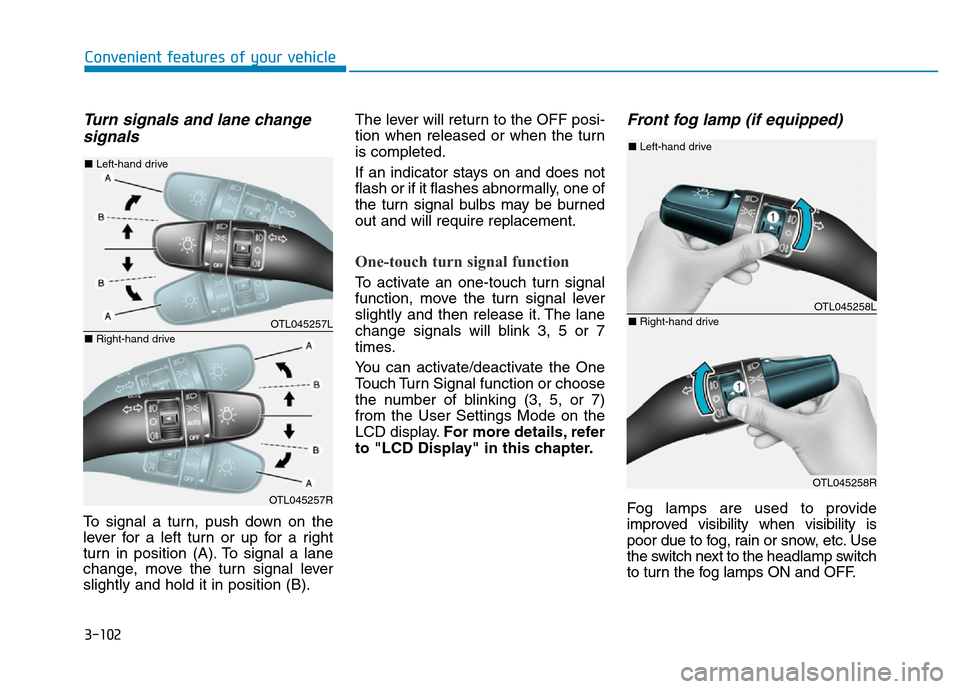
To signal a turn, push down on the
lever for a left turn or up for a right
turn in position (A). To signal a lane
change, move the turn signal lever
slightly and hold it in position (B).The lever will return to the OFF posi-
tion when released or when the turn
is completed.
If an indicator stays on and does not
flash or if it flashes abnormally, one of
the turn signal bulbs may be burned
out and will require replacement.
One-touch turn signal function
To activate an one-touch turn signal
function, move the turn signal lever
slightly and then release it. The lane
change signals will blink 3, 5 or 7
times.
You can activate/deactivate the One
Touch Turn Signal function or choose
the number of blinking (3, 5, or 7)
from the User Settings Mode on the
LCD display.For more details, refer
to "LCD Display" in this chapter.
Front fog lamp (if equipped)
Fog lamps are used to provide
improved visibility when visibility is
poor due to fog, rain or snow, etc. Use
the switch next to the headlamp switch
to turn the fog lamps ON and OFF.
OTL045257L
OTL045257R
■Left-hand drive
■Right-hand drive
OTL045258L
OTL045258R
■Left-hand drive
■Right-hand drive
Page 198 of 637
3-103
Convenient features of your vehicle
3
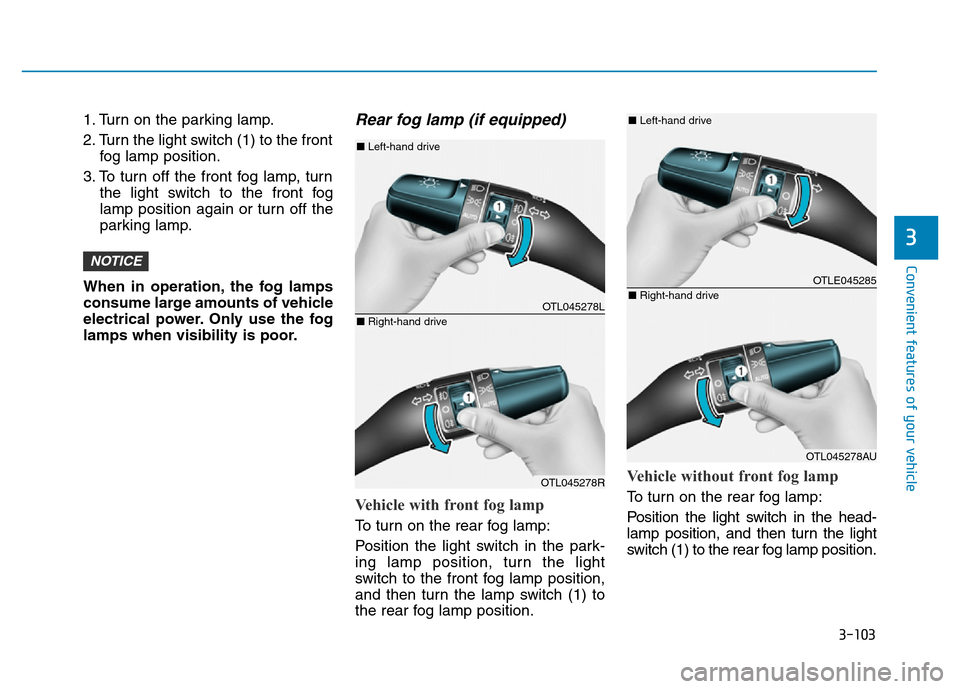
1. Turn on the parking lamp.
2. Turn the light switch (1) to the front
fog lamp position.
3. To turn off the front fog lamp, turn
the light switch to the front fog
lamp position again or turn off the
parking lamp.
When in operation, the fog lamps
consume large amounts of vehicle
electrical power. Only use the fog
lamps when visibility is poor.Rear fog lamp (if equipped)
Vehicle with front fog lamp
To turn on the rear fog lamp:
Position the light switch in the park-
ing lamp position, turn the light
switch to the front fog lamp position,
and then turn the lamp switch (1) to
the rear fog lamp position.
Vehicle without front fog lamp
To turn on the rear fog lamp:
Position the light switch in the head-
lamp position, and then turn the light
switch (1) to the rear fog lamp position.
NOTICE
OTL045278L
OTL045278R
■Left-hand drive
■Right-hand drive
OTLE045285
OTL045278AU
■Left-hand drive
■Right-hand drive