automatic trans Hyundai Elantra 2018 User Guide
[x] Cancel search | Manufacturer: HYUNDAI, Model Year: 2018, Model line: Elantra, Model: Hyundai Elantra 2018Pages: 526, PDF Size: 17.2 MB
Page 291 of 526
5-8
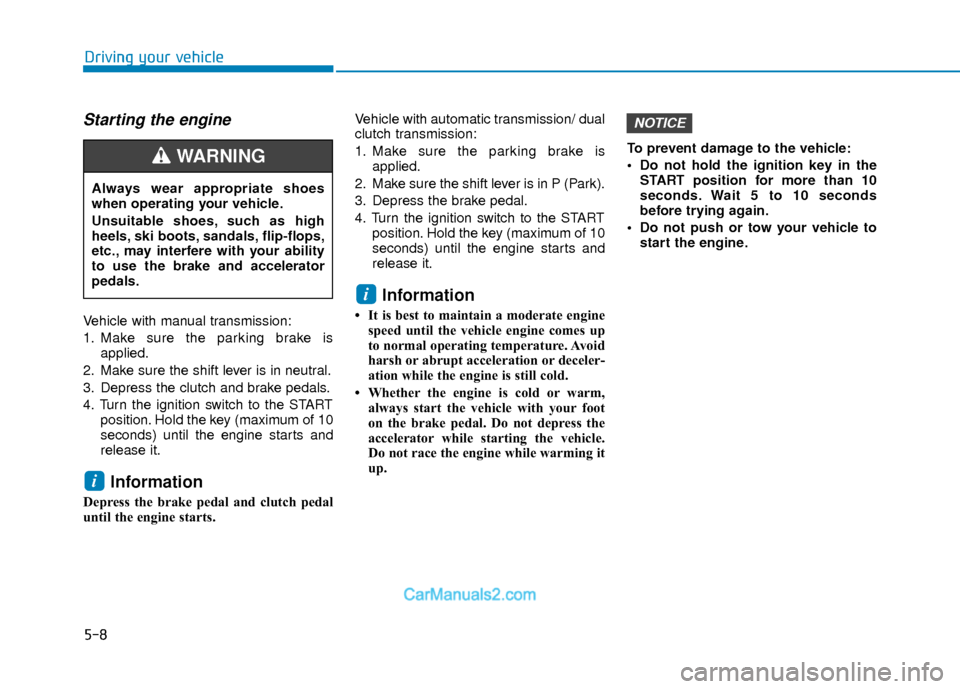
Starting the engine
Vehicle with manual transmission:
1. Make sure the parking brake isapplied.
2. Make sure the shift lever is in neutral.
3. Depress the clutch and brake pedals.
4. Turn the ignition switch to the START position. Hold the key (maximum of 10
seconds) until the engine starts and
release it.
Information
Depress the brake pedal and clutch pedal
until the engine starts. Vehicle with automatic transmission/ dual
clutch transmission:
1. Make sure the parking brake is
applied.
2. Make sure the shift lever is in P (Park).
3. Depress the brake pedal.
4. Turn the ignition switch to the START position. Hold the key (maximum of 10
seconds) until the engine starts and
release it.
Information
• It is best to maintain a moderate enginespeed until the vehicle engine comes up
to normal operating temperature. Avoid
harsh or abrupt acceleration or deceler-
ation while the engine is still cold.
• Whether the engine is cold or warm, always start the vehicle with your foot
on the brake pedal. Do not depress the
accelerator while starting the vehicle.
Do not race the engine while warming it
up. To prevent damage to the vehicle:
Do not hold the ignition key in the
START position for more than 10
seconds. Wait 5 to 10 seconds
before trying again.
Do not push or tow your vehicle to start the engine.
NOTICE
i
i
Driving your vehicle
Always wear appropriate shoes
when operating your vehicle.
Unsuitable shoes, such as high
heels, ski boots, sandals, flip-flops,
etc., may interfere with your ability
to use the brake and accelerator
pedals.
WARNING
Page 293 of 526
5-10
Driving your vehicle
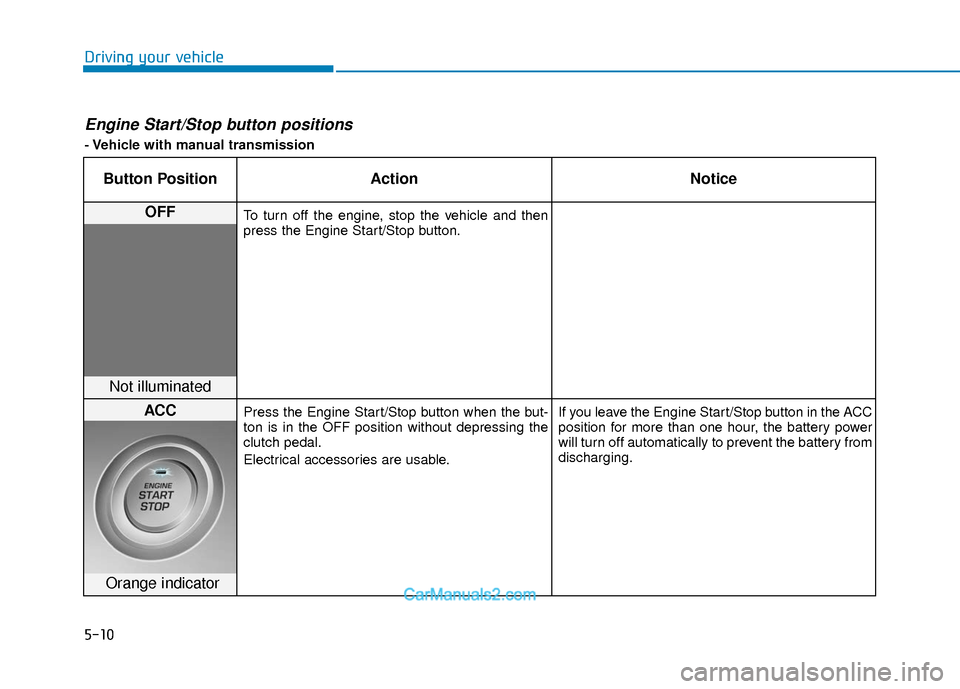
Engine Start/Stop button positions
- Vehicle with manual transmission
Button PositionAction Notice
OFFTo turn off the engine, stop the vehicle and then
press the Engine Start/Stop button.
Not illuminated
ACCPress the Engine Start/Stop button when the but-
ton is in the OFF position without depressing the
clutch pedal.
Electrical accessories are usable. If you leave the Engine Start/Stop button in the ACC
position for more than one hour, the battery power
will turn off automatically to prevent the battery from
discharging.
Orange indicator
Page 295 of 526
5-12
Driving your vehicle
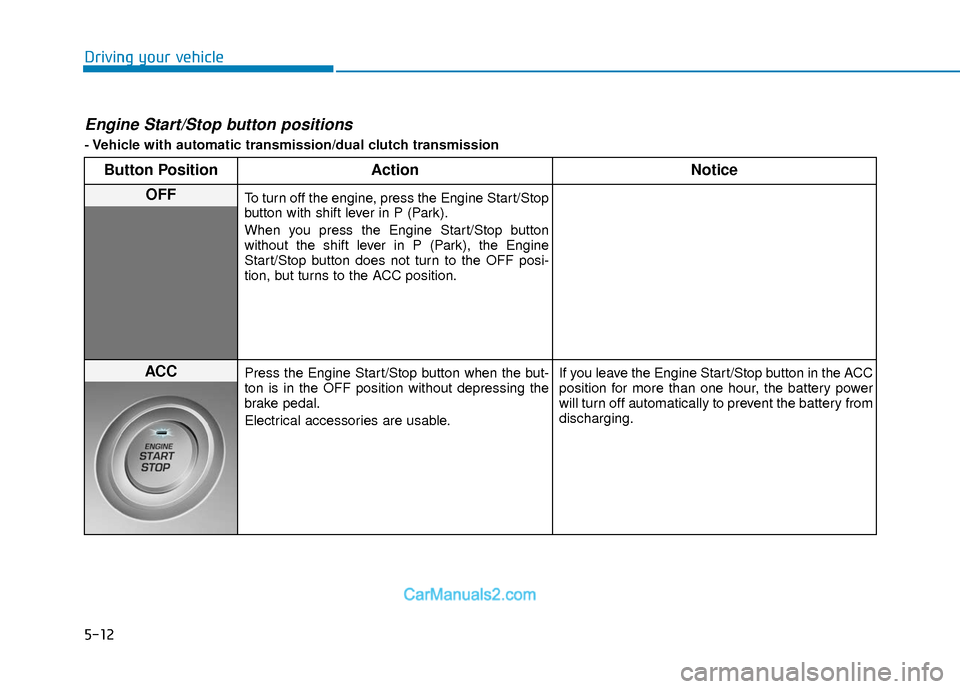
Engine Start/Stop button positions
- Vehicle with automatic transmission/dual clutch transmission
Button PositionAction Notice
OFFTo turn off the engine, press the Engine Start/Stop
button with shift lever in P (Park).
When you press the Engine Start/Stop button
without the shift lever in P (Park), the Engine
Start/Stop button does not turn to the OFF posi-
tion, but turns to the ACC position.
ACCPress the Engine Start/Stop button when the but-
ton is in the OFF position without depressing the
brake pedal.
Electrical accessories are usable. If you leave the Engine Start/Stop button in the ACC
position for more than one hour, the battery power
will turn off automatically to prevent the battery from
discharging.
Page 296 of 526
5-13
Driving your vehicle
5
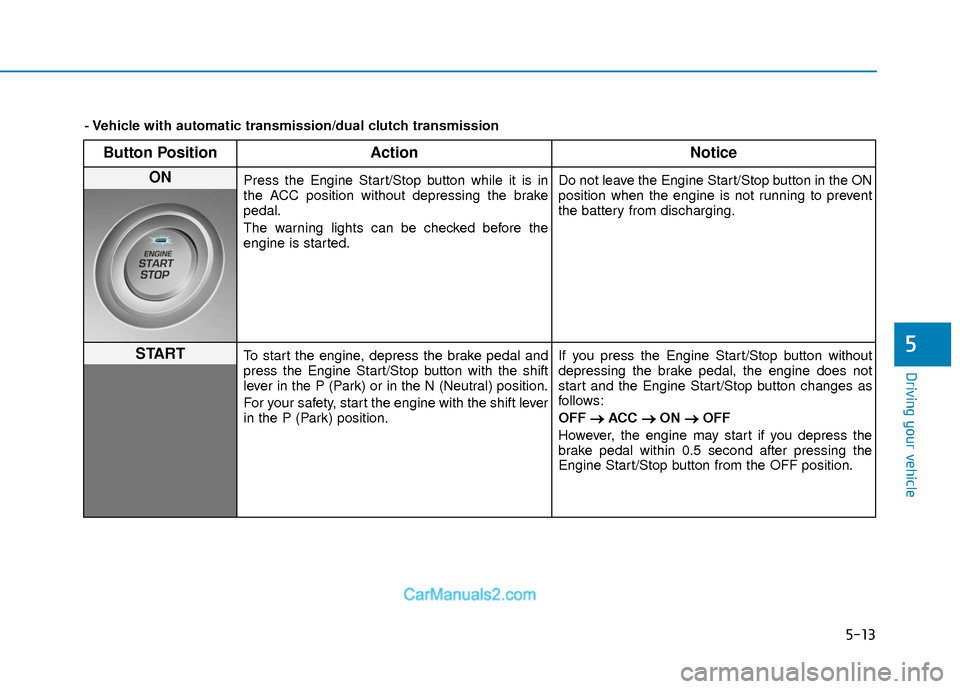
Button PositionAction Notice
ON Press the Engine Start/Stop button while it is in
the ACC position without depressing the brake
pedal.
The warning lights can be checked before the
engine is started. Do not leave the Engine Start/Stop button in the ON
position when the engine is not running to prevent
the battery from discharging.
STARTTo start the engine, depress the brake pedal and
press the Engine Start/Stop button with the shift
lever in the P (Park) or in the N (Neutral) position.
For your safety, start the engine with the shift lever
in the P (Park) position.If you press the Engine Start/Stop button without
depressing the brake pedal, the engine does not
start and the Engine Start/Stop button changes as
follows:
OFF
→ →
ACC →
→
ON →
→
OFF
However, the engine may start if you depress the
brake pedal within 0.5 second after pressing the
Engine Start/Stop button from the OFF position.
- Vehicle with automatic transmission/dual clutch transmission
Page 297 of 526
5-14
Driving your vehicle
Starting the engine Information
• The engine will start by pressing theEngine Start/Stop button, only when the
smart key is in the vehicle.
• Even if the smart key is in the vehicle, if it is far away from the driver, the engine
may not start.
• When the Engine Start/Stop button is in the ACC or ON position, if any door is
open, the system checks for the smart
key. If the smart key is not in the vehicle,
the " " indicator will blink and the
warning "Key not in vehicle" will come
on and if all doors are closed, the chime
will also sound for about 5 seconds.
Keep the smart key in the vehicle when
using the ACC position or if the vehicle
engine is ON. Vehicle with manual transmission:
1. Always carry the smart key with you.
2. Make sure the parking brake is
applied.
3. Make sure the shift lever is in neutral.
4. Depress the clutch and brake pedals.
5. Press the Engine Start/Stop button.
Information
Depress the brake pedal and clutch pedal
until the engine starts.
Vehicle with automatic transmission/dual
clutch transmission:
1. Always carry the smart key with you.
2. Make sure the parking brake is applied.
3. Make sure the shift lever is in P (Park).
4. Depress the brake pedal.
5. Press the Engine Start/Stop button.
i
i
Always wear appropriate shoes
when operating your vehicle.
Unsuitable shoes, such as high
heels, ski boots, sandals, flip-
flops, etc., may interfere with your
ability to use the brake and accel-
erator pedals.
Do not start the vehicle with the
accelerator pedal depressed. The
vehicle can move and lead to an
accident.
Wait until the engine rpm is nor-
mal. The vehicle may suddenly
move if the brake pedal is
released when the rpm is high.
WARNING
Page 302 of 526
5-19
Driving your vehicle
5
A
AU
U T
TO
O M
M A
AT
TI
IC
C
T
T R
R A
A N
N S
SM
M I
IS
S S
SI
IO
O N
N
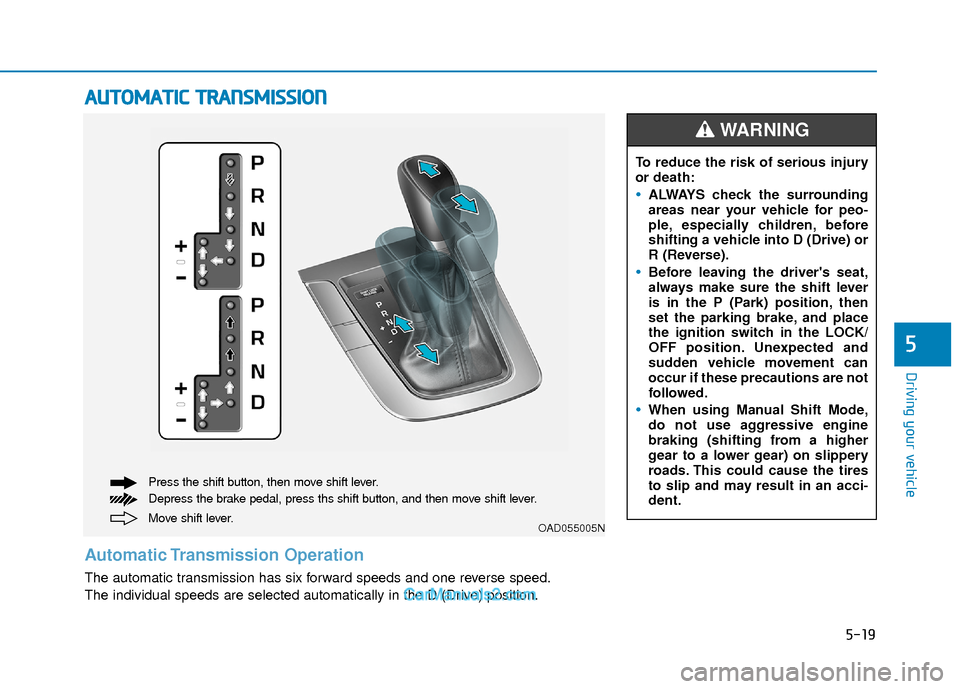
Move shift lever. Press the shift button, then move shift lever.
Depress the brake pedal, press ths shift button, and then move shift lever.OAD055005N
Automatic Transmission Operation
The automatic transmission has six forward speeds and one reverse speed.
The individual speeds are selected automatically in the D (Drive) position. To reduce the risk of serious injury
or death:
ALWAYS check the surrounding
areas near your vehicle for peo-
ple, especially children, before
shifting a vehicle into D (Drive) or
R (Reverse).
Before leaving the driver's seat,
always make sure the shift lever
is in the P (Park) position, then
set the parking brake, and place
the ignition switch in the LOCK/
OFF position. Unexpected and
sudden vehicle movement can
occur if these precautions are not
followed.
When using Manual Shift Mode,
do not use aggressive engine
braking (shifting from a higher
gear to a lower gear) on slippery
roads. This could cause the tires
to slip and may result in an acci-
dent.
WARNING
Page 304 of 526
5-21
Driving your vehicle
5
D (Drive)
This is the normal driving position. The
transmission will automatically shift
through a six-gear sequence, providing
the best fuel economy and power.
For extra power when passing another
vehicle or driving uphill depress the
accelerator pedal further until you feel
the transmission downshift to a lower
gear.
The DRIVE MODE switch, located on the
shift lever console, allows the driver to
switch from NORMAL mode to ECO or
SPORT mode.
For more information, refer to "Drive
Mode Integrated Control System"
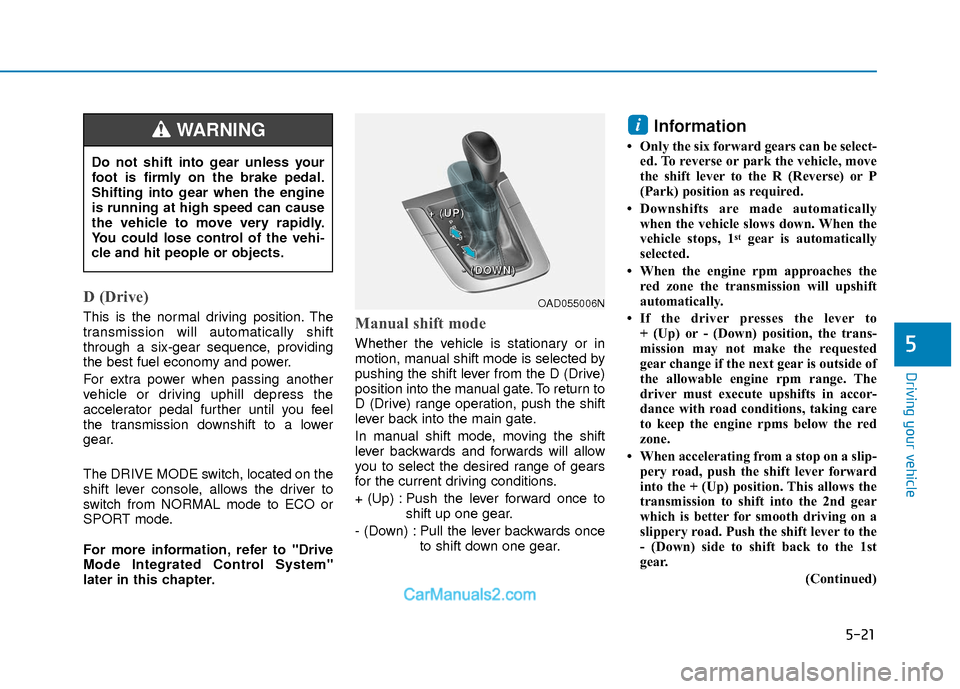
later in this chapter.Manual shift mode
Whether the vehicle is stationary or in
motion, manual shift mode is selected by
pushing the shift lever from the D (Drive)
position into the manual gate. To return to
D (Drive) range operation, push the shift
lever back into the main gate.
In manual shift mode, moving the shift
lever backwards and forwards will allow
you to select the desired range of gears
for the current driving conditions.
+ (Up) : Push the lever forward once toshift up one gear.
- (Down) : Pull the lever backwards once to shift down one gear.
Information
• Only the six forward gears can be select-ed. To reverse or park the vehicle, move
the shift lever to the R (Reverse) or P
(Park) position as required.
• Downshifts are made automatically when the vehicle slows down. When the
vehicle stops, 1
stgear is automatically
selected.
• When the engine rpm approaches the red zone the transmission will upshift
automatically.
• If the driver presses the lever to + (Up) or - (Down) position, the trans-
mission may not make the requested
gear change if the next gear is outside of
the allowable engine rpm range. The
driver must execute upshifts in accor-
dance with road conditions, taking care
to keep the engine rpms below the red
zone.
• When accelerating from a stop on a slip- pery road, push the shift lever forward
into the + (Up) position. This allows the
transmission to shift into the 2nd gear
which is better for smooth driving on a
slippery road. Push the shift lever to the
- (Down) side to shift back to the 1st
gear.
(Continued)
i
Do not shift into gear unless your
foot is firmly on the brake pedal.
Shifting into gear when the engine
is running at high speed can cause
the vehicle to move very rapidly.
You could lose control of the vehi-
cle and hit people or objects.
WARNING
OAD055006N
+
+
+
+
(
(
(
(
U
U
U
U
P
P
P
P
)
)
)
)
-
-
-
-
(
(
(
(
D
D
D
D
O
O
O
O
W
W
W
W
N
N
N
N
)
)
)
)
Page 305 of 526
5-22
Driving your vehicle
(Continued)
• When driving in Manual Shift Mode,slow down before shifting to a lower
gear. Otherwise, the lower gear may not
be engaged if the engine rpms are out-
side of the allowable range.
Shift-lock system
For your safety, the automatic transmis-
sion has a shift-lock system which pre-
vents shifting the transmission from P
(Park) into R (Reverse) unless the brake
pedal is depressed.
To shift the transmission from P (Park)
into R (Reverse):
1. Depress and hold the brake pedal.
2. Start the engine or place the ignition switch in the ON position.
3. Move the shift lever.
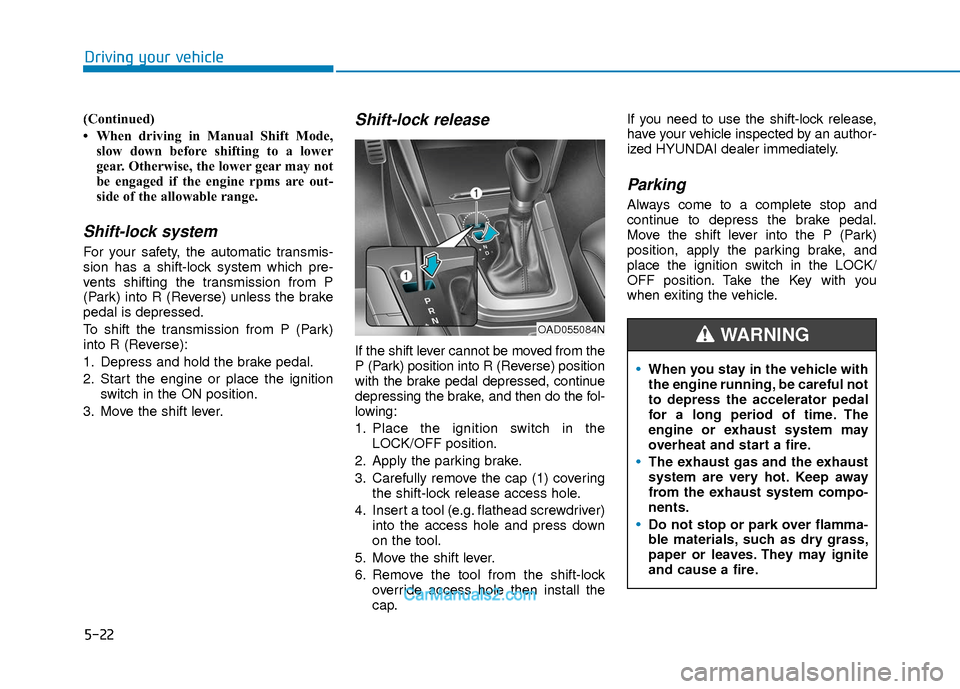
Shift-lock release
If the shift lever cannot be moved from the
P (Park) position into R (Reverse) position
with the brake pedal depressed, continue
depressing the brake, and then do the fol-
lowing:
1. Place the ignition switch in the LOCK/OFF position.
2. Apply the parking brake.
3. Carefully remove the cap (1) covering the shift-lock release access hole.
4. Insert a tool (e.g. flathead screwdriver) into the access hole and press down
on the tool.
5. Move the shift lever.
6. Remove the tool from the shift-lock override access hole then install the
cap. If you need to use the shift-lock release,
have your vehicle inspected by an author-
ized HYUNDAI dealer immediately.
Parking
Always come to a complete stop and
continue to depress the brake pedal.
Move the shift lever into the P (Park)
position, apply the parking brake, and
place the ignition switch in the LOCK/
OFF position. Take the Key with you
when exiting the vehicle.
When you stay in the vehicle with
the engine running, be careful not
to depress the accelerator pedal
for a long period of time. The
engine or exhaust system may
overheat and start a fire.
The exhaust gas and the exhaust
system are very hot. Keep away
from the exhaust system compo-
nents.
Do not stop or park over flamma-
ble materials, such as dry grass,
paper or leaves. They may ignite
and cause a fire.
WARNING OAD055084N
Page 307 of 526
5-24
Driving your vehicle
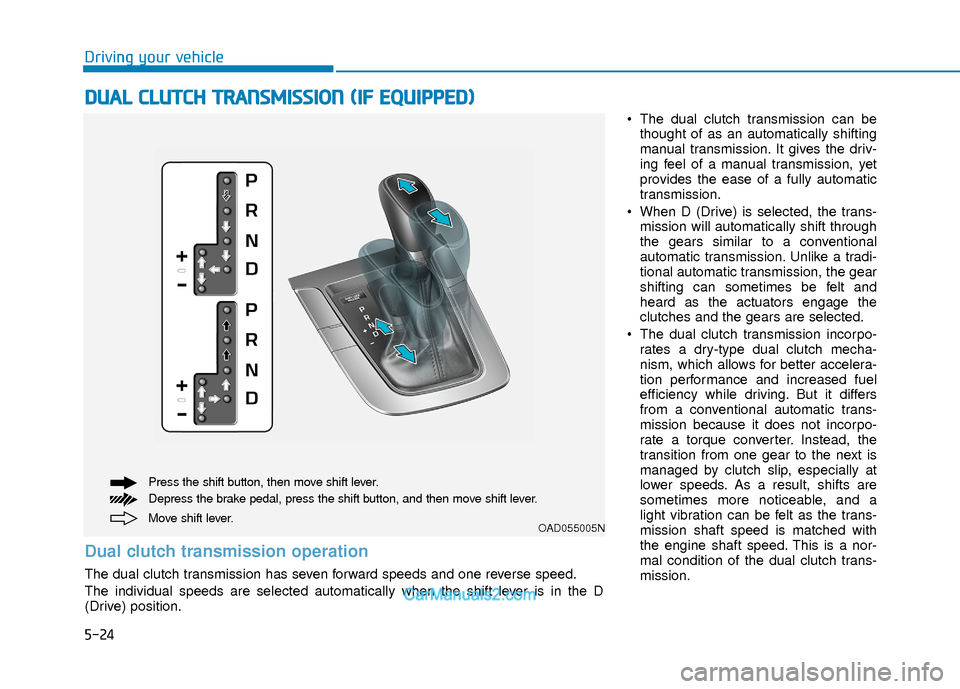
The dual clutch transmission can bethought of as an automatically shifting
manual transmission. It gives the driv-
ing feel of a manual transmission, yet
provides the ease of a fully automatic
transmission.
When D (Drive) is selected, the trans- mission will automatically shift through
the gears similar to a conventional
automatic transmission. Unlike a tradi-
tional automatic transmission, the gear
shifting can sometimes be felt and
heard as the actuators engage the
clutches and the gears are selected.
The dual clutch transmission incorpo- rates a dry-type dual clutch mecha-
nism, which allows for better accelera-
tion performance and increased fuel
efficiency while driving. But it differs
from a conventional automatic trans-
mission because it does not incorpo-
rate a torque converter. Instead, the
transition from one gear to the next is
managed by clutch slip, especially at
lower speeds. As a result, shifts are
sometimes more noticeable, and a
light vibration can be felt as the trans-
mission shaft speed is matched with
the engine shaft speed. This is a nor-
mal condition of the dual clutch trans-
mission.
D DU
U A
AL
L
C
C L
LU
U T
TC
CH
H
T
T R
R A
A N
N S
SM
M I
IS
S S
SI
IO
O N
N
(
( I
IF
F
E
E Q
Q U
UI
IP
P P
PE
ED
D )
)
Move shift lever. Press the shift button, then move shift lever.
Depress the brake pedal, press the shift button, and then move shift lever.OAD055005N
Dual clutch transmission operation
The dual clutch transmission has seven forward speeds and one reverse speed.
The individual speeds are selected automatically when the shift lever is in the D
(Drive) position.
Page 308 of 526
5-25
Driving your vehicle
5
The dry-type clutch transfers torquemore directly and provides a direct-
drive feeling which may feel different
from a conventional automatic trans-
mission. This may be more noticeable
when launching the vehicle from a stop
or when traveling at low, stop-and-go
vehicle speeds.
When rapidly accelerating from a lower vehicle speed, the engine rpm may
increase dramatically as a result of
clutch slip as the dual clutch transmis-
sion selects the correct gear. This is a
normal condition.
When accelerating from a stop on an incline, press the accelerator smoothly
and gradually to avoid any shudder
feeling or jerkiness.
When traveling at a lower vehicle speed, if you release the accelerator
pedal quickly, you may feel engine
braking before the transmission
changes gears. This engine braking
feeling is similar to operating a manual
transmission at low speed.
When driving downhill, you may wish to move the gear shift lever to Manual
Shift mode and downshift to a lower
gear in order to control your speed
without using the brake pedal exces-
sively. When you turn the engine on and off,
you may hear clicking sounds as the
system goes through a self-test. This is
a normal sound for the dual clutch
transmission.
During the first 1000 miles, you may feel that the vehicle may not be smooth
when accelerating at low speed.
During this break-in period, the shift
quality and performance of your new
vehicle is continuously optimized. Always come to a complete stop
before shifting into D (Drive) or R
(Reverse).
Do not put the shift lever in N (Neutral) while driving.
NOTICE
To reduce the risk of serious injury
or death:
ALWAYS check the surrounding
areas near your vehicle for peo-
ple, especially children, before
shifting a vehicle into D (Drive) or
R (Reverse).
Before leaving the driver's seat,
always make sure the shift lever
is in the P (Park) position, then
set the parking brake, and place
the ignition switch in the
LOCK/OFF position. Unexpected
and sudden vehicle movement
can occur if these precautions
are not followed.
(Continued)
WARNING
(Continued)
Do not use aggressive engine
braking (shifting from a higher
gear to a lower gear) on slippery
roads. This could cause the tires
to slip and may result in an acci-
dent.
Due to transmission failure, you
may not continue to drive and the
position indicator (D, R) on the
cluster will blink. Contact an
authorized hyundai dealer and have
the system checked.
WARNING