charging Hyundai Elantra 2018 User Guide
[x] Cancel search | Manufacturer: HYUNDAI, Model Year: 2018, Model line: Elantra, Model: Hyundai Elantra 2018Pages: 526, PDF Size: 17.2 MB
Page 294 of 526
5-11
Driving your vehicle
5
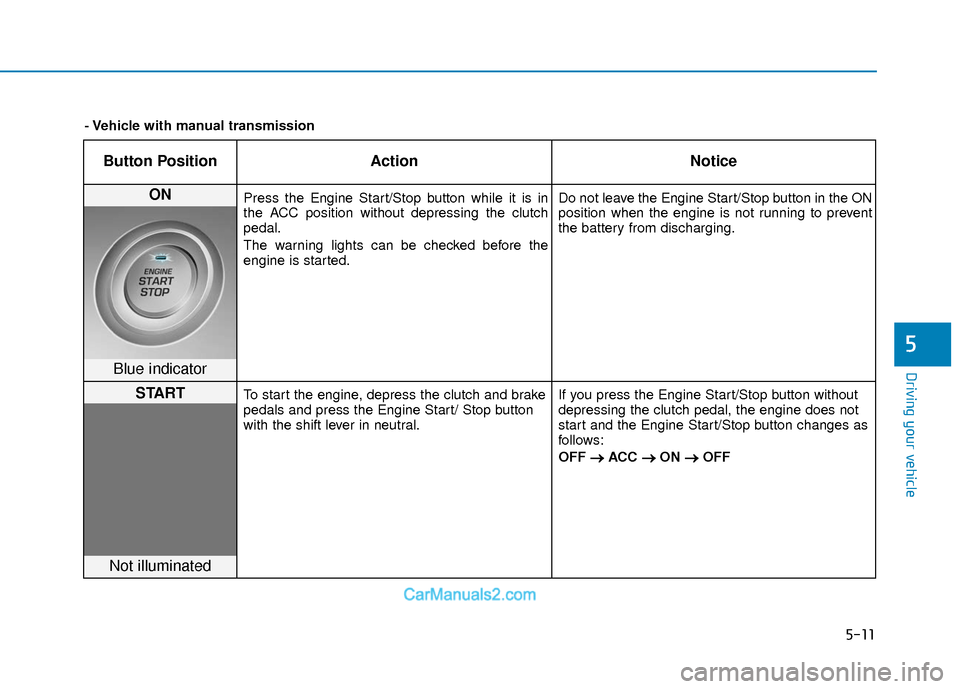
Button PositionAction Notice
ON Press the Engine Start/Stop button while it is in
the ACC position without depressing the clutch
pedal.
The warning lights can be checked before the
engine is started. Do not leave the Engine Start/Stop button in the ON
position when the engine is not running to prevent
the battery from discharging.
Blue indicator
STARTTo start the engine, depress the clutch and brake
pedals and press the Engine Start/ Stop button
with the shift lever in neutral.
If you press the Engine Start/Stop button without
depressing the clutch pedal, the engine does not
start and the Engine Start/Stop button changes as
follows:
OFF
→ →
ACC →
→
ON →
→
OFF
Not illuminated
- Vehicle with manual transmission
Page 295 of 526
5-12
Driving your vehicle
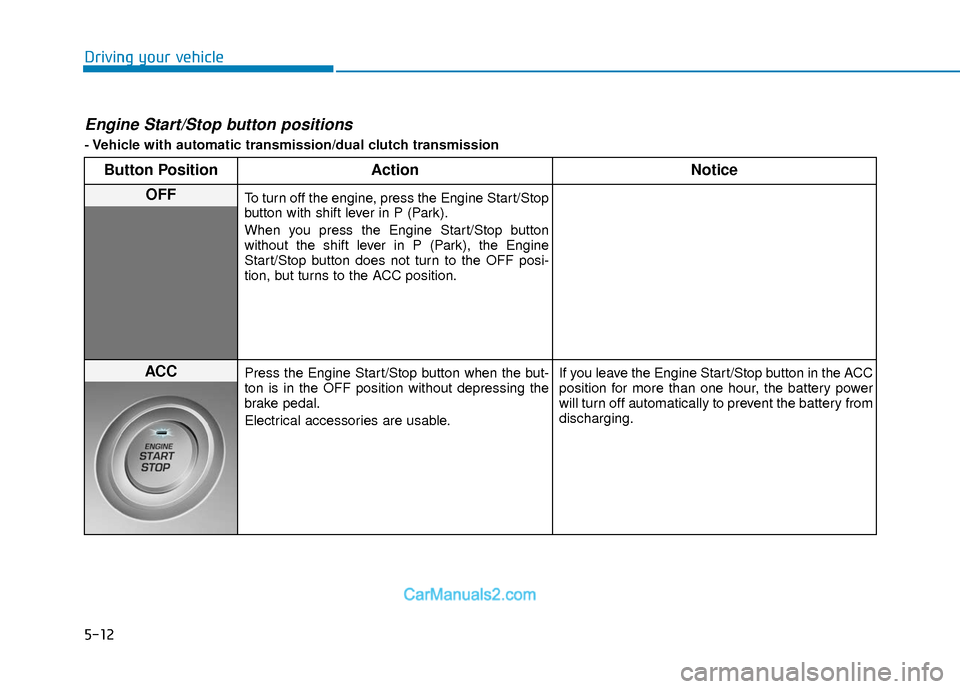
Engine Start/Stop button positions
- Vehicle with automatic transmission/dual clutch transmission
Button PositionAction Notice
OFFTo turn off the engine, press the Engine Start/Stop
button with shift lever in P (Park).
When you press the Engine Start/Stop button
without the shift lever in P (Park), the Engine
Start/Stop button does not turn to the OFF posi-
tion, but turns to the ACC position.
ACCPress the Engine Start/Stop button when the but-
ton is in the OFF position without depressing the
brake pedal.
Electrical accessories are usable. If you leave the Engine Start/Stop button in the ACC
position for more than one hour, the battery power
will turn off automatically to prevent the battery from
discharging.
Page 296 of 526
5-13
Driving your vehicle
5
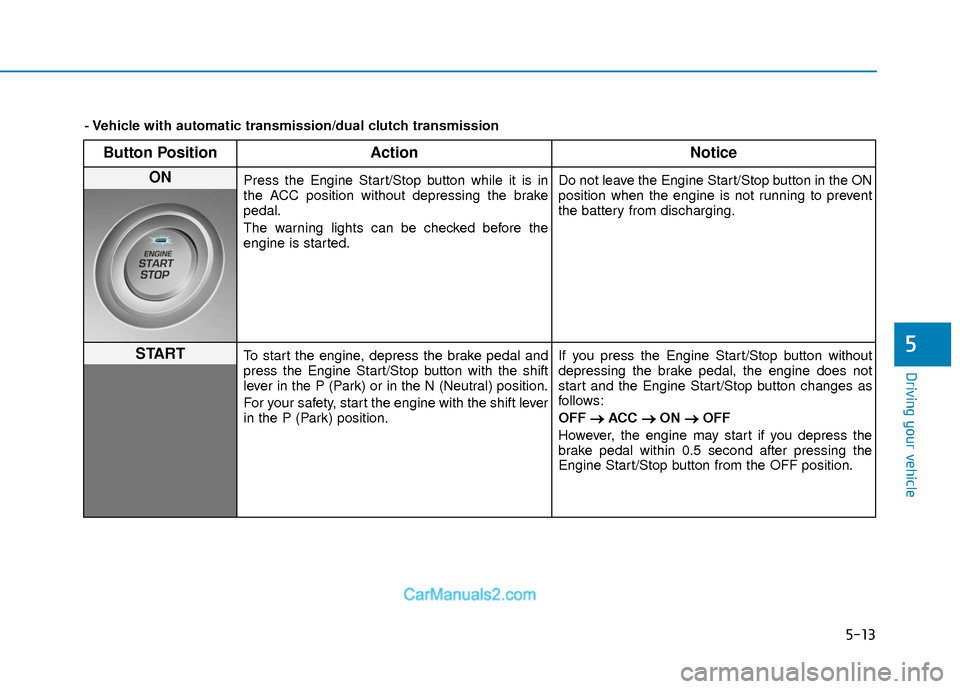
Button PositionAction Notice
ON Press the Engine Start/Stop button while it is in
the ACC position without depressing the brake
pedal.
The warning lights can be checked before the
engine is started. Do not leave the Engine Start/Stop button in the ON
position when the engine is not running to prevent
the battery from discharging.
STARTTo start the engine, depress the brake pedal and
press the Engine Start/Stop button with the shift
lever in the P (Park) or in the N (Neutral) position.
For your safety, start the engine with the shift lever
in the P (Park) position.If you press the Engine Start/Stop button without
depressing the brake pedal, the engine does not
start and the Engine Start/Stop button changes as
follows:
OFF
→ →
ACC →
→
ON →
→
OFF
However, the engine may start if you depress the
brake pedal within 0.5 second after pressing the
Engine Start/Stop button from the OFF position.
- Vehicle with automatic transmission/dual clutch transmission
Page 386 of 526
6-5
What to do in an emergency
6
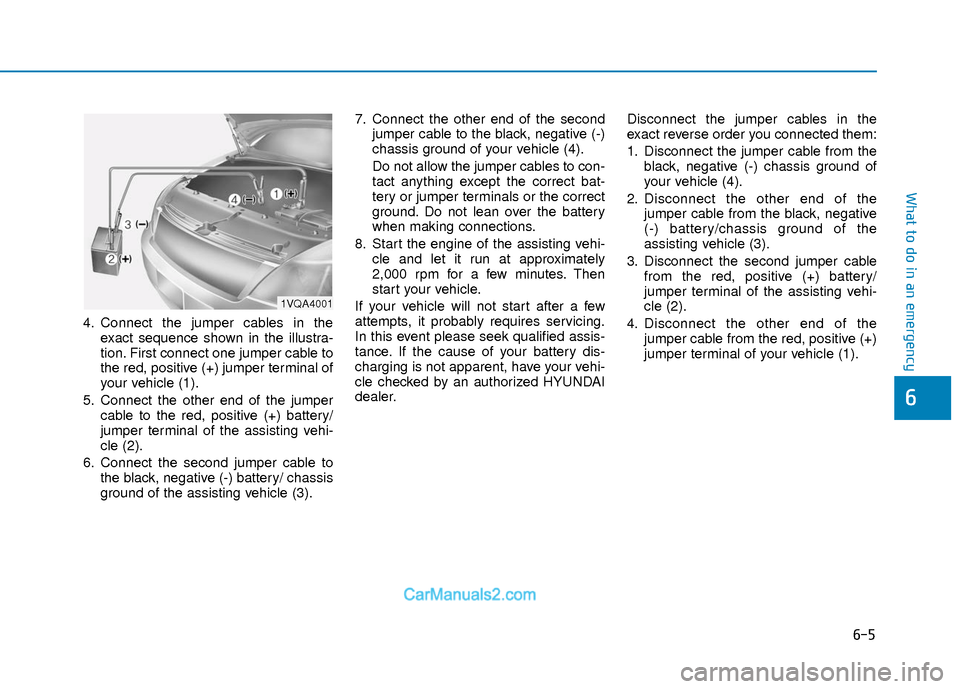
4. Connect the jumper cables in theexact sequence shown in the illustra-
tion. First connect one jumper cable to
the red, positive (+) jumper terminal of
your vehicle (1).
5. Connect the other end of the jumper cable to the red, positive (+) battery/
jumper terminal of the assisting vehi-
cle (2).
6. Connect the second jumper cable to the black, negative (-) battery/ chassis
ground of the assisting vehicle (3). 7. Connect the other end of the second
jumper cable to the black, negative (-)
chassis ground of your vehicle (4).
Do not allow the jumper cables to con-
tact anything except the correct bat-
tery or jumper terminals or the correct
ground. Do not lean over the battery
when making connections.
8. Start the engine of the assisting vehi- cle and let it run at approximately
2,000 rpm for a few minutes. Then
start your vehicle.
If your vehicle will not start after a few
attempts, it probably requires servicing.
In this event please seek qualified assis-
tance. If the cause of your battery dis-
charging is not apparent, have your vehi-
cle checked by an authorized HYUNDAI
dealer. Disconnect the jumper cables in the
exact reverse order you connected them:
1. Disconnect the jumper cable from the
black, negative (-) chassis ground of
your vehicle (4).
2. Disconnect the other end of the jumper cable from the black, negative
(-) battery/chassis ground of the
assisting vehicle (3).
3. Disconnect the second jumper cable from the red, positive (+) battery/
jumper terminal of the assisting vehi-
cle (2).
4. Disconnect the other end of the jumper cable from the red, positive (+)
jumper terminal of your vehicle (1).
1VQA4001
Page 419 of 526
7
Maintenance
7
Maintenance
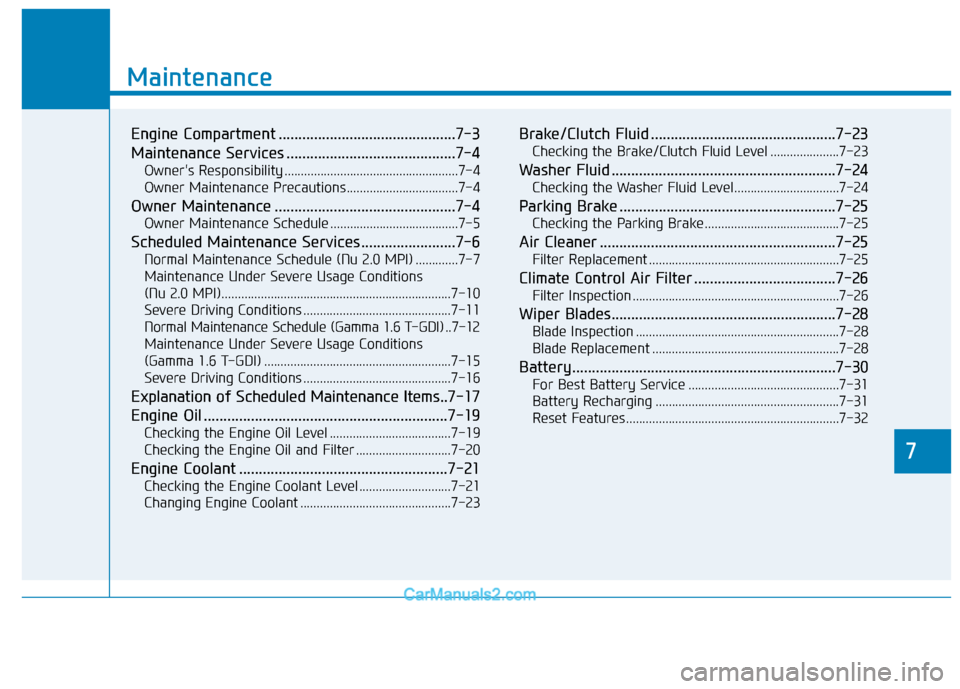
Engine Compartment .............................................7-3
Maintenance Services ...........................................7-4
Owner's Responsibility .....................................................7-4
Owner Maintenance Precautions..................................7-4
Owner Maintenance ..............................................7-4
Owner Maintenance Schedule .......................................7-5
Scheduled Maintenance Services........................7-6
Normal Maintenance Schedule (Nu 2.0 MPI) .............7-7
Maintenance Under Severe Usage Conditions
(Nu 2.0 MPI)......................................................................7-\
10
Severe Driving Conditions .............................................7-11
Normal Maintenance Schedule (Gamma 1.6 T-GDI) ..7-12
Maintenance Under Severe Usage Conditions
(Gamma 1.6 T-GDI) .........................................................7-15
Severe Driving Conditions .............................................7-16
Explanation of Scheduled Maintenance Items.. 7-17
Engine Oil ..............................................................7-19
Checking the Engine Oil Level .....................................7-19
Checking the Engine Oil and Filter .............................7-20
Engine Coolant .....................................................7-21
Checking the Engine Coolant Level ............................7-21
Changing Engine Coolant ..............................................7-23
Brake/Clutch Fluid ...............................................7-23
Checking the Brake/Clutch Fluid Level .....................7-23
Washer Fluid .........................................................7-24
Checking the Washer Fluid Level................................7-24
Parking Brake .......................................................7-25
Checking the Parking Brake .........................................7-25
Air Cleaner ............................................................7-25
Filter Replacement ..........................................................7-25
Climate Control Air Filter ....................................7-26
Filter Inspection ...............................................................7-26
Wiper Blades.........................................................7-28
Blade Inspection ..............................................................7-28
Blade Replacement .........................................................7-28
Battery...................................................................7-30
For Best Battery Service ..............................................7-31
Battery Recharging ........................................................7-31
Reset Features.................................................................7-32
7
Page 449 of 526
7-31
7
Maintenance
When you do not use the vehicle fora long time in a low temperature
area, disconnect the battery and
keep it indoors.
Always charge the battery fully to prevent battery case damage in low
temperature areas.
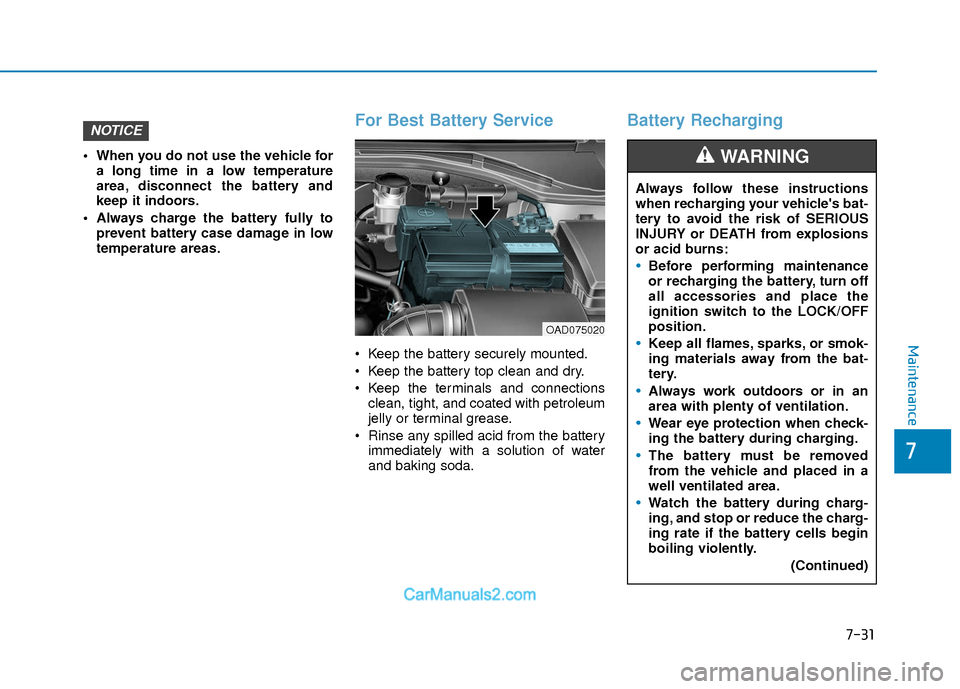
For Best Battery Service
Keep the battery securely mounted.
Keep the battery top clean and dry.
Keep the terminals and connectionsclean, tight, and coated with petroleum
jelly or terminal grease.
Rinse any spilled acid from the battery immediately with a solution of water
and baking soda.
Battery RechargingNOTICE
Always follow these instructions
when recharging your vehicle's bat-
tery to avoid the risk of SERIOUS
INJURY or DEATH from explosions
or acid burns:
Before performing maintenance
or recharging the battery, turn off
all accessories and place the
ignition switch to the LOCK/OFF
position.
Keep all flames, sparks, or smok-
ing materials away from the bat-
tery.
Always work outdoors or in an
area with plenty of ventilation.
Wear eye protection when check-
ing the battery during charging.
The battery must be removed
from the vehicle and placed in a
well ventilated area.
Watch the battery during charg-
ing, and stop or reduce the charg-
ing rate if the battery cells begin
boiling violently.
(Continued)
WARNING
OAD075020
Page 473 of 526
7-55
7
Maintenance
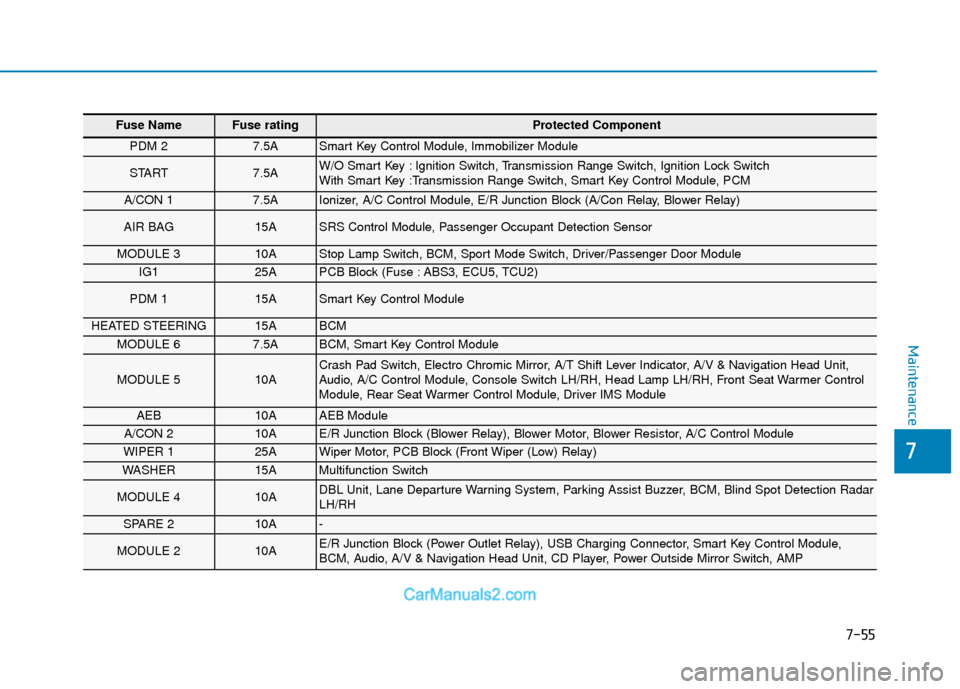
Fuse Name Fuse rating Protected Component
PDM 2 7.5A Smart Key Control Module, Immobilizer Module
START 7.5A W/O Smart Key : Ignition Switch, Transmission Range Switch, Ignition Lock Switch
With Smart Key :Transmission Range Switch, Smart Key Control Module, PCM
A/CON 1 7.5A Ionizer, A/C Control Module, E/R Junction Block (A/Con Relay, Blower Relay)
AIR BAG 15A SRS Control Module, Passenger Occupant Detection Sensor
MODULE 3 10A Stop Lamp Switch, BCM, Sport Mode Switch, Driver/Passenger Door Module
IG1 25A PCB Block (Fuse : ABS3, ECU5, TCU2)
PDM 1 15A Smart Key Control Module
HEATED STEERING 15A BCM
MODULE 6 7.5A BCM, Smart Key Control Module
MODULE 5 10A Crash Pad Switch, Electro Chromic Mirror, A/T Shift Lever Indicator, A/V & Navigation Head Unit,
Audio, A/C Control Module, Console Switch LH/RH, Head Lamp LH/RH, Front Seat Warmer Control
Module, Rear Seat Warmer Control Module, Driver IMS Module
AEB 10A AEB Module
A/CON 2 10A E/R Junction Block (Blower Relay), Blower Motor, Blower Resistor, A/C Control Module
WIPER 1 25A Wiper Motor, PCB Block (Front Wiper (Low) Relay)
WASHER 15A Multifunction Switch
MODULE 4 10A DBL Unit, Lane Departure Warning System, Parking Assist Buzzer, BCM, Blind Spot Detection Radar
LH/RH
SPARE 2 10A -
MODULE 2 10A E/R Junction Block (Power Outlet Relay), USB Charging Connector, Smart Key Control Module,
BCM, Audio, A/V & Navigation Head Unit, CD Player, Power Outside Mirror Switch, AMP
Page 520 of 526

I-3
Battery ........................................................................\
.....7-30Battery Recharging .....................................................7-31
For Best Battery Service ............................................7-31
Reset Features ............................................................7-32
Before Driving ..................................................................5-4 Before Entering the Vehicle .........................................5-4
Before Starting .............................................................5-4
Blind Spot Detection System (BSD) ..............................5-45 BSD (Blind Spot Detection) / LCA (Lane Change Assist) .....................................5-46
Limitations of the System ..........................................5-51
RCTA (Rear Cross Traffic Alert) ...............................5-49
Brake/Clutch Fluid..........................................................7-23 Checking the Brake/Clutch Fluid Level.....................7-23
Braking System ...............................................................5-33 Anti-lock Brake System (ABS)..................................5-36
Disc Brakes Wear Indicator........................................5-34
Electronic Stability Control (ESC).............................5-38
Good Braking Practices..............................................5-42
Hill-Start Assist Control (HAC) .................................5-42
Parking Brake .............................................................5-34
Power Brakes..............................................................5-33
Rear Drum Brakes ......................................................5-34
Vehicle Stability Management (VSM) .......................5-41
Bulb Wattage .....................................................................8-3\
California Perchlorate Notice .........................................7-86
Child restraint system (CRS) ..........................................2-28
Children Always in the Rear ......................................2-28
Installing a Child Restraint System (CRS) ................2-31
Selecting a Child Restraint System (CRS).................2-29
Climate Control Additional Features ............................3-135 Automatic Ventilation...............................................3-135
Sunroof Inside Air Recirculation .............................3-135
Climate Control Air Filter...............................................7-26 Filter Inspection..........................................................7-26
Consumer Information ....................................................8-12
Cruise Control .................................................................5-69 Cruise Control operation ............................................5-69
Declaration of conformity...............................................4-63 FCC ........................................................................\
....4-63
Defroster........................................................................\
3-110 Rear Window Defroster ............................................3-110
Dimensions .......................................................................8\
-2
Door Locks......................................................................3-\
11 Auto Door Lock/Unlock Features ..............................3-14
Child-Protector Rear Door locks................................3-15
Operating Door Locks from Inside the Vehicle .........3-12
Operating Door Locks from Outside the Vehicle.......3-11
I
Index
BC
D