check engine light Hyundai Elantra 2018 User Guide
[x] Cancel search | Manufacturer: HYUNDAI, Model Year: 2018, Model line: Elantra, Model: Hyundai Elantra 2018Pages: 526, PDF Size: 17.2 MB
Page 181 of 526
3-104
Convenient features of your vehicle
AFLS (Adaptive Front LightingSystem) a.k.a. DBL (DynamicBending Light) (if equipped)
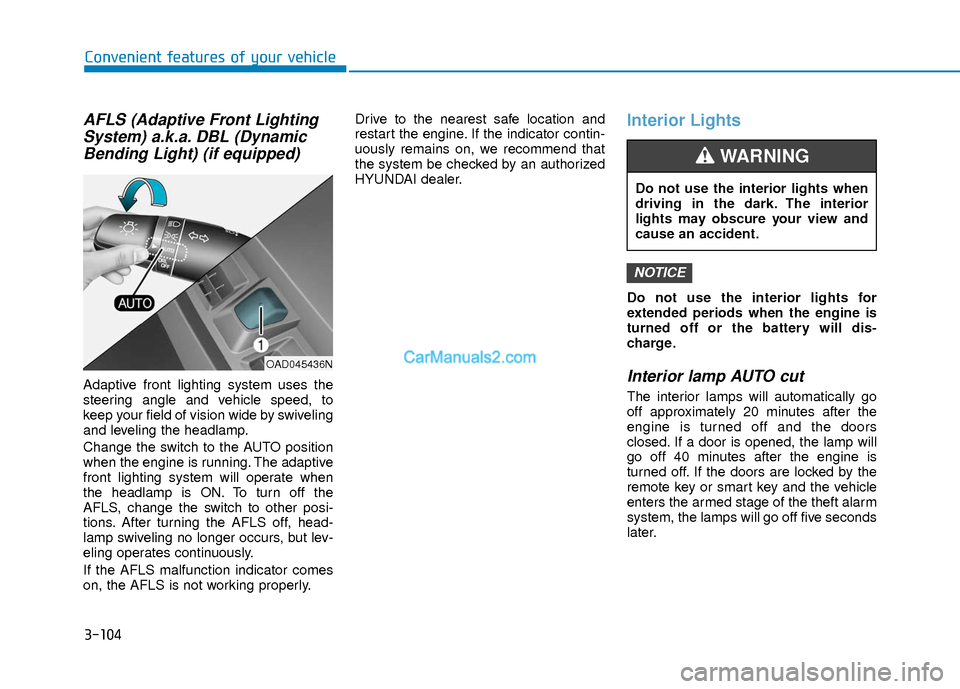
Adaptive front lighting system uses the
steering angle and vehicle speed, to
keep your field of vision wide by swiveling
and leveling the headlamp.
Change the switch to the AUTO position
when the engine is running. The adaptive
front lighting system will operate when
the headlamp is ON. To turn off the
AFLS, change the switch to other posi-
tions. After turning the AFLS off, head-
lamp swiveling no longer occurs, but lev-
eling operates continuously.
If the AFLS malfunction indicator comes
on, the AFLS is not working properly. Drive to the nearest safe location and
restart the engine. If the indicator contin-
uously remains on, we recommend that
the system be checked by an authorized
HYUNDAI dealer.
Interior Lights
Do not use the interior lights for
extended periods when the engine is
turned off or the battery will dis-
charge.
Interior lamp AUTO cut
The interior lamps will automatically go
off approximately 20 minutes after the
engine is turned off and the doors
closed. If a door is opened, the lamp will
go off 40 minutes after the engine is
turned off. If the doors are locked by the
remote key or smart key and the vehicle
enters the armed stage of the theft alarm
system, the lamps will go off five seconds
later.
NOTICE
OAD045436N
Do not use the interior lights when
driving in the dark. The interior
lights may obscure your view and
cause an accident.
WARNING
Page 287 of 526
5-4
Driving your vehicle
Before Entering the Vehicle
• Be sure all windows, outside mirror(s),and outside lights are clean and unob-
structed.
Remove frost, snow, or ice.
Visually check the tires for uneven wear and damage.
Check under the vehicle for any sign of leaks.
Be sure there are no obstacles behind you if you intend to back up.
Before Starting
Make sure the hood, the trunk, and thedoors are securely closed and locked.
Adjust the position of the seat and steering wheel.
Adjust the inside and outside rearview mirrors.
Verify all the lights work.
Fasten your seatbelt. Check that all passengers have fastened their seat-
belts.
Check the gauges and indicators in the instrument panel and the messages on
the instrument display when the igni-
tion switch is in the ON position.
Check that any items you are carrying are stored properly or fastened down
securely.
CALIFORNIA PROPOSITION 65
WARNING
Engine exhaust and a wide variety
of automobile components includ-
ing components found in the interi-
or furnishings in a vehicle, contain
or emit harmful chemicals known to
the State of California to cause can-
cer and birth defects and reproduc-
tive harm. In addition, certain fluids
contained in vehicles and certain
products of components contain or
emit chemicals known to the State
of California to cause cancer and
birth defects or other reproductive
harm.WARNING
B B
E
EF
FO
O R
RE
E
D
D R
RI
IV
V I
IN
N G
G
Page 290 of 526
5-7
Driving your vehicle
5
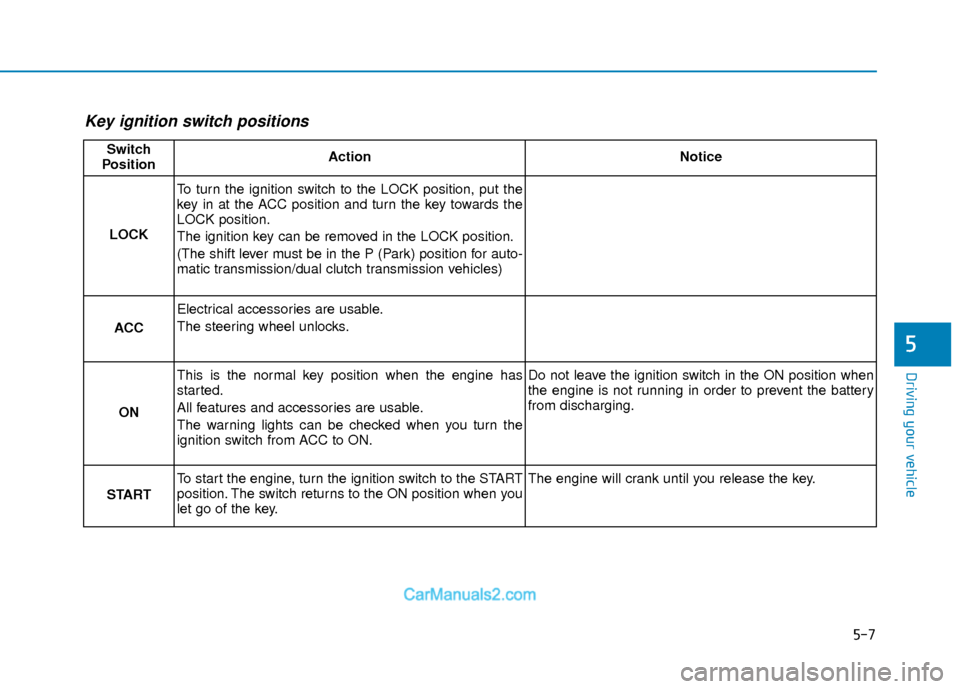
Key ignition switch positions
Switch
PositionActionNotice
LOCK
To turn the ignition switch to the LOCK position, put the
key in at the ACC position and turn the key towards the
LOCK position.
The ignition key can be removed in the LOCK position.
(The shift lever must be in the P (Park) position for auto-
matic transmission/dual clutch transmission vehicles)
ACC
Electrical accessories are usable.
The steering wheel unlocks.
ON
This is the normal key position when the engine has
started.
All features and accessories are usable.
The warning lights can be checked when you turn the
ignition switch from ACC to ON.Do not leave the ignition switch in the ON position when
the engine is not running in order to prevent the battery
from discharging.
START
To start the engine, turn the ignition switch to the START
position. The switch returns to the ON position when you
let go of the key.The engine will crank until you release the key.
Page 294 of 526
5-11
Driving your vehicle
5
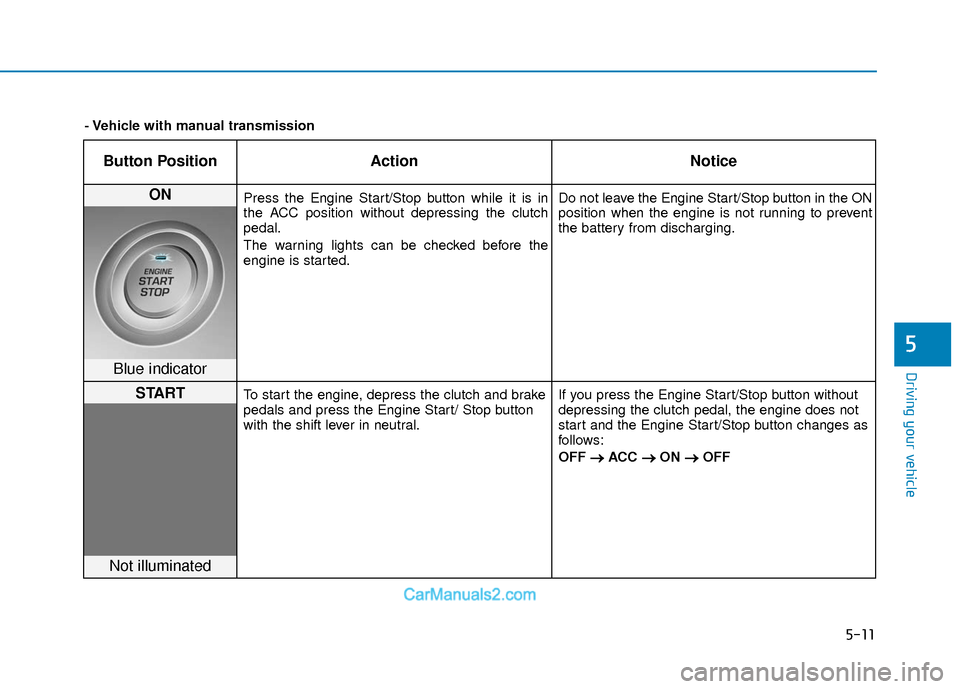
Button PositionAction Notice
ON Press the Engine Start/Stop button while it is in
the ACC position without depressing the clutch
pedal.
The warning lights can be checked before the
engine is started. Do not leave the Engine Start/Stop button in the ON
position when the engine is not running to prevent
the battery from discharging.
Blue indicator
STARTTo start the engine, depress the clutch and brake
pedals and press the Engine Start/ Stop button
with the shift lever in neutral.
If you press the Engine Start/Stop button without
depressing the clutch pedal, the engine does not
start and the Engine Start/Stop button changes as
follows:
OFF
→ →
ACC →
→
ON →
→
OFF
Not illuminated
- Vehicle with manual transmission
Page 296 of 526
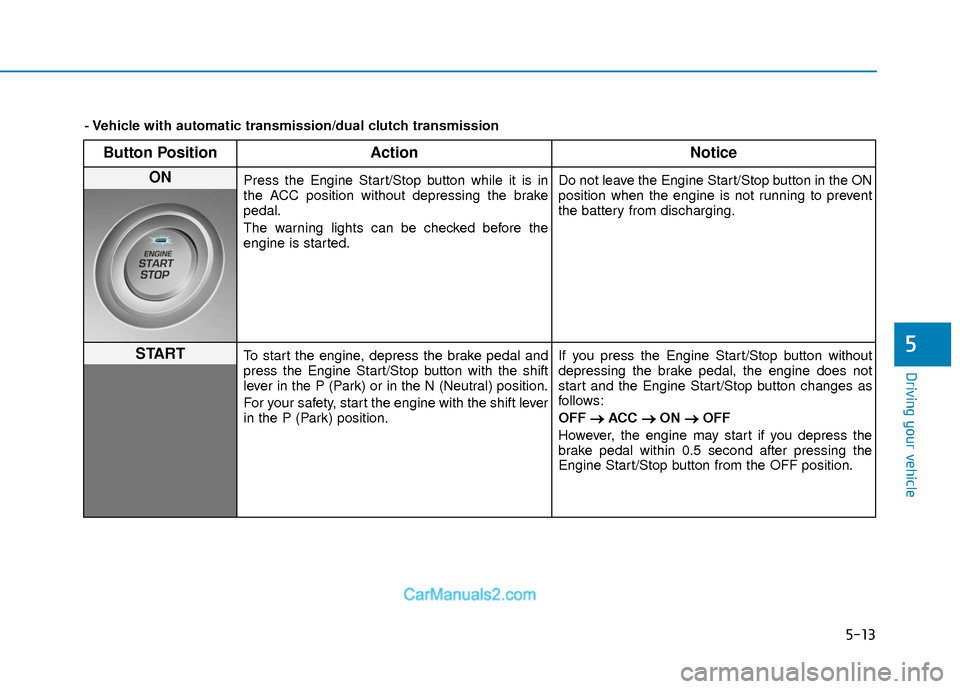
5-13
Driving your vehicle
5
Button PositionAction Notice
ON Press the Engine Start/Stop button while it is in
the ACC position without depressing the brake
pedal.
The warning lights can be checked before the
engine is started. Do not leave the Engine Start/Stop button in the ON
position when the engine is not running to prevent
the battery from discharging.
STARTTo start the engine, depress the brake pedal and
press the Engine Start/Stop button with the shift
lever in the P (Park) or in the N (Neutral) position.
For your safety, start the engine with the shift lever
in the P (Park) position.If you press the Engine Start/Stop button without
depressing the brake pedal, the engine does not
start and the Engine Start/Stop button changes as
follows:
OFF
→ →
ACC →
→
ON →
→
OFF
However, the engine may start if you depress the
brake pedal within 0.5 second after pressing the
Engine Start/Stop button from the OFF position.
- Vehicle with automatic transmission/dual clutch transmission
Page 319 of 526
5-36
Driving your vehicle
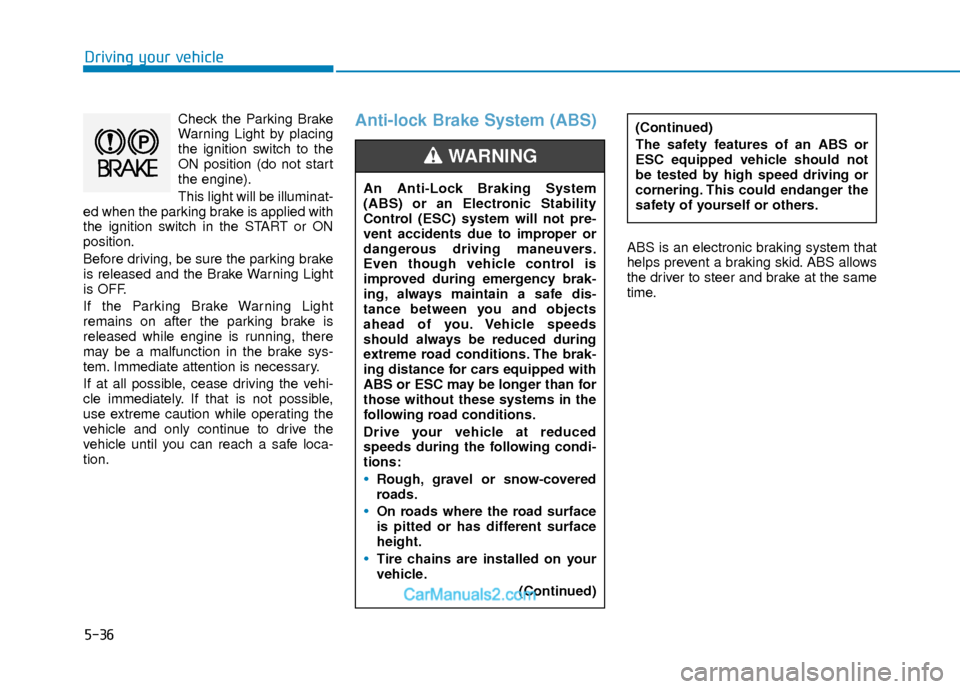
Check the Parking Brake
Warning Light by placing
the ignition switch to the
ON position (do not start
the engine).
This light will be illuminat-
ed when the parking brake is applied with
the ignition switch in the START or ON
position.
Before driving, be sure the parking brake
is released and the Brake Warning Light
is OFF.
If the Parking Brake Warning Light
remains on after the parking brake is
released while engine is running, there
may be a malfunction in the brake sys-
tem. Immediate attention is necessary.
If at all possible, cease driving the vehi-
cle immediately. If that is not possible,
use extreme caution while operating the
vehicle and only continue to drive the
vehicle until you can reach a safe loca-
tion.Anti-lock Brake System (ABS)
ABS is an electronic braking system that
helps prevent a braking skid. ABS allows
the driver to steer and brake at the same
time.
An Anti-Lock Braking System
(ABS) or an Electronic Stability
Control (ESC) system will not pre-
vent accidents due to improper or
dangerous driving maneuvers.
Even though vehicle control is
improved during emergency brak-
ing, always maintain a safe dis-
tance between you and objects
ahead of you. Vehicle speeds
should always be reduced during
extreme road conditions. The brak-
ing distance for cars equipped with
ABS or ESC may be longer than for
those without these systems in the
following road conditions.
Drive your vehicle at reduced
speeds during the following condi-
tions:
Rough, gravel or snow-covered
roads.
On roads where the road surface
is pitted or has different surface
height.
Tire chains are installed on your
vehicle.
(Continued)
WARNING
(Continued)
The safety features of an ABS or
ESC equipped vehicle should not
be tested by high speed driving or
cornering. This could endanger the
safety of yourself or others.
Page 321 of 526
5-38
Driving your vehicle
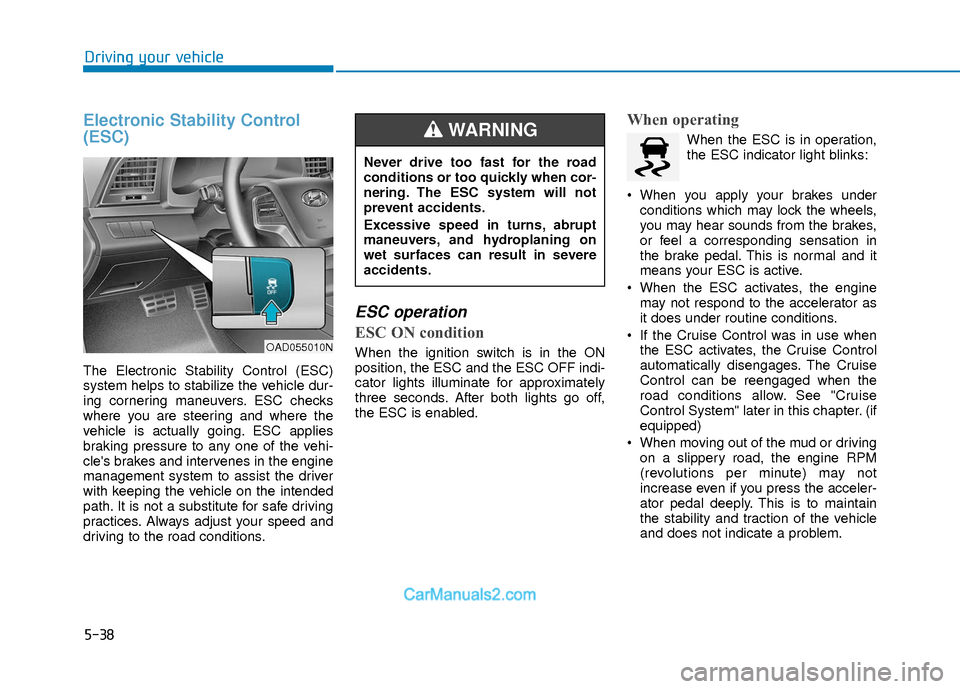
Electronic Stability Control
(ESC)
The Electronic Stability Control (ESC)
system helps to stabilize the vehicle dur-
ing cornering maneuvers. ESC checks
where you are steering and where the
vehicle is actually going. ESC applies
braking pressure to any one of the vehi-
cle's brakes and intervenes in the engine
management system to assist the driver
with keeping the vehicle on the intended
path. It is not a substitute for safe driving
practices. Always adjust your speed and
driving to the road conditions.
ESC operation
ESC ON condition
When the ignition switch is in the ON
position, the ESC and the ESC OFF indi-
cator lights illuminate for approximately
three seconds. After both lights go off,
the ESC is enabled.
When operating
When the ESC is in operation,
the ESC indicator light blinks:
When you apply your brakes under conditions which may lock the wheels,
you may hear sounds from the brakes,
or feel a corresponding sensation in
the brake pedal. This is normal and it
means your ESC is active.
When the ESC activates, the engine may not respond to the accelerator as
it does under routine conditions.
If the Cruise Control was in use when the ESC activates, the Cruise Control
automatically disengages. The Cruise
Control can be reengaged when the
road conditions allow. See "Cruise
Control System" later in this chapter. (if
equipped)
When moving out of the mud or driving on a slippery road, the engine RPM
(revolutions per minute) may not
increase even if you press the acceler-
ator pedal deeply. This is to maintain
the stability and traction of the vehicle
and does not indicate a problem.
OAD055010N
Never drive too fast for the road
conditions or too quickly when cor-
nering. The ESC system will not
prevent accidents.
Excessive speed in turns, abrupt
maneuvers, and hydroplaning on
wet surfaces can result in severe
accidents.
WARNING
Page 322 of 526
5-39
Driving your vehicle
5
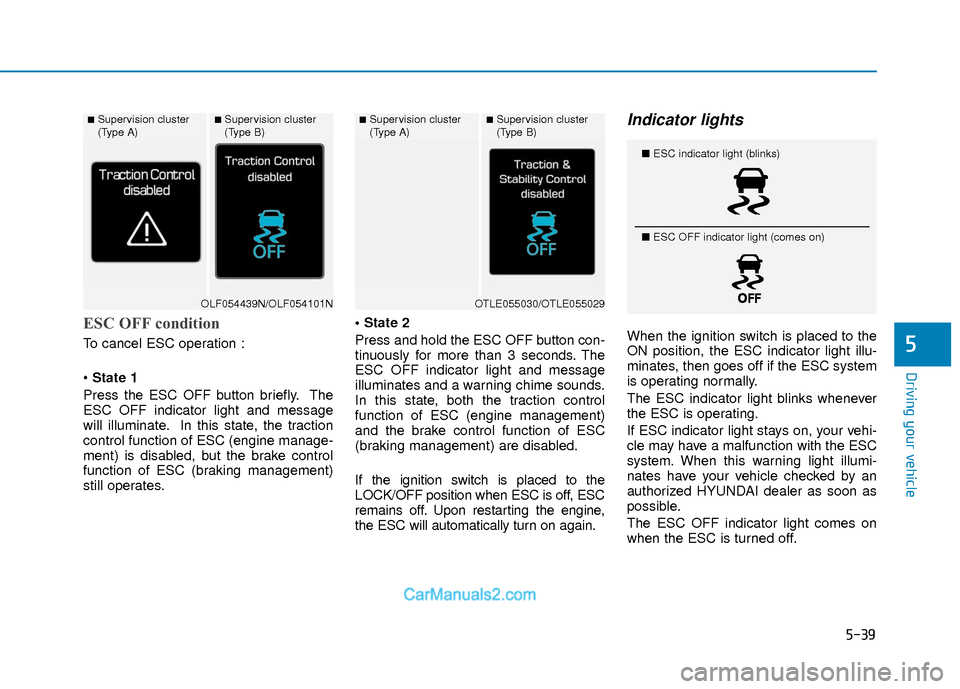
ESC OFF condition
To cancel ESC operation :
State 1
Press the ESC OFF button briefly. The
ESC OFF indicator light and message
will illuminate. In this state, the traction
control function of ESC (engine manage-
ment) is disabled, but the brake control
function of ESC (braking management)
still operates.
Press and hold the ESC OFF button con-
tinuously for more than 3 seconds. The
ESC OFF indicator light and message
illuminates and a warning chime sounds.
In this state, both the traction control
function of ESC (engine management)
and the brake control function of ESC
(braking management) are disabled.
If the ignition switch is placed to the
LOCK/OFF position when ESC is off, ESC
remains off. Upon restarting the engine,
the ESC will automatically turn on again.
Indicator lights
When the ignition switch is placed to the
ON position, the ESC indicator light illu-
minates, then goes off if the ESC system
is operating normally.
The ESC indicator light blinks whenever
the ESC is operating.
If ESC indicator light stays on, your vehi-
cle may have a malfunction with the ESC
system. When this warning light illumi-
nates have your vehicle checked by an
authorized HYUNDAI dealer as soon as
possible.
The ESC OFF indicator light comes on
when the ESC is turned off.
■Supervision cluster
(Type A)■Supervision cluster
(Type B)
OLF054439N/OLF054101N
■Supervision cluster
(Type A)■Supervision cluster
(Type B)
OTLE055030/OTLE055029
■
ESC indicator light (blinks)
■ ESC OFF indicator light (comes on)
Page 352 of 526
5-69
Driving your vehicle
5
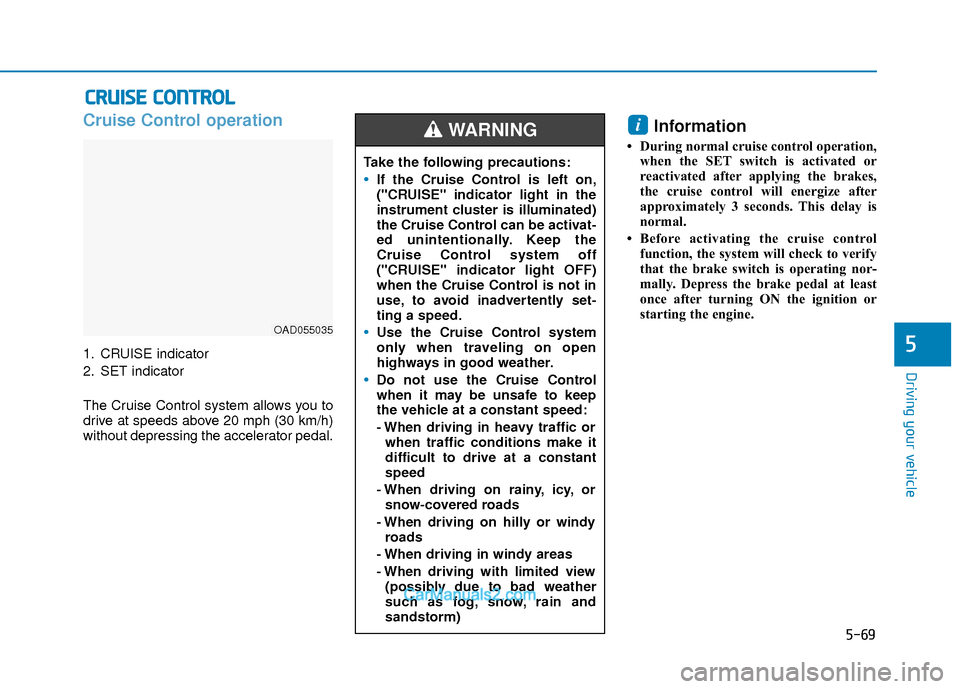
Cruise Control operation
1. CRUISE indicator
2. SET indicator
The Cruise Control system allows you to
drive at speeds above 20 mph (30 km/h)
without depressing the accelerator pedal.
Information
• During normal cruise control operation,when the SET switch is activated or
reactivated after applying the brakes,
the cruise control will energize after
approximately 3 seconds. This delay is
normal.
• Before activating the cruise control function, the system will check to verify
that the brake switch is operating nor-
mally. Depress the brake pedal at least
once after turning ON the ignition or
starting the engine.
i
C CR
R U
U I
IS
S E
E
C
C O
O N
NT
TR
R O
O L
L
OAD055035
Take the following precautions:
If the Cruise Control is left on,
("CRUISE" indicator light in the
instrument cluster is illuminated)
the Cruise Control can be activat-
ed unintentionally. Keep the
Cruise Control system off
("CRUISE" indicator light OFF)
when the Cruise Control is not in
use, to avoid inadvertently set-
ting a speed.
Use the Cruise Control system
only when traveling on open
highways in good weather.
Do not use the Cruise Control
when it may be unsafe to keep
the vehicle at a constant speed:
- When driving in heavy traffic or
when traffic conditions make it
difficult to drive at a constant
speed
- When driving on rainy, icy, or snow-covered roads
- When driving on hilly or windy roads
- When driving in windy areas
- When driving with limited view (possibly due to bad weather
such as fog, snow, rain and
sandstorm)
WARNING
Page 362 of 526
5-79
Driving your vehicle
5
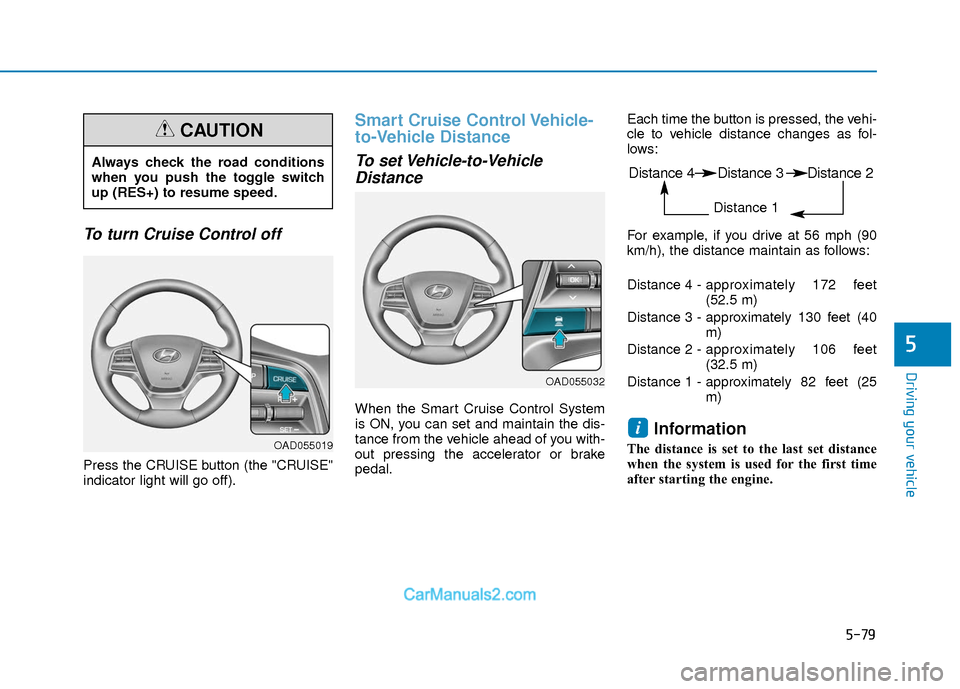
To turn Cruise Control off
Press the CRUISE button (the "CRUISE"
indicator light will go off).
Smart Cruise Control Vehicle-
to-Vehicle Distance
To set Vehicle-to-VehicleDistance
When the Smart Cruise Control System
is ON, you can set and maintain the dis-
tance from the vehicle ahead of you with-
out pressing the accelerator or brake
pedal. Each time the button is pressed, the vehi-
cle to vehicle distance changes as fol-
lows:
For example, if you drive at 56 mph (90
km/h), the distance maintain as follows:
Distance 4 -
approximately 172 feet
(52.5 m)
Distance 3 - approximately 130 feet (40 m)
Distance 2 - approximately 106 feet
(32.5 m)
Distance 1 - approximately 82 feet (25 m)
Information
The distance is set to the last set distance
when the system is used for the first time
after starting the engine.
i
Always check the road conditions
when you push the toggle switch
up (RES+) to resume speed.
CAUTION
OAD055019
OAD055032
Distance 4 Distance 3 Distance 2
Distance 1