radio Hyundai Elantra 2018 User Guide
[x] Cancel search | Manufacturer: HYUNDAI, Model Year: 2018, Model line: Elantra, Model: Hyundai Elantra 2018Pages: 526, PDF Size: 17.2 MB
Page 220 of 526
Multimedia System
Multimedia system .................................................4-2
AUX, USB and iPod®port ...............................................4-2
Antenna ........................................................................\
.......4-2
Steering Wheel Audio Controls ......................................4-3
Bluetooth®Wireless Technology Hands-Free ...........4-4
Audio (Display Audio) / Video /
Navigation System (AVN).................................................4-4
How Vehicle Audio Works ...............................................4-5
Features of Your Vehicle.................................................4-6
Caring for CDs ....................................................................4-7
Audio (Without Touch Screen) ..........................4-16
Features of Your Audio .................................................4-17
Radio Mode.......................................................................4\
-32
SiriusXM Radio Mode.....................................................4-34
Media Mode......................................................................4-\
36
Phone Mode .....................................................................4-4\
2
Voice Recognition Mode ...............................................4-46
Setup Mode ......................................................................4-\
53
Declaration of conformity ..................................4-63
FCC ........................................................................\
..............4-63
4
Page 222 of 526
4-3
Multimedia System
4
Do not clean the inside of the rearglass window with a cleaner or
scraper to remove foreign deposits
as this may cause damage to the
antenna elements.
Avoid adding metallic coatings to the rear glass window. These can
degrade AM and FM broadcast sig-
nals.
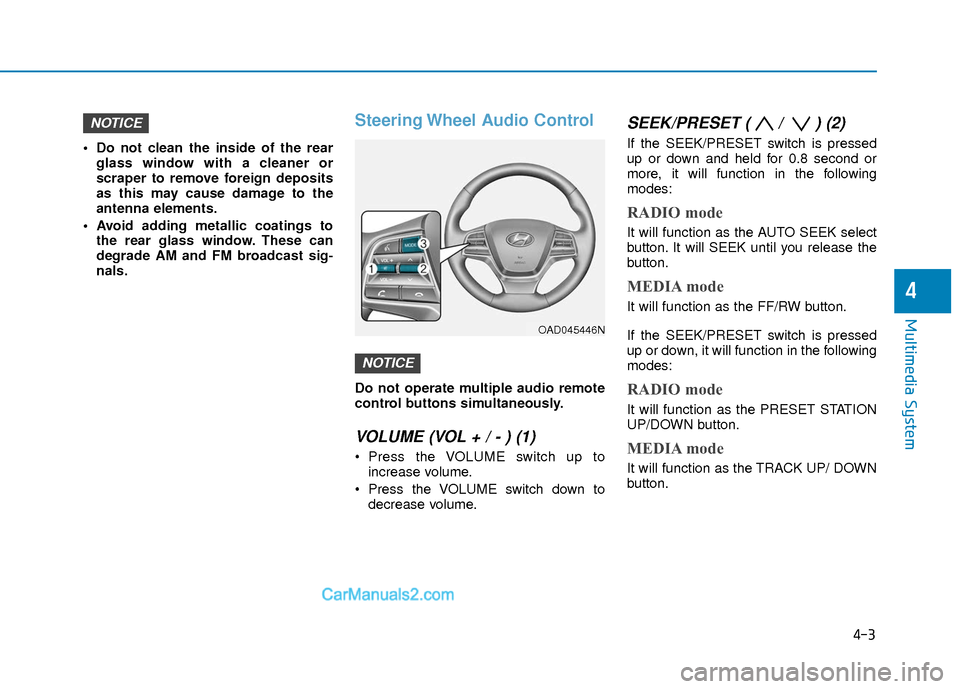
Steering Wheel Audio Control
Do not operate multiple audio remote
control buttons simultaneously.
VOLUME (VOL + / - ) (1)
Press the VOLUME switch up toincrease volume.
Press the VOLUME switch down to decrease volume.
SEEK/PRESET ( / ) (2)
If the SEEK/PRESET switch is pressed
up or down and held for 0.8 second or
more, it will function in the following
modes:
RADIO mode
It will function as the AUTO SEEK select
button. It will SEEK until you release the
button.
MEDIA mode
It will function as the FF/RW button.
If the SEEK/PRESET switch is pressed
up or down, it will function in the following
modes:
RADIO mode
It will function as the PRESET STATION
UP/DOWN button.
MEDIA mode
It will function as the TRACK UP/ DOWN
button.
NOTICE
NOTICE
OAD045446N
Page 223 of 526
4-4
Multimedia System
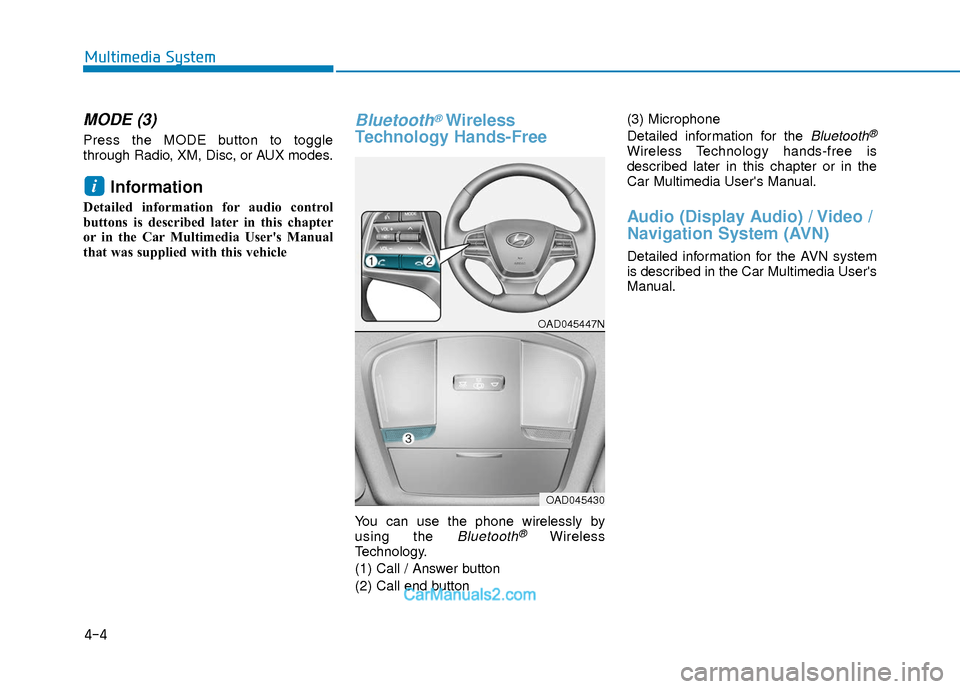
MODE (3)
Press the MODE button to toggle
through Radio, XM, Disc, or AUX modes.
Information
Detailed information for audio control
buttons is described later in this chapter
or in the Car Multimedia User's Manual
that was supplied with this vehicle
Bluetooth®Wireless
Technology Hands-Free
You can use the phone wirelessly by
using the Bluetooth®Wireless
Technology.
(1) Call / Answer button
(2) Call end button (3) Microphone
Detailed information for the
Bluetooth®
Wireless Technology hands-free is
described later in this chapter or in the
Car Multimedia User's Manual.
Audio (Display Audio) / Video /
Navigation System (AVN)
Detailed information for the AVN system
is described in the Car Multimedia User's
Manual.
i
OAD045447N
OAD045430
Page 224 of 526
How Vehicle Audio Works
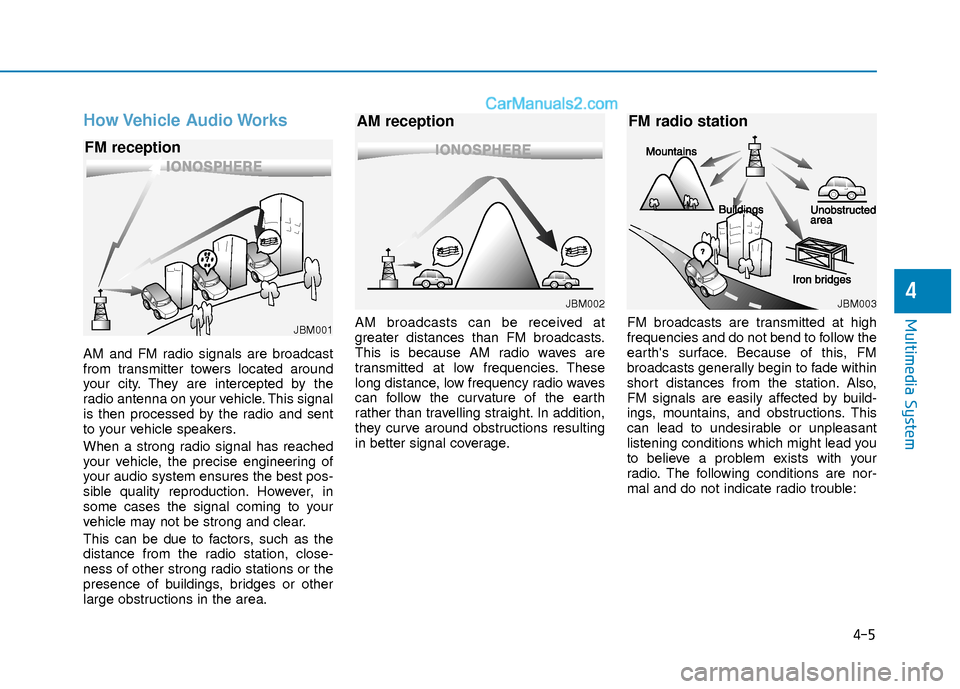
AM and FM radio signals are broadcast
from transmitter towers located around
your city. They are intercepted by the
radio antenna on your vehicle. This signal
is then processed by the radio and sent
to your vehicle speakers.
When a strong radio signal has reached
your vehicle, the precise engineering of
your audio system ensures the best pos-
sible quality reproduction. However, in
some cases the signal coming to your
vehicle may not be strong and clear.
This can be due to factors, such as the
distance from the radio station, close-
ness of other strong radio stations or the
presence of buildings, bridges or other
large obstructions in the area.AM broadcasts can be received at
greater distances than FM broadcasts.
This is because AM radio waves are
transmitted at low frequencies. These
long distance, low frequency radio waves
can follow the curvature of the earth
rather than travelling straight. In addition,
they curve around obstructions resulting
in better signal coverage.
FM broadcasts are transmitted at high
frequencies and do not bend to follow the
earth's surface. Because of this, FM
broadcasts generally begin to fade within
short distances from the station. Also,
FM signals are easily affected by build-
ings, mountains, and obstructions. This
can lead to undesirable or unpleasant
listening conditions which might lead you
to believe a problem exists with your
radio. The following conditions are nor-
mal and do not indicate radio trouble:
4-5
Multimedia System
4
JBM001
FM reception
JBM002
AM reception
JBM003
FM radio station
Page 225 of 526
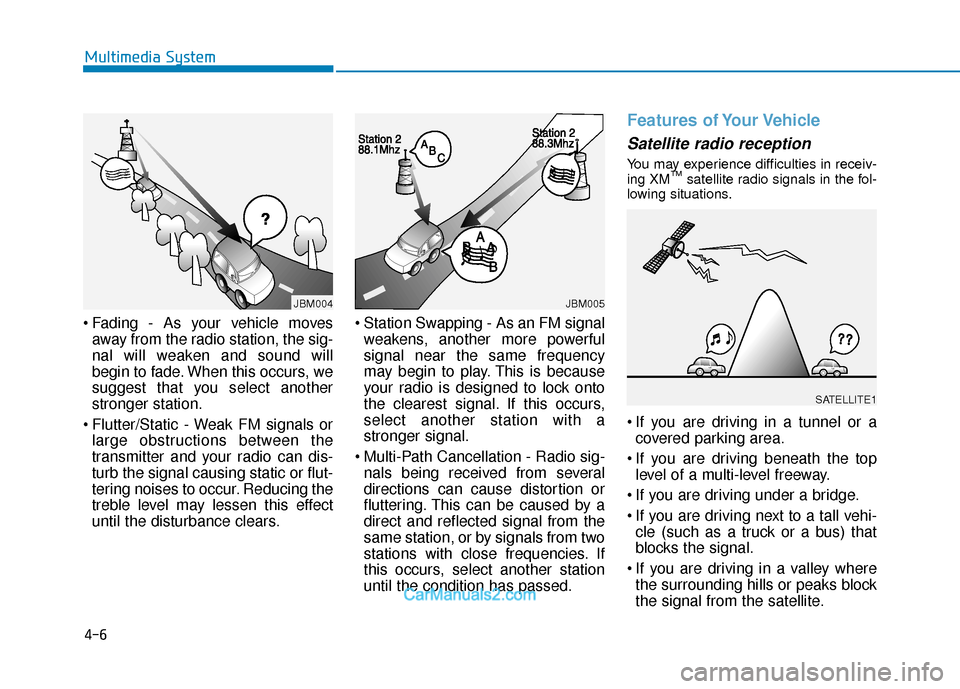
Fading - As your vehicle movesaway from the radio station, the sig-
nal will weaken and sound will
begin to fade. When this occurs, we
suggest that you select another
stronger station.
Flutter/Static - Weak FM signals or large obstructions between the
transmitter and your radio can dis-
turb the signal causing static or flut-
tering noises to occur. Reducing the
treble level may lessen this effect
until the disturbance clears. Station Swapping - As an FM signal
weakens, another more powerful
signal near the same frequency
may begin to play. This is because
your radio is designed to lock onto
the clearest signal. If this occurs,
select another station with a
stronger signal.
Multi-Path Cancellation - Radio sig- nals being received from several
directions can cause distortion or
fluttering. This can be caused by a
direct and reflected signal from the
same station, or by signals from two
stations with close frequencies. If
this occurs, select another station
until the condition has passed.
Features of Your Vehicle
Satellite radio reception
You may experience difficulties in receiv-
ing XM™satellite radio signals in the fol-
lowing situations.
If you are driving in a tunnel or a covered parking area.
If you are driving beneath the top level of a multi-level freeway.
If you are driving under a bridge.
If you are driving next to a tall vehi- cle (such as a truck or a bus) that
blocks the signal.
If you are driving in a valley where the surrounding hills or peaks block
the signal from the satellite.
4-6
Multimedia System
¢¢¢
JBM004JBM005
SATELLITE1
Page 226 of 526
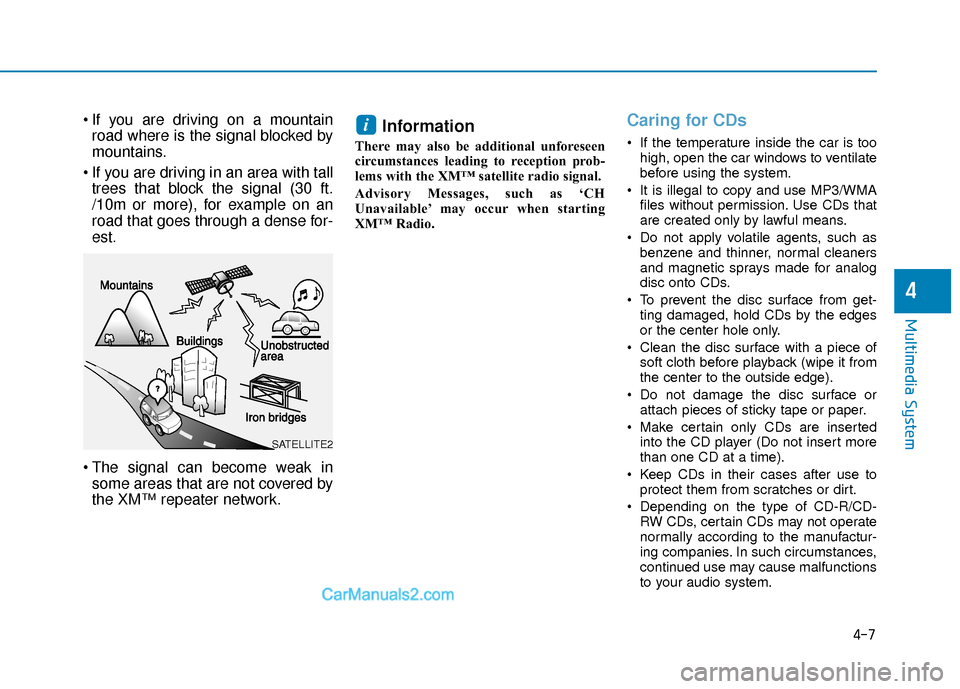
If you are driving on a mountainroad where is the signal blocked by
mountains.
If you are driving in an area with tall trees that block the signal (30 ft.
/10m or more), for example on an
road that goes through a dense for-
est.
The signal can become weak in some areas that are not covered by
the XM™ repeater network.Information
There may also be additional unforeseen
circumstances leading to reception prob-
lems with the XM™ satellite radio signal.
Advisory Messages, such as ‘CH
Unavailable’ may occur when starting
XM™ Radio.
Caring for CDs
If the temperature inside the car is too
high, open the car windows to ventilate
before using the system.
It is illegal to copy and use MP3/WMA files without permission. Use CDs that
are created only by lawful means.
Do not apply volatile agents, such as benzene and thinner, normal cleaners
and magnetic sprays made for analog
disc onto CDs.
To prevent the disc surface from get- ting damaged, hold CDs by the edges
or the center hole only.
Clean the disc surface with a piece of soft cloth before playback (wipe it from
the center to the outside edge).
Do not damage the disc surface or attach pieces of sticky tape or paper.
Make certain only CDs are inserted into the CD player (Do not insert more
than one CD at a time).
Keep CDs in their cases after use to protect them from scratches or dirt.
Depending on the type of CD-R/CD- RW CDs, certain CDs may not operate
normally according to the manufactur-
ing companies. In such circumstances,
continued use may cause malfunctions
to your audio system.
i
4-7
Multimedia System
4
SATELLITE2
Page 227 of 526
Information - Playing an
Incompatible Copy Protected
Audio CD
Some copy protected CDs, which do not
comply with international audio CD stan-
dards (Red Book), may not play on your
car audio. Please note that inabilities to
properly play a copy protected CD may
indicate that the CD is defective, not the
CD player.
Using a cellular phone or a two-
way radio
When a cellular phone is used inside the
vehicle, noise may be produced from the
audio system. This does not mean that
something is wrong with the audio equip-
ment. In such a case, try to operate
mobile devices as far from the audio
equipment as possible.
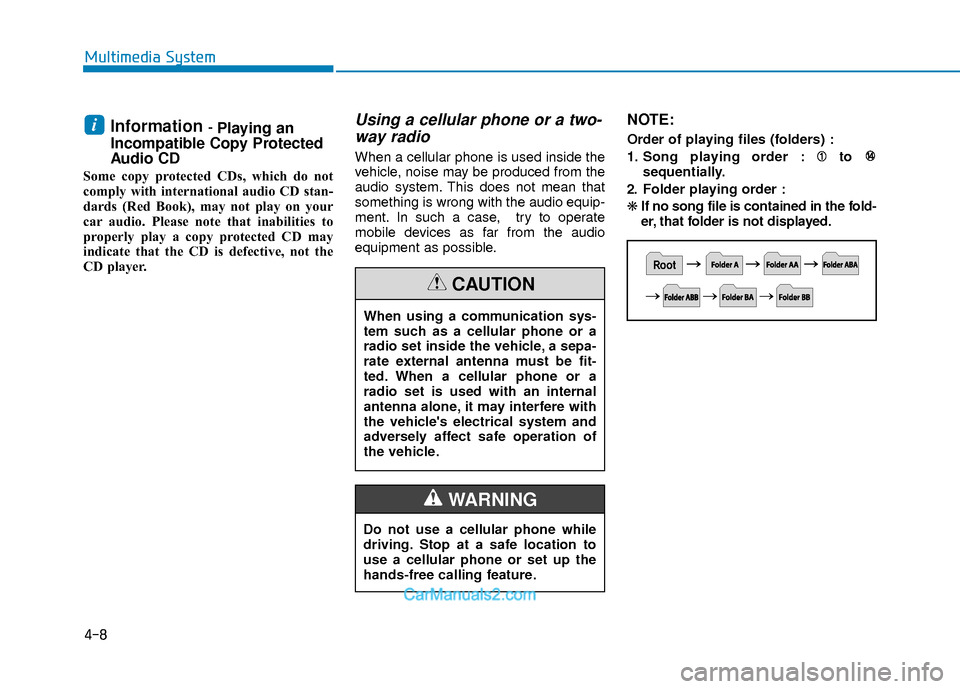
NOTE:
Order of playing files (folders) :
1. Song playing order : to
sequentially.
2. Folder playing order :
❋ If no song file is contained in the fold-
er, that folder is not displayed.i
4-8
Multimedia System
When using a communication sys-
tem such as a cellular phone or a
radio set inside the vehicle, a sepa-
rate external antenna must be fit-
ted. When a cellular phone or a
radio set is used with an internal
antenna alone, it may interfere with
the vehicle's electrical system and
adversely affect safe operation of
the vehicle.
CAUTION
Do not use a cellular phone while
driving. Stop at a safe location to
use a cellular phone or set up the
hands-free calling feature.
WARNING
Page 236 of 526
4-17
Multimedia System
4
Features of Your Audio
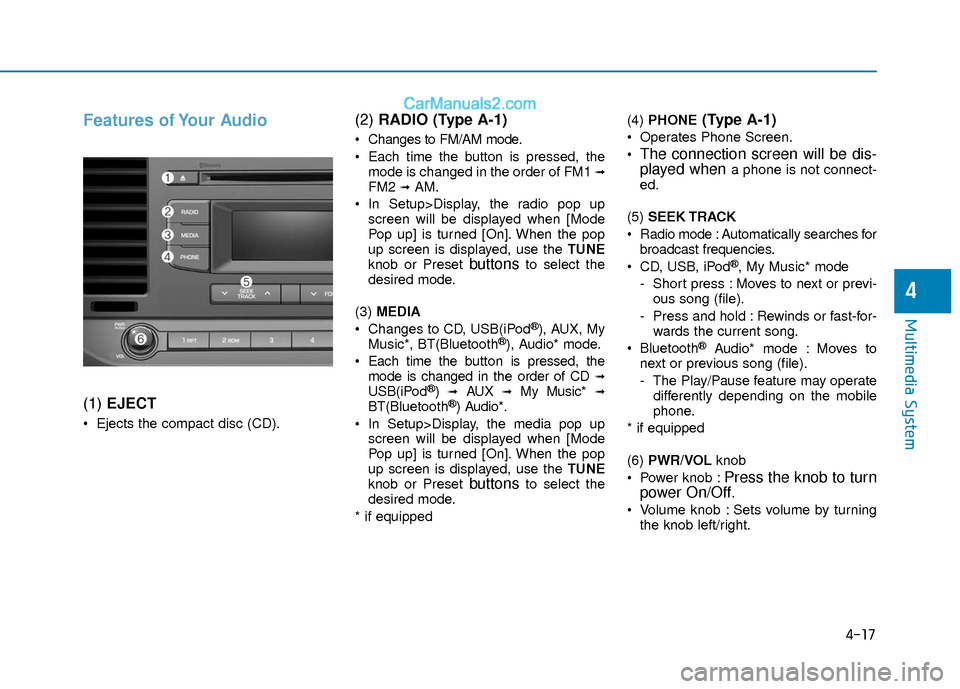
(1) EJECT
Ejects the compact disc (CD).
(2) RADIO (Type A-1)
Changes to FM/AM mode.
Each time the button is pressed, the
mode is changed in the order of FM1
➟FM2 ➟AM.
In Setup>Display, the radio pop up screen will be displayed when [Mode
Pop up] is turned [On]. When the pop
up screen is displayed, use the TUNE
knob or Preset
buttonsto select the
desired mode.
(3) MEDIA
Changes to CD, USB(iPod
®), AUX, My
Music*, BT(Bluetooth®), Audio* mode.
Each time the button is pressed, the mode is changed in the order of CD
➟USB(iPod®)➟AUX➟My Music*➟BT(Bluetooth®) Audio*.
In Setup>Display, the media pop up screen will be displayed when [Mode
Pop up] is turned [On]. When the pop
up screen is displayed, use the TUNE
knob or Preset
buttonsto select the
desired mode.
* if equipped (4)
PHONE
(Type A-1)
Operates Phone Screen.
The connection screen will be dis-
played whena phone is not connect-
ed.
(5) SEEK TRACK
Radio mode : Automatically searches for broadcast frequencies.
CD, USB, iPod
®, My Music* mode
- Short press : Moves to next or previ- ous song (file).
- Press and hold : Rewinds or fast-for- wards the current song.
Bluetooth
®Audio* mode : Moves to
next or previous song (file).
- The Play/Pause feature may operate differently depending on the mobile
phone.
* if equipped
(6) PWR/VOL knob
Power knob :
Press the knob to turn
power On/Off.
Volume knob : Sets volume by turning
the knob left/right.
Page 237 of 526
![Hyundai Elantra 2018 User Guide 4-18
Multimedia System
(7) [1] ~ [6] (Preset)
Radio mode : Saves frequencies (channels) or receives saved frequen-
cies (channels).
CD, USB, iPod
®, My Music* mode
- [RPT] : Repeat
- [RDM] : Random](/img/35/14540/w960_14540-236.png "Hyundai Elantra 2018 User Guide 4-18
Multimedia System
(7) [1] ~ [6] (Preset)
Radio mode : Saves frequencies (channels) or receives saved frequen-
cies (channels).
CD, USB, iPod
®, My Music* mode
- [RPT] : Repeat
- [RDM] : Random")
4-18
Multimedia System
(7) [1] ~ [6] (Preset)
Radio mode : Saves frequencies (channels) or receives saved frequen-
cies (channels).
CD, USB, iPod
®, My Music* mode
- [RPT] : Repeat
- [RDM] : Random
In the Radio, Media, Setup, and Menu
pop up screen, the number menu is
selected.
* if equipped (8) DISP
Each short press toggles through the following modes : Screen Off
➟Screen
On ➟Screen Off.
Audio operation is maintained and only the Screen will be turned Off.
In the Screen Off state, press any but- ton to turn the Screen On again. (9)
SCAN
Radio mode - Short press : Previews each broad-cast for 5 seconds each.
- Press and hold : Previews the broad- casts saved in Preset [1] ~ [6] for 5
seconds each.
- Press the [SCAN] button again to
continue listening to the current fre-
quency.
CD, USB, My Music* mode - Short press : Previews each song(file) for 10 seconds each.
- Press the [SCAN] button again to
continue listening to the current song
(file).
* if equipped
(10) SETUP/CLOCK
Moves to the Display, Sound, Clock, Phone, System setting menu.
Page 238 of 526
4-19
Multimedia System
4
(11) MENU
Displays menus for the current mode.
®List : Move to parent category.
(12) FOLDER
MP3 CD/USB mode - Folder Search
(13) TUNE knob
Radio mode : Changes frequency by turning the knob left/right.
CD, USB, iPod
®, My Music* mode :
Searches songs (files) by turning the
knob left/right. When the desired song
is displayed, press the knob to play the
song.
Moves focus in all selection menus and selects menus.
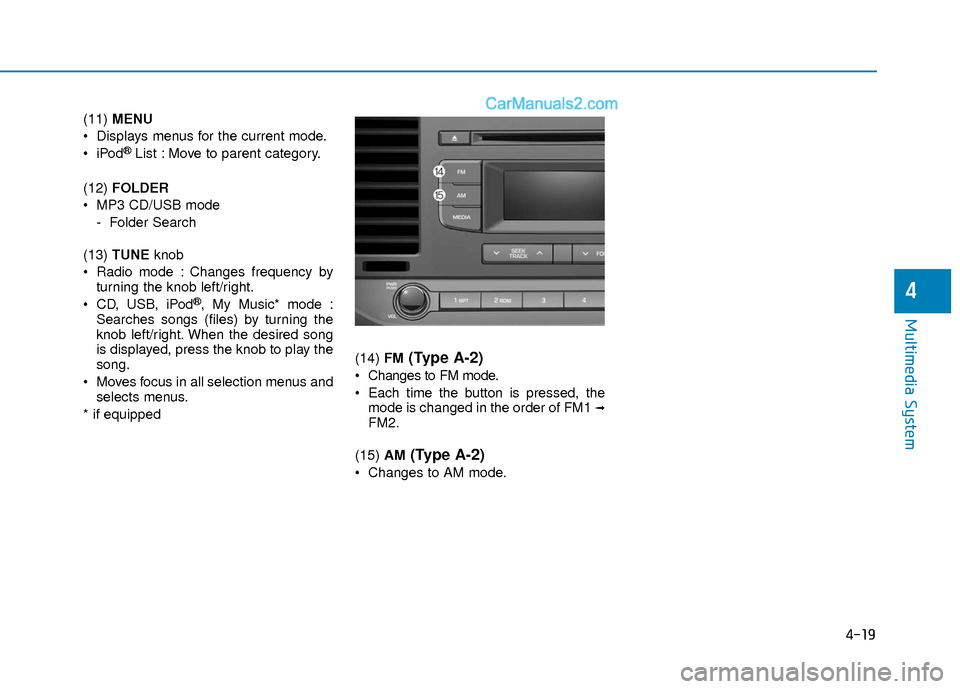
* if equipped (14)
FM
(Type A-2)
Changes to FM mode.
Each time the button is pressed, the
mode is changed in the order of FM1
➟FM2.
(15) AM
(Type A-2)
Changes to AM mode.