service Hyundai Elantra 2018 User Guide
[x] Cancel search | Manufacturer: HYUNDAI, Model Year: 2018, Model line: Elantra, Model: Hyundai Elantra 2018Pages: 526, PDF Size: 17.2 MB
Page 167 of 526
3-90
Convenient features of your vehicle
Conventional Cluster
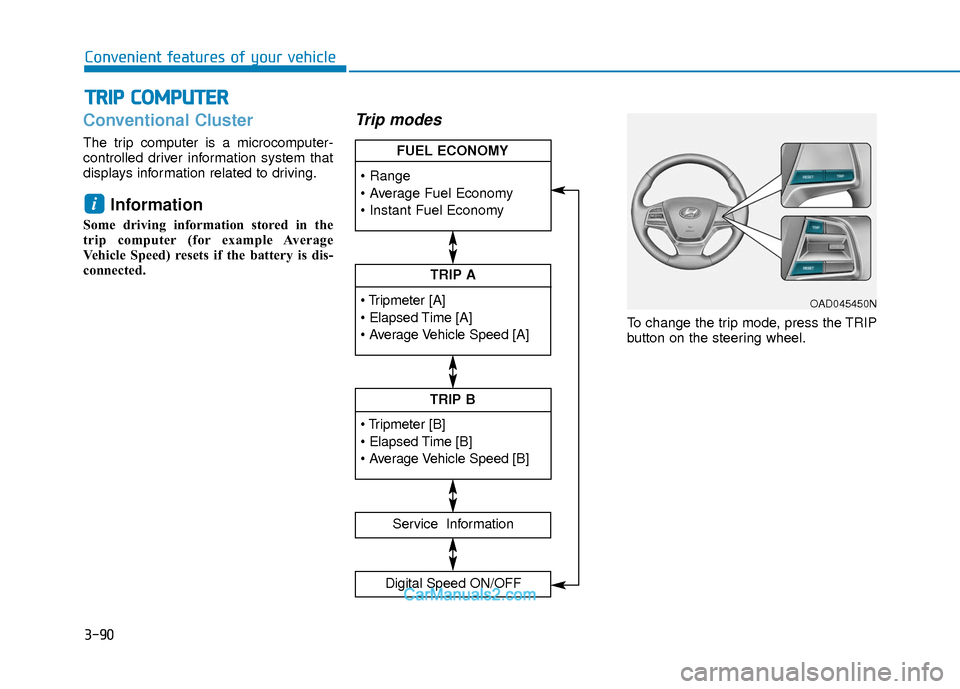
The trip computer is a microcomputer-
controlled driver information system that
displays information related to driving.
Information
Some driving information stored in the
trip computer (for example Average
Vehicle Speed) resets if the battery is dis-
connected.
Trip modes
To change the trip mode, press the TRIP
button on the steering wheel.
i
T TR
R I
IP
P
C
C O
O M
M P
PU
U T
TE
ER
R
TRIP A
Service Information
Digital Speed ON/OFF
TRIP B
FUEL ECONOMY
OAD045450N
Page 170 of 526
3-93
Convenient features of your vehicle
3
Service information
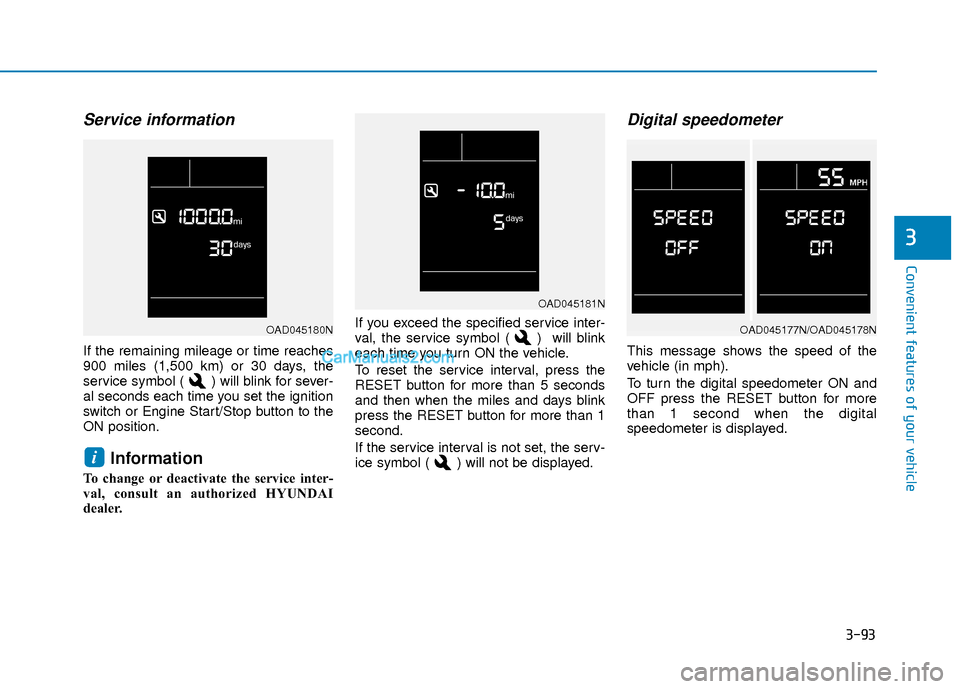
If the remaining mileage or time reaches
900 miles (1,500 km) or 30 days, the
service symbol ( ) will blink for sever-
al seconds each time you set the ignition
switch or Engine Start/Stop button to the
ON position.
Information
To change or deactivate the service inter-
val, consult an authorized HYUNDAI
dealer.If you exceed the specified service inter-
val, the service symbol ( ) will blink
each time you turn ON the vehicle.
To reset the service interval, press the
RESET button for more than 5 seconds
and then when the miles and days blink
press the RESET button for more than 1
second.
If the service interval is not set, the serv-
ice symbol ( ) will not be displayed.
Digital speedometer
This message shows the speed of the
vehicle (in mph).
To turn the digital speedometer ON and
OFF press the RESET button for more
than 1 second when the digital
speedometer is displayed.
i
OAD045181N
OAD045177N/OAD045178NOAD045180N
Page 195 of 526
3-118
Convenient features of your vehicle
System Maintenance
Climate control air filter
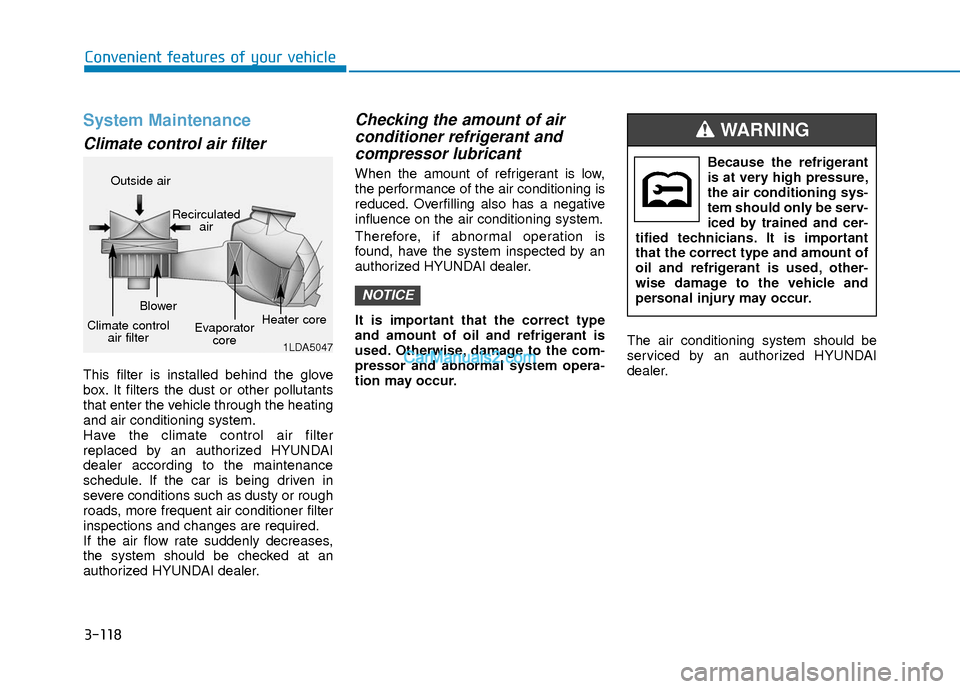
This filter is installed behind the glove
box. It filters the dust or other pollutants
that enter the vehicle through the heating
and air conditioning system.
Have the climate control air filter
replaced by an authorized HYUNDAI
dealer according to the maintenance
schedule. If the car is being driven in
severe conditions such as dusty or rough
roads, more frequent air conditioner filter
inspections and changes are required.
If the air flow rate suddenly decreases,
the system should be checked at an
authorized HYUNDAI dealer.
Checking the amount of air conditioner refrigerant andcompressor lubricant
When the amount of refrigerant is low,
the performance of the air conditioning is
reduced. Overfilling also has a negative
influence on the air conditioning system.
Therefore, if abnormal operation is
found, have the system inspected by an
authorized HYUNDAI dealer.
It is important that the correct type
and amount of oil and refrigerant is
used. Otherwise, damage to the com-
pressor and abnormal system opera-
tion may occur. The air conditioning system should be
serviced by an authorized HYUNDAI
dealer.
NOTICE
1LDA5047
Outside air
Recirculatedair
Climate control air filter Blower
Evaporatorcore Heater core
Because the refrigerant
is at very high pressure,
the air conditioning sys-
tem should only be serv-
iced by trained and cer-
tified technicians. It is important
that the correct type and amount of
oil and refrigerant is used, other-
wise damage to the vehicle and
personal injury may occur.
WARNING
Page 207 of 526
3-130
Convenient features of your vehicle
System Maintenance
Climate control air filter
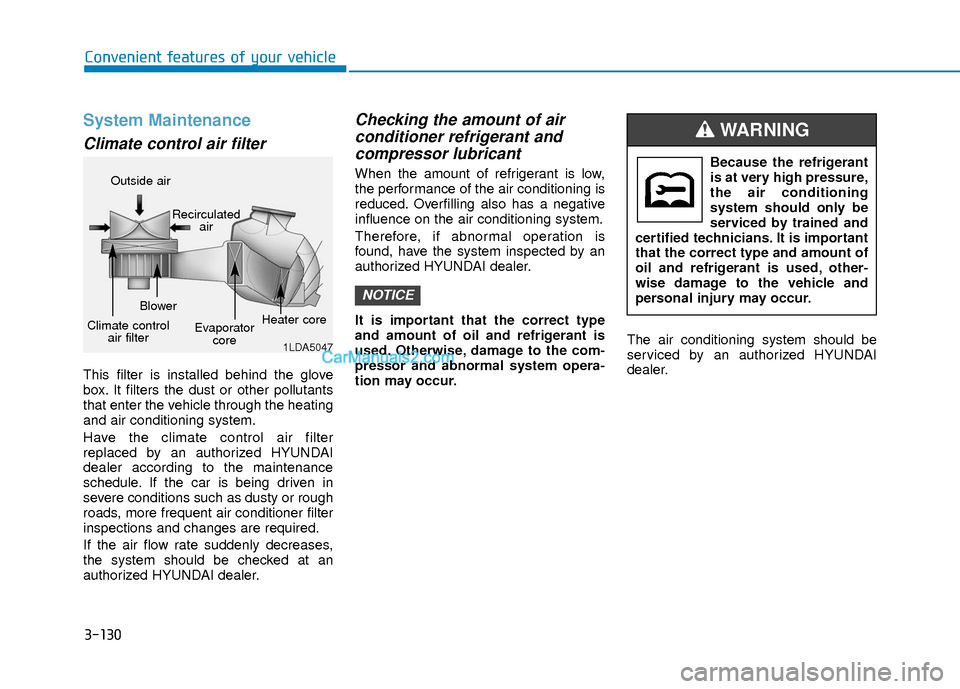
This filter is installed behind the glove
box. It filters the dust or other pollutants
that enter the vehicle through the heating
and air conditioning system.
Have the climate control air filter
replaced by an authorized HYUNDAI
dealer according to the maintenance
schedule. If the car is being driven in
severe conditions such as dusty or rough
roads, more frequent air conditioner filter
inspections and changes are required.
If the air flow rate suddenly decreases,
the system should be checked at an
authorized HYUNDAI dealer.
Checking the amount of air conditioner refrigerant andcompressor lubricant
When the amount of refrigerant is low,
the performance of the air conditioning is
reduced. Overfilling also has a negative
influence on the air conditioning system.
Therefore, if abnormal operation is
found, have the system inspected by an
authorized HYUNDAI dealer.
It is important that the correct type
and amount of oil and refrigerant is
used. Otherwise, damage to the com-
pressor and abnormal system opera-
tion may occur. The air conditioning system should be
serviced by an authorized HYUNDAI
dealer.
NOTICE
1LDA5047
Outside air
Recirculatedair
Climate control air filter Blower
Evaporatorcore Heater core
Because the refrigerant
is at very high pressure,
the air conditioning
system should only be
serviced by trained and
certified technicians. It is important
that the correct type and amount of
oil and refrigerant is used, other-
wise damage to the vehicle and
personal injury may occur.
WARNING
Page 244 of 526
4-25
Multimedia System
4
Information
Turn on the car ignition before using this
device. Do not operate the audio system
for long periods of time with the ignition
turned off as such operations may lead to
battery discharge.
Do not subject the device to severeshock or impact. Direct pressure
onto the front side of the monitor
may cause damage to the LCD or
touch screen.
When cleaning the device, make sure to turn off the device and use a
dry and smooth cloth. Never use
rough materials, chemical cloths, or
solvents (alcohol, benzene, thin-
ners, etc.) as such materials may
damage the device panel or cause
color/quality deterioration.
Do not place beverages close to the audio system. Spilling beverages
may lead to system malfunction.
Placing the audio system within an electromagnetic environment may
result in noise interference.
Information
In case of product malfunction, please
contact your dealer or vehicle service cen-
ter.
i
NOTICE
i(Continued)
Do not touch the antenna during
thunder or lightening as such
acts may lead to lightning
induced electric shock.
Do not stop or park in parking-
restricted areas to operate the
product. Such acts could lead to
traffic accidents.
Distracted Driving
Driving while distracted can result
in a loss of vehicle control that may
lead to an accident, severe person-
al injury, and death. The driver’s pri-
mary responsibility is in the safe
and legal operation of a vehicle,
and use of any handheld devices,
other equipment, or vehicle sys-
tems which take the driver’s eyes,
attention and focus away from the
safe operation of a vehicle or which
are not permissible by law should
never be used during operation of
the vehicle.
WARNING
Page 248 of 526
4-29
Multimedia System
4
(Continued)
• The phone must be paired to the audiosystem to use Bluetooth
®Wireless
Technology related features.
• Pairing and connecting a Bluetooth
®
Wireless Technology enabled mobile
phone will work only when the
Bluetooth
®Wireless Technology option
within your mobile phone has been
turned on. (Methods of turning on the
Bluetooth
®Wireless Technology enabled
feature may differ depending on the
mobile phone.)
• Do not use a cellular phone or perform Bluetooth
®Wireless Technology settings
(e.g. pairing a phone) while driving.
• Even if the phone supports Bluetooth
®
Wireless Technology, the phone will not
be found during device searches if the
phone has been set to hidden state or the
Bluetooth
®Wireless Technology power
is turned off. Disable the hidden state or
turn on the Bluetooth
®Wireless
Technology power prior to
searching/connecting with the car audio
system.
(Continued)(Continued)
• You will not be able to use the hands-
free feature when your phone (in the
car) is outside of the cellular service area
(e.g. in a tunnel, in an underground
location, in a mountainous area, etc.).
• If the cellular phone signal is poor or the vehicle’s interior noise is too loud, it
may be difficult to hear the other per-
son’s voice during a call.
• Do not place the phone near or inside metallic objects, otherwise communica-
tions with Bluetooth
®Wireless
Technology system or cellular service
stations can be disturbed.
• Placing the audio system within an elec- tromagnetic environment may result in
noise interference.
• Some cellular phones or other devices may cause interference noise or a mal-
function to the audio system. In this
case, storing the device in a different
location may resolve the condition.
• While a phone is connected through Bluetooth
®Wireless Technology your
phone may discharge quicker than usual
for additional Bluetooth
®Wireless
Technology-related operations.
(Continued)(Continued)
• If Priority is set upon vehicle ignition
(IGN/ACC ON), the Bluetooth
®
Wireless Technology phone will be auto-
matically connected. Even if you are
outside, the Bluetooth
®Wireless
Technology phone will be automatically
connected once you are in the vicinity of
the vehicle. If you do not want to auto-
matically connect your Bluetooth
®
Wireless Technology phone, try the fol-
lowing.
1) Turn off the Bluetooth
®Wireless
Technology feature in your mobile
phone.
2) Turn off the Bluetooth
®Wireless
Technology feature in your car audio
system.
- To turn off the Bluetooth
®Wireless
Technology feature in your car audio
system, go to [SETUP/CLOCK] >
[Phone] and [turn off] the Bluetooth
®
Wireless Technology feature.
(Continued)
Page 252 of 526
4-33
Multimedia System
4
SiriusXM®Satellite Radio
information (if equipped)
Satellite Radio channels :
Enjoy SiriusXM Satellite Radio with a 3-
month trial subscription to the SiriusXM
Select package. You’ll get over 140 chan-
nels, including commercial-free music,
plus all your favorite sports, exclusive
talk, entertainment, and a selection of
premium programming. For more infor-
mation and a complete list of SiriusXM
channels, visit siriusxm.com in the
United States, siriusxm.ca in Canada, or
call SiriusXM at 1-888-539-7474.
Satellite Radio reception factors :
To receive the satellite signal, your vehi-
cle has been equipped with a satellite
radio antenna located on the roof of your
vehicle. The vehicle roof provides the
best location for an unobstructed, open
view of the sky, a requirement of a satel-
lite radio system. Like AM/FM, there are
several factors that can affect satellite
radio reception performance :
Antenna obstructions : For optimal
reception performance, keep the
antenna clear of snow and ice build-up
and keep luggage and other material
as far away from the antenna as possi-
ble.
Terrain : Hills, mountains, tall buildings, bridges, tunnels, freeway overpasses,
parking garages, dense tree foliage
and thunderstorms can interfere with
your reception.
SiriusXM Satellite Radio service :
SiriusXM is a subscription-based satellite
radio service that broadcasts music,
sports, news and entertainment pro-
gramming to radio receivers, which are
available for installation in motor vehicles
or factory installed, as well as for the
home, portable and wireless devices,
and through an Internet connection on a
personal computer.
Vehicles that are equipped with a factory
installed SiriusXM Satellite Radio system
include :
Hardware and an introductory trial sub-scription term, which begins on the
date of sale or lease of the vehicle.
For a small upgrade fee, access to SiriusXM music channels, and other
select channels over the Internet using
any computer connected to the
Internet (U.S. customers only).
For information on extended subscrip-
tion terms, contact SiriusXM at 1-888-
539-7474.
Page 253 of 526
4-34
Multimedia System
NOTE :
SiriusXM services require a subscrip-
tion sold separately, or as a package,
by Sirius XM Radio Inc. If you decide
to continue service after your trial, the
subscription plan you choose will
automatically renew thereafter and
you will be charged according to your
chosen payment method at then-cur-
rent rates. Fees and taxes apply. To
cancel you must call SiriusXM at 1-
866-635-2349. See SiriusXM Customer
Agreement for complete terms at
www.siriusxm.com. SiriusXM U.S.
satellite and data services are avail-
able only in the 48 contiguous states,
DC and Puerto Rico (with coverage
limitations). SiriusXM satellite service
is also available in Canada; see
www.siriusxm.ca. All fees and pro-
gramming subject to change. Sirius,
XM and all related marks and logos
are trademarks of Sirius XM Radio Inc.
SiriusXM Radio Mode
(if equipped)
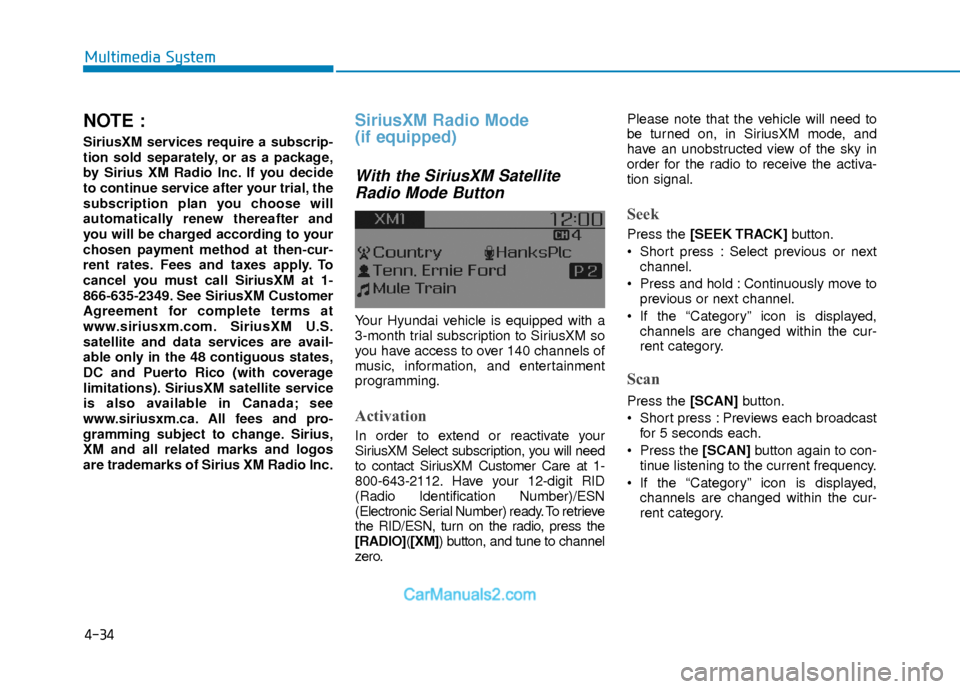
With the SiriusXM SatelliteRadio Mode Button
Your Hyundai vehicle is equipped with a
3-month trial subscription to SiriusXM so
you have access to over 140 channels of
music, information, and entertainment
programming.
Activation
In order to extend or reactivate your
SiriusXM Select subscription, you will need
to contact SiriusXM Customer Care at 1-
800-643-2112. Have your 12-digit RID
(Radio Identification Number)/ESN
(Electronic Serial Number) ready. To retrieve
the RID/ESN, turn on the radio, press the
[RADIO]( [XM]) button, and tune to channel
zero. Please note that the vehicle will need to
be turned on, in SiriusXM mode, and
have an unobstructed view of the sky in
order for the radio to receive the activa-
tion signal.
Seek
Press the [SEEK TRACK]
button.
Short press : Select previous or next channel.
Press and hold : Continuously move to previous or next channel.
If the “Category” icon is displayed, channels are changed within the cur-
rent category.
Scan
Press the [SCAN] button.
Short press : Previews each broadcast for 5 seconds each.
Press the [SCAN] button again to con-
tinue listening to the current frequency.
If the “Category” icon is displayed, channels are changed within the cur-
rent category.
Page 281 of 526
![Hyundai Elantra 2018 User Guide 4-62
Multimedia System
Language
This menu is used to set the display and
voice recognition language.
Select [Language]
The system will reboot after the language
is changed.
Language support by region](/img/35/14540/w960_14540-280.png "Hyundai Elantra 2018 User Guide 4-62
Multimedia System
Language
This menu is used to set the display and
voice recognition language.
Select [Language]
The system will reboot after the language
is changed.
Language support by region")
4-62
Multimedia System
Language
This menu is used to set the display and
voice recognition language.
Select [Language]
The system will reboot after the language
is changed.
Language support by regionEnglish, Français, Español iPod
®is a registered trademark of
Apple Inc. iPod®mobile digital device
sold separately. The Bluetooth®word
mark and logos are registered trade-
marks owned by Bluetooth
®SIG, Inc.
and any use of such marks by
Hyundai is under license. SiriusXM
services require a subscription sold
separately, or as a package, by Sirius
XM Radio Inc. If you decide to contin-
ue service after your trial, the sub-
scription plan you choose will auto-
matically renew thereafter and you
will be charged according to your cho-
sen payment method at then-current
rates. Fees and taxes apply. To cancel
you must call SiriusXM at 1-866-635-
2349. See SiriusXM Customer
Agreement for complete terms at
www.siriusxm.com. SiriusXM U.S.
satellite and data services are avail-
able only in the 48 contiguous states,
DC and Puerto Rico (with coverage
limitations). SiriusXM satellite service
is also available in Canada; see
www.siriusxm.ca. All fees and pro-
gramming subject to change. Sirius, XM and all related marks and
logos are trademarks of Sirius XM
Radio Inc. Android™ is a trademark of
Google, Inc. BlackBerry is a registered
trademark of Research In Motion
Limited (RIM). All other marks, chan-
nel names and logos are the property
of their respective owners. All rights
reserved.
Page 375 of 526
5-92
Driving your vehicle
Winter Precautions
Use high quality ethylene glycolcoolant
Your vehicle is delivered with high quality
ethylene glycol coolant in the cooling
system. It is the only type of coolant that
should be used because it helps prevent
corrosion in the cooling system, lubri-
cates the water pump and prevents
freezing. Be sure to replace or replenish
your coolant in accordance with the
maintenance schedule in chapter 7.
Before winter, have your coolant tested to
assure that its freezing point is sufficient
for the temperatures anticipated during
the winter.
Change to "winter weight" oil ifnecessary
In some climates it is recommended that
a lower viscosity "winter weight" oil be
used during cold weather. See chapter 8
for recommendations. If you aren't sure
what weight oil you should use, consult
an authorized HYUNDAI dealer.
Check battery and cables
Winter puts additional burdens on the
battery system. Visually inspect the bat-
tery and cables as described in chapter
7. The level of charge in your battery can
be checked by an authorized HYUNDAI
dealer or a service station.
Check spark plugs and ignitionsystem
Inspect your spark plugs as described in
chapter 7 and replace them if necessary.
Also check all ignition wiring and compo-
nents to be sure they are not cracked,
worn or damaged in any way.
Use approved window washeranti-freeze in system
To keep the water in the window washer
system from freezing, add an approved
window washer anti-freeze solution in
accordance with instructions on the con-
tainer. Window washer anti-freeze is
available from an authorized HYUNDAI
dealer and most auto parts outlets. Do
not use engine coolant or other types of
anti-freeze as these may damage the
paint finish.
Do not let your parking brakefreeze
Under some conditions your parking
brake can freeze in the engaged position.
This is most likely to happen when there
is an accumulation of snow or ice around
or near the rear brakes or if the brakes
are wet. If there is a risk the parking
brake may freeze, apply it only temporar-
ily while you put the gear selector lever in
P and block the rear wheels so the car
cannot roll. Then release the parking
brake.
Do not let ice and snow accu-mulate underneath
Under some conditions, snow and ice
can build up under the fenders and inter-
fere with the steering. When driving in
severe winter conditions where this may
happen, you should periodically check
underneath the car to be sure the move-
ment of the front wheels and the steering
components is not obstructed.