Cluster Hyundai Elantra 2018 Owner's Guide
[x] Cancel search | Manufacturer: HYUNDAI, Model Year: 2018, Model line: Elantra, Model: Hyundai Elantra 2018Pages: 526, PDF Size: 17.2 MB
Page 167 of 526
3-90
Convenient features of your vehicle
Conventional Cluster
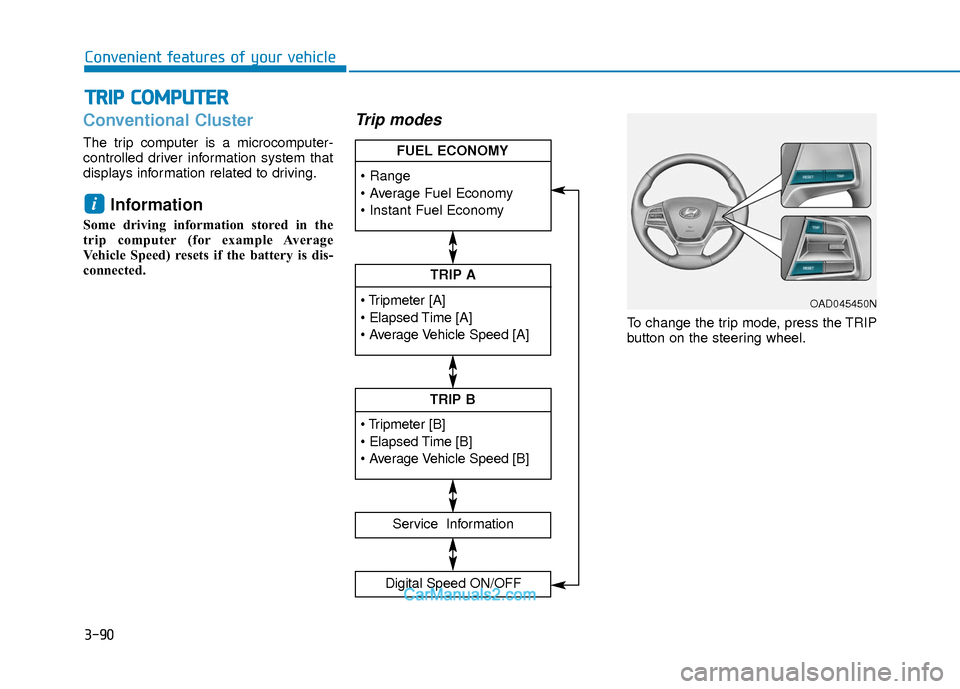
The trip computer is a microcomputer-
controlled driver information system that
displays information related to driving.
Information
Some driving information stored in the
trip computer (for example Average
Vehicle Speed) resets if the battery is dis-
connected.
Trip modes
To change the trip mode, press the TRIP
button on the steering wheel.
i
T TR
R I
IP
P
C
C O
O M
M P
PU
U T
TE
ER
R
TRIP A
Service Information
Digital Speed ON/OFF
TRIP B
FUEL ECONOMY
OAD045450N
Page 171 of 526
3-94
Convenient features of your vehicle
Supervision Cluster
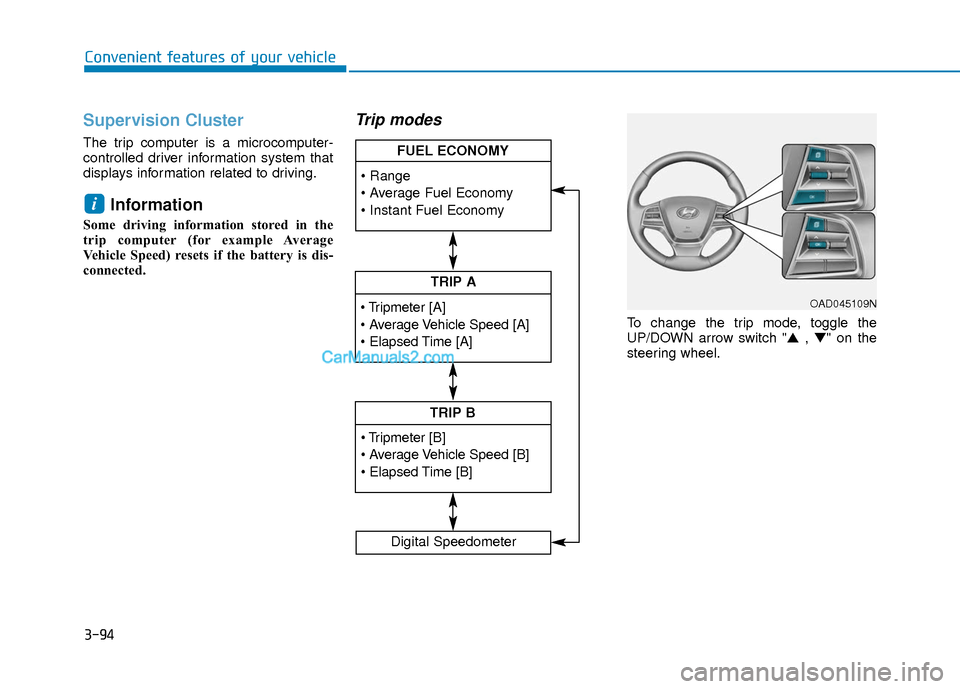
The trip computer is a microcomputer-
controlled driver information system that
displays information related to driving.
Information
Some driving information stored in the
trip computer (for example Average
Vehicle Speed) resets if the battery is dis-
connected.
Trip modes
To change the trip mode, toggle the
UP/DOWN arrow switch "▲ , ▼" on the
steering wheel.
i
TRIP A
TRIP B
FUEL ECONOMY
Digital Speedometer
OAD045109N
Page 174 of 526
3-97
Convenient features of your vehicle
3
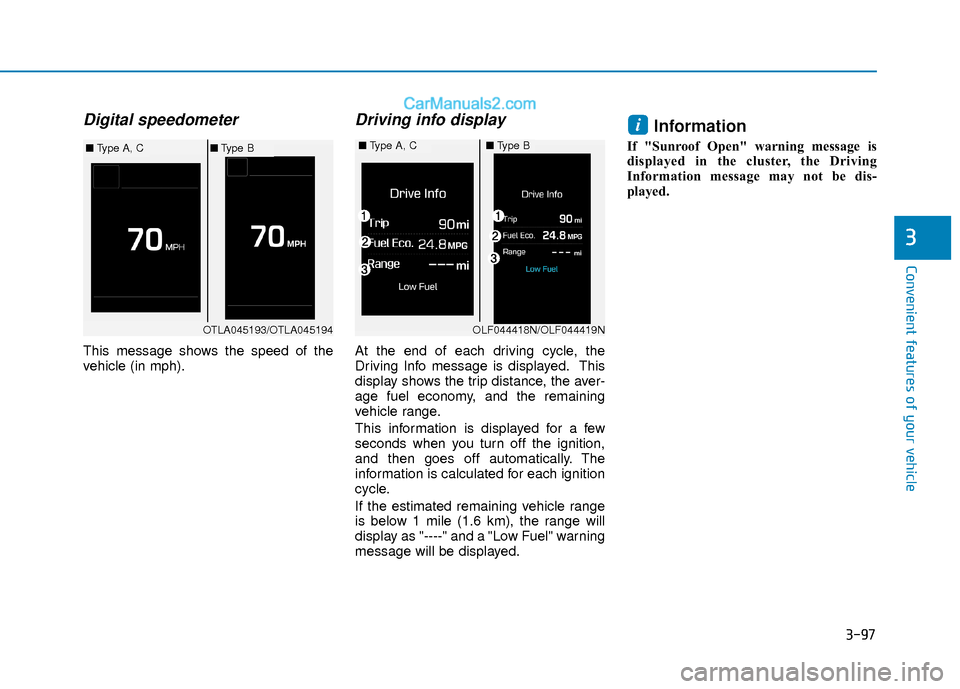
Digital speedometer
This message shows the speed of the
vehicle (in mph).
Driving info display
At the end of each driving cycle, the
Driving Info message is displayed. This
display shows the trip distance, the aver-
age fuel economy, and the remaining
vehicle range.
This information is displayed for a few
seconds when you turn off the ignition,
and then goes off automatically. The
information is calculated for each ignition
cycle.
If the estimated remaining vehicle range
is below 1 mile (1.6 km), the range will
display as "----" and a "Low Fuel" warning
message will be displayed.
Information
If "Sunroof Open" warning message is
displayed in the cluster, the Driving
Information message may not be dis-
played.
i
OTLA045193/OTLA045194
■Type A, C■Type B■Type A, C■Type B
OLF044418N/OLF044419N
Page 203 of 526
3-126
Convenient features of your vehicle
Temperature conversion
If the battery has been discharged or dis-
connected, the temperature mode dis-
play will reset to Fahrenheit.
To change the temperature unit from °F
to °C or °C to °F:
- On the instrument cluster, go to UserSettings Mode ➝ Other Features ➝
Temperature Unit.
- Press the AUTO button for 3 seconds while pressing the OFF button.
(Automatic climate control system)
Both the temperature unit on the cluster
LCD display and climate control screen
will change.
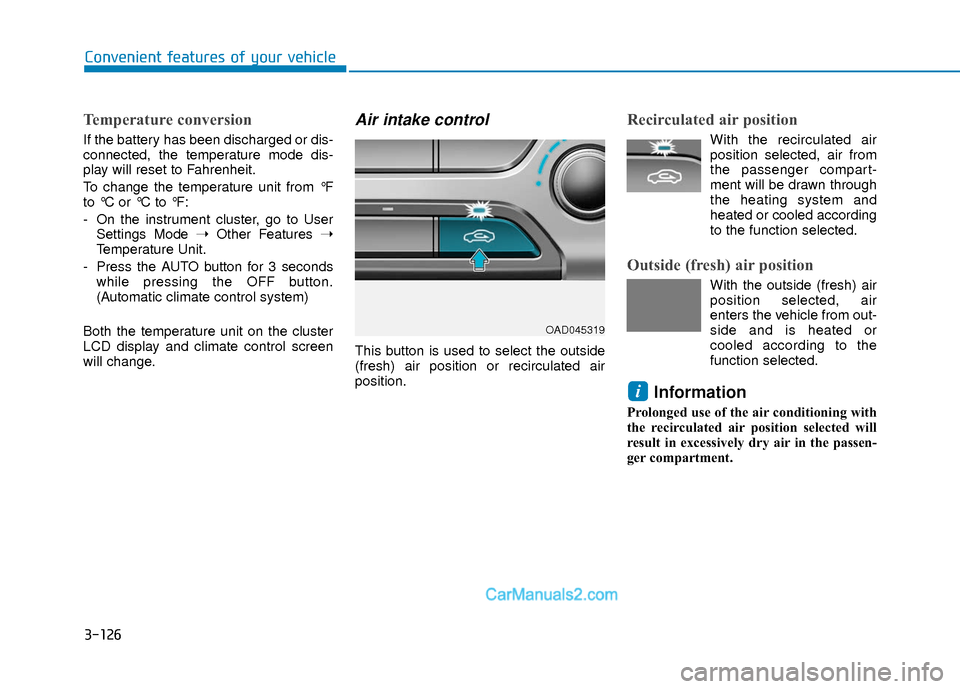
Air intake control
This button is used to select the outside
(fresh) air position or recirculated air
position.
Recirculated air position
With the recirculated air position selected, air from
the passenger compart-
ment will be drawn through
the heating system and
heated or cooled according
to the function selected.
Outside (fresh) air position
With the outside (fresh) air position selected, air
enters the vehicle from out-
side and is heated or
cooled according to the
function selected.
Information
Prolonged use of the air conditioning with
the recirculated air position selected will
result in excessively dry air in the passen-
ger compartment.
i
OAD045319
Page 303 of 526
5-20
Driving your vehicle
Transmission ranges
The indicator in the instrument cluster
displays the shift lever position when the
ignition switch is in the ON position.
P (Park)
Always come to a complete stop before
shifting into P (Park).
To shift from P (Park), you must depress
firmly on the brake pedal and make sure
your foot is off the accelerator pedal.
If you have done all of the above and still
cannot shift the lever out of P (Park), see
"Shift-Lock Release" in this section.
The shift lever must be in P (Park) before
turning the engine off.
R (Reverse)
Use this position to drive the vehicle
backward.
N (Neutral)
The wheels and transmission are not
engaged.
Use N (Neutral) if you need to restart a
stalled engine. Shift into P (Park) if you
need to leave your vehicle for any rea-
son.
Always depress the brake pedal when
you are shifting from N (Neutral) to
another gear.
Shifting into P (Park) while the
vehicle is in motion may cause
you to lose control of the vehicle.
After the vehicle has stopped,
always make sure the shift lever
is in P (Park), apply the parking
brake, and turn the engine off.
When parking on an incline, block
the wheels to prevent the vehicle
from rolling down.
Do not use the P (Park) position
in place of the parking brake.
WARNING
Always come to a complete stop
before shifting into or out of R
(Reverse); you may damage the
transmission if you shift into R
(Reverse) while the vehicle is in
motion.
CAUTION
Page 308 of 526
5-25
Driving your vehicle
5
The dry-type clutch transfers torquemore directly and provides a direct-
drive feeling which may feel different
from a conventional automatic trans-
mission. This may be more noticeable
when launching the vehicle from a stop
or when traveling at low, stop-and-go
vehicle speeds.
When rapidly accelerating from a lower vehicle speed, the engine rpm may
increase dramatically as a result of
clutch slip as the dual clutch transmis-
sion selects the correct gear. This is a
normal condition.
When accelerating from a stop on an incline, press the accelerator smoothly
and gradually to avoid any shudder
feeling or jerkiness.
When traveling at a lower vehicle speed, if you release the accelerator
pedal quickly, you may feel engine
braking before the transmission
changes gears. This engine braking
feeling is similar to operating a manual
transmission at low speed.
When driving downhill, you may wish to move the gear shift lever to Manual
Shift mode and downshift to a lower
gear in order to control your speed
without using the brake pedal exces-
sively. When you turn the engine on and off,
you may hear clicking sounds as the
system goes through a self-test. This is
a normal sound for the dual clutch
transmission.
During the first 1000 miles, you may feel that the vehicle may not be smooth
when accelerating at low speed.
During this break-in period, the shift
quality and performance of your new
vehicle is continuously optimized. Always come to a complete stop
before shifting into D (Drive) or R
(Reverse).
Do not put the shift lever in N (Neutral) while driving.
NOTICE
To reduce the risk of serious injury
or death:
ALWAYS check the surrounding
areas near your vehicle for peo-
ple, especially children, before
shifting a vehicle into D (Drive) or
R (Reverse).
Before leaving the driver's seat,
always make sure the shift lever
is in the P (Park) position, then
set the parking brake, and place
the ignition switch in the
LOCK/OFF position. Unexpected
and sudden vehicle movement
can occur if these precautions
are not followed.
(Continued)
WARNING
(Continued)
Do not use aggressive engine
braking (shifting from a higher
gear to a lower gear) on slippery
roads. This could cause the tires
to slip and may result in an acci-
dent.
Due to transmission failure, you
may not continue to drive and the
position indicator (D, R) on the
cluster will blink. Contact an
authorized hyundai dealer and have
the system checked.
WARNING
Page 311 of 526
5-28
Driving your vehicle
Transmission ranges
The indicator in the instrument cluster
displays the shift lever position when the
ignition switch is in the ON position.
P (Park)
Always come to a complete stop before
shifting into P (Park).
To shift from P (Park), you must depress
firmly on the brake pedal and make sure
your foot is off the accelerator pedal.
If you have done all of the above and still
cannot shift the lever out of P (Park), see
"Shift-Lock Release" in this section.
The shift lever must be in P (Park) before
turning the engine off.
R (Reverse)
Use this position to drive the vehicle
backward.
N (Neutral)
The wheels and transmission are not
engaged.
Use N (Neutral) if you need to restart a
stalled engine, or if it is necessary to stop
with the engine ON. Shift into P (Park) if
you need to leave your vehicle for any
reason.
Always depress the brake pedal when
you are shifting from N (Neutral) to
another gear.
Shifting into P (Park) while the
vehicle is in motion may cause
you to lose control of the vehicle.
After the vehicle has stopped,
always make sure the shift lever
is in P (Park), apply the parking
brake, and turn the engine off.
When parking on an incline, block
the wheels to prevent the vehicle
from rolling down.
Do not use the P (Park) position
in place of the parking brake.
WARNING
Always come to a complete stop
before shifting into or out of R
(Reverse); you may damage the
transmission if you shift into R
(Reverse) while the vehicle is in
motion.
CAUTION
Page 322 of 526
5-39
Driving your vehicle
5
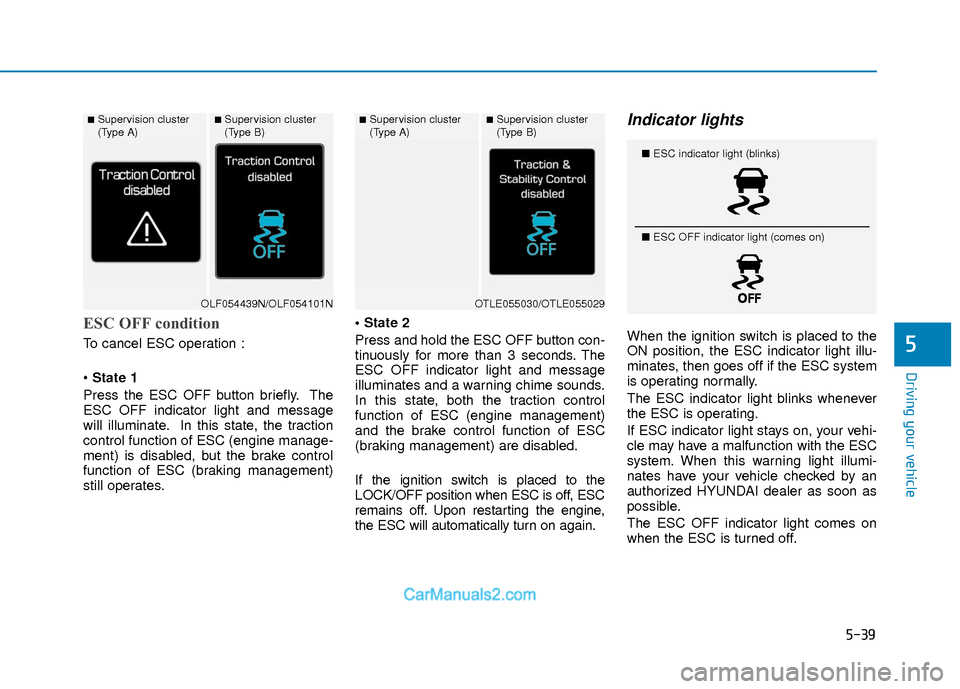
ESC OFF condition
To cancel ESC operation :
State 1
Press the ESC OFF button briefly. The
ESC OFF indicator light and message
will illuminate. In this state, the traction
control function of ESC (engine manage-
ment) is disabled, but the brake control
function of ESC (braking management)
still operates.
Press and hold the ESC OFF button con-
tinuously for more than 3 seconds. The
ESC OFF indicator light and message
illuminates and a warning chime sounds.
In this state, both the traction control
function of ESC (engine management)
and the brake control function of ESC
(braking management) are disabled.
If the ignition switch is placed to the
LOCK/OFF position when ESC is off, ESC
remains off. Upon restarting the engine,
the ESC will automatically turn on again.
Indicator lights
When the ignition switch is placed to the
ON position, the ESC indicator light illu-
minates, then goes off if the ESC system
is operating normally.
The ESC indicator light blinks whenever
the ESC is operating.
If ESC indicator light stays on, your vehi-
cle may have a malfunction with the ESC
system. When this warning light illumi-
nates have your vehicle checked by an
authorized HYUNDAI dealer as soon as
possible.
The ESC OFF indicator light comes on
when the ESC is turned off.
■Supervision cluster
(Type A)■Supervision cluster
(Type B)
OLF054439N/OLF054101N
■Supervision cluster
(Type A)■Supervision cluster
(Type B)
OTLE055030/OTLE055029
■
ESC indicator light (blinks)
■ ESC OFF indicator light (comes on)
Page 326 of 526
5-43
Driving your vehicle
5
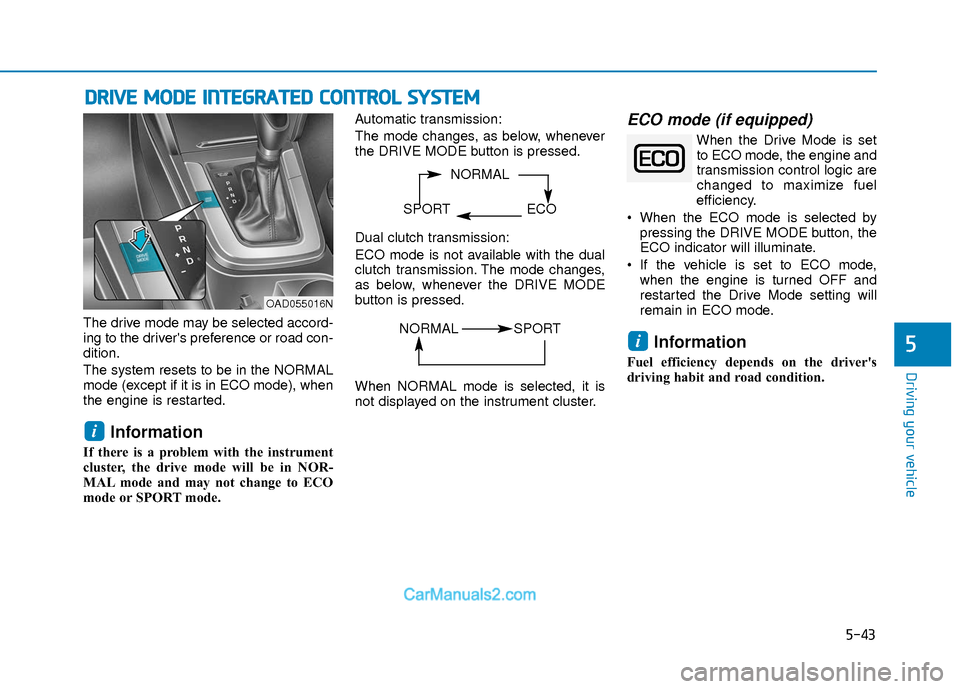
The drive mode may be selected accord-
ing to the driver's preference or road con-
dition.
The system resets to be in the NORMAL
mode (except if it is in ECO mode), when
the engine is restarted.
Information
If there is a problem with the instrument
cluster, the drive mode will be in NOR-
MAL mode and may not change to ECO
mode or SPORT mode. Automatic transmission:
The mode changes, as below, whenever
the DRIVE MODE button is pressed.
Dual clutch transmission:
ECO mode is not available with the dual
clutch transmission. The mode changes,
as below, whenever the DRIVE MODE
button is pressed.
When NORMAL mode is selected, it is
not displayed on the instrument cluster.
ECO mode (if equipped)
When the Drive Mode is set
to ECO mode, the engine and
transmission control logic are
changed to maximize fuel
efficiency.
When the ECO mode is selected by pressing the DRIVE MODE button, the
ECO indicator will illuminate.
If the vehicle is set to ECO mode, when the engine is turned OFF and
restarted the Drive Mode setting will
remain in ECO mode.
Information
Fuel efficiency depends on the driver's
driving habit and road condition.
i
i
D DR
RI
IV
V E
E
M
M O
OD
DE
E
I
IN
N T
TE
EG
G R
RA
A T
TE
ED
D
C
C O
O N
NT
TR
R O
O L
L
S
S Y
Y S
ST
T E
EM
M
NORMAL
SPORT ECO
OAD055016N
NORMAL SPORT
Page 331 of 526
5-48
Driving your vehicle
Warning message
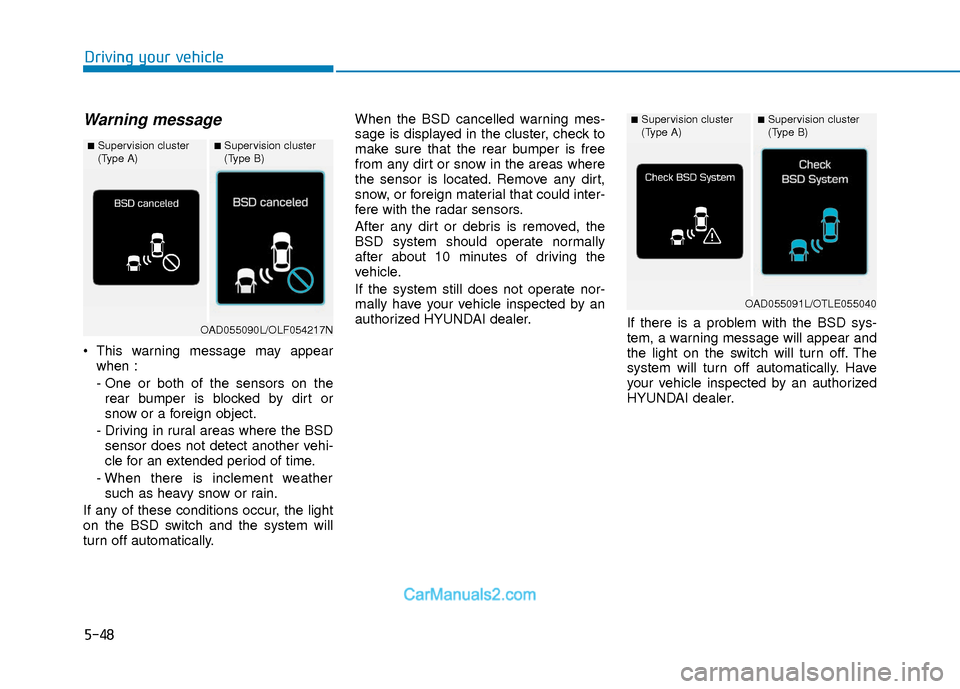
This warning message may appearwhen :
- One or both of the sensors on therear bumper is blocked by dirt or
snow or a foreign object.
- Driving in rural areas where the BSD sensor does not detect another vehi-
cle for an extended period of time.
- When there is inclement weather such as heavy snow or rain.
If any of these conditions occur, the light
on the BSD switch and the system will
turn off automatically. When the BSD cancelled warning mes-
sage is displayed in the cluster, check to
make sure that the rear bumper is free
from any dirt or snow in the areas where
the sensor is located. Remove any dirt,
snow, or foreign material that could inter-
fere with the radar sensors.
After any dirt or debris is removed, the
BSD system should operate normally
after about 10 minutes of driving the
vehicle.
If the system still does not operate nor-
mally have your vehicle inspected by an
authorized HYUNDAI dealer.
If there is a problem with the BSD sys-
tem, a warning message will appear and
the light on the switch will turn off. The
system will turn off automatically. Have
your vehicle inspected by an authorized
HYUNDAI dealer.
■Supervision cluster
(Type A)■Supervision cluster
(Type B)
OAD055090L/OLF054217N
■Supervision cluster
(Type A)■Supervision cluster
(Type B)
OAD055091L/OTLE055040