key Hyundai Elantra 2018 Service Manual
[x] Cancel search | Manufacturer: HYUNDAI, Model Year: 2018, Model line: Elantra, Model: Hyundai Elantra 2018Pages: 526, PDF Size: 17.2 MB
Page 291 of 526
5-8
Starting the engine
Vehicle with manual transmission:
1. Make sure the parking brake isapplied.
2. Make sure the shift lever is in neutral.
3. Depress the clutch and brake pedals.
4. Turn the ignition switch to the START position. Hold the key (maximum of 10
seconds) until the engine starts and
release it.
Information
Depress the brake pedal and clutch pedal
until the engine starts. Vehicle with automatic transmission/ dual
clutch transmission:
1. Make sure the parking brake is
applied.
2. Make sure the shift lever is in P (Park).
3. Depress the brake pedal.
4. Turn the ignition switch to the START position. Hold the key (maximum of 10
seconds) until the engine starts and
release it.
Information
• It is best to maintain a moderate enginespeed until the vehicle engine comes up
to normal operating temperature. Avoid
harsh or abrupt acceleration or deceler-
ation while the engine is still cold.
• Whether the engine is cold or warm, always start the vehicle with your foot
on the brake pedal. Do not depress the
accelerator while starting the vehicle.
Do not race the engine while warming it
up. To prevent damage to the vehicle:
Do not hold the ignition key in the
START position for more than 10
seconds. Wait 5 to 10 seconds
before trying again.
Do not push or tow your vehicle to start the engine.
NOTICE
i
i
Driving your vehicle
Always wear appropriate shoes
when operating your vehicle.
Unsuitable shoes, such as high
heels, ski boots, sandals, flip-flops,
etc., may interfere with your ability
to use the brake and accelerator
pedals.
WARNING
Page 292 of 526
5-9
Driving your vehicle
5
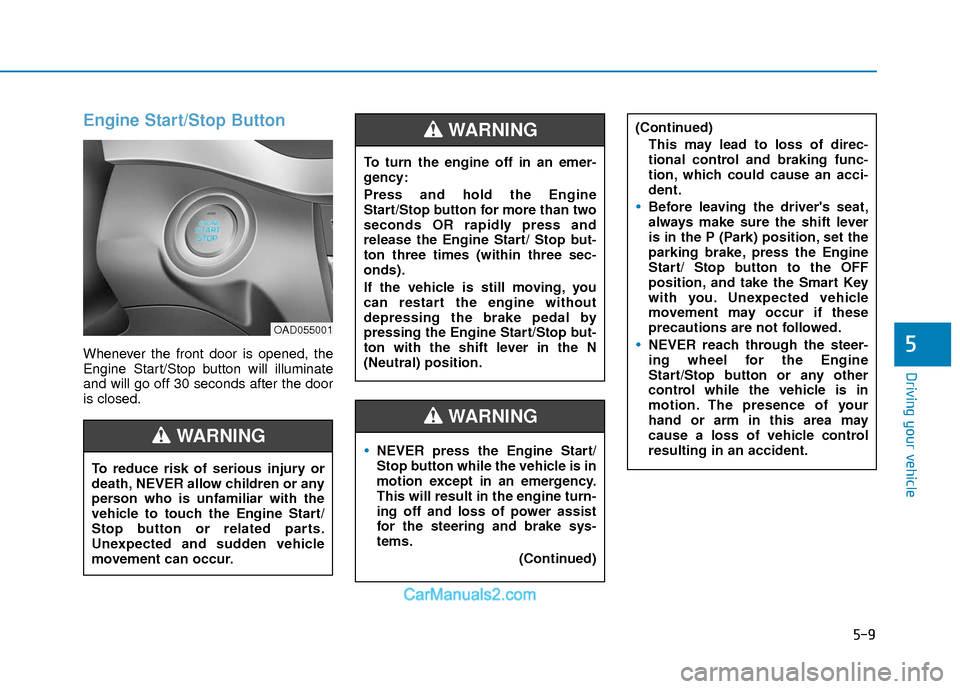
Engine Start/Stop Button
Whenever the front door is opened, the
Engine Start/Stop button will illuminate
and will go off 30 seconds after the door
is closed.
NEVER press the Engine Start/
Stop button while the vehicle is in
motion except in an emergency.
This will result in the engine turn-
ing off and loss of power assist
for the steering and brake sys-
tems.(Continued)
WARNING
To turn the engine off in an emer-
gency:
Press and hold the Engine
Start/Stop button for more than two
seconds OR rapidly press and
release the Engine Start/ Stop but-
ton three times (within three sec-
onds).
If the vehicle is still moving, you
can restart the engine without
depressing the brake pedal by
pressing the Engine Start/Stop but-
ton with the shift lever in the N
(Neutral) position.
(Continued)This may lead to loss of direc-
tional control and braking func-
tion, which could cause an acci-
dent.
Before leaving the driver's seat,
always make sure the shift lever
is in the P (Park) position, set the
parking brake, press the Engine
Start/ Stop button to the OFF
position, and take the Smart Key
with you. Unexpected vehicle
movement may occur if these
precautions are not followed.
NEVER reach through the steer-
ing wheel for the Engine
Start/Stop button or any other
control while the vehicle is in
motion. The presence of your
hand or arm in this area may
cause a loss of vehicle control
resulting in an accident.
WARNING
To reduce risk of serious injury or
death, NEVER allow children or any
person who is unfamiliar with the
vehicle to touch the Engine Start/
Stop button or related parts.
Unexpected and sudden vehicle
movement can occur.
WARNING
OAD055001
Page 297 of 526
5-14
Driving your vehicle
Starting the engine Information
• The engine will start by pressing theEngine Start/Stop button, only when the
smart key is in the vehicle.
• Even if the smart key is in the vehicle, if it is far away from the driver, the engine
may not start.
• When the Engine Start/Stop button is in the ACC or ON position, if any door is
open, the system checks for the smart
key. If the smart key is not in the vehicle,
the " " indicator will blink and the
warning "Key not in vehicle" will come
on and if all doors are closed, the chime
will also sound for about 5 seconds.
Keep the smart key in the vehicle when
using the ACC position or if the vehicle
engine is ON. Vehicle with manual transmission:
1. Always carry the smart key with you.
2. Make sure the parking brake is
applied.
3. Make sure the shift lever is in neutral.
4. Depress the clutch and brake pedals.
5. Press the Engine Start/Stop button.
Information
Depress the brake pedal and clutch pedal
until the engine starts.
Vehicle with automatic transmission/dual
clutch transmission:
1. Always carry the smart key with you.
2. Make sure the parking brake is applied.
3. Make sure the shift lever is in P (Park).
4. Depress the brake pedal.
5. Press the Engine Start/Stop button.
i
i
Always wear appropriate shoes
when operating your vehicle.
Unsuitable shoes, such as high
heels, ski boots, sandals, flip-
flops, etc., may interfere with your
ability to use the brake and accel-
erator pedals.
Do not start the vehicle with the
accelerator pedal depressed. The
vehicle can move and lead to an
accident.
Wait until the engine rpm is nor-
mal. The vehicle may suddenly
move if the brake pedal is
released when the rpm is high.
WARNING
Page 298 of 526
5-15
Driving your vehicle
5
Information
• Do not wait for the engine to warm upwhile the vehicle remains stationary.
Start driving at moderate engine speeds.
(Aggressive accelerating and decelerat-
ing should be avoided.)
• Always start the vehicle with your foot on the brake pedal. Do not depress the
accelerator while starting the vehicle.
Do not race the engine while warming it
up.
To prevent damage to the vehicle:
If the engine stalls while you are in motion, do not attempt to move the
shift lever to the P (Park) position.
If traffic and road conditions permit,
you may put the shift lever in the N
(Neutral) position while the vehicle
is still moving and press the Engine
Start/Stop button in an attempt to
restart the engine.
Do not push or tow your vehicle to start the engine. To prevent damage to the vehicle:
When the stop lamp switch fuse is
blown, you can't start the engine nor-
mally. Replace the fuse with a new
one. If you are not able to replace the
fuse, you can start the engine by
pressing and holding the Engine
Start/Stop button for 10 seconds with
the Engine Start/Stop button in the
ACC position.
Do not press the Engine Start/Stop
button for more than 10 seconds
except when the stop lamp switch
fuse is blown.
For your safety always depress the
brake pedal before starting the
engine.
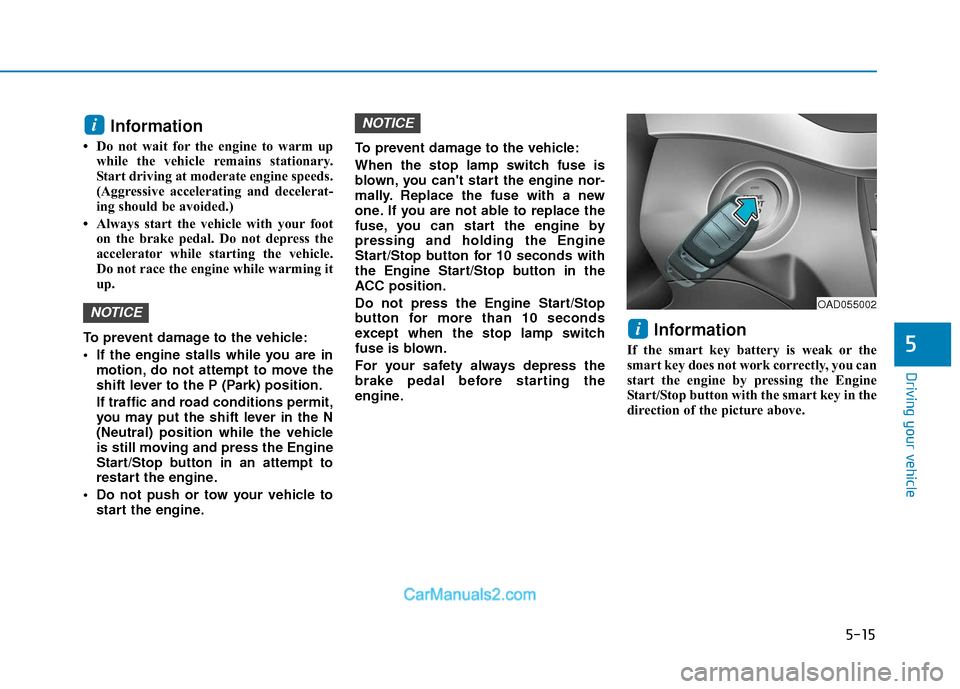
Information
If the smart key battery is weak or the
smart key does not work correctly, you can
start the engine by pressing the Engine
Start/Stop button with the smart key in the
direction of the picture above.
i
NOTICE
NOTICE
i
OAD055002
Page 305 of 526
5-22
Driving your vehicle
(Continued)
• When driving in Manual Shift Mode,slow down before shifting to a lower
gear. Otherwise, the lower gear may not
be engaged if the engine rpms are out-
side of the allowable range.
Shift-lock system
For your safety, the automatic transmis-
sion has a shift-lock system which pre-
vents shifting the transmission from P
(Park) into R (Reverse) unless the brake
pedal is depressed.
To shift the transmission from P (Park)
into R (Reverse):
1. Depress and hold the brake pedal.
2. Start the engine or place the ignition switch in the ON position.
3. Move the shift lever.
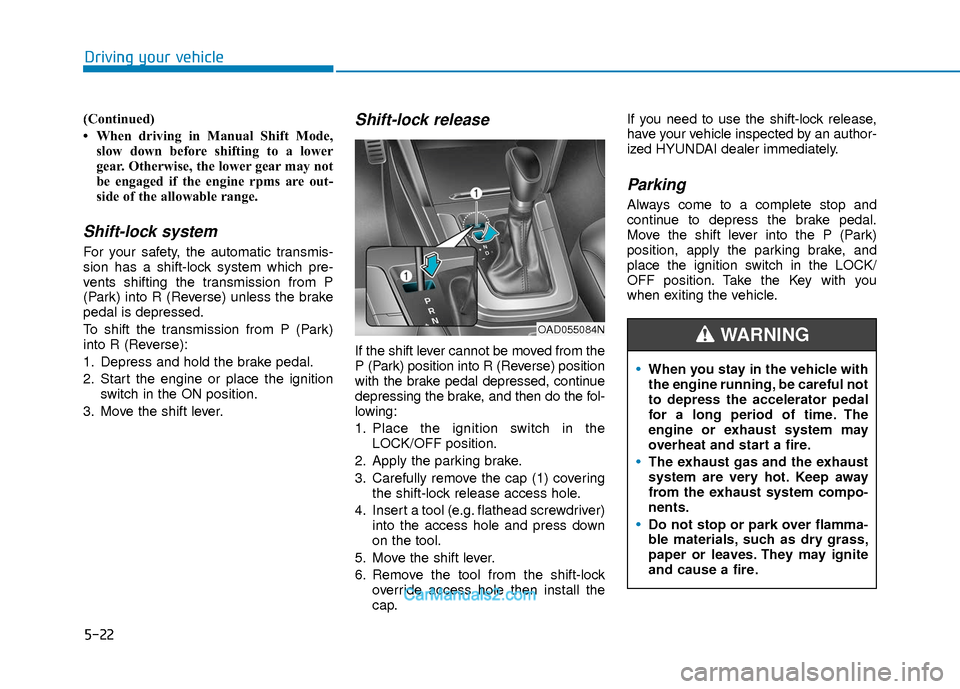
Shift-lock release
If the shift lever cannot be moved from the
P (Park) position into R (Reverse) position
with the brake pedal depressed, continue
depressing the brake, and then do the fol-
lowing:
1. Place the ignition switch in the LOCK/OFF position.
2. Apply the parking brake.
3. Carefully remove the cap (1) covering the shift-lock release access hole.
4. Insert a tool (e.g. flathead screwdriver) into the access hole and press down
on the tool.
5. Move the shift lever.
6. Remove the tool from the shift-lock override access hole then install the
cap. If you need to use the shift-lock release,
have your vehicle inspected by an author-
ized HYUNDAI dealer immediately.
Parking
Always come to a complete stop and
continue to depress the brake pedal.
Move the shift lever into the P (Park)
position, apply the parking brake, and
place the ignition switch in the LOCK/
OFF position. Take the Key with you
when exiting the vehicle.
When you stay in the vehicle with
the engine running, be careful not
to depress the accelerator pedal
for a long period of time. The
engine or exhaust system may
overheat and start a fire.
The exhaust gas and the exhaust
system are very hot. Keep away
from the exhaust system compo-
nents.
Do not stop or park over flamma-
ble materials, such as dry grass,
paper or leaves. They may ignite
and cause a fire.
WARNING OAD055084N
Page 314 of 526
5-31
Driving your vehicle
5
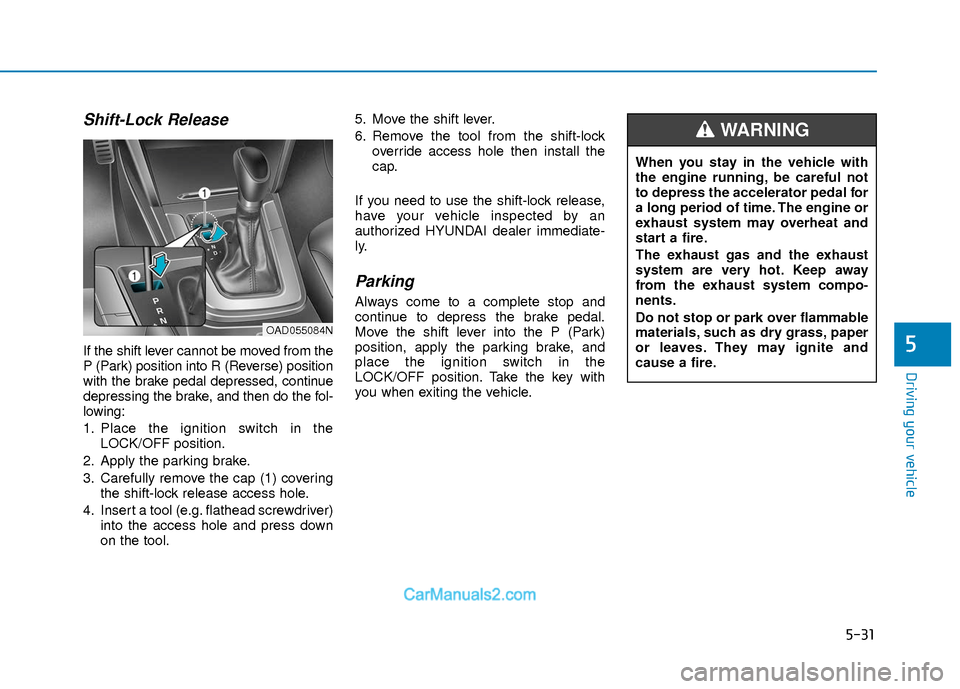
Shift-Lock Release
If the shift lever cannot be moved from the
P (Park) position into R (Reverse) position
with the brake pedal depressed, continue
depressing the brake, and then do the fol-
lowing:
1. Place the ignition switch in theLOCK/OFF position.
2. Apply the parking brake.
3. Carefully remove the cap (1) covering the shift-lock release access hole.
4. Insert a tool (e.g. flathead screwdriver) into the access hole and press down
on the tool. 5. Move the shift lever.
6. Remove the tool from the shift-lock
override access hole then install the
cap.
If you need to use the shift-lock release,
have your vehicle inspected by an
authorized HYUNDAI dealer immediate-
ly.
Parking
Always come to a complete stop and
continue to depress the brake pedal.
Move the shift lever into the P (Park)
position, apply the parking brake, and
place the ignition switch in the
LOCK/OFF position. Take the key with
you when exiting the vehicle.
OAD055084N
When you stay in the vehicle with
the engine running, be careful not
to depress the accelerator pedal for
a long period of time. The engine or
exhaust system may overheat and
start a fire.
The exhaust gas and the exhaust
system are very hot. Keep away
from the exhaust system compo-
nents.
Do not stop or park over flammable
materials, such as dry grass, paper
or leaves. They may ignite and
cause a fire.
WARNING
Page 376 of 526
5-93
Driving your vehicle
V
VE
EH
H I
IC
C L
LE
E
L
L O
O A
AD
D
L
L I
IM
M I
IT
T
5
Don't place foreign objects or
materials in the engine com-partment
Placement of foreign object or materials
which prevent cooling of the engine, in
the engine compartment, may cause a
failure or combustion. The manufacturer
is not responsible for the damage caused
by such placement.
To keep locks from freezing
To keep the locks from freezing, squirt an
approved de-icer fluid or glycerine into
the key opening. If a lock is covered with
ice, squirt it with an approved de-icing
fluid to remove the ice. If the lock is
frozen internally, you may be able to thaw
it out by using a heated key. Handle the
heated key with care to avoid injury.
Two labels on your driver's door sill
show how much weight your vehicle
was designed to carry: the Tire and
Loading Information Label and the
Certification Label.
Before loading your vehicle, familiar-
ize yourself with the following terms
for determining your vehicle’s weight
ratings, from the vehicle's specifica-
tions and the Certification Label:
Base Curb Weight
This is the weight of the vehicle
including a full tank of fuel and all
standard equipment. It does not
include passengers, cargo, or option-
al equipment.
Vehicle Curb Weight
This is the weight of your new vehicle
when you picked it up from your deal-
er plus any aftermarket equipment.
Cargo Weight
This figure includes all weight added
to the Base Curb Weight, including
cargo and optional equipment. GAW (Gross Axle Weight)
This is the total weight placed on
each axle (front and rear) - including
vehicle curb weight and all payload.
GAWR (Gross Axle Weight Rating)
This is the maximum allowable
weight that can be carried by a single
axle (front or rear). These numbers
are shown on the Certification Label.
The total load on each axle must
never exceed its GAWR.
GVW (Gross Vehicle Weight)
This is the Base Curb Weight plus
actual Cargo Weight plus passen-
gers.
GVWR (Gross Vehicle Weight
Rating)
This is the maximum allowable
weight of the fully loaded vehicle
(including all options, equipment,
passengers and cargo). The GVWR
is shown on the Certification Label
located on the driver’s door sill.
Page 468 of 526
7-50
Maintenance
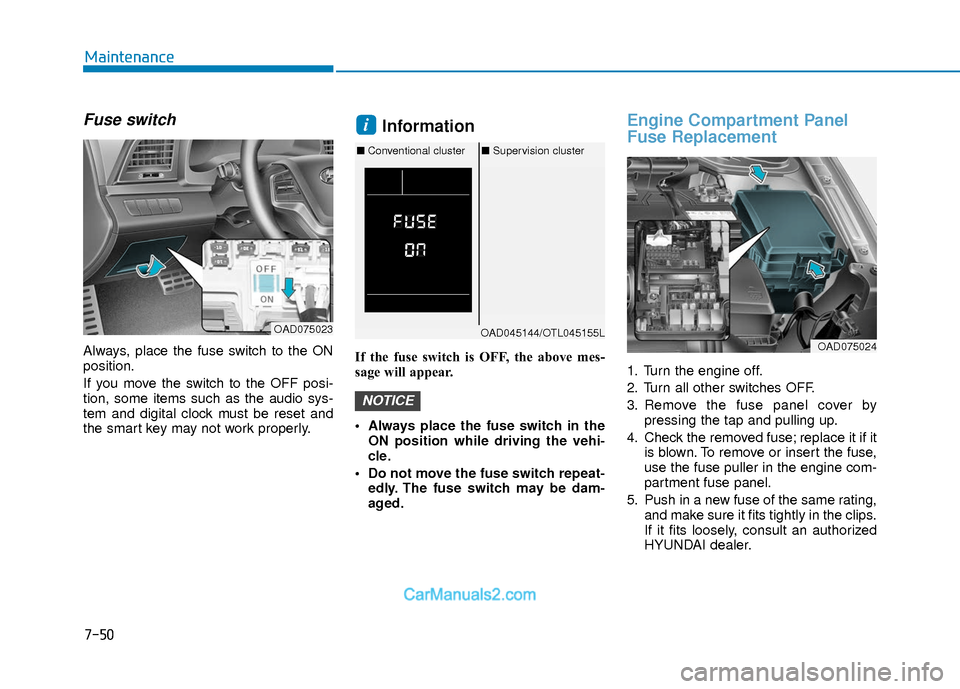
Fuse switch
Always, place the fuse switch to the ON
position.
If you move the switch to the OFF posi-
tion, some items such as the audio sys-
tem and digital clock must be reset and
the smart key may not work properly.
Information
If the fuse switch is OFF, the above mes-
sage will appear.
Always place the fuse switch in theON position while driving the vehi-
cle.
Do not move the fuse switch repeat- edly. The fuse switch may be dam-
aged.
Engine Compartment Panel
Fuse Replacement
1. Turn the engine off.
2. Turn all other switches OFF.
3. Remove the fuse panel cover by pressing the tap and pulling up.
4. Check the removed fuse; replace it if it is blown. To remove or insert the fuse,
use the fuse puller in the engine com-
partment fuse panel.
5. Push in a new fuse of the same rating, and make sure it fits tightly in the clips.
If it fits loosely, consult an authorized
HYUNDAI dealer.
NOTICE
i
OAD075023OAD045144/OTL045155L
■Conventional cluster ■Supervision cluster
OAD075024
Page 472 of 526
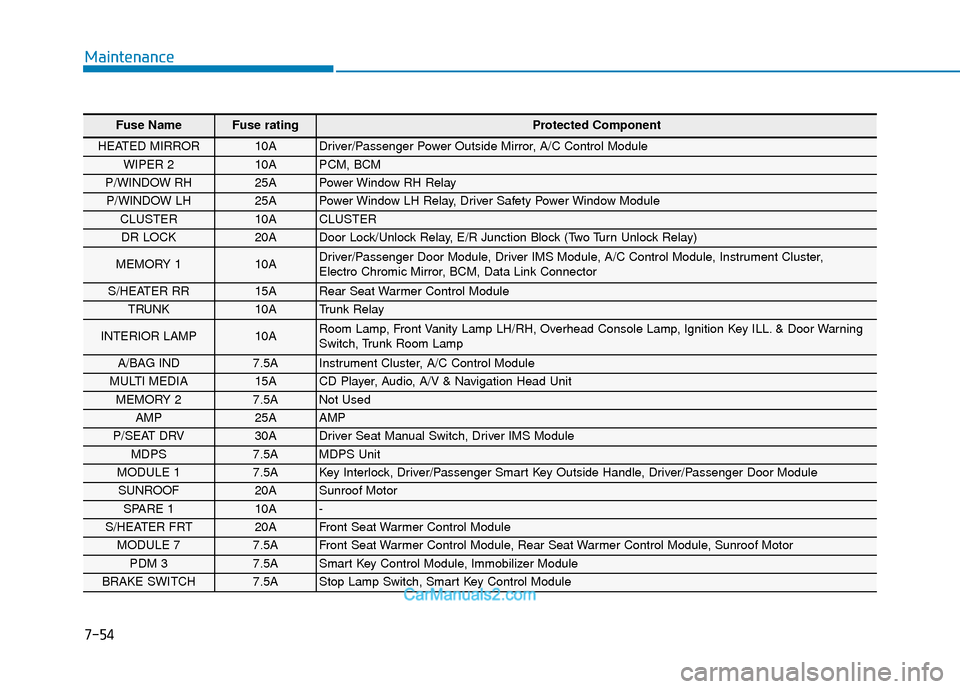
7-54
Maintenance
Fuse Name Fuse rating Protected Component
HEATED MIRROR 10A Driver/Passenger Power Outside Mirror, A/C Control Module
WIPER 2 10A PCM, BCM
P/WINDOW RH 25A Power Window RH Relay
P/WINDOW LH 25A Power Window LH Relay, Driver Safety Power Window Module
CLUSTER 10A CLUSTER
DR LOCK 20A Door Lock/Unlock Relay, E/R Junction Block (Two Turn Unlock Relay)
MEMORY 1 10A Driver/Passenger Door Module, Driver IMS Module, A/C Control Module, Instrument Cluster,
Electro Chromic Mirror, BCM, Data Link Connector
S/HEATER RR 15A Rear Seat Warmer Control Module
TRUNK 10A Trunk Relay
INTERIOR LAMP 10A Room Lamp, Front Vanity Lamp LH/RH, Overhead Console Lamp, Ignition Key ILL. & Door Warning
Switch, Trunk Room Lamp
A/BAG IND 7.5A Instrument Cluster, A/C Control Module
MULTI MEDIA 15A CD Player, Audio, A/V & Navigation Head Unit
MEMORY 2 7.5A Not Used
AMP 25A AMP
P/SEAT DRV 30A Driver Seat Manual Switch, Driver IMS Module
MDPS 7.5A MDPS Unit
MODULE 1 7.5A Key Interlock, Driver/Passenger Smart Key Outside Handle, Driver/Passenger Door Module
SUNROOF 20A Sunroof Motor
SPARE 1 10A -
S/HEATER FRT 20A Front Seat Warmer Control Module
MODULE 7 7.5A Front Seat Warmer Control Module, Rear Seat Warmer Control Module, Sunroof Motor
PDM 3 7.5A Smart Key Control Module, Immobilizer Module
BRAKE SWITCH 7.5A Stop Lamp Switch, Smart Key Control Module
Page 473 of 526
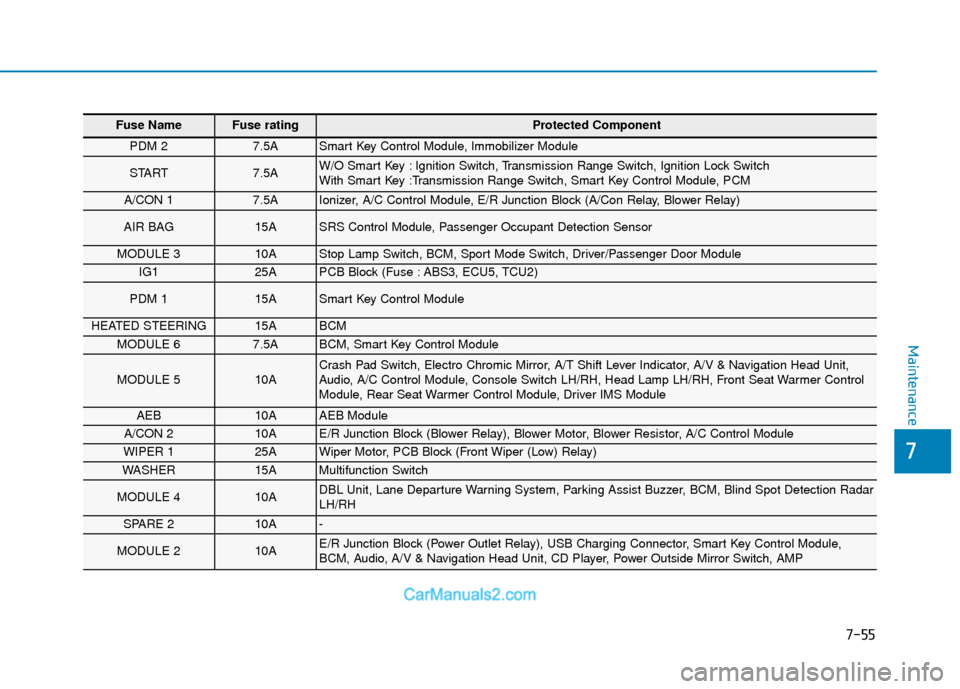
7-55
7
Maintenance
Fuse Name Fuse rating Protected Component
PDM 2 7.5A Smart Key Control Module, Immobilizer Module
START 7.5A W/O Smart Key : Ignition Switch, Transmission Range Switch, Ignition Lock Switch
With Smart Key :Transmission Range Switch, Smart Key Control Module, PCM
A/CON 1 7.5A Ionizer, A/C Control Module, E/R Junction Block (A/Con Relay, Blower Relay)
AIR BAG 15A SRS Control Module, Passenger Occupant Detection Sensor
MODULE 3 10A Stop Lamp Switch, BCM, Sport Mode Switch, Driver/Passenger Door Module
IG1 25A PCB Block (Fuse : ABS3, ECU5, TCU2)
PDM 1 15A Smart Key Control Module
HEATED STEERING 15A BCM
MODULE 6 7.5A BCM, Smart Key Control Module
MODULE 5 10A Crash Pad Switch, Electro Chromic Mirror, A/T Shift Lever Indicator, A/V & Navigation Head Unit,
Audio, A/C Control Module, Console Switch LH/RH, Head Lamp LH/RH, Front Seat Warmer Control
Module, Rear Seat Warmer Control Module, Driver IMS Module
AEB 10A AEB Module
A/CON 2 10A E/R Junction Block (Blower Relay), Blower Motor, Blower Resistor, A/C Control Module
WIPER 1 25A Wiper Motor, PCB Block (Front Wiper (Low) Relay)
WASHER 15A Multifunction Switch
MODULE 4 10A DBL Unit, Lane Departure Warning System, Parking Assist Buzzer, BCM, Blind Spot Detection Radar
LH/RH
SPARE 2 10A -
MODULE 2 10A E/R Junction Block (Power Outlet Relay), USB Charging Connector, Smart Key Control Module,
BCM, Audio, A/V & Navigation Head Unit, CD Player, Power Outside Mirror Switch, AMP