driving lights Hyundai Elantra 2018 Owner's Manual
[x] Cancel search | Manufacturer: HYUNDAI, Model Year: 2018, Model line: Elantra, Model: Hyundai Elantra 2018Pages: 526, PDF Size: 17.2 MB
Page 36 of 526
2-19
Safety system of your vehicle
2
Seat Belt Warning Light
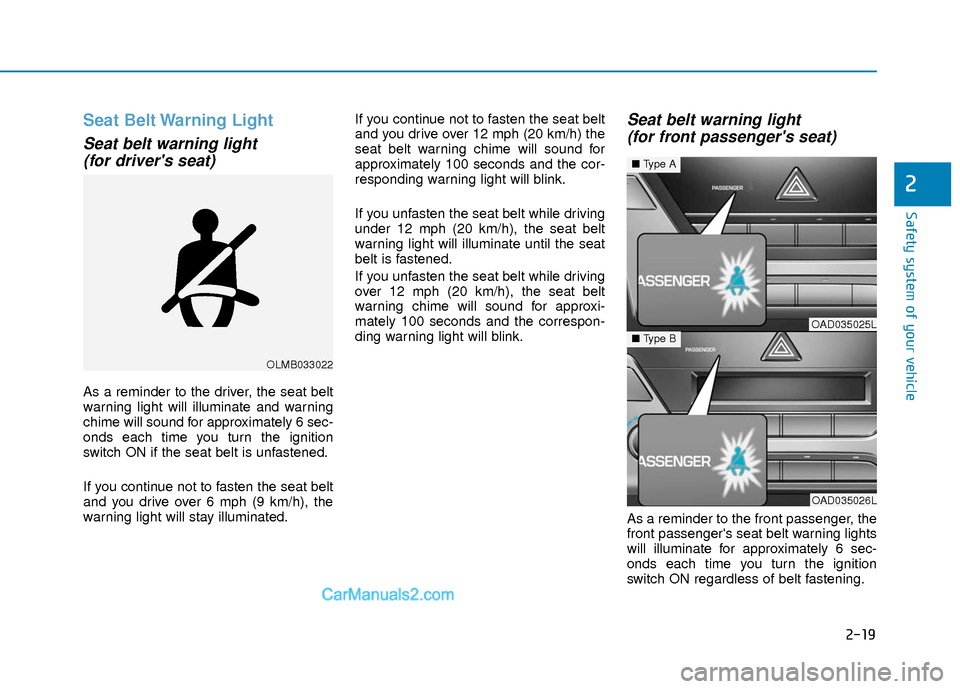
Seat belt warning light (for driver's seat)
As a reminder to the driver, the seat belt
warning light will illuminate and warning
chime will sound for approximately 6 sec-
onds each time you turn the ignition
switch ON if the seat belt is unfastened.
If you continue not to fasten the seat belt
and you drive over 6 mph (9 km/h), the
warning light will stay illuminated. If you continue not to fasten the seat belt
and you drive over 12 mph (20 km/h) the
seat belt warning chime will sound for
approximately 100 seconds and the cor-
responding warning light will blink.
If you unfasten the seat belt while driving
under 12 mph (20 km/h), the seat belt
warning light will illuminate until the seat
belt is fastened.
If you unfasten the seat belt while driving
over 12 mph (20 km/h), the seat belt
warning chime will sound for approxi-
mately 100 seconds and the correspon-
ding warning light will blink.
Seat belt warning light
(for front passenger's seat)
As a reminder to the front passenger, the
front passenger's seat belt warning lights
will illuminate for approximately 6 sec-
onds each time you turn the ignition
switch ON regardless of belt fastening.
OLMB033022
OAD035025L
OAD035026L
■ Type A
■Type B
Page 96 of 526
3-19
Convenient features of your vehicle
3
Tilt Steering/Telescope Steering
Adjust the steering wheel so it points
toward your chest, not toward your face.
Make sure you can see the instrument
cluster warning lights and gauges. After
adjusting, push the steering wheel both
up and down to be certain it is locked in
position. Always adjust the position of the
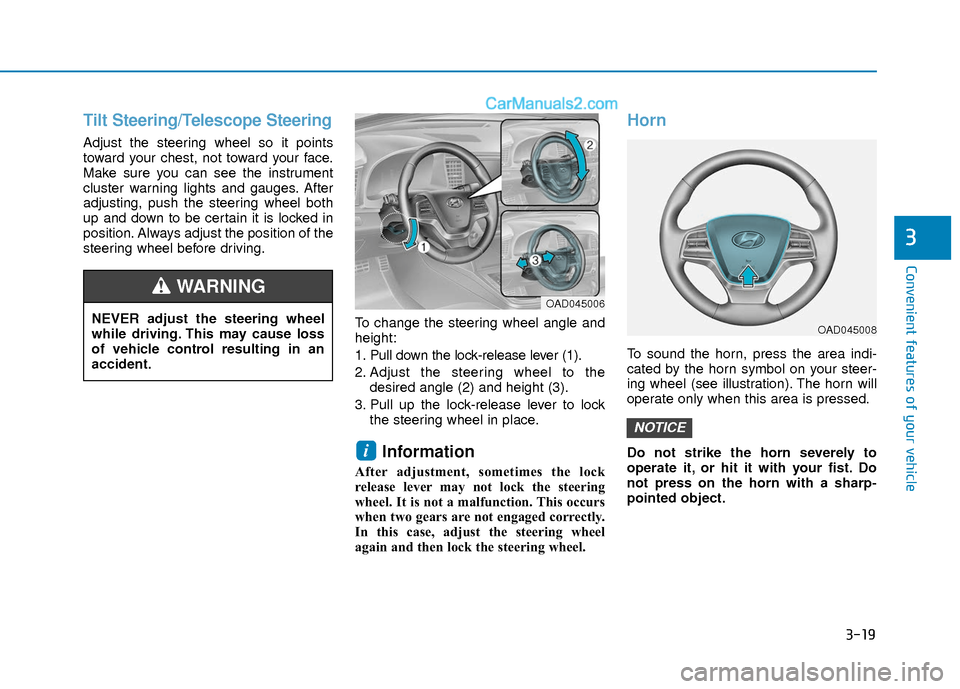
steering wheel before driving.To change the steering wheel angle and
height:
1. Pull down the lock-release lever (1).
2. Adjust the steering wheel to thedesired angle (2) and height (3).
3. Pull up the lock-release lever to lock the steering wheel in place.
Information
After adjustment, sometimes the lock
release lever may not lock the steering
wheel. It is not a malfunction. This occurs
when two gears are not engaged correctly.
In this case, adjust the steering wheel
again and then lock the steering wheel.
Horn
To sound the horn, press the area indi-
cated by the horn symbol on your steer-
ing wheel (see illustration). The horn will
operate only when this area is pressed.
Do not strike the horn severely to
operate it, or hit it with your fist. Do
not press on the horn with a sharp-
pointed object.
NOTICE
i
NEVER adjust the steering wheel
while driving. This may cause loss
of vehicle control resulting in an
accident.
WARNING OAD045006
OAD045008
Page 97 of 526
3-20
Convenient features of your vehicle
Inside Rearview Mirror
Before you start driving, adjust the
rearview mirror to the center on the view
through the rear window.When cleaning the mirror, use a paper
towel or similar material dampened
with glass cleaner. Do not spray glass
cleaner directly on the mirror as that
may cause the liquid cleaner to enter
the mirror housing.
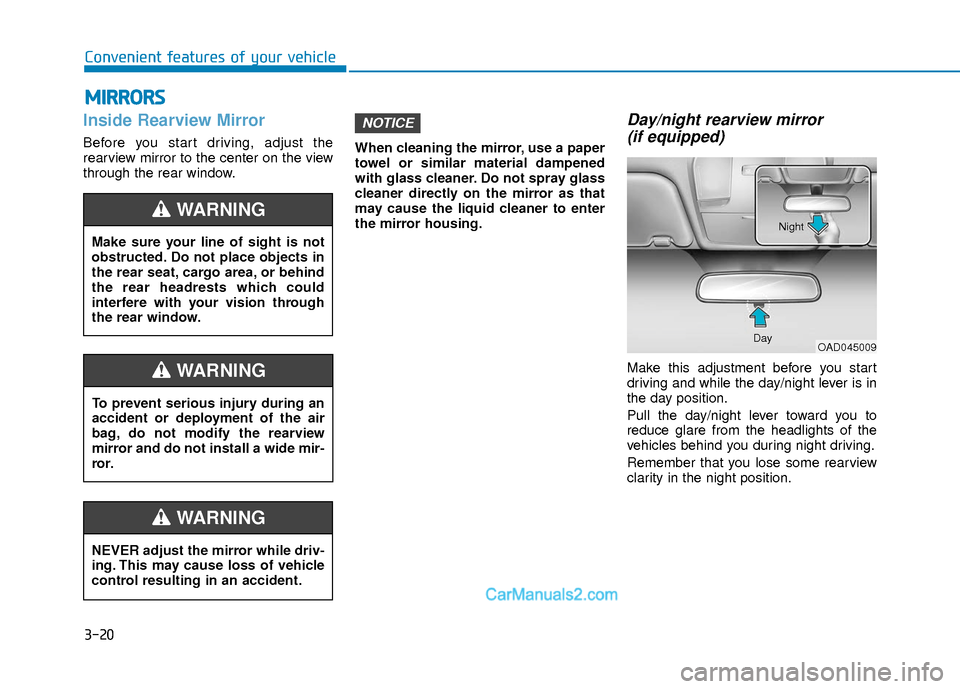
Day/night rearview mirror
(if equipped)
Make this adjustment before you start
driving and while the day/night lever is in
the day position.
Pull the day/night lever toward you to
reduce glare from the headlights of the
vehicles behind you during night driving.
Remember that you lose some rearview
clarity in the night position.
NOTICE
M M I
IR
R R
RO
O R
RS
S
Make sure your line of sight is not
obstructed. Do not place objects in
the rear seat, cargo area, or behind
the rear headrests which could
interfere with your vision through
the rear window.
WARNING
NEVER adjust the mirror while driv-
ing. This may cause loss of vehicle
control resulting in an accident.
WARNING
To prevent serious injury during an
accident or deployment of the air
bag, do not modify the rearview
mirror and do not install a wide mir-
ror.
WARNING
OAD045009
Day Night
Page 126 of 526
3-49
Convenient features of your vehicle
3
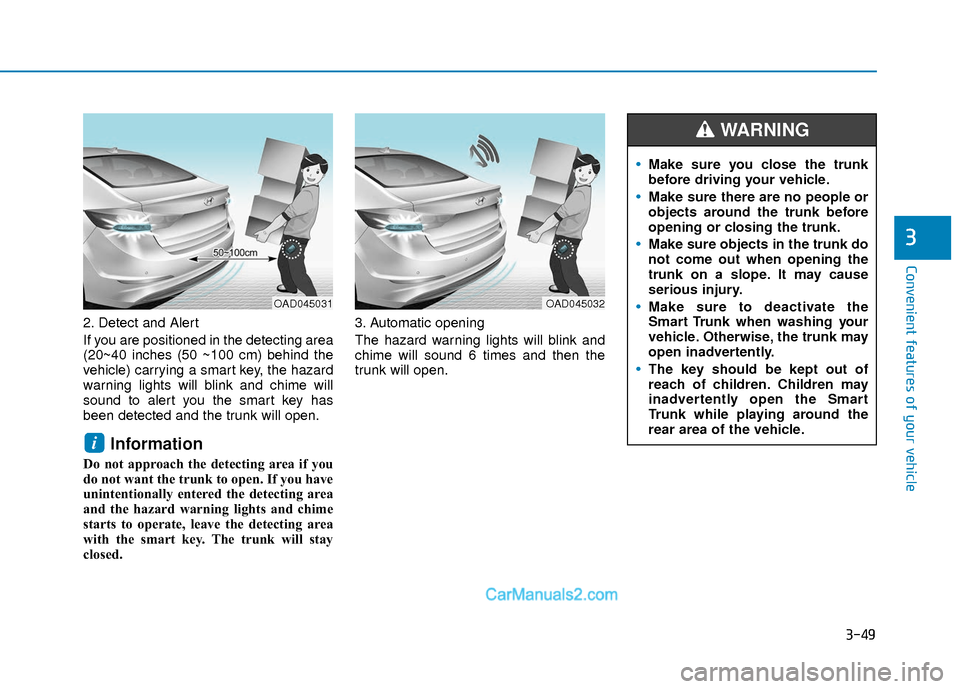
2. Detect and Alert
If you are positioned in the detecting area
(20~40 inches (50 ~100 cm) behind the
vehicle) carrying a smart key, the hazard
warning lights will blink and chime will
sound to alert you the smart key has
been detected and the trunk will open.
Information
Do not approach the detecting area if you
do not want the trunk to open. If you have
unintentionally entered the detecting area
and the hazard warning lights and chime
starts to operate, leave the detecting area
with the smart key. The trunk will stay
closed.3. Automatic opening
The hazard warning lights will blink and
chime will sound 6 times and then the
trunk will open.
i
OAD045032OAD045031
Make sure you close the trunk
before driving your vehicle.
Make sure there are no people or
objects around the trunk before
opening or closing the trunk.
Make sure objects in the trunk do
not come out when opening the
trunk on a slope. It may cause
serious injury.
Make sure to deactivate the
Smart Trunk when washing your
vehicle. Otherwise, the trunk may
open inadvertently.
The key should be kept out of
reach of children. Children may
inadvertently open the Smart
Trunk while playing around the
rear area of the vehicle.
WARNING
Page 138 of 526
3-61
Convenient features of your vehicle
3
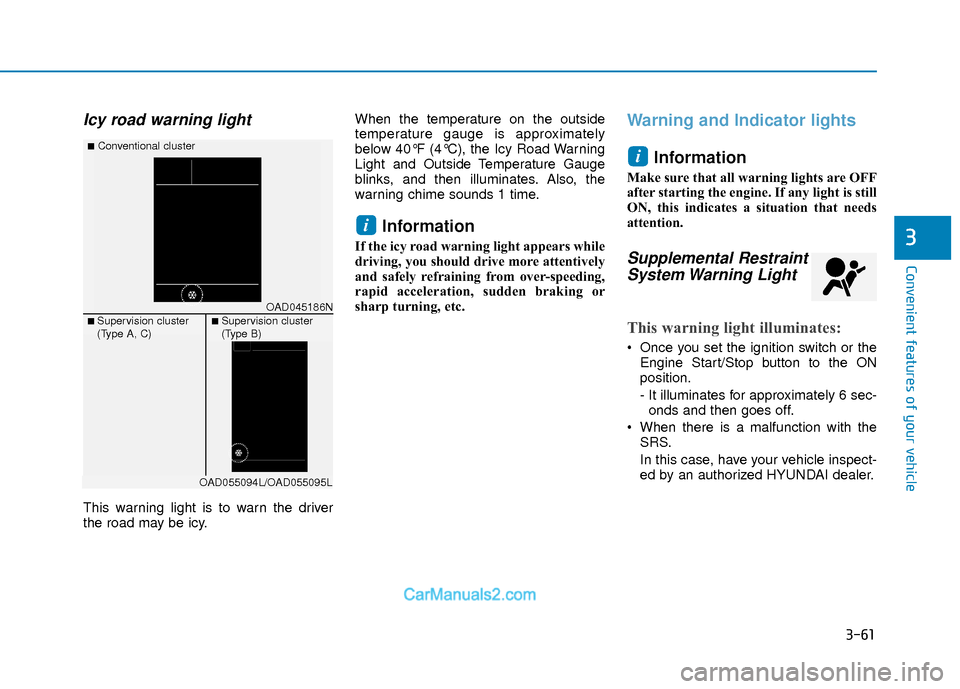
Icy road warning light
This warning light is to warn the driver
the road may be icy.When the temperature on the outside
temperature gauge is approximately
below 40°F (4°C), the Icy Road Warning
Light and Outside Temperature Gauge
blinks, and then illuminates. Also, the
warning chime sounds 1 time.
Information
If the icy road warning light appears while
driving, you should drive more attentively
and safely refraining from over-speeding,
rapid acceleration, sudden braking or
sharp turning, etc.
Warning and Indicator lights
Information
Make sure that all warning lights are OFF
after starting the engine. If any light is still
ON, this indicates a situation that needs
attention.
Supplemental RestraintSystem Warning Light
This warning light illuminates:
Once you set the ignition switch or the
Engine Start/Stop button to the ON
position.
- It illuminates for approximately 6 sec-onds and then goes off.
When there is a malfunction with the SRS.
In this case, have your vehicle inspect-
ed by an authorized HYUNDAI dealer.
i
i
OAD045186N
■Conventional cluster
■ Supervision cluster
(Type A, C)■ Supervision cluster
(Type B)
OAD055094L/OAD055095L
Page 140 of 526
3-63
Convenient features of your vehicle
3
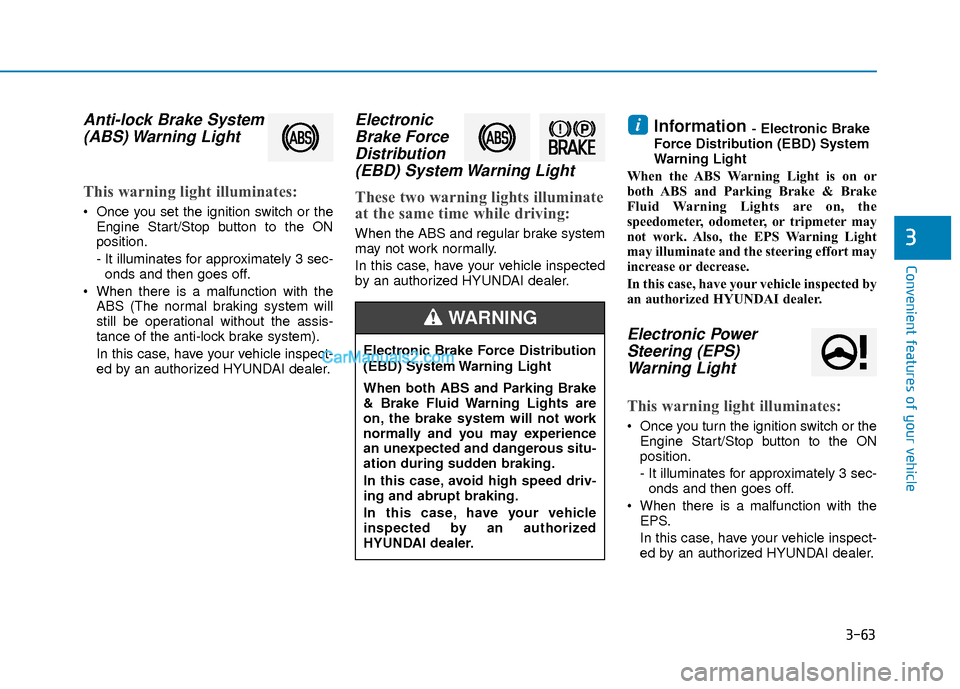
Anti-lock Brake System(ABS) Warning Light
This warning light illuminates:
Once you set the ignition switch or the
Engine Start/Stop button to the ON
position.
- It illuminates for approximately 3 sec-onds and then goes off.
When there is a malfunction with the ABS (The normal braking system will
still be operational without the assis-
tance of the anti-lock brake system).
In this case, have your vehicle inspect-
ed by an authorized HYUNDAI dealer.
ElectronicBrake ForceDistribution(EBD) System Warning Light
These two warning lights illuminate
at the same time while driving:
When the ABS and regular brake system
may not work normally.
In this case, have your vehicle inspected
by an authorized HYUNDAI dealer.
Information - Electronic Brake
Force Distribution (EBD) System
Warning Light
When the ABS Warning Light is on or
both ABS and Parking Brake & Brake
Fluid Warning Lights are on, the
speedometer, odometer, or tripmeter may
not work. Also, the EPS Warning Light
may illuminate and the steering effort may
increase or decrease.
In this case, have your vehicle inspected by
an authorized HYUNDAI dealer.
Electronic Power Steering (EPS)Warning Light
This warning light illuminates:
Once you turn the ignition switch or the
Engine Start/Stop button to the ON
position.
- It illuminates for approximately 3 sec-onds and then goes off.
When there is a malfunction with the EPS.
In this case, have your vehicle inspect-
ed by an authorized HYUNDAI dealer.
i
Electronic Brake Force Distribution
(EBD) System Warning Light
When both ABS and Parking Brake
& Brake Fluid Warning Lights are
on, the brake system will not work
normally and you may experience
an unexpected and dangerous situ-
ation during sudden braking.
In this case, avoid high speed driv-
ing and abrupt braking.
In this case, have your vehicle
inspected by an authorized
HYUNDAI dealer.
WARNING
Page 181 of 526
3-104
Convenient features of your vehicle
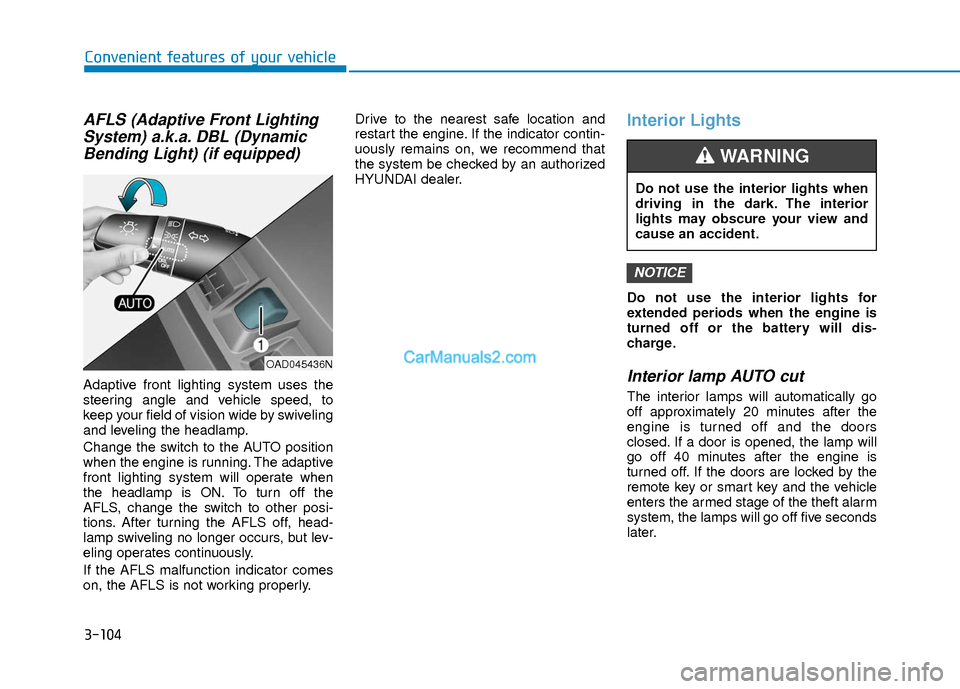
AFLS (Adaptive Front LightingSystem) a.k.a. DBL (DynamicBending Light) (if equipped)
Adaptive front lighting system uses the
steering angle and vehicle speed, to
keep your field of vision wide by swiveling
and leveling the headlamp.
Change the switch to the AUTO position
when the engine is running. The adaptive
front lighting system will operate when
the headlamp is ON. To turn off the
AFLS, change the switch to other posi-
tions. After turning the AFLS off, head-
lamp swiveling no longer occurs, but lev-
eling operates continuously.
If the AFLS malfunction indicator comes
on, the AFLS is not working properly. Drive to the nearest safe location and
restart the engine. If the indicator contin-
uously remains on, we recommend that
the system be checked by an authorized
HYUNDAI dealer.
Interior Lights
Do not use the interior lights for
extended periods when the engine is
turned off or the battery will dis-
charge.
Interior lamp AUTO cut
The interior lamps will automatically go
off approximately 20 minutes after the
engine is turned off and the doors
closed. If a door is opened, the lamp will
go off 40 minutes after the engine is
turned off. If the doors are locked by the
remote key or smart key and the vehicle
enters the armed stage of the theft alarm
system, the lamps will go off five seconds
later.
NOTICE
OAD045436N
Do not use the interior lights when
driving in the dark. The interior
lights may obscure your view and
cause an accident.
WARNING
Page 287 of 526
5-4
Driving your vehicle
Before Entering the Vehicle
• Be sure all windows, outside mirror(s),and outside lights are clean and unob-
structed.
Remove frost, snow, or ice.
Visually check the tires for uneven wear and damage.
Check under the vehicle for any sign of leaks.
Be sure there are no obstacles behind you if you intend to back up.
Before Starting
Make sure the hood, the trunk, and thedoors are securely closed and locked.
Adjust the position of the seat and steering wheel.
Adjust the inside and outside rearview mirrors.
Verify all the lights work.
Fasten your seatbelt. Check that all passengers have fastened their seat-
belts.
Check the gauges and indicators in the instrument panel and the messages on
the instrument display when the igni-
tion switch is in the ON position.
Check that any items you are carrying are stored properly or fastened down
securely.
CALIFORNIA PROPOSITION 65
WARNING
Engine exhaust and a wide variety
of automobile components includ-
ing components found in the interi-
or furnishings in a vehicle, contain
or emit harmful chemicals known to
the State of California to cause can-
cer and birth defects and reproduc-
tive harm. In addition, certain fluids
contained in vehicles and certain
products of components contain or
emit chemicals known to the State
of California to cause cancer and
birth defects or other reproductive
harm.WARNING
B B
E
EF
FO
O R
RE
E
D
D R
RI
IV
V I
IN
N G
G
Page 290 of 526
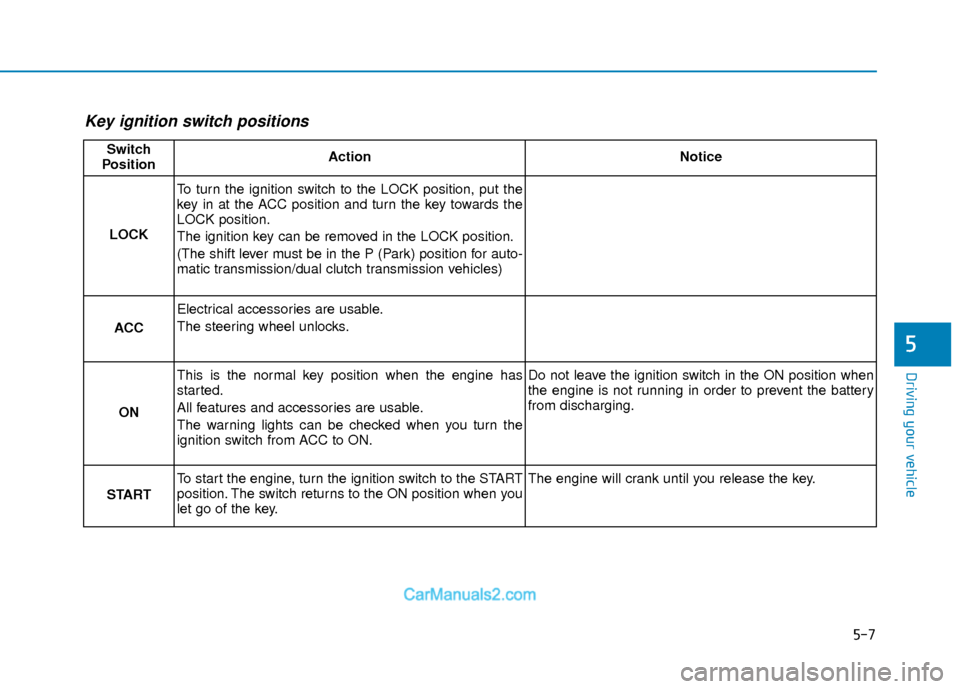
5-7
Driving your vehicle
5
Key ignition switch positions
Switch
PositionActionNotice
LOCK
To turn the ignition switch to the LOCK position, put the
key in at the ACC position and turn the key towards the
LOCK position.
The ignition key can be removed in the LOCK position.
(The shift lever must be in the P (Park) position for auto-
matic transmission/dual clutch transmission vehicles)
ACC
Electrical accessories are usable.
The steering wheel unlocks.
ON
This is the normal key position when the engine has
started.
All features and accessories are usable.
The warning lights can be checked when you turn the
ignition switch from ACC to ON.Do not leave the ignition switch in the ON position when
the engine is not running in order to prevent the battery
from discharging.
START
To start the engine, turn the ignition switch to the START
position. The switch returns to the ON position when you
let go of the key.The engine will crank until you release the key.
Page 294 of 526
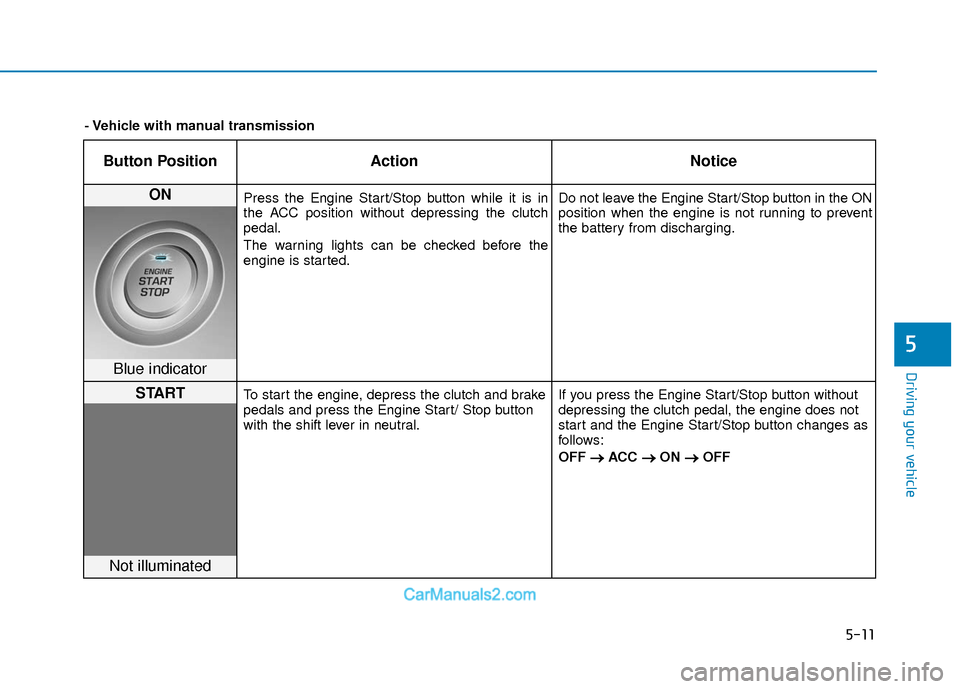
5-11
Driving your vehicle
5
Button PositionAction Notice
ON Press the Engine Start/Stop button while it is in
the ACC position without depressing the clutch
pedal.
The warning lights can be checked before the
engine is started. Do not leave the Engine Start/Stop button in the ON
position when the engine is not running to prevent
the battery from discharging.
Blue indicator
STARTTo start the engine, depress the clutch and brake
pedals and press the Engine Start/ Stop button
with the shift lever in neutral.
If you press the Engine Start/Stop button without
depressing the clutch pedal, the engine does not
start and the Engine Start/Stop button changes as
follows:
OFF
→ →
ACC →
→
ON →
→
OFF
Not illuminated
- Vehicle with manual transmission