stop light Hyundai Elantra 2018 Owner's Manual
[x] Cancel search | Manufacturer: HYUNDAI, Model Year: 2018, Model line: Elantra, Model: Hyundai Elantra 2018Pages: 526, PDF Size: 17.2 MB
Page 23 of 526
2-6
Safety system of your vehicle
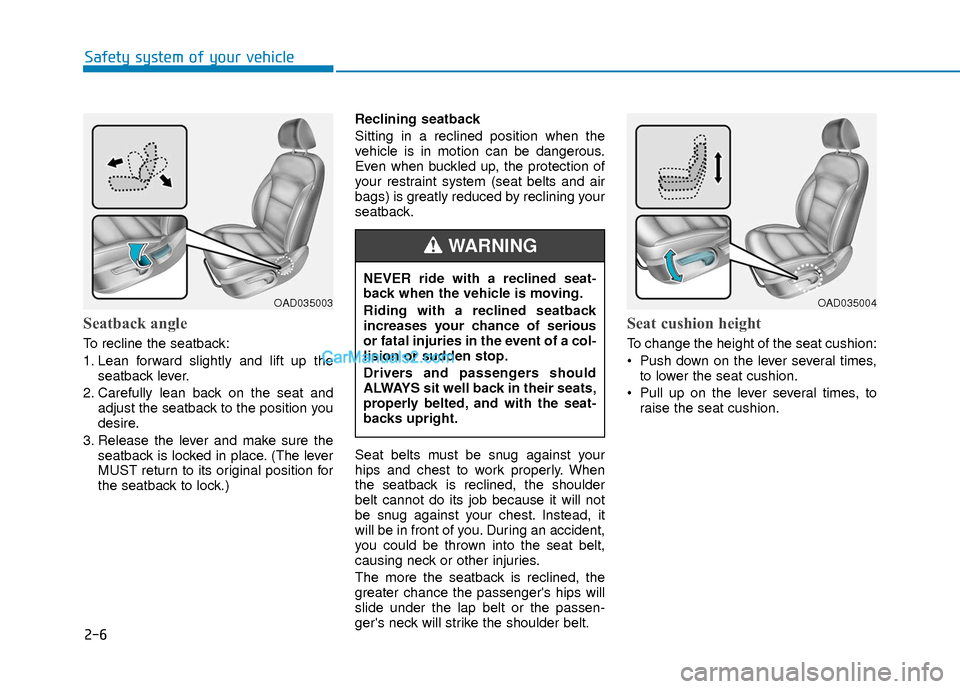
Seatback angle
To recline the seatback:
1. Lean forward slightly and lift up theseatback lever.
2. Carefully lean back on the seat and adjust the seatback to the position you
desire.
3. Release the lever and make sure the seatback is locked in place. (The lever
MUST return to its original position for
the seatback to lock.) Reclining seatback
Sitting in a reclined position when the
vehicle is in motion can be dangerous.
Even when buckled up, the protection of
your restraint system (seat belts and air
bags) is greatly reduced by reclining your
seatback.
Seat belts must be snug against your
hips and chest to work properly. When
the seatback is reclined, the shoulder
belt cannot do its job because it will not
be snug against your chest. Instead, it
will be in front of you. During an accident,
you could be thrown into the seat belt,
causing neck or other injuries.
The more the seatback is reclined, the
greater chance the passenger's hips will
slide under the lap belt or the passen-
ger's neck will strike the shoulder belt.
Seat cushion height
To change the height of the seat cushion:
Push down on the lever several times,
to lower the seat cushion.
Pull up on the lever several times, to raise the seat cushion.
OAD035003OAD035004
NEVER ride with a reclined seat-
back when the vehicle is moving.
Riding with a reclined seatback
increases your chance of serious
or fatal injuries in the event of a col-
lision or sudden stop.
Drivers and passengers should
ALWAYS sit well back in their seats,
properly belted, and with the seat-
backs upright.
WARNING
Page 37 of 526
2-20
Safety system of your vehicle
If you continue not to fasten the seat belt
and you drive over 6 mph (9 km/h), the
warning light will stay illuminated.
If you continue not to fasten the seat belt
and you drive over 12 mph (20 km/h) the
seat belt warning chime
will sound for approximately 100 seconds
and the corresponding warning light will
blink.
If you unfasten the seat belt while driving
under 12 mph (20 km/h) the seat belt
warning light will illuminate until the seat
belt is fastened.
If you unfasten the seat belt while driving
over 12 mph (20 km/h), the seat belt
warning chime will sound for approxi-
mately 100 seconds and the correspon-
ding warning light will blink.Seat Belt Restraint System
Seat Belt-Driver's 3-point sys-tem with emergency lockingretractor
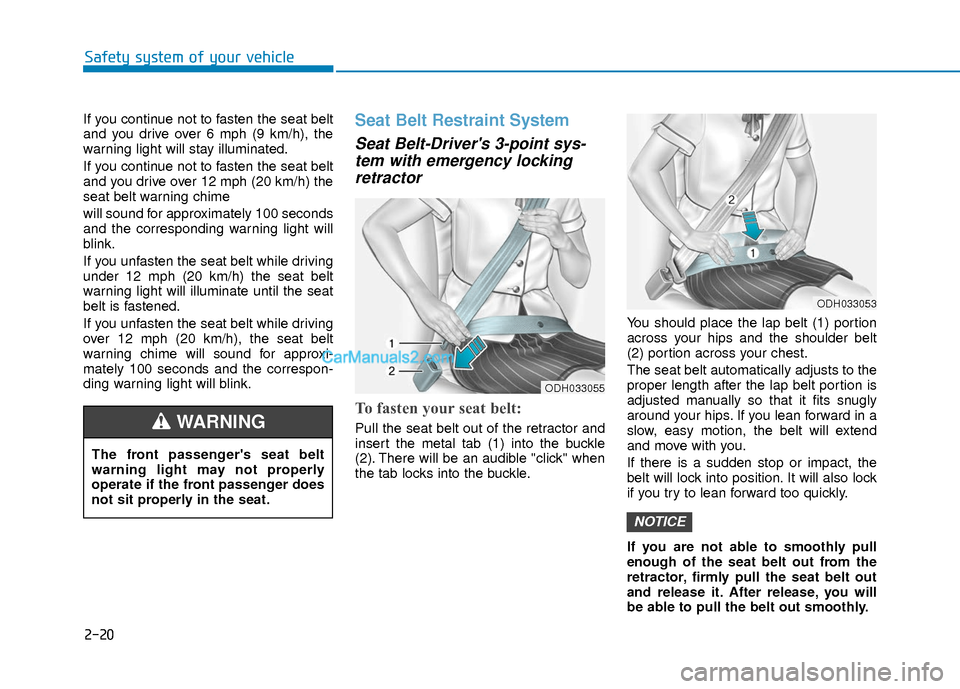
To fasten your seat belt:
Pull the seat belt out of the retractor and
insert the metal tab (1) into the buckle
(2). There will be an audible "click" when
the tab locks into the buckle. You should place the lap belt (1) portion
across your hips and the shoulder belt
(2) portion across your chest.
The seat belt automatically adjusts to the
proper length after the lap belt portion is
adjusted manually so that it fits snugly
around your hips. If you lean forward in a
slow, easy motion, the belt will extend
and move with you.
If there is a sudden stop or impact, the
belt will lock into position. It will also lock
if you try to lean forward too quickly.
If you are not able to smoothly pull
enough of the seat belt out from the
retractor, firmly pull the seat belt out
and release it. After release, you will
be able to pull the belt out smoothly.
NOTICE
The front passenger's seat belt
warning light may not properly
operate if the front passenger does
not sit properly in the seat.
WARNING
ODH033055
ODH033053
Page 84 of 526
3-7
Convenient features of your vehicle
3
Information
The door handle button will only operate
when the smart key is within 28~40 inches
(0.7~1 m) from the outside door handle.
Even though you press the outside door
handle button, the doors will not lock and
the chime will sound for three seconds if
any of the following occur:
The Smart Key is in the vehicle.
The Engine Start/Stop button is in ACCor ON position.
Any door except the trunk is open.
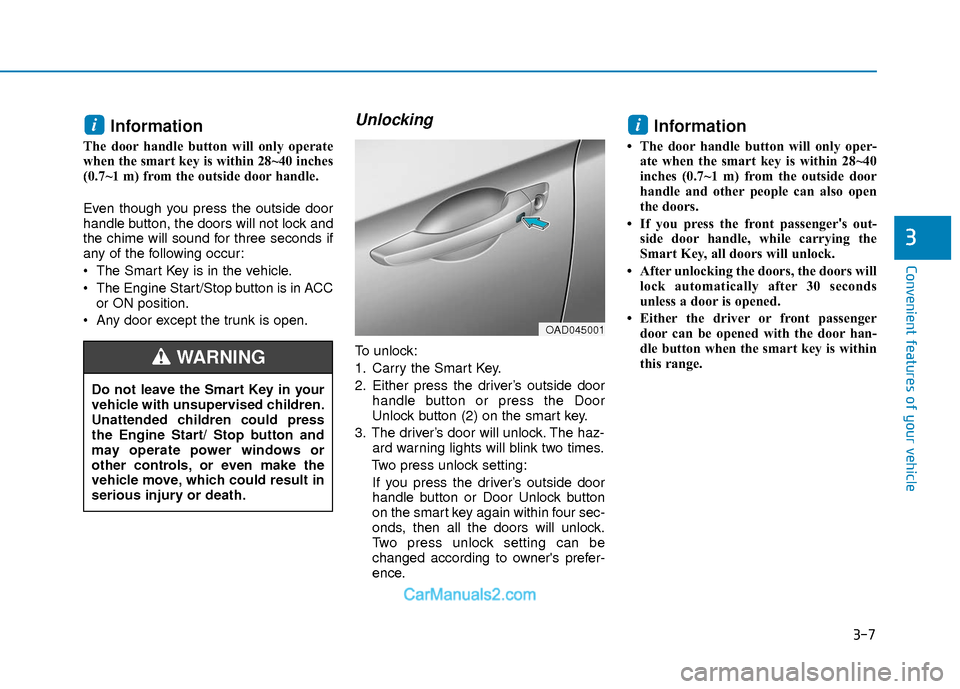
Unlocking
To unlock:
1. Carry the Smart Key.
2. Either press the driver’s outside door handle button or press the Door
Unlock button (2) on the smart key.
3. The driver’s door will unlock. The haz- ard warning lights will blink two times.
Two press unlock setting: If you press the driver’s outside door
handle button or Door Unlock button
on the smart key again within four sec-
onds, then all the doors will unlock.
Two press unlock setting can be
changed according to owner's prefer-
ence.
Information
• The door handle button will only oper- ate when the smart key is within 28~40
inches (0.7~1 m) from the outside door
handle and other people can also open
the doors.
• If you press the front passenger 's out-
side door handle, while carrying the
Smart Key, all doors will unlock.
• After unlocking the doors, the doors will lock automatically after 30 seconds
unless a door is opened.
• Either the driver or front passenger door can be opened with the door han-
dle button when the smart key is within
this range.
ii
Do not leave the Smart Key in your
vehicle with unsupervised children.
Unattended children could press
the Engine Start/ Stop button and
may operate power windows or
other controls, or even make the
vehicle move, which could result in
serious injury or death.
WARNING
OAD045001
Page 85 of 526
3-8
Convenient features of your vehicle
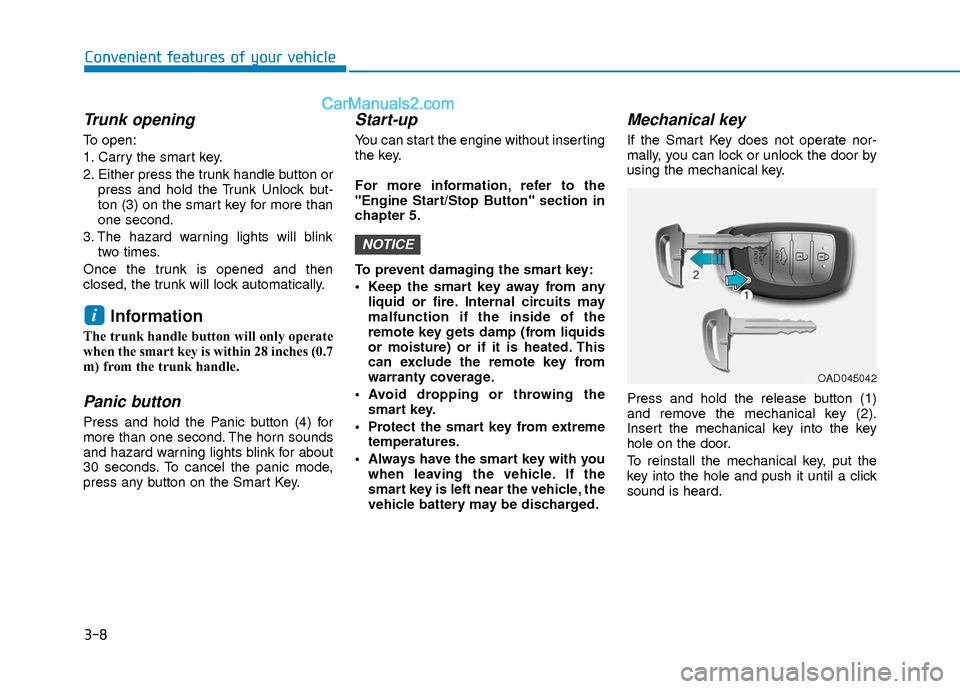
Trunk opening
To open:
1. Carry the smart key.
2. Either press the trunk handle button orpress and hold the Trunk Unlock but-
ton (3) on the smart key for more than
one second.
3. The hazard warning lights will blink two times.
Once the trunk is opened and then
closed, the trunk will lock automatically.
Information
The trunk handle button will only operate
when the smart key is within 28 inches (0.7
m) from the trunk handle.
Panic button
Press and hold the Panic button (4) for
more than one second. The horn sounds
and hazard warning lights blink for about
30 seconds. To cancel the panic mode,
press any button on the Smart Key.
Start-up
You can start the engine without inserting
the key.
For more information, refer to the
"Engine Start/Stop Button" section in
chapter 5.
To prevent damaging the smart key:
Keep the smart key away from any liquid or fire. Internal circuits may
malfunction if the inside of the
remote key gets damp (from liquids
or moisture) or if it is heated. This
can exclude the remote key from
warranty coverage.
Avoid dropping or throwing the smart key.
Protect the smart key from extreme temperatures.
Always have the smart key with you when leaving the vehicle. If the
smart key is left near the vehicle, the
vehicle battery may be discharged.
Mechanical key
If the Smart Key does not operate nor-
mally, you can lock or unlock the door by
using the mechanical key.
Press and hold the release button (1)
and remove the mechanical key (2).
Insert the mechanical key into the key
hole on the door.
To reinstall the mechanical key, put the
key into the hole and push it until a click
sound is heard.
NOTICE
i
OAD045042
Page 95 of 526
3-18
S
ST
T E
EE
ER
R I
IN
N G
G
W
W H
HE
EE
EL
L
Convenient features of your vehicle
If the Electric Power Steering
System does not operate normally,
the warning light ( ) will illumi-
nate on the instrument cluster. You
may steer the vehicle, but it will
require increased steering efforts.
Take your vehicle to an authorized
HYUNDAI dealer and have the sys-
tem checked as soon as possible.
CAUTION
Easy Access Function
When exiting the vehicle the driver’s seat
will move rearward when the engine is
turned off and the shift lever in P (Park).
When entering the vehicle the driver’s
seat will move forward when the ignition
switch is placed to the ACC position.
You can activate or deactivate the Easy
Access Function from the User Settings
Mode on the LCD display.
For more information, refer to the
"LCD Display" section in this chapter.
Electric Power Steering (EPS)
The system assists you with steering the
vehicle. If the engine is turned off or if the
power steering system becomes inoper-
ative, you may still steer the vehicle, but
it will require increased steering effort.
Should you notice any change in the
effort required to steer during normal
vehicle operation, have the system
checked by an authorized HYUNDAI
dealer.
Information
The following symptoms may occur dur-
ing normal vehicle operation:
• The steering effort may be high immedi-
ately after placing the ignition switch in
the ON position.
This happens as the system performs the
EPS system diagnostics. When the diag-
nostics is completed, the steering wheel
will return to its normal condition.
• A click noise may be heard from the EPS relay after the ignition switch is in
the ON or OFF position.
• Motor noise may be heard when the vehicle is at a stop or at a low driving
speed.
• When you operate the steering wheel in low temperature, abnormal noise may
occur. If temperature rises, the noise will
disappear. This is a normal condition.
• When an error is detected from the EPS, the warning light will illuminate on the
instrument cluster and the steering
efforts may be increased. When the fol-
lowing symptoms occur, immediately
drive the vehicle to a safe area and
check it.
i
Page 101 of 526
3-24
Convenient features of your vehicle
If you need to recalibrate the compass:
1. Press and hold the button for morethan 9 seconds. When the compass
memory is cleared a "C" will appear in
the display.
2. Drive the vehicle in 2 complete circles at less than 5 mph (8 km/h).Integrated HomeLink®Wireless
Control System
The HomeLink®Wireless Control
System can replace up to three hand-
held radio-frequency (RF) transmitters
with a single built-in device. This innova-
tive feature will learn the radio frequency
codes of most current transmitters to
operate devices such as gate operators,
garage door openers, entry door locks,
security systems, even home lighting.
Both standard and rolling code-equipped
transmitters can be programmed by fol-
lowing the outlined procedures.
Additional HomeLink
®information can
be found at: www.homelink.com or by
calling 1-800-355-3515.
Retain the original transmitter of the RF
device you are programming for use in
other vehicles as well as for future
HomeLink
®programming. It is also sug-
gested that upon the sale of the vehicle,
the programmed HomeLink
®buttons be
erased for security purposes.
Before programming HomeLink®to
a garage door opener or gate oper-
ator, make sure people and objects
are out of the way of the device to
prevent potential harm or damage.
Do not use the HomeLink
®with any
garage door opener that lacks the
safety stop and reverse features
required by U.S. federal safety stan-
dards (this includes any garage
door opener model manufactured
before April 1, 1982). A garage door
that cannot detect an object - sig-
naling the door to stop and reverse
- does not meet current U.S. federal
safety standards. Using a garage
door opener without these features
increases the risk of serious injury
or death.
WARNING
Page 103 of 526
3-26
Convenient features of your vehicle
Information
Some devices may require you to replace
this Programming step 3 with procedures
noted in the "Gate Operator/Canadian
Programming" chapter. If the
HomeLink
®indicator light does not
change to a rapidly blinking light after
performing these steps, contact
HomeLink
®at www.homelink.com.
4. Press and hold for 5 seconds and release the programmed HomeLink
®
button up to two separate times to
activate the door. If the door does not
activate, press and hold the just-
trained HomeLink
®button and
observe the indicator light.
stantly, programming is complete
and your device should activate
when the HomeLink
®button is
pressed and released.
2 seconds and then turns to a con-
stant light, continue with
"Programming" steps 5-7 to com-
plete the programming of a rolling
code equipped device (most com-
monly a garage door opener). 5. At the garage door opener receiver
(motor-head unit) in the garage, locate
the "learn" or "smart" button. This can
usually be found where the hanging
antenna wire is attached to the motor-
head unit.
6. Firmly press and release the "learn" or "smart" button. (The name and color
of the button vary by manufacturer).
There are 30 seconds to initiate step
7.
7. Return to the vehicle and firmly press, hold for 2 seconds and release the
programmed HomeLink
®button.
Repeat the "press/hold/release"
sequence a second time, and,
depending on the brand of the garage
door opener (or other rolling code
equipped device), repeat this
sequence a third time to complete the
programming process.
HomeLink
®should now activate your
rolling code equipped device.
Gate operator & Canadian programming
During programming, your handheld
transmitter may automatically stop trans-
mitting. Continue to press the Integrated
HomeLink
®Wireless Control System but-
ton (note steps 2 through 3 in the
Programming portion of this document)
while you press and re-press ("cycle")
your handheld transmitter every two sec-
onds until the frequency signal has been
learned. The indicator light will flash
slowly and then rapidly after several sec-
onds upon successful training.
Operating HomeLink®
To operate, simply press and release the
programmed HomeLink®button.
Activation will now occur for the trained
device (i.e. garage door opener, gate
operator, security system, entry door
lock, home/office lighting, etc.). For con-
venience, the hand-held transmitter of
the device may also be used at any time.
i
Page 107 of 526
3-30
Convenient features of your vehicle
To adjust the Zone setting:
1. Determine the desired Zone Numberbased upon your current location on
the Zone Map.
2. Press and hold the button for more than 3 but less than 6 seconds, the
current Zone Number will appear on
the display.
3. Pressing and holding the button again will cause the numbers to incre-
ment (Note: they will repeat …13, 14,
15, 1, 2, …). Releasing the button
when the desired Zone Number
appears on the display will set the new
Zone.
4. Within about 5 seconds the compass will start displaying a compass head-
ing again.
There are some conditions that can
cause changes to the vehicle magnets,
such as installing a ski rack or a CB
antenna. Body repair work on the vehicle
can also cause changes to the vehicle’s
magnetic field. In these situations, the
compass will need to be re-calibrated to
quickly correct these changes. If you need to recalibrate the compass:
1. Press and hold the button for more
than 6 seconds. When the compass
memory is cleared a "C" will appear in
the display.
2. Drive the vehicle in 2 complete circles at less than 5 mph (8 km/h).
Integrated HomeLink®Wireless
Control System
The HomeLink®Wireless Control System
can replace up to three hand-held radio-
frequency (RF) transmitters with a single
built-in device. This innovative feature will
learn the radio frequency codes of most
current transmitters to operate devices
such as gate operators, garage door
openers, entry door locks, security sys-
tems, even home lighting. Both standard
and rolling code-equipped transmitters
can be programmed by following the out-
lined procedures.
Additional HomeLink
®information can be
found at: www.homelink.com or by calling
1-800-355-3515.
Retain the original transmitter of the RF
device you are programming for use in
other vehicles as well as for future
HomeLink
®programming. It is also sug-
gested that upon the sale of the vehicle,
the programmed HomeLink
®buttons be
erased for security purposes.
Before programming HomeLink®to
a garage door opener or gate oper-
ator, make sure people and objects
are out of the way of the device to
prevent potential harm or damage.
Do not use the HomeLink
®with any
garage door opener that lacks the
safety stop and reverse features
required by U.S. federal safety stan-
dards (this includes any garage
door opener model manufactured
before April 1, 1982). A garage door
that cannot detect an object - sig-
naling the door to stop and reverse
- does not meet current U.S. federal
safety standards. Using a garage
door opener without these features
increases the risk of serious injury
or death.
WARNING
Page 109 of 526
3-32
Convenient features of your vehicle
Standard programming
To train most devices, follow these
instructions:
1. For first-time programming, press andhold the two outside buttons,
HomeLink
®Channel 1 and Channel 3
Buttons, until the indicator light begins
to flash (after 20 seconds). Release
both buttons. Do not hold the buttons
for longer than 30 seconds.
2. Position the end of your hand-held transmitter 1-3 inches (2-8 cm) away
from the HomeLink
®buttons while
keeping the indicator light in view.
3. Simultaneously press and hold both the HomeLink
®and hand-held trans-
mitter button. DO NOT release the but-
tons until step 4 has been completed.
4. While continuing to hold the buttons the red Indicator Status LED will flash
slowly and then rapidly after
HomeLink
®successfully trains to the
frequency signal from the hand-held
transmitter. Release both buttons.
5. Press and hold the just-trained HomeLink
®button and observe the
red Status Indicator LED. If the indica-
tor light stays on constantly, program-
ming is complete and your device
should activate when the HomeLink
®
button is pressed and released. 6. To program the remaining two
HomeLink
®buttons, follow steps 2
through 5.
Gate operator & Canadian programming
During programming, your handheld
transmitter may automatically stop trans-
mitting. Continue to press the Integrated
HomeLink
®Wireless Control System but-
ton (note steps 2 through 4 in the
Standard Programming portion of this
document) while you press and re-press
("cycle") your handheld transmitter every
two seconds until the frequency signal
has been learned. The indicator light will
flash slowly and then rapidly after sever-
al seconds upon successful training.
Operating HomeLink®
To operate, simply press and release the
programmed HomeLink®button.
Activation will now occur for the trained
device (i.e. garage door opener, gate
operator, security system, entry door
lock, home/office lighting, etc.). For con-
venience, the hand-held transmitter of
the device may also be used at any time.
Reprogramming a single HomeLink®but-
ton
To program a new device to a previously
trained HomeLink®button, follow these
steps:
1. Press and hold the desired HomeLink
®button. Do NOT release
until step 4 has been completed.
2. When the indicator light begins to flash slowly (after 20 seconds), posi-
tion the handheld transmitter 1 to 3
inches away from the HomeLink
®sur-
face.
3. Press and hold the handheld transmit- ter button. The HomeLink
®indicator
light will flash, first slowly and then
rapidly.
4. When the indicator light begins to flash rapidly, release both buttons.
5. Press and hold the just-trained HomeLink
®button and observe the
red Status Indicator LED. If the indica-
tor light stays on constantly, program-
ming is complete and your new device
should activate.
Page 115 of 526
3-38
Convenient features of your vehicle
Power Windows
The ignition switch must be in the ON
position to be able to raise or lower the
windows. Each door has a Power
Window switch to control that door's win-
dow. The driver has a Power Window
Lock switch which can block the opera-
tion of passenger windows. The power
windows will operate for approximately
30 seconds after the ignition switch is
placed in the ACC or LOCK/OFF posi-
tion. However, if the front doors are
opened, the Power Windows cannot be
operated even within the 30 second peri-
od.
Information
• In cold and wet climates, power win-dows may not work properly due to
freezing conditions.
• While driving with the rear windows down or with the sunroof (if equipped)
opened (or partially opened), your vehi-
cle may demonstrate a wind buffeting or
pulsation noise. This noise is normal and
can be reduced or eliminated by taking
the following actions. If the noise occurs
with one or both of the rear windows
down, partially lower both front win-
dows approximately 1 inch (2.5 cm). If
you experience the noise with the sun-
roof open, slightly close the sunroof.
Window opening and closing
To open:
Press the window switch down to the first
detent position (5). Release the switch
when you want the window to stop.
To close:
Pull the window switch up to the first
detent position (5). Release the window
switch when you want the window to
stop.
i
To avoid serious injury or death, do
not extend your head, arms or body
outside the windows while driving.
WARNING
OAD045038