trip computer Hyundai Elantra 2020 User Guide
[x] Cancel search | Manufacturer: HYUNDAI, Model Year: 2020, Model line: Elantra, Model: Hyundai Elantra 2020Pages: 535, PDF Size: 16.8 MB
Page 179 of 535
3-95
Convenient features of your vehicle
3
Supervision Cluster
The trip computer is a microcomput-
er-controlled driver information sys-
tem that displays information related
to driving.
Information
Some driving information stored in
the trip computer (for example
Average Vehicle Speed) resets if the
battery is disconnected.
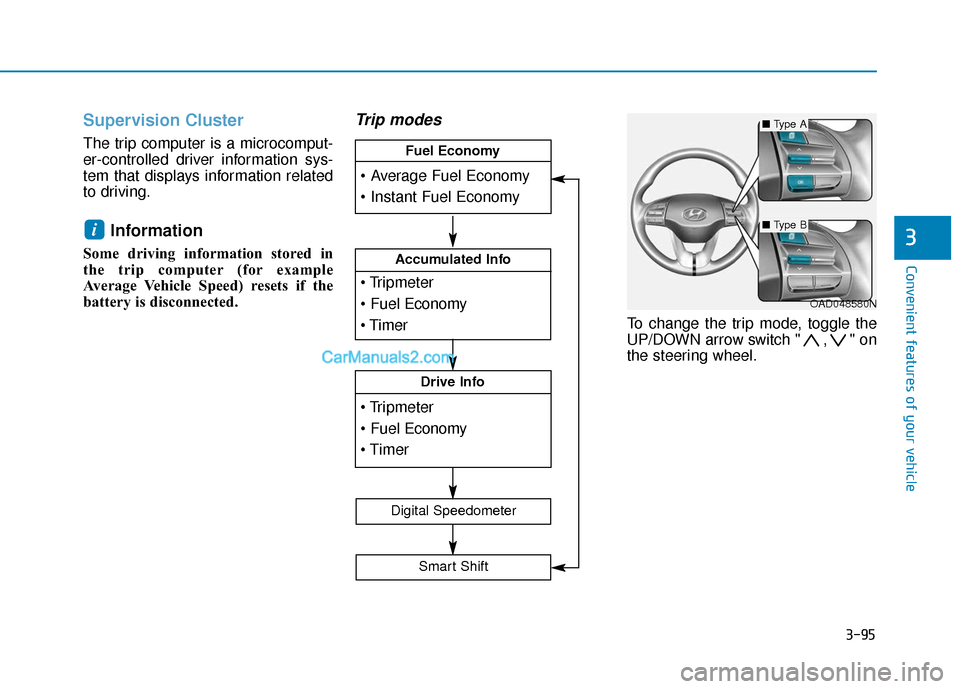
Trip modes
To change the trip mode, toggle the
UP/DOWN arrow switch " , " on
the steering wheel.
i
OAD048580N
Accumulated Info
Drive Info
Fuel Economy
Digital Speedometer
Smart Shift
■Type A
■Type B
Page 264 of 535
5-28
Driving your vehicle
Always come to a complete stop before shifting into D (Drive) or
R (Reverse).
Do not put the shift lever in N (Neutral) while driving.
LCD display for transmission
temperature and warning mes-
sage
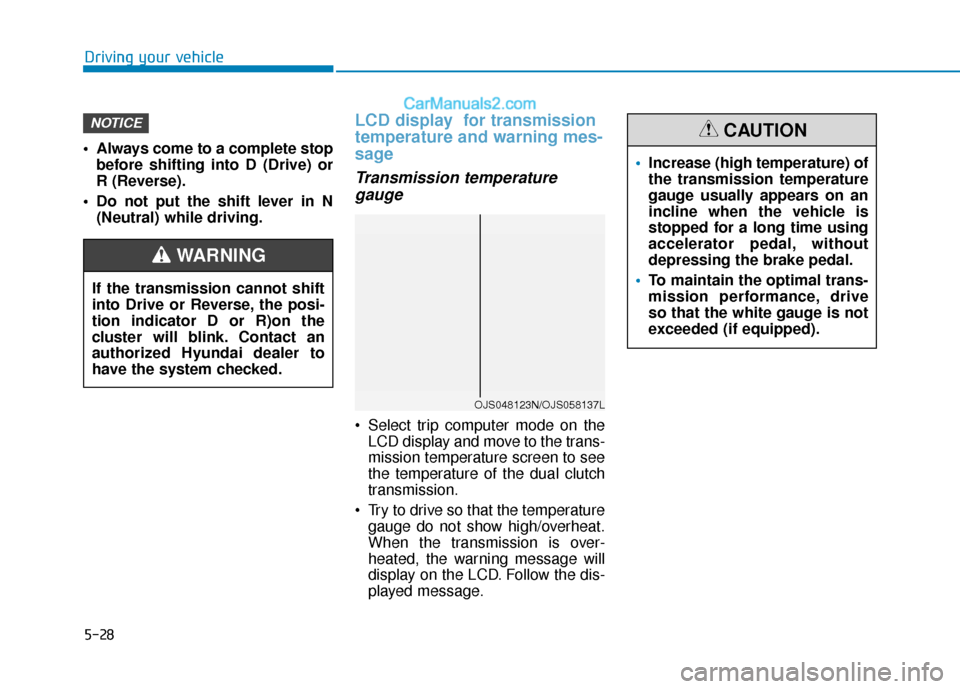
Transmission temperaturegauge
Select trip computer mode on the
LCD display and move to the trans-
mission temperature screen to see
the temperature of the dual clutch
transmission.
Try to drive so that the temperature gauge do not show high/overheat.
When the transmission is over-
heated, the warning message will
display on the LCD. Follow the dis-
played message.
NOTICE
If the transmission cannot shift
into Drive or Reverse, the posi-
tion indicator D or R)on the
cluster will blink. Contact an
authorized Hyundai dealer to
have the system checked.
WARNING
OJS048123N/OJS058137L
Increase (high temperature) of
the transmission temperature
gauge usually appears on an
incline when the vehicle is
stopped for a long time using
accelerator pedal, without
depressing the brake pedal.
To maintain the optimal trans-
mission performance, drive
so that the white gauge is not
exceeded (if equipped).
CAUTION
Page 459 of 535
7-37
7
Maintenance
By jump starting
After a jump start from a good bat-
tery, drive the vehicle for 20-30 min-
utes before it is shutoff. The vehicle
may not restart if you shut it off
before the battery had a chance to
adequately recharge. See "Jump
Starting" in chapter 6 for more infor-
mation on jump starting procedures.
Information
An inappropriately disposedbattery can be harmful to
the environment and human
health.
Dispose the battery according to your
local law(s) or regulation.
Reset Features
The following items may need to be
reset after the battery has been dis-
charged or the battery has been dis-
connected.
Power Windows
Trip Computer
Climate Control System
Clock
Audio System
Sunroof
i
Watch the battery during
charging, and stop or reduce
the charging rate if the battery
cells begin boiling violently.
The negative battery cable
must be removed first and
installed last when the battery
is disconnected. Disconnect
the battery charger in the fol-
lowing order:
(1) Turn off the battery charg- er main switch.
(2) Unhook the negative
clamp from the negative
battery terminal.
(3) Unhook the positive clamp from the positive battery
terminal.
Always use a genuine
HYUNDAI approved battery
when you replace the battery.
Page 529 of 535
I-7
Highway driving ...........................................................5-136
Hill-start assist control (HAC)........................................5-49
Hood........................................................................\
........3-43
Horn ........................................................................\
........3-22
How to use this manual ....................................................F-6
If the engine doesn't turn over or turns over slowly.........6-4
If the engine overheats ......................................................6-7
If the engine stalls at a crossroad or crossing...................6-3
If the engine stalls while driving ......................................6-3
If the engine turns over normally but doesn't start ...........6-4
If the engine will not start.................................................6-4
If you have a flat tire ......................................................6-15
If you have a flat tire while driving ..................................6-3
Ignition switchEngine Start/Stop button ..............................................5-9
Key ignition switch ......................................................5-6
Immobilizer System ........................................................3-11
Impact sensing door unlock ............................................3-15
Improtant safety precautions.............................................2-2 Air bag hazards ............................................................2-2
Always wear your seat belt ..........................................2-2
Control your speed .......................................................2-3
Driver distraction..........................................................2-2
Keep your vehicle in safe condition.............................2-3
Restrain all children .....................................................2-2 In case of emergency while driving..................................6-3
Inside rearview mirror ....................................................3-23
Instrument cluster ...........................................................3-53
Gauges ........................................................................\
3-56
Instrument panel illumination ....................................3-55
LCD display messages ...............................................3-73
Transmission shift indicator .......................................3-60
Trip computer....................................................3-91,3- 95
Warnings and indicator lights.....................................3-61
Instrument panel fuse replacement .................................7-54
Instrument panel overview ...............................................1-5
Interior care .....................................................................7-8\
0
Interior features Clock ........................................................................\
3-147
Clothes hanger ..........................................................3-147
Cup holder ................................................................3-142
Floor mat anchor(s) ..................................................3-148
Power outlet..............................................................3-144
Sunvisor ....................................................................3-14\
3
USB charger .............................................................3-147
Wireless cellular phone charging system .................3-145
Interior lights.................................................................3-106 Interior lamp AUTO cut ...........................................3-106
Interior overview...............................................................1-4
I
Index
I
Page 534 of 535

I-12
Tachometer ......................................................................3-\
56
Theft alarm system .........................................................3-17
Tilt steering/Telescopic steering .....................................3-21
Tire chains .....................................................................5-1\
37
Tire loading information label ......................................5-142
Tire Mobility Kit .............................................................6-22
Tire pressure monitoring system (TPMS) ........................6-9Changing a tire with TPMS .......................................6-13
Low tire pressure LCD display with position indicator...................................................................6-11
Low tire pressure telltale ............................................6-11
TPMS malfunction indicator ......................................6-12
Tire rotation ....................................................................7-41\
Tire specification and pressure label ..............................8-11
Tires and wheels .............................................................7-38 All season tires ...........................................................7-51
Checking tire inflation pressure .................................7-40
Compact spare tire replacement .................................7-43
Low aspect ratio tires .................................................7-52
Radial-ply tires ...........................................................7-51
Recommended cold tire inflation pressures ...............7-39
Snow tires ...................................................................5-51
Summer tires ..............................................................7-51
Tire care ......................................................................7-\
38
Tire maintenance ........................................................7-44
Tire replacement .........................................................7-42 Tire rotation ................................................................7-41
Tire sidewall labeling .................................................7-44
Tire terminology and definitions ................................7-48
Tire traction ................................................................7-43
Wheel alignment and tire balance ..............................7-42
Wheel replacement .....................................................7-43
Tires and wheels ...............................................................8-5
Towing ........................................................................\
....6-36
Trailer towing................................................................5-146
Transmission shift indicator............................................3-60
Transmission temperature and warning message ...........5-28
Trip computer Conventional cluster...................................................3-91
Supervision cluster .....................................................3-95
Trunk ........................................................................\
.......3-44 Emergency trunk safety release .................................3-45
Smart trunk .................................................................3-46
Trunk room lamp ..........................................................3-107
Turn signals...................................................................3-104\
USB charger ..................................................................3-147
User settings mode..........................................................3-83
Index
T
U