replace HYUNDAI ELANTRA 2021 User Guide
[x] Cancel search | Manufacturer: HYUNDAI, Model Year: 2021, Model line: ELANTRA, Model: HYUNDAI ELANTRA 2021Pages: 570, PDF Size: 52.21 MB
Page 102 of 570
Instrument Cluster
4-16
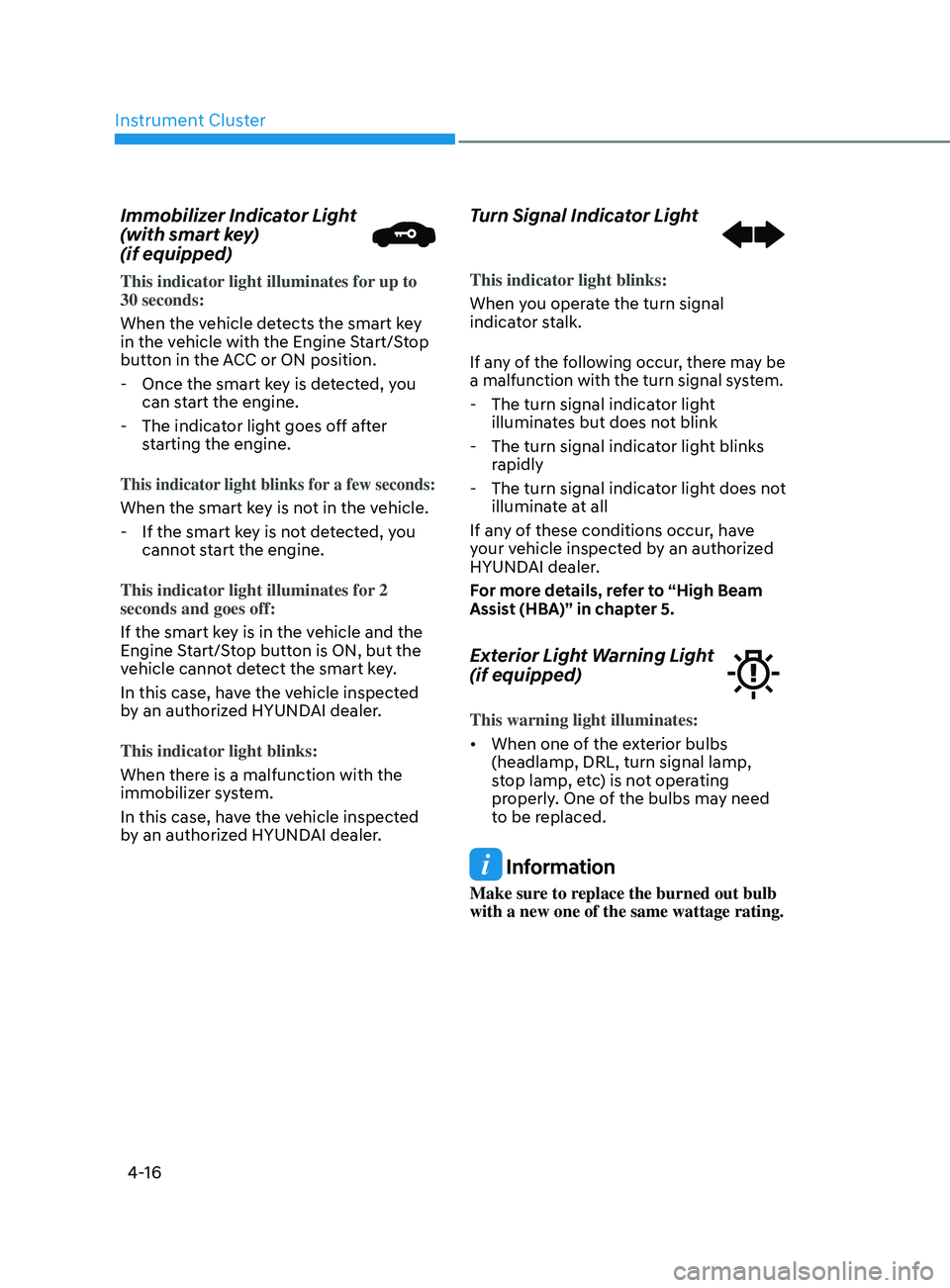
Immobilizer Indicator Light
(with smart key)
(if equipped)
This indicator light illuminates for up to
30 seconds:
When the vehicle detects the smart key
in the vehicle with the Engine Start/Stop
button in the ACC or ON position.
- Once the smart ke
y is detected, you
can start the engine.
- The indicat
or light goes off after
starting the engine.
This indicator light blinks for a few seconds:
When the smart key is not in the vehicle.
- If the smart ke
y is not detected, you
cannot start the engine.
This indicator light illuminates for 2
seconds and goes off:
If the smart key is in the vehicle and the
Engine Start/Stop button is ON, but the
vehicle cannot detect the smart key.
In this case, have the vehicle inspected
by an authorized HYUNDAI dealer.
This indicator light blinks:
When there is a malfunction with the
immobilizer system.
In this case, have the vehicle inspected
by an authorized HYUNDAI dealer.
Turn Signal Indicator Light
This indicator light blinks:
When you operate the turn signal
indicator stalk.
If any of the following occur, there may be
a malfunction with the turn signal system.
- The turn signal indicat or light
illuminates but does not blink
- The turn signal indicat
or light blinks
rapidly
- The turn signal indicat
or light does not
illuminate at all
If any of these conditions occur, have
your vehicle inspected by an authorized
HYUNDAI dealer.
For more details, refer to “High Beam
Assist (HBA)” in chapter 5.
Exterior Light Warning Light
(if equipped)
This warning light illuminates:
• When one of the exterior bulbs
(headlamp, DRL, turn signal lamp,
stop lamp, etc) is not operating
properly. One of the bulbs may need
to be replaced.
Information
Make sure to replace the burned out bulb
with a new one of the same wattage rating.
Page 106 of 570
Instrument Cluster
4-20
Key not in vehicle
(for smart key system)
This warning message is displayed if the
smart key is not in the vehicle when you
press the Engine Start/Stop button.
When attempting to start the vehicle,
always have the smart key with you.
Key not detected
(for smart key system)
This warning message is displayed if the
smart key is not detected when you press
the Engine Start/Stop button.
Press START button again
(for smart key system)
This message is displayed if you were
unable to start the vehicle when the
Engine Start/Stop button was pressed.
If this occurs, attempt to start the engine
by pressing the Engine Start/Stop button
again.
If the warning message appears each
time you press the Engine Start/Stop
button, have your vehicle inspected by
an authorized HYUNDAI dealer.
Battery discharging due to external
electrical devices (if equipped)
This message is displayed if the battery
voltage is weak due to any non-factory
electrical accessories (ex. dashboard
camera) while parking. Be careful that
the battery is not discharged.
If the warning message appears after
removing the non-factory electrical
accessories, have the vehicle inspected
by an authorized HYUNDAI dealer.
Press START button with key
(for smart key system)
This warning message is displayed if you
press the Engine Start/Stop button while
the warning message "Key not detected"
is displayed.
At this time, the immobilizer indicator
light blinks.
Check BRAKE SWITCH fuse (for
smart key system and automatic
transmission/intelligent variable
transmission)
This warning message is displayed if the
brake switch fuse is disconnected.
You need to replace the fuse with a new
one before starting the engine.
If that is not possible, you can start the
engine by pressing the Engine Start/
Stop button for 10 seconds in the ACC
position.
Page 108 of 570
Instrument Cluster
4-22
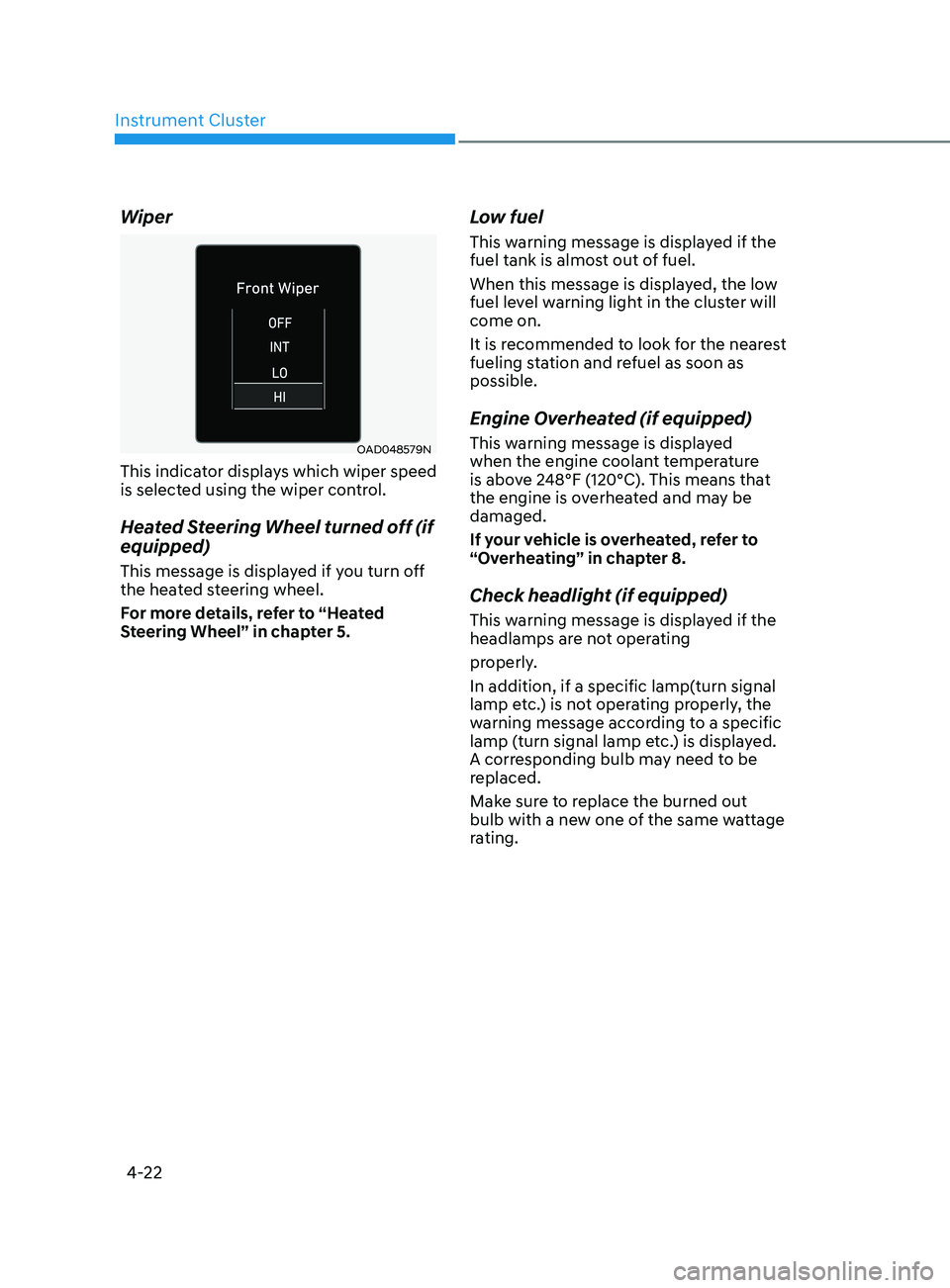
Wiper
OAD048579N
This indicator displays which wiper speed
is selected using the wiper control.
Heated Steering Wheel turned off (if
equipped)
This message is displayed if you turn off
the heated steering wheel.
For more details, refer to “Heated
Steering Wheel” in chapter 5.
Low fuel
This warning message is displayed if the
fuel tank is almost out of fuel.
When this message is displayed, the low
fuel level warning light in the cluster will
come on.
It is recommended to look for the nearest
fueling station and refuel as soon as
possible.
Engine Overheated (if equipped)
This warning message is displayed
when the engine coolant temperature
is above 248°F (120°C). This means that
the engine is overheated and may be
damaged.
If your vehicle is overheated, refer to
“Overheating” in chapter 8.
Check headlight (if equipped)
This warning message is displayed if the
headlamps are not operating
properly.
In addition, if a specific lamp(turn signal
lamp etc.) is not operating properly, the
warning message according to a specific
lamp (turn signal lamp etc.) is displayed.
A corresponding bulb may need to be
replaced.
Make sure to replace the burned out
bulb with a new one of the same wattage
rating.
Page 109 of 570
04
4-23
Check headlight (Low) (if equipped)
This warning message is displayed if
the headlamp (Low) are not operating
properly.
In addition, if a specific lamp(turn signal
lamp etc.) is not operating properly, the
warning message according to a specific
lamp (turn signal lamp etc.) is displayed.
A corresponding bulb may need to be
replaced.
Make sure to replace the burned out
bulb with a new one of the same wattage
rating
Check turn signal (if equipped)
This warning message is displayed if the
turn signal lamps are not operat-
ing properly. A lamp may need to be
replaced.
Make sure to replace the burned out
bulb with a new one of the same wattage
rating.
Check brake light (if equipped)
This warning message is displayed if the
stop lamps are not operating properly. A
lamp may need to be replaced.
Make sure to replace the burned out
bulb with a new one of the same wattage
rating.
Check daytime running light (if
equipped)
This warning message is displayed
if the daytime running lights are not
operating properly. A lamp may need to
be replaced.
Make sure to replace the burned out
bulb with a new one of the same wattage
rating.
Check high mounted stop lamp (if
equipped)
This warning message is displayed if
the high mounted stop lamp are not
operating properly. A lamp may need to
be replaced.
Make sure to replace the burned out
bulb with a new one of the same wattage
rating.
Check headlight LED (if equipped)
This warning message is displayed
if there is a problem with the LED
headlight. Have the vehicle inspected by
an authorized HYUNDAI dealer.
Page 142 of 570
Convenient Features
5-6
If the remote key is in close proximity to
your mobile phone, the signal could be
blocked by your mobile phone’s normal
operational signals. This is specifically
relevant when the phone is active such
as making and receiving calls, text
messaging, and/or sending/receiving
emails.
When possible, avoid placing the remote
key and your mobile phone in the same
location such as a pants or jacket pocket
in order to avoid interference between
the two devices.
Information
This device complies with Part 15 of the
FCC rules.
Operation is subject to the following three
conditions:
1.
This device may not cause harmful
interference.
2.
This device must accept any
interference r
eceived, including
interference that may cause undesired
operation.
3.
Changes or modifications not expr
essly
approved by the party responsible
for compliance could void the user’s
authority to operate the device.
NOTICE
Keep the remote key away from
electromagnetic materials that block
electromagnetic waves to the key
surface.
Battery replacement
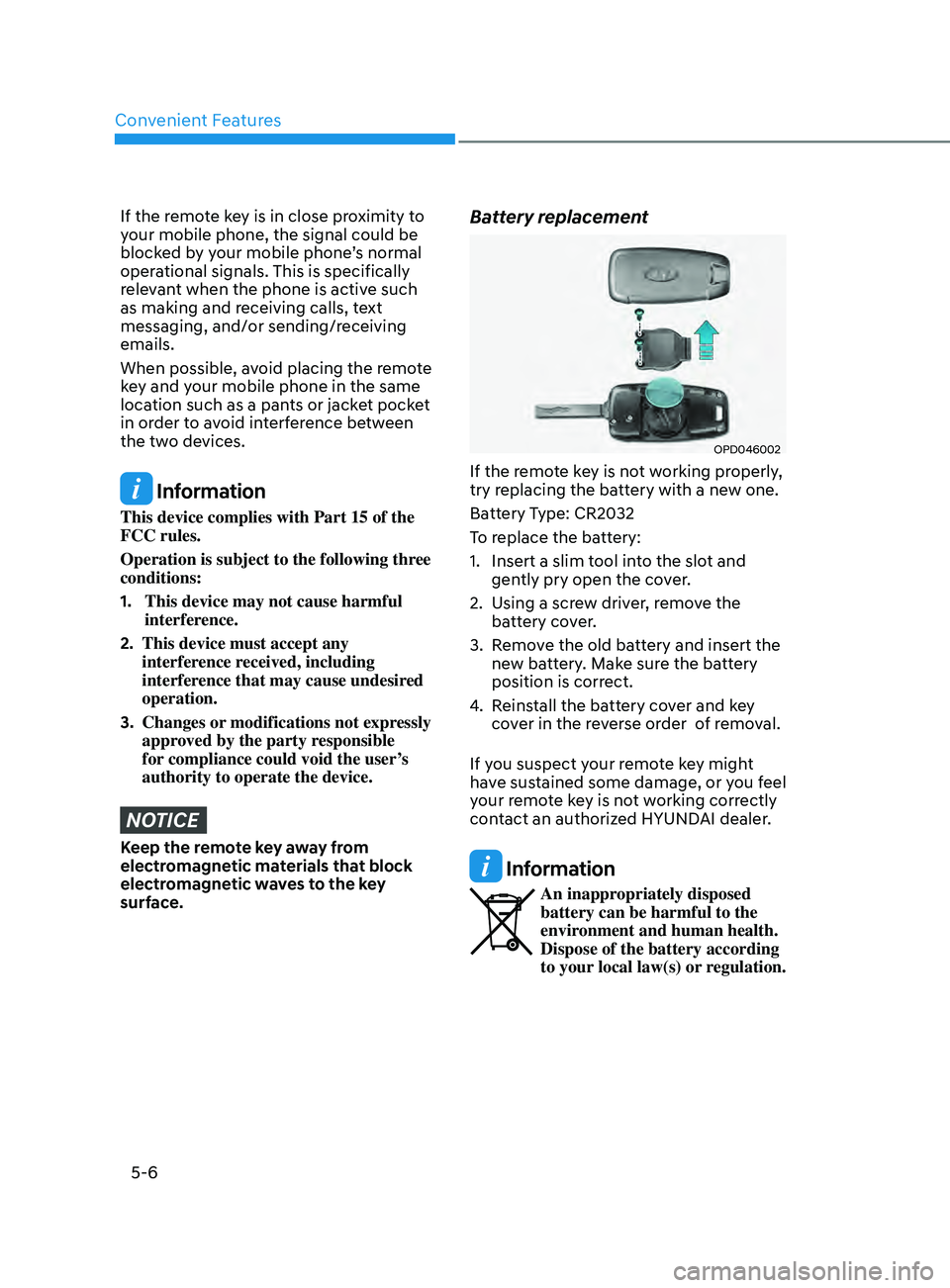
OPD046002
If the remote key is not working properly,
try replacing the battery with a new one.
Battery Type: CR2032
To replace the battery:
1.
Insert a slim tool in
to the slot and
gently pry open the cover.
2.
Using a scr
ew driver, remove the
battery cover.
3.
Remo
ve the old battery and insert the
new battery. Make sure the battery
position is correct.
4.
Reins
tall the battery cover and key
cover in the reverse order of removal.
If you suspect your remote key might
have sustained some damage, or you feel
your remote key is not working correctly
contact an authorized HYUNDAI dealer.
Information
An inappropriately disposed
battery can be harmful to the
environment and human health.
Dispose of the battery according
to your local law(s) or regulation.
Page 149 of 570
05
5-13
If the smart key does not work correctly,
open and close the door with the
mechanical key. If you have a problem
with the smart key, contact an authorized
HYUNDAI dealer.
If the smart key is in close proximity to
your mobile phone, the signal could be
blocked by your mobile phone’s normal
operational signals. This is specifically
relevant when the phone is active such
as making and receiving calls, text
messaging, and/or sending/receiving
emails. When possible, avoid keeping the
smart key and your mobile phone in the
same location such as a pants or jacket
pocket in order to avoid interference
between the two devices.
Information
This device complies with Part 15 of the
FCC rules.
Operation is subject to the following three
conditions:
1.
This device may not cause harmful
interference, and
2.
This device must accept any
interference r
eceived, including
interference that may cause undesired
operation.
3.
Changes or modifications not expr
essly
approved by the party responsible
for compliance could void the user’s
authority to operate the device.
NOTICE
Keep the smart key away from
electromagnetic materials that blocks
electromagnetic waves to the key
surface.
Battery replacement
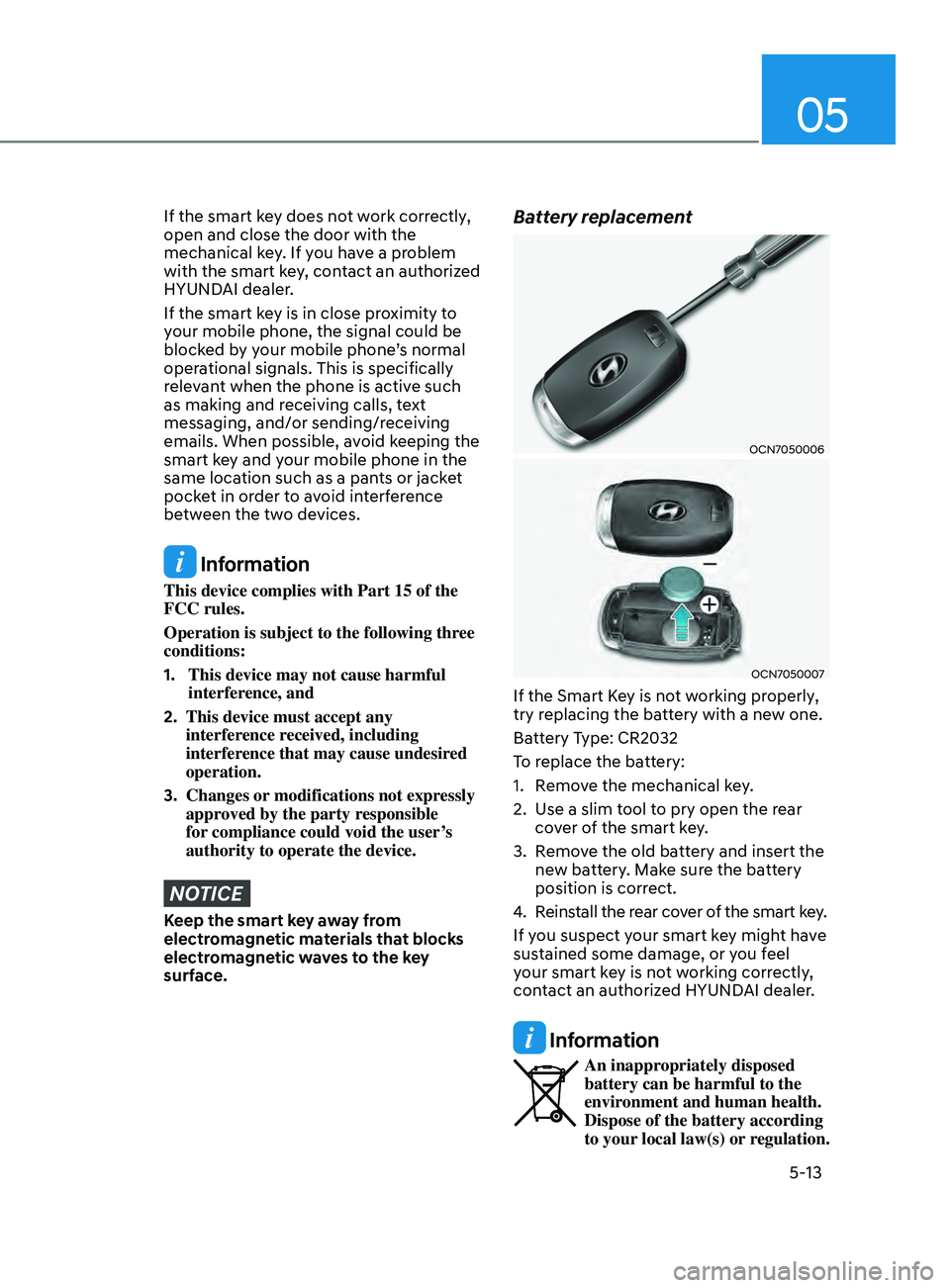
OCN7050006
OCN7050007
If the Smart Key is not working properly,
try replacing the battery with a new one.
Battery Type: CR2032
To replace the battery:
1.
Remo
ve the mechanical key.
2.
Use a slim t
ool to pry open the rear
cover of the smart key.
3.
Remo
ve the old battery and insert the
new battery. Make sure the battery
position is correct.
4.
Reins
tall the rear cover of the smart key.
If you suspect your smart key might have
sustained some damage, or you feel
your smart key is not working correctly,
contact an authorized HYUNDAI dealer.
Information
An inappropriately disposed
battery can be harmful to the
environment and human health.
Dispose of the battery according
to your local law(s) or regulation.
Page 151 of 570
05
5-15
hyundai Digital Key
(if equipped)
Digital Key Application
To use Hyundai Digital Key mobile app,
you should install Hyundai digital key
application. Search ‘Hyundai digital key’
in the Google Play Store and download
the app. Please refer to the detailed
manual of the digital key app. The option
can be found under the following app
menu:
Menu → Application Info → Tutorial
Please note the manual before using the
app.
à This service is only av
ailable for
Android smartphones. Please confirm
supported/compatible devices on our
website.
WARNING
For used vehicle
If any of the digital key (smartphone key
or card key) is already registered when
you press ON button after unlocking
the doors, the message ‘Digital key(s)
active’ appears on the instrument
cluster once. If you buy a used vehicle,
you should confirm the message and
delete the registered smartphone key
and card key. In addition, please notify
the Hyundai Customer Care Center.
If the card key does not work properly,
please delete the card key and register
the smartphone key and re-register the
card key.
For vehicle maintenance
If you need to have your Digital Key
System repaired or replaced please
ensure you Smartphone Key is still
active. You may have to pair your phone
again.
In the case, re-initialize your Digital
Keys using the Hyundai Digital Key
mobile app.
Digital key (smartphone) NFC
function
You can use the Digital Key NFC (Near
Field Communication) function after
turning on your smartphone function in
the NFC settings. And you should unlock
& turn on smartphone screen to use it.
à To change the NF
C mode of the
smartphone, please refer to the
smartphone manual or contact
to the customer service center of
smartphone manufacturers.
Page 178 of 570
Convenient Features
5-42
Electrochromic mirror (ECM) with
HomeLink® system (if equipped)
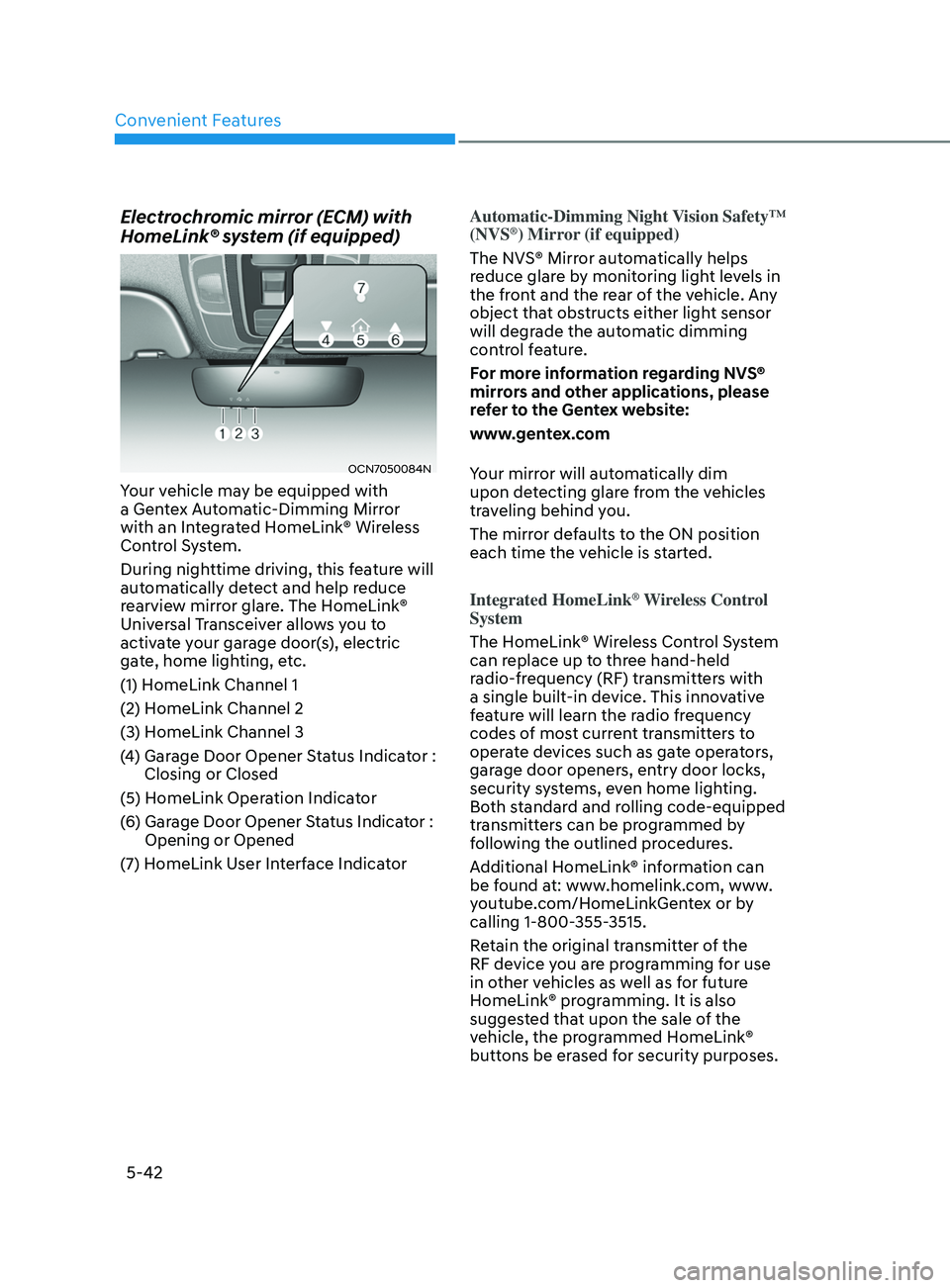
OCN7050084N
Your vehicle may be equipped with
a Gentex Automatic-Dimming Mirror
with an Integrated HomeLink® Wireless
Control System.
During nighttime driving, this feature will
automatically detect and help reduce
rearview mirror glare. The HomeLink®
Universal Transceiver allows you to
activate your garage door(s), electric
gate, home lighting, etc.
(1) HomeLink Channel 1
(2) HomeLink Channel 2
(3) HomeLink Channel 3
(4)
Garage Door Opener S
tatus Indicator :
Closing or Closed
(5) HomeLink Operation Indicator
(6)
Garage Door Opener S
tatus Indicator :
Opening or Opened
(7)
HomeLink U
ser Interface Indicator Automatic-Dimming Night Vision Safety™
(NVS
®) Mirror (if equipped)
The NVS® Mirror automatically helps
reduce glare by monitoring light levels in
the front and the rear of the vehicle. Any
object that obstructs either light sensor
will degrade the automatic dimming
control feature.
For more information regarding NVS®
mirrors and other applications, please
refer to the Gentex website:
www.gentex.com
Your mirror will automatically dim
upon detecting glare from the vehicles
traveling behind you.
The mirror defaults to the ON position
each time the vehicle is started.
Integrated HomeLink
® Wireless Control
System
The HomeLink® Wireless Control System
can replace up to three hand-held
radio-frequency (RF) transmitters with
a single built-in device. This innovative
feature will learn the radio frequency
codes of most current transmitters to
operate devices such as gate operators,
garage door openers, entry door locks,
security systems, even home lighting.
Both standard and rolling code-equipped
transmitters can be programmed by
following the outlined procedures.
Additional HomeLink® information can
be found at: www.homelink.com, www.
youtube.com/HomeLinkGentex or by
calling 1-800-355-3515.
Retain the original transmitter of the
RF device you are programming for use
in other vehicles as well as for future
HomeLink® programming. It is also
suggested that upon the sale of the
vehicle, the programmed HomeLink®
buttons be erased for security purposes.
Page 194 of 570
Convenient Features
5-58
Resetting the sunroof
The sunroof may need to be reset if the
following conditions occur:
- The batt
ery is discharged or
disconnected or the sunroof fuse has
been replaced or disconnected.
- The sunroo
f control lever is not
operating correctly.
1.
Turn the ignition s
witch to the ON
position or start the engine. We
recommend resetting the sunroof
while the engine is running.
2.
Close the sunroo
f completely if
opened.
3.
Release the sunr
oof control lever.
4.
Mo
ve the sunroof control lever
forward in the direction of close
until the sunroof moves tilt up. Then,
release the lever.
5.
Mo
ve the sunroof control lever
forward in the direction of close, until
the sunroof operates as follow again:
Tilt
do
wn
→ Slide Open → Slide Close
NOTICE
Do not release the lever until the
operation is completed. If you release
the lever during operation, try again
from step 2.
6.
Release the sunr
oof control lever after
all operation has completed. (The
sunroof system has been reset.)
Information
• If the sunroof does not reset when
the vehicle battery is disconnected or
discharged, or related fuse is blown, the
sunroof may not operate normally.
• For more detailed information, we
recommend that you contact an
authorized HYUNDAI dealer.
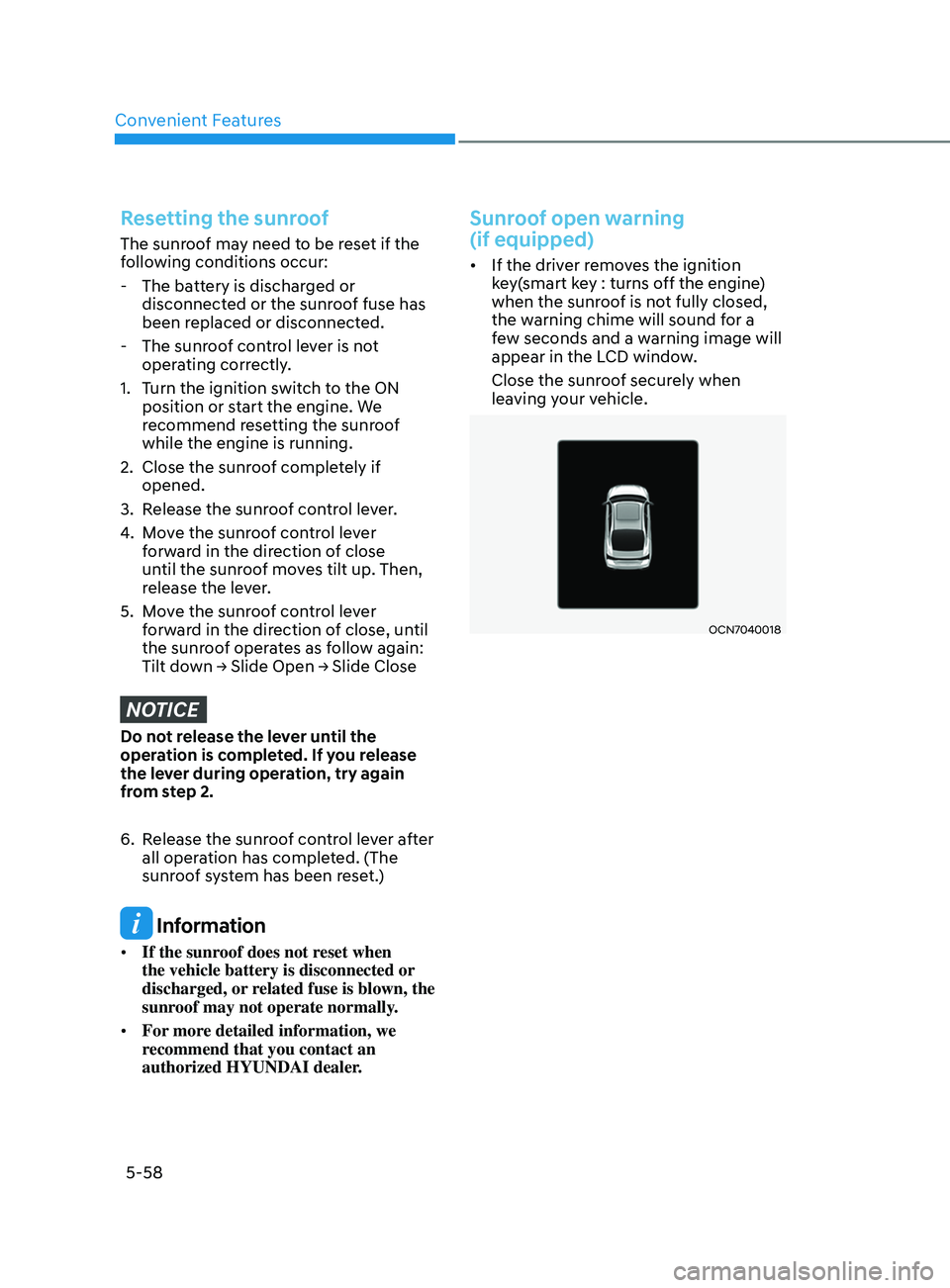
Sunroof open warning
(if equipped)
• If the driver removes the ignition
key(smart key : turns off the engine)
when the sunroof is not fully closed,
the warning chime will sound for a
few seconds and a warning image will
appear in the LCD window.
Close the sunroof securely when
leaving your vehicle.
OCN7040018
Page 203 of 570
05
5-67
• Do not get back into a vehicle
once you have begun refueling.
You can generate a build-up of
static electricity by touching,
rubbing or sliding against any item
or fabric capable of producing
static electricity. Static electricity
discharge can ignite fuel vapors
causing a fire. If you must re-enter
the vehicle, you should once again
eliminate potentially dangerous
static electricity discharge by
touching a metal part of the vehicle,
away from the fuel filler neck, nozzle
or other gasoline source, with your
bare hand.
• When refueling, always move the
shift lever to the P (Park) position,
set the parking brake, and place the
ignition switch to the LOCK/OFF
position.
• Sparks produced by electrical
components related to the engine
can ignite fuel vapors causing a fire.
• When using an approved portable
fuel container, be sure to place the
container on the ground prior to
refueling. Static electricity discharge
from the container can ignite fuel
vapors causing a fire. Once refueling
has begun, contact between your
bare hand and the vehicle should
be maintained until the filling is
complete.
• Use only approved portable plastic
fuel containers designed to carry and
store gasoline.
• Do not use matches or a lighter and
do not smoke or leave a lit cigarette
in your vehicle while at a gas station,
especially during refueling.• Do not over-fill or top-off your
vehicle tank, which can cause
gasoline spillage.
• If a fire breaks out during refueling,
leave the vicinity of the vehicle, and
immediately contact the manager
of the gas station and then contact
the local fire department. Follow any
safety instructions they provide.
• If pressurized fuel sprays out, it can
cover your clothes or skin and thus
subject you to the risk of fire and
burns. Always remove the fuel cap
carefully and slowly. If the cap is
venting fuel or if you hear a hissing
sound, wait until the condition stops
before completely removing the cap.
• Always check that the fuel cap is
installed securely to prevent fuel
spillage in the event of an accident.
Information
Make sure to refuel your vehicle according
to the “Fuel Requirements” suggested in
the Introduction chapter.
NOTICE
• Do not spill fuel on the exterior
surfaces of the vehicle. Any type of
fuel spilled on painted surfaces may
damage the paint.
• If the fuel filler cap requires
replacement, use only a genuine
HYUNDAI cap or the equivalent
specified for your vehicle. An
incorrect fuel filler cap can result
in a serious malfunction of the fuel
system or emission control system.